




Внедрение IDE Node-RED.
-
Уважаемые разработчики, прошу обратить внимание на "A visual tool for wiring the Internet of Things" - http://nodered.org/.
Может получится его внедрить взамен или как альтернатива ScriptEditor/ScriptGUI?
Очень уж понравилась штукенция, играюсь со связкой RaspberryPi+Arduino+Node-RED и до сих пор оторваться не могу))
К сожалению на русском документации и примеров крайне мало, зато за границей - хоть отбавляй - на сайте https://learn.adafruit.com/raspberry-pi-hosting-node-red к примеру, на ютубе можно поискать… `
Что тебе понравилось в этом проекте и как ты его используешь? -
Уважаемые разработчики, прошу обратить внимание на "A visual tool for wiring the Internet of Things" - http://nodered.org/.
Может получится его внедрить взамен или как альтернатива ScriptEditor/ScriptGUI?
Очень уж понравилась штукенция, играюсь со связкой RaspberryPi+Arduino+Node-RED и до сих пор оторваться не могу))
К сожалению на русском документации и примеров крайне мало, зато за границей - хоть отбавляй - на сайте https://learn.adafruit.com/raspberry-pi-hosting-node-red к примеру, на ютубе можно поискать… `
Появился адаптер "node-red" проверил, работает. -
Так…а где его искать.
-
Так…а где его искать. `
Сначала установить или обновить ioBroker и искать на закладке "Adapters" в админ панели -
Ок. Ставили по немецкому форуму. И на какое железо. У меня на атоме ccio крутится под дебиан.
-
Ок. Ставили по немецкому форуму. И на какое железо. У меня на атоме ccio крутится под дебиан. `
Ставил по этой доке https://github.com/ioBroker/ioBroker.js … /README.md на ubuntu 13.10 -
Отлично, значит под дебиан подойдёт
-
Под debian должно инсталлироваться ещё проще:
wget http://download.iobroker.org/ioBroker-0.0.31.deb ; sudo dpkg -i ioBroker-0.0.31.deb ; rm ioBroker-0.0.31.debКонечно node.js должен быть до этого проинсталлирован.
В самом брутальном случае node.js можно проинсталлировать из исходников:
sudo apt-get install g++ curl libssl-dev apache2-utils sudo apt-get install git-core git clone git://github.com/joyent/node cd node ./configure make sudo make install -
Спасибо, вчера уже поставил. Админка работает. С остальным разбираюсь. Кстати как извлечь звук кроме сонос, есть плагин.
-
Спасибо, вчера уже поставил. Админка работает. С остальным разбираюсь. Кстати как извлечь звук кроме сонос, есть плагин. `
Вроде для ONKYO есть, но только для управления, а не для "говорения" -
Вобщем звука пока нет
-
После последнего обновления сыпятся ошибки
! 2014-12-14 23:34:29.397 - info: node-red.0 starting. Version 0.0.7
! 2014-12-14 23:34:39.385 - error: node-red.0 14 Dec 23:34:39 - [35-arduino.js] Error: Cannot find module 'arduino-firmata'
! 2014-12-14 23:34:39.386 - error: node-red.0 14 Dec 23:34:39 - [36-rpi-gpio.js] Info : Ignoring Raspberry Pi specific node.
! 14 Dec 23:34:39 - [25-serial.js] Error: Cannot find module 'serialport'
! 14 Dec 23:34:39 - –---------------------------------------- -
После последнего обновления сыпятся ошибки
! 2014-12-14 23:34:29.397 - info: node-red.0 starting. Version 0.0.7
! 2014-12-14 23:34:39.385 - error: node-red.0 14 Dec 23:34:39 - [35-arduino.js] Error: Cannot find module 'arduino-firmata'
! 2014-12-14 23:34:39.386 - error: node-red.0 14 Dec 23:34:39 - [36-rpi-gpio.js] Info : Ignoring Raspberry Pi specific node.
! 14 Dec 23:34:39 - [25-serial.js] Error: Cannot find module 'serialport'
! 14 Dec 23:34:39 - –---------------------------------------- `
Их можно проигнорировать. -
После последнего обновления сыпятся ошибки
! 2014-12-14 23:34:29.397 - info: node-red.0 starting. Version 0.0.7
! 2014-12-14 23:34:39.385 - error: node-red.0 14 Dec 23:34:39 - [35-arduino.js] Error: Cannot find module 'arduino-firmata'
! 2014-12-14 23:34:39.386 - error: node-red.0 14 Dec 23:34:39 - [36-rpi-gpio.js] Info : Ignoring Raspberry Pi specific node.
! 14 Dec 23:34:39 - [25-serial.js] Error: Cannot find module 'serialport'
! 14 Dec 23:34:39 - –----------------------------------------Их можно проигнорировать.
Спасибо. -
Использование Меги на node-red оказалось немного сложнее, чем я думал, но всё равно достаточно просто.
Вот заготовка для node-red:
! [{"id":"8843bb83.77bc48","type":"debug","name":"","active":true,"console":"false","complete":"false","x":763.2000274658203,"y":320.200008392334,"z":"82c1a833.7d3e58","wires":[]},{"id":"b4d906ad.4b26f8","type":"http request","name":"Считать порт 0","method":"GET","url":"http://ccu.io/version.php":[["38339e90.c7cc62","7aa81488.8557ec"]]},{"id":"ca561b0a.35a9e8","type":"inject","name":"Каждые 5 секунд","topic":"","payload":"","payloadType":"date","repeat":"5","crontab":"","once":true,"x":195.1999969482422,"y":95.20001220703125,"z":"82c1a833.7d3e58","wires":[["b4d906ad.4b26f8"]]},{"id":"b702bade.48fd48","type":"ioBroker out","name":"inPort0","topic":"inPort0","ack":"true","autoCreate":"true","x":825.2000274658203,"y":95.19999694824219,"z":"82c1a833.7d3e58","wires":[]},{"id":"1e2c944e.e1d36c","type":"ioBroker in","name":"outPort8","topic":"outPort8","payloadType":"value","x":141.1999969482422,"y":289.200008392334,"z":"82c1a833.7d3e58","wires":[["af48d0bd.50b73","8843bb83.77bc48"]]},{"id":"d5b31d67.2a4ce","type":"http request","name":"Записать в порт 8 единицу","method":"GET","url":"http://ccu.io/version.php":[["8843bb83.77bc48"]]},{"id":"a63c52e8.59c3b","type":"ioBroker out","name":"","topic":"outPort8","ack":"true","autoCreate":"true","x":431.2000274658203,"y":548.2000999450684,"z":"82c1a833.7d3e58","wires":[]},{"id":"dc5191be.23ae7","type":"inject","name":"Один раз при запуске","topic":"","payload":"create","payloadType":"string","repeat":"","crontab":"","once":true,"x":195.20001220703125,"y":548.2000923156738,"z":"82c1a833.7d3e58","wires":[["a63c52e8.59c3b"]]},{"id":"6d05f63e.92fa08","type":"comment","name":"Создать переменную outPort8 при старте","info":"","x":257.20001220703125,"y":503.2000608444214,"z":"82c1a833.7d3e58","wires":[]},{"id":"d31e4e2f.2ce1b","type":"comment","name":"При записи из ioBroker переменной node-red.0.outPort8 записать значение в порт","info":"","x":377.20001220703125,"y":237.1999969482422,"z":"82c1a833.7d3e58","wires":[]},{"id":"6ec30c2f.913cf4","type":"comment","name":"Считывать состояние порта 0, каждые 5 секунд","info":"","x":266.20001220703125,"y":56.19999694824219,"z":"82c1a833.7d3e58","wires":[]},{"id":"47c09b62.b83f64","type":"comment","name":" http://mega_ip/sec/?pt=0&cmd=get","info":"","x":434.2000274658203,"y":128.1999969482422,"z":"82c1a833.7d3e58","wires":[]},{"id":"8ea2e211.715d2","type":"comment","name":"http://mega_ip/sec/?cmd=8:1","info":"","x":490.2000274658203,"y":315.200008392334,"z":"82c1a833.7d3e58","wires":[]},{"id":"af48d0bd.50b73","type":"switch","name":"","property":"payload","rules":[{"t":"eq","v":"true"},{"t":"eq","v":"false"}],"checkall":"true","outputs":2,"x":267.20001220703125,"y":289.200008392334,"z":"82c1a833.7d3e58","wires":[["d5b31d67.2a4ce"],["66034820.99fcb8"]]},{"id":"66034820.99fcb8","type":"http request","name":"Записать в порт 8 ноль","method":"GET","url":"http://ccu.io/version.php":[["8843bb83.77bc48"]]},{"id":"ad020ae0.52fdf8","type":"comment","name":"http://mega_ip/sec/?cmd=8:0","info":"","x":491.2000274658203,"y":402.200008392334,"z":"82c1a833.7d3e58","wires":[]},{"id":"38339e90.c7cc62","type":"debug","name":"","active":true,"console":"false","complete":"false","x":763.1999969482422,"y":55.19999694824219,"z":"82c1a833.7d3e58","wires":[]},{"id":"7aa81488.8557ec","type":"function","name":"Если 'ON'","func":"msg.payload = (msg.payload == '1.0.49');\nreturn msg;","outputs":1,"x":658.2000274658203,"y":95.19999694824219,"z":"82c1a833.7d3e58","wires":[["b702bade.48fd48"]]}]
(это надо импортировать)
Выглядит это вот так:
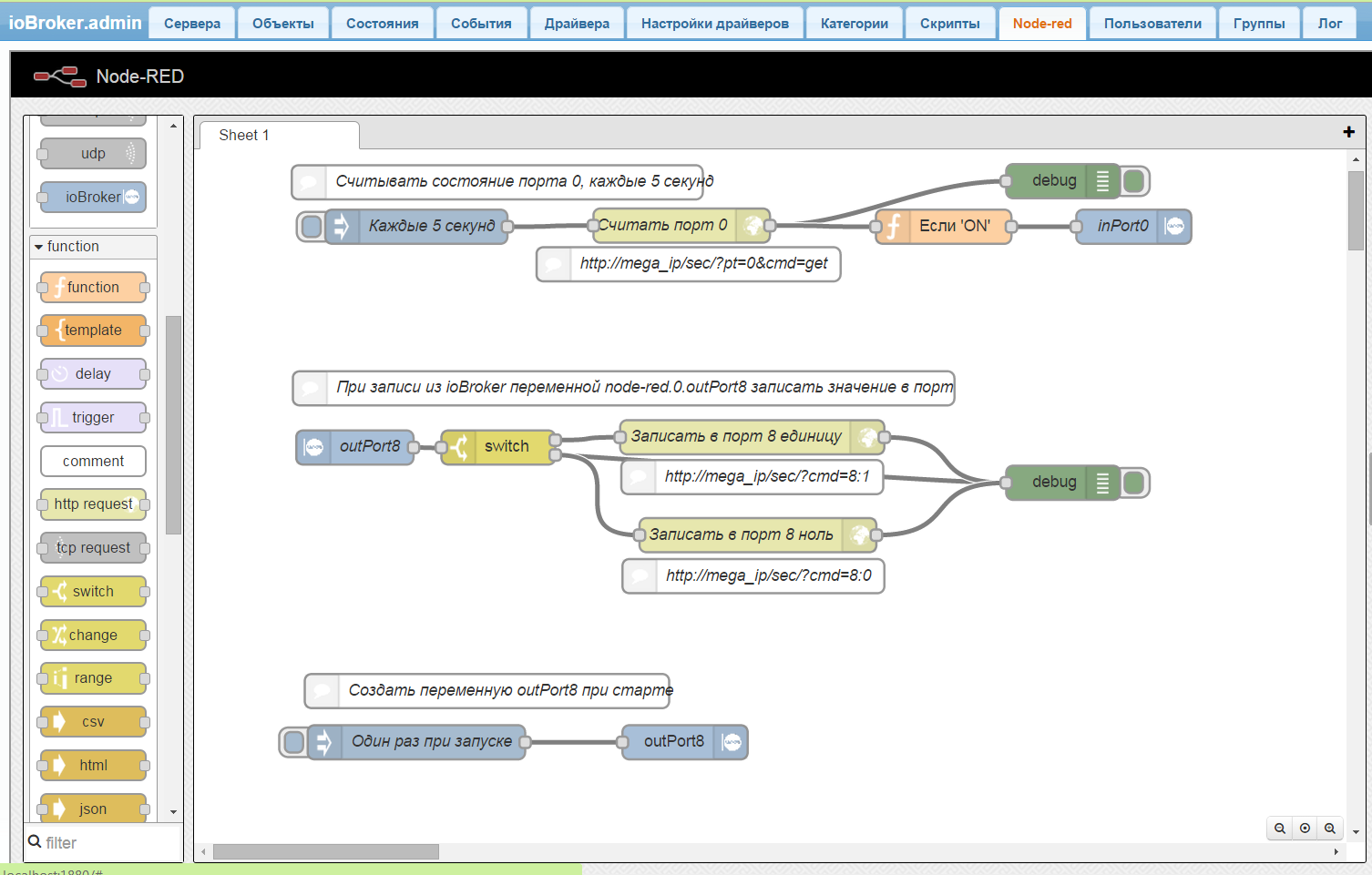
Верхняя часть ответственна за считывание порта 0.
Средняя за управление портом 8.
Нижняя создает переменную outPort8 в ioBroker, чтоб её можно было писать из Vis или скриптов.
P.S Нужно использовать новейшие версии ioBroker.js-controller и ioBroker.node-red.
-
В версии ioBroker.node-red 0.1.4 не нужно больше последнего шага. Переменная создаться автоматически
! [{"id":"7aa81488.8557ec","type":"function","name":"Если 'ON'","func":"//msg.payload = (msg.payload == '1.0.49');\nreturn msg;","outputs":1,"x":658.2000274658203,"y":95.19999694824219,"z":"82c1a833.7d3e58","wires":[["b702bade.48fd48"]]},{"id":"8843bb83.77bc48","type":"debug","name":"","active":true,"console":"false","complete":"false","x":763.2000274658203,"y":320.200008392334,"z":"82c1a833.7d3e58","wires":[]},{"id":"b4d906ad.4b26f8","type":"http request","name":"Считать порт 0","method":"GET","url":"http://ccu.io/version.php":[["38339e90.c7cc62","7aa81488.8557ec"]]},{"id":"ca561b0a.35a9e8","type":"inject","name":"Каждые 5 секунд","topic":"","payload":"","payloadType":"date","repeat":"5","crontab":"","once":true,"x":195.1999969482422,"y":95.20001220703125,"z":"82c1a833.7d3e58","wires":[["b4d906ad.4b26f8"]]},{"id":"b702bade.48fd48","type":"ioBroker out","name":"inPort0","topic":"inPort0","ack":"true","autoCreate":"true","x":825.2000274658203,"y":95.19999694824219,"z":"82c1a833.7d3e58","wires":[]},{"id":"1e2c944e.e1d36c","type":"ioBroker in","name":"outPort8","topic":"outPort8","payloadType":"value","x":141.1999969482422,"y":289.200008392334,"z":"82c1a833.7d3e58","wires":[["af48d0bd.50b73","8843bb83.77bc48"]]},{"id":"d5b31d67.2a4ce","type":"http request","name":"Записать в порт 8 единицу","method":"GET","url":"http://ccu.io/version.php":[["8843bb83.77bc48"]]},{"id":"d31e4e2f.2ce1b","type":"comment","name":"При записи из ioBroker переменной node-red.0.outPort8 записать значение в порт","info":"","x":377.20001220703125,"y":237.1999969482422,"z":"82c1a833.7d3e58","wires":[]},{"id":"6ec30c2f.913cf4","type":"comment","name":"Считывать состояние порта 0, каждые 5 секунд","info":"","x":266.20001220703125,"y":56.19999694824219,"z":"82c1a833.7d3e58","wires":[]},{"id":"47c09b62.b83f64","type":"comment","name":" http://mega_ip/sec/?pt=0&cmd=get","info":"","x":434.2000274658203,"y":128.1999969482422,"z":"82c1a833.7d3e58","wires":[]},{"id":"8ea2e211.715d2","type":"comment","name":"http://mega_ip/sec/?cmd=8:1","info":"","x":490.2000274658203,"y":315.200008392334,"z":"82c1a833.7d3e58","wires":[]},{"id":"af48d0bd.50b73","type":"switch","name":"","property":"payload","rules":[{"t":"eq","v":"true"},{"t":"eq","v":"false"}],"checkall":"true","outputs":2,"x":267.20001220703125,"y":289.200008392334,"z":"82c1a833.7d3e58","wires":[["d5b31d67.2a4ce"],["66034820.99fcb8"]]},{"id":"66034820.99fcb8","type":"http request","name":"Записать в порт 8 ноль","method":"GET","url":"http://ccu.io/version.php":[["8843bb83.77bc48"]]},{"id":"ad020ae0.52fdf8","type":"comment","name":"http://mega_ip/sec/?cmd=8:0","info":"","x":491.2000274658203,"y":402.200008392334,"z":"82c1a833.7d3e58","wires":[]},{"id":"38339e90.c7cc62","type":"debug","name":"","active":true,"console":"false","complete":"false","x":763.1999969482422,"y":55.19999694824219,"z":"82c1a833.7d3e58","wires":[]}]
-
Bluefox, огромное спасибо за пример.
-
Bluefox, огромное спасибо за пример. `
Получилось? -
Не ставиться NOD RED
! $ ./iobroker add node-red
! npm install iobroker.node-red –production --prefix "C:/Program Files/ioBroker" (System call)
! npm
! WARN engine node-red@0.10.6: wanted: {"node":">=0.8 <0.12"} (current: {"node":"0.12.2","npm":"2.7.4"})
! gyp
! ERR! configure error gyp ERR! stack Error: Can't find Python executable "python", you can set the PYTHON env variable.
! gyp ERR! stack at failNoPython (C:\Program Files\nodejs\node_modules\npm\node_modules\node-gyp\lib\configure.js:103:14)
! gyp ERR! stack at C:\Program Files\nodejs\node_modules\npm\node_modules\node-gyp\lib\configure.js:64:11
! gyp ERR! stack at FSReqWrap.oncomplete (evalmachine.<anonymous>:95:15)
! gyp ERR! System Windows_NT 6.1.7601
! gyp ERR! command "node" "C:\Program Files\nodejs\node_modules\npm\node_modules\node-gyp\bin\node-gyp.js" "rebuild"
! gyp ERR! cwd C:\Program Files\ioBroker\node_modules\iobroker.node-red\node_modules\node-red\node_modules\irc\node_modules\node-icu-charset-detector
! gyp ERR! node -v v0.12.2
! gyp ERR! node-gyp -v v1.0.3
! gyp ERR! not ok
! gyp
! ERR!
! configure error gyp ERR! stack Error: Can't find Python executable "python", you can set the PYTHON env variable.
! gyp ERR! stack at failNoPython (C:\Program Files\nodejs\node_modules\npm\node_modules\node-gyp\lib\configure.js:103:14)
! gyp ERR! stack at C:\Program Files\nodejs\node_modules\npm\node_modules\node-gyp\lib\configure.js:64:11
! gyp ERR! stack at FSReqWrap.oncomplete (evalmachine.<anonymous>:95:15)
! gyp ERR! System Windows_NT 6.1.7601
! gyp ERR! command "node" "C:\Program Files\nodejs\node_modules\npm\node_modules\node-gyp\bin\node-gyp.js" "rebuild"
! gyp ERR! cwd C:\Program Files\ioBroker\node_modules\iobroker.node-red\node_modules\node-red\node_modules\bcrypt
! gyp ERR! node -v v0.12.2
! gyp ERR! node-gyp -v v1.0.3
! gyp ERR! not ok
! npm WARN optional dep failed, continuing node-icu-charset-detector@0.0.7
! npm WARN installMany
! nopt was bundled with node-pre-gyp@0.6.4, but bundled package wasn't found in unpacked treenpm WARN
! installMany npmlog was bundled with node-pre-gyp@0.6.4, but bundled package wasn't found in unpacked treenpm
! WARN installMany
! request was bundled with node-pre-gyp@0.6.4, but bundled package wasn't found in unpacked treenpm WARN
! installMany semver was bundled with node-pre-gyp@0.6.4, but bundled package wasn't found in unpacked treenpm
! WARN installMany tar was bundled with node-pre-gyp@0.6.4, but bundled package wasn't found in unpacked tree
! npm WARN installMany tar-pack was bundled with node-pre-gyp@0.6.4, but bundled package wasn't found in unpacked treenpm WARN installMany mkdirp was bundled with node-pre-gyp@0.6.4, but bundled package wasn't found in unpacked tree
! npm WARN installMany rc was bundled with node-pre-gyp@0.6.4, but bundled package wasn't found in unpacked tree
! npm WARN installMany rimraf was bundled with node-pre-gyp@0.6.4, but bundled package wasn't found in unpacked tree
! gyp
! ERR!
! configure error
! gyp
! ERR!
! stack
! Error: Can't find Python executable "python", you can set the PYTHON env variable.
! gyp ERR!
! stack at failNoPython (C:\Program Files\nodejs\node_modules\npm\node_modules\node-gyp\lib\configure.js:103:14)
! gyp ERR!
! stack at C:\Program Files\nodejs\node_modules\npm\node_modules\node-gyp\lib\configure.js:64:11gyp ERR! stack at FSReqWrap.oncomplete (evalmachine.<anonymous>:95:15)
! gyp ERR!
! System
! Windows_NT 6.1.7601
! gyp ERR! command
! "node" "C:\Program Files\nodejs\node_modules\npm\node_modules\node-gyp\bin\node-gyp.js" "rebuild"gyp ERR!
! cwd C:\Program Files\ioBroker\node_modules\iobroker.node-red\node_modules\node-red\node_modules\ws\node_modules\utf-8-validategyp
! ERR! node -v
! v0.12.2gyp ERR!
! node-gyp -v v1.0.3gyp
! ERR! not ok
! npm
! WARN
! optional dep failed, continuing bcrypt@0.8.1
! gyp
! ERR!
! configure error
! gyp ERR! stack Error: Can't find Python executable "python", you can set the PYTHON env variable.gyp ERR! stack at failNoPython (C:\Program Files\nodejs\node_modules\npm\node_modules\node-gyp\lib\configure.js:103:14)
! gyp
! ERR! stack at C:\Program Files\nodejs\node_modules\npm\node_modules\node-gyp\lib\configure.js:64:11gyp ERR! stack at FSReqWrap.oncomplete (evalmachine.<anonymous>:95:15)
! gyp ERR! System Windows_NT 6.1.7601
! gyp ERR! command "node" "C:\Program Files\nodejs\node_modules\npm\node_modules\node-gyp\bin\node-gyp.js" "rebuild"
! gyp ERR! cwd C:\Program Files\ioBroker\node_modules\iobroker.node-red\node_modules\node-red\node_modules\ws\node_modules\bufferutil
! gyp ERR! node -v v0.12.2
! gyp ERR! node-gyp -v v1.0.3
! gyp ERR! not ok
! npm WARN optional dep failed, continuing utf-8-validate@1.0.1
! npm
! WARN optional dep failed, continuing
! bufferutil@1.0.1
! gyp
! ERR!
! configure error
! gyp
! ERR!
! stack Error: Can't find Python executable "python", you can set the PYTHON env variable.gyp
! ERR! stack
! at failNoPython (C:\Program Files\nodejs\node_modules\npm\node_modules\node-gyp\lib\configure.js:103:14)gyp ERR!
! stack at C:\Program Files\nodejs\node_modules\npm\node_modules\node-gyp\lib\configure.js:64:11
! gyp ERR! stack
! at FSReqWrap.oncomplete (evalmachine.<anonymous>:95:15)gyp ERR!
! System
! Windows_NT 6.1.7601gyp ERR! command "node" "C:\Program Files\nodejs\node_modules\npm\node_modules\node-gyp\bin\node-gyp.js" "configure" "--fallback-to-build" "--module=C:\Program Files\ioBroker\node_modules\iobroker.node-red\node_modules\mongodb\node_modules\mongodb-core\node_modules\bson\node_modules\bson-ext\build\Release\bson.node" "--module_name=bson" "--module_path=C:\Program Files\ioBroker\node_modules\iobroker.node-red\node_modules\mongodb\node_modules\mongodb-core\node_modules\bson\node_modules\bson-ext\build\Release"
! gyp ERR! cwd C:\Program Files\ioBroker\node_modules\iobroker.node-red\node_modules\mongodb\node_modules\mongodb-core\node_modules\bson\node_modules\bson-ext
! gyp
! ERR! node -v v0.12.2
! gyp ERR! node-gyp -v v1.0.3gyp ERR! not ok
! node-pre-gyp ERR! build error
! node-pre-gyp ERR! stack Error: Failed to execute 'node-gyp.cmd configure --fallback-to-build --module=C:\Program Files\ioBroker\node_modules\iobroker.node-red\node_modules\mongodb\node_modules\mongodb-core\node_modules\bson\node_modules\bson-ext\build\Release\bson.node --module_name=bson --module_path=C:\Program Files\ioBroker\node_modules\iobroker.node-red\node_modules\mongodb\node_modules\mongodb-core\node_modules\bson\node_modules\bson-ext\build\Release' (1)
! node-pre-gyp ERR! stack at ChildProcess. <anonymous>(C:\Program Files\ioBroker\node_modules\iobroker.node-red\node_modules\mongodb\node_modules\mongodb-core\node_modules\bson\node_modules\bson-ext\node_modules\node-pre-gyp\lib\util\compile.js:83:29)
! node-pre-gyp ERR! stack at ChildProcess.emit (events.js:110:17)
! node-pre-gyp ERR! stack at maybeClose (child_process.js:1015:16)
! node-pre-gyp ERR!
! stack at Process.ChildProcess._handle.onexit (child_process.js:1087:5)node-pre-gyp
! ERR! System Windows_NT 6.1.7601
! node-pre-gyp ERR!
! command "node" "C:\Program Files\ioBroker\node_modules\iobroker.node-red\node_modules\mongodb\node_modules\mongodb-core\node_modules\bson\node_modules\bson-ext\node_modules\node-pre-gyp\bin\node-pre-gyp.js" "install" "--fallback-to-build"node-pre-gyp
! ERR! cwd C:\Program Files\ioBroker\node_modules\iobroker.node-red\node_modules\mongodb\node_modules\mongodb-core\node_modules\bson\node_modules\bson-extnode-pre-gyp ERR! node -v v0.12.2
! node-pre-gyp ERR! node-pre-gyp -v v0.6.4
! node-pre-gyp ERR! not ok
! gyp
! ERR! configure error
! gyp ERR! stack Error: Can't find Python executable "python", you can set the PYTHON env variable.gyp ERR! stack at failNoPython (C:\Program Files\nodejs\node_modules\npm\node_modules\node-gyp\lib\configure.js:103:14)
! gyp ERR! stack at C:\Program Files\nodejs\node_modules\npm\node_modules\node-gyp\lib\configure.js:64:11
! gyp ERR! stack at FSReqWrap.oncomplete (evalmachine.<anonymous>:95:15)
! gyp ERR! System Windows_NT 6.1.7601
! gyp ERR! command "node" "C:\Program Files\nodejs\node_modules\npm\node_modules\node-gyp\bin\node-gyp.js" "rebuild"
! gyp ERR! cwd C:\Program Files\ioBroker\node_modules\iobroker.node-red\node_modules\node-red\node_modules\irc\node_modules\iconv
! gyp ERR! node -v v0.12.2
! gyp
! ERR! node-gyp -v v1.0.3gyp ERR! not ok
! npm
! WARN
! optional dep failed, continuing bson-ext@0.1.3
! npm
! WARN
! optional dep failed, continuing
! iconv@2.1.6
! child_process: customFds option is deprecated, use stdio instead.
! gyp
! ERR!
! configure error
! gyp ERR! stack Error: Can't find Python executable "python", you can set the PYTHON env variable.gyp ERR!
! stack at failNoPython (C:\Program Files\nodejs\node_modules\npm\node_modules\node-gyp\lib\configure.js:103:14)gyp ERR!
! stack at C:\Program Files\nodejs\node_modules\npm\node_modules\node-gyp\lib\configure.js:64:11gyp
! ERR! stack
! at FSReqWrap.oncomplete (evalmachine.<anonymous>:95:15)gyp
! ERR! System Windows_NT 6.1.7601
! gyp ERR!
! command "node" "C:\Program Files\nodejs\node_modules\npm\node_modules\node-gyp\bin\node-gyp.js" "rebuild" "--name=serialport" "--configuration=Release" "--module_name=serialport" "--version=1.4.10" "--major=1" "--minor=4" "--patch=10" "--runtime=node" "--node_abi=node-v14" "--platform=win32" "--target_platform=win32" "--arch=ia32" "--target_arch=ia32" "--module_main=./serialport" "--host=https://node-serialport.s3.amazonaws.com/" "--module_path=C:\Program Files\ioBroker\node_modules\iobroker.node-red\node_modules\node-red\node_modules\serialport\build\serialport\v1.4.10\Release\node-v14-win32-ia32" "--remote_path=./serialport/v1.4.10/Release/" "--package_name=node-v14-win32-ia32.tar.gz" "--staged_tarball=build\stage\serialport\v1.4.10\Release\node-v14-win32-ia32.tar.gz" "--hosted_path=https://node-serialport.s3.amazonaws.co ... 0/Release/" "--hosted_tarball=https://node-serialport.s3.amazonaws.co ... a32.tar.gz"
! gyp ERR! cwd
! C:\Program Files\ioBroker\node_modules\iobroker.node-red\node_modules\node-red\node_modules\serialportgyp ERR!
! node -v v0.12.2
! gyp ERR! node-gyp -v v1.0.3
! gyp ERR!
! not ok
! node-pre-gyp
! ERR! build error
! node-pre-gyp
! ERR! stack Error: Failed to execute 'node-gyp.cmd rebuild --name=serialport --configuration=Release --module_name=serialport --version=1.4.10 --major=1 --minor=4 --patch=10 --runtime=node --node_abi=node-v14 --platform=win32 --target_platform=win32 --arch=ia32 --target_arch=ia32 --module_main=./serialport --host=https://node-serialport.s3.amazonaws.com/ --module_path=C:\Program Files\ioBroker\node_modules\iobroker.node-red\node_modules\node-red\node_modules\serialport\build\serialport\v1.4.10\Release\node-v14-win32-ia32 --remote_path=./serialport/v1.4.10/Release/ --package_name=node-v14-win32-ia32.tar.gz --staged_tarball=build\stage\serialport\v1.4.10\Release\node-v14-win32-ia32.tar.gz --hosted_path=https://node-serialport.s3.amazonaws.co ... 0/Release/ --hosted_tarball=https://node-serialport.s3.amazonaws.co ... a32.tar.gz' (1)node-pre-gyp ERR! stack at ChildProcess. <anonymous>(C:\Program Files\ioBroker\node_modules\iobroker.node-red\node_modules\node-red\node_modules\serialport\node_modules\node-pre-gyp\lib\util\compile.js:76:29)
! node-pre-gyp ERR! stack at ChildProcess.emit (events.js:110:17)
! node-pre-gyp ERR! stack at maybeClose (child_process.js:1015:16)
! node-pre-gyp ERR!
! stack at Process.ChildProcess._handle.onexit (child_process.js:1087:5)node-pre-gyp
! ERR! System Windows_NT 6.1.7601node-pre-gyp ERR!
! command "node" "C:\Program Files\ioBroker\node_modules\iobroker.node-red\node_modules\node-red\node_modules\serialport\node_modules\node-pre-gyp\bin\node-pre-gyp" "install" "--fallback-to-build"node-pre-gyp
! ERR! cwd C:\Program Files\ioBroker\node_modules\iobroker.node-red\node_modules\node-red\node_modules\serialport
! node-pre-gyp ERR!
! node -v v0.12.2node-pre-gyp
! ERR! node-pre-gyp -v v0.5.19
! node-pre-gyp ERR!
! not ok
! npm
! ERR! Windows_NT 6.1.7601
! npm ERR!
! argv "C:\Program Files\nodejs\\node.exe" "C:\Program Files\nodejs\node_modules\npm\bin\npm-cli.js" "install" "iobroker.node-red" "--production" "--prefix" "C:/Program Files/ioBroker"npm
! ERR! node
! v0.12.2npm ERR!
! npm v2.7.4
! npm ERR!
! code ELIFECYCLE
! npm
! ERR!
! serialport@1.4.10 install:node-pre-gyp install --fallback-to-buildnpm
! ERR!
! Exit status 1
! npm ERR! npm ERR! Failed at the serialport@1.4.10 install script 'node-pre-gyp install --fallback-to-build'.
! npm ERR! This is most likely a problem with the serialport package,
! npm ERR! not with npm itself.
! npm ERR! Tell the author that this fails on your system:
! npm ERR! node-pre-gyp install --fallback-to-build
! npm ERR! You can get their info via:
! npm ERR! npm owner ls serialport
! npm ERR! There is likely additional logging output above.
! npm
! ERR!
! Please include the following file with any support request:
! npm
! ERR!
! C:\Windows\system32\npm-debug.log
! Cannot install iobroker.node-red: 1
! ERROR: process exited with code 25</anonymous></anonymous></anonymous></anonymous></anonymous></anonymous></anonymous></anonymous></anonymous>
1959_response.docx -
wanted: {"node":">=0.8 <0.12"} (current: {"node":"0.12.2","npm":"2.7.4"})Желаемая(wanted) версия node.js от 0.8 и меньше 0.12. Твоя версия (current) 0.12.2.
http://nodered.org/docs/getting-started … ation.html
Note: The most recent stable release of Node 0.12.x is not currently supported.


Hey! Du scheinst an dieser Unterhaltung interessiert zu sein, hast aber noch kein Konto.
Hast du es satt, bei jedem Besuch durch die gleichen Beiträge zu scrollen? Wenn du dich für ein Konto anmeldest, kommst du immer genau dorthin zurück, wo du zuvor warst, und kannst dich über neue Antworten benachrichtigen lassen (entweder per E-Mail oder Push-Benachrichtigung). Du kannst auch Lesezeichen speichern und Beiträge positiv bewerten, um anderen Community-Mitgliedern deine Wertschätzung zu zeigen.
Mit deinem Input könnte dieser Beitrag noch besser werden 💗
Registrieren AnmeldenSupport us
358
Online33.1k
Benutzende83.7k
Themen1.3m
Beiträge