




[New adapter] Kanban board
-
[New adapter] Kanban board
Current release: 0.4.0. What changed since 0.3.2 is at the bottom under "New in 0.4.0".
A Kanban board as a dedicated ioBroker adapter. What I wanted was shared task management that feels like a normal Kanban board, but tied into the smart home. It brings its own web server, serves a single-page app with no framework, and keeps every open view in sync over a WebSocket. Every event lands in a state that scripts and Node-RED can read, and the board embeds into Lovelace as a webpage card.
Features
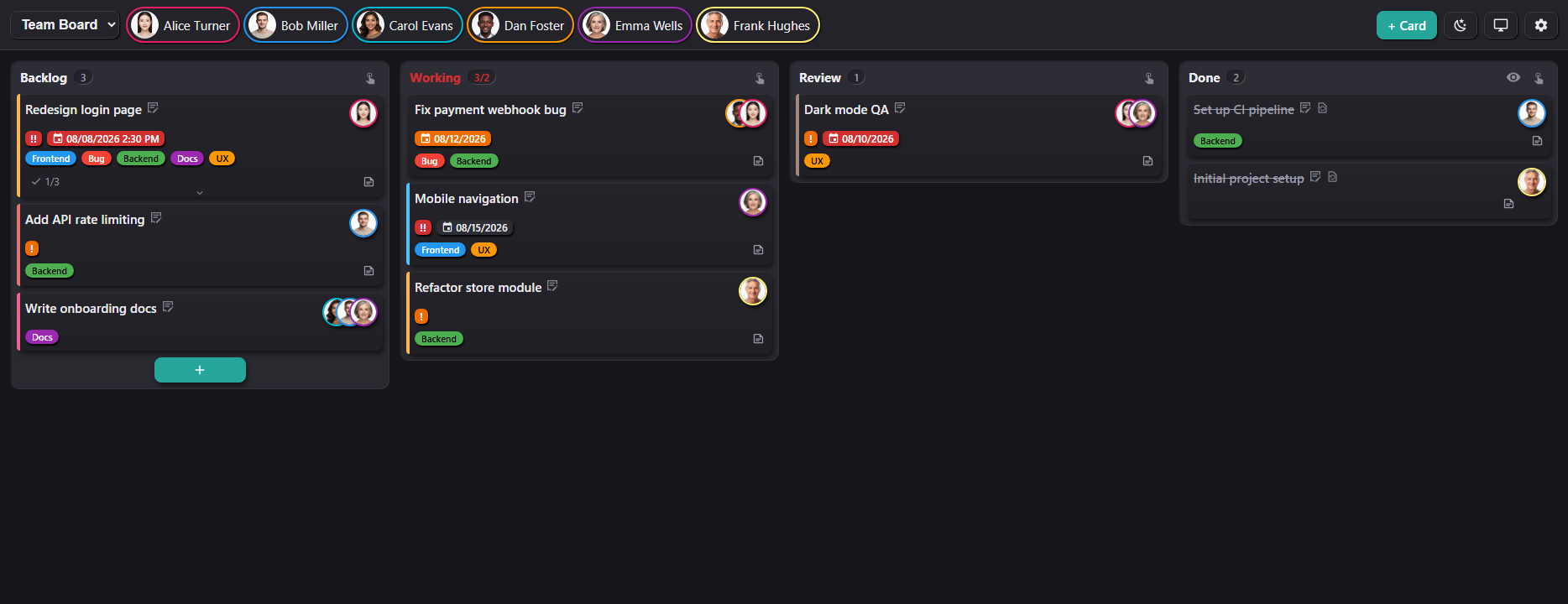
- Own web server (default port 8095). The UI comes straight from the adapter, so a UI update needs no
iobroker upload - Multiple boards with freely configurable columns (name, order, display limit, WIP limit, the "new" and "done" flags)
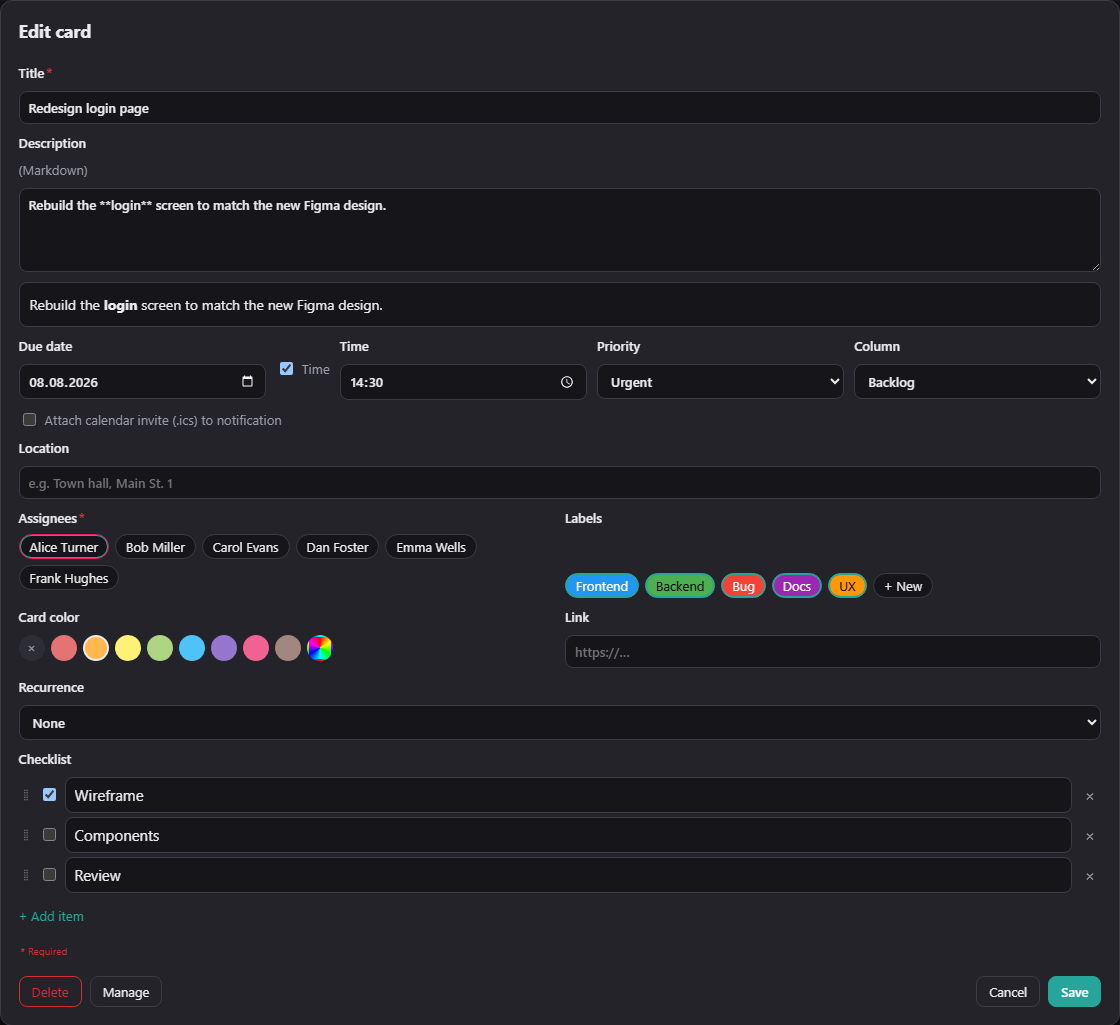
- Cards with title, Markdown description, assignees, due date (optionally with a time of day), labels, colour, priority, checklist, link, location and calendar invite
- Recurring tasks: daily, weekly, monthly, yearly, nth weekday, nth working day including public-holiday calculation, plus free cron expressions
- Card templates: save a card as a template, fill new cards from it, and exchange templates as a file between boards and instances
- Trash per board: deleted cards stay restorable for 30 days, and old done cards can move there automatically
- Per-column sorting in five modes with a direction toggle, or keep ordering by hand with drag and drop
- Drag and drop with mouse and touch, live sync over WebSocket to every open view
- Multiple users without a login: the user list lives in the instance settings, and each board decides who is assignable. The chips in the header double as a person filter that is remembered per board
- E-mail notifications through the
emailadapter on assignment, due date and card events, switchable per event and per user, with a calendar invite attached - Eleven languages (de, en, fr, nl, it, es, pl, pt, ru, uk, zh-cn), plus a per-instance date and time format, light/dark/auto theme, accent colour and custom CSS
Integration
- REST API for everything the UI can do. Reading is open on the LAN, writing needs a token
- Inbound webhooks with a separate token per integration, restrictable to individual boards
- Outbound webhooks: a JSON POST to any URL on every event
sendToand theactionstate for ioBroker scripts, using the same command vocabulary- Mirror states per board and per user (card count, overdue cards, last event) for dashboards and script triggers
- iframe friendly, with
?embed=1for Lovelace webpage cards
Other services such as Telegram or Pushover are deliberately not hard-wired. Every event is written to the state
kanban.0.lastEventand, if configured, sent as an outbound webhook, so a short script can route it anywhere. A ready-to-copy Telegram example is in the docs, and Pushover, Pushbullet or WhatsApp need nothing but a different send line.Mobile
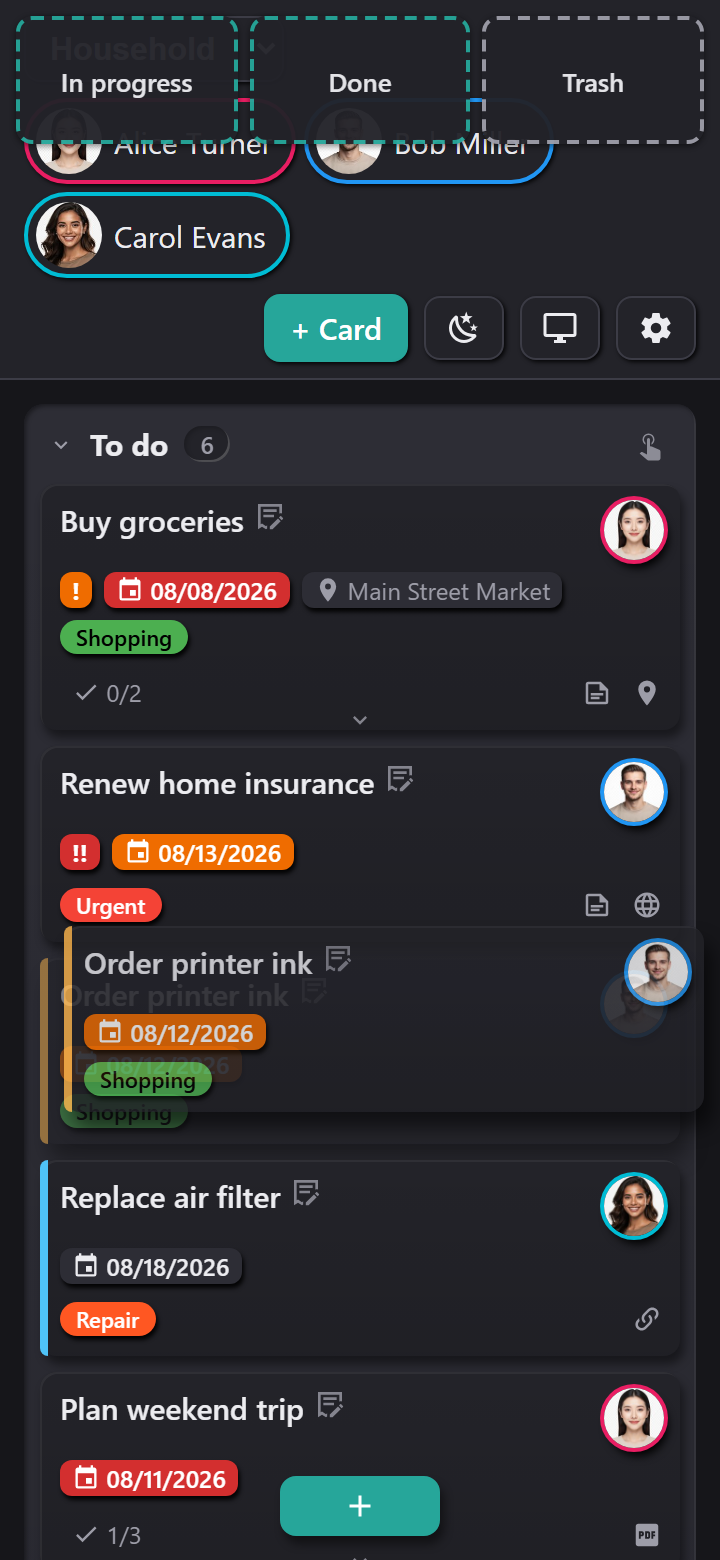
On narrow screens the board stacks the columns, and each one folds away like an accordion. Dialogs open full screen with a fixed action bar. To move a card, press and hold it; while dragging, a row of target columns appears along the top.
Requirements and installation
You need js-controller 6.0.11 or newer and Node.js 22 or newer. For e-mail notifications you also need a configured
emailinstance, and for region-accurate public holidays the optionalfeiertageadapter.The adapter is not in the official ioBroker repository yet, inclusion is in progress. Until then install it through Adapters, install from own URL:
https://github.com/bmueller77/ioBroker.kanbanThen create an instance, check the port under Instances and open
http://<host>:8095/.Worth knowing before you start
The board works without a login. Anyone who can reach the port can read and edit. Writing through the API is token protected, which stops other websites and naive scanners, but it is no substitute for network isolation: a device on the same network that loads the page can read the token along with it. The adapter is built for a LAN. If you want it reachable from outside, bind the port to the LAN only and put an authenticating reverse proxy in front.
New in 0.4.0
Card templates. A template is a named set of card fields. It belongs to a board and works as a stamp rather than a link: whatever comes out of it is an ordinary card afterwards and knows nothing of its origin.
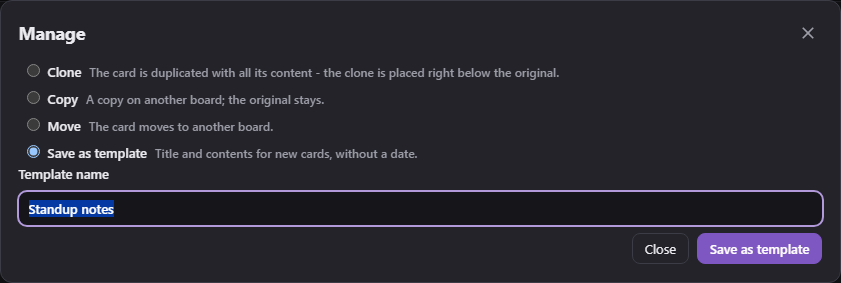
Creating one: On an existing card choose "Manage" and then "Save as template". The name field is prefilled with the card title; the name is also the title that later cards receive. If the name already exists, the adapter asks before replacing the contents of that template.
Using one: While creating a card, a picker with the board's templates sits at the bottom left of the editor. A choice sets every field anew, including those empty in the template; if the editor already holds something, a question comes first. Labels the board no longer has and assignees who are not members of the board are left out.
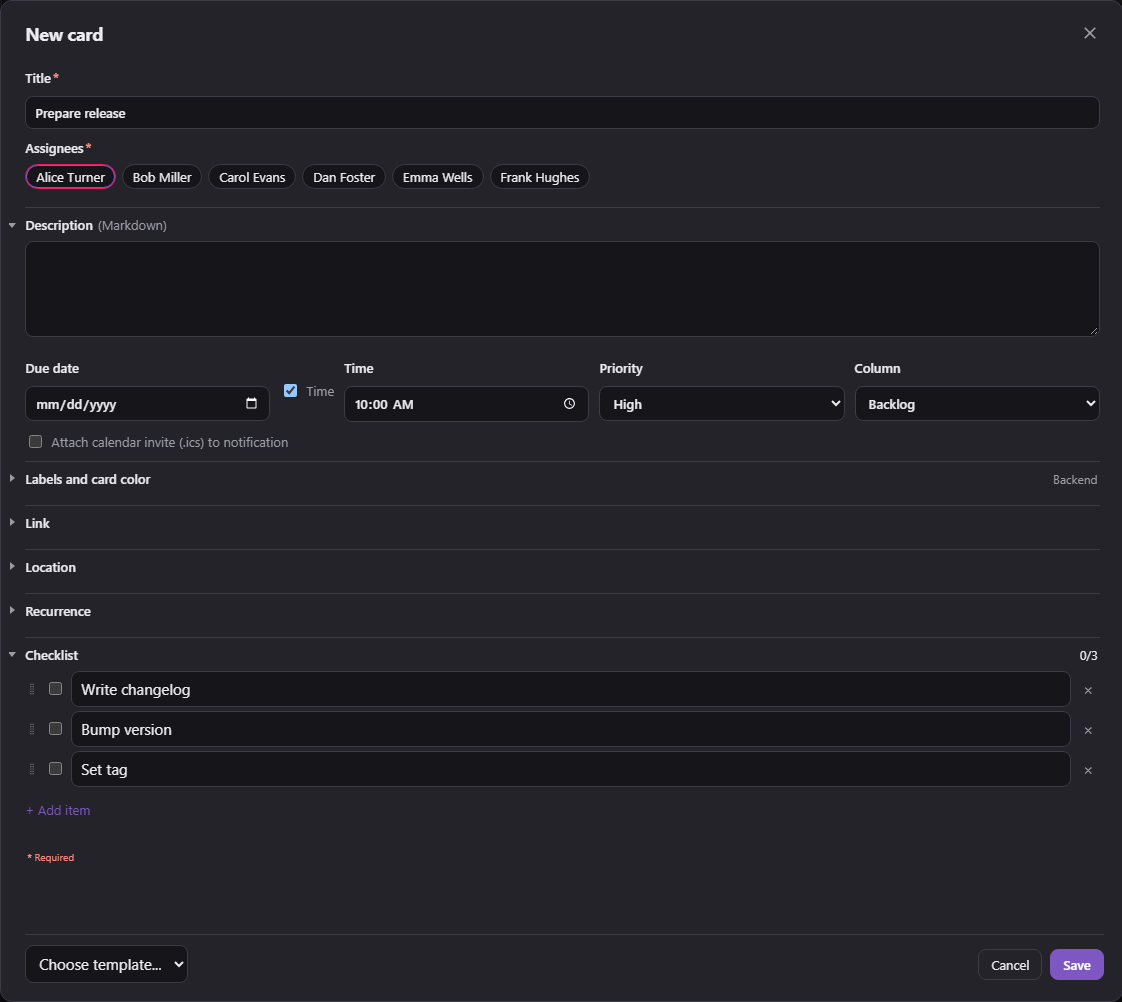
Two things are not carried into a template. The due date is dropped, because a fixed date ages: a template saved in January would create cards dated the day before yesterday in March. And the checklist ticks are reset, because a template holds the items, not their state. The time of day does travel along, since 17:00 is a property of the task.
If the template carries a recurrence and the due field is left empty, the adapter works out the next date itself and anchors the pattern to today. A template of "every 30 days" therefore creates a card that is due today and counts from there, not from a pattern set half a year ago.
Managing them: The board settings have a "Templates" tab. There you can drag templates into order, rename them, open one in the card editor to change its content, export them and delete them. The order in the tab is the order in the picker. Nothing takes effect until the dialog is saved.
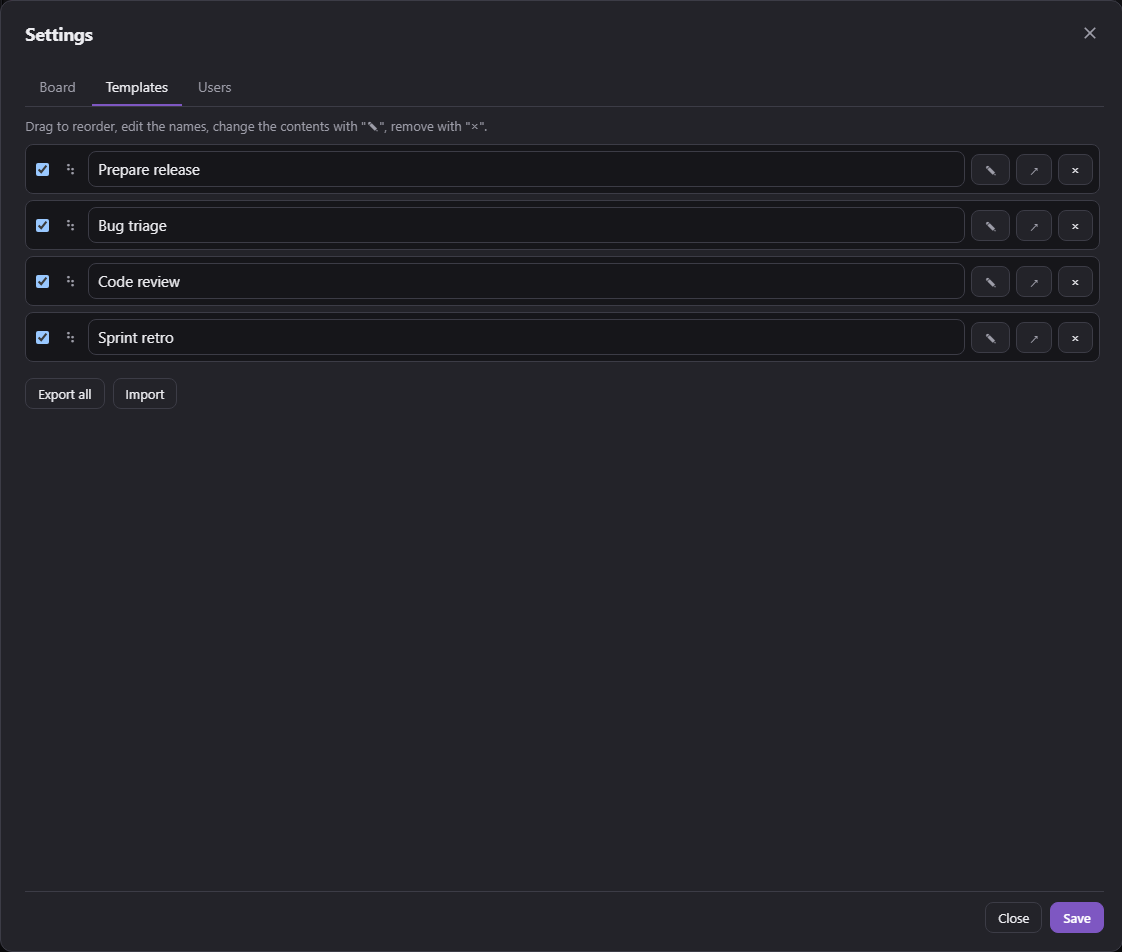
Moving them between boards and instances: Templates export one at a time or together, as a file or as text to copy, and import on another board or in another instance. An import appends and never replaces; a name that already exists gets a counter. Labels are matched by name.
From scripts. The
addCardcommand takes atemplatefield, matched against the ID first and the name second:{ "cmd": "addCard", "board": "house", "template": "Filter change", "due": "2026-10-01" }Also since 0.3.2
- Dragging a card with a finger works again. On a tablet a card could not be picked up at all. When a card is dragged to the edge, the board now scrolls along.
- The quick-move menu with the target columns appears whenever the columns do not all fit on screen, tablets included. The "Views" dialog can switch it on for good through "Always show the drop zones while dragging". The trash is listed in it only while the trash column itself is shown.
- The web interface is no longer cached. After an update, Fully Kiosk kept showing the old version for days while the adapter had long been serving the new one.
- All logs in English: log messages, REST API responses and answers to
sendTo. The same goes for the state names, on existing installations too, since the adapter renames them once at startup. The UI stays in the language you set.
The full changelog is in the README of the repository, including the history of older versions.
Important for existing automations
The user channels in the object tree got new IDs in 0.3.8. The display name is sanitized before it becomes part of the object ID: lower case, umlauts spelled out, everything else collapsed into hyphens. "Tina Müller" becomes
kanban.0.users.tina-mueller; up to 0.3.7 it waskanban.0.users.Tina Müller, with a space and an umlaut in the path. On the first start the old channel is removed and rebuilt under the new ID, and every removal shows up in the log. Scripts and views that read the old IDs have to be updated once. The display name itself stays in the channel name and on the cards.Error messages have been in English since 0.3.3. A script that checks for the German wording,
existiert nichtfor instance, needs adjusting.Coming from a version before 0.3.2: 0.3.2 closed two holes in the API. The write token was readable by any website, and a board-restricted token could escape its boards. Some of what changed with those fixes is behaviour a script may have relied on:
- CORS is limited to
/apiand/webhook, and only to origins you list, with an empty default. Only browser access is affected, since scripts and curl never went through that check. - Tokens are no longer accepted as a URL parameter, and a token row left blank no longer matches every request that carries no token.
- An empty "allowed boards" field counts as "none" instead of "all".
- The API no longer quietly straightens out bad input. An unknown
columnIdused to land in the first column, an invalidduewas dropped, andgetBoardon an unknown board answered with200andnull. All three now return an error.
Feedback is welcome in this thread, requests and bug reports please on GitHub. The full documentation is in the repository under
docs/en/README.md, and the complete changelog is in the README. - Own web server (default port 8095). The UI comes straight from the adapter, so a UI update needs no
-
Version 0.3.2 is out.
The focus was the feedback from the German thread: due date colours in four steps, switchable counts in the column header, a reorganised card editor with the required fields at the top and everything else in collapsible sections, and user IDs that stay stable, with a repair for the assignees that were already orphaned.
What is in it is listed in the first post under "New in 0.3.2".
-

Hey! Du scheinst an dieser Unterhaltung interessiert zu sein, hast aber noch kein Konto.
Hast du es satt, bei jedem Besuch durch die gleichen Beiträge zu scrollen? Wenn du dich für ein Konto anmeldest, kommst du immer genau dorthin zurück, wo du zuvor warst, und kannst dich über neue Antworten benachrichtigen lassen (entweder per E-Mail oder Push-Benachrichtigung). Du kannst auch Lesezeichen speichern und Beiträge positiv bewerten, um anderen Community-Mitgliedern deine Wertschätzung zu zeigen.
Mit deinem Input könnte dieser Beitrag noch besser werden 💗
Registrieren AnmeldenSupport us
380
Online33.1k
Benutzer84.1k
Themen1.4m
Beiträge