




Kein Anmelden am Alexa Adapter mehr möglich
-
Doch. Aber du musst deinen Amazon-Account halt per 2FA absichern. Solltest du ohnehin tun, wenn du von
Hackerangriffe.
betroffen bist...
@thomas-braun Aber er funktioniert ja nicht
-
@thomas-braun Aber er funktioniert ja nicht
Hier funktioniert der [tm] ganz einwandfrei.
-
Hier funktioniert der [tm] ganz einwandfrei.
@thomas-braun
Ich habe momentan nur noch Probleme mit IoBroker, da einiges veraltet ist und sich dadurch keine Adapter mehr aktualisieren lassen. Der IoT-Adapter funktioniert nun auch nicht mehr, da ich da auch das Passwort ändern musste. Bin echt am verzweifeln. Ich habe vor Wochen schon probiert, JS-Controller und Node zu aktualisieren, aber danach hat gar nichts mehr funktioniert. Ich bräuchte mal eine direkte Unterstützung. (per Messenger oder ähnlichem) -
@thomas-braun
Ich habe momentan nur noch Probleme mit IoBroker, da einiges veraltet ist und sich dadurch keine Adapter mehr aktualisieren lassen. Der IoT-Adapter funktioniert nun auch nicht mehr, da ich da auch das Passwort ändern musste. Bin echt am verzweifeln. Ich habe vor Wochen schon probiert, JS-Controller und Node zu aktualisieren, aber danach hat gar nichts mehr funktioniert. Ich bräuchte mal eine direkte Unterstützung. (per Messenger oder ähnlichem)@balkonfarmer sagte in Kein Anmelden am Alexa Adapter mehr möglich:
Ich bräuchte mal eine direkte Unterstützung. (per Messenger oder ähnlichem)
Ich bräuchte mal eine Übersicht, wo du da überhaupt unterwegs bist. Die Ausgabe von
iob diagwäre da ganz hilfreich.
-
@balkonfarmer sagte in Kein Anmelden am Alexa Adapter mehr möglich:
Ich bräuchte mal eine direkte Unterstützung. (per Messenger oder ähnlichem)
Ich bräuchte mal eine Übersicht, wo du da überhaupt unterwegs bist. Die Ausgabe von
iob diagwäre da ganz hilfreich.
@thomas-braun Soll ich das hier posten? ist viel Text
-
@thomas-braun Soll ich das hier posten? ist viel Text
Ja, hier rein, den vielen Text.
-
Ja, hier rein, den vielen Text.
========== Start marking the full check here ===========
Script v.2025-03-08 *** BASE SYSTEM *** Static hostname: raspberrypi Icon name: computer Operating System: Raspbian GNU/Linux 11 (bullseye) Kernel: Linux 6.1.21-v8+ Architecture: arm64 OS is similar to: debian Model : Raspberry Pi 4 Model B Rev 1.1 Docker : false Virtualization : none Kernel : aarch64 Userland : 32 bit Systemuptime and Load: 16:03:56 up 2:25, 1 user, load average: 1.02, 0.56, 0.49 CPU threads: 4 *** LIFE CYCLE STATUS *** Debian 'bullseye' is the current oldstable version. Please upgrade to the latest stable release 'bookworm' in due time! *** RASPBERRY THROTTLING *** Current issues: No throttling issues detected. Previously detected issues: No throttling issues detected. *** TIME AND TIMEZONES *** Local time: Mon 2025-07-07 16:03:56 CEST Universal time: Mon 2025-07-07 14:03:56 UTC RTC time: n/a Time zone: Europe/Berlin (CEST, +0200) System clock synchronized: yes NTP service: active RTC in local TZ: no *** Users and Groups *** User that called 'iob diag': pi HOME=/home/pi GROUPS=pi adm dialout cdrom sudo audio video plugdev games users input netdev gpio i2c spi iobroker User that is running 'js-controller': iobroker HOME=/home/iobroker GROUPS=iobroker tty dialout audio video plugdev bluetooth redis gpio i2c *** DISPLAY-SERVER SETUP *** Display-Server: false Desktop: Terminal: tty System is booting into 'graphical.target'. Usually a server is running in 'multi-user.target'. Please set BootTarget to 'multi-user.target' or run 'iobroker fix' *** MEMORY *** total used free shared buff/cache available Mem: 3.8G 1.2G 2.2G 0.0K 360M 2.8G Swap: 99M 0B 99M Total: 3.9G 1.2G 2.3G Active iob-Instances: 22 3793 M total memory 1207 M used memory 912 M active memory 527 M inactive memory 2224 M free memory 58 M buffer memory 302 M swap cache 99 M total swap 0 M used swap 99 M free swap *** top - Table Of Processes *** top - 16:03:57 up 2:25, 1 user, load average: 1.02, 0.56, 0.49 Tasks: 176 total, 1 running, 175 sleeping, 0 stopped, 0 zombie %Cpu(s): 5.6 us, 7.0 sy, 0.0 ni, 87.3 id, 0.0 wa, 0.0 hi, 0.0 si, 0.0 st MiB Mem : 3793.3 total, 2224.6 free, 1207.4 used, 361.3 buff/cache MiB Swap: 100.0 total, 100.0 free, 0.0 used. 2828.1 avail Mem *** FAILED SERVICES *** UNIT LOAD ACTIVE SUB DESCRIPTION 0 loaded units listed. *** DMESG CRITICAL ERRORS *** No critical errors detected *** FILESYSTEM *** Filesystem Type Size Used Avail Use% Mounted on /dev/root ext4 15G 5.3G 8.4G 39% / devtmpfs devtmpfs 1.7G 0 1.7G 0% /dev tmpfs tmpfs 1.9G 0 1.9G 0% /dev/shm tmpfs tmpfs 759M 836K 758M 1% /run tmpfs tmpfs 5.0M 4.0K 5.0M 1% /run/lock /dev/sda1 vfat 253M 51M 202M 20% /boot tmpfs tmpfs 380M 0 380M 0% /run/user/1000 Messages concerning ext4 filesystem in dmesg: [Mon Jul 7 13:38:05 2025] Kernel command line: coherent_pool=1M 8250.nr_uarts=0 snd_bcm2835.enable_headphones=0 snd_bcm2835.enable_headphones=1 snd_bcm2835.enable_hdmi=1 snd_bcm2835.enable_hdmi=0 smsc95xx.macaddr=DC:A6:32:17:D0:59 vc_mem.mem_base=0x3eb00000 vc_mem.mem_size=0x3ff00000 console=ttyS0,115200 console=tty1 root=PARTUUID=a97293b6-02 rootfstype=ext4 fsck.repair=yes rootwait [Mon Jul 7 13:38:08 2025] EXT4-fs (sda2): mounted filesystem with ordered data mode. Quota mode: none. [Mon Jul 7 13:38:08 2025] VFS: Mounted root (ext4 filesystem) readonly on device 8:2. [Mon Jul 7 13:38:10 2025] EXT4-fs (sda2): re-mounted. Quota mode: none. Show mounted filesystems: TARGET SOURCE FSTYPE OPTIONS / /dev/sda2 ext4 rw,noatime `-/boot /dev/sda1 vfat rw,relatime,fmask=0022,dmask=0022,codepage=437,iocharset=ascii,shortname=mixed,flush,errors=remount-ro Files in neuralgic directories: /var: 2.0G /var/ 1.5G /var/log/journal/faf0bbffdeae42ee938bcf9ac7b405cd 1.5G /var/log/journal 1.5G /var/log 345M /var/cache Archived and active journals take up 1.4G in the file system. /opt/iobroker/backups: 42M /opt/iobroker/backups/ /opt/iobroker/iobroker-data: 587M /opt/iobroker/iobroker-data/ 231M /opt/iobroker/iobroker-data/files 220M /opt/iobroker/iobroker-data/Luftdaten 96M /opt/iobroker/iobroker-data/backup-objects 78M /opt/iobroker/iobroker-data/files/icons-open-icon-library-png The five largest files in iobroker-data are: 25M /opt/iobroker/iobroker-data/objects.jsonl 12M /opt/iobroker/iobroker-data/files/javascript.admin/static/js/2.ea6ad656.chunk.js.map 12M /opt/iobroker/iobroker-data/files/javascript.admin/static/js/2.b7bbd921.chunk.js.map 9.8M /opt/iobroker/iobroker-data/files/javascript.admin/static/js/2.f6fd0e72.chunk.js.map 7.6M /opt/iobroker/iobroker-data/objects.json.migrated USB-Devices by-id: USB-Sticks - Avoid direct links to /dev/tty* in your adapter setups, please always prefer the links 'by-id': No Devices found 'by-id' Zigbee Network Settings on your coordinator/in nvbackup are: zigbee.X Extended Pan ID: *** MASKED *** Pan ID: *** MASKED *** Channel: *** MASKED *** Network Key: *** MASKED *** To unmask the settings run 'iob diag --unmask' *** NodeJS-Installation *** nodejs: N/A /usr/bin/node v14.21.3 /usr/bin/npm 6.14.18 /usr/bin/npx 6.14.18 /usr/bin/corepack 0.15.1 *** nodejs is NOT correctly installed *** nodejs: Installed: 14.21.3-deb-1nodesource1 Candidate: 14.21.3-deb-1nodesource1 Version table: *** 14.21.3-deb-1nodesource1 500 500 https://deb.nodesource.com/node_14.x bullseye/main armhf Packages 100 /var/lib/dpkg/status 12.22.12~dfsg-1~deb11u7 500 500 http://raspbian.raspberrypi.org/raspbian bullseye/main armhf Packages Temp directories causing deletion problem: 0 No problems detected Errors in npm tree: 0 No problems detected *** ioBroker-Installation *** ioBroker Status iobroker is running on this host. Objects type: jsonl States type: redis Hosts: raspberrypi raspberrypi (version: 4.0.24, hostname: raspberrypi , alive, uptime: 8750) Core adapters versions js-controller: 4.0.24 admin: 5.3.8 javascript: 5.7.0 nodejs modules from github: 0 Adapter State + system.adapter.admin.0 : admin : raspberrypi - enabled, port: 8081, bind: 0.0.0.0, run as: admin + system.adapter.alexa2.0 : alexa2 : raspberrypi - enabled + system.adapter.backitup.0 : backitup : raspberrypi - enabled + system.adapter.broadlink2.0 : broadlink2 : raspberrypi - enabled + system.adapter.chromecast.0 : chromecast : raspberrypi - enabled + system.adapter.discovery.0 : discovery : raspberrypi - enabled + system.adapter.email.0 : email : raspberrypi - enabled system.adapter.flot.0 : flot : raspberrypi - disabled + system.adapter.fritzbox.0 : fritzbox : raspberrypi - enabled + system.adapter.history.0 : history : raspberrypi - enabled + system.adapter.hmip.0 : hmip : raspberrypi - enabled system.adapter.icons-addictive-flavour-png.0: icons-addictive-flavour-png: raspberrypi - disabled system.adapter.icons-icons8.0 : icons-icons8 : raspberrypi - disabled system.adapter.icons-material-png.0 : icons-material-png : raspberrypi - disabled system.adapter.icons-material-svg.0 : icons-material-svg : raspberrypi - disabled system.adapter.icons-open-icon-library-png.0: icons-open-icon-library-png: raspberrypi - disabled + system.adapter.info.0 : info : raspberrypi - enabled + system.adapter.iot.0 : iot : raspberrypi - enabled + system.adapter.javascript.0 : javascript : raspberrypi - enabled + system.adapter.meross.0 : meross : raspberrypi - enabled system.adapter.mqtt-client.0 : mqtt-client : raspberrypi - disabled, port: 1883 system.adapter.mqtt.0 : mqtt : raspberrypi - disabled, port: 1883, bind: 0.0.0.0 system.adapter.nina.0 : nina : raspberrypi - disabled system.adapter.pi-hole.0 : pi-hole : raspberrypi - disabled + system.adapter.rpi2.0 : rpi2 : raspberrypi - enabled + system.adapter.sayit.0 : sayit : raspberrypi - enabled, port: 0 + system.adapter.simple-api.0 : simple-api : raspberrypi - enabled, port: 8087, bind: 0.0.0.0, run as: admin + system.adapter.socketio.0 : socketio : raspberrypi - enabled, port: 8084, bind: 0.0.0.0, run as: admin + system.adapter.sonoff.0 : sonoff : raspberrypi - enabled, port: 1883, bind: 192.168.178.78 + system.adapter.tr-064.0 : tr-064 : raspberrypi - enabled system.adapter.vis-bars.0 : vis-bars : raspberrypi - disabled system.adapter.vis-colorpicker.0 : vis-colorpicker : raspberrypi - disabled system.adapter.vis-fancyswitch.0 : vis-fancyswitch : raspberrypi - disabled system.adapter.vis-google-fonts.0 : vis-google-fonts : raspberrypi - enabled system.adapter.vis-history.0 : vis-history : raspberrypi - disabled system.adapter.vis-hqwidgets.0 : vis-hqwidgets : raspberrypi - disabled system.adapter.vis-metro.0 : vis-metro : raspberrypi - disabled system.adapter.vis-rgraph.0 : vis-rgraph : raspberrypi - disabled system.adapter.vis-timeandweather.0 : vis-timeandweather : raspberrypi - disabled system.adapter.vis.0 : vis : raspberrypi - enabled + system.adapter.web.0 : web : raspberrypi - enabled, port: 8082, bind: 0.0.0.0, run as: admin + instance is alive Enabled adapters with bindings + system.adapter.admin.0 : admin : raspberrypi - enabled, port: 8081, bind: 0.0.0.0, run as: admin + system.adapter.sayit.0 : sayit : raspberrypi - enabled, port: 0 + system.adapter.simple-api.0 : simple-api : raspberrypi - enabled, port: 8087, bind: 0.0.0.0, run as: admin + system.adapter.socketio.0 : socketio : raspberrypi - enabled, port: 8084, bind: 0.0.0.0, run as: admin + system.adapter.sonoff.0 : sonoff : raspberrypi - enabled, port: 1883, bind: 192.168.178.78 + system.adapter.web.0 : web : raspberrypi - enabled, port: 8082, bind: 0.0.0.0, run as: admin ioBroker-Repositories Stable (default): http://download.iobroker.net/sources-dist.json Beta (latest) : http://download.iobroker.net/sources-dist-latest.json Active repo(s): Stable (default) Installed ioBroker-Adapters Used repository: Stable (default) Adapter "admin" : 7.6.17 , installed 5.3.8 [Updatable] Adapter "alexa2" : 3.26.5 , installed 3.11.2 [Updatable] Adapter "backitup" : 3.2.2 , installed 2.4.9 [Updatable] Adapter "broadlink2" : 2.3.0 , installed 2.0.3 [Updatable] Adapter "chromecast" : 4.0.0 , installed 2.3.1 [Updatable] Adapter "discovery" : 5.0.0 , installed 3.0.3 [Updatable] Adapter "email" : 2.0.4 , installed 1.1.3 [Updatable] Adapter "flot" : 1.12.0 , installed 1.11.0 [Updatable] Adapter "fritzbox" : 0.6.0 , installed 0.2.1 [Updatable] Adapter "history" : 3.0.1 , installed 1.11.1 [Updatable] Adapter "hmip" : 1.27.0 , installed 1.17.0 [Updatable] Adapter "icons-addictive-flavour-png": 0.1.0, installed 0.1.0 Adapter "icons-icons8" : 0.0.1 , installed 0.0.1 Adapter "icons-material-png": 0.1.0, installed 0.1.0 Adapter "icons-material-svg": 0.1.0, installed 0.1.0 Adapter "icons-open-icon-library-png": 0.1.2, installed 0.1.2 Adapter "iot" : 3.3.0 , installed 1.11.4 [Updatable] Adapter "javascript" : 8.9.2 , installed 5.7.0 [Updatable] Controller "js-controller": 7.0.6 , installed 4.0.24 [Updatable] Adapter "luftdaten" : 4.0.0 , installed 2.2.4 [Updatable] Adapter "meross" : 1.17.0 , installed 1.12.0 [Updatable] Adapter "mqtt" : 6.1.2 , installed 3.0.6 [Updatable] Adapter "mqtt-client" : 3.0.0 , installed 1.6.2 [Updatable] Adapter "nina" : 0.0.25 , installed 0.0.25 Adapter "pi-hole" : 1.3.6 , installed 1.3.4 [Updatable] Adapter "rpi2" : 2.4.0 , installed 1.3.2 [Updatable] Adapter "sayit" : 5.0.0 , installed 1.12.3 [Updatable] Adapter "simple-api" : 2.8.0 , installed 2.7.0 [Updatable] Adapter "socketio" : 6.7.1 , installed 4.2.0 [Updatable] Adapter "sonoff" : 3.1.2 , installed 2.5.1 [Updatable] Adapter "tr-064" : 4.3.0 , installed 4.2.16 [Updatable] Adapter "vis" : 1.5.6 , installed 1.4.15 [Updatable] Adapter "vis-bars" : 0.1.4 , installed 0.1.4 Adapter "vis-colorpicker": 2.0.3 , installed 1.2.0 [Updatable] Adapter "vis-fancyswitch": 1.1.0 , installed 1.1.0 Adapter "vis-google-fonts": 1.0.4 , installed 1.0.3 [Updatable] Adapter "vis-history" : 1.0.0 , installed 1.0.0 Adapter "vis-hqwidgets": 1.5.1 , installed 1.2.0 [Updatable] Adapter "vis-metro" : 1.2.0 , installed 1.2.0 Adapter "vis-rgraph" : 0.0.2 , installed 0.0.2 Adapter "vis-timeandweather": 1.2.2, installed 1.1.7 [Updatable] Adapter "web" : 7.0.8 , installed 4.3.0 [Updatable] Adapter "ws" : 2.6.2 , installed 1.3.0 [Updatable] Objects and States Please stand by - This may take a while Objects: 4815 States: 3719 *** OS-Repositories and Updates *** Get:1 http://giteduberger.fr rpimonitor/ InRelease [1933 B] Hit:2 http://archive.raspberrypi.org/debian bullseye InRelease Hit:3 http://raspbian.raspberrypi.org/raspbian bullseye InRelease Hit:4 https://deb.nodesource.com/node_14.x bullseye InRelease Fetched 1933 B in 1s (1653 B/s) Reading package lists... Pending Updates: 28 *** Listening Ports *** Active Internet connections (only servers) Proto Recv-Q Send-Q Local Address Foreign Address State User Inode PID/Program name tcp 0 0 0.0.0.0:8888 0.0.0.0:* LISTEN 0 3867 569/perl tcp 0 0 192.168.178.78:1883 0.0.0.0:* LISTEN 1001 17575 1175/io.sonoff.0 tcp 0 0 0.0.0.0:22 0.0.0.0:* LISTEN 0 3838 532/sshd: /usr/sbin tcp 0 0 127.0.0.1:6379 0.0.0.0:* LISTEN 109 13895 508/redis-server 12 tcp 0 0 0.0.0.0:34675 0.0.0.0:* LISTEN 1001 732532 12412/io.alexa2.0 tcp 0 0 127.0.0.1:9001 0.0.0.0:* LISTEN 1001 14849 545/iobroker.js-con tcp6 0 0 :::22 :::* LISTEN 0 3840 532/sshd: /usr/sbin tcp6 0 0 :::8084 :::* LISTEN 1001 21035 2085/io.socketio.0 tcp6 0 0 :::8087 :::* LISTEN 1001 17140 1851/io.simple-api. tcp6 0 0 :::8081 :::* LISTEN 1001 14940 591/io.admin.0 tcp6 0 0 :::8082 :::* LISTEN 1001 21983 2438/io.web.0 tcp6 0 0 ::1:6379 :::* LISTEN 109 13896 508/redis-server 12 udp 0 0 0.0.0.0:5353 0.0.0.0:* 1001 18476 1266/io.chromecast. udp 0 0 192.168.178.78:5353 0.0.0.0:* 1001 15953 1192/io.tr-064.0 udp 0 0 0.0.0.0:5353 0.0.0.0:* 108 13833 389/avahi-daemon: r udp 0 0 0.0.0.0:46726 0.0.0.0:* 108 13835 389/avahi-daemon: r udp 0 0 0.0.0.0:57137 0.0.0.0:* 1001 18452 1244/io.broadlink2. udp 0 0 0.0.0.0:68 0.0.0.0:* 0 3893 795/dhcpcd udp 0 0 0.0.0.0:15001 0.0.0.0:* 1001 18450 1244/io.broadlink2. udp6 0 0 :::5353 :::* 108 13834 389/avahi-daemon: r udp6 0 0 :::36482 :::* 108 13836 389/avahi-daemon: r udp6 0 0 :::546 :::* 0 14908 795/dhcpcd *** Log File - Last 25 Lines *** 2025-07-07 16:01:28.952 - info: javascript.0 (801) Stop script script.js.Neue_Scripte.Roller_Keller 2025-07-07 16:01:38.992 - info: javascript.0 (801) Stop script script.js.Neue_Scripte.Roller_Keller 2025-07-07 16:01:48.986 - info: javascript.0 (801) Stop script script.js.Neue_Scripte.Roller_Keller 2025-07-07 16:01:58.978 - info: javascript.0 (801) Stop script script.js.Neue_Scripte.Roller_Keller 2025-07-07 16:02:09.029 - info: javascript.0 (801) Stop script script.js.Neue_Scripte.Roller_Keller 2025-07-07 16:02:14.063 - info: sonoff.0 (1175) Client [Luftdaten] connected with secret 1751896934062_9433 2025-07-07 16:02:18.997 - info: javascript.0 (801) Stop script script.js.Neue_Scripte.Roller_Keller 2025-07-07 16:02:28.974 - info: javascript.0 (801) Stop script script.js.Neue_Scripte.Roller_Keller 2025-07-07 16:02:39.023 - info: javascript.0 (801) Stop script script.js.Neue_Scripte.Roller_Keller 2025-07-07 16:02:48.992 - info: javascript.0 (801) Stop script script.js.Neue_Scripte.Roller_Keller 2025-07-07 16:02:58.969 - info: javascript.0 (801) Stop script script.js.Neue_Scripte.Roller_Keller 2025-07-07 16:03:09.018 - info: javascript.0 (801) Stop script script.js.Neue_Scripte.Roller_Keller 2025-07-07 16:03:14.264 - info: sonoff.0 (1175) Client [Luftdaten] connection closed: timeout 2025-07-07 16:03:18.995 - info: javascript.0 (801) Stop script script.js.Neue_Scripte.Roller_Keller 2025-07-07 16:03:28.981 - info: javascript.0 (801) Stop script script.js.Neue_Scripte.Roller_Keller 2025-07-07 16:03:39.023 - info: javascript.0 (801) Stop script script.js.Neue_Scripte.Roller_Keller 2025-07-07 16:03:45.085 - info: sonoff.0 (1175) Client [Luftdaten] connected with secret 1751897025083_575 2025-07-07 16:03:49.008 - info: javascript.0 (801) Stop script script.js.Neue_Scripte.Roller_Keller 2025-07-07 16:03:58.972 - info: javascript.0 (801) Stop script script.js.Neue_Scripte.Roller_Keller 2025-07-07 16:04:09.012 - info: javascript.0 (801) Stop script script.js.Neue_Scripte.Roller_Keller 2025-07-07 16:04:19.001 - info: javascript.0 (801) Stop script script.js.Neue_Scripte.Roller_Keller 2025-07-07 16:04:28.975 - info: javascript.0 (801) Stop script script.js.Neue_Scripte.Roller_Keller 2025-07-07 16:04:39.016 - info: javascript.0 (801) Stop script script.js.Neue_Scripte.Roller_Keller 2025-07-07 16:04:45.115 - info: sonoff.0 (1175) Client [Luftdaten] connection closed: timeout 2025-07-07 16:04:48.982 - info: javascript.0 (801) Stop script script.js.Neue_Scripte.Roller_Keller============ Mark until here for C&P =============
iob diag has finished.
-
========== Start marking the full check here ===========
Script v.2025-03-08 *** BASE SYSTEM *** Static hostname: raspberrypi Icon name: computer Operating System: Raspbian GNU/Linux 11 (bullseye) Kernel: Linux 6.1.21-v8+ Architecture: arm64 OS is similar to: debian Model : Raspberry Pi 4 Model B Rev 1.1 Docker : false Virtualization : none Kernel : aarch64 Userland : 32 bit Systemuptime and Load: 16:03:56 up 2:25, 1 user, load average: 1.02, 0.56, 0.49 CPU threads: 4 *** LIFE CYCLE STATUS *** Debian 'bullseye' is the current oldstable version. Please upgrade to the latest stable release 'bookworm' in due time! *** RASPBERRY THROTTLING *** Current issues: No throttling issues detected. Previously detected issues: No throttling issues detected. *** TIME AND TIMEZONES *** Local time: Mon 2025-07-07 16:03:56 CEST Universal time: Mon 2025-07-07 14:03:56 UTC RTC time: n/a Time zone: Europe/Berlin (CEST, +0200) System clock synchronized: yes NTP service: active RTC in local TZ: no *** Users and Groups *** User that called 'iob diag': pi HOME=/home/pi GROUPS=pi adm dialout cdrom sudo audio video plugdev games users input netdev gpio i2c spi iobroker User that is running 'js-controller': iobroker HOME=/home/iobroker GROUPS=iobroker tty dialout audio video plugdev bluetooth redis gpio i2c *** DISPLAY-SERVER SETUP *** Display-Server: false Desktop: Terminal: tty System is booting into 'graphical.target'. Usually a server is running in 'multi-user.target'. Please set BootTarget to 'multi-user.target' or run 'iobroker fix' *** MEMORY *** total used free shared buff/cache available Mem: 3.8G 1.2G 2.2G 0.0K 360M 2.8G Swap: 99M 0B 99M Total: 3.9G 1.2G 2.3G Active iob-Instances: 22 3793 M total memory 1207 M used memory 912 M active memory 527 M inactive memory 2224 M free memory 58 M buffer memory 302 M swap cache 99 M total swap 0 M used swap 99 M free swap *** top - Table Of Processes *** top - 16:03:57 up 2:25, 1 user, load average: 1.02, 0.56, 0.49 Tasks: 176 total, 1 running, 175 sleeping, 0 stopped, 0 zombie %Cpu(s): 5.6 us, 7.0 sy, 0.0 ni, 87.3 id, 0.0 wa, 0.0 hi, 0.0 si, 0.0 st MiB Mem : 3793.3 total, 2224.6 free, 1207.4 used, 361.3 buff/cache MiB Swap: 100.0 total, 100.0 free, 0.0 used. 2828.1 avail Mem *** FAILED SERVICES *** UNIT LOAD ACTIVE SUB DESCRIPTION 0 loaded units listed. *** DMESG CRITICAL ERRORS *** No critical errors detected *** FILESYSTEM *** Filesystem Type Size Used Avail Use% Mounted on /dev/root ext4 15G 5.3G 8.4G 39% / devtmpfs devtmpfs 1.7G 0 1.7G 0% /dev tmpfs tmpfs 1.9G 0 1.9G 0% /dev/shm tmpfs tmpfs 759M 836K 758M 1% /run tmpfs tmpfs 5.0M 4.0K 5.0M 1% /run/lock /dev/sda1 vfat 253M 51M 202M 20% /boot tmpfs tmpfs 380M 0 380M 0% /run/user/1000 Messages concerning ext4 filesystem in dmesg: [Mon Jul 7 13:38:05 2025] Kernel command line: coherent_pool=1M 8250.nr_uarts=0 snd_bcm2835.enable_headphones=0 snd_bcm2835.enable_headphones=1 snd_bcm2835.enable_hdmi=1 snd_bcm2835.enable_hdmi=0 smsc95xx.macaddr=DC:A6:32:17:D0:59 vc_mem.mem_base=0x3eb00000 vc_mem.mem_size=0x3ff00000 console=ttyS0,115200 console=tty1 root=PARTUUID=a97293b6-02 rootfstype=ext4 fsck.repair=yes rootwait [Mon Jul 7 13:38:08 2025] EXT4-fs (sda2): mounted filesystem with ordered data mode. Quota mode: none. [Mon Jul 7 13:38:08 2025] VFS: Mounted root (ext4 filesystem) readonly on device 8:2. [Mon Jul 7 13:38:10 2025] EXT4-fs (sda2): re-mounted. Quota mode: none. Show mounted filesystems: TARGET SOURCE FSTYPE OPTIONS / /dev/sda2 ext4 rw,noatime `-/boot /dev/sda1 vfat rw,relatime,fmask=0022,dmask=0022,codepage=437,iocharset=ascii,shortname=mixed,flush,errors=remount-ro Files in neuralgic directories: /var: 2.0G /var/ 1.5G /var/log/journal/faf0bbffdeae42ee938bcf9ac7b405cd 1.5G /var/log/journal 1.5G /var/log 345M /var/cache Archived and active journals take up 1.4G in the file system. /opt/iobroker/backups: 42M /opt/iobroker/backups/ /opt/iobroker/iobroker-data: 587M /opt/iobroker/iobroker-data/ 231M /opt/iobroker/iobroker-data/files 220M /opt/iobroker/iobroker-data/Luftdaten 96M /opt/iobroker/iobroker-data/backup-objects 78M /opt/iobroker/iobroker-data/files/icons-open-icon-library-png The five largest files in iobroker-data are: 25M /opt/iobroker/iobroker-data/objects.jsonl 12M /opt/iobroker/iobroker-data/files/javascript.admin/static/js/2.ea6ad656.chunk.js.map 12M /opt/iobroker/iobroker-data/files/javascript.admin/static/js/2.b7bbd921.chunk.js.map 9.8M /opt/iobroker/iobroker-data/files/javascript.admin/static/js/2.f6fd0e72.chunk.js.map 7.6M /opt/iobroker/iobroker-data/objects.json.migrated USB-Devices by-id: USB-Sticks - Avoid direct links to /dev/tty* in your adapter setups, please always prefer the links 'by-id': No Devices found 'by-id' Zigbee Network Settings on your coordinator/in nvbackup are: zigbee.X Extended Pan ID: *** MASKED *** Pan ID: *** MASKED *** Channel: *** MASKED *** Network Key: *** MASKED *** To unmask the settings run 'iob diag --unmask' *** NodeJS-Installation *** nodejs: N/A /usr/bin/node v14.21.3 /usr/bin/npm 6.14.18 /usr/bin/npx 6.14.18 /usr/bin/corepack 0.15.1 *** nodejs is NOT correctly installed *** nodejs: Installed: 14.21.3-deb-1nodesource1 Candidate: 14.21.3-deb-1nodesource1 Version table: *** 14.21.3-deb-1nodesource1 500 500 https://deb.nodesource.com/node_14.x bullseye/main armhf Packages 100 /var/lib/dpkg/status 12.22.12~dfsg-1~deb11u7 500 500 http://raspbian.raspberrypi.org/raspbian bullseye/main armhf Packages Temp directories causing deletion problem: 0 No problems detected Errors in npm tree: 0 No problems detected *** ioBroker-Installation *** ioBroker Status iobroker is running on this host. Objects type: jsonl States type: redis Hosts: raspberrypi raspberrypi (version: 4.0.24, hostname: raspberrypi , alive, uptime: 8750) Core adapters versions js-controller: 4.0.24 admin: 5.3.8 javascript: 5.7.0 nodejs modules from github: 0 Adapter State + system.adapter.admin.0 : admin : raspberrypi - enabled, port: 8081, bind: 0.0.0.0, run as: admin + system.adapter.alexa2.0 : alexa2 : raspberrypi - enabled + system.adapter.backitup.0 : backitup : raspberrypi - enabled + system.adapter.broadlink2.0 : broadlink2 : raspberrypi - enabled + system.adapter.chromecast.0 : chromecast : raspberrypi - enabled + system.adapter.discovery.0 : discovery : raspberrypi - enabled + system.adapter.email.0 : email : raspberrypi - enabled system.adapter.flot.0 : flot : raspberrypi - disabled + system.adapter.fritzbox.0 : fritzbox : raspberrypi - enabled + system.adapter.history.0 : history : raspberrypi - enabled + system.adapter.hmip.0 : hmip : raspberrypi - enabled system.adapter.icons-addictive-flavour-png.0: icons-addictive-flavour-png: raspberrypi - disabled system.adapter.icons-icons8.0 : icons-icons8 : raspberrypi - disabled system.adapter.icons-material-png.0 : icons-material-png : raspberrypi - disabled system.adapter.icons-material-svg.0 : icons-material-svg : raspberrypi - disabled system.adapter.icons-open-icon-library-png.0: icons-open-icon-library-png: raspberrypi - disabled + system.adapter.info.0 : info : raspberrypi - enabled + system.adapter.iot.0 : iot : raspberrypi - enabled + system.adapter.javascript.0 : javascript : raspberrypi - enabled + system.adapter.meross.0 : meross : raspberrypi - enabled system.adapter.mqtt-client.0 : mqtt-client : raspberrypi - disabled, port: 1883 system.adapter.mqtt.0 : mqtt : raspberrypi - disabled, port: 1883, bind: 0.0.0.0 system.adapter.nina.0 : nina : raspberrypi - disabled system.adapter.pi-hole.0 : pi-hole : raspberrypi - disabled + system.adapter.rpi2.0 : rpi2 : raspberrypi - enabled + system.adapter.sayit.0 : sayit : raspberrypi - enabled, port: 0 + system.adapter.simple-api.0 : simple-api : raspberrypi - enabled, port: 8087, bind: 0.0.0.0, run as: admin + system.adapter.socketio.0 : socketio : raspberrypi - enabled, port: 8084, bind: 0.0.0.0, run as: admin + system.adapter.sonoff.0 : sonoff : raspberrypi - enabled, port: 1883, bind: 192.168.178.78 + system.adapter.tr-064.0 : tr-064 : raspberrypi - enabled system.adapter.vis-bars.0 : vis-bars : raspberrypi - disabled system.adapter.vis-colorpicker.0 : vis-colorpicker : raspberrypi - disabled system.adapter.vis-fancyswitch.0 : vis-fancyswitch : raspberrypi - disabled system.adapter.vis-google-fonts.0 : vis-google-fonts : raspberrypi - enabled system.adapter.vis-history.0 : vis-history : raspberrypi - disabled system.adapter.vis-hqwidgets.0 : vis-hqwidgets : raspberrypi - disabled system.adapter.vis-metro.0 : vis-metro : raspberrypi - disabled system.adapter.vis-rgraph.0 : vis-rgraph : raspberrypi - disabled system.adapter.vis-timeandweather.0 : vis-timeandweather : raspberrypi - disabled system.adapter.vis.0 : vis : raspberrypi - enabled + system.adapter.web.0 : web : raspberrypi - enabled, port: 8082, bind: 0.0.0.0, run as: admin + instance is alive Enabled adapters with bindings + system.adapter.admin.0 : admin : raspberrypi - enabled, port: 8081, bind: 0.0.0.0, run as: admin + system.adapter.sayit.0 : sayit : raspberrypi - enabled, port: 0 + system.adapter.simple-api.0 : simple-api : raspberrypi - enabled, port: 8087, bind: 0.0.0.0, run as: admin + system.adapter.socketio.0 : socketio : raspberrypi - enabled, port: 8084, bind: 0.0.0.0, run as: admin + system.adapter.sonoff.0 : sonoff : raspberrypi - enabled, port: 1883, bind: 192.168.178.78 + system.adapter.web.0 : web : raspberrypi - enabled, port: 8082, bind: 0.0.0.0, run as: admin ioBroker-Repositories Stable (default): http://download.iobroker.net/sources-dist.json Beta (latest) : http://download.iobroker.net/sources-dist-latest.json Active repo(s): Stable (default) Installed ioBroker-Adapters Used repository: Stable (default) Adapter "admin" : 7.6.17 , installed 5.3.8 [Updatable] Adapter "alexa2" : 3.26.5 , installed 3.11.2 [Updatable] Adapter "backitup" : 3.2.2 , installed 2.4.9 [Updatable] Adapter "broadlink2" : 2.3.0 , installed 2.0.3 [Updatable] Adapter "chromecast" : 4.0.0 , installed 2.3.1 [Updatable] Adapter "discovery" : 5.0.0 , installed 3.0.3 [Updatable] Adapter "email" : 2.0.4 , installed 1.1.3 [Updatable] Adapter "flot" : 1.12.0 , installed 1.11.0 [Updatable] Adapter "fritzbox" : 0.6.0 , installed 0.2.1 [Updatable] Adapter "history" : 3.0.1 , installed 1.11.1 [Updatable] Adapter "hmip" : 1.27.0 , installed 1.17.0 [Updatable] Adapter "icons-addictive-flavour-png": 0.1.0, installed 0.1.0 Adapter "icons-icons8" : 0.0.1 , installed 0.0.1 Adapter "icons-material-png": 0.1.0, installed 0.1.0 Adapter "icons-material-svg": 0.1.0, installed 0.1.0 Adapter "icons-open-icon-library-png": 0.1.2, installed 0.1.2 Adapter "iot" : 3.3.0 , installed 1.11.4 [Updatable] Adapter "javascript" : 8.9.2 , installed 5.7.0 [Updatable] Controller "js-controller": 7.0.6 , installed 4.0.24 [Updatable] Adapter "luftdaten" : 4.0.0 , installed 2.2.4 [Updatable] Adapter "meross" : 1.17.0 , installed 1.12.0 [Updatable] Adapter "mqtt" : 6.1.2 , installed 3.0.6 [Updatable] Adapter "mqtt-client" : 3.0.0 , installed 1.6.2 [Updatable] Adapter "nina" : 0.0.25 , installed 0.0.25 Adapter "pi-hole" : 1.3.6 , installed 1.3.4 [Updatable] Adapter "rpi2" : 2.4.0 , installed 1.3.2 [Updatable] Adapter "sayit" : 5.0.0 , installed 1.12.3 [Updatable] Adapter "simple-api" : 2.8.0 , installed 2.7.0 [Updatable] Adapter "socketio" : 6.7.1 , installed 4.2.0 [Updatable] Adapter "sonoff" : 3.1.2 , installed 2.5.1 [Updatable] Adapter "tr-064" : 4.3.0 , installed 4.2.16 [Updatable] Adapter "vis" : 1.5.6 , installed 1.4.15 [Updatable] Adapter "vis-bars" : 0.1.4 , installed 0.1.4 Adapter "vis-colorpicker": 2.0.3 , installed 1.2.0 [Updatable] Adapter "vis-fancyswitch": 1.1.0 , installed 1.1.0 Adapter "vis-google-fonts": 1.0.4 , installed 1.0.3 [Updatable] Adapter "vis-history" : 1.0.0 , installed 1.0.0 Adapter "vis-hqwidgets": 1.5.1 , installed 1.2.0 [Updatable] Adapter "vis-metro" : 1.2.0 , installed 1.2.0 Adapter "vis-rgraph" : 0.0.2 , installed 0.0.2 Adapter "vis-timeandweather": 1.2.2, installed 1.1.7 [Updatable] Adapter "web" : 7.0.8 , installed 4.3.0 [Updatable] Adapter "ws" : 2.6.2 , installed 1.3.0 [Updatable] Objects and States Please stand by - This may take a while Objects: 4815 States: 3719 *** OS-Repositories and Updates *** Get:1 http://giteduberger.fr rpimonitor/ InRelease [1933 B] Hit:2 http://archive.raspberrypi.org/debian bullseye InRelease Hit:3 http://raspbian.raspberrypi.org/raspbian bullseye InRelease Hit:4 https://deb.nodesource.com/node_14.x bullseye InRelease Fetched 1933 B in 1s (1653 B/s) Reading package lists... Pending Updates: 28 *** Listening Ports *** Active Internet connections (only servers) Proto Recv-Q Send-Q Local Address Foreign Address State User Inode PID/Program name tcp 0 0 0.0.0.0:8888 0.0.0.0:* LISTEN 0 3867 569/perl tcp 0 0 192.168.178.78:1883 0.0.0.0:* LISTEN 1001 17575 1175/io.sonoff.0 tcp 0 0 0.0.0.0:22 0.0.0.0:* LISTEN 0 3838 532/sshd: /usr/sbin tcp 0 0 127.0.0.1:6379 0.0.0.0:* LISTEN 109 13895 508/redis-server 12 tcp 0 0 0.0.0.0:34675 0.0.0.0:* LISTEN 1001 732532 12412/io.alexa2.0 tcp 0 0 127.0.0.1:9001 0.0.0.0:* LISTEN 1001 14849 545/iobroker.js-con tcp6 0 0 :::22 :::* LISTEN 0 3840 532/sshd: /usr/sbin tcp6 0 0 :::8084 :::* LISTEN 1001 21035 2085/io.socketio.0 tcp6 0 0 :::8087 :::* LISTEN 1001 17140 1851/io.simple-api. tcp6 0 0 :::8081 :::* LISTEN 1001 14940 591/io.admin.0 tcp6 0 0 :::8082 :::* LISTEN 1001 21983 2438/io.web.0 tcp6 0 0 ::1:6379 :::* LISTEN 109 13896 508/redis-server 12 udp 0 0 0.0.0.0:5353 0.0.0.0:* 1001 18476 1266/io.chromecast. udp 0 0 192.168.178.78:5353 0.0.0.0:* 1001 15953 1192/io.tr-064.0 udp 0 0 0.0.0.0:5353 0.0.0.0:* 108 13833 389/avahi-daemon: r udp 0 0 0.0.0.0:46726 0.0.0.0:* 108 13835 389/avahi-daemon: r udp 0 0 0.0.0.0:57137 0.0.0.0:* 1001 18452 1244/io.broadlink2. udp 0 0 0.0.0.0:68 0.0.0.0:* 0 3893 795/dhcpcd udp 0 0 0.0.0.0:15001 0.0.0.0:* 1001 18450 1244/io.broadlink2. udp6 0 0 :::5353 :::* 108 13834 389/avahi-daemon: r udp6 0 0 :::36482 :::* 108 13836 389/avahi-daemon: r udp6 0 0 :::546 :::* 0 14908 795/dhcpcd *** Log File - Last 25 Lines *** 2025-07-07 16:01:28.952 - info: javascript.0 (801) Stop script script.js.Neue_Scripte.Roller_Keller 2025-07-07 16:01:38.992 - info: javascript.0 (801) Stop script script.js.Neue_Scripte.Roller_Keller 2025-07-07 16:01:48.986 - info: javascript.0 (801) Stop script script.js.Neue_Scripte.Roller_Keller 2025-07-07 16:01:58.978 - info: javascript.0 (801) Stop script script.js.Neue_Scripte.Roller_Keller 2025-07-07 16:02:09.029 - info: javascript.0 (801) Stop script script.js.Neue_Scripte.Roller_Keller 2025-07-07 16:02:14.063 - info: sonoff.0 (1175) Client [Luftdaten] connected with secret 1751896934062_9433 2025-07-07 16:02:18.997 - info: javascript.0 (801) Stop script script.js.Neue_Scripte.Roller_Keller 2025-07-07 16:02:28.974 - info: javascript.0 (801) Stop script script.js.Neue_Scripte.Roller_Keller 2025-07-07 16:02:39.023 - info: javascript.0 (801) Stop script script.js.Neue_Scripte.Roller_Keller 2025-07-07 16:02:48.992 - info: javascript.0 (801) Stop script script.js.Neue_Scripte.Roller_Keller 2025-07-07 16:02:58.969 - info: javascript.0 (801) Stop script script.js.Neue_Scripte.Roller_Keller 2025-07-07 16:03:09.018 - info: javascript.0 (801) Stop script script.js.Neue_Scripte.Roller_Keller 2025-07-07 16:03:14.264 - info: sonoff.0 (1175) Client [Luftdaten] connection closed: timeout 2025-07-07 16:03:18.995 - info: javascript.0 (801) Stop script script.js.Neue_Scripte.Roller_Keller 2025-07-07 16:03:28.981 - info: javascript.0 (801) Stop script script.js.Neue_Scripte.Roller_Keller 2025-07-07 16:03:39.023 - info: javascript.0 (801) Stop script script.js.Neue_Scripte.Roller_Keller 2025-07-07 16:03:45.085 - info: sonoff.0 (1175) Client [Luftdaten] connected with secret 1751897025083_575 2025-07-07 16:03:49.008 - info: javascript.0 (801) Stop script script.js.Neue_Scripte.Roller_Keller 2025-07-07 16:03:58.972 - info: javascript.0 (801) Stop script script.js.Neue_Scripte.Roller_Keller 2025-07-07 16:04:09.012 - info: javascript.0 (801) Stop script script.js.Neue_Scripte.Roller_Keller 2025-07-07 16:04:19.001 - info: javascript.0 (801) Stop script script.js.Neue_Scripte.Roller_Keller 2025-07-07 16:04:28.975 - info: javascript.0 (801) Stop script script.js.Neue_Scripte.Roller_Keller 2025-07-07 16:04:39.016 - info: javascript.0 (801) Stop script script.js.Neue_Scripte.Roller_Keller 2025-07-07 16:04:45.115 - info: sonoff.0 (1175) Client [Luftdaten] connection closed: timeout 2025-07-07 16:04:48.982 - info: javascript.0 (801) Stop script script.js.Neue_Scripte.Roller_Keller============ Mark until here for C&P =============
iob diag has finished.
Kannste sinnvoll nur komplett Neuinstallieren.
Zuerst den ioBroker samt Unterbau auf einen aktuellen Stand bringen.
sudo apt update
sudo apt full-upgrade
sudo reboot
iob stop
iob fix
iob nodejs-update 20
iob update
iob upgrade all
iob upgrade self
iob update
iob upgrade all
iob start
Dann davon ein Backup ziehen und mit dem auf ein frisch installiertes RaspberryOS 12 'Bookworm' in der 64Bit-Lite-Version umziehen.
-
Kannste sinnvoll nur komplett Neuinstallieren.
Zuerst den ioBroker samt Unterbau auf einen aktuellen Stand bringen.
sudo apt update
sudo apt full-upgrade
sudo reboot
iob stop
iob fix
iob nodejs-update 20
iob update
iob upgrade all
iob upgrade self
iob update
iob upgrade all
iob start
Dann davon ein Backup ziehen und mit dem auf ein frisch installiertes RaspberryOS 12 'Bookworm' in der 64Bit-Lite-Version umziehen.
@thomas-braun
Da habe ich einige Probleme:- kann ich die Skripte sichern? So dass ich sie in die Neuinstallation integrieren kann.
- der Adapter Broadlink ist mir sehr wichtig. Leider habe ich die Fernbedienungen nicht mehr und die Funkcodes liegen nur noch in den Objekten vor. (die könnte ich notfalls händisch kopieren,aber das macht viel Arbeit)
- kann ich VIS irgendwie übernehmen?
-
@thomas-braun
Da habe ich einige Probleme:- kann ich die Skripte sichern? So dass ich sie in die Neuinstallation integrieren kann.
- der Adapter Broadlink ist mir sehr wichtig. Leider habe ich die Fernbedienungen nicht mehr und die Funkcodes liegen nur noch in den Objekten vor. (die könnte ich notfalls händisch kopieren,aber das macht viel Arbeit)
- kann ich VIS irgendwie übernehmen?
@balkonfarmer sagte in Kein Anmelden am Alexa Adapter mehr möglich:
kann ich die Skripte sichern? So dass ich sie in die Neuinstallation integrieren kann.
Geht mit dem Backitup-Adapter.
der Adapter Broadlink ist mir sehr wichtig. Leider habe ich die Fernbedienungen nicht mehr und die Funkcodes liegen nur noch in den Objekten vor. (die könnte ich notfalls händisch kopieren,aber das macht viel Arbeit)
Kann ich ja nix zu.
kann ich VIS irgendwie übernehmen?
Geht mit dem Backitup-Adapter.
Lass einfach Kiste künftig nicht mehr so versumpfen, dann ist das auch alles viel leichter handlebar.
-
@balkonfarmer sagte in Kein Anmelden am Alexa Adapter mehr möglich:
kann ich die Skripte sichern? So dass ich sie in die Neuinstallation integrieren kann.
Geht mit dem Backitup-Adapter.
der Adapter Broadlink ist mir sehr wichtig. Leider habe ich die Fernbedienungen nicht mehr und die Funkcodes liegen nur noch in den Objekten vor. (die könnte ich notfalls händisch kopieren,aber das macht viel Arbeit)
Kann ich ja nix zu.
kann ich VIS irgendwie übernehmen?
Geht mit dem Backitup-Adapter.
Lass einfach Kiste künftig nicht mehr so versumpfen, dann ist das auch alles viel leichter handlebar.
@thomas-braun Ich danke Dir schonmal. Das werde ich morgen mal in Angriff nehmen.
-
Kannste sinnvoll nur komplett Neuinstallieren.
Zuerst den ioBroker samt Unterbau auf einen aktuellen Stand bringen.
sudo apt update
sudo apt full-upgrade
sudo reboot
iob stop
iob fix
iob nodejs-update 20
iob update
iob upgrade all
iob upgrade self
iob update
iob upgrade all
iob start
Dann davon ein Backup ziehen und mit dem auf ein frisch installiertes RaspberryOS 12 'Bookworm' in der 64Bit-Lite-Version umziehen.
@thomas-braun sagte in Kein Anmelden am Alexa Adapter mehr möglich:
Kannste sinnvoll nur komplett Neuinstallieren.
Zuerst den ioBroker samt Unterbau auf einen aktuellen Stand bringen.
Dann davon ein Backup ziehen und mit dem auf ein frisch installiertes RaspberryOS 12 'Bookworm' in der 64Bit-Lite-Version umziehen.Das habe ich nun getan, aber nachdem ich das Backup wiederhergestellt habe, komme ich nicht mehr auf die Oberfläche von IoBroker.
-
@thomas-braun sagte in Kein Anmelden am Alexa Adapter mehr möglich:
Kannste sinnvoll nur komplett Neuinstallieren.
Zuerst den ioBroker samt Unterbau auf einen aktuellen Stand bringen.
Dann davon ein Backup ziehen und mit dem auf ein frisch installiertes RaspberryOS 12 'Bookworm' in der 64Bit-Lite-Version umziehen.Das habe ich nun getan, aber nachdem ich das Backup wiederhergestellt habe, komme ich nicht mehr auf die Oberfläche von IoBroker.
@balkonfarmer wie lange hast du gewartet? 5 Minuten oder eine Stunde? Aber das gehört nicht hier her.
Ro75.
-
@balkonfarmer wie lange hast du gewartet? 5 Minuten oder eine Stunde? Aber das gehört nicht hier her.
Ro75.
-
@ro75 Ich hab gewartet, bis sich das Fenster geschlossen hat. Das war nach ein paar Minuten.
Wohin soll ich es denn posten, ich habe ihm ja nur geantwortet.
@balkonfarmer sagte in Kein Anmelden am Alexa Adapter mehr möglich:
Ich hab gewartet, bis sich das Fenster geschlossen hat.
du warst zu schnell. Da hat gerade erst die Wiederherstellung begonnen. Du musst warten, ruhig ne Stunde.
Ro75.
-
@thomas-braun sagte in Kein Anmelden am Alexa Adapter mehr möglich:
Kannste sinnvoll nur komplett Neuinstallieren.
Zuerst den ioBroker samt Unterbau auf einen aktuellen Stand bringen.
Dann davon ein Backup ziehen und mit dem auf ein frisch installiertes RaspberryOS 12 'Bookworm' in der 64Bit-Lite-Version umziehen.Das habe ich nun getan, aber nachdem ich das Backup wiederhergestellt habe, komme ich nicht mehr auf die Oberfläche von IoBroker.
@balkonfarmer sagte in Kein Anmelden am Alexa Adapter mehr möglich:
Das habe ich nun getan, aber nachdem ich das Backup wiederhergestellt habe, komme ich nicht mehr auf die Oberfläche von IoBroker.
Kann eine Stunde dauern, kann aber im logfile beobachtet werden
iob logs --watchWenn das dann da ruhig ist kommst du auch wieder auf den Admin, sonst ggfls den Admin von Hand starten, wenn alle Stricke reißen per
iob diagden Zustand prüfen.
-
@balkonfarmer sagte in Kein Anmelden am Alexa Adapter mehr möglich:
Ich hab gewartet, bis sich das Fenster geschlossen hat.
du warst zu schnell. Da hat gerade erst die Wiederherstellung begonnen. Du musst warten, ruhig ne Stunde.
Ro75.
@ro75
Das Backup zu erstellen hat auch nur so kurz gedauert.Das ist auch der Grund, warum ich kaum Updates gemacht habe, denn immer war irgendwas. Ich bin jetzt mit meinem Latein am Ende.
-
@balkonfarmer sagte in Kein Anmelden am Alexa Adapter mehr möglich:
Das habe ich nun getan, aber nachdem ich das Backup wiederhergestellt habe, komme ich nicht mehr auf die Oberfläche von IoBroker.
Kann eine Stunde dauern, kann aber im logfile beobachtet werden
iob logs --watchWenn das dann da ruhig ist kommst du auch wieder auf den Admin, sonst ggfls den Admin von Hand starten, wenn alle Stricke reißen per
iob diagden Zustand prüfen.
@thomas-braun sagte in Kein Anmelden am Alexa Adapter mehr möglich:
iob logs --watch
Der sagt im Log immer das gleiche
2025-07-09 17:37:21.843 - error: host.PiHole No connection to databases possibl e, restart 2025-07-09 17:37:21.863 - info: host.PiHole iobroker _restart 2025-07-09 17:37:28.057 - info: host.PiHole iobroker.js-controller version 7.0. 6 js-controller starting 2025-07-09 17:37:28.063 - info: host.PiHole Copyright (c) 2014-2024 bluefox, 20 14 hobbyquaker 2025-07-09 17:37:28.065 - info: host.PiHole hostname: PiHole, node: v20.19.3 2025-07-09 17:37:28.066 - info: host.PiHole ip addresses: 192.168.178.78 2001:9 e8:f0b3:8a00:e85d:c197:a829:228f fdd0:3d3:253b:0:d911:b3c0:c7c0:2034 fe80::3033: 88cb:66e6:9b32 2025-07-09 17:37:58.080 - error: host.PiHole No connection to databases possibl e, restart 2025-07-09 17:37:58.101 - info: host.PiHole iobroker _restart 2025-07-09 17:38:04.320 - info: host.PiHole iobroker.js-controller version 7.0. 6 js-controller starting 2025-07-09 17:38:04.328 - info: host.PiHole Copyright (c) 2014-2024 bluefox, 20 14 hobbyquaker 2025-07-09 17:38:04.329 - info: host.PiHole hostname: PiHole, node: v20.19.3 2025-07-09 17:38:04.331 - info: host.PiHole ip addresses: 192.168.178.78 2001:9 e8:f0b3:8a00:e85d:c197:a829:228f fdd0:3d3:253b:0:d911:b3c0:c7c0:2034 fe80::3033: 88cb:66e6:9b32 -
@balkonfarmer sagte in Kein Anmelden am Alexa Adapter mehr möglich:
Das habe ich nun getan, aber nachdem ich das Backup wiederhergestellt habe, komme ich nicht mehr auf die Oberfläche von IoBroker.
Kann eine Stunde dauern, kann aber im logfile beobachtet werden
iob logs --watchWenn das dann da ruhig ist kommst du auch wieder auf den Admin, sonst ggfls den Admin von Hand starten, wenn alle Stricke reißen per
iob diagden Zustand prüfen.
Ich mach das jetzt nochmal neu.
-
@balkonfarmer sagte in Kein Anmelden am Alexa Adapter mehr möglich:
Das habe ich nun getan, aber nachdem ich das Backup wiederhergestellt habe, komme ich nicht mehr auf die Oberfläche von IoBroker.
Kann eine Stunde dauern, kann aber im logfile beobachtet werden
iob logs --watchWenn das dann da ruhig ist kommst du auch wieder auf den Admin, sonst ggfls den Admin von Hand starten, wenn alle Stricke reißen per
iob diagden Zustand prüfen.
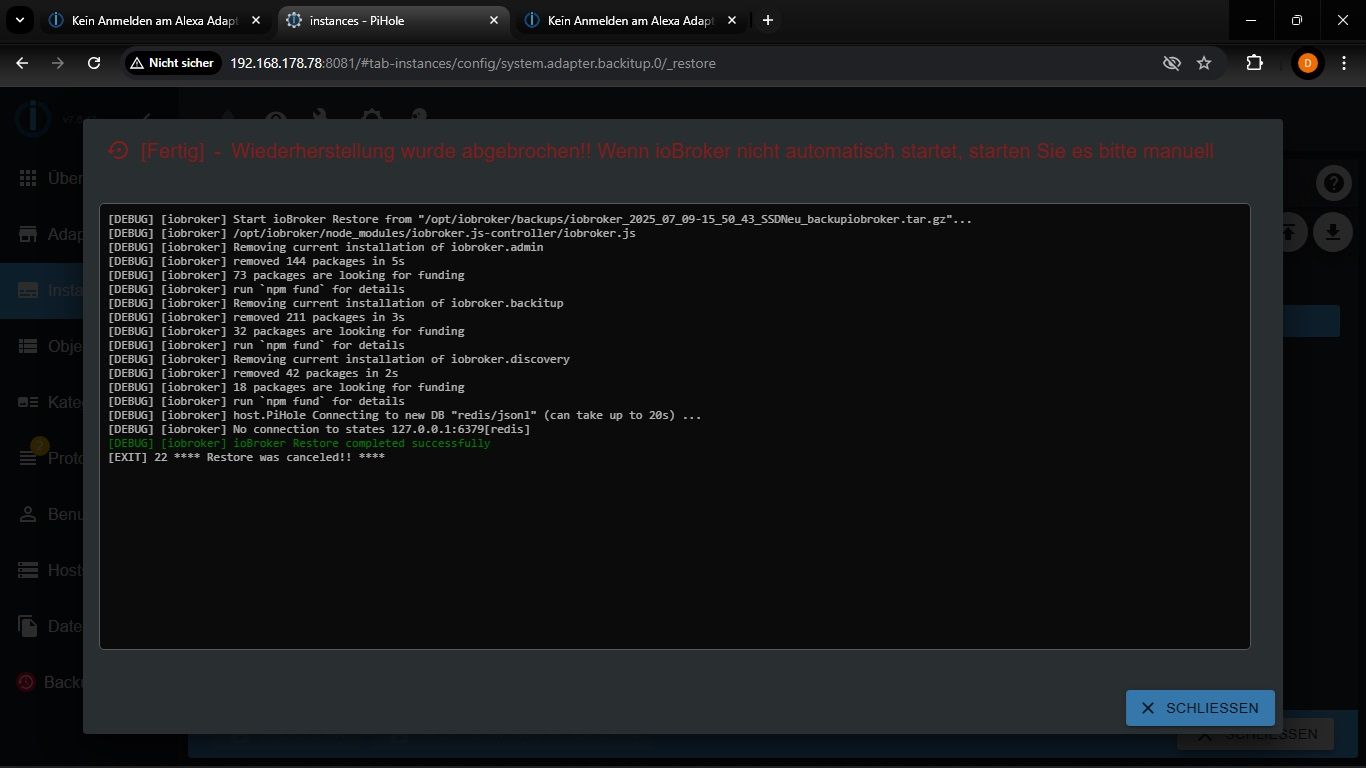
Den roten Text habe ich beim ersten Mal nicht gesehen. Jetzt habe ich IoBroker nochmal neu installiert. Im Log steht weiterhin das, was ich schon beim letzten Mal gepostet habe.


Hey! Du scheinst an dieser Unterhaltung interessiert zu sein, hast aber noch kein Konto.
Hast du es satt, bei jedem Besuch durch die gleichen Beiträge zu scrollen? Wenn du dich für ein Konto anmeldest, kommst du immer genau dorthin zurück, wo du zuvor warst, und kannst dich über neue Antworten benachrichtigen lassen (entweder per E-Mail oder Push-Benachrichtigung). Du kannst auch Lesezeichen speichern und Beiträge positiv bewerten, um anderen Community-Mitgliedern deine Wertschätzung zu zeigen.
Mit deinem Input könnte dieser Beitrag noch besser werden 💗
Registrieren Anmelden433
Online33.0k
Benutzer83.6k
Themen1.3m
Beiträge