




Problem mit Proxmox Speicher
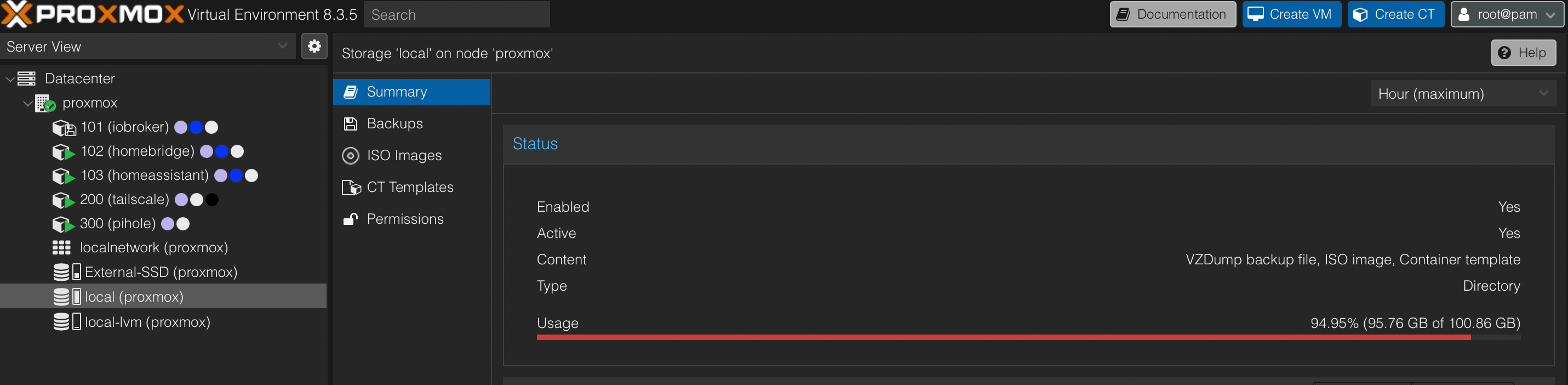
-
root@proxmox:~# du /mnt/* -sh
89G     /mnt/sda
4.0K    /mnt/vzsnap0
root@proxmox:~# du /mnt/sda/* -sh
89G     /mnt/sda/dump
4.0K    /mnt/sda/images
16K     /mnt/sda/lost+found
4.0K    /mnt/sda/private
4.0K    /mnt/sda/snippets
12K     /mnt/sda/template
root@proxmox:~# du /mnt/sda/dump/* -sh
4.0K    /mnt/sda/dump/vzdump-lxc-101-2024_09_06-02_30_02.log
4.0K    /mnt/sda/dump/vzdump-lxc-101-2024_09_07-02_30_05.log
4.0K    /mnt/sda/dump/vzdump-lxc-101-2025_03_24-02_30_00.log
8.9G    /mnt/sda/dump/vzdump-lxc-101-2025_03_24-02_30_00.tar.zst
4.0K    /mnt/sda/dump/vzdump-lxc-101-2025_03_24-02_30_00.tar.zst.notes
4.0K    /mnt/sda/dump/vzdump-lxc-101-2025_03_25-02_30_03.log
8.9G    /mnt/sda/dump/vzdump-lxc-101-2025_03_25-02_30_03.tar.zst
4.0K    /mnt/sda/dump/vzdump-lxc-101-2025_03_25-02_30_03.tar.zst.notes
4.0K    /mnt/sda/dump/vzdump-lxc-101-2025_03_26-02_30_05.log
8.9G    /mnt/sda/dump/vzdump-lxc-101-2025_03_26-02_30_05.tar.zst
4.0K    /mnt/sda/dump/vzdump-lxc-101-2025_03_26-02_30_05.tar.zst.notes
4.0K    /mnt/sda/dump/vzdump-lxc-101-2025_03_27-02_30_07.log
8.9G    /mnt/sda/dump/vzdump-lxc-101-2025_03_27-02_30_07.tar.zst
4.0K    /mnt/sda/dump/vzdump-lxc-101-2025_03_27-02_30_07.tar.zst.notes
4.0K    /mnt/sda/dump/vzdump-lxc-101-2025_03_31-21_20_16.log
9.0G    /mnt/sda/dump/vzdump-lxc-101-2025_03_31-21_20_16.tar.zst
4.0K    /mnt/sda/dump/vzdump-lxc-101-2025_03_31-21_20_16.tar.zst.notes
4.0K    /mnt/sda/dump/vzdump-lxc-102-2023_12_24-02_30_38.log
4.0K    /mnt/sda/dump/vzdump-lxc-102-2025_03_24-02_31_44.log
4.8G    /mnt/sda/dump/vzdump-lxc-102-2025_03_24-02_31_44.tar.zst
4.0K    /mnt/sda/dump/vzdump-lxc-102-2025_03_24-02_31_44.tar.zst.notes
4.0K    /mnt/sda/dump/vzdump-lxc-102-2025_03_25-02_31_48.log
4.8G    /mnt/sda/dump/vzdump-lxc-102-2025_03_25-02_31_48.tar.zst
4.0K    /mnt/sda/dump/vzdump-lxc-102-2025_03_25-02_31_48.tar.zst.notes
4.0K    /mnt/sda/dump/vzdump-lxc-102-2025_03_26-02_31_50.log
4.8G    /mnt/sda/dump/vzdump-lxc-102-2025_03_26-02_31_50.tar.zst
4.0K    /mnt/sda/dump/vzdump-lxc-102-2025_03_26-02_31_50.tar.zst.notes
4.0K    /mnt/sda/dump/vzdump-lxc-102-2025_03_27-02_31_52.log
4.8G    /mnt/sda/dump/vzdump-lxc-102-2025_03_27-02_31_52.tar.zst
4.0K    /mnt/sda/dump/vzdump-lxc-102-2025_03_27-02_31_52.tar.zst.notes
4.0K    /mnt/sda/dump/vzdump-lxc-102-2025_03_31-21_22_05.log
4.9G    /mnt/sda/dump/vzdump-lxc-102-2025_03_31-21_22_05.tar.zst
4.0K    /mnt/sda/dump/vzdump-lxc-102-2025_03_31-21_22_05.tar.zst.notes
4.0K    /mnt/sda/dump/vzdump-lxc-103-2025_03_24-02_32_32.log
2.1G    /mnt/sda/dump/vzdump-lxc-103-2025_03_24-02_32_32.tar.zst
4.0K    /mnt/sda/dump/vzdump-lxc-103-2025_03_24-02_32_32.tar.zst.notes
4.0K    /mnt/sda/dump/vzdump-lxc-103-2025_03_25-02_32_38.log
2.1G    /mnt/sda/dump/vzdump-lxc-103-2025_03_25-02_32_38.tar.zst
4.0K    /mnt/sda/dump/vzdump-lxc-103-2025_03_25-02_32_38.tar.zst.notes
4.0K    /mnt/sda/dump/vzdump-lxc-103-2025_03_26-02_32_40.log
2.1G    /mnt/sda/dump/vzdump-lxc-103-2025_03_26-02_32_40.tar.zst
4.0K    /mnt/sda/dump/vzdump-lxc-103-2025_03_26-02_32_40.tar.zst.notes
4.0K    /mnt/sda/dump/vzdump-lxc-103-2025_03_27-02_32_41.log
2.1G    /mnt/sda/dump/vzdump-lxc-103-2025_03_27-02_32_41.tar.zst
4.0K    /mnt/sda/dump/vzdump-lxc-103-2025_03_27-02_32_41.tar.zst.notes
4.0K    /mnt/sda/dump/vzdump-lxc-103-2025_03_31-21_22_56.log
2.1G    /mnt/sda/dump/vzdump-lxc-103-2025_03_31-21_22_56.tar.zst
4.0K    /mnt/sda/dump/vzdump-lxc-103-2025_03_31-21_22_56.tar.zst.notes
4.0K    /mnt/sda/dump/vzdump-lxc-200-2025_03_24-02_33_27.log
1.1G    /mnt/sda/dump/vzdump-lxc-200-2025_03_24-02_33_27.tar.zst
4.0K    /mnt/sda/dump/vzdump-lxc-200-2025_03_24-02_33_27.tar.zst.notes
4.0K    /mnt/sda/dump/vzdump-lxc-200-2025_03_25-02_33_34.log
1.1G    /mnt/sda/dump/vzdump-lxc-200-2025_03_25-02_33_34.tar.zst
4.0K    /mnt/sda/dump/vzdump-lxc-200-2025_03_25-02_33_34.tar.zst.notes
4.0K    /mnt/sda/dump/vzdump-lxc-200-2025_03_26-02_33_36.log
1.1G    /mnt/sda/dump/vzdump-lxc-200-2025_03_26-02_33_36.tar.zst
4.0K    /mnt/sda/dump/vzdump-lxc-200-2025_03_26-02_33_36.tar.zst.notes
4.0K    /mnt/sda/dump/vzdump-lxc-200-2025_03_27-02_33_37.log
1.1G    /mnt/sda/dump/vzdump-lxc-200-2025_03_27-02_33_37.tar.zst
4.0K    /mnt/sda/dump/vzdump-lxc-200-2025_03_27-02_33_37.tar.zst.notes
4.0K    /mnt/sda/dump/vzdump-lxc-200-2025_03_31-21_23_53.log
1.2G    /mnt/sda/dump/vzdump-lxc-200-2025_03_31-21_23_53.tar.zst
4.0K    /mnt/sda/dump/vzdump-lxc-200-2025_03_31-21_23_53.tar.zst.notes
4.0K    /mnt/sda/dump/vzdump-lxc-300-2025_03_24-02_33_40.log
950M    /mnt/sda/dump/vzdump-lxc-300-2025_03_24-02_33_40.tar.zst
4.0K    /mnt/sda/dump/vzdump-lxc-300-2025_03_24-02_33_40.tar.zst.notes
4.0K    /mnt/sda/dump/vzdump-lxc-300-2025_03_25-02_33_47.log
949M    /mnt/sda/dump/vzdump-lxc-300-2025_03_25-02_33_47.tar.zst
4.0K    /mnt/sda/dump/vzdump-lxc-300-2025_03_25-02_33_47.tar.zst.notes
4.0K    /mnt/sda/dump/vzdump-lxc-300-2025_03_26-02_33_49.log
951M    /mnt/sda/dump/vzdump-lxc-300-2025_03_26-02_33_49.tar.zst
4.0K    /mnt/sda/dump/vzdump-lxc-300-2025_03_26-02_33_49.tar.zst.notes
4.0K    /mnt/sda/dump/vzdump-lxc-300-2025_03_27-02_33_50.log
952M    /mnt/sda/dump/vzdump-lxc-300-2025_03_27-02_33_50.tar.zst
4.0K    /mnt/sda/dump/vzdump-lxc-300-2025_03_27-02_33_50.tar.zst.notes
4.0K    /mnt/sda/dump/vzdump-lxc-300-2025_03_31-21_24_06.log
960M    /mnt/sda/dump/vzdump-lxc-300-2025_03_31-21_24_06.tar.zst
4.0K    /mnt/sda/dump/vzdump-lxc-300-2025_03_31-21_24_06.tar.zst.notes
root@proxmox:~#
Ich habe keine Ahnung was das alles ist und vor allem wo das herkommt…
@guitardoc
Der rechnet den inhalt von /mnt/sda deinem root zu, obwohl oben steht das /dev/sda auf /mnt/sda gemoutet ist.EDIT: ich hab alle meine Festplatten über proxmox hinzugefügt.. naja ich hab aber auch nur zfs volumen
-
sind die dumps nicht Backups?
-
Jup.
Was ist vzdump? vzdump ist eine Befehlszeilentool in Proxmox VE zum Erstellen von Sicherungskopien von VMs und Containern. Es ermöglicht Ihnen das Erstellen vollständiger Sicherungen von Containern, einschließlich ihrer Konfiguration, Daten und Metadaten
Das sind alte Sicherungen.
Vielleicht auch schiefgelaufene. -
@guitardoc wie sehen die Backups deiner VMs aus, was ist da eingestellt:

Ansonsten dort mal durchschalten
-
Jup.
Was ist vzdump? vzdump ist eine Befehlszeilentool in Proxmox VE zum Erstellen von Sicherungskopien von VMs und Containern. Es ermöglicht Ihnen das Erstellen vollständiger Sicherungen von Containern, einschließlich ihrer Konfiguration, Daten und Metadaten
Das sind alte Sicherungen.
Vielleicht auch schiefgelaufene.Das könnten Backups sein. Vor allem, weil die letzten Tage keine Backups auf die externe Platte geschrieben wurden, auf den ersten Blick sind das genau die Backups die fehlen. Nur was machen die hier? Die externe Platte ist ja nicht mal halb voll…
-
Das könnten Backups sein. Vor allem, weil die letzten Tage keine Backups auf die externe Platte geschrieben wurden, auf den ersten Blick sind das genau die Backups die fehlen. Nur was machen die hier? Die externe Platte ist ja nicht mal halb voll…
@guitardoc schlechter screenshot:

Backups löschen!
Und woanders hinsichern! also anderen Ort auswählen, die SSD z.B. -
@guitardoc schlechter screenshot:
Backups löschen!
Und woanders hinsichern! also anderen Ort auswählen, die SSD z.B.@bananajoe Die Backups gehen alle auf die externe SSD:
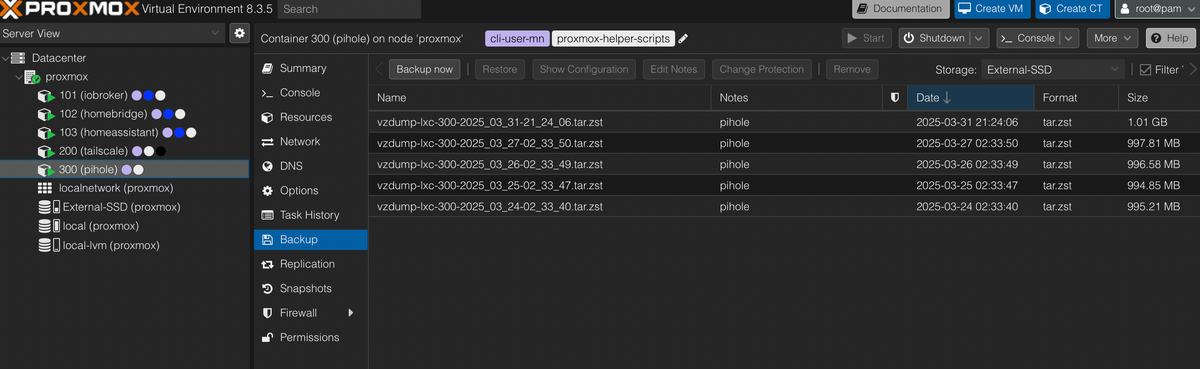
Und in der Liste fehlen genau die mit dem Datum, welche auf local gelandet sind. Wie passiert denn sowas? Hmm, sehr mysteriös.
EDIT: Ich vermute, dass ich da auf Local die Backups löschen kann. Nur wie, ohne was anderes mit in den Abgrund zu reißen?
-
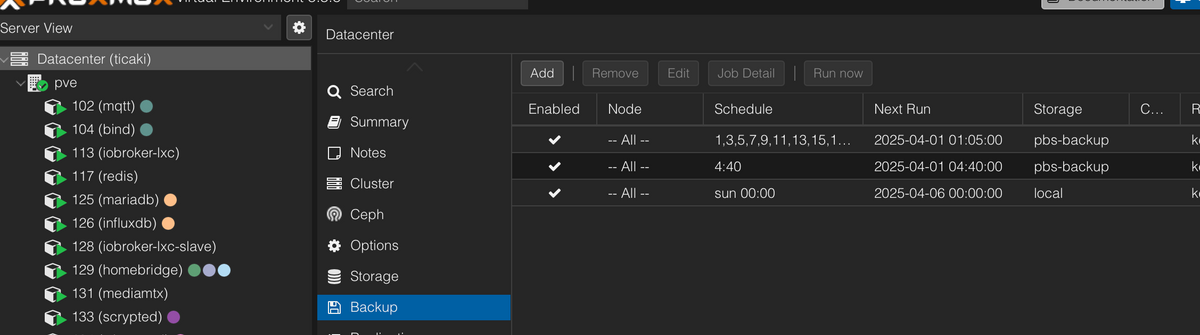
und wie sieht es da aus?
-
Zeig nochmal die Backup übersicht bei local.
Es wäre möglich das die Backups nach /mnt/sda gesichert wurde, als die Platte nicht gemounted war.
-
Zeig nochmal die Backup übersicht bei local.
Es wäre möglich das die Backups nach /mnt/sda gesichert wurde, als die Platte nicht gemounted war.
-
Verwirrend - kannst du mal die ausgabe von
mountzeigen? -
Verwirrend - kannst du mal die ausgabe von
mountzeigen? -
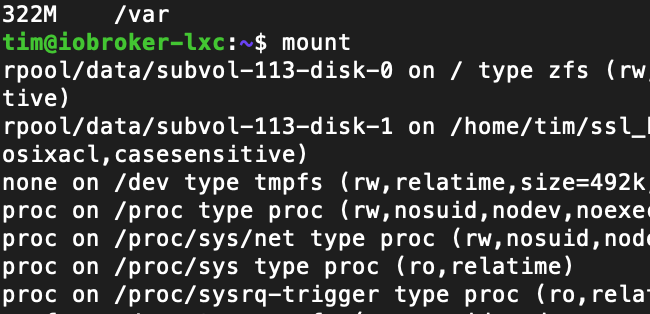
natürlich aus der proxmox shell und nicht einem container :)
-
mn@iobroker:~$ mount
/dev/mapper/pve-vm--101--disk--1 on / type ext4 (rw,relatime,stripe=16)
none on /dev type tmpfs (rw,relatime,size=492k,mode=755,uid=100000,gid=100000,inode64)
proc on /proc type proc (rw,nosuid,nodev,noexec,relatime)
proc on /proc/sys/net type proc (rw,nosuid,nodev,noexec,relatime)
proc on /proc/sys type proc (ro,relatime)
proc on /proc/sysrq-trigger type proc (ro,relatime)
sysfs on /sys type sysfs (ro,nosuid,nodev,noexec,relatime)
sysfs on /sys/devices/virtual/net type sysfs (rw,nosuid,nodev,noexec,relatime)
fusectl on /sys/fs/fuse/connections type fusectl (rw,nosuid,nodev,noexec,relatime)
/dev/mapper/pve-root on /dev/ttyACM0 type ext4 (rw,relatime,errors=remount-ro)
proc on /dev/.lxc/proc type proc (rw,relatime)
sys on /dev/.lxc/sys type sysfs (rw,relatime)
none on /sys/fs/cgroup type cgroup2 (rw,nosuid,nodev,noexec,relatime)
lxcfs on /proc/cpuinfo type fuse.lxcfs (rw,nosuid,nodev,relatime,user_id=0,group_id=0,allow_other)
lxcfs on /proc/diskstats type fuse.lxcfs (rw,nosuid,nodev,relatime,user_id=0,group_id=0,allow_other)
lxcfs on /proc/loadavg type fuse.lxcfs (rw,nosuid,nodev,relatime,user_id=0,group_id=0,allow_other)
lxcfs on /proc/meminfo type fuse.lxcfs (rw,nosuid,nodev,relatime,user_id=0,group_id=0,allow_other)
lxcfs on /proc/slabinfo type fuse.lxcfs (rw,nosuid,nodev,relatime,user_id=0,group_id=0,allow_other)
lxcfs on /proc/stat type fuse.lxcfs (rw,nosuid,nodev,relatime,user_id=0,group_id=0,allow_other)
lxcfs on /proc/swaps type fuse.lxcfs (rw,nosuid,nodev,relatime,user_id=0,group_id=0,allow_other)
lxcfs on /proc/uptime type fuse.lxcfs (rw,nosuid,nodev,relatime,user_id=0,group_id=0,allow_other)
lxcfs on /sys/devices/system/cpu type fuse.lxcfs (rw,nosuid,nodev,relatime,user_id=0,group_id=0,allow_other)
udev on /dev/full type devtmpfs (rw,nosuid,relatime,size=32816220k,nr_inodes=8204055,mode=755,inode64)
udev on /dev/null type devtmpfs (rw,nosuid,relatime,size=32816220k,nr_inodes=8204055,mode=755,inode64)
udev on /dev/random type devtmpfs (rw,nosuid,relatime,size=32816220k,nr_inodes=8204055,mode=755,inode64)
udev on /dev/tty type devtmpfs (rw,nosuid,relatime,size=32816220k,nr_inodes=8204055,mode=755,inode64)
udev on /dev/urandom type devtmpfs (rw,nosuid,relatime,size=32816220k,nr_inodes=8204055,mode=755,inode64)
udev on /dev/zero type devtmpfs (rw,nosuid,relatime,size=32816220k,nr_inodes=8204055,mode=755,inode64)
devpts on /dev/pts type devpts (rw,nosuid,noexec,relatime,gid=100005,mode=620,ptmxmode=666,max=1026)
devpts on /dev/ptmx type devpts (rw,nosuid,noexec,relatime,gid=100005,mode=620,ptmxmode=666,max=1026)
devpts on /dev/console type devpts (rw,nosuid,noexec,relatime,gid=100005,mode=620,ptmxmode=666,max=1026)
devpts on /dev/tty1 type devpts (rw,nosuid,noexec,relatime,gid=100005,mode=620,ptmxmode=666,max=1026)
devpts on /dev/tty2 type devpts (rw,nosuid,noexec,relatime,gid=100005,mode=620,ptmxmode=666,max=1026)
none on /proc/sys/kernel/random/boot_id type tmpfs (ro,nosuid,nodev,noexec,relatime,size=492k,mode=755,uid=100000,gid=100000,inode64)
tmpfs on /dev/shm type tmpfs (rw,nosuid,nodev,uid=100000,gid=100000,inode64)
tmpfs on /run type tmpfs (rw,nosuid,nodev,size=13140064k,nr_inodes=819200,mode=755,uid=100000,gid=100000,inode64)
tmpfs on /run/lock type tmpfs (rw,nosuid,nodev,noexec,relatime,size=5120k,uid=100000,gid=100000,inode64)
mqueue on /dev/mqueue type mqueue (rw,nosuid,nodev,noexec,relatime)
ramfs on /run/credentials/systemd-sysctl.service type ramfs (ro,nosuid,nodev,noexec,relatime,mode=700)
ramfs on /run/credentials/systemd-sysusers.service type ramfs (ro,nosuid,nodev,noexec,relatime,mode=700)
ramfs on /run/credentials/systemd-tmpfiles-setup-dev.service type ramfs (ro,nosuid,nodev,noexec,relatime,mode=700)
ramfs on /run/credentials/systemd-tmpfiles-setup.service type ramfs (ro,nosuid,nodev,noexec,relatime,mode=700)
tmpfs on /run/user/1001 type tmpfs (rw,nosuid,nodev,relatime,size=6570032k,nr_inodes=1642508,mode=700,uid=101001,gid=101001,inode64)
mn@iobroker:~$
Oder meintest du mount in der Proxmox-Shell?
-
mn@iobroker:~$ mount
/dev/mapper/pve-vm--101--disk--1 on / type ext4 (rw,relatime,stripe=16)
none on /dev type tmpfs (rw,relatime,size=492k,mode=755,uid=100000,gid=100000,inode64)
proc on /proc type proc (rw,nosuid,nodev,noexec,relatime)
proc on /proc/sys/net type proc (rw,nosuid,nodev,noexec,relatime)
proc on /proc/sys type proc (ro,relatime)
proc on /proc/sysrq-trigger type proc (ro,relatime)
sysfs on /sys type sysfs (ro,nosuid,nodev,noexec,relatime)
sysfs on /sys/devices/virtual/net type sysfs (rw,nosuid,nodev,noexec,relatime)
fusectl on /sys/fs/fuse/connections type fusectl (rw,nosuid,nodev,noexec,relatime)
/dev/mapper/pve-root on /dev/ttyACM0 type ext4 (rw,relatime,errors=remount-ro)
proc on /dev/.lxc/proc type proc (rw,relatime)
sys on /dev/.lxc/sys type sysfs (rw,relatime)
none on /sys/fs/cgroup type cgroup2 (rw,nosuid,nodev,noexec,relatime)
lxcfs on /proc/cpuinfo type fuse.lxcfs (rw,nosuid,nodev,relatime,user_id=0,group_id=0,allow_other)
lxcfs on /proc/diskstats type fuse.lxcfs (rw,nosuid,nodev,relatime,user_id=0,group_id=0,allow_other)
lxcfs on /proc/loadavg type fuse.lxcfs (rw,nosuid,nodev,relatime,user_id=0,group_id=0,allow_other)
lxcfs on /proc/meminfo type fuse.lxcfs (rw,nosuid,nodev,relatime,user_id=0,group_id=0,allow_other)
lxcfs on /proc/slabinfo type fuse.lxcfs (rw,nosuid,nodev,relatime,user_id=0,group_id=0,allow_other)
lxcfs on /proc/stat type fuse.lxcfs (rw,nosuid,nodev,relatime,user_id=0,group_id=0,allow_other)
lxcfs on /proc/swaps type fuse.lxcfs (rw,nosuid,nodev,relatime,user_id=0,group_id=0,allow_other)
lxcfs on /proc/uptime type fuse.lxcfs (rw,nosuid,nodev,relatime,user_id=0,group_id=0,allow_other)
lxcfs on /sys/devices/system/cpu type fuse.lxcfs (rw,nosuid,nodev,relatime,user_id=0,group_id=0,allow_other)
udev on /dev/full type devtmpfs (rw,nosuid,relatime,size=32816220k,nr_inodes=8204055,mode=755,inode64)
udev on /dev/null type devtmpfs (rw,nosuid,relatime,size=32816220k,nr_inodes=8204055,mode=755,inode64)
udev on /dev/random type devtmpfs (rw,nosuid,relatime,size=32816220k,nr_inodes=8204055,mode=755,inode64)
udev on /dev/tty type devtmpfs (rw,nosuid,relatime,size=32816220k,nr_inodes=8204055,mode=755,inode64)
udev on /dev/urandom type devtmpfs (rw,nosuid,relatime,size=32816220k,nr_inodes=8204055,mode=755,inode64)
udev on /dev/zero type devtmpfs (rw,nosuid,relatime,size=32816220k,nr_inodes=8204055,mode=755,inode64)
devpts on /dev/pts type devpts (rw,nosuid,noexec,relatime,gid=100005,mode=620,ptmxmode=666,max=1026)
devpts on /dev/ptmx type devpts (rw,nosuid,noexec,relatime,gid=100005,mode=620,ptmxmode=666,max=1026)
devpts on /dev/console type devpts (rw,nosuid,noexec,relatime,gid=100005,mode=620,ptmxmode=666,max=1026)
devpts on /dev/tty1 type devpts (rw,nosuid,noexec,relatime,gid=100005,mode=620,ptmxmode=666,max=1026)
devpts on /dev/tty2 type devpts (rw,nosuid,noexec,relatime,gid=100005,mode=620,ptmxmode=666,max=1026)
none on /proc/sys/kernel/random/boot_id type tmpfs (ro,nosuid,nodev,noexec,relatime,size=492k,mode=755,uid=100000,gid=100000,inode64)
tmpfs on /dev/shm type tmpfs (rw,nosuid,nodev,uid=100000,gid=100000,inode64)
tmpfs on /run type tmpfs (rw,nosuid,nodev,size=13140064k,nr_inodes=819200,mode=755,uid=100000,gid=100000,inode64)
tmpfs on /run/lock type tmpfs (rw,nosuid,nodev,noexec,relatime,size=5120k,uid=100000,gid=100000,inode64)
mqueue on /dev/mqueue type mqueue (rw,nosuid,nodev,noexec,relatime)
ramfs on /run/credentials/systemd-sysctl.service type ramfs (ro,nosuid,nodev,noexec,relatime,mode=700)
ramfs on /run/credentials/systemd-sysusers.service type ramfs (ro,nosuid,nodev,noexec,relatime,mode=700)
ramfs on /run/credentials/systemd-tmpfiles-setup-dev.service type ramfs (ro,nosuid,nodev,noexec,relatime,mode=700)
ramfs on /run/credentials/systemd-tmpfiles-setup.service type ramfs (ro,nosuid,nodev,noexec,relatime,mode=700)
tmpfs on /run/user/1001 type tmpfs (rw,nosuid,nodev,relatime,size=6570032k,nr_inodes=1642508,mode=700,uid=101001,gid=101001,inode64)
mn@iobroker:~$
Oder meintest du mount in der Proxmox-Shell?
@guitardoc
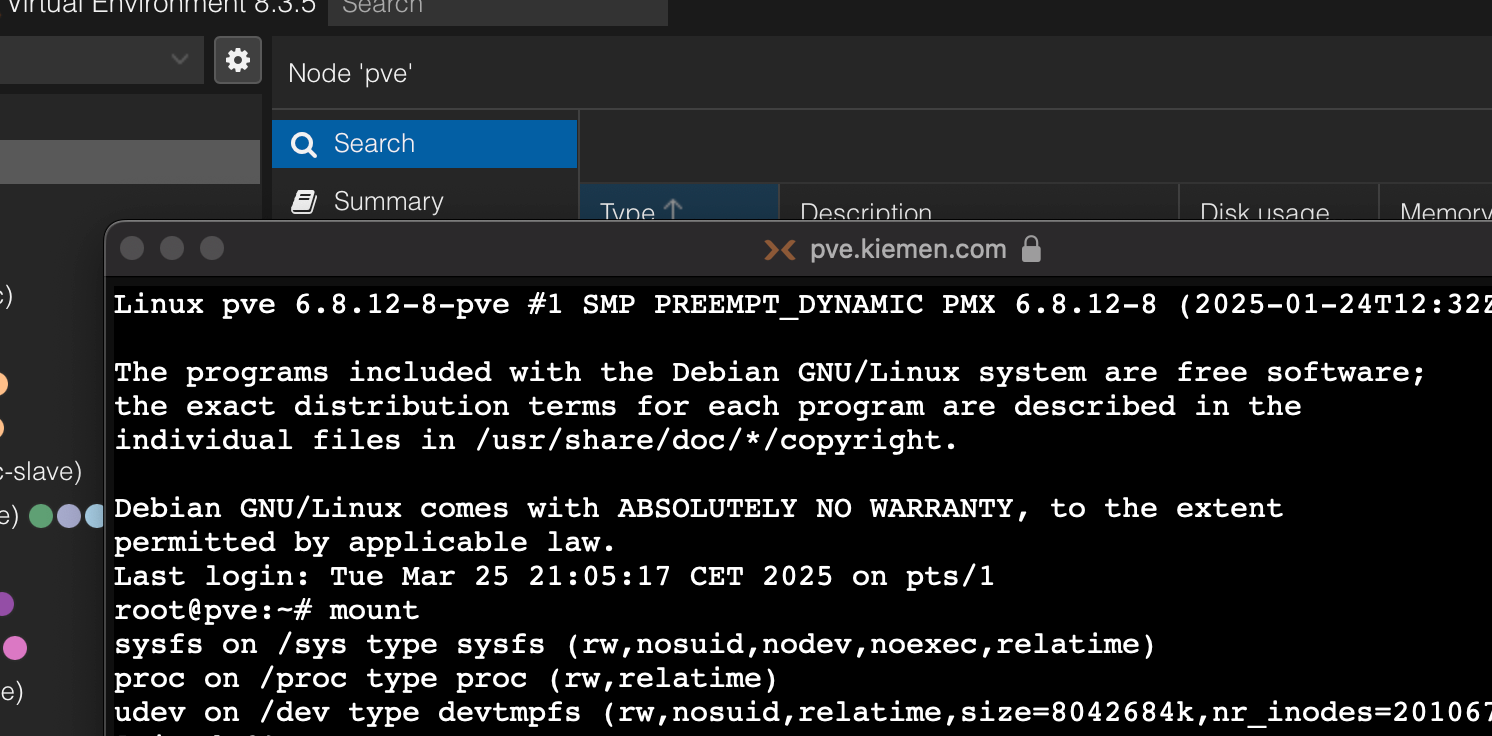
Das ist die aus einem Container :) ich meinte im pve
-
@guitardoc
Das ist die aus einem Container :) ich meinte im pve
Linux proxmox 6.8.12-9-pve #1 SMP PREEMPT_DYNAMIC PMX 6.8.12-9 (2025-03-16T19:18Z) x86_64 The programs included with the Debian GNU/Linux system are free software; the exact distribution terms for each program are described in the individual files in /usr/share/doc/*/copyright. Debian GNU/Linux comes with ABSOLUTELY NO WARRANTY, to the extent permitted by applicable law. Last login: Mon Mar 31 23:25:49 CEST 2025 on pts/0 root@proxmox:~# mount sysfs on /sys type sysfs (rw,nosuid,nodev,noexec,relatime) proc on /proc type proc (rw,relatime) udev on /dev type devtmpfs (rw,nosuid,relatime,size=32816220k,nr_inodes=8204055,mode=755,inode64) devpts on /dev/pts type devpts (rw,nosuid,noexec,relatime,gid=5,mode=620,ptmxmode=000) tmpfs on /run type tmpfs (rw,nosuid,nodev,noexec,relatime,size=6570032k,mode=755,inode64) /dev/mapper/pve-root on / type ext4 (rw,relatime,errors=remount-ro) securityfs on /sys/kernel/security type securityfs (rw,nosuid,nodev,noexec,relatime) tmpfs on /dev/shm type tmpfs (rw,nosuid,nodev,inode64) tmpfs on /run/lock type tmpfs (rw,nosuid,nodev,noexec,relatime,size=5120k,inode64) cgroup2 on /sys/fs/cgroup type cgroup2 (rw,nosuid,nodev,noexec,relatime) pstore on /sys/fs/pstore type pstore (rw,nosuid,nodev,noexec,relatime) efivarfs on /sys/firmware/efi/efivars type efivarfs (rw,nosuid,nodev,noexec,relatime) bpf on /sys/fs/bpf type bpf (rw,nosuid,nodev,noexec,relatime,mode=700) systemd-1 on /proc/sys/fs/binfmt_misc type autofs (rw,relatime,fd=30,pgrp=1,timeout=0,minproto=5,maxproto=5,direct,pipe_ino=10286) mqueue on /dev/mqueue type mqueue (rw,nosuid,nodev,noexec,relatime) hugetlbfs on /dev/hugepages type hugetlbfs (rw,relatime,pagesize=2M) debugfs on /sys/kernel/debug type debugfs (rw,nosuid,nodev,noexec,relatime) tracefs on /sys/kernel/tracing type tracefs (rw,nosuid,nodev,noexec,relatime) fusectl on /sys/fs/fuse/connections type fusectl (rw,nosuid,nodev,noexec,relatime) configfs on /sys/kernel/config type configfs (rw,nosuid,nodev,noexec,relatime) ramfs on /run/credentials/systemd-sysusers.service type ramfs (ro,nosuid,nodev,noexec,relatime,mode=700) ramfs on /run/credentials/systemd-tmpfiles-setup-dev.service type ramfs (ro,nosuid,nodev,noexec,relatime,mode=700) /dev/nvme0n1p2 on /boot/efi type vfat (rw,relatime,fmask=0022,dmask=0022,codepage=437,iocharset=iso8859-1,shortname=mixed,errors=remount-ro) /dev/sda on /mnt/sda type ext4 (rw,relatime) ramfs on /run/credentials/systemd-sysctl.service type ramfs (ro,nosuid,nodev,noexec,relatime,mode=700) ramfs on /run/credentials/systemd-tmpfiles-setup.service type ramfs (ro,nosuid,nodev,noexec,relatime,mode=700) binfmt_misc on /proc/sys/fs/binfmt_misc type binfmt_misc (rw,nosuid,nodev,noexec,relatime) lxcfs on /var/lib/lxcfs type fuse.lxcfs (rw,nosuid,nodev,relatime,user_id=0,group_id=0,allow_other) sunrpc on /run/rpc_pipefs type rpc_pipefs (rw,relatime) /dev/fuse on /etc/pve type fuse (rw,nosuid,nodev,relatime,user_id=0,group_id=0,default_permissions,allow_other) tmpfs on /run/user/0 type tmpfs (rw,nosuid,nodev,relatime,size=6570032k,nr_inodes=1642508,mode=700,inode64) root@proxmox:~# -
Linux proxmox 6.8.12-9-pve #1 SMP PREEMPT_DYNAMIC PMX 6.8.12-9 (2025-03-16T19:18Z) x86_64 The programs included with the Debian GNU/Linux system are free software; the exact distribution terms for each program are described in the individual files in /usr/share/doc/*/copyright. Debian GNU/Linux comes with ABSOLUTELY NO WARRANTY, to the extent permitted by applicable law. Last login: Mon Mar 31 23:25:49 CEST 2025 on pts/0 root@proxmox:~# mount sysfs on /sys type sysfs (rw,nosuid,nodev,noexec,relatime) proc on /proc type proc (rw,relatime) udev on /dev type devtmpfs (rw,nosuid,relatime,size=32816220k,nr_inodes=8204055,mode=755,inode64) devpts on /dev/pts type devpts (rw,nosuid,noexec,relatime,gid=5,mode=620,ptmxmode=000) tmpfs on /run type tmpfs (rw,nosuid,nodev,noexec,relatime,size=6570032k,mode=755,inode64) /dev/mapper/pve-root on / type ext4 (rw,relatime,errors=remount-ro) securityfs on /sys/kernel/security type securityfs (rw,nosuid,nodev,noexec,relatime) tmpfs on /dev/shm type tmpfs (rw,nosuid,nodev,inode64) tmpfs on /run/lock type tmpfs (rw,nosuid,nodev,noexec,relatime,size=5120k,inode64) cgroup2 on /sys/fs/cgroup type cgroup2 (rw,nosuid,nodev,noexec,relatime) pstore on /sys/fs/pstore type pstore (rw,nosuid,nodev,noexec,relatime) efivarfs on /sys/firmware/efi/efivars type efivarfs (rw,nosuid,nodev,noexec,relatime) bpf on /sys/fs/bpf type bpf (rw,nosuid,nodev,noexec,relatime,mode=700) systemd-1 on /proc/sys/fs/binfmt_misc type autofs (rw,relatime,fd=30,pgrp=1,timeout=0,minproto=5,maxproto=5,direct,pipe_ino=10286) mqueue on /dev/mqueue type mqueue (rw,nosuid,nodev,noexec,relatime) hugetlbfs on /dev/hugepages type hugetlbfs (rw,relatime,pagesize=2M) debugfs on /sys/kernel/debug type debugfs (rw,nosuid,nodev,noexec,relatime) tracefs on /sys/kernel/tracing type tracefs (rw,nosuid,nodev,noexec,relatime) fusectl on /sys/fs/fuse/connections type fusectl (rw,nosuid,nodev,noexec,relatime) configfs on /sys/kernel/config type configfs (rw,nosuid,nodev,noexec,relatime) ramfs on /run/credentials/systemd-sysusers.service type ramfs (ro,nosuid,nodev,noexec,relatime,mode=700) ramfs on /run/credentials/systemd-tmpfiles-setup-dev.service type ramfs (ro,nosuid,nodev,noexec,relatime,mode=700) /dev/nvme0n1p2 on /boot/efi type vfat (rw,relatime,fmask=0022,dmask=0022,codepage=437,iocharset=iso8859-1,shortname=mixed,errors=remount-ro) /dev/sda on /mnt/sda type ext4 (rw,relatime) ramfs on /run/credentials/systemd-sysctl.service type ramfs (ro,nosuid,nodev,noexec,relatime,mode=700) ramfs on /run/credentials/systemd-tmpfiles-setup.service type ramfs (ro,nosuid,nodev,noexec,relatime,mode=700) binfmt_misc on /proc/sys/fs/binfmt_misc type binfmt_misc (rw,nosuid,nodev,noexec,relatime) lxcfs on /var/lib/lxcfs type fuse.lxcfs (rw,nosuid,nodev,relatime,user_id=0,group_id=0,allow_other) sunrpc on /run/rpc_pipefs type rpc_pipefs (rw,relatime) /dev/fuse on /etc/pve type fuse (rw,nosuid,nodev,relatime,user_id=0,group_id=0,default_permissions,allow_other) tmpfs on /run/user/0 type tmpfs (rw,nosuid,nodev,relatime,size=6570032k,nr_inodes=1642508,mode=700,inode64) root@proxmox:~#@guitardoc sagte in Problem mit Proxmox Speicher:
/dev/sda on /mnt/sda type ext4 (rw,relatime)
Ich weiß jetzt leider nicht so ganz wie ich dir helfen soll. Das Problem ist das /mnt/sda deinen Speicher gefüllt hat... ABER da ist die externe Platte gemoutet. Wenn du da was löschst hilft das nicht.
- externe Platte aus Proxmox entfernen, dann
- umount /mnt/sda
- den Inhalt von /mnt/sda löschen,
- mount /mnt/sda
- die externe Platte wieder in proxmox hinzufügen.
Das geht aber so nur im besten Fall.
-
@guitardoc sagte in Problem mit Proxmox Speicher:
/dev/sda on /mnt/sda type ext4 (rw,relatime)
Ich weiß jetzt leider nicht so ganz wie ich dir helfen soll. Das Problem ist das /mnt/sda deinen Speicher gefüllt hat... ABER da ist die externe Platte gemoutet. Wenn du da was löschst hilft das nicht.
- externe Platte aus Proxmox entfernen, dann
- umount /mnt/sda
- den Inhalt von /mnt/sda löschen,
- mount /mnt/sda
- die externe Platte wieder in proxmox hinzufügen.
Das geht aber so nur im besten Fall.
-
Hmm, da bräuchte ich für jeden Schritt eine genaue Anleitung was ich wo machen muss… Geht das irgendwie?
Ich fühle mich in der Materie nicht wirklich sicher genug um Anleitungen zu schreiben. Versuchen kann ich es aber:
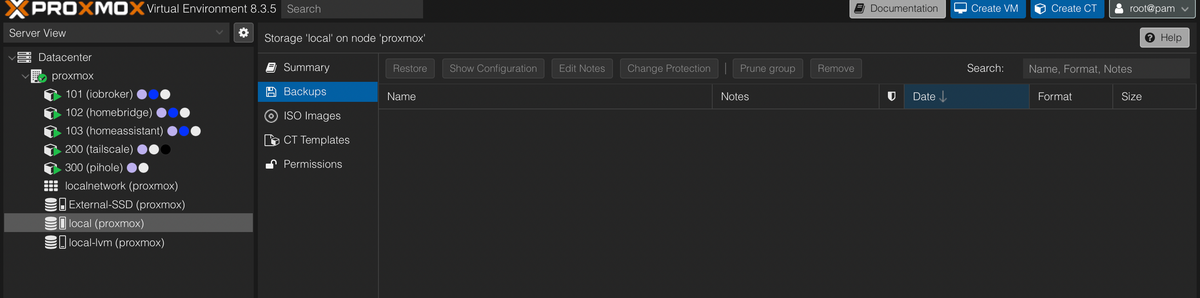
Geh mal ins Datacenter und Storage und entferne dort die externe ssd
Dann gibts du in der PVE shell umount /mnt/sda ein und zeigst die ausgabe.



Hey! Du scheinst an dieser Unterhaltung interessiert zu sein, hast aber noch kein Konto.
Hast du es satt, bei jedem Besuch durch die gleichen Beiträge zu scrollen? Wenn du dich für ein Konto anmeldest, kommst du immer genau dorthin zurück, wo du zuvor warst, und kannst dich über neue Antworten benachrichtigen lassen (entweder per E-Mail oder Push-Benachrichtigung). Du kannst auch Lesezeichen speichern und Beiträge positiv bewerten, um anderen Community-Mitgliedern deine Wertschätzung zu zeigen.
Mit deinem Input könnte dieser Beitrag noch besser werden 💗
Registrieren AnmeldenSupport us
265
Online33.0k
Benutzer83.4k
Themen1.3m
Beiträge