




rpi-clone Kopie bootet nicht
-
Hallo zusammen,
ich habe mir rpi-clone installiert um mir Vollbackups anzulegen.
Mit sudo rpi-clone sdb wurde die Kopie auch gemacht, aber die Kopie bootet nicht. Siehe Bild (Upload kommt gleich mit dem Handy).
Danke für jeden Tipp.
Grüße
AlexanderDisk /dev/mmcblk0: 119.08 GiB, 127865454592 bytes, 249737216 sectors Units: sectors of 1 * 512 = 512 bytes Sector size (logical/physical): 512 bytes / 512 bytes I/O size (minimum/optimal): 512 bytes / 512 bytes Disklabel type: dos Disk identifier: 0x2e43cf65 Device Boot Start End Sectors Size Id Type /dev/mmcblk0p1 8192 1056767 1048576 512M c W95 FAT32 (LBA) /dev/mmcblk0p2 1056768 249737215 248680448 118.6G 83 Linux Disk /dev/sdb: 29.76 GiB, 31954305024 bytes, 62410752 sectors Disk model: MassStorageClass Units: sectors of 1 * 512 = 512 bytes Sector size (logical/physical): 512 bytes / 512 bytes I/O size (minimum/optimal): 512 bytes / 512 bytes Disklabel type: dos Disk identifier: 0x80a96f2d Device Boot Start End Sectors Size Id Type /dev/sdb1 8192 1056767 1048576 512M c W95 FAT32 (LBA) /dev/sdb2 1056768 62410751 61353984 29.3G 83 Linux -
Hallo zusammen,
ich habe mir rpi-clone installiert um mir Vollbackups anzulegen.
Mit sudo rpi-clone sdb wurde die Kopie auch gemacht, aber die Kopie bootet nicht. Siehe Bild (Upload kommt gleich mit dem Handy).
Danke für jeden Tipp.
Grüße
AlexanderDisk /dev/mmcblk0: 119.08 GiB, 127865454592 bytes, 249737216 sectors Units: sectors of 1 * 512 = 512 bytes Sector size (logical/physical): 512 bytes / 512 bytes I/O size (minimum/optimal): 512 bytes / 512 bytes Disklabel type: dos Disk identifier: 0x2e43cf65 Device Boot Start End Sectors Size Id Type /dev/mmcblk0p1 8192 1056767 1048576 512M c W95 FAT32 (LBA) /dev/mmcblk0p2 1056768 249737215 248680448 118.6G 83 Linux Disk /dev/sdb: 29.76 GiB, 31954305024 bytes, 62410752 sectors Disk model: MassStorageClass Units: sectors of 1 * 512 = 512 bytes Sector size (logical/physical): 512 bytes / 512 bytes I/O size (minimum/optimal): 512 bytes / 512 bytes Disklabel type: dos Disk identifier: 0x80a96f2d Device Boot Start End Sectors Size Id Type /dev/sdb1 8192 1056767 1048576 512M c W95 FAT32 (LBA) /dev/sdb2 1056768 62410751 61353984 29.3G 83 LinuxHier noch der Bootscreen
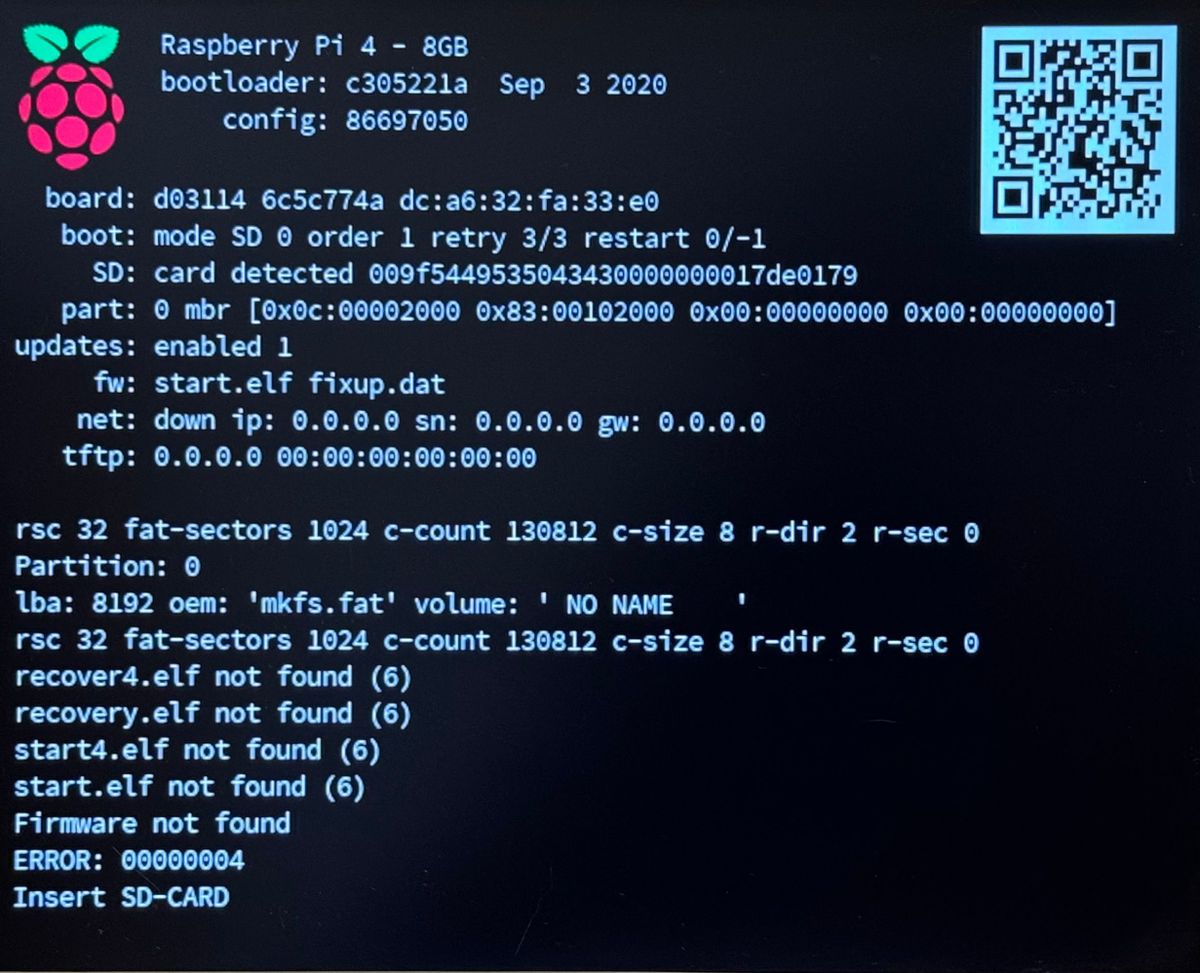
hier noch der Output von rpi-clone
pi@sys-server-raspi4:~ $ sudo rpi-clone sdb

Booted disk: mmcblk0 127.9GB               Destination disk: sdb 32.0GB
---------------------------------------------------------------------------
Part               Size    FS     Label           Part   Size    FS     Label
1 /boot/firmware   512.0M  fat32  --              1      512.0M  fat32  --
2 root             118.6G  ext4   rootfs          2       29.3G  ext4   --
---------------------------------------------------------------------------
== SYNC mmcblk0 file systems to sdb ==
/boot/firmware        (60.5M used)   : SYNC to sdb1 (512.0M size)
/                     (4.6G used)    : SYNC to sdb2 (29.3G size)
---------------------------------------------------------------------------
Run setup script       : no.
Verbose mode           : no.
-----------------------:

Ok to proceed with the clone?  (yes/no): y

Syncing file systems (can take a long time)
Syncing mounted partitions:
  Mounting /dev/sdb2 on /mnt/clone
mount: (hint) your fstab has been modified, but systemd still uses
       the old version; use 'systemctl daemon-reload' to reload.
  => rsync // /mnt/clone with-root-excludes ...
  Mounting /dev/sdb1 on /mnt/clone/boot/firmware
mount: (hint) your fstab has been modified, but systemd still uses
       the old version; use 'systemctl daemon-reload' to reload.
  => rsync /boot/firmware/ /mnt/clone/boot/firmware  ...

Editing /mnt/clone/boot/cmdline.txt PARTUUID to use 80a96f2d
Editing /mnt/clone/etc/fstab PARTUUID to use 80a96f2d
===============================
Done with clone to /dev/sdb
   Start - 12:03:40    End - 12:04:30    Elapsed Time - 0:50

Cloned partitions are mounted on /mnt/clone for inspection or customizing.

Hit Enter when ready to unmount the /dev/sdb partitions ...
  unmounting /mnt/clone/boot/firmware
  unmounting /mnt/clone
===============================
Hey! Du scheinst an dieser Unterhaltung interessiert zu sein, hast aber noch kein Konto.
Hast du es satt, bei jedem Besuch durch die gleichen Beiträge zu scrollen? Wenn du dich für ein Konto anmeldest, kommst du immer genau dorthin zurück, wo du zuvor warst, und kannst dich über neue Antworten benachrichtigen lassen (entweder per E-Mail oder Push-Benachrichtigung). Du kannst auch Lesezeichen speichern und Beiträge positiv bewerten, um anderen Community-Mitgliedern deine Wertschätzung zu zeigen.
Mit deinem Input könnte dieser Beitrag noch besser werden 💗
Registrieren AnmeldenSupport us
484
Online33.0k
Benutzer83.6k
Themen1.3m
Beiträge