




[gelöst] Update - node.js wird falsch erkannt
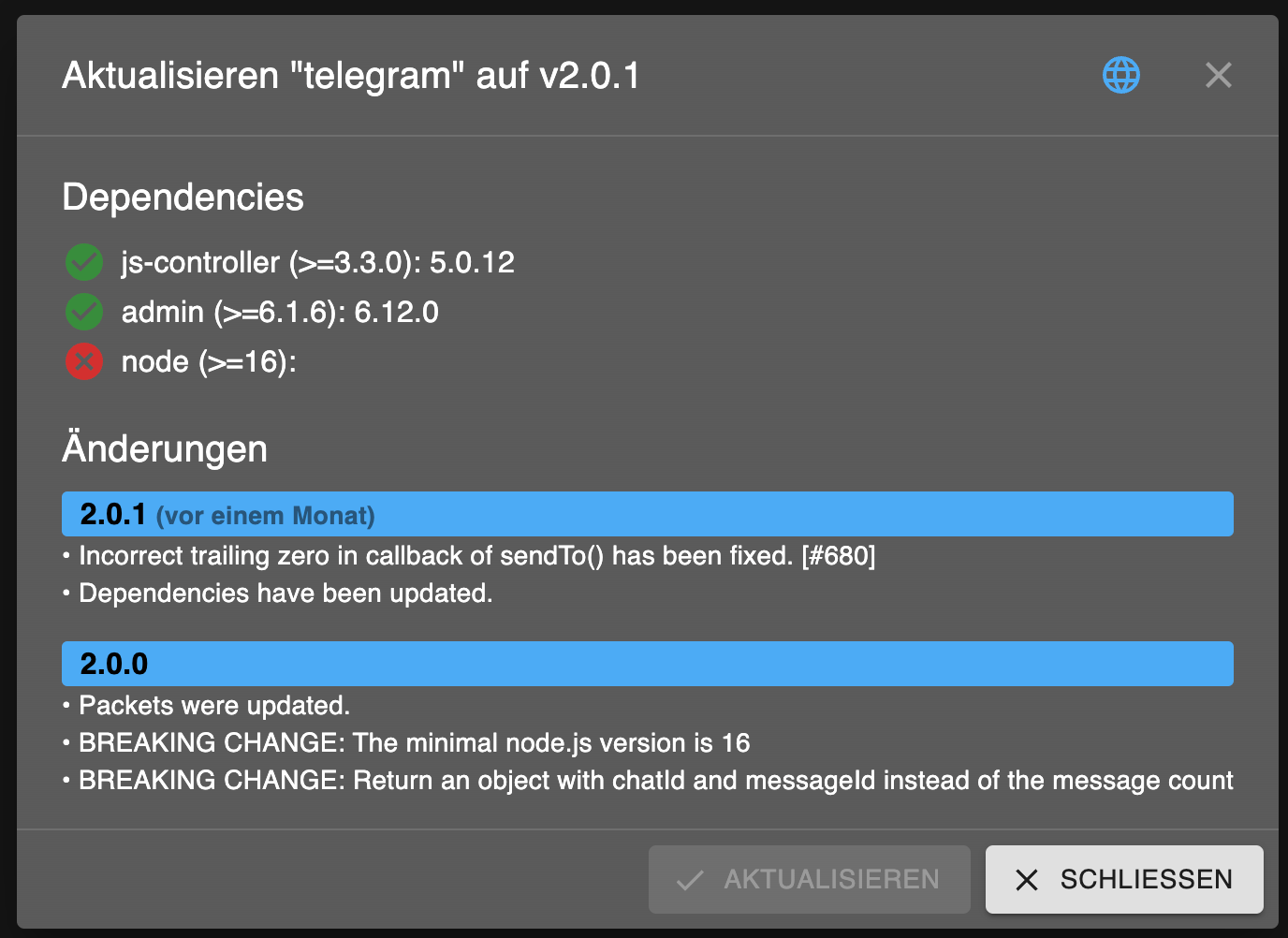
-
diag gemacht
======================= SUMMARY =======================
			v.2023-10-10


 Static hostname: iobrokerMaster
       Icon name: computer
Operating System: Debian GNU/Linux 12 (bookworm)
          Kernel: Linux 6.1.0-rpi4-rpi-v8
    Architecture: arm64

Installation: 		native
Kernel: 		aarch64
Userland: 		arm64
Timezone: 		Europe/Berlin (CET, +0100)
User-ID: 		1000
X-Server: 		false
Boot Target: 		multi-user.target

Pending OS-Updates: 	8
/opt/iobroker/node_modules/standard-as-callback/built/index.js:6
        throw e;
        ^

Error: Connection is closed.
    at Redis.sendCommand (/opt/iobroker/node_modules/ioredis/built/redis/index.js:636:24)
    at Redis.scan (/opt/iobroker/node_modules/ioredis/built/commander.js:122:25)
    at ScanStream._read (/opt/iobroker/node_modules/ioredis/built/ScanStream.js:36:41)
    at Readable.read (node:internal/streams/readable:507:12)
    at resume_ (node:internal/streams/readable:1008:12)
    at process.processTicksAndRejections (node:internal/process/task_queues:82:21)
Emitted 'error' event on ScanStream instance at:
    at /opt/iobroker/node_modules/ioredis/built/ScanStream.js:38:22
    at tryCatcher (/opt/iobroker/node_modules/standard-as-callback/built/utils.js:12:23)
    at /opt/iobroker/node_modules/standard-as-callback/built/index.js:33:51
    at process.processTicksAndRejections (node:internal/process/task_queues:95:5)

Node.js v18.18.2
Pending iob updates: 	0

Nodejs-Installation: 	/usr/bin/nodejs 	v18.18.2
			/usr/bin/node 		v18.18.2
			/usr/bin/npm 		9.8.1
			/usr/bin/npx 		9.8.1
			/usr/bin/corepack 	0.19.0

Recommended versions are nodejs  and npm
Your nodejs installation is correct

MEMORY:
               total        used        free      shared  buff/cache   available
Mem:            4.0G        2.6G        505M        282K        946M        1.3G
Swap:           104M         96M        8.5M
Total:          4.1G        2.7G        513M

Active iob-Instances: 	32
Active repo(s): stable

ioBroker Core: 		js-controller 		5.0.12
			admin 			6.12.0

ioBroker Status: 	iobroker is running on this host.


Objects type: jsonl
States  type: jsonl

Status admin and web instance:
+ system.adapter.admin.0                  : admin                 : ioBrokerMaster                           -  enabled, port: 8081, bind: 0.0.0.0, run as: admin
+ system.adapter.web.0                    : web                   : ioBrokerMaster                           -  enabled, port: 8082, bind: 192.168.1.32, run as: admin

Objects: 		24526
States: 		2

Size of iob-Database:

40M	/opt/iobroker/iobroker-data/objects.jsonl
5.4M	/opt/iobroker/iobroker-data/states.jsonl


=================== END OF SUMMARY ====================
den Upload starte ich jetzt mal und schaue Morgen weiter ... :-) Ich werde berichten !
-
diag gemacht
======================= SUMMARY =======================
			v.2023-10-10


 Static hostname: iobrokerMaster
       Icon name: computer
Operating System: Debian GNU/Linux 12 (bookworm)
          Kernel: Linux 6.1.0-rpi4-rpi-v8
    Architecture: arm64

Installation: 		native
Kernel: 		aarch64
Userland: 		arm64
Timezone: 		Europe/Berlin (CET, +0100)
User-ID: 		1000
X-Server: 		false
Boot Target: 		multi-user.target

Pending OS-Updates: 	8
/opt/iobroker/node_modules/standard-as-callback/built/index.js:6
        throw e;
        ^

Error: Connection is closed.
    at Redis.sendCommand (/opt/iobroker/node_modules/ioredis/built/redis/index.js:636:24)
    at Redis.scan (/opt/iobroker/node_modules/ioredis/built/commander.js:122:25)
    at ScanStream._read (/opt/iobroker/node_modules/ioredis/built/ScanStream.js:36:41)
    at Readable.read (node:internal/streams/readable:507:12)
    at resume_ (node:internal/streams/readable:1008:12)
    at process.processTicksAndRejections (node:internal/process/task_queues:82:21)
Emitted 'error' event on ScanStream instance at:
    at /opt/iobroker/node_modules/ioredis/built/ScanStream.js:38:22
    at tryCatcher (/opt/iobroker/node_modules/standard-as-callback/built/utils.js:12:23)
    at /opt/iobroker/node_modules/standard-as-callback/built/index.js:33:51
    at process.processTicksAndRejections (node:internal/process/task_queues:95:5)

Node.js v18.18.2
Pending iob updates: 	0

Nodejs-Installation: 	/usr/bin/nodejs 	v18.18.2
			/usr/bin/node 		v18.18.2
			/usr/bin/npm 		9.8.1
			/usr/bin/npx 		9.8.1
			/usr/bin/corepack 	0.19.0

Recommended versions are nodejs  and npm
Your nodejs installation is correct

MEMORY:
               total        used        free      shared  buff/cache   available
Mem:            4.0G        2.6G        505M        282K        946M        1.3G
Swap:           104M         96M        8.5M
Total:          4.1G        2.7G        513M

Active iob-Instances: 	32
Active repo(s): stable

ioBroker Core: 		js-controller 		5.0.12
			admin 			6.12.0

ioBroker Status: 	iobroker is running on this host.


Objects type: jsonl
States  type: jsonl

Status admin and web instance:
+ system.adapter.admin.0                  : admin                 : ioBrokerMaster                           -  enabled, port: 8081, bind: 0.0.0.0, run as: admin
+ system.adapter.web.0                    : web                   : ioBrokerMaster                           -  enabled, port: 8082, bind: 192.168.1.32, run as: admin

Objects: 		24526
States: 		2

Size of iob-Database:

40M	/opt/iobroker/iobroker-data/objects.jsonl
5.4M	/opt/iobroker/iobroker-data/states.jsonl


=================== END OF SUMMARY ====================
den Upload starte ich jetzt mal und schaue Morgen weiter ... :-) Ich werde berichten !
Da ist aber auch was mit der Datenbank...
2 States und die Fehler in der Ausgabe sind jedenfalls nicht normal. -
Da ist aber auch was mit der Datenbank...
2 States und die Fehler in der Ausgabe sind jedenfalls nicht normal.@thomas-braun
wenn ich später zu Hause bin lasse ich die Diagnose noch einmal laufen nachdem ich alles neu geladen hatte gestern.Was kann ich denn bezüglich Datenbank bzw. dem Fehler den Du da gesehen hast unternehmen ?
Ich habe auch das Gefühl das alles seit es im Multihost läuft viel langsamer geworden ist. Ich habe eigentlich immer timeouts …
-
Da ist aber auch was mit der Datenbank...
2 States und die Fehler in der Ausgabe sind jedenfalls nicht normal.@thomas-braun
nochmal diag - sieht aber besser aus, oder ?======================= SUMMARY ======================= v.2023-10-10 Static hostname: iobrokerMaster Icon name: computer Operating System: Debian GNU/Linux 12 (bookworm) Kernel: Linux 6.1.0-rpi4-rpi-v8 Architecture: arm64 Installation: native Kernel: aarch64 Userland: arm64 Timezone: Europe/Berlin (CET, +0100) User-ID: 1000 X-Server: false Boot Target: multi-user.target Pending OS-Updates: 9 Pending iob updates: 1 Nodejs-Installation: /usr/bin/nodejs v18.18.2 /usr/bin/node v18.18.2 /usr/bin/npm 9.8.1 /usr/bin/npx 9.8.1 /usr/bin/corepack 0.19.0 Recommended versions are nodejs and npm Your nodejs installation is correct MEMORY: total used free shared buff/cache available Mem: 4.0G 2.7G 668M 274K 642M 1.2G Swap: 104M 104M 225K Total: 4.1G 2.8G 668M Active iob-Instances: 32 Active repo(s): stable ioBroker Core: js-controller 5.0.12 admin 6.12.0 ioBroker Status: iobroker is running on this host. Objects type: jsonl States type: jsonl Status admin and web instance: + system.adapter.admin.0 : admin : ioBrokerMaster - enabled, port: 8081, bind: 0.0.0.0, run as: admin + system.adapter.web.0 : web : ioBrokerMaster - enabled, port: 8082, bind: 192.168.1.32, run as: admin Objects: 24526 States: 5 Size of iob-Database: 35M /opt/iobroker/iobroker-data/objects.jsonl 3.5M /opt/iobroker/iobroker-data/states.jsonl =================== END OF SUMMARY ==================== -
@thomas-braun
nochmal diag - sieht aber besser aus, oder ?======================= SUMMARY ======================= v.2023-10-10 Static hostname: iobrokerMaster Icon name: computer Operating System: Debian GNU/Linux 12 (bookworm) Kernel: Linux 6.1.0-rpi4-rpi-v8 Architecture: arm64 Installation: native Kernel: aarch64 Userland: arm64 Timezone: Europe/Berlin (CET, +0100) User-ID: 1000 X-Server: false Boot Target: multi-user.target Pending OS-Updates: 9 Pending iob updates: 1 Nodejs-Installation: /usr/bin/nodejs v18.18.2 /usr/bin/node v18.18.2 /usr/bin/npm 9.8.1 /usr/bin/npx 9.8.1 /usr/bin/corepack 0.19.0 Recommended versions are nodejs and npm Your nodejs installation is correct MEMORY: total used free shared buff/cache available Mem: 4.0G 2.7G 668M 274K 642M 1.2G Swap: 104M 104M 225K Total: 4.1G 2.8G 668M Active iob-Instances: 32 Active repo(s): stable ioBroker Core: js-controller 5.0.12 admin 6.12.0 ioBroker Status: iobroker is running on this host. Objects type: jsonl States type: jsonl Status admin and web instance: + system.adapter.admin.0 : admin : ioBrokerMaster - enabled, port: 8081, bind: 0.0.0.0, run as: admin + system.adapter.web.0 : web : ioBrokerMaster - enabled, port: 8082, bind: 192.168.1.32, run as: admin Objects: 24526 States: 5 Size of iob-Database: 35M /opt/iobroker/iobroker-data/objects.jsonl 3.5M /opt/iobroker/iobroker-data/states.jsonl =================== END OF SUMMARY ====================@meicker sagte in Update - node.js wird falsch erkannt:
Schaufel die Updates rein.
Pending OS-Updates: 	9
Pending iob updates: 	1
Die Langfassung schaut wie aus?
-
@meicker sagte in Update - node.js wird falsch erkannt:
Schaufel die Updates rein.
Pending OS-Updates: 	9
Pending iob updates: 	1
Die Langfassung schaut wie aus?
@thomas-braun
die Langfassung:Skript v.2023-10-10 *** BASE SYSTEM *** Static hostname: iobrokerMaster Icon name: computer Operating System: Debian GNU/Linux 12 (bookworm) Kernel: Linux 6.1.0-rpi4-rpi-v8 Architecture: arm64 Model : Raspberry Pi 4 Model B Rev 1.2 Docker : false Virtualization : none Kernel : aarch64 Userland : arm64 Systemuptime and Load: 20:11:33 up 14 days, 22:55, 2 users, load average: 1.85, 1.71, 1.92 CPU threads: 4 *** RASPBERRY THROTTLING *** Current issues: ~ Under-voltage detected ~ Arm frequency capped Previously detected issues: ~ Under-voltage has occurred ~ Arm frequency capping has occurred *** Time and Time Zones *** Local time: Wed 2023-11-08 20:11:34 CET Universal time: Wed 2023-11-08 19:11:34 UTC RTC time: Wed 2023-11-08 19:11:34 Time zone: Europe/Berlin (CET, +0100) System clock synchronized: yes NTP service: active RTC in local TZ: no *** User and Groups *** marc /home/marc marc adm dialout cdrom sudo audio video plugdev games users input render netdev gpio i2c spi iobroker *** X-Server-Setup *** X-Server: false Desktop: Terminal: tty Boot Target: multi-user.target *** MEMORY *** total used free shared buff/cache available Mem: 4.0G 2.7G 311M 311K 1.0G 1.3G Swap: 104M 104M 421K Total: 4.1G 2.8G 311M 3793 M total memory 2576 M used memory 1047 M active memory 2172 M inactive memory 297 M free memory 68 M buffer memory 927 M swap cache 99 M total swap 99 M used swap 0 M free swap Raspberry only: oom events: 0 lifetime oom required: 0 Mbytes total time in oom handler: 0 ms max time spent in oom handler: 0 ms *** FAILED SERVICES *** UNIT LOAD ACTIVE SUB DESCRIPTION * NetworkManager-wait-online.service loaded failed failed Network Manager Wait Online LOAD = Reflects whether the unit definition was properly loaded. ACTIVE = The high-level unit activation state, i.e. generalization of SUB. SUB = The low-level unit activation state, values depend on unit type. 1 loaded units listed. *** FILESYSTEM *** Filesystem Type Size Used Avail Use% Mounted on udev devtmpfs 1.6G 0 1.6G 0% /dev tmpfs tmpfs 380M 1.2M 379M 1% /run /dev/mmcblk0p2 ext4 59G 6.4G 49G 12% / tmpfs tmpfs 1.9G 0 1.9G 0% /dev/shm tmpfs tmpfs 5.0M 16K 5.0M 1% /run/lock /dev/mmcblk0p1 vfat 510M 63M 448M 13% /boot/firmware tmpfs tmpfs 380M 0 380M 0% /run/user/1000 Messages concerning ext4 filesystem in dmesg: Show mounted filesystems \(real ones only\): TARGET SOURCE FSTYPE OPTIONS / /dev/mmcblk0p2 ext4 rw,noatime `-/boot/firmware /dev/mmcblk0p1 vfat rw,relatime,fmask=0022,dmask=0022,codepage=437,iocharset=ascii,shortname=mixed,errors=remount-ro Files in neuralgic directories: /var: 1.5G /var/ 776M /var/lib 602M /var/lib/piVCCU3 548M /var/lib/piVCCU3/rootfs 326M /var/log Archived and active journals take up 324.7M in the file system. /opt/iobroker/backups: 1012M /opt/iobroker/backups/ /opt/iobroker/iobroker-data: 449M /opt/iobroker/iobroker-data/ 315M /opt/iobroker/iobroker-data/files 92M /opt/iobroker/iobroker-data/backup-objects 55M /opt/iobroker/iobroker-data/files/material 53M /opt/iobroker/iobroker-data/files/material/static The five largest files in iobroker-data are: 41M /opt/iobroker/iobroker-data/files/material/static/js/main.c5478f66.js.map 39M /opt/iobroker/iobroker-data/objects.jsonl 35M /opt/iobroker/iobroker-data/files/devices.admin/static/js/main.24f2bb56.js.map 33M /opt/iobroker/iobroker-data/files/iot.admin/static/js/main.a3f9f634.js.map 21M /opt/iobroker/iobroker-data/files/web.admin/static/js/main.eafddf6f.js.map USB-Devices by-id: USB-Sticks - Avoid direct links to /dev/* in your adapter setups, please always prefer the links 'by-id': find: '/dev/serial/by-id/': No such file or directory *** NodeJS-Installation *** /usr/bin/nodejs v18.18.2 /usr/bin/node v18.18.2 /usr/bin/npm 9.8.1 /usr/bin/npx 9.8.1 /usr/bin/corepack 0.19.0 nodejs: Installed: 18.18.2-1nodesource1 Candidate: 18.18.2-1nodesource1 Version table: *** 18.18.2-1nodesource1 1001 500 https://deb.nodesource.com/node_18.x nodistro/main arm64 Packages 100 /var/lib/dpkg/status 18.18.1-1nodesource1 1001 500 https://deb.nodesource.com/node_18.x nodistro/main arm64 Packages 18.18.0-1nodesource1 1001 500 https://deb.nodesource.com/node_18.x nodistro/main arm64 Packages 18.17.1-1nodesource1 1001 500 https://deb.nodesource.com/node_18.x nodistro/main arm64 Packages 18.17.0-1nodesource1 1001 500 https://deb.nodesource.com/node_18.x nodistro/main arm64 Packages 18.16.1-1nodesource1 1001 500 https://deb.nodesource.com/node_18.x nodistro/main arm64 Packages 18.16.0-1nodesource1 1001 500 https://deb.nodesource.com/node_18.x nodistro/main arm64 Packages 18.15.0-1nodesource1 1001 500 https://deb.nodesource.com/node_18.x nodistro/main arm64 Packages 18.14.2-1nodesource1 1001 500 https://deb.nodesource.com/node_18.x nodistro/main arm64 Packages 18.14.1-1nodesource1 1001 500 https://deb.nodesource.com/node_18.x nodistro/main arm64 Packages 18.14.0-1nodesource1 1001 500 https://deb.nodesource.com/node_18.x nodistro/main arm64 Packages 18.13.0+dfsg1-1 500 500 http://deb.debian.org/debian bookworm/main arm64 Packages 18.13.0-1nodesource1 1001 500 https://deb.nodesource.com/node_18.x nodistro/main arm64 Packages 18.12.0-1nodesource1 1001 500 https://deb.nodesource.com/node_18.x nodistro/main arm64 Packages 18.11.0-1nodesource1 1001 500 https://deb.nodesource.com/node_18.x nodistro/main arm64 Packages 18.10.0-1nodesource1 1001 500 https://deb.nodesource.com/node_18.x nodistro/main arm64 Packages 18.9.1-1nodesource1 1001 500 https://deb.nodesource.com/node_18.x nodistro/main arm64 Packages 18.9.0-1nodesource1 1001 500 https://deb.nodesource.com/node_18.x nodistro/main arm64 Packages 18.8.0-1nodesource1 1001 500 https://deb.nodesource.com/node_18.x nodistro/main arm64 Packages 18.7.0-1nodesource1 1001 500 https://deb.nodesource.com/node_18.x nodistro/main arm64 Packages 18.6.0-1nodesource1 1001 500 https://deb.nodesource.com/node_18.x nodistro/main arm64 Packages 18.5.0-1nodesource1 1001 500 https://deb.nodesource.com/node_18.x nodistro/main arm64 Packages 18.4.0-1nodesource1 1001 500 https://deb.nodesource.com/node_18.x nodistro/main arm64 Packages 18.3.0-1nodesource1 1001 500 https://deb.nodesource.com/node_18.x nodistro/main arm64 Packages 18.2.0-1nodesource1 1001 500 https://deb.nodesource.com/node_18.x nodistro/main arm64 Packages 18.1.0-1nodesource1 1001 500 https://deb.nodesource.com/node_18.x nodistro/main arm64 Packages 18.0.0-1nodesource1 1001 500 https://deb.nodesource.com/node_18.x nodistro/main arm64 Packages Temp directories causing npm8 problem: 0 No problems detected Errors in npm tree: *** ioBroker-Installation *** ioBroker Status iobroker is running on this host. Objects type: jsonl States type: jsonl Core adapters versions js-controller: 5.0.12 admin: 6.12.0 javascript: 7.1.4 Adapters from github: 2 Adapter State + system.adapter.admin.0 : admin : ioBrokerMaster - enabled, port: 8081, bind: 0.0.0.0, run as: admin + system.adapter.alexa2.0 : alexa2 : ioBrokerMaster - enabled + system.adapter.backitup.0 : backitup : ioBrokerMaster - enabled + system.adapter.backitup.1 : backitup : ioBrokerMaster - enabled + system.adapter.cloud.0 : cloud : tinkerboard - enabled + system.adapter.controme.0 : controme : ioBrokerMaster - enabled system.adapter.devices.0 : devices : tinkerboard - enabled + system.adapter.discovery.0 : discovery : tinkerboard - enabled system.adapter.flot.0 : flot : tinkerboard - enabled + system.adapter.geofency.0 : geofency : ioBrokerMaster - enabled, port: 7999, bind: 192.168.1.32 + system.adapter.hm-rega.0 : hm-rega : ioBrokerMaster - enabled + system.adapter.hm-rpc.0 : hm-rpc : ioBrokerMaster - enabled, port: 0 + system.adapter.hm-rpc.1 : hm-rpc : ioBrokerMaster - enabled, port: 0 + system.adapter.homepilot20.0 : homepilot20 : ioBrokerMaster - enabled + system.adapter.hue-extended.0 : hue-extended : ioBrokerMaster - enabled + system.adapter.info.0 : info : tinkerboard - enabled + system.adapter.iot.0 : iot : ioBrokerMaster - enabled + system.adapter.jarvis.0 : jarvis : ioBrokerMaster - enabled + system.adapter.javascript.0 : javascript : ioBrokerMaster - enabled system.adapter.klf200.0 : klf200 : ioBrokerMaster - disabled system.adapter.material.0 : material : ioBrokerMaster - enabled + system.adapter.melcloud.0 : melcloud : ioBrokerMaster - enabled + system.adapter.mercedesme.0 : mercedesme : tinkerboard - enabled + system.adapter.nuki-extended.0 : nuki-extended : ioBrokerMaster - enabled system.adapter.rpi2.0 : rpi2 : ioBrokerMaster - disabled + system.adapter.simple-api.0 : simple-api : tinkerboard - enabled, port: 8087, bind: 192.168.1.31, run as: admin + system.adapter.sql.0 : sql : ioBrokerMaster - enabled, port: 3306 + system.adapter.statistics.0 : statistics : ioBrokerMaster - enabled + system.adapter.systeminfo.0 : systeminfo : tinkerboard - enabled + system.adapter.telegram.0 : telegram : ioBrokerMaster - enabled, port: 8443, bind: 0.0.0.0 + system.adapter.terminal.0 : terminal : ioBrokerMaster - enabled, port: 8088, bind: 0.0.0.0, run as: admin system.adapter.text2command.0 : text2command : ioBrokerMaster - disabled + system.adapter.tr-064.0 : tr-064 : ioBrokerMaster - enabled + system.adapter.upnp.0 : upnp : tinkerboard - enabled system.adapter.vis-materialdesign.0 : vis-materialdesign : ioBrokerMaster - enabled system.adapter.vis.0 : vis : ioBrokerMaster - enabled + system.adapter.web.0 : web : ioBrokerMaster - enabled, port: 8082, bind: 192.168.1.32, run as: admin + system.adapter.ws.0 : ws : ioBrokerMaster - enabled, port: 8084, bind: 0.0.0.0, run as: admin + system.adapter.yahka.0 : yahka : ioBrokerMaster - enabled + instance is alive Enabled adapters with bindings + system.adapter.admin.0 : admin : ioBrokerMaster - enabled, port: 8081, bind: 0.0.0.0, run as: admin + system.adapter.geofency.0 : geofency : ioBrokerMaster - enabled, port: 7999, bind: 192.168.1.32 + system.adapter.hm-rpc.0 : hm-rpc : ioBrokerMaster - enabled, port: 0 + system.adapter.hm-rpc.1 : hm-rpc : ioBrokerMaster - enabled, port: 0 + system.adapter.simple-api.0 : simple-api : tinkerboard - enabled, port: 8087, bind: 192.168.1.31, run as: admin + system.adapter.sql.0 : sql : ioBrokerMaster - enabled, port: 3306 + system.adapter.telegram.0 : telegram : ioBrokerMaster - enabled, port: 8443, bind: 0.0.0.0 + system.adapter.terminal.0 : terminal : ioBrokerMaster - enabled, port: 8088, bind: 0.0.0.0, run as: admin + system.adapter.web.0 : web : ioBrokerMaster - enabled, port: 8082, bind: 192.168.1.32, run as: admin + system.adapter.ws.0 : ws : ioBrokerMaster - enabled, port: 8084, bind: 0.0.0.0, run as: admin ioBroker-Repositories stable : http://download.iobroker.net/sources-dist.json beta : http://download.iobroker.net/sources-dist-latest.json Active repo(s): stable Installed ioBroker-Instances Cannot determine Lua scripts strategy: Connection is closed. ["cfg.o.system.host.ioBrokerMaster","cfg.o.system.host.tinkerboard"] Server Configured backup period 7200000 is larger than the supported maximum of 35791 minutes. Defaulting to 120 minutes. Server Configured backup period 7200000 is larger than the supported maximum of 35791 minutes. Defaulting to 120 minutes. Server Cannot start inMem-states on port 9000: Failed to lock DB file "/opt/iobroker/iobroker-data/states.jsonl"! Objects and States Please stand by - This may take a while Objects: 24528 States: 15005 *** OS-Repositories and Updates *** Hit:1 http://deb.debian.org/debian bookworm InRelease Hit:2 http://deb.debian.org/debian-security bookworm-security InRelease Hit:3 http://deb.debian.org/debian bookworm-updates InRelease Hit:4 http://archive.raspberrypi.com/debian bookworm InRelease Hit:5 https://deb.nodesource.com/node_18.x nodistro InRelease Hit:6 https://apt.pivccu.de/piVCCU stable InRelease Reading package lists... Pending Updates: 0 *** Listening Ports *** Active Internet connections (only servers) Proto Recv-Q Send-Q Local Address Foreign Address State User Inode PID/Program name tcp 0 0 192.168.1.32:7999 0.0.0.0:* LISTEN 1001 10847548 691841/io.geofency. tcp 0 0 192.168.1.32:2001 0.0.0.0:* LISTEN 1001 10847066 692034/io.hm-rpc.1 tcp 0 0 192.168.1.32:2010 0.0.0.0:* LISTEN 1001 10846890 691902/io.hm-rpc.0 tcp 0 0 192.168.1.32:8082 0.0.0.0:* LISTEN 1001 11194061 715322/io.web.0 tcp 0 0 127.0.0.1:37539 0.0.0.0:* LISTEN 1001 11294423 692261/io.yahka.0 tcp 0 0 0.0.0.0:22 0.0.0.0:* LISTEN 0 17423 2066/sshd: /usr/sbi tcp 0 0 0.0.0.0:8400 0.0.0.0:* LISTEN 1001 10848766 692252/io.jarvis.0 tcp 0 0 0.0.0.0:9001 0.0.0.0:* LISTEN 1001 10845391 691553/iobroker.js- tcp 0 0 0.0.0.0:9000 0.0.0.0:* LISTEN 1001 10843853 691553/iobroker.js- tcp 0 0 10.0.3.1:53 0.0.0.0:* LISTEN 0 16488 2190/dnsmasq tcp6 0 0 :::8088 :::* LISTEN 1001 10847874 692305/io.terminal. tcp6 0 0 :::8081 :::* LISTEN 1001 10848364 691726/io.admin.0 tcp6 0 0 :::8084 :::* LISTEN 1001 11194648 715329/io.ws.0 tcp6 0 0 :::22 :::* LISTEN 0 17425 2066/sshd: /usr/sbi tcp6 0 0 :::32967 :::* LISTEN 1001 10847120 692261/io.yahka.0 tcp6 0 0 :::51989 :::* LISTEN 1001 10848458 691966/io.nuki-exte udp 0 0 10.0.3.1:53 0.0.0.0:* 0 16487 2190/dnsmasq udp 0 0 0.0.0.0:67 0.0.0.0:* 0 16484 2190/dnsmasq udp 0 0 0.0.0.0:47514 0.0.0.0:* 104 14591 492/avahi-daemon: r udp 0 0 192.168.1.32:5353 0.0.0.0:* 1001 10849286 691988/io.tr-064.0 udp 0 0 192.168.1.13:5353 0.0.0.0:* 1001 10849285 691988/io.tr-064.0 udp 0 0 0.0.0.0:5353 0.0.0.0:* 104 14589 492/avahi-daemon: r udp6 0 0 :::48995 :::* 104 14592 492/avahi-daemon: r udp6 0 0 fe80::265e:8f14:fa1:546 :::* 0 2878567 548/NetworkManager udp6 0 0 :::5353 :::* 104 14590 492/avahi-daemon: r *** Log File - Last 25 Lines *** 2023-11-08 20:03:30.828 - warn: statistics.0 (692259) [STATE CHANGE] wrong value => null on javascript.0.Homepilot.Windgeschwindigkeit1 => check the other adapter where value comes from 2023-11-08 20:04:04.931 - warn: statistics.0 (692259) [STATE CHANGE] wrong value => null on javascript.0.Homepilot.Windgeschwindigkeit1 => check the other adapter where value comes from 2023-11-08 20:04:31.836 - warn: statistics.0 (692259) [STATE CHANGE] wrong value => null on javascript.0.Homepilot.Windgeschwindigkeit1 => check the other adapter where value comes from 2023-11-08 20:05:02.081 - warn: statistics.0 (692259) [STATE CHANGE] wrong value => null on javascript.0.Homepilot.Windgeschwindigkeit1 => check the other adapter where value comes from 2023-11-08 20:05:30.858 - warn: statistics.0 (692259) [STATE CHANGE] wrong value => null on javascript.0.Homepilot.Windgeschwindigkeit1 => check the other adapter where value comes from 2023-11-08 20:06:01.548 - warn: statistics.0 (692259) [STATE CHANGE] wrong value => null on javascript.0.Homepilot.Windgeschwindigkeit1 => check the other adapter where value comes from 2023-11-08 20:06:30.861 - warn: statistics.0 (692259) [STATE CHANGE] wrong value => null on javascript.0.Homepilot.Windgeschwindigkeit1 => check the other adapter where value comes from 2023-11-08 20:07:01.941 - warn: statistics.0 (692259) [STATE CHANGE] wrong value => null on javascript.0.Homepilot.Windgeschwindigkeit1 => check the other adapter where value comes from 2023-11-08 20:07:30.825 - warn: statistics.0 (692259) [STATE CHANGE] wrong value => null on javascript.0.Homepilot.Windgeschwindigkeit1 => check the other adapter where value comes from 2023-11-08 20:08:02.351 - warn: statistics.0 (692259) [STATE CHANGE] wrong value => null on javascript.0.Homepilot.Windgeschwindigkeit1 => check the other adapter where value comes from 2023-11-08 20:08:30.852 - warn: statistics.0 (692259) [STATE CHANGE] wrong value => null on javascript.0.Homepilot.Windgeschwindigkeit1 => check the other adapter where value comes from 2023-11-08 20:09:04.449 - warn: statistics.0 (692259) [STATE CHANGE] wrong value => null on javascript.0.Homepilot.Windgeschwindigkeit1 => check the other adapter where value comes from 2023-11-08 20:09:31.482 - warn: statistics.0 (692259) [STATE CHANGE] wrong value => null on javascript.0.Homepilot.Windgeschwindigkeit1 => check the other adapter where value comes from 2023-11-08 20:10:02.487 - warn: statistics.0 (692259) [STATE CHANGE] wrong value => null on javascript.0.Homepilot.Windgeschwindigkeit1 => check the other adapter where value comes from 2023-11-08 20:10:30.875 - warn: statistics.0 (692259) [STATE CHANGE] wrong value => null on javascript.0.Homepilot.Windgeschwindigkeit1 => check the other adapter where value comes from 2023-11-08 20:11:02.252 - warn: statistics.0 (692259) [STATE CHANGE] wrong value => null on javascript.0.Homepilot.Windgeschwindigkeit1 => check the other adapter where value comes from 2023-11-08 20:11:30.871 - warn: statistics.0 (692259) [STATE CHANGE] wrong value => null on javascript.0.Homepilot.Windgeschwindigkeit1 => check the other adapter where value comes from 2023-11-08 20:12:02.640 - warn: statistics.0 (692259) [STATE CHANGE] wrong value => null on javascript.0.Homepilot.Windgeschwindigkeit1 => check the other adapter where value comes from 2023-11-08 20:12:31.184 - warn: statistics.0 (692259) [STATE CHANGE] wrong value => null on javascript.0.Homepilot.Windgeschwindigkeit1 => check the other adapter where value comes from 2023-11-08 20:13:05.379 - warn: statistics.0 (692259) [STATE CHANGE] wrong value => null on javascript.0.Homepilot.Windgeschwindigkeit1 => check the other adapter where value comes from 2023-11-08 20:13:31.134 - warn: statistics.0 (692259) [STATE CHANGE] wrong value => null on javascript.0.Homepilot.Windgeschwindigkeit1 => check the other adapter where value comes from 2023-11-08 20:14:05.303 - warn: statistics.0 (692259) [STATE CHANGE] wrong value => null on javascript.0.Homepilot.Windgeschwindigkeit1 => check the other adapter where value comes from 2023-11-08 20:14:34.836 - warn: statistics.0 (692259) [STATE CHANGE] wrong value => null on javascript.0.Homepilot.Windgeschwindigkeit1 => check the other adapter where value comes from 2023-11-08 20:15:02.774 - warn: statistics.0 (692259) [STATE CHANGE] wrong value => null on javascript.0.Homepilot.Windgeschwindigkeit1 => check the other adapter where value comes from 2023-11-08 20:15:30.876 - warn: statistics.0 (692259) [STATE CHANGE] wrong value => null on javascript.0.Homepilot.Windgeschwindigkeit1 => check the other adapter where value comes from -
@thomas-braun
die Langfassung:Skript v.2023-10-10 *** BASE SYSTEM *** Static hostname: iobrokerMaster Icon name: computer Operating System: Debian GNU/Linux 12 (bookworm) Kernel: Linux 6.1.0-rpi4-rpi-v8 Architecture: arm64 Model : Raspberry Pi 4 Model B Rev 1.2 Docker : false Virtualization : none Kernel : aarch64 Userland : arm64 Systemuptime and Load: 20:11:33 up 14 days, 22:55, 2 users, load average: 1.85, 1.71, 1.92 CPU threads: 4 *** RASPBERRY THROTTLING *** Current issues: ~ Under-voltage detected ~ Arm frequency capped Previously detected issues: ~ Under-voltage has occurred ~ Arm frequency capping has occurred *** Time and Time Zones *** Local time: Wed 2023-11-08 20:11:34 CET Universal time: Wed 2023-11-08 19:11:34 UTC RTC time: Wed 2023-11-08 19:11:34 Time zone: Europe/Berlin (CET, +0100) System clock synchronized: yes NTP service: active RTC in local TZ: no *** User and Groups *** marc /home/marc marc adm dialout cdrom sudo audio video plugdev games users input render netdev gpio i2c spi iobroker *** X-Server-Setup *** X-Server: false Desktop: Terminal: tty Boot Target: multi-user.target *** MEMORY *** total used free shared buff/cache available Mem: 4.0G 2.7G 311M 311K 1.0G 1.3G Swap: 104M 104M 421K Total: 4.1G 2.8G 311M 3793 M total memory 2576 M used memory 1047 M active memory 2172 M inactive memory 297 M free memory 68 M buffer memory 927 M swap cache 99 M total swap 99 M used swap 0 M free swap Raspberry only: oom events: 0 lifetime oom required: 0 Mbytes total time in oom handler: 0 ms max time spent in oom handler: 0 ms *** FAILED SERVICES *** UNIT LOAD ACTIVE SUB DESCRIPTION * NetworkManager-wait-online.service loaded failed failed Network Manager Wait Online LOAD = Reflects whether the unit definition was properly loaded. ACTIVE = The high-level unit activation state, i.e. generalization of SUB. SUB = The low-level unit activation state, values depend on unit type. 1 loaded units listed. *** FILESYSTEM *** Filesystem Type Size Used Avail Use% Mounted on udev devtmpfs 1.6G 0 1.6G 0% /dev tmpfs tmpfs 380M 1.2M 379M 1% /run /dev/mmcblk0p2 ext4 59G 6.4G 49G 12% / tmpfs tmpfs 1.9G 0 1.9G 0% /dev/shm tmpfs tmpfs 5.0M 16K 5.0M 1% /run/lock /dev/mmcblk0p1 vfat 510M 63M 448M 13% /boot/firmware tmpfs tmpfs 380M 0 380M 0% /run/user/1000 Messages concerning ext4 filesystem in dmesg: Show mounted filesystems \(real ones only\): TARGET SOURCE FSTYPE OPTIONS / /dev/mmcblk0p2 ext4 rw,noatime `-/boot/firmware /dev/mmcblk0p1 vfat rw,relatime,fmask=0022,dmask=0022,codepage=437,iocharset=ascii,shortname=mixed,errors=remount-ro Files in neuralgic directories: /var: 1.5G /var/ 776M /var/lib 602M /var/lib/piVCCU3 548M /var/lib/piVCCU3/rootfs 326M /var/log Archived and active journals take up 324.7M in the file system. /opt/iobroker/backups: 1012M /opt/iobroker/backups/ /opt/iobroker/iobroker-data: 449M /opt/iobroker/iobroker-data/ 315M /opt/iobroker/iobroker-data/files 92M /opt/iobroker/iobroker-data/backup-objects 55M /opt/iobroker/iobroker-data/files/material 53M /opt/iobroker/iobroker-data/files/material/static The five largest files in iobroker-data are: 41M /opt/iobroker/iobroker-data/files/material/static/js/main.c5478f66.js.map 39M /opt/iobroker/iobroker-data/objects.jsonl 35M /opt/iobroker/iobroker-data/files/devices.admin/static/js/main.24f2bb56.js.map 33M /opt/iobroker/iobroker-data/files/iot.admin/static/js/main.a3f9f634.js.map 21M /opt/iobroker/iobroker-data/files/web.admin/static/js/main.eafddf6f.js.map USB-Devices by-id: USB-Sticks - Avoid direct links to /dev/* in your adapter setups, please always prefer the links 'by-id': find: '/dev/serial/by-id/': No such file or directory *** NodeJS-Installation *** /usr/bin/nodejs v18.18.2 /usr/bin/node v18.18.2 /usr/bin/npm 9.8.1 /usr/bin/npx 9.8.1 /usr/bin/corepack 0.19.0 nodejs: Installed: 18.18.2-1nodesource1 Candidate: 18.18.2-1nodesource1 Version table: *** 18.18.2-1nodesource1 1001 500 https://deb.nodesource.com/node_18.x nodistro/main arm64 Packages 100 /var/lib/dpkg/status 18.18.1-1nodesource1 1001 500 https://deb.nodesource.com/node_18.x nodistro/main arm64 Packages 18.18.0-1nodesource1 1001 500 https://deb.nodesource.com/node_18.x nodistro/main arm64 Packages 18.17.1-1nodesource1 1001 500 https://deb.nodesource.com/node_18.x nodistro/main arm64 Packages 18.17.0-1nodesource1 1001 500 https://deb.nodesource.com/node_18.x nodistro/main arm64 Packages 18.16.1-1nodesource1 1001 500 https://deb.nodesource.com/node_18.x nodistro/main arm64 Packages 18.16.0-1nodesource1 1001 500 https://deb.nodesource.com/node_18.x nodistro/main arm64 Packages 18.15.0-1nodesource1 1001 500 https://deb.nodesource.com/node_18.x nodistro/main arm64 Packages 18.14.2-1nodesource1 1001 500 https://deb.nodesource.com/node_18.x nodistro/main arm64 Packages 18.14.1-1nodesource1 1001 500 https://deb.nodesource.com/node_18.x nodistro/main arm64 Packages 18.14.0-1nodesource1 1001 500 https://deb.nodesource.com/node_18.x nodistro/main arm64 Packages 18.13.0+dfsg1-1 500 500 http://deb.debian.org/debian bookworm/main arm64 Packages 18.13.0-1nodesource1 1001 500 https://deb.nodesource.com/node_18.x nodistro/main arm64 Packages 18.12.0-1nodesource1 1001 500 https://deb.nodesource.com/node_18.x nodistro/main arm64 Packages 18.11.0-1nodesource1 1001 500 https://deb.nodesource.com/node_18.x nodistro/main arm64 Packages 18.10.0-1nodesource1 1001 500 https://deb.nodesource.com/node_18.x nodistro/main arm64 Packages 18.9.1-1nodesource1 1001 500 https://deb.nodesource.com/node_18.x nodistro/main arm64 Packages 18.9.0-1nodesource1 1001 500 https://deb.nodesource.com/node_18.x nodistro/main arm64 Packages 18.8.0-1nodesource1 1001 500 https://deb.nodesource.com/node_18.x nodistro/main arm64 Packages 18.7.0-1nodesource1 1001 500 https://deb.nodesource.com/node_18.x nodistro/main arm64 Packages 18.6.0-1nodesource1 1001 500 https://deb.nodesource.com/node_18.x nodistro/main arm64 Packages 18.5.0-1nodesource1 1001 500 https://deb.nodesource.com/node_18.x nodistro/main arm64 Packages 18.4.0-1nodesource1 1001 500 https://deb.nodesource.com/node_18.x nodistro/main arm64 Packages 18.3.0-1nodesource1 1001 500 https://deb.nodesource.com/node_18.x nodistro/main arm64 Packages 18.2.0-1nodesource1 1001 500 https://deb.nodesource.com/node_18.x nodistro/main arm64 Packages 18.1.0-1nodesource1 1001 500 https://deb.nodesource.com/node_18.x nodistro/main arm64 Packages 18.0.0-1nodesource1 1001 500 https://deb.nodesource.com/node_18.x nodistro/main arm64 Packages Temp directories causing npm8 problem: 0 No problems detected Errors in npm tree: *** ioBroker-Installation *** ioBroker Status iobroker is running on this host. Objects type: jsonl States type: jsonl Core adapters versions js-controller: 5.0.12 admin: 6.12.0 javascript: 7.1.4 Adapters from github: 2 Adapter State + system.adapter.admin.0 : admin : ioBrokerMaster - enabled, port: 8081, bind: 0.0.0.0, run as: admin + system.adapter.alexa2.0 : alexa2 : ioBrokerMaster - enabled + system.adapter.backitup.0 : backitup : ioBrokerMaster - enabled + system.adapter.backitup.1 : backitup : ioBrokerMaster - enabled + system.adapter.cloud.0 : cloud : tinkerboard - enabled + system.adapter.controme.0 : controme : ioBrokerMaster - enabled system.adapter.devices.0 : devices : tinkerboard - enabled + system.adapter.discovery.0 : discovery : tinkerboard - enabled system.adapter.flot.0 : flot : tinkerboard - enabled + system.adapter.geofency.0 : geofency : ioBrokerMaster - enabled, port: 7999, bind: 192.168.1.32 + system.adapter.hm-rega.0 : hm-rega : ioBrokerMaster - enabled + system.adapter.hm-rpc.0 : hm-rpc : ioBrokerMaster - enabled, port: 0 + system.adapter.hm-rpc.1 : hm-rpc : ioBrokerMaster - enabled, port: 0 + system.adapter.homepilot20.0 : homepilot20 : ioBrokerMaster - enabled + system.adapter.hue-extended.0 : hue-extended : ioBrokerMaster - enabled + system.adapter.info.0 : info : tinkerboard - enabled + system.adapter.iot.0 : iot : ioBrokerMaster - enabled + system.adapter.jarvis.0 : jarvis : ioBrokerMaster - enabled + system.adapter.javascript.0 : javascript : ioBrokerMaster - enabled system.adapter.klf200.0 : klf200 : ioBrokerMaster - disabled system.adapter.material.0 : material : ioBrokerMaster - enabled + system.adapter.melcloud.0 : melcloud : ioBrokerMaster - enabled + system.adapter.mercedesme.0 : mercedesme : tinkerboard - enabled + system.adapter.nuki-extended.0 : nuki-extended : ioBrokerMaster - enabled system.adapter.rpi2.0 : rpi2 : ioBrokerMaster - disabled + system.adapter.simple-api.0 : simple-api : tinkerboard - enabled, port: 8087, bind: 192.168.1.31, run as: admin + system.adapter.sql.0 : sql : ioBrokerMaster - enabled, port: 3306 + system.adapter.statistics.0 : statistics : ioBrokerMaster - enabled + system.adapter.systeminfo.0 : systeminfo : tinkerboard - enabled + system.adapter.telegram.0 : telegram : ioBrokerMaster - enabled, port: 8443, bind: 0.0.0.0 + system.adapter.terminal.0 : terminal : ioBrokerMaster - enabled, port: 8088, bind: 0.0.0.0, run as: admin system.adapter.text2command.0 : text2command : ioBrokerMaster - disabled + system.adapter.tr-064.0 : tr-064 : ioBrokerMaster - enabled + system.adapter.upnp.0 : upnp : tinkerboard - enabled system.adapter.vis-materialdesign.0 : vis-materialdesign : ioBrokerMaster - enabled system.adapter.vis.0 : vis : ioBrokerMaster - enabled + system.adapter.web.0 : web : ioBrokerMaster - enabled, port: 8082, bind: 192.168.1.32, run as: admin + system.adapter.ws.0 : ws : ioBrokerMaster - enabled, port: 8084, bind: 0.0.0.0, run as: admin + system.adapter.yahka.0 : yahka : ioBrokerMaster - enabled + instance is alive Enabled adapters with bindings + system.adapter.admin.0 : admin : ioBrokerMaster - enabled, port: 8081, bind: 0.0.0.0, run as: admin + system.adapter.geofency.0 : geofency : ioBrokerMaster - enabled, port: 7999, bind: 192.168.1.32 + system.adapter.hm-rpc.0 : hm-rpc : ioBrokerMaster - enabled, port: 0 + system.adapter.hm-rpc.1 : hm-rpc : ioBrokerMaster - enabled, port: 0 + system.adapter.simple-api.0 : simple-api : tinkerboard - enabled, port: 8087, bind: 192.168.1.31, run as: admin + system.adapter.sql.0 : sql : ioBrokerMaster - enabled, port: 3306 + system.adapter.telegram.0 : telegram : ioBrokerMaster - enabled, port: 8443, bind: 0.0.0.0 + system.adapter.terminal.0 : terminal : ioBrokerMaster - enabled, port: 8088, bind: 0.0.0.0, run as: admin + system.adapter.web.0 : web : ioBrokerMaster - enabled, port: 8082, bind: 192.168.1.32, run as: admin + system.adapter.ws.0 : ws : ioBrokerMaster - enabled, port: 8084, bind: 0.0.0.0, run as: admin ioBroker-Repositories stable : http://download.iobroker.net/sources-dist.json beta : http://download.iobroker.net/sources-dist-latest.json Active repo(s): stable Installed ioBroker-Instances Cannot determine Lua scripts strategy: Connection is closed. ["cfg.o.system.host.ioBrokerMaster","cfg.o.system.host.tinkerboard"] Server Configured backup period 7200000 is larger than the supported maximum of 35791 minutes. Defaulting to 120 minutes. Server Configured backup period 7200000 is larger than the supported maximum of 35791 minutes. Defaulting to 120 minutes. Server Cannot start inMem-states on port 9000: Failed to lock DB file "/opt/iobroker/iobroker-data/states.jsonl"! Objects and States Please stand by - This may take a while Objects: 24528 States: 15005 *** OS-Repositories and Updates *** Hit:1 http://deb.debian.org/debian bookworm InRelease Hit:2 http://deb.debian.org/debian-security bookworm-security InRelease Hit:3 http://deb.debian.org/debian bookworm-updates InRelease Hit:4 http://archive.raspberrypi.com/debian bookworm InRelease Hit:5 https://deb.nodesource.com/node_18.x nodistro InRelease Hit:6 https://apt.pivccu.de/piVCCU stable InRelease Reading package lists... Pending Updates: 0 *** Listening Ports *** Active Internet connections (only servers) Proto Recv-Q Send-Q Local Address Foreign Address State User Inode PID/Program name tcp 0 0 192.168.1.32:7999 0.0.0.0:* LISTEN 1001 10847548 691841/io.geofency. tcp 0 0 192.168.1.32:2001 0.0.0.0:* LISTEN 1001 10847066 692034/io.hm-rpc.1 tcp 0 0 192.168.1.32:2010 0.0.0.0:* LISTEN 1001 10846890 691902/io.hm-rpc.0 tcp 0 0 192.168.1.32:8082 0.0.0.0:* LISTEN 1001 11194061 715322/io.web.0 tcp 0 0 127.0.0.1:37539 0.0.0.0:* LISTEN 1001 11294423 692261/io.yahka.0 tcp 0 0 0.0.0.0:22 0.0.0.0:* LISTEN 0 17423 2066/sshd: /usr/sbi tcp 0 0 0.0.0.0:8400 0.0.0.0:* LISTEN 1001 10848766 692252/io.jarvis.0 tcp 0 0 0.0.0.0:9001 0.0.0.0:* LISTEN 1001 10845391 691553/iobroker.js- tcp 0 0 0.0.0.0:9000 0.0.0.0:* LISTEN 1001 10843853 691553/iobroker.js- tcp 0 0 10.0.3.1:53 0.0.0.0:* LISTEN 0 16488 2190/dnsmasq tcp6 0 0 :::8088 :::* LISTEN 1001 10847874 692305/io.terminal. tcp6 0 0 :::8081 :::* LISTEN 1001 10848364 691726/io.admin.0 tcp6 0 0 :::8084 :::* LISTEN 1001 11194648 715329/io.ws.0 tcp6 0 0 :::22 :::* LISTEN 0 17425 2066/sshd: /usr/sbi tcp6 0 0 :::32967 :::* LISTEN 1001 10847120 692261/io.yahka.0 tcp6 0 0 :::51989 :::* LISTEN 1001 10848458 691966/io.nuki-exte udp 0 0 10.0.3.1:53 0.0.0.0:* 0 16487 2190/dnsmasq udp 0 0 0.0.0.0:67 0.0.0.0:* 0 16484 2190/dnsmasq udp 0 0 0.0.0.0:47514 0.0.0.0:* 104 14591 492/avahi-daemon: r udp 0 0 192.168.1.32:5353 0.0.0.0:* 1001 10849286 691988/io.tr-064.0 udp 0 0 192.168.1.13:5353 0.0.0.0:* 1001 10849285 691988/io.tr-064.0 udp 0 0 0.0.0.0:5353 0.0.0.0:* 104 14589 492/avahi-daemon: r udp6 0 0 :::48995 :::* 104 14592 492/avahi-daemon: r udp6 0 0 fe80::265e:8f14:fa1:546 :::* 0 2878567 548/NetworkManager udp6 0 0 :::5353 :::* 104 14590 492/avahi-daemon: r *** Log File - Last 25 Lines *** 2023-11-08 20:03:30.828 - warn: statistics.0 (692259) [STATE CHANGE] wrong value => null on javascript.0.Homepilot.Windgeschwindigkeit1 => check the other adapter where value comes from 2023-11-08 20:04:04.931 - warn: statistics.0 (692259) [STATE CHANGE] wrong value => null on javascript.0.Homepilot.Windgeschwindigkeit1 => check the other adapter where value comes from 2023-11-08 20:04:31.836 - warn: statistics.0 (692259) [STATE CHANGE] wrong value => null on javascript.0.Homepilot.Windgeschwindigkeit1 => check the other adapter where value comes from 2023-11-08 20:05:02.081 - warn: statistics.0 (692259) [STATE CHANGE] wrong value => null on javascript.0.Homepilot.Windgeschwindigkeit1 => check the other adapter where value comes from 2023-11-08 20:05:30.858 - warn: statistics.0 (692259) [STATE CHANGE] wrong value => null on javascript.0.Homepilot.Windgeschwindigkeit1 => check the other adapter where value comes from 2023-11-08 20:06:01.548 - warn: statistics.0 (692259) [STATE CHANGE] wrong value => null on javascript.0.Homepilot.Windgeschwindigkeit1 => check the other adapter where value comes from 2023-11-08 20:06:30.861 - warn: statistics.0 (692259) [STATE CHANGE] wrong value => null on javascript.0.Homepilot.Windgeschwindigkeit1 => check the other adapter where value comes from 2023-11-08 20:07:01.941 - warn: statistics.0 (692259) [STATE CHANGE] wrong value => null on javascript.0.Homepilot.Windgeschwindigkeit1 => check the other adapter where value comes from 2023-11-08 20:07:30.825 - warn: statistics.0 (692259) [STATE CHANGE] wrong value => null on javascript.0.Homepilot.Windgeschwindigkeit1 => check the other adapter where value comes from 2023-11-08 20:08:02.351 - warn: statistics.0 (692259) [STATE CHANGE] wrong value => null on javascript.0.Homepilot.Windgeschwindigkeit1 => check the other adapter where value comes from 2023-11-08 20:08:30.852 - warn: statistics.0 (692259) [STATE CHANGE] wrong value => null on javascript.0.Homepilot.Windgeschwindigkeit1 => check the other adapter where value comes from 2023-11-08 20:09:04.449 - warn: statistics.0 (692259) [STATE CHANGE] wrong value => null on javascript.0.Homepilot.Windgeschwindigkeit1 => check the other adapter where value comes from 2023-11-08 20:09:31.482 - warn: statistics.0 (692259) [STATE CHANGE] wrong value => null on javascript.0.Homepilot.Windgeschwindigkeit1 => check the other adapter where value comes from 2023-11-08 20:10:02.487 - warn: statistics.0 (692259) [STATE CHANGE] wrong value => null on javascript.0.Homepilot.Windgeschwindigkeit1 => check the other adapter where value comes from 2023-11-08 20:10:30.875 - warn: statistics.0 (692259) [STATE CHANGE] wrong value => null on javascript.0.Homepilot.Windgeschwindigkeit1 => check the other adapter where value comes from 2023-11-08 20:11:02.252 - warn: statistics.0 (692259) [STATE CHANGE] wrong value => null on javascript.0.Homepilot.Windgeschwindigkeit1 => check the other adapter where value comes from 2023-11-08 20:11:30.871 - warn: statistics.0 (692259) [STATE CHANGE] wrong value => null on javascript.0.Homepilot.Windgeschwindigkeit1 => check the other adapter where value comes from 2023-11-08 20:12:02.640 - warn: statistics.0 (692259) [STATE CHANGE] wrong value => null on javascript.0.Homepilot.Windgeschwindigkeit1 => check the other adapter where value comes from 2023-11-08 20:12:31.184 - warn: statistics.0 (692259) [STATE CHANGE] wrong value => null on javascript.0.Homepilot.Windgeschwindigkeit1 => check the other adapter where value comes from 2023-11-08 20:13:05.379 - warn: statistics.0 (692259) [STATE CHANGE] wrong value => null on javascript.0.Homepilot.Windgeschwindigkeit1 => check the other adapter where value comes from 2023-11-08 20:13:31.134 - warn: statistics.0 (692259) [STATE CHANGE] wrong value => null on javascript.0.Homepilot.Windgeschwindigkeit1 => check the other adapter where value comes from 2023-11-08 20:14:05.303 - warn: statistics.0 (692259) [STATE CHANGE] wrong value => null on javascript.0.Homepilot.Windgeschwindigkeit1 => check the other adapter where value comes from 2023-11-08 20:14:34.836 - warn: statistics.0 (692259) [STATE CHANGE] wrong value => null on javascript.0.Homepilot.Windgeschwindigkeit1 => check the other adapter where value comes from 2023-11-08 20:15:02.774 - warn: statistics.0 (692259) [STATE CHANGE] wrong value => null on javascript.0.Homepilot.Windgeschwindigkeit1 => check the other adapter where value comes from 2023-11-08 20:15:30.876 - warn: statistics.0 (692259) [STATE CHANGE] wrong value => null on javascript.0.Homepilot.Windgeschwindigkeit1 => check the other adapter where value comes from@meicker sagte in Update - node.js wird falsch erkannt:
*** RASPBERRY THROTTLING ***

Current issues:

~ Under-voltage detected

~ Arm frequency capped
Du hast ein ernstes Problem mit der Spannungsversorgung des Pi.
Besseres Netzteil besorgen. -
@meicker sagte in Update - node.js wird falsch erkannt:
*** RASPBERRY THROTTLING ***

Current issues:

~ Under-voltage detected

~ Arm frequency capped
Du hast ein ernstes Problem mit der Spannungsversorgung des Pi.
Besseres Netzteil besorgen.@thomas-braun
ich hab dem letztens ein gehäuse verpasst mit Lüfter und dazu läuft auch noch das große Board für Homematic drauf.Das jetztige Netzteil hat 30W
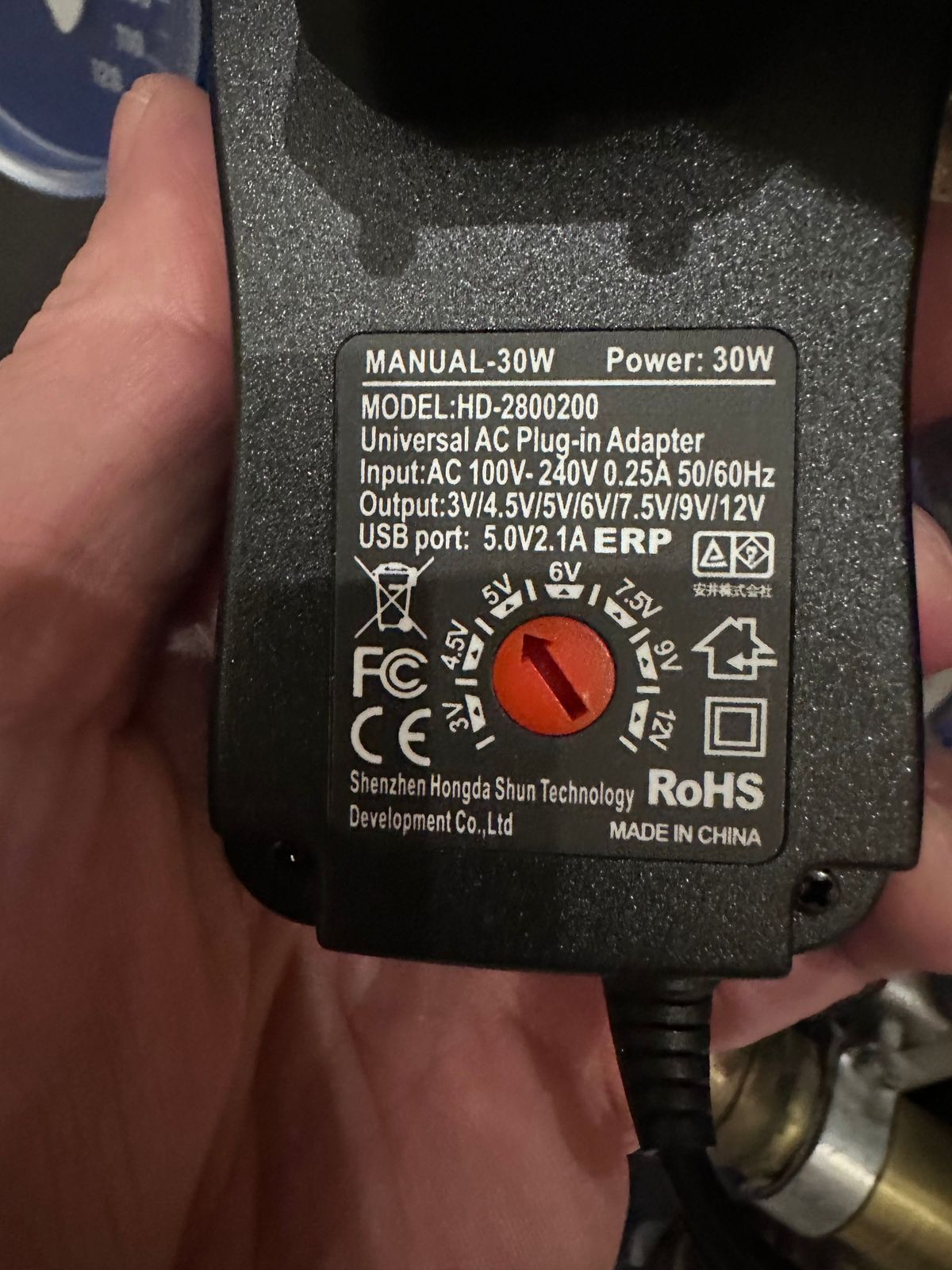
angeschlossen ist es an dem Board für Homematic.Ich habe aber auch noch eines mit 15W was ich an den USBC Port anschließen kann. Aber reicht das für das Homematic Board dann aus ?
-
@thomas-braun
ich hab dem letztens ein gehäuse verpasst mit Lüfter und dazu läuft auch noch das große Board für Homematic drauf.Das jetztige Netzteil hat 30W
angeschlossen ist es an dem Board für Homematic.Ich habe aber auch noch eines mit 15W was ich an den USBC Port anschließen kann. Aber reicht das für das Homematic Board dann aus ?
Keine Ahnung was du da alles betreibst, jedenfalls beschwert sich die Kiste deutlichst.
-
Keine Ahnung was du da alles betreibst, jedenfalls beschwert sich die Kiste deutlichst.
@thomas-braun
Netzteil getauscht - die Beschwerde ist weg ... :-)Skript v.2023-10-10 *** BASE SYSTEM *** Static hostname: iobrokerMaster Icon name: computer Operating System: Debian GNU/Linux 12 (bookworm) Kernel: Linux 6.1.0-rpi6-rpi-v8 Architecture: arm64 Model : Raspberry Pi 4 Model B Rev 1.2 Docker : false Virtualization : none Kernel : aarch64 Userland : arm64 Systemuptime and Load: 21:43:22 up 2 min, 2 users, load average: 3.90, 1.49, 0.55 CPU threads: 4 *** RASPBERRY THROTTLING *** Current issues: No throttling issues detected. Previously detected issues: No throttling issues detected. *** Time and Time Zones *** Local time: Wed 2023-11-08 21:43:22 CET Universal time: Wed 2023-11-08 20:43:22 UTC RTC time: Wed 2023-11-08 20:43:23 Time zone: Europe/Berlin (CET, +0100) System clock synchronized: yes NTP service: active RTC in local TZ: no *** User and Groups *** marc /home/marc marc adm dialout cdrom sudo audio video plugdev games users input render netdev gpio i2c spi iobroker *** X-Server-Setup *** X-Server: false Desktop: Terminal: tty Boot Target: multi-user.target *** MEMORY *** total used free shared buff/cache available Mem: 4.0G 2.4G 1.3G 1.3M 424M 1.6G Swap: 104M 0B 104M Total: 4.1G 2.4G 1.4G 3793 M total memory 2266 M used memory 2280 M active memory 190 M inactive memory 1196 M free memory 40 M buffer memory 364 M swap cache 99 M total swap 0 M used swap 99 M free swap Raspberry only: oom events: 0 lifetime oom required: 0 Mbytes total time in oom handler: 0 ms max time spent in oom handler: 0 ms *** FAILED SERVICES *** UNIT LOAD ACTIVE SUB DESCRIPTION * NetworkManager-wait-online.service loaded failed failed Network Manager Wait Online LOAD = Reflects whether the unit definition was properly loaded. ACTIVE = The high-level unit activation state, i.e. generalization of SUB. SUB = The low-level unit activation state, values depend on unit type. 1 loaded units listed. *** FILESYSTEM *** Filesystem Type Size Used Avail Use% Mounted on udev devtmpfs 1.6G 0 1.6G 0% /dev tmpfs tmpfs 380M 1.2M 379M 1% /run /dev/mmcblk0p2 ext4 59G 6.3G 49G 12% / tmpfs tmpfs 1.9G 0 1.9G 0% /dev/shm tmpfs tmpfs 5.0M 16K 5.0M 1% /run/lock /dev/mmcblk0p1 vfat 510M 63M 448M 13% /boot/firmware tmpfs tmpfs 380M 0 380M 0% /run/user/1000 Messages concerning ext4 filesystem in dmesg: [Wed Nov 8 21:40:43 2023] Kernel command line: coherent_pool=1M 8250.nr_uarts=1 snd_bcm2835.enable_headphones=0 snd_bcm2835.enable_headphones=1 snd_bcm2835.enable_hdmi=1 snd_bcm2835.enable_hdmi=0 smsc95xx.macaddr=DC:A6:32:90:70:D2 vc_mem.mem_base=0x3ec00000 vc_mem.mem_size=0x40000000 console=ttyAMA0,115200 console=tty1 root=PARTUUID=dc96beb8-02 rootfstype=ext4 fsck.repair=yes rootwait cfg80211.ieee80211_regdom=GB [Wed Nov 8 21:40:46 2023] EXT4-fs (mmcblk0p2): mounted filesystem with ordered data mode. Quota mode: none. [Wed Nov 8 21:40:48 2023] EXT4-fs (mmcblk0p2): re-mounted. Quota mode: none. Show mounted filesystems \(real ones only\): TARGET SOURCE FSTYPE OPTIONS / /dev/mmcblk0p2 ext4 rw,noatime `-/boot/firmware /dev/mmcblk0p1 vfat rw,relatime,fmask=0022,dmask=0022,codepage=437,iocharset=ascii,shortname=mixed,errors=remount-ro Files in neuralgic directories: /var: 1.4G /var/ 776M /var/lib 602M /var/lib/piVCCU3 548M /var/lib/piVCCU3/rootfs 322M /var/log Archived and active journals take up 320.8M in the file system. /opt/iobroker/backups: 1017M /opt/iobroker/backups/ /opt/iobroker/iobroker-data: 438M /opt/iobroker/iobroker-data/ 315M /opt/iobroker/iobroker-data/files 92M /opt/iobroker/iobroker-data/backup-objects 55M /opt/iobroker/iobroker-data/files/material 53M /opt/iobroker/iobroker-data/files/material/static The five largest files in iobroker-data are: 41M /opt/iobroker/iobroker-data/files/material/static/js/main.c5478f66.js.map 35M /opt/iobroker/iobroker-data/files/devices.admin/static/js/main.24f2bb56.js.map 33M /opt/iobroker/iobroker-data/files/iot.admin/static/js/main.a3f9f634.js.map 25M /opt/iobroker/iobroker-data/objects.jsonl 21M /opt/iobroker/iobroker-data/files/web.admin/static/js/main.eafddf6f.js.map USB-Devices by-id: USB-Sticks - Avoid direct links to /dev/* in your adapter setups, please always prefer the links 'by-id': find: '/dev/serial/by-id/': No such file or directory *** NodeJS-Installation *** /usr/bin/nodejs v18.18.2 /usr/bin/node v18.18.2 /usr/bin/npm 9.8.1 /usr/bin/npx 9.8.1 /usr/bin/corepack 0.19.0 nodejs: Installed: 18.18.2-1nodesource1 Candidate: 18.18.2-1nodesource1 Version table: *** 18.18.2-1nodesource1 1001 500 https://deb.nodesource.com/node_18.x nodistro/main arm64 Packages 100 /var/lib/dpkg/status 18.18.1-1nodesource1 1001 500 https://deb.nodesource.com/node_18.x nodistro/main arm64 Packages 18.18.0-1nodesource1 1001 500 https://deb.nodesource.com/node_18.x nodistro/main arm64 Packages 18.17.1-1nodesource1 1001 500 https://deb.nodesource.com/node_18.x nodistro/main arm64 Packages 18.17.0-1nodesource1 1001 500 https://deb.nodesource.com/node_18.x nodistro/main arm64 Packages 18.16.1-1nodesource1 1001 500 https://deb.nodesource.com/node_18.x nodistro/main arm64 Packages 18.16.0-1nodesource1 1001 500 https://deb.nodesource.com/node_18.x nodistro/main arm64 Packages 18.15.0-1nodesource1 1001 500 https://deb.nodesource.com/node_18.x nodistro/main arm64 Packages 18.14.2-1nodesource1 1001 500 https://deb.nodesource.com/node_18.x nodistro/main arm64 Packages 18.14.1-1nodesource1 1001 500 https://deb.nodesource.com/node_18.x nodistro/main arm64 Packages 18.14.0-1nodesource1 1001 500 https://deb.nodesource.com/node_18.x nodistro/main arm64 Packages 18.13.0+dfsg1-1 500 500 http://deb.debian.org/debian bookworm/main arm64 Packages 18.13.0-1nodesource1 1001 500 https://deb.nodesource.com/node_18.x nodistro/main arm64 Packages 18.12.0-1nodesource1 1001 500 https://deb.nodesource.com/node_18.x nodistro/main arm64 Packages 18.11.0-1nodesource1 1001 500 https://deb.nodesource.com/node_18.x nodistro/main arm64 Packages 18.10.0-1nodesource1 1001 500 https://deb.nodesource.com/node_18.x nodistro/main arm64 Packages 18.9.1-1nodesource1 1001 500 https://deb.nodesource.com/node_18.x nodistro/main arm64 Packages 18.9.0-1nodesource1 1001 500 https://deb.nodesource.com/node_18.x nodistro/main arm64 Packages 18.8.0-1nodesource1 1001 500 https://deb.nodesource.com/node_18.x nodistro/main arm64 Packages 18.7.0-1nodesource1 1001 500 https://deb.nodesource.com/node_18.x nodistro/main arm64 Packages 18.6.0-1nodesource1 1001 500 https://deb.nodesource.com/node_18.x nodistro/main arm64 Packages 18.5.0-1nodesource1 1001 500 https://deb.nodesource.com/node_18.x nodistro/main arm64 Packages 18.4.0-1nodesource1 1001 500 https://deb.nodesource.com/node_18.x nodistro/main arm64 Packages 18.3.0-1nodesource1 1001 500 https://deb.nodesource.com/node_18.x nodistro/main arm64 Packages 18.2.0-1nodesource1 1001 500 https://deb.nodesource.com/node_18.x nodistro/main arm64 Packages 18.1.0-1nodesource1 1001 500 https://deb.nodesource.com/node_18.x nodistro/main arm64 Packages 18.0.0-1nodesource1 1001 500 https://deb.nodesource.com/node_18.x nodistro/main arm64 Packages Temp directories causing npm8 problem: 0 No problems detected Errors in npm tree: *** ioBroker-Installation *** ioBroker Status iobroker is running on this host. Objects type: jsonl States type: jsonl Core adapters versions js-controller: 5.0.12 admin: 6.12.0 javascript: 7.1.4 Adapters from github: 2 Adapter State + system.adapter.admin.0 : admin : ioBrokerMaster - enabled, port: 8081, bind: 0.0.0.0, run as: admin + system.adapter.alexa2.0 : alexa2 : ioBrokerMaster - enabled + system.adapter.backitup.0 : backitup : ioBrokerMaster - enabled + system.adapter.backitup.1 : backitup : ioBrokerMaster - enabled + system.adapter.cloud.0 : cloud : tinkerboard - enabled + system.adapter.controme.0 : controme : ioBrokerMaster - enabled system.adapter.devices.0 : devices : tinkerboard - enabled + system.adapter.discovery.0 : discovery : tinkerboard - enabled system.adapter.flot.0 : flot : tinkerboard - enabled + system.adapter.geofency.0 : geofency : ioBrokerMaster - enabled, port: 7999, bind: 192.168.1.32 + system.adapter.hm-rega.0 : hm-rega : ioBrokerMaster - enabled + system.adapter.hm-rpc.0 : hm-rpc : ioBrokerMaster - enabled, port: 0 + system.adapter.hm-rpc.1 : hm-rpc : ioBrokerMaster - enabled, port: 0 + system.adapter.homepilot20.0 : homepilot20 : ioBrokerMaster - enabled + system.adapter.hue-extended.0 : hue-extended : ioBrokerMaster - enabled + system.adapter.info.0 : info : tinkerboard - enabled + system.adapter.iot.0 : iot : ioBrokerMaster - enabled + system.adapter.jarvis.0 : jarvis : ioBrokerMaster - enabled + system.adapter.javascript.0 : javascript : ioBrokerMaster - enabled system.adapter.klf200.0 : klf200 : ioBrokerMaster - disabled system.adapter.material.0 : material : ioBrokerMaster - enabled + system.adapter.melcloud.0 : melcloud : ioBrokerMaster - enabled + system.adapter.mercedesme.0 : mercedesme : tinkerboard - enabled + system.adapter.nuki-extended.0 : nuki-extended : ioBrokerMaster - enabled system.adapter.rpi2.0 : rpi2 : ioBrokerMaster - disabled + system.adapter.simple-api.0 : simple-api : tinkerboard - enabled, port: 8087, bind: 192.168.1.31, run as: admin + system.adapter.sql.0 : sql : ioBrokerMaster - enabled, port: 3306 + system.adapter.statistics.0 : statistics : ioBrokerMaster - enabled + system.adapter.systeminfo.0 : systeminfo : tinkerboard - enabled + system.adapter.telegram.0 : telegram : ioBrokerMaster - enabled, port: 8443, bind: 0.0.0.0 + system.adapter.terminal.0 : terminal : ioBrokerMaster - enabled, port: 8088, bind: 0.0.0.0, run as: admin system.adapter.text2command.0 : text2command : ioBrokerMaster - disabled + system.adapter.tr-064.0 : tr-064 : ioBrokerMaster - enabled + system.adapter.upnp.0 : upnp : tinkerboard - enabled system.adapter.vis-materialdesign.0 : vis-materialdesign : ioBrokerMaster - enabled system.adapter.vis.0 : vis : ioBrokerMaster - enabled + system.adapter.web.0 : web : ioBrokerMaster - enabled, port: 8082, bind: 192.168.1.32, run as: admin + system.adapter.ws.0 : ws : ioBrokerMaster - enabled, port: 8084, bind: 0.0.0.0, run as: admin + system.adapter.yahka.0 : yahka : ioBrokerMaster - enabled + instance is alive Enabled adapters with bindings + system.adapter.admin.0 : admin : ioBrokerMaster - enabled, port: 8081, bind: 0.0.0.0, run as: admin + system.adapter.geofency.0 : geofency : ioBrokerMaster - enabled, port: 7999, bind: 192.168.1.32 + system.adapter.hm-rpc.0 : hm-rpc : ioBrokerMaster - enabled, port: 0 + system.adapter.hm-rpc.1 : hm-rpc : ioBrokerMaster - enabled, port: 0 + system.adapter.simple-api.0 : simple-api : tinkerboard - enabled, port: 8087, bind: 192.168.1.31, run as: admin + system.adapter.sql.0 : sql : ioBrokerMaster - enabled, port: 3306 + system.adapter.telegram.0 : telegram : ioBrokerMaster - enabled, port: 8443, bind: 0.0.0.0 + system.adapter.terminal.0 : terminal : ioBrokerMaster - enabled, port: 8088, bind: 0.0.0.0, run as: admin + system.adapter.web.0 : web : ioBrokerMaster - enabled, port: 8082, bind: 192.168.1.32, run as: admin + system.adapter.ws.0 : ws : ioBrokerMaster - enabled, port: 8084, bind: 0.0.0.0, run as: admin ioBroker-Repositories stable : http://download.iobroker.net/sources-dist.json beta : http://download.iobroker.net/sources-dist-latest.json Active repo(s): stable Installed ioBroker-Instances Used repository: stable Adapter "admin" : 6.12.0 , installed 6.12.0 Adapter "alexa2" : 3.25.2 , installed 3.25.5 Adapter "backitup" : 2.8.7 , installed 2.8.7 Adapter "cloud" : 4.4.1 , installed 4.4.1 Adapter "devices" : 1.1.5 , installed 1.1.5 Adapter "discovery" : 3.1.0 , installed 3.2.0 Adapter "flot" : 1.12.0 , installed 1.12.0 Adapter "geofency" : 1.2.4 , installed 1.2.4 Adapter "hm-rega" : 3.0.47 , installed 3.0.47 Adapter "hm-rpc" : 1.15.19 , installed 1.15.19 Adapter "hue-extended" : 2.0.0 , installed 2.0.0 Adapter "info" : 2.0.0 , installed 2.0.0 Adapter "iot" : 1.14.5 , installed 2.0.10 Adapter "jarvis" : 3.1.8 , installed 3.1.8 Adapter "javascript" : 7.1.4 , installed 7.1.4 Controller "js-controller": 5.0.12 , installed 5.0.12 Adapter "klf200" : 1.1.2 , installed 1.1.2 Adapter "material" : 1.3.1 , installed 1.3.1 Adapter "melcloud" : 1.3.5 , installed 1.3.5 Adapter "mercedesme" : 0.1.1 , installed 0.1.1 Adapter "nuki-extended": 2.6.5 , installed 2.6.5 Adapter "rpi2" : 1.3.2 , installed 1.3.2 Adapter "simple-api" : 2.7.2 , installed 2.7.2 Adapter "socketio" : 6.5.5 , installed 6.5.7 Adapter "sql" : 2.2.0 , installed 2.2.0 Adapter "statistics" : 2.3.0 , installed 2.3.0 Adapter "systeminfo" : 1.1.0 , installed 1.1.0 Adapter "telegram" : 2.0.1 , installed 2.0.1 Adapter "terminal" : 1.0.0 , installed 1.0.0 Adapter "text2command" : 3.0.2 , installed 3.0.2 Adapter "tr-064" : 4.2.18 , installed 4.2.18 Adapter "upnp" : 1.0.21 , installed 1.0.21 Adapter "vis" : 1.4.16 , installed 1.4.16 Adapter "web" : 6.1.4 , installed 6.1.4 Adapter "ws" : 2.5.5 , installed 2.5.7 Adapter "yahka" : 1.0.3 , installed 1.0.3 Objects and States Please stand by - This may take a while Objects: 24529 States: 15030 *** OS-Repositories and Updates *** Hit:1 http://deb.debian.org/debian bookworm InRelease Hit:2 http://deb.debian.org/debian-security bookworm-security InRelease Hit:3 http://deb.debian.org/debian bookworm-updates InRelease Hit:4 http://archive.raspberrypi.com/debian bookworm InRelease Hit:5 https://apt.pivccu.de/piVCCU stable InRelease Hit:6 https://deb.nodesource.com/node_18.x nodistro InRelease Reading package lists... Pending Updates: 0 *** Listening Ports *** Active Internet connections (only servers) Proto Recv-Q Send-Q Local Address Foreign Address State User Inode PID/Program name tcp 0 0 0.0.0.0:9001 0.0.0.0:* LISTEN 1001 15137 2074/iobroker.js-co tcp 0 0 0.0.0.0:9000 0.0.0.0:* LISTEN 1001 13263 2074/iobroker.js-co tcp 0 0 10.0.3.1:53 0.0.0.0:* LISTEN 0 15221 2219/dnsmasq tcp 0 0 0.0.0.0:22 0.0.0.0:* LISTEN 0 16853 2079/sshd: /usr/sbi tcp 0 0 192.168.1.32:7999 0.0.0.0:* LISTEN 1001 18447 2746/io.geofency.0 tcp 0 0 192.168.1.32:2010 0.0.0.0:* LISTEN 1001 22307 3882/io.hm-rpc.0 tcp 0 0 192.168.1.32:2001 0.0.0.0:* LISTEN 1001 24024 4008/io.hm-rpc.1 tcp 0 0 0.0.0.0:8400 0.0.0.0:* LISTEN 1001 19240 3486/io.jarvis.0 tcp 0 0 192.168.1.32:8082 0.0.0.0:* LISTEN 1001 22668 3626/io.web.0 tcp 0 0 127.0.0.1:46433 0.0.0.0:* LISTEN 1001 22297 3636/io.yahka.0 tcp6 0 0 :::51989 :::* LISTEN 1001 19650 2891/io.nuki-extend tcp6 0 0 :::22 :::* LISTEN 0 16855 2079/sshd: /usr/sbi tcp6 0 0 :::45143 :::* LISTEN 1001 23970 3636/io.yahka.0 tcp6 0 0 :::8084 :::* LISTEN 1001 20275 3803/io.ws.0 tcp6 0 0 :::8081 :::* LISTEN 1001 17474 2096/io.admin.0 tcp6 0 0 :::8088 :::* LISTEN 1001 23973 3822/io.terminal.0 udp 0 0 192.168.1.32:5353 0.0.0.0:* 1001 20557 2906/io.tr-064.0 udp 0 0 192.168.1.13:5353 0.0.0.0:* 1001 20556 2906/io.tr-064.0 udp 0 0 0.0.0.0:5353 0.0.0.0:* 104 10739 432/avahi-daemon: r udp 0 0 0.0.0.0:52552 0.0.0.0:* 104 10741 432/avahi-daemon: r udp 0 0 10.0.3.1:53 0.0.0.0:* 0 15220 2219/dnsmasq udp 0 0 0.0.0.0:67 0.0.0.0:* 0 15217 2219/dnsmasq udp6 0 0 fe80::265e:8f14:fa1:546 :::* 0 14924 464/NetworkManager udp6 0 0 :::5353 :::* 104 10740 432/avahi-daemon: r udp6 0 0 :::44969 :::* 104 10742 432/avahi-daemon: r *** Log File - Last 25 Lines *** 2023-11-08 21:44:51.470 - warn: homepilot20.0 (3334) Transmitter sensors -> Cannot connect to Homepilot: Error: connect EHOSTUNREACH 192.168.1.180:80 2023-11-08 21:44:54.538 - warn: homepilot20.0 (3334) Read sensors -> Cannot connect to Homepilot: Error: connect EHOSTUNREACH 192.168.1.180:80 2023-11-08 21:44:54.541 - warn: homepilot20.0 (3334) Transmitter sensors -> Cannot connect to Homepilot: Error: connect EHOSTUNREACH 192.168.1.180:80 2023-11-08 21:44:54.543 - warn: homepilot20.0 (3334) Scenes -> Cannot connect to Homepilot: Error: connect EHOSTUNREACH 192.168.1.180:80 2023-11-08 21:44:57.610 - warn: homepilot20.0 (3334) Read actuator -> Cannot connect to Homepilot: Error: connect EHOSTUNREACH 192.168.1.180:80 2023-11-08 21:44:57.612 - warn: homepilot20.0 (3334) Read sensors -> Cannot connect to Homepilot: Error: connect EHOSTUNREACH 192.168.1.180:80 2023-11-08 21:44:57.613 - warn: homepilot20.0 (3334) Transmitter sensors -> Cannot connect to Homepilot: Error: connect EHOSTUNREACH 192.168.1.180:80 2023-11-08 21:45:00.682 - warn: homepilot20.0 (3334) Scenes -> Cannot connect to Homepilot: Error: connect EHOSTUNREACH 192.168.1.180:80 2023-11-08 21:45:00.684 - error: javascript.0 (2107) script.js.Homepilot.Sensordaten1: Fehler request: Error: connect EHOSTUNREACH 192.168.1.180:80 2023-11-08 21:45:00.684 - warn: homepilot20.0 (3334) Read sensors -> Cannot connect to Homepilot: Error: connect EHOSTUNREACH 192.168.1.180:80 2023-11-08 21:45:00.685 - warn: homepilot20.0 (3334) Transmitter sensors -> Cannot connect to Homepilot: Error: connect EHOSTUNREACH 192.168.1.180:80 2023-11-08 21:45:00.684 - error: javascript.0 (2107) Request error: Error: connect EHOSTUNREACH 192.168.1.180:80 2023-11-08 21:45:00.685 - error: javascript.0 (2107) script.js.Homepilot.Sensordaten1: Fehler request: Error: connect EHOSTUNREACH 192.168.1.180:80 2023-11-08 21:45:00.686 - error: javascript.0 (2107) Request error: Error: connect EHOSTUNREACH 192.168.1.180:80 2023-11-08 21:45:00.687 - error: javascript.0 (2107) script.js.Homepilot.Sensordaten1: Fehler request: Error: connect EHOSTUNREACH 192.168.1.180:80 2023-11-08 21:45:00.688 - error: javascript.0 (2107) Request error: Error: connect EHOSTUNREACH 192.168.1.180:80 2023-11-08 21:45:03.756 - warn: homepilot20.0 (3334) Read sensors -> Cannot connect to Homepilot: Error: connect EHOSTUNREACH 192.168.1.180:80 2023-11-08 21:45:03.758 - warn: homepilot20.0 (3334) Transmitter sensors -> Cannot connect to Homepilot: Error: connect EHOSTUNREACH 192.168.1.180:80 2023-11-08 21:45:06.827 - warn: homepilot20.0 (3334) Scenes -> Cannot connect to Homepilot: Error: connect EHOSTUNREACH 192.168.1.180:80 2023-11-08 21:45:06.835 - warn: homepilot20.0 (3334) Read sensors -> Cannot connect to Homepilot: Error: connect EHOSTUNREACH 192.168.1.180:80 2023-11-08 21:45:06.837 - warn: homepilot20.0 (3334) Transmitter sensors -> Cannot connect to Homepilot: Error: connect EHOSTUNREACH 192.168.1.180:80 2023-11-08 21:45:09.901 - warn: homepilot20.0 (3334) Read actuator -> Cannot connect to Homepilot: Error: connect EHOSTUNREACH 192.168.1.180:80 2023-11-08 21:45:09.905 - warn: homepilot20.0 (3334) Read sensors -> Cannot connect to Homepilot: Error: connect EHOSTUNREACH 192.168.1.180:80 2023-11-08 21:45:09.908 - warn: homepilot20.0 (3334) Transmitter sensors -> Cannot connect to Homepilot: Error: connect EHOSTUNREACH 192.168.1.180:80 2023-11-08 21:45:09.911 - warn: homepilot20.0 (3334) Scenes -> Cannot connect to Homepilot: Error: connect EHOSTUNREACH 192.168.1.180:80ich hab da jeetzt mal ein Auge drauf ...
-
@thomas-braun
ich hab dem letztens ein gehäuse verpasst mit Lüfter und dazu läuft auch noch das große Board für Homematic drauf.Das jetztige Netzteil hat 30W
angeschlossen ist es an dem Board für Homematic.Ich habe aber auch noch eines mit 15W was ich an den USBC Port anschließen kann. Aber reicht das für das Homematic Board dann aus ?
-
@thomas-braun
Netzteil getauscht - die Beschwerde ist weg ... :-)Skript v.2023-10-10 *** BASE SYSTEM *** Static hostname: iobrokerMaster Icon name: computer Operating System: Debian GNU/Linux 12 (bookworm) Kernel: Linux 6.1.0-rpi6-rpi-v8 Architecture: arm64 Model : Raspberry Pi 4 Model B Rev 1.2 Docker : false Virtualization : none Kernel : aarch64 Userland : arm64 Systemuptime and Load: 21:43:22 up 2 min, 2 users, load average: 3.90, 1.49, 0.55 CPU threads: 4 *** RASPBERRY THROTTLING *** Current issues: No throttling issues detected. Previously detected issues: No throttling issues detected. *** Time and Time Zones *** Local time: Wed 2023-11-08 21:43:22 CET Universal time: Wed 2023-11-08 20:43:22 UTC RTC time: Wed 2023-11-08 20:43:23 Time zone: Europe/Berlin (CET, +0100) System clock synchronized: yes NTP service: active RTC in local TZ: no *** User and Groups *** marc /home/marc marc adm dialout cdrom sudo audio video plugdev games users input render netdev gpio i2c spi iobroker *** X-Server-Setup *** X-Server: false Desktop: Terminal: tty Boot Target: multi-user.target *** MEMORY *** total used free shared buff/cache available Mem: 4.0G 2.4G 1.3G 1.3M 424M 1.6G Swap: 104M 0B 104M Total: 4.1G 2.4G 1.4G 3793 M total memory 2266 M used memory 2280 M active memory 190 M inactive memory 1196 M free memory 40 M buffer memory 364 M swap cache 99 M total swap 0 M used swap 99 M free swap Raspberry only: oom events: 0 lifetime oom required: 0 Mbytes total time in oom handler: 0 ms max time spent in oom handler: 0 ms *** FAILED SERVICES *** UNIT LOAD ACTIVE SUB DESCRIPTION * NetworkManager-wait-online.service loaded failed failed Network Manager Wait Online LOAD = Reflects whether the unit definition was properly loaded. ACTIVE = The high-level unit activation state, i.e. generalization of SUB. SUB = The low-level unit activation state, values depend on unit type. 1 loaded units listed. *** FILESYSTEM *** Filesystem Type Size Used Avail Use% Mounted on udev devtmpfs 1.6G 0 1.6G 0% /dev tmpfs tmpfs 380M 1.2M 379M 1% /run /dev/mmcblk0p2 ext4 59G 6.3G 49G 12% / tmpfs tmpfs 1.9G 0 1.9G 0% /dev/shm tmpfs tmpfs 5.0M 16K 5.0M 1% /run/lock /dev/mmcblk0p1 vfat 510M 63M 448M 13% /boot/firmware tmpfs tmpfs 380M 0 380M 0% /run/user/1000 Messages concerning ext4 filesystem in dmesg: [Wed Nov 8 21:40:43 2023] Kernel command line: coherent_pool=1M 8250.nr_uarts=1 snd_bcm2835.enable_headphones=0 snd_bcm2835.enable_headphones=1 snd_bcm2835.enable_hdmi=1 snd_bcm2835.enable_hdmi=0 smsc95xx.macaddr=DC:A6:32:90:70:D2 vc_mem.mem_base=0x3ec00000 vc_mem.mem_size=0x40000000 console=ttyAMA0,115200 console=tty1 root=PARTUUID=dc96beb8-02 rootfstype=ext4 fsck.repair=yes rootwait cfg80211.ieee80211_regdom=GB [Wed Nov 8 21:40:46 2023] EXT4-fs (mmcblk0p2): mounted filesystem with ordered data mode. Quota mode: none. [Wed Nov 8 21:40:48 2023] EXT4-fs (mmcblk0p2): re-mounted. Quota mode: none. Show mounted filesystems \(real ones only\): TARGET SOURCE FSTYPE OPTIONS / /dev/mmcblk0p2 ext4 rw,noatime `-/boot/firmware /dev/mmcblk0p1 vfat rw,relatime,fmask=0022,dmask=0022,codepage=437,iocharset=ascii,shortname=mixed,errors=remount-ro Files in neuralgic directories: /var: 1.4G /var/ 776M /var/lib 602M /var/lib/piVCCU3 548M /var/lib/piVCCU3/rootfs 322M /var/log Archived and active journals take up 320.8M in the file system. /opt/iobroker/backups: 1017M /opt/iobroker/backups/ /opt/iobroker/iobroker-data: 438M /opt/iobroker/iobroker-data/ 315M /opt/iobroker/iobroker-data/files 92M /opt/iobroker/iobroker-data/backup-objects 55M /opt/iobroker/iobroker-data/files/material 53M /opt/iobroker/iobroker-data/files/material/static The five largest files in iobroker-data are: 41M /opt/iobroker/iobroker-data/files/material/static/js/main.c5478f66.js.map 35M /opt/iobroker/iobroker-data/files/devices.admin/static/js/main.24f2bb56.js.map 33M /opt/iobroker/iobroker-data/files/iot.admin/static/js/main.a3f9f634.js.map 25M /opt/iobroker/iobroker-data/objects.jsonl 21M /opt/iobroker/iobroker-data/files/web.admin/static/js/main.eafddf6f.js.map USB-Devices by-id: USB-Sticks - Avoid direct links to /dev/* in your adapter setups, please always prefer the links 'by-id': find: '/dev/serial/by-id/': No such file or directory *** NodeJS-Installation *** /usr/bin/nodejs v18.18.2 /usr/bin/node v18.18.2 /usr/bin/npm 9.8.1 /usr/bin/npx 9.8.1 /usr/bin/corepack 0.19.0 nodejs: Installed: 18.18.2-1nodesource1 Candidate: 18.18.2-1nodesource1 Version table: *** 18.18.2-1nodesource1 1001 500 https://deb.nodesource.com/node_18.x nodistro/main arm64 Packages 100 /var/lib/dpkg/status 18.18.1-1nodesource1 1001 500 https://deb.nodesource.com/node_18.x nodistro/main arm64 Packages 18.18.0-1nodesource1 1001 500 https://deb.nodesource.com/node_18.x nodistro/main arm64 Packages 18.17.1-1nodesource1 1001 500 https://deb.nodesource.com/node_18.x nodistro/main arm64 Packages 18.17.0-1nodesource1 1001 500 https://deb.nodesource.com/node_18.x nodistro/main arm64 Packages 18.16.1-1nodesource1 1001 500 https://deb.nodesource.com/node_18.x nodistro/main arm64 Packages 18.16.0-1nodesource1 1001 500 https://deb.nodesource.com/node_18.x nodistro/main arm64 Packages 18.15.0-1nodesource1 1001 500 https://deb.nodesource.com/node_18.x nodistro/main arm64 Packages 18.14.2-1nodesource1 1001 500 https://deb.nodesource.com/node_18.x nodistro/main arm64 Packages 18.14.1-1nodesource1 1001 500 https://deb.nodesource.com/node_18.x nodistro/main arm64 Packages 18.14.0-1nodesource1 1001 500 https://deb.nodesource.com/node_18.x nodistro/main arm64 Packages 18.13.0+dfsg1-1 500 500 http://deb.debian.org/debian bookworm/main arm64 Packages 18.13.0-1nodesource1 1001 500 https://deb.nodesource.com/node_18.x nodistro/main arm64 Packages 18.12.0-1nodesource1 1001 500 https://deb.nodesource.com/node_18.x nodistro/main arm64 Packages 18.11.0-1nodesource1 1001 500 https://deb.nodesource.com/node_18.x nodistro/main arm64 Packages 18.10.0-1nodesource1 1001 500 https://deb.nodesource.com/node_18.x nodistro/main arm64 Packages 18.9.1-1nodesource1 1001 500 https://deb.nodesource.com/node_18.x nodistro/main arm64 Packages 18.9.0-1nodesource1 1001 500 https://deb.nodesource.com/node_18.x nodistro/main arm64 Packages 18.8.0-1nodesource1 1001 500 https://deb.nodesource.com/node_18.x nodistro/main arm64 Packages 18.7.0-1nodesource1 1001 500 https://deb.nodesource.com/node_18.x nodistro/main arm64 Packages 18.6.0-1nodesource1 1001 500 https://deb.nodesource.com/node_18.x nodistro/main arm64 Packages 18.5.0-1nodesource1 1001 500 https://deb.nodesource.com/node_18.x nodistro/main arm64 Packages 18.4.0-1nodesource1 1001 500 https://deb.nodesource.com/node_18.x nodistro/main arm64 Packages 18.3.0-1nodesource1 1001 500 https://deb.nodesource.com/node_18.x nodistro/main arm64 Packages 18.2.0-1nodesource1 1001 500 https://deb.nodesource.com/node_18.x nodistro/main arm64 Packages 18.1.0-1nodesource1 1001 500 https://deb.nodesource.com/node_18.x nodistro/main arm64 Packages 18.0.0-1nodesource1 1001 500 https://deb.nodesource.com/node_18.x nodistro/main arm64 Packages Temp directories causing npm8 problem: 0 No problems detected Errors in npm tree: *** ioBroker-Installation *** ioBroker Status iobroker is running on this host. Objects type: jsonl States type: jsonl Core adapters versions js-controller: 5.0.12 admin: 6.12.0 javascript: 7.1.4 Adapters from github: 2 Adapter State + system.adapter.admin.0 : admin : ioBrokerMaster - enabled, port: 8081, bind: 0.0.0.0, run as: admin + system.adapter.alexa2.0 : alexa2 : ioBrokerMaster - enabled + system.adapter.backitup.0 : backitup : ioBrokerMaster - enabled + system.adapter.backitup.1 : backitup : ioBrokerMaster - enabled + system.adapter.cloud.0 : cloud : tinkerboard - enabled + system.adapter.controme.0 : controme : ioBrokerMaster - enabled system.adapter.devices.0 : devices : tinkerboard - enabled + system.adapter.discovery.0 : discovery : tinkerboard - enabled system.adapter.flot.0 : flot : tinkerboard - enabled + system.adapter.geofency.0 : geofency : ioBrokerMaster - enabled, port: 7999, bind: 192.168.1.32 + system.adapter.hm-rega.0 : hm-rega : ioBrokerMaster - enabled + system.adapter.hm-rpc.0 : hm-rpc : ioBrokerMaster - enabled, port: 0 + system.adapter.hm-rpc.1 : hm-rpc : ioBrokerMaster - enabled, port: 0 + system.adapter.homepilot20.0 : homepilot20 : ioBrokerMaster - enabled + system.adapter.hue-extended.0 : hue-extended : ioBrokerMaster - enabled + system.adapter.info.0 : info : tinkerboard - enabled + system.adapter.iot.0 : iot : ioBrokerMaster - enabled + system.adapter.jarvis.0 : jarvis : ioBrokerMaster - enabled + system.adapter.javascript.0 : javascript : ioBrokerMaster - enabled system.adapter.klf200.0 : klf200 : ioBrokerMaster - disabled system.adapter.material.0 : material : ioBrokerMaster - enabled + system.adapter.melcloud.0 : melcloud : ioBrokerMaster - enabled + system.adapter.mercedesme.0 : mercedesme : tinkerboard - enabled + system.adapter.nuki-extended.0 : nuki-extended : ioBrokerMaster - enabled system.adapter.rpi2.0 : rpi2 : ioBrokerMaster - disabled + system.adapter.simple-api.0 : simple-api : tinkerboard - enabled, port: 8087, bind: 192.168.1.31, run as: admin + system.adapter.sql.0 : sql : ioBrokerMaster - enabled, port: 3306 + system.adapter.statistics.0 : statistics : ioBrokerMaster - enabled + system.adapter.systeminfo.0 : systeminfo : tinkerboard - enabled + system.adapter.telegram.0 : telegram : ioBrokerMaster - enabled, port: 8443, bind: 0.0.0.0 + system.adapter.terminal.0 : terminal : ioBrokerMaster - enabled, port: 8088, bind: 0.0.0.0, run as: admin system.adapter.text2command.0 : text2command : ioBrokerMaster - disabled + system.adapter.tr-064.0 : tr-064 : ioBrokerMaster - enabled + system.adapter.upnp.0 : upnp : tinkerboard - enabled system.adapter.vis-materialdesign.0 : vis-materialdesign : ioBrokerMaster - enabled system.adapter.vis.0 : vis : ioBrokerMaster - enabled + system.adapter.web.0 : web : ioBrokerMaster - enabled, port: 8082, bind: 192.168.1.32, run as: admin + system.adapter.ws.0 : ws : ioBrokerMaster - enabled, port: 8084, bind: 0.0.0.0, run as: admin + system.adapter.yahka.0 : yahka : ioBrokerMaster - enabled + instance is alive Enabled adapters with bindings + system.adapter.admin.0 : admin : ioBrokerMaster - enabled, port: 8081, bind: 0.0.0.0, run as: admin + system.adapter.geofency.0 : geofency : ioBrokerMaster - enabled, port: 7999, bind: 192.168.1.32 + system.adapter.hm-rpc.0 : hm-rpc : ioBrokerMaster - enabled, port: 0 + system.adapter.hm-rpc.1 : hm-rpc : ioBrokerMaster - enabled, port: 0 + system.adapter.simple-api.0 : simple-api : tinkerboard - enabled, port: 8087, bind: 192.168.1.31, run as: admin + system.adapter.sql.0 : sql : ioBrokerMaster - enabled, port: 3306 + system.adapter.telegram.0 : telegram : ioBrokerMaster - enabled, port: 8443, bind: 0.0.0.0 + system.adapter.terminal.0 : terminal : ioBrokerMaster - enabled, port: 8088, bind: 0.0.0.0, run as: admin + system.adapter.web.0 : web : ioBrokerMaster - enabled, port: 8082, bind: 192.168.1.32, run as: admin + system.adapter.ws.0 : ws : ioBrokerMaster - enabled, port: 8084, bind: 0.0.0.0, run as: admin ioBroker-Repositories stable : http://download.iobroker.net/sources-dist.json beta : http://download.iobroker.net/sources-dist-latest.json Active repo(s): stable Installed ioBroker-Instances Used repository: stable Adapter "admin" : 6.12.0 , installed 6.12.0 Adapter "alexa2" : 3.25.2 , installed 3.25.5 Adapter "backitup" : 2.8.7 , installed 2.8.7 Adapter "cloud" : 4.4.1 , installed 4.4.1 Adapter "devices" : 1.1.5 , installed 1.1.5 Adapter "discovery" : 3.1.0 , installed 3.2.0 Adapter "flot" : 1.12.0 , installed 1.12.0 Adapter "geofency" : 1.2.4 , installed 1.2.4 Adapter "hm-rega" : 3.0.47 , installed 3.0.47 Adapter "hm-rpc" : 1.15.19 , installed 1.15.19 Adapter "hue-extended" : 2.0.0 , installed 2.0.0 Adapter "info" : 2.0.0 , installed 2.0.0 Adapter "iot" : 1.14.5 , installed 2.0.10 Adapter "jarvis" : 3.1.8 , installed 3.1.8 Adapter "javascript" : 7.1.4 , installed 7.1.4 Controller "js-controller": 5.0.12 , installed 5.0.12 Adapter "klf200" : 1.1.2 , installed 1.1.2 Adapter "material" : 1.3.1 , installed 1.3.1 Adapter "melcloud" : 1.3.5 , installed 1.3.5 Adapter "mercedesme" : 0.1.1 , installed 0.1.1 Adapter "nuki-extended": 2.6.5 , installed 2.6.5 Adapter "rpi2" : 1.3.2 , installed 1.3.2 Adapter "simple-api" : 2.7.2 , installed 2.7.2 Adapter "socketio" : 6.5.5 , installed 6.5.7 Adapter "sql" : 2.2.0 , installed 2.2.0 Adapter "statistics" : 2.3.0 , installed 2.3.0 Adapter "systeminfo" : 1.1.0 , installed 1.1.0 Adapter "telegram" : 2.0.1 , installed 2.0.1 Adapter "terminal" : 1.0.0 , installed 1.0.0 Adapter "text2command" : 3.0.2 , installed 3.0.2 Adapter "tr-064" : 4.2.18 , installed 4.2.18 Adapter "upnp" : 1.0.21 , installed 1.0.21 Adapter "vis" : 1.4.16 , installed 1.4.16 Adapter "web" : 6.1.4 , installed 6.1.4 Adapter "ws" : 2.5.5 , installed 2.5.7 Adapter "yahka" : 1.0.3 , installed 1.0.3 Objects and States Please stand by - This may take a while Objects: 24529 States: 15030 *** OS-Repositories and Updates *** Hit:1 http://deb.debian.org/debian bookworm InRelease Hit:2 http://deb.debian.org/debian-security bookworm-security InRelease Hit:3 http://deb.debian.org/debian bookworm-updates InRelease Hit:4 http://archive.raspberrypi.com/debian bookworm InRelease Hit:5 https://apt.pivccu.de/piVCCU stable InRelease Hit:6 https://deb.nodesource.com/node_18.x nodistro InRelease Reading package lists... Pending Updates: 0 *** Listening Ports *** Active Internet connections (only servers) Proto Recv-Q Send-Q Local Address Foreign Address State User Inode PID/Program name tcp 0 0 0.0.0.0:9001 0.0.0.0:* LISTEN 1001 15137 2074/iobroker.js-co tcp 0 0 0.0.0.0:9000 0.0.0.0:* LISTEN 1001 13263 2074/iobroker.js-co tcp 0 0 10.0.3.1:53 0.0.0.0:* LISTEN 0 15221 2219/dnsmasq tcp 0 0 0.0.0.0:22 0.0.0.0:* LISTEN 0 16853 2079/sshd: /usr/sbi tcp 0 0 192.168.1.32:7999 0.0.0.0:* LISTEN 1001 18447 2746/io.geofency.0 tcp 0 0 192.168.1.32:2010 0.0.0.0:* LISTEN 1001 22307 3882/io.hm-rpc.0 tcp 0 0 192.168.1.32:2001 0.0.0.0:* LISTEN 1001 24024 4008/io.hm-rpc.1 tcp 0 0 0.0.0.0:8400 0.0.0.0:* LISTEN 1001 19240 3486/io.jarvis.0 tcp 0 0 192.168.1.32:8082 0.0.0.0:* LISTEN 1001 22668 3626/io.web.0 tcp 0 0 127.0.0.1:46433 0.0.0.0:* LISTEN 1001 22297 3636/io.yahka.0 tcp6 0 0 :::51989 :::* LISTEN 1001 19650 2891/io.nuki-extend tcp6 0 0 :::22 :::* LISTEN 0 16855 2079/sshd: /usr/sbi tcp6 0 0 :::45143 :::* LISTEN 1001 23970 3636/io.yahka.0 tcp6 0 0 :::8084 :::* LISTEN 1001 20275 3803/io.ws.0 tcp6 0 0 :::8081 :::* LISTEN 1001 17474 2096/io.admin.0 tcp6 0 0 :::8088 :::* LISTEN 1001 23973 3822/io.terminal.0 udp 0 0 192.168.1.32:5353 0.0.0.0:* 1001 20557 2906/io.tr-064.0 udp 0 0 192.168.1.13:5353 0.0.0.0:* 1001 20556 2906/io.tr-064.0 udp 0 0 0.0.0.0:5353 0.0.0.0:* 104 10739 432/avahi-daemon: r udp 0 0 0.0.0.0:52552 0.0.0.0:* 104 10741 432/avahi-daemon: r udp 0 0 10.0.3.1:53 0.0.0.0:* 0 15220 2219/dnsmasq udp 0 0 0.0.0.0:67 0.0.0.0:* 0 15217 2219/dnsmasq udp6 0 0 fe80::265e:8f14:fa1:546 :::* 0 14924 464/NetworkManager udp6 0 0 :::5353 :::* 104 10740 432/avahi-daemon: r udp6 0 0 :::44969 :::* 104 10742 432/avahi-daemon: r *** Log File - Last 25 Lines *** 2023-11-08 21:44:51.470 - warn: homepilot20.0 (3334) Transmitter sensors -> Cannot connect to Homepilot: Error: connect EHOSTUNREACH 192.168.1.180:80 2023-11-08 21:44:54.538 - warn: homepilot20.0 (3334) Read sensors -> Cannot connect to Homepilot: Error: connect EHOSTUNREACH 192.168.1.180:80 2023-11-08 21:44:54.541 - warn: homepilot20.0 (3334) Transmitter sensors -> Cannot connect to Homepilot: Error: connect EHOSTUNREACH 192.168.1.180:80 2023-11-08 21:44:54.543 - warn: homepilot20.0 (3334) Scenes -> Cannot connect to Homepilot: Error: connect EHOSTUNREACH 192.168.1.180:80 2023-11-08 21:44:57.610 - warn: homepilot20.0 (3334) Read actuator -> Cannot connect to Homepilot: Error: connect EHOSTUNREACH 192.168.1.180:80 2023-11-08 21:44:57.612 - warn: homepilot20.0 (3334) Read sensors -> Cannot connect to Homepilot: Error: connect EHOSTUNREACH 192.168.1.180:80 2023-11-08 21:44:57.613 - warn: homepilot20.0 (3334) Transmitter sensors -> Cannot connect to Homepilot: Error: connect EHOSTUNREACH 192.168.1.180:80 2023-11-08 21:45:00.682 - warn: homepilot20.0 (3334) Scenes -> Cannot connect to Homepilot: Error: connect EHOSTUNREACH 192.168.1.180:80 2023-11-08 21:45:00.684 - error: javascript.0 (2107) script.js.Homepilot.Sensordaten1: Fehler request: Error: connect EHOSTUNREACH 192.168.1.180:80 2023-11-08 21:45:00.684 - warn: homepilot20.0 (3334) Read sensors -> Cannot connect to Homepilot: Error: connect EHOSTUNREACH 192.168.1.180:80 2023-11-08 21:45:00.685 - warn: homepilot20.0 (3334) Transmitter sensors -> Cannot connect to Homepilot: Error: connect EHOSTUNREACH 192.168.1.180:80 2023-11-08 21:45:00.684 - error: javascript.0 (2107) Request error: Error: connect EHOSTUNREACH 192.168.1.180:80 2023-11-08 21:45:00.685 - error: javascript.0 (2107) script.js.Homepilot.Sensordaten1: Fehler request: Error: connect EHOSTUNREACH 192.168.1.180:80 2023-11-08 21:45:00.686 - error: javascript.0 (2107) Request error: Error: connect EHOSTUNREACH 192.168.1.180:80 2023-11-08 21:45:00.687 - error: javascript.0 (2107) script.js.Homepilot.Sensordaten1: Fehler request: Error: connect EHOSTUNREACH 192.168.1.180:80 2023-11-08 21:45:00.688 - error: javascript.0 (2107) Request error: Error: connect EHOSTUNREACH 192.168.1.180:80 2023-11-08 21:45:03.756 - warn: homepilot20.0 (3334) Read sensors -> Cannot connect to Homepilot: Error: connect EHOSTUNREACH 192.168.1.180:80 2023-11-08 21:45:03.758 - warn: homepilot20.0 (3334) Transmitter sensors -> Cannot connect to Homepilot: Error: connect EHOSTUNREACH 192.168.1.180:80 2023-11-08 21:45:06.827 - warn: homepilot20.0 (3334) Scenes -> Cannot connect to Homepilot: Error: connect EHOSTUNREACH 192.168.1.180:80 2023-11-08 21:45:06.835 - warn: homepilot20.0 (3334) Read sensors -> Cannot connect to Homepilot: Error: connect EHOSTUNREACH 192.168.1.180:80 2023-11-08 21:45:06.837 - warn: homepilot20.0 (3334) Transmitter sensors -> Cannot connect to Homepilot: Error: connect EHOSTUNREACH 192.168.1.180:80 2023-11-08 21:45:09.901 - warn: homepilot20.0 (3334) Read actuator -> Cannot connect to Homepilot: Error: connect EHOSTUNREACH 192.168.1.180:80 2023-11-08 21:45:09.905 - warn: homepilot20.0 (3334) Read sensors -> Cannot connect to Homepilot: Error: connect EHOSTUNREACH 192.168.1.180:80 2023-11-08 21:45:09.908 - warn: homepilot20.0 (3334) Transmitter sensors -> Cannot connect to Homepilot: Error: connect EHOSTUNREACH 192.168.1.180:80 2023-11-08 21:45:09.911 - warn: homepilot20.0 (3334) Scenes -> Cannot connect to Homepilot: Error: connect EHOSTUNREACH 192.168.1.180:80ich hab da jeetzt mal ein Auge drauf ...
@meicker sagte in Update - node.js wird falsch erkannt:
EHOSTUNREACH 192.168.1.180:80
Wassen mit dem los?
-
@meicker sagte in Update - node.js wird falsch erkannt:
EHOSTUNREACH 192.168.1.180:80
Wassen mit dem los?
danke für den Hinweis - hatte ich übersehen ! Das ist mein Homepilot - den hatte ich scheinbar aus der Steckerleiste gezogen als ich das Netzteil ausgetauscht hatte. Das wäre mir dann morgen früh aufgefallen wenn die Rollos unten geblieben wären :-)
-
@meicker sagte in Update - node.js wird falsch erkannt:
Das jetztige Netzteil hat 30W
du vertraust doch nicht ernsthaft so einem Multi-Spielzeug (netz) Teil?
-
@homoran
ich glaube das war im Sack ... das was ich jetzt dran habe sieht weniger vertrauenswürdig aus und funktioniert besser. Ich glaube die Timeouts sind weg und die Seiten bauen sich wieder schnell auf. Muss ich jetzt mal beobachten.@meicker sagte in Update - node.js wird falsch erkannt:
Seiten bauen sich wieder schnell auf.
Der Pi fährt ja jetzt auch nicht mehr im Notbetrieb.

Hey! Du scheinst an dieser Unterhaltung interessiert zu sein, hast aber noch kein Konto.
Hast du es satt, bei jedem Besuch durch die gleichen Beiträge zu scrollen? Wenn du dich für ein Konto anmeldest, kommst du immer genau dorthin zurück, wo du zuvor warst, und kannst dich über neue Antworten benachrichtigen lassen (entweder per E-Mail oder Push-Benachrichtigung). Du kannst auch Lesezeichen speichern und Beiträge positiv bewerten, um anderen Community-Mitgliedern deine Wertschätzung zu zeigen.
Mit deinem Input könnte dieser Beitrag noch besser werden 💗
Registrieren Anmelden215
Online33.0k
Benutzer83.4k
Themen1.3m
Beiträge