




[gelöst] Neue Alexa Routinen erscheinen nicht in Alexa2 Obj.
-
@djmarc75 @Frank579 Hatte ich ja geschrieben, dass ich die neue mit dem bereits gefixten "History" Problem (die 3.24.1) installiert habe.
Ich hab aber auch gerade festgestellt, dass die neue Routine als Objekt unter jedem meiner Echo Devices hängt. Also synchronisiert Amazon zumindest irgendetwas. Nur nicht die Routine dorthin, wo die ganzen anderen Routinen auch hinsynchronisiert wurden/werden.Ich fürchte ich habe da einen Denkfehler.
Aber, was will ich eigentlich machen.
Ich möchte eine Routine (ohne eigene Aktion) mit verschiedenen Wortvarianten "Wie voll ist die Batterie" & "Wieviel Prozent hat die Batterie" usw. erzeugen, die dann bei "Alexa, wie voll ist die Batterie" getriggert wird und dann zu dem angesprochenen Gerät eine Antwort mit dem Wert schickt, den ich mir wieder aus einem anderen Objekt hole. das funktionert alles schon, nur mit der Ansprache haperts noch. Ich habe diese Lösung hier mal irgendwo gelesen und hab mir gedacht, dass das ja nicht so schwer sein kann. Ein Irrtum wie ich merke. 🤷♂️
@wofried sagte in Neue Alexa Routinen erscheinen nicht in den Alexa2 Objekten:
Ein Irrtum wie ich merke.
?
Ja und wie versuchst Du das umzusetzen ? Mit welcher Logikmaschine ?
Und gibt es da schon von Dir ein Skript?
Falls ja bitte zeigen ! -
@djmarc75 @Frank579 Hatte ich ja geschrieben, dass ich die neue mit dem bereits gefixten "History" Problem (die 3.24.1) installiert habe.
Ich hab aber auch gerade festgestellt, dass die neue Routine als Objekt unter jedem meiner Echo Devices hängt. Also synchronisiert Amazon zumindest irgendetwas. Nur nicht die Routine dorthin, wo die ganzen anderen Routinen auch hinsynchronisiert wurden/werden.Ich fürchte ich habe da einen Denkfehler.
Aber, was will ich eigentlich machen.
Ich möchte eine Routine (ohne eigene Aktion) mit verschiedenen Wortvarianten "Wie voll ist die Batterie" & "Wieviel Prozent hat die Batterie" usw. erzeugen, die dann bei "Alexa, wie voll ist die Batterie" getriggert wird und dann zu dem angesprochenen Gerät eine Antwort mit dem Wert schickt, den ich mir wieder aus einem anderen Objekt hole. das funktionert alles schon, nur mit der Ansprache haperts noch. Ich habe diese Lösung hier mal irgendwo gelesen und hab mir gedacht, dass das ja nicht so schwer sein kann. Ein Irrtum wie ich merke. 🤷♂️
@wofried sagte in Neue Alexa Routinen erscheinen nicht in den Alexa2 Objekten:
Nur nicht die Routine dorthin, wo die ganzen anderen Routinen auch hinsynchronisiert wurden/werden
@wofried sagte in Neue Alexa Routinen erscheinen nicht in den Alexa2 Objekten:
die neue Routine als Objekt unter jedem meiner Echo Devices hängt
und genau so soll es ja auch sein damit man "auswerten" kann welches Gerät Deinen Routinenbefehl "verstanden" hat.
So kann man in iobroker auch Auswerten und eine Antwort vom angesprochenen Device erhalten (Skript vorausgesetzt). -
@wofried sagte in Neue Alexa Routinen erscheinen nicht in den Alexa2 Objekten:
Ein Irrtum wie ich merke.
?
Ja und wie versuchst Du das umzusetzen ? Mit welcher Logikmaschine ?
Und gibt es da schon von Dir ein Skript?
Falls ja bitte zeigen !@djmarc75 Im Moment gehe ich über die History/summary Funktion (die trotz der 3.24.1 bei mir gerade leer bleibt), aber egal ich kann den Workaround auch wieder einbauen.
Aktuell so implementiert:
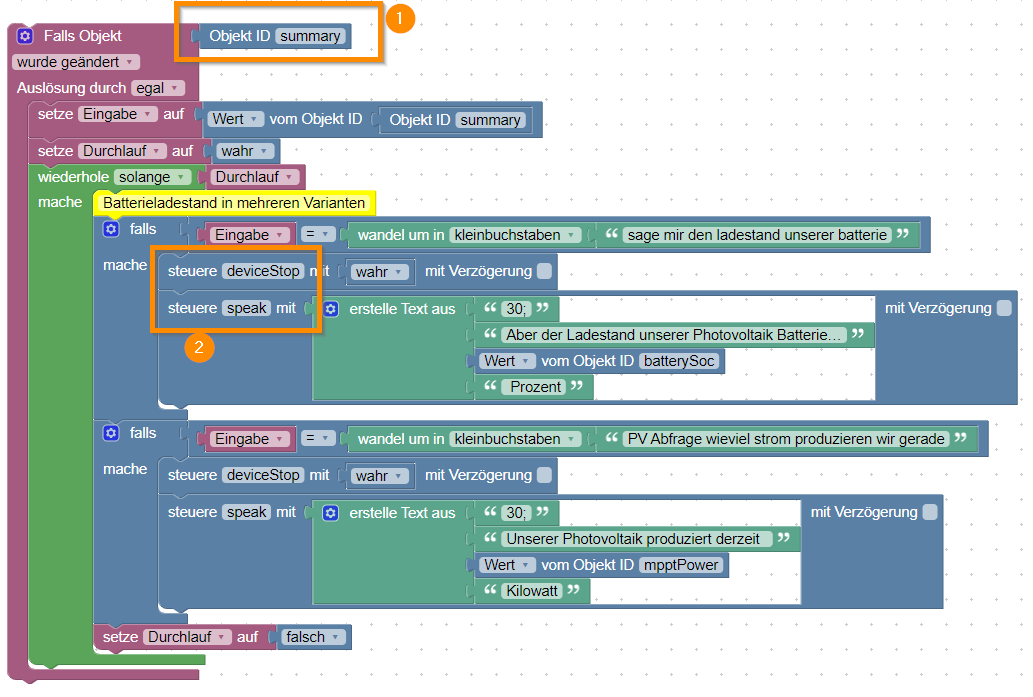
(1) würde ich gerne gegen das triggern der Routine austauschen und dann habe ich noch Arbeit im Block
(2) den ich dann dynamisch so umbauen muss, dass die Antwort auch an das aktivierte gerät geht und nicht nur an ein Standardgerät wie heute. -
@djmarc75 Im Moment gehe ich über die History/summary Funktion (die trotz der 3.24.1 bei mir gerade leer bleibt), aber egal ich kann den Workaround auch wieder einbauen.
Aktuell so implementiert:
(1) würde ich gerne gegen das triggern der Routine austauschen und dann habe ich noch Arbeit im Block
(2) den ich dann dynamisch so umbauen muss, dass die Antwort auch an das aktivierte gerät geht und nicht nur an ein Standardgerät wie heute.Grad mal innerhalb paar Minuten ein funktionierendes Skript gebaut.
Bei Deinem Vorhaben braucht es weder eine Schleife noch den Block mit dem Du das Device stoppst.
Du musst halt für jede unterschiedlichen Wert welche abgefragt werden eine Routinen in der AlexaApp ohne Funktion anlegen.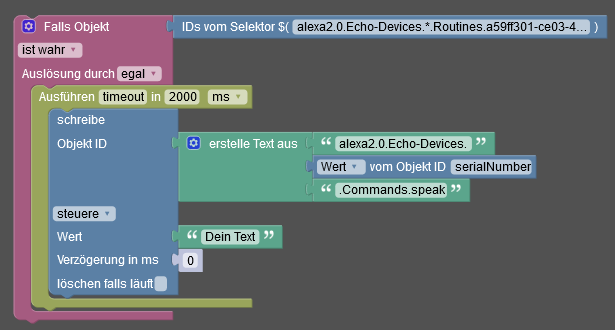
-
Grad mal innerhalb paar Minuten ein funktionierendes Skript gebaut.
Bei Deinem Vorhaben braucht es weder eine Schleife noch den Block mit dem Du das Device stoppst.
Du musst halt für jede unterschiedlichen Wert welche abgefragt werden eine Routinen in der AlexaApp ohne Funktion anlegen.@djmarc75 Erstmal herzlichen Dank. Das habe ich soweit verstanden und gut weggelegt. Coole Idee das so zu machen.
Ich lege das Thema hier aber erstmal auf Eis. Irgendwas stimmt mit meiner Installation nicht. Ich habe plötzlich wieder das "history" Problem, obwohl ich die neueste Version des Adapters habe und auch die json Datei nochmal angepasst habe.
Das muss erstmal sauber laufen, vorher macht eine "Fehlersuche" (die jetzt ja sehr wahrscheinlich keine mehr ist) wieder Sinn macht. -
@djmarc75 Erstmal herzlichen Dank. Das habe ich soweit verstanden und gut weggelegt. Coole Idee das so zu machen.
Ich lege das Thema hier aber erstmal auf Eis. Irgendwas stimmt mit meiner Installation nicht. Ich habe plötzlich wieder das "history" Problem, obwohl ich die neueste Version des Adapters habe und auch die json Datei nochmal angepasst habe.
Das muss erstmal sauber laufen, vorher macht eine "Fehlersuche" (die jetzt ja sehr wahrscheinlich keine mehr ist) wieder Sinn macht.@wofried sagte in Neue Alexa Routinen erscheinen nicht in den Alexa2 Objekten:
Ich habe plötzlich wieder das "history" Problem
Wenn es bei allen Anderen mit der neuesten Version funktioniert dann stimmt bei Dir halt irgendwo anders was nicht.
Zeig mal
iob diagdie Langfassung und BITTE in Codetags
-
@wofried sagte in Neue Alexa Routinen erscheinen nicht in den Alexa2 Objekten:
Ich habe plötzlich wieder das "history" Problem
Wenn es bei allen Anderen mit der neuesten Version funktioniert dann stimmt bei Dir halt irgendwo anders was nicht.
Zeig mal
iob diagdie Langfassung und BITTE in Codetags
@djmarc75 Aber gerne doch. habe mittlerweile den Adapter deinstalliert und wieder neu drauf gepackt. Alle Smart-Home Devices sind da, aber history immer noch nicht.
Der im Log beschriebene Crash des Adapters war nur einmalig direkt nach der frischen Installation.======== Start marking the full check here ========= Skript v.2023-04-16 *** BASE SYSTEM *** Model : Raspberry Pi 4 Model B Rev 1.5 Architecture : aarch64 Docker : false Virtualization : none Distributor ID: Raspbian Description: Raspbian GNU/Linux 11 (bullseye) Release: 11 Codename: bullseye PRETTY_NAME="Raspbian GNU/Linux 11 (bullseye)" NAME="Raspbian GNU/Linux" VERSION_ID="11" VERSION="11 (bullseye)" VERSION_CODENAME=bullseye ID=raspbian ID_LIKE=debian HOME_URL="http://www.raspbian.org/" SUPPORT_URL="http://www.raspbian.org/RaspbianForums" BUG_REPORT_URL="http://www.raspbian.org/RaspbianBugs" Systemuptime and Load: 18:11:12 up 3:47, 2 users, load average: 1.12, 0.83, 0.67 CPU threads: 4 Raspberry only: throttled=0x0 Other values than 0x0 hint to temperature/voltage problems temp=38.9'C volt=0.9260V *** Time and Time Zones *** Local time: Thu 2023-08-10 18:11:12 CEST Universal time: Thu 2023-08-10 16:11:12 UTC RTC time: n/a Time zone: Europe/Berlin (CEST, +0200) System clock synchronized: yes NTP service: active RTC in local TZ: no *** User and Groups *** pi /home/pi pi adm dialout cdrom sudo audio video plugdev games users input render netdev lpadmin gpio i2c spi iobroker *** X-Server-Setup *** X-Server: true Desktop: LXDE-pi Terminal: x11 Boot Target: graphical.target *** MEMORY *** total used free shared buff/cache available Mem: 7.8G 1.1G 5.6G 95M 1.1G 6.7G Swap: 99M 0B 99M Total: 7.9G 1.1G 5.7G 7811 M total memory 1103 M used memory 1099 M active memory 829 M inactive memory 5630 M free memory 88 M buffer memory 988 M swap cache 99 M total swap 0 M used swap 99 M free swap Raspberry only: oom events: 0 lifetime oom required: 0 Mbytes total time in oom handler: 0 ms max time spent in oom handler: 0 ms *** FILESYSTEM *** Filesystem Type Size Used Avail Use% Mounted on /dev/root ext4 29G 5.9G 22G 22% / devtmpfs devtmpfs 3.6G 0 3.6G 0% /dev tmpfs tmpfs 3.9G 5.9M 3.9G 1% /dev/shm tmpfs tmpfs 1.6G 1.2M 1.6G 1% /run tmpfs tmpfs 5.0M 4.0K 5.0M 1% /run/lock /dev/sda1 vfat 253M 51M 202M 20% /boot tmpfs tmpfs 782M 24K 782M 1% /run/user/1000 Messages concerning ext4 filesystem in dmesg: [Thu Aug 10 14:23:33 2023] Kernel command line: coherent_pool=1M 8250.nr_uarts=0 snd_bcm2835.enable_headphones=0 snd_bcm2835.enable_headphones=1 snd_bcm2835.enable_hdmi=1 snd_bcm2835.enable_hdmi=0 smsc95xx.macaddr=D8:3A:DD:43:B4:2C vc_mem.mem_base=0x3eb00000 vc_mem.mem_size=0x3ff00000 console=ttyS0,115200 console=tty1 root=PARTUUID=846165e2-02 rootfstype=ext4 fsck.repair=yes rootwait quiet splash plymouth.ignore-serial-consoles [Thu Aug 10 14:23:36 2023] EXT4-fs (sda2): mounted filesystem with ordered data mode. Quota mode: none. [Thu Aug 10 14:23:36 2023] VFS: Mounted root (ext4 filesystem) readonly on device 8:2. [Thu Aug 10 14:23:39 2023] EXT4-fs (sda2): re-mounted. Quota mode: none. Show mounted filesystems (real ones only): TARGET SOURCE FSTYPE OPTIONS / /dev/sda2 ext4 rw,noatime `-/boot /dev/sda1 vfat rw,relatime,fmask=0022,dmask=0022,codepage=437,iocharset=ascii,shortname=mixed,errors=remount-ro Files in neuralgic directories: /var: 1.1G /var/ 534M /var/cache 521M /var/cache/apt 457M /var/cache/apt/archives 277M /var/log Archived and active journals take up 240.0M in the file system. /opt/iobroker/backups: 7.7M /opt/iobroker/backups/ /opt/iobroker/iobroker-data: 150M /opt/iobroker/iobroker-data/ 111M /opt/iobroker/iobroker-data/files 52M /opt/iobroker/iobroker-data/files/javascript.admin 34M /opt/iobroker/iobroker-data/files/javascript.admin/static 33M /opt/iobroker/iobroker-data/files/javascript.admin/static/js The five largest files in iobroker-data are: 19M /opt/iobroker/iobroker-data/files/iot.admin/static/js/main.2975a411.js.map 17M /opt/iobroker/iobroker-data/objects.jsonl 8.9M /opt/iobroker/iobroker-data/files/scenes.admin/static/js/2.7de3299d.chunk.js.map 8.2M /opt/iobroker/iobroker-data/files/iot.admin/static/js/main.2975a411.js 6.9M /opt/iobroker/iobroker-data/files/javascript.admin/static/js/610.312d98a8.chunk.js.map *** NodeJS-Installation *** /usr/bin/nodejs v16.20.2 /usr/bin/node v16.20.2 /usr/bin/npm 8.19.4 /usr/bin/npx 8.19.4 nodejs: Installed: 16.20.2-deb-1nodesource1 Candidate: 16.20.2-deb-1nodesource1 Version table: *** 16.20.2-deb-1nodesource1 500 500 https://deb.nodesource.com/node_16.x bullseye/main armhf Packages 100 /var/lib/dpkg/status 12.22.12~dfsg-1~deb11u4 500 500 http://raspbian.raspberrypi.org/raspbian bullseye/main armhf Packages Temp directories causing npm8 problem: 0 No problems detected *** ioBroker-Installation *** ioBroker Status iobroker is running on this host. Objects type: jsonl States type: jsonl MULTIHOSTSERVICE/enabled: false Core adapters versions js-controller: 4.0.24 admin: 6.3.5 javascript: 7.0.3 Adapters from github: 1 Adapter State + system.adapter.admin.0 : admin : raspi - enabled, port: 8081, bind: 0.0.0.0, run as: admin + system.adapter.alexa2.0 : alexa2 : raspi - enabled + system.adapter.backitup.0 : backitup : raspi - enabled system.adapter.broadlink2.0 : broadlink2 : raspi - disabled + system.adapter.discovery.0 : discovery : raspi - enabled + system.adapter.fusionsolar.0 : fusionsolar : raspi - enabled system.adapter.hm-rega.0 : hm-rega : raspi - disabled system.adapter.hm-rpc.0 : hm-rpc : raspi - disabled, port: 0 + system.adapter.iot.0 : iot : raspi - enabled + system.adapter.javascript.0 : javascript : raspi - enabled + system.adapter.mihome-vacuum.0 : mihome-vacuum : raspi - enabled, port: 54321 system.adapter.netatmo-crawler.0 : netatmo-crawler : raspi - enabled + system.adapter.pushover.0 : pushover : raspi - enabled + system.adapter.rpi2.0 : rpi2 : raspi - enabled + system.adapter.scenes.0 : scenes : raspi - enabled + system.adapter.shelly.0 : shelly : raspi - enabled, port: 1882, bind: 0.0.0.0 + system.adapter.tuya.0 : tuya : raspi - enabled + instance is alive Enabled adapters with bindings + system.adapter.admin.0 : admin : raspi - enabled, port: 8081, bind: 0.0.0.0, run as: admin + system.adapter.mihome-vacuum.0 : mihome-vacuum : raspi - enabled, port: 54321 + system.adapter.shelly.0 : shelly : raspi - enabled, port: 1882, bind: 0.0.0.0 ioBroker-Repositories stable : http://download.iobroker.net/sources-dist.json beta : http://download.iobroker.net/sources-dist-latest.json Active repo(s): stable Installed ioBroker-Instances Used repository: stable Adapter "admin" : 6.3.5 , installed 6.3.5 Adapter "alexa2" : 3.24.1 , installed 3.24.1 Adapter "backitup" : 2.6.23 , installed 2.6.23 Adapter "broadlink2" : 2.1.5 , installed 2.1.5 Adapter "discovery" : 3.1.0 , installed 3.1.0 Adapter "hm-rega" : 3.0.46 , installed 3.0.46 Adapter "hm-rpc" : 1.15.18 , installed 1.15.18 Adapter "iot" : 1.14.5 , installed 1.14.5 Adapter "javascript" : 7.0.3 , installed 7.0.3 Controller "js-controller": 4.0.24 , installed 4.0.24 Adapter "mihome-vacuum": 3.11.0 , installed 3.11.0 Adapter "netatmo-crawler": 0.8.1 , installed 0.8.1 Adapter "pushover" : 3.0.3 , installed 3.0.3 Adapter "rpi2" : 1.3.2 , installed 1.3.2 Adapter "scenes" : 2.3.9 , installed 2.3.9 Adapter "shelly" : 6.4.1 , installed 6.4.1 Adapter "tuya" : 3.14.2 , installed 3.14.2 Objects and States Please stand by - This may take a while Objects: 8279 States: 7073 *** OS-Repositories and Updates *** Hit:1 http://archive.raspberrypi.org/debian bullseye InRelease Hit:2 http://raspbian.raspberrypi.org/raspbian bullseye InRelease Hit:3 https://deb.nodesource.com/node_16.x bullseye InRelease Reading package lists... Pending Updates: 0 *** Listening Ports *** Active Internet connections (only servers) Proto Recv-Q Send-Q Local Address Foreign Address State User Inode PID/Program name tcp 0 0 0.0.0.0:80 0.0.0.0:* LISTEN 0 16635 654/lighttpd tcp 0 0 127.0.0.1:4711 0.0.0.0:* LISTEN 999 14976 596/pihole-FTL tcp 0 0 127.0.0.1:631 0.0.0.0:* LISTEN 0 15781 562/cupsd tcp 0 0 0.0.0.0:22 0.0.0.0:* LISTEN 0 15673 607/sshd: /usr/sbin tcp 0 0 0.0.0.0:53 0.0.0.0:* LISTEN 999 14970 596/pihole-FTL tcp 0 0 127.0.0.1:9000 0.0.0.0:* LISTEN 1001 17254 563/iobroker.js-con tcp 0 0 127.0.0.1:9001 0.0.0.0:* LISTEN 1001 18628 563/iobroker.js-con tcp 0 0 0.0.0.0:1882 0.0.0.0:* LISTEN 1001 22605 2121/io.shelly.0 tcp 0 0 0.0.0.0:5900 0.0.0.0:* LISTEN 0 15802 602/vncserver-x11-c tcp6 0 0 :::80 :::* LISTEN 0 16636 654/lighttpd tcp6 0 0 :::22 :::* LISTEN 0 15675 607/sshd: /usr/sbin tcp6 0 0 :::53 :::* LISTEN 999 14972 596/pihole-FTL tcp6 0 0 ::1:4711 :::* LISTEN 999 14977 596/pihole-FTL tcp6 0 0 ::1:631 :::* LISTEN 0 15780 562/cupsd tcp6 0 0 :::5900 :::* LISTEN 0 15801 602/vncserver-x11-c tcp6 0 0 :::3389 :::* LISTEN 116 14960 630/xrdp tcp6 0 0 :::8081 :::* LISTEN 1001 21542 1470/io.admin.0 tcp6 0 0 ::1:3350 :::* LISTEN 0 16540 600/xrdp-sesman udp 0 0 0.0.0.0:5353 0.0.0.0:* 108 16454 401/avahi-daemon: r udp 0 0 0.0.0.0:58939 0.0.0.0:* 108 16456 401/avahi-daemon: r udp 0 0 0.0.0.0:6666 0.0.0.0:* 1001 21095 2138/io.tuya.0 udp 0 0 0.0.0.0:6667 0.0.0.0:* 1001 21096 2138/io.tuya.0 udp 0 0 0.0.0.0:53 0.0.0.0:* 999 14969 596/pihole-FTL udp 0 0 0.0.0.0:68 0.0.0.0:* 0 14989 473/dhcpcd udp 0 0 0.0.0.0:53421 0.0.0.0:* 1001 20919 2026/io.mihome-vacu udp 0 0 0.0.0.0:631 0.0.0.0:* 0 12977 639/cups-browsed udp6 0 0 :::5353 :::* 108 16455 401/avahi-daemon: r udp6 0 0 :::52815 :::* 108 16457 401/avahi-daemon: r udp6 0 0 :::53 :::* 999 14971 596/pihole-FTL udp6 0 0 :::546 :::* 0 17277 473/dhcpcd *** Log File - Last 25 Lines *** 2023-08-10 18:02:27.017 - info: alexa2.0 (12851) starting. Version 3.24.1 in /opt/iobroker/node_modules/iobroker.alexa2, node: v16.20.2, js-controller: 4.0.24 2023-08-10 18:02:27.086 - info: alexa2.0 (12851) Starting Alexa2 adapter ... it can take several minutes to initialize all data. Please be patient! A done message is logged. 2023-08-10 18:02:27.092 - error: alexa2.0 (12851) Adapter seems to have issues and crashed three times in a row. Disabling!! Please start again and check logs. 2023-08-10 18:02:28.095 - info: alexa2.0 (12851) Terminated (ADAPTER_REQUESTED_TERMINATION): Without reason 2023-08-10 18:02:28.670 - error: host.raspi instance system.adapter.alexa2.0 terminated by request of the instance itself and will not be restarted, before user restarts it. 2023-08-10 18:02:28.670 - info: host.raspi Do not restart adapter system.adapter.alexa2.0 because desired by instance 2023-08-10 18:03:30.191 - info: host.raspi instance system.adapter.alexa2.0 started with pid 13053 2023-08-10 18:03:32.564 - info: alexa2.0 (13053) starting. Version 3.24.1 in /opt/iobroker/node_modules/iobroker.alexa2, node: v16.20.2, js-controller: 4.0.24 2023-08-10 18:03:32.637 - info: alexa2.0 (13053) Starting Alexa2 adapter ... it can take several minutes to initialize all data. Please be patient! A done message is logged. 2023-08-10 18:03:38.462 - info: alexa2.0 (13053) Initialize all Device states ... 2023-08-10 18:04:29.009 - info: alexa2.0 (13053) Unknown Device, but enabling commands, Try it and report back if commands work. 2023-08-10 18:04:29.011 - info: alexa2.0 (13053) Report to developer as GitHub issue with details for device. Please grab full next line pot. from logfile on disk if cutted 2023-08-10 18:04:29.013 - info: alexa2.0 (13053) Device-type:A324YMIUSWQDGE - Fernseher (Samsung TV 2020-Q) (SLEEP,DEEZER,APPLE_MUSIC,SUPPORTS_LOCALE,GOLDFISH,SOUND_SETTINGS,I_HEART_RADIO,REMINDERS,DIALOG_INTERFACE_VERSION,TIMERS_AND_ALARMS,AUDIO_PLAYER,SUPPORTS_CONNECTED_HOME_CLOUD_ONLY,ASCENDING_ALARM_VOLUME,DEREGISTER_DEVICE,MUSIC_SKILL,MULTI_WAKEWORDS_SUPPORTED,TIDAL,CHANGE_NAME,PERSISTENT_CONNECTION,AUDIBLE,HANDS_FREE,TUNE_IN,CUSTOM_ALARM_TONE,SUPPORTS_LOCALE_SWITCH,DREAM_TRAINING,EARCONS,MICROPHONE,SET_LOCALE,KINDLE_BOOKS,ADAPTIVE_LISTENING,TOUCH_INITIATED,AMAZON_MUSIC,VOLUME_SETTING,SPEECH_RECOGNIZER_USS,SET_TIME_ZONE,SIRIUSXM) 2023-08-10 18:04:59.659 - info: alexa2.0 (13053) Unknown Device, but enabling commands, Try it and report back if commands work. 2023-08-10 18:04:59.660 - info: alexa2.0 (13053) Report to developer as GitHub issue with details for device. Please grab full next line pot. from logfile on disk if cutted 2023-08-10 18:04:59.660 - info: alexa2.0 (13053) Device-type:A15996VY63BQ2D - Echo Show Küche (DEEZER,APPLE_MUSIC,SUPPORTS_SOFTWARE_VERSION,FACE_TO_TALK,TIMERS_AND_ALARMS,GUARD_EARCON,SALMON,ASCENDING_ALARM_VOLUME,MUSIC_SKILL,AUDIO_CONTROLS,TIDAL,TIMERS_ALARMS_NOTIFICATIONS_VOLUME,LIVE_VIEW,TUNE_IN,CUSTOM_ALARM_TONE,LEMUR_ALPHA,EQUALIZER_CONTROLLER_BASS,SUPPORTS_LOCALE_SWITCH,EARCONS,SET_LOCALE,MICROPHONE,FAR_FIELD_WAKE_WORD,TUPLE,SUPPORT_CALENDAR_ALERT,ADAPTIVE_LISTENING,ALEXA_VOICE,PAIR_BT_SINK,DS_VOLUME_SETTING,VOLUME_SETTING,SPEECH_RECOGNIZER_USS,SIRIUSXM,EQUALIZER_CONTROLLER_MIDRANGE,SHARKNADO,SLEEP,SUPPORTS_LOCALE,LOCALIZATION,GOLDFISH,EQUALIZER_CONTROLLER_TREBLE,SOUND_SETTINGS,I_HEART_RADIO,REMINDERS,DIALOG_INTERFACE_VERSION,POPTART,VOICE_TRAINING,AUDIO_PLAYER,SUPPORTS_CONNECTED_HOME_CLOUD_ONLY,PANDORA,DEREGISTER_DEVICE,MULTI_WAKEWORDS_SUPPORTED,CHANGE_NAME,CLOCK_FORMAT_24_HR,PERSISTENT_CONNECTION,AUDIBLE,TUPLE_CATEGORY_B,DREAM_TRAINING,KINDLE_BOOKS,EFDCARDS,BT_PAIRING_FLOW_V2,VISUAL_GESTURE,AMAZON_MUSIC,FLASH_BRIEFING,ALEXA_PRESENCE) 2023-08-10 18:05:00.079 - info: host.raspi instance system.adapter.netatmo-crawler.0 started with pid 13345 2023-08-10 18:05:03.135 - info: netatmo-crawler.0 (13345) starting. Version 0.8.1 in /opt/iobroker/node_modules/iobroker.netatmo-crawler, node: v16.20.2, js-controller: 4.0.24 2023-08-10 18:05:03.205 - info: netatmo-crawler.0 (13345) Getting data for stationid:*********************** 2023-08-10 18:05:03.946 - info: netatmo-crawler.0 (13345) Terminated (ADAPTER_REQUESTED_TERMINATION): Everything done. Going to terminate till next schedule 2023-08-10 18:05:04.477 - info: host.raspi instance system.adapter.netatmo-crawler.0 terminated with code 11 (ADAPTER_REQUESTED_TERMINATION) 2023-08-10 18:05:22.362 - info: alexa2.0 (13053) No smart home devices to query 2023-08-10 18:05:25.058 - info: alexa2.0 (13053) Subscribing to states... 2023-08-10 18:05:27.436 - info: alexa2.0 (13053) Alexa-Push-Connection (macDms = true) established. Disable Polling 2023-08-10 18:06:03.410 - info: alexa2.0 (13053) Initialization Done ... ============ Mark until here for C&P ============= -
@djmarc75 Aber gerne doch. habe mittlerweile den Adapter deinstalliert und wieder neu drauf gepackt. Alle Smart-Home Devices sind da, aber history immer noch nicht.
Der im Log beschriebene Crash des Adapters war nur einmalig direkt nach der frischen Installation.======== Start marking the full check here ========= Skript v.2023-04-16 *** BASE SYSTEM *** Model : Raspberry Pi 4 Model B Rev 1.5 Architecture : aarch64 Docker : false Virtualization : none Distributor ID: Raspbian Description: Raspbian GNU/Linux 11 (bullseye) Release: 11 Codename: bullseye PRETTY_NAME="Raspbian GNU/Linux 11 (bullseye)" NAME="Raspbian GNU/Linux" VERSION_ID="11" VERSION="11 (bullseye)" VERSION_CODENAME=bullseye ID=raspbian ID_LIKE=debian HOME_URL="http://www.raspbian.org/" SUPPORT_URL="http://www.raspbian.org/RaspbianForums" BUG_REPORT_URL="http://www.raspbian.org/RaspbianBugs" Systemuptime and Load: 18:11:12 up 3:47, 2 users, load average: 1.12, 0.83, 0.67 CPU threads: 4 Raspberry only: throttled=0x0 Other values than 0x0 hint to temperature/voltage problems temp=38.9'C volt=0.9260V *** Time and Time Zones *** Local time: Thu 2023-08-10 18:11:12 CEST Universal time: Thu 2023-08-10 16:11:12 UTC RTC time: n/a Time zone: Europe/Berlin (CEST, +0200) System clock synchronized: yes NTP service: active RTC in local TZ: no *** User and Groups *** pi /home/pi pi adm dialout cdrom sudo audio video plugdev games users input render netdev lpadmin gpio i2c spi iobroker *** X-Server-Setup *** X-Server: true Desktop: LXDE-pi Terminal: x11 Boot Target: graphical.target *** MEMORY *** total used free shared buff/cache available Mem: 7.8G 1.1G 5.6G 95M 1.1G 6.7G Swap: 99M 0B 99M Total: 7.9G 1.1G 5.7G 7811 M total memory 1103 M used memory 1099 M active memory 829 M inactive memory 5630 M free memory 88 M buffer memory 988 M swap cache 99 M total swap 0 M used swap 99 M free swap Raspberry only: oom events: 0 lifetime oom required: 0 Mbytes total time in oom handler: 0 ms max time spent in oom handler: 0 ms *** FILESYSTEM *** Filesystem Type Size Used Avail Use% Mounted on /dev/root ext4 29G 5.9G 22G 22% / devtmpfs devtmpfs 3.6G 0 3.6G 0% /dev tmpfs tmpfs 3.9G 5.9M 3.9G 1% /dev/shm tmpfs tmpfs 1.6G 1.2M 1.6G 1% /run tmpfs tmpfs 5.0M 4.0K 5.0M 1% /run/lock /dev/sda1 vfat 253M 51M 202M 20% /boot tmpfs tmpfs 782M 24K 782M 1% /run/user/1000 Messages concerning ext4 filesystem in dmesg: [Thu Aug 10 14:23:33 2023] Kernel command line: coherent_pool=1M 8250.nr_uarts=0 snd_bcm2835.enable_headphones=0 snd_bcm2835.enable_headphones=1 snd_bcm2835.enable_hdmi=1 snd_bcm2835.enable_hdmi=0 smsc95xx.macaddr=D8:3A:DD:43:B4:2C vc_mem.mem_base=0x3eb00000 vc_mem.mem_size=0x3ff00000 console=ttyS0,115200 console=tty1 root=PARTUUID=846165e2-02 rootfstype=ext4 fsck.repair=yes rootwait quiet splash plymouth.ignore-serial-consoles [Thu Aug 10 14:23:36 2023] EXT4-fs (sda2): mounted filesystem with ordered data mode. Quota mode: none. [Thu Aug 10 14:23:36 2023] VFS: Mounted root (ext4 filesystem) readonly on device 8:2. [Thu Aug 10 14:23:39 2023] EXT4-fs (sda2): re-mounted. Quota mode: none. Show mounted filesystems (real ones only): TARGET SOURCE FSTYPE OPTIONS / /dev/sda2 ext4 rw,noatime `-/boot /dev/sda1 vfat rw,relatime,fmask=0022,dmask=0022,codepage=437,iocharset=ascii,shortname=mixed,errors=remount-ro Files in neuralgic directories: /var: 1.1G /var/ 534M /var/cache 521M /var/cache/apt 457M /var/cache/apt/archives 277M /var/log Archived and active journals take up 240.0M in the file system. /opt/iobroker/backups: 7.7M /opt/iobroker/backups/ /opt/iobroker/iobroker-data: 150M /opt/iobroker/iobroker-data/ 111M /opt/iobroker/iobroker-data/files 52M /opt/iobroker/iobroker-data/files/javascript.admin 34M /opt/iobroker/iobroker-data/files/javascript.admin/static 33M /opt/iobroker/iobroker-data/files/javascript.admin/static/js The five largest files in iobroker-data are: 19M /opt/iobroker/iobroker-data/files/iot.admin/static/js/main.2975a411.js.map 17M /opt/iobroker/iobroker-data/objects.jsonl 8.9M /opt/iobroker/iobroker-data/files/scenes.admin/static/js/2.7de3299d.chunk.js.map 8.2M /opt/iobroker/iobroker-data/files/iot.admin/static/js/main.2975a411.js 6.9M /opt/iobroker/iobroker-data/files/javascript.admin/static/js/610.312d98a8.chunk.js.map *** NodeJS-Installation *** /usr/bin/nodejs v16.20.2 /usr/bin/node v16.20.2 /usr/bin/npm 8.19.4 /usr/bin/npx 8.19.4 nodejs: Installed: 16.20.2-deb-1nodesource1 Candidate: 16.20.2-deb-1nodesource1 Version table: *** 16.20.2-deb-1nodesource1 500 500 https://deb.nodesource.com/node_16.x bullseye/main armhf Packages 100 /var/lib/dpkg/status 12.22.12~dfsg-1~deb11u4 500 500 http://raspbian.raspberrypi.org/raspbian bullseye/main armhf Packages Temp directories causing npm8 problem: 0 No problems detected *** ioBroker-Installation *** ioBroker Status iobroker is running on this host. Objects type: jsonl States type: jsonl MULTIHOSTSERVICE/enabled: false Core adapters versions js-controller: 4.0.24 admin: 6.3.5 javascript: 7.0.3 Adapters from github: 1 Adapter State + system.adapter.admin.0 : admin : raspi - enabled, port: 8081, bind: 0.0.0.0, run as: admin + system.adapter.alexa2.0 : alexa2 : raspi - enabled + system.adapter.backitup.0 : backitup : raspi - enabled system.adapter.broadlink2.0 : broadlink2 : raspi - disabled + system.adapter.discovery.0 : discovery : raspi - enabled + system.adapter.fusionsolar.0 : fusionsolar : raspi - enabled system.adapter.hm-rega.0 : hm-rega : raspi - disabled system.adapter.hm-rpc.0 : hm-rpc : raspi - disabled, port: 0 + system.adapter.iot.0 : iot : raspi - enabled + system.adapter.javascript.0 : javascript : raspi - enabled + system.adapter.mihome-vacuum.0 : mihome-vacuum : raspi - enabled, port: 54321 system.adapter.netatmo-crawler.0 : netatmo-crawler : raspi - enabled + system.adapter.pushover.0 : pushover : raspi - enabled + system.adapter.rpi2.0 : rpi2 : raspi - enabled + system.adapter.scenes.0 : scenes : raspi - enabled + system.adapter.shelly.0 : shelly : raspi - enabled, port: 1882, bind: 0.0.0.0 + system.adapter.tuya.0 : tuya : raspi - enabled + instance is alive Enabled adapters with bindings + system.adapter.admin.0 : admin : raspi - enabled, port: 8081, bind: 0.0.0.0, run as: admin + system.adapter.mihome-vacuum.0 : mihome-vacuum : raspi - enabled, port: 54321 + system.adapter.shelly.0 : shelly : raspi - enabled, port: 1882, bind: 0.0.0.0 ioBroker-Repositories stable : http://download.iobroker.net/sources-dist.json beta : http://download.iobroker.net/sources-dist-latest.json Active repo(s): stable Installed ioBroker-Instances Used repository: stable Adapter "admin" : 6.3.5 , installed 6.3.5 Adapter "alexa2" : 3.24.1 , installed 3.24.1 Adapter "backitup" : 2.6.23 , installed 2.6.23 Adapter "broadlink2" : 2.1.5 , installed 2.1.5 Adapter "discovery" : 3.1.0 , installed 3.1.0 Adapter "hm-rega" : 3.0.46 , installed 3.0.46 Adapter "hm-rpc" : 1.15.18 , installed 1.15.18 Adapter "iot" : 1.14.5 , installed 1.14.5 Adapter "javascript" : 7.0.3 , installed 7.0.3 Controller "js-controller": 4.0.24 , installed 4.0.24 Adapter "mihome-vacuum": 3.11.0 , installed 3.11.0 Adapter "netatmo-crawler": 0.8.1 , installed 0.8.1 Adapter "pushover" : 3.0.3 , installed 3.0.3 Adapter "rpi2" : 1.3.2 , installed 1.3.2 Adapter "scenes" : 2.3.9 , installed 2.3.9 Adapter "shelly" : 6.4.1 , installed 6.4.1 Adapter "tuya" : 3.14.2 , installed 3.14.2 Objects and States Please stand by - This may take a while Objects: 8279 States: 7073 *** OS-Repositories and Updates *** Hit:1 http://archive.raspberrypi.org/debian bullseye InRelease Hit:2 http://raspbian.raspberrypi.org/raspbian bullseye InRelease Hit:3 https://deb.nodesource.com/node_16.x bullseye InRelease Reading package lists... Pending Updates: 0 *** Listening Ports *** Active Internet connections (only servers) Proto Recv-Q Send-Q Local Address Foreign Address State User Inode PID/Program name tcp 0 0 0.0.0.0:80 0.0.0.0:* LISTEN 0 16635 654/lighttpd tcp 0 0 127.0.0.1:4711 0.0.0.0:* LISTEN 999 14976 596/pihole-FTL tcp 0 0 127.0.0.1:631 0.0.0.0:* LISTEN 0 15781 562/cupsd tcp 0 0 0.0.0.0:22 0.0.0.0:* LISTEN 0 15673 607/sshd: /usr/sbin tcp 0 0 0.0.0.0:53 0.0.0.0:* LISTEN 999 14970 596/pihole-FTL tcp 0 0 127.0.0.1:9000 0.0.0.0:* LISTEN 1001 17254 563/iobroker.js-con tcp 0 0 127.0.0.1:9001 0.0.0.0:* LISTEN 1001 18628 563/iobroker.js-con tcp 0 0 0.0.0.0:1882 0.0.0.0:* LISTEN 1001 22605 2121/io.shelly.0 tcp 0 0 0.0.0.0:5900 0.0.0.0:* LISTEN 0 15802 602/vncserver-x11-c tcp6 0 0 :::80 :::* LISTEN 0 16636 654/lighttpd tcp6 0 0 :::22 :::* LISTEN 0 15675 607/sshd: /usr/sbin tcp6 0 0 :::53 :::* LISTEN 999 14972 596/pihole-FTL tcp6 0 0 ::1:4711 :::* LISTEN 999 14977 596/pihole-FTL tcp6 0 0 ::1:631 :::* LISTEN 0 15780 562/cupsd tcp6 0 0 :::5900 :::* LISTEN 0 15801 602/vncserver-x11-c tcp6 0 0 :::3389 :::* LISTEN 116 14960 630/xrdp tcp6 0 0 :::8081 :::* LISTEN 1001 21542 1470/io.admin.0 tcp6 0 0 ::1:3350 :::* LISTEN 0 16540 600/xrdp-sesman udp 0 0 0.0.0.0:5353 0.0.0.0:* 108 16454 401/avahi-daemon: r udp 0 0 0.0.0.0:58939 0.0.0.0:* 108 16456 401/avahi-daemon: r udp 0 0 0.0.0.0:6666 0.0.0.0:* 1001 21095 2138/io.tuya.0 udp 0 0 0.0.0.0:6667 0.0.0.0:* 1001 21096 2138/io.tuya.0 udp 0 0 0.0.0.0:53 0.0.0.0:* 999 14969 596/pihole-FTL udp 0 0 0.0.0.0:68 0.0.0.0:* 0 14989 473/dhcpcd udp 0 0 0.0.0.0:53421 0.0.0.0:* 1001 20919 2026/io.mihome-vacu udp 0 0 0.0.0.0:631 0.0.0.0:* 0 12977 639/cups-browsed udp6 0 0 :::5353 :::* 108 16455 401/avahi-daemon: r udp6 0 0 :::52815 :::* 108 16457 401/avahi-daemon: r udp6 0 0 :::53 :::* 999 14971 596/pihole-FTL udp6 0 0 :::546 :::* 0 17277 473/dhcpcd *** Log File - Last 25 Lines *** 2023-08-10 18:02:27.017 - info: alexa2.0 (12851) starting. Version 3.24.1 in /opt/iobroker/node_modules/iobroker.alexa2, node: v16.20.2, js-controller: 4.0.24 2023-08-10 18:02:27.086 - info: alexa2.0 (12851) Starting Alexa2 adapter ... it can take several minutes to initialize all data. Please be patient! A done message is logged. 2023-08-10 18:02:27.092 - error: alexa2.0 (12851) Adapter seems to have issues and crashed three times in a row. Disabling!! Please start again and check logs. 2023-08-10 18:02:28.095 - info: alexa2.0 (12851) Terminated (ADAPTER_REQUESTED_TERMINATION): Without reason 2023-08-10 18:02:28.670 - error: host.raspi instance system.adapter.alexa2.0 terminated by request of the instance itself and will not be restarted, before user restarts it. 2023-08-10 18:02:28.670 - info: host.raspi Do not restart adapter system.adapter.alexa2.0 because desired by instance 2023-08-10 18:03:30.191 - info: host.raspi instance system.adapter.alexa2.0 started with pid 13053 2023-08-10 18:03:32.564 - info: alexa2.0 (13053) starting. Version 3.24.1 in /opt/iobroker/node_modules/iobroker.alexa2, node: v16.20.2, js-controller: 4.0.24 2023-08-10 18:03:32.637 - info: alexa2.0 (13053) Starting Alexa2 adapter ... it can take several minutes to initialize all data. Please be patient! A done message is logged. 2023-08-10 18:03:38.462 - info: alexa2.0 (13053) Initialize all Device states ... 2023-08-10 18:04:29.009 - info: alexa2.0 (13053) Unknown Device, but enabling commands, Try it and report back if commands work. 2023-08-10 18:04:29.011 - info: alexa2.0 (13053) Report to developer as GitHub issue with details for device. Please grab full next line pot. from logfile on disk if cutted 2023-08-10 18:04:29.013 - info: alexa2.0 (13053) Device-type:A324YMIUSWQDGE - Fernseher (Samsung TV 2020-Q) (SLEEP,DEEZER,APPLE_MUSIC,SUPPORTS_LOCALE,GOLDFISH,SOUND_SETTINGS,I_HEART_RADIO,REMINDERS,DIALOG_INTERFACE_VERSION,TIMERS_AND_ALARMS,AUDIO_PLAYER,SUPPORTS_CONNECTED_HOME_CLOUD_ONLY,ASCENDING_ALARM_VOLUME,DEREGISTER_DEVICE,MUSIC_SKILL,MULTI_WAKEWORDS_SUPPORTED,TIDAL,CHANGE_NAME,PERSISTENT_CONNECTION,AUDIBLE,HANDS_FREE,TUNE_IN,CUSTOM_ALARM_TONE,SUPPORTS_LOCALE_SWITCH,DREAM_TRAINING,EARCONS,MICROPHONE,SET_LOCALE,KINDLE_BOOKS,ADAPTIVE_LISTENING,TOUCH_INITIATED,AMAZON_MUSIC,VOLUME_SETTING,SPEECH_RECOGNIZER_USS,SET_TIME_ZONE,SIRIUSXM) 2023-08-10 18:04:59.659 - info: alexa2.0 (13053) Unknown Device, but enabling commands, Try it and report back if commands work. 2023-08-10 18:04:59.660 - info: alexa2.0 (13053) Report to developer as GitHub issue with details for device. Please grab full next line pot. from logfile on disk if cutted 2023-08-10 18:04:59.660 - info: alexa2.0 (13053) Device-type:A15996VY63BQ2D - Echo Show Küche (DEEZER,APPLE_MUSIC,SUPPORTS_SOFTWARE_VERSION,FACE_TO_TALK,TIMERS_AND_ALARMS,GUARD_EARCON,SALMON,ASCENDING_ALARM_VOLUME,MUSIC_SKILL,AUDIO_CONTROLS,TIDAL,TIMERS_ALARMS_NOTIFICATIONS_VOLUME,LIVE_VIEW,TUNE_IN,CUSTOM_ALARM_TONE,LEMUR_ALPHA,EQUALIZER_CONTROLLER_BASS,SUPPORTS_LOCALE_SWITCH,EARCONS,SET_LOCALE,MICROPHONE,FAR_FIELD_WAKE_WORD,TUPLE,SUPPORT_CALENDAR_ALERT,ADAPTIVE_LISTENING,ALEXA_VOICE,PAIR_BT_SINK,DS_VOLUME_SETTING,VOLUME_SETTING,SPEECH_RECOGNIZER_USS,SIRIUSXM,EQUALIZER_CONTROLLER_MIDRANGE,SHARKNADO,SLEEP,SUPPORTS_LOCALE,LOCALIZATION,GOLDFISH,EQUALIZER_CONTROLLER_TREBLE,SOUND_SETTINGS,I_HEART_RADIO,REMINDERS,DIALOG_INTERFACE_VERSION,POPTART,VOICE_TRAINING,AUDIO_PLAYER,SUPPORTS_CONNECTED_HOME_CLOUD_ONLY,PANDORA,DEREGISTER_DEVICE,MULTI_WAKEWORDS_SUPPORTED,CHANGE_NAME,CLOCK_FORMAT_24_HR,PERSISTENT_CONNECTION,AUDIBLE,TUPLE_CATEGORY_B,DREAM_TRAINING,KINDLE_BOOKS,EFDCARDS,BT_PAIRING_FLOW_V2,VISUAL_GESTURE,AMAZON_MUSIC,FLASH_BRIEFING,ALEXA_PRESENCE) 2023-08-10 18:05:00.079 - info: host.raspi instance system.adapter.netatmo-crawler.0 started with pid 13345 2023-08-10 18:05:03.135 - info: netatmo-crawler.0 (13345) starting. Version 0.8.1 in /opt/iobroker/node_modules/iobroker.netatmo-crawler, node: v16.20.2, js-controller: 4.0.24 2023-08-10 18:05:03.205 - info: netatmo-crawler.0 (13345) Getting data for stationid:*********************** 2023-08-10 18:05:03.946 - info: netatmo-crawler.0 (13345) Terminated (ADAPTER_REQUESTED_TERMINATION): Everything done. Going to terminate till next schedule 2023-08-10 18:05:04.477 - info: host.raspi instance system.adapter.netatmo-crawler.0 terminated with code 11 (ADAPTER_REQUESTED_TERMINATION) 2023-08-10 18:05:22.362 - info: alexa2.0 (13053) No smart home devices to query 2023-08-10 18:05:25.058 - info: alexa2.0 (13053) Subscribing to states... 2023-08-10 18:05:27.436 - info: alexa2.0 (13053) Alexa-Push-Connection (macDms = true) established. Disable Polling 2023-08-10 18:06:03.410 - info: alexa2.0 (13053) Initialization Done ... ============ Mark until here for C&P =============*** NodeJS-Installation *** /usr/bin/nodejs v16.20.2 /usr/bin/node v16.20.2 /usr/bin/npm 8.19.4 /usr/bin/npx 8.19.4nicht gerade aktuell... geh auf die empfohlene Version
@wofried sagte in Neue Alexa Routinen erscheinen nicht in den Alexa2 Objekten:
X-Server: true
ausknipsen - braucht/nutzt man nicht...
Wenn Du das gemacht hast, können wir nochmals drüberschauen.
Und bitte nicht den Adapter oder/und Deine Kiste unnötig neu starten... das stößt Amazon etwas auf.
Zusätzlich die Einstellungen im AlexaAdapter auch nochmal zeigen. -
*** NodeJS-Installation ***
/usr/bin/nodejs 	v16.20.2
/usr/bin/node 		v16.20.2
/usr/bin/npm 		8.19.4
/usr/bin/npx 		8.19.4
nicht gerade aktuell... geh auf die empfohlene Version
@wofried sagte in Neue Alexa Routinen erscheinen nicht in den Alexa2 Objekten:
X-Server: true
ausknipsen - braucht/nutzt man nicht...
Wenn Du das gemacht hast, können wir nochmals drüberschauen.
Und bitte nicht den Adapter oder/und Deine Kiste unnötig neu starten... das stößt Amazon etwas auf.
Zusätzlich die Einstellungen im AlexaAdapter auch nochmal zeigen.@djmarc75 Ich hab nix gemacht außer einem kleinen Nickerchen gemacht und schwupps ist alles da.
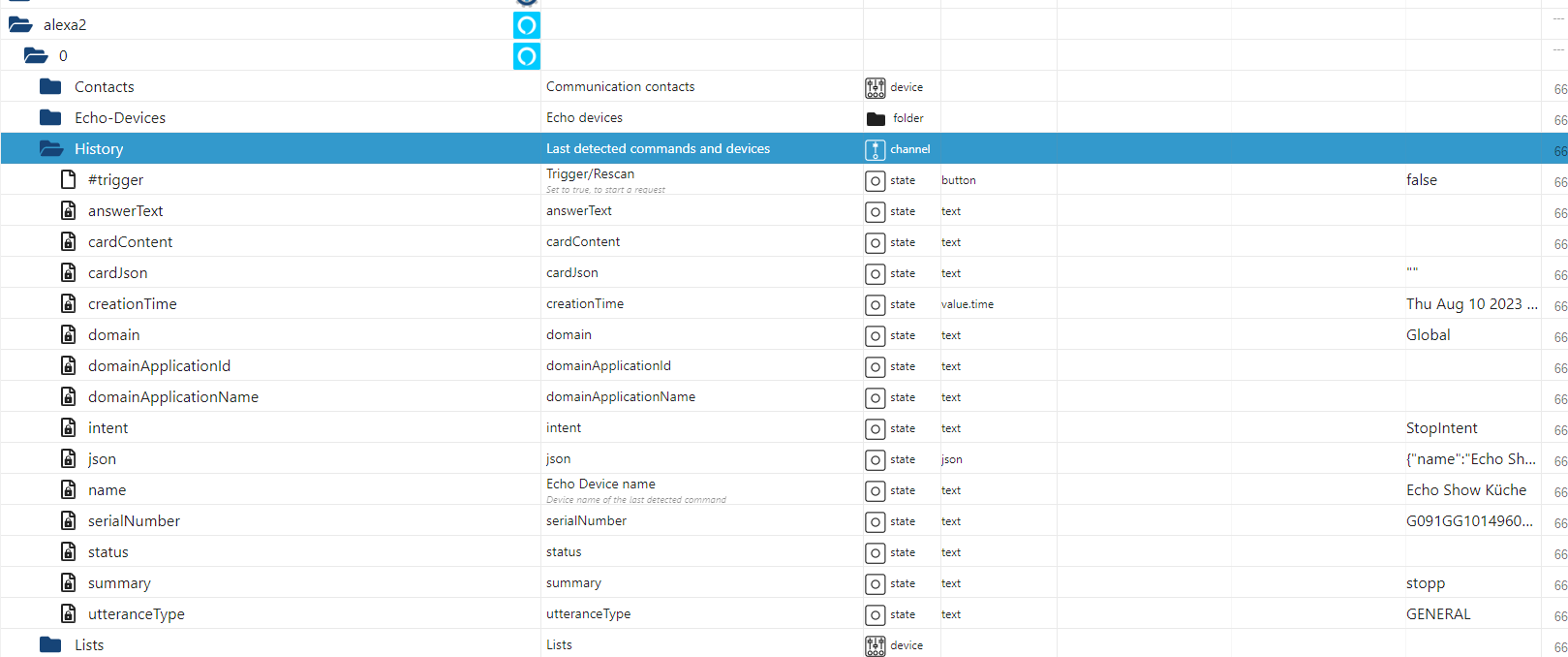
Naja ein Update von Nodejs & Co. zu machen, kann ja nicht schaden.
Wäre es vermessern zu fragen ob ich dann auf NodeJS 20 gehe (ganz nach der ANleitung Update NodeJS best practises... hier aus dem Forum) und die anderen dann passig dazu hochziehe?
Edit: Dein Skript funktioniert bestens!
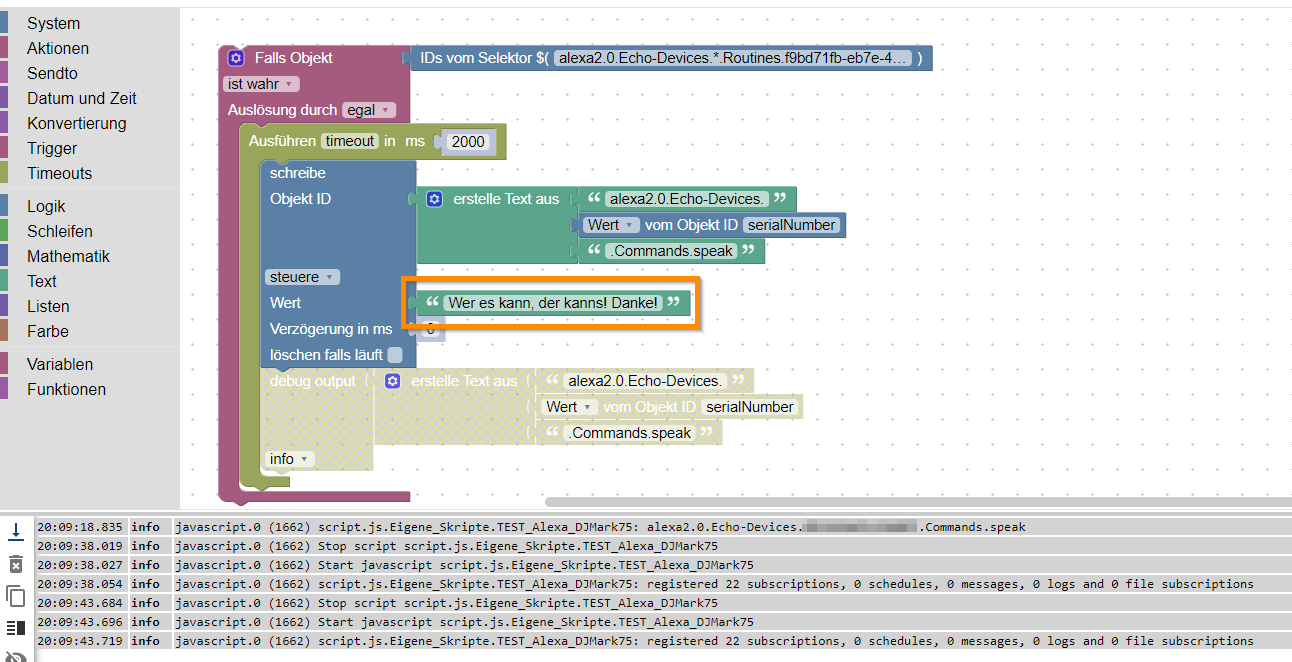
-
@djmarc75 Ich hab nix gemacht außer einem kleinen Nickerchen gemacht und schwupps ist alles da.
Naja ein Update von Nodejs & Co. zu machen, kann ja nicht schaden.
Wäre es vermessern zu fragen ob ich dann auf NodeJS 20 gehe (ganz nach der ANleitung Update NodeJS best practises... hier aus dem Forum) und die anderen dann passig dazu hochziehe?
Edit: Dein Skript funktioniert bestens!
V20 ist noch nicht angesagt, gibt da ggf. noch Probleme.
Die Empfehlung ist Stand heute nicht ohne Grund v18. -
@djmarc75 Ich hab nix gemacht außer einem kleinen Nickerchen gemacht und schwupps ist alles da.
Naja ein Update von Nodejs & Co. zu machen, kann ja nicht schaden.
Wäre es vermessern zu fragen ob ich dann auf NodeJS 20 gehe (ganz nach der ANleitung Update NodeJS best practises... hier aus dem Forum) und die anderen dann passig dazu hochziehe?
Edit: Dein Skript funktioniert bestens!
@wofried sagte in Neue Alexa Routinen erscheinen nicht in den Alexa2 Objekten:
Wäre es vermessern zu fragen ob ich dann auf NodeJS 20 gehe
JA... immer nur auf die empfohlene Version gehen - Du möchtest ja keinen Alpha oder Betauser spielen.
Das solltest Du Dir auch auf der ioBroker-Ebene merken.
Bitte nicht auf das BETA-Repository gehen (das ist eine Kenntnisfrage und bringt Dir mehr Probleme als sinnvollen Nutzen) -
@wofried sagte in Neue Alexa Routinen erscheinen nicht in den Alexa2 Objekten:
Wäre es vermessern zu fragen ob ich dann auf NodeJS 20 gehe
JA... immer nur auf die empfohlene Version gehen - Du möchtest ja keinen Alpha oder Betauser spielen.
Das solltest Du Dir auch auf der ioBroker-Ebene merken.
Bitte nicht auf das BETA-Repository gehen (das ist eine Kenntnisfrage und bringt Dir mehr Probleme als sinnvollen Nutzen) -
@djmarc75 @Thomas-Braun Alles klar, dann gehe ich auf die 18.
-
@djmarc75 Ja, ich denke schon. Alle "Probleme die ich hatte sind gelöst.
Der Adapter funtkioniert in der neuen Version, man muss nur 5-10 Minuten warten, bis sich die Werte das erste Mal aktualisieren.
Die neuen Routinen die ich in der Alexa App anlege erscheinen jetzt immer sofort dann, nachdem ich den Adapter neustarte.
Mit deinem Skript kann ich dann genau das machen was ich vorhatte, nämlich meine individuellen Ansage definieren und das von jedem Echo Gerät.
Das Update auf Node.js 18.7.1 und npm 9.6.7 hat auch ganz wunderbar funktioniert und ich bin wieder auf dem neuesten Stand.Also ich hätte keine Fragen mehr. 😉 Gerne kann ich den aber noch auf lassen, ich hatte nur immer das Verständnis, dass durch das [gelöst] am Anfang signalisiert wird, dass man in diesem Thread eben eine "Lösung" findet.


Hey! Du scheinst an dieser Unterhaltung interessiert zu sein, hast aber noch kein Konto.
Hast du es satt, bei jedem Besuch durch die gleichen Beiträge zu scrollen? Wenn du dich für ein Konto anmeldest, kommst du immer genau dorthin zurück, wo du zuvor warst, und kannst dich über neue Antworten benachrichtigen lassen (entweder per E-Mail oder Push-Benachrichtigung). Du kannst auch Lesezeichen speichern und Beiträge positiv bewerten, um anderen Community-Mitgliedern deine Wertschätzung zu zeigen.
Mit deinem Input könnte dieser Beitrag noch besser werden 💗
Registrieren Anmelden499
Online33.0k
Benutzer83.6k
Themen1.3m
Beiträge