




[gelöst] Meteohub Daten, XML parsen, JSON durchsuchen
-
@homoran
Uiuiui, die Antwort kam so schnell, das die an mir vorbeigerauscht ist. Danke!Ok, "zu nicht gut" ... wie kann ich das beheben, bzw. in welchem Verzeichnis sollte ich das ausführen?
Und noch eine Frage .. wie binde ich das Modul in die Konfiguration der Javascript Instanz ein?
Viele Grüße
-
@homoran
Uiuiui, die Antwort kam so schnell, das die an mir vorbeigerauscht ist. Danke!Ok, "zu nicht gut" ... wie kann ich das beheben, bzw. in welchem Verzeichnis sollte ich das ausführen?
Und noch eine Frage .. wie binde ich das Modul in die Konfiguration der Javascript Instanz ein?
Viele Grüße
@steinche https://www.iobroker.net/#de/adapters/adapterref/iobroker.javascript/README.md
etwas ältere Oberfläche! -
@steinche https://www.iobroker.net/#de/adapters/adapterref/iobroker.javascript/README.md
etwas ältere Oberfläche!@homoran said in [gelöst] Meteohub Daten, XML parsen, JSON durchsuchen:
@steinche https://www.iobroker.net/#de/adapters/adapterref/iobroker.javascript/README.md
Dankeschön, das sieht bei mir ziemlich leer aus:
-
@homoran said in [gelöst] Meteohub Daten, XML parsen, JSON durchsuchen:
@steinche https://www.iobroker.net/#de/adapters/adapterref/iobroker.javascript/README.md
Dankeschön, das sieht bei mir ziemlich leer aus:
@steinche sollte so aussehen
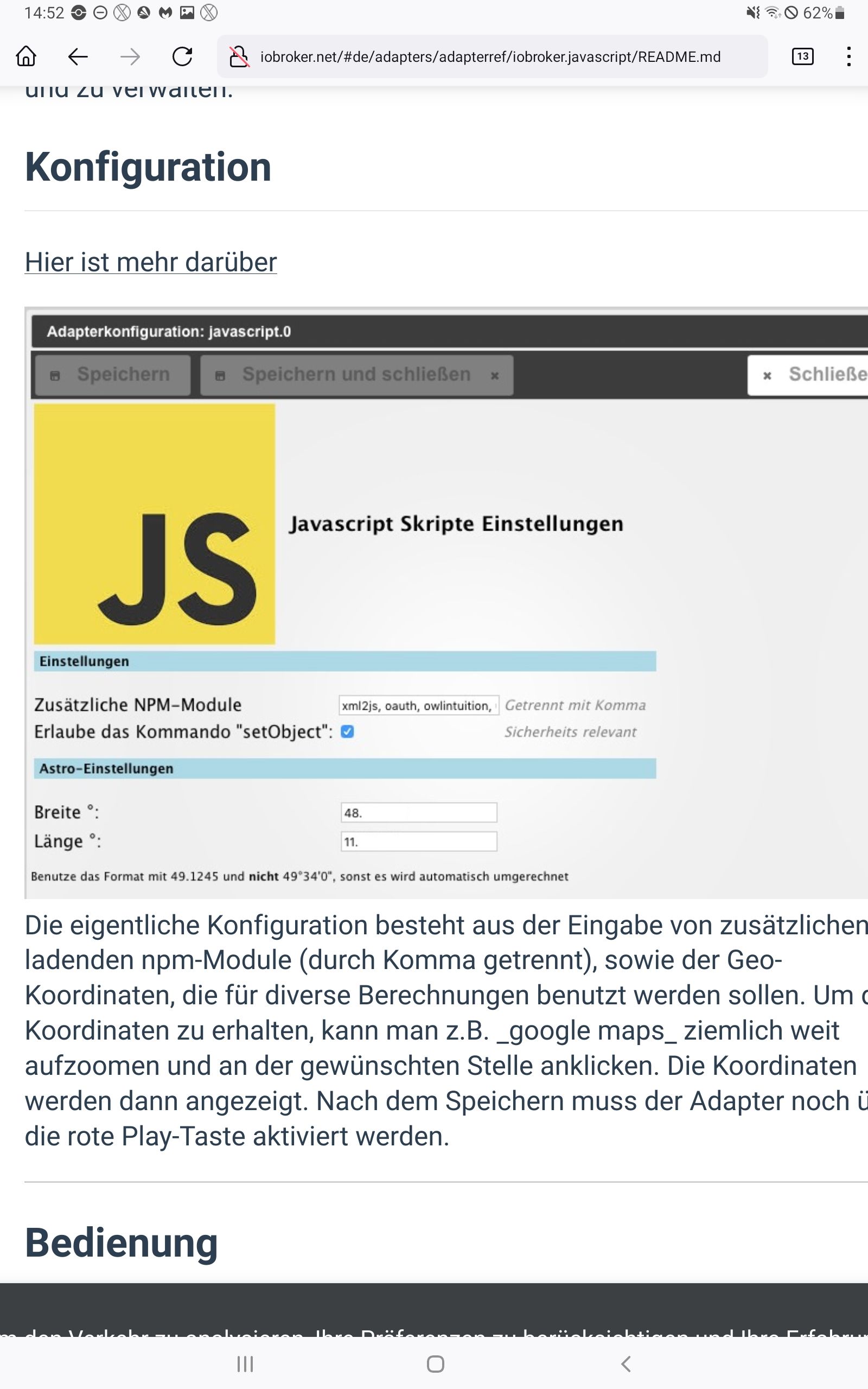
was ist denn mit deinem Browser/Netzwerk/pihole/firewall......
-
@homoran said in [gelöst] Meteohub Daten, XML parsen, JSON durchsuchen:
@steinche https://www.iobroker.net/#de/adapters/adapterref/iobroker.javascript/README.md
Dankeschön, das sieht bei mir ziemlich leer aus:
-
@steinche sollte so aussehen
was ist denn mit deinem Browser/Netzwerk/pihole/firewall......
@homoran said in [gelöst] Meteohub Daten, XML parsen, JSON durchsuchen:
@steinche
was ist denn mit deinem Browser/Netzwerk/pihole/firewall......
Oh, dünnes Eis Hier suche ich seit Tagen nach dem Grund, weshalb ich bestimmte Internetseiten nicht aufrufen kann. piHole schließe ich aus, da dass Problem auch mit manuellen Netzwerkeinstellungen besteht, aber andere Baustelle.
Der Tipp von @paul53 hat geholfen, und das NPM Modul habe ich in der Instanz eingetragen.
Jetzt ist auch der Fehler des fehlenden Moduls weg.
Wäre es korrekt gewesen, das Modul in dem Verzeichnis:/opt/iobroker/node_moduleszu installieren?
Nun bin ich auch wieder an dem Punkt, wo ich den Post ursprünglich erstellen habe :D Die Sache mit dem ungültigen Header.
Der Scriptaufruf liefert folgenden Fehler:3.8.2023, 12:31:21.312 [info ]: javascript.0 (1584787) Start javascript script.js.common.WetterdatenEinlesen 3.8.2023, 12:31:21.313 [info ]: javascript.0 (1584787) script.js.common.WetterdatenEinlesen: meteohub query data from http://192.168.75.9/meteograph.cgi?text=allxml 3.8.2023, 12:31:21.315 [info ]: javascript.0 (1584787) script.js.common.WetterdatenEinlesen: registered 0 subscriptions, 1 schedule, 0 messages, 0 logs and 0 file subscriptions 3.8.2023, 12:31:23.341 [error]: javascript.0 (1584787) script.js.common.WetterdatenEinlesen: Fehler beim Herunterladen Meteohub XML: Error: Parse Error: Invalid header value char 3.8.2023, 12:31:28.787 [info ]: javascript.0 (1584787) Stop script script.js.common.WetterdatenEinlesenWenn ich die XML Daten in der Console des ioBrokers abrufe, sieht das für mich normal aus:
root@ioBroker-Master-51:~# curl http://192.168.75.9/meteograph.cgi?text=allxml
<?xml version="1.0" encoding="ISO-8859-1" standalone="yes"?>
<meteohub>
  <config>
    <language>de</language>
    <temp_sensor unit="c" print="°C">th0</temp_sensor>
    <hum_sensor unit="rel" print="%">th0</hum_sensor>
    <dew_sensor unit="c" print="°C">th0</dew_sensor>
    <baro_sensor unit="hpa" print="hPa">thb0</baro_sensor>
    <wind_sensor unit="ms" print="m/s"></wind_sensor>
    <rain_sensor unit="mm" print="mm">rain0</rain_sensor>
    <row number="1">last24h</row>
    <row number="2">last60m</row>
    <row number="3">month1</row>
    <row number="4">day1</row>
  </config>
  <data timeframe="actual">
    <item sensor="system" cat="version" unit="text">5.1e</item>
    <item sensor="thb0" cat="altimeter" unit="hpa">1004.0</item>
    <item sensor="thb0" cat="altimeter" unit="psi">14.56</item>
    <item sensor="thb0" cat="altimeter" unit="mmhg">753.0</item>
    <item sensor="thb0" cat="altimeter" unit="inhg">29.65</item>
    <item sensor="thb0" cat="fc" unit="">1</item>
    <item sensor="thb0" cat="fc" unit="wdlive">2</item>
    <item sensor="thb0" cat="fc" unit="vpicon">2</item>
    <item sensor="thb0" cat="fc" unit="rule">122</item>
    <item sensor="thb0" cat="fc" unit="textindividual">-</item>
  </data>
  <data timeframe="alltime">
    <item sensor="date0" cat="date" unit="utc">20230803025434</item>
    <item sensor="date0" cat="date" unit="local">20230803045434</item>
    <item sensor="rain0" cat="rate" unit="mm">0.1</item>
    <item sensor="rain0" cat="rate" unit="in">0.00</item>
    <item sensor="rain0" cat="ratemin" unit="time">20170101010027</item>
  </data>
</meteohub>
(Ausgabe gekürzt)
Oder bräuchte er bei
encoding="ISO-8859-1"ein
encoding="UTF-8"Schlimm, wenn man die Zusammenhänge (noch) nicht kapiert.
-
@homoran said in [gelöst] Meteohub Daten, XML parsen, JSON durchsuchen:
@steinche
was ist denn mit deinem Browser/Netzwerk/pihole/firewall......
Oh, dünnes Eis Hier suche ich seit Tagen nach dem Grund, weshalb ich bestimmte Internetseiten nicht aufrufen kann. piHole schließe ich aus, da dass Problem auch mit manuellen Netzwerkeinstellungen besteht, aber andere Baustelle.Der Tipp von @paul53 hat geholfen, und das NPM Modul habe ich in der Instanz eingetragen.
Jetzt ist auch der Fehler des fehlenden Moduls weg.
Wäre es korrekt gewesen, das Modul in dem Verzeichnis:/opt/iobroker/node_moduleszu installieren?
Nun bin ich auch wieder an dem Punkt, wo ich den Post ursprünglich erstellen habe :D Die Sache mit dem ungültigen Header.
Der Scriptaufruf liefert folgenden Fehler:3.8.2023, 12:31:21.312 [info ]: javascript.0 (1584787) Start javascript script.js.common.WetterdatenEinlesen 3.8.2023, 12:31:21.313 [info ]: javascript.0 (1584787) script.js.common.WetterdatenEinlesen: meteohub query data from http://192.168.75.9/meteograph.cgi?text=allxml 3.8.2023, 12:31:21.315 [info ]: javascript.0 (1584787) script.js.common.WetterdatenEinlesen: registered 0 subscriptions, 1 schedule, 0 messages, 0 logs and 0 file subscriptions 3.8.2023, 12:31:23.341 [error]: javascript.0 (1584787) script.js.common.WetterdatenEinlesen: Fehler beim Herunterladen Meteohub XML: Error: Parse Error: Invalid header value char 3.8.2023, 12:31:28.787 [info ]: javascript.0 (1584787) Stop script script.js.common.WetterdatenEinlesenWenn ich die XML Daten in der Console des ioBrokers abrufe, sieht das für mich normal aus:
root@ioBroker-Master-51:~# curl http://192.168.75.9/meteograph.cgi?text=allxml
<?xml version="1.0" encoding="ISO-8859-1" standalone="yes"?>
<meteohub>
  <config>
    <language>de</language>
    <temp_sensor unit="c" print="°C">th0</temp_sensor>
    <hum_sensor unit="rel" print="%">th0</hum_sensor>
    <dew_sensor unit="c" print="°C">th0</dew_sensor>
    <baro_sensor unit="hpa" print="hPa">thb0</baro_sensor>
    <wind_sensor unit="ms" print="m/s"></wind_sensor>
    <rain_sensor unit="mm" print="mm">rain0</rain_sensor>
    <row number="1">last24h</row>
    <row number="2">last60m</row>
    <row number="3">month1</row>
    <row number="4">day1</row>
  </config>
  <data timeframe="actual">
    <item sensor="system" cat="version" unit="text">5.1e</item>
    <item sensor="thb0" cat="altimeter" unit="hpa">1004.0</item>
    <item sensor="thb0" cat="altimeter" unit="psi">14.56</item>
    <item sensor="thb0" cat="altimeter" unit="mmhg">753.0</item>
    <item sensor="thb0" cat="altimeter" unit="inhg">29.65</item>
    <item sensor="thb0" cat="fc" unit="">1</item>
    <item sensor="thb0" cat="fc" unit="wdlive">2</item>
    <item sensor="thb0" cat="fc" unit="vpicon">2</item>
    <item sensor="thb0" cat="fc" unit="rule">122</item>
    <item sensor="thb0" cat="fc" unit="textindividual">-</item>
  </data>
  <data timeframe="alltime">
    <item sensor="date0" cat="date" unit="utc">20230803025434</item>
    <item sensor="date0" cat="date" unit="local">20230803045434</item>
    <item sensor="rain0" cat="rate" unit="mm">0.1</item>
    <item sensor="rain0" cat="rate" unit="in">0.00</item>
    <item sensor="rain0" cat="ratemin" unit="time">20170101010027</item>
  </data>
</meteohub>
(Ausgabe gekürzt)
Oder bräuchte er bei
encoding="ISO-8859-1"ein
encoding="UTF-8"Schlimm, wenn man die Zusammenhänge (noch) nicht kapiert.
lass dir mal mit log vor dem parser
log(xmldata)
var mh_json = parser.toJson(xmldata);
die Daten ausgeben.
Der von dir gegebene Auschnitt läuft anstandlose durch den Parser:
kleinen Teil vom Skript verändert ums zu testen
var data1 = '<?xml version="1.0" encoding="ISO-8859-1" standalone="yes"?> \
<meteohub> \
  <config> \
    <language>de</language> \
    <temp_sensor unit="c" print="°C">th0</temp_sensor> \
    <hum_sensor unit="rel" print="%">th0</hum_sensor> \
    <dew_sensor unit="c" print="°C">th0</dew_sensor> \
    <baro_sensor unit="hpa" print="hPa">thb0</baro_sensor> \
    <wind_sensor unit="ms" print="m/s"></wind_sensor> \
    <rain_sensor unit="mm" print="mm">rain0</rain_sensor> \
    <row number="1">last24h</row> \
    <row number="2">last60m</row> \
    <row number="3">month1</row> \
    <row number="4">day1</row> \
  </config> \
  <data timeframe="actual"> \
    <item sensor="system" cat="version" unit="text">5.1e</item> \
    <item sensor="thb0" cat="altimeter" unit="hpa">1004.0</item> \
    <item sensor="thb0" cat="altimeter" unit="psi">14.56</item> \
    <item sensor="thb0" cat="altimeter" unit="mmhg">753.0</item> \
    <item sensor="thb0" cat="altimeter" unit="inhg">29.65</item> \
    <item sensor="thb0" cat="fc" unit="">1</item> \
    <item sensor="thb0" cat="fc" unit="wdlive">2</item> \
    <item sensor="thb0" cat="fc" unit="vpicon">2</item> \
    <item sensor="thb0" cat="fc" unit="rule">122</item> \
    <item sensor="thb0" cat="fc" unit="textindividual">-</item> \
  </data> \
  <data timeframe="alltime"> \
    <item sensor="date0" cat="date" unit="utc">20230803025434</item> \
    <item sensor="date0" cat="date" unit="local">20230803045434</item> \
    <item sensor="rain0" cat="rate" unit="mm">0.1</item> \
    <item sensor="rain0" cat="rate" unit="in">0.00</item> \
    <item sensor="rain0" cat="ratemin" unit="time">20170101010027</item> \
  </data>\ \
</meteohub> '

function getXML(do_init) {
    log('meteohub query data from '+mh_URL); // Debug output
             parseXML(data1,do_init);
}
let do_init=true;
 getXML(do_init);
um zu testen mußt du die genannten Funktionen und die letzten beiden Zeilen entfernen
-
lass dir mal mit log vor dem parser
log(xmldata)
var mh_json = parser.toJson(xmldata);
die Daten ausgeben.
Der von dir gegebene Auschnitt läuft anstandlose durch den Parser:
kleinen Teil vom Skript verändert ums zu testen
var data1 = '<?xml version="1.0" encoding="ISO-8859-1" standalone="yes"?> \
<meteohub> \
  <config> \
    <language>de</language> \
    <temp_sensor unit="c" print="°C">th0</temp_sensor> \
    <hum_sensor unit="rel" print="%">th0</hum_sensor> \
    <dew_sensor unit="c" print="°C">th0</dew_sensor> \
    <baro_sensor unit="hpa" print="hPa">thb0</baro_sensor> \
    <wind_sensor unit="ms" print="m/s"></wind_sensor> \
    <rain_sensor unit="mm" print="mm">rain0</rain_sensor> \
    <row number="1">last24h</row> \
    <row number="2">last60m</row> \
    <row number="3">month1</row> \
    <row number="4">day1</row> \
  </config> \
  <data timeframe="actual"> \
    <item sensor="system" cat="version" unit="text">5.1e</item> \
    <item sensor="thb0" cat="altimeter" unit="hpa">1004.0</item> \
    <item sensor="thb0" cat="altimeter" unit="psi">14.56</item> \
    <item sensor="thb0" cat="altimeter" unit="mmhg">753.0</item> \
    <item sensor="thb0" cat="altimeter" unit="inhg">29.65</item> \
    <item sensor="thb0" cat="fc" unit="">1</item> \
    <item sensor="thb0" cat="fc" unit="wdlive">2</item> \
    <item sensor="thb0" cat="fc" unit="vpicon">2</item> \
    <item sensor="thb0" cat="fc" unit="rule">122</item> \
    <item sensor="thb0" cat="fc" unit="textindividual">-</item> \
  </data> \
  <data timeframe="alltime"> \
    <item sensor="date0" cat="date" unit="utc">20230803025434</item> \
    <item sensor="date0" cat="date" unit="local">20230803045434</item> \
    <item sensor="rain0" cat="rate" unit="mm">0.1</item> \
    <item sensor="rain0" cat="rate" unit="in">0.00</item> \
    <item sensor="rain0" cat="ratemin" unit="time">20170101010027</item> \
  </data>\ \
</meteohub> '

function getXML(do_init) {
    log('meteohub query data from '+mh_URL); // Debug output
             parseXML(data1,do_init);
}
let do_init=true;
 getXML(do_init);
um zu testen mußt du die genannten Funktionen und die letzten beiden Zeilen entfernen
Also erst mal herzlichen Dank für Eure tolle und unermüdliche Unterstützung!!!!
Ich muss mir glaub erst mal ein "JavaScrpt für Dummies" holen, komme mir so dämlich vor.
Der komplette JavaScript Code sieht bei mir so aus, es ist aus dem Post und die Zeile zum Datenabruf habe ich angepasst.
/* Meteohub
Skript holt Daten aus Meteohub XML Datei, bereitet sie auf und stellt einige Datenpunkte zur Verfügung
erstellt: 2020 Wolfgang Berger
{1}
V 0.1 Initiale Version. Hartcodierte Zuordnung. Wird nicht funktionieren sobald der Windmesser online ist.
V 0.2 jetzt Sensoren in Liste
V 0.3 kosmetische Aufbereitung. Altlasten entfernt.
*/

// Settings   ################################################################
const mh_URL = 'http://192.168.75.9/meteograph.cgi?text=allxml';


// End of settings ###########################################################


// Includes    ################################################################
const request = require('request');
var parser = require('xml2json');
const util = require('util');      // for debugging. Use log(util.inspect(obj));

// Type definitions  ################################################################
var state_temp = {      type: 'number',  unit: '°C',  read: true,  write: false,role: 'value.temperature' };
var state_json = {                                     read: true,  write: false,role: 'mh.json' };
var state_humidity = {  type: 'number',  unit: '%rH',  read: true,  write: false,role: 'value.humidity' };
var state_speed = {     type: 'number',  unit: 'km/h',  read: true,  write: false,role: 'value.speed' };
var state_direction = { type: 'number',  unit: '°',  read: true,  write: false,role: 'value.direction' };
var state_pressure  = { type: 'number',  unit: 'mbar',  read: true,  write: false,role: 'value.pressure' };
var state_rainrate  = { type: 'number',  unit: 'mm/h',  read: true,  write: false,role: 'value.precipitation.hour' };
var state_rain  = {     type: 'number',  unit: 'mm',  read: true,  write: false,role: 'value.precipitation.today' };

// Now build State Tree ################################################################

function parseXML(xmldata,do_init) {
   var mh_json = parser.toJson(xmldata);    // convert XML to JSON
   var mh_data = JSON.parse(mh_json);       // parse JSON into JS object

   let data = mh_data.meteohub.data;        // only use the data section of the object. We ignore the config section for now.

   // Loop through data sections. each data[i] contains data for a given timeframe like actual, like 1h, 1day, etc.
   for(let i = 0; i < data.length; i++) {
     let folder = 'meteohub.' + data[i].timeframe + '.';       // timeframe is can be "actual", "alltime" and much more. Each datasection only contains one timeframe value
     let item = data[i].item;
     //   log(util.inspect(data[i]));

     // Now we have selected one timeframe and loop through all items
     // instead of building a state tree with hundreds of values, we pick only the ones that are interesting.
     for(let j = 0; j < item.length; j++) {
        let id = folder + item[j].sensor + '.' + item[j].cat;

        // Temperature Value in degrees Celsius
        if( (item[j].cat == 'temp') && (item[j].unit == 'c')) {
            if (do_init==true) {    createState(id,parseFloat(item[j].$t),state_temp); }
              else {    setState(id,parseFloat(item[j].$t)); }
        }

        // Humidity as relative humidity
        if( (item[j].cat == 'hum') && (item[j].unit == 'rel')) {
            if (do_init==true) {   createState(id,parseFloat(item[j].$t),state_humidity); }
              else  {   setState(id,parseFloat(item[j].$t)); }
        }

        // Air pressure refered to sealevel
        if( (item[j].cat == 'sealevel') && (item[j].unit == 'hpa')) {
            if (do_init==true) {   createState(id,parseFloat(item[j].$t),state_pressure); }
              else  {   setState(id,parseFloat(item[j].$t)); }
        }

        // rain values in mm
        if( (item[j].sensor == 'rain0') && (item[j].unit == 'mm')) {
            if (do_init==true) { createState(id,parseFloat(item[j].$t),state_rain);  }
              else { setState(id,parseFloat(item[j].$t));  }
        }

        // for windsensor currently we tend to catch nearly all, because the whitelist could be long. For example windspeed is interesting in different units.
        // Therefore instead of whitelisting the values we do the oposit and use a blacklist for the ones we don't like.
        if( (item[j].sensor == 'wind0') ) {
            if ((item[j].unit == 'time')) {
                let dat = item[j].$t;
                let d = new Date(dat.substring(0,4) + '-' + dat.substring(4,6) + '-' + dat.substring(6,8) + 'T' + dat.substring(8,10) +':' + dat.substring(10,12) + ':'+ dat.substring(12,14) );
                if (do_init==true) {    createState(id+'.'+item[j].unit,  d);    }
                  else {    setState(id+'.'+item[j].unit,  d);    }
            }
            else {
                // first catch values in degrees celsius. Because there we can set the unit. Leave the others without unit.
                if (item[j].unit == 'c') {
                  if (do_init==true) { createState(id+'.'+item[j].unit,  parseFloat(item[j].$t),state_temp); }
                    else  { setState(id+'.'+item[j].unit,  parseFloat(item[j].$t)); }
                }
                else {
                    // Blacklisting for values we don't like
                    if (!(item[j].unit == 'f' || item[j].unit == 'en' || item[j].unit == 'nl' || item[j].unit == 'mph')) {
                    if (do_init==true) { createState(id+'.'+item[j].unit,  parseFloat(item[j].$t)); }
                        else  { setState(id+'.'+item[j].unit,  parseFloat(item[j].$t)); }
                    }
                }
            }
        }

     }
    }

}  // end parseXML()

function getXML(do_init) {
    // loads full meteohub xml file from the mh_URL and calls the parse function.
    // on very first execution do_init is true and all states are created. Each successive call only sets the state values.
    log('meteohub query data from '+mh_URL); // Debug output
    request(mh_URL, function (error, response, body) {
        if (error) log("Fehler beim Herunterladen Meteohub XML: " + error, 'error');
        else {
            var start = new Date();
            parseXML(body,do_init);
            var time = new Date() - start;
            log('Meteohub XML2JSON Durchlaufzeit: '+time);
        };
    });
}

// On first script execution, create the states
 let do_init=true;
 getXML(do_init);

// Regular Update
schedule('*/1 * * * *', function () {
    let do_init=false;
    getXML(do_init);  // regelmäßiger Update
});
Der XML Output in Gänze so:
<?xml version="1.0" encoding="ISO-8859-1" standalone="yes"?> <meteohub> <config> <language>de</language> <temp_sensor unit="c" print="°C">th0</temp_sensor> <hum_sensor unit="rel" print="%">th0</hum_sensor> <dew_sensor unit="c" print="°C">th0</dew_sensor> <baro_sensor unit="hpa" print="hPa">thb0</baro_sensor> <wind_sensor unit="ms" print="m/s"></wind_sensor> <rain_sensor unit="mm" print="mm">rain0</rain_sensor> <row number="1">last24h</row> <row number="2">last60m</row> <row number="3">month1</row> <row number="4">day1</row> </config> <data timeframe="actual"> <item sensor="system" cat="version" unit="text">5.1e</item> <item sensor="system" cat="version" unit="num">51</item> <item sensor="system" cat="build" unit="num">277</item> <item sensor="system" cat="platform" unit="text">Raspberry_PI_Model_3</item> <item sensor="system" cat="language" unit="text">German</item> <item sensor="system" cat="temp" unit="unit">c</item> <item sensor="system" cat="hum" unit="unit">rel</item> <item sensor="system" cat="press" unit="unit">hpa</item> <item sensor="system" cat="wind" unit="unit">ms</item> <item sensor="system" cat="rain" unit="unit">mm</item> <item sensor="date0" cat="date" unit="utc">20230803170437</item> <item sensor="date0" cat="date2" unit="utc">03.08.2023 17:04:37</item> <item sensor="date0" cat="puredate" unit="utc">03.08.2023</item> <item sensor="date0" cat="time" unit="utc">17:04:37</item> <item sensor="date0" cat="year" unit="utc">2023</item> <item sensor="date0" cat="month" unit="utc">08</item> <item sensor="date0" cat="day" unit="utc">03</item> <item sensor="date0" cat="dayofweek" unit="utc">4</item> <item sensor="date0" cat="hour" unit="utc">17</item> <item sensor="date0" cat="min" unit="utc">04</item> <item sensor="date0" cat="sec" unit="utc">37</item> <item sensor="date0" cat="date" unit="local">20230803190437</item> <item sensor="date0" cat="date2" unit="local">03.08.2023 19:04:37</item> <item sensor="date0" cat="puredate" unit="local">03.08.2023</item> <item sensor="date0" cat="time" unit="local">19:04:37</item> <item sensor="date0" cat="year" unit="local">2023</item> <item sensor="date0" cat="month" unit="local">08</item> <item sensor="date0" cat="day" unit="local">03</item> <item sensor="date0" cat="dayofweek" unit="local">4</item> <item sensor="date0" cat="hour" unit="local">19</item> <item sensor="date0" cat="min" unit="local">04</item> <item sensor="date0" cat="sec" unit="local">37</item> <item sensor="lunar" cat="phase" unit="percentage">93.8</item> <item sensor="lunar" cat="age" unit="days">17</item> <item sensor="lunar" cat="phase" unit="segment">5</item> <item sensor="lunar" cat="phase" unit="de">Dreiviertelmond_(abnehmend)</item> <item sensor="lunar" cat="phase" unit="en">Waning_Gibbous</item> <item sensor="lunar" cat="phase" unit="es">Gibosa_Menguante</item> <item sensor="lunar" cat="phase" unit="es">Gibosa_Menguante</item> <item sensor="lunar" cat="phase" unit="nl">Afnemende_maan</item> <item sensor="lunar" cat="phase" unit="dk">Mere_end_halv,_aftagende</item> <item sensor="lunar" cat="phase" unit="dk">Mere_end_halv,_aftagende</item> <item sensor="lunar" cat="phase" unit="cz">Couvaj&iacute;c&iacute;_M&#283;s&iacute;c</item> <item sensor="lunar" cat="phase" unit="hr">Vi&#353;e_od_polovice,_u_opadanju</item> <item sensor="station" cat="longitude" unit="decimal">8.436944</item> <item sensor="station" cat="latitude" unit="decimal">49.388333</item> <item sensor="daylength" cat="standard" unit="hours">15.07</item> <item sensor="daylength" cat="standard" unit="minutes">904</item> <item sensor="daylength" cat="standard" unit="hhmm">15:04</item> <item sensor="daylength" cat="civiltwilight" unit="hours">16.32</item> <item sensor="daylength" cat="civiltwilight" unit="minutes">979</item> <item sensor="daylength" cat="civiltwilight" unit="hhmm">16:19</item> <item sensor="daylength" cat="nauticaltwilight" unit="hours">17.95</item> <item sensor="daylength" cat="nauticaltwilight" unit="minutes">1077</item> <item sensor="daylength" cat="nauticaltwilight" unit="hhmm">17:57</item> <item sensor="sunrise" cat="standard" unit="utc">04:00</item> <item sensor="sunset" cat="standard" unit="utc">19:05</item> <item sensor="sunrise" cat="standard" unit="local">06:00</item> <item sensor="sunset" cat="standard" unit="local">21:05</item> <item sensor="sunrise" cat="civiltwilight" unit="utc">03:23</item> <item sensor="sunset" cat="civiltwilight" unit="utc">19:42</item> <item sensor="sunrise" cat="civiltwilight" unit="local">05:23</item> <item sensor="sunset" cat="civiltwilight" unit="local">21:42</item> <item sensor="daynight" cat="flag" unit="local">D</item> <item sensor="sunrise" cat="nauticaltwilight" unit="utc">02:34</item> <item sensor="sunset" cat="nauticaltwilight" unit="utc">20:31</item> <item sensor="sunrise" cat="nauticaltwilight" unit="local">04:34</item> <item sensor="sunset" cat="nauticaltwilight" unit="local">22:31</item> <item sensor="moonrise" cat="standard" unit="local">22:26</item> <item sensor="moonrise" cat="standard" unit="utc">20:26</item> <item sensor="moonset" cat="standard" unit="local">07:48</item> <item sensor="moonset" cat="standard" unit="utc">05:48</item> <item sensor="solar" cat="irradiance" unit="wqm">895</item> <item sensor="th0" cat="temp" unit="c">21.2</item> <item sensor="th0" cat="temp" unit="f">70.2</item> <item sensor="th0" cat="hum" unit="rel">65</item> <item sensor="th0" cat="hum" unit="abs">12.0</item> <item sensor="th0" cat="dew" unit="c">14.4</item> <item sensor="th0" cat="dew" unit="f">57.9</item> <item sensor="th0" cat="heatindex" unit="c">21.2</item> <item sensor="th0" cat="heatindex" unit="f">70.2</item> <item sensor="th0" cat="humidex" unit="c">24.8</item> <item sensor="th0" cat="humidex" unit="f">76.6</item> <item sensor="th0" cat="cloudheight" unit="m">850</item> <item sensor="th0" cat="cloudheight" unit="ft">2720</item> <item sensor="uv0" cat="index" unit="">0.5</item> <item sensor="sol0" cat="radiation" unit="wqm">107.0</item> <item sensor="sol0" cat="radiation" unit="rel">12</item> <item sensor="sol0" cat="evapotranspiration" unit="inch">0.000</item> <item sensor="sol0" cat="evapotranspiration" unit="mm">0.00</item> <item sensor="rain0" cat="rate" unit="mm">0.0</item> <item sensor="rain0" cat="rate" unit="in">0.00</item> <item sensor="rain0" cat="total" unit="mm">232.8</item> <item sensor="rain0" cat="total" unit="in">9.17</item> <item sensor="thb0" cat="height" unit="m">99</item> <item sensor="thb0" cat="height" unit="ft">325</item> <item sensor="thb0" cat="temp" unit="c">24.6</item> <item sensor="thb0" cat="temp" unit="f">76.3</item> <item sensor="thb0" cat="hum" unit="rel">59</item> <item sensor="thb0" cat="hum" unit="abs">13.3</item> <item sensor="thb0" cat="dew" unit="c">16.1</item> <item sensor="thb0" cat="dew" unit="f">61.0</item> <item sensor="thb0" cat="heatindex" unit="c">24.6</item> <item sensor="thb0" cat="heatindex" unit="f">76.3</item> <item sensor="thb0" cat="humidex" unit="c">29.3</item> <item sensor="thb0" cat="humidex" unit="f">84.7</item> <item sensor="thb0" cat="cloudheight" unit="m">1063</item> <item sensor="thb0" cat="cloudheight" unit="ft">3400</item> <item sensor="thb0" cat="press" unit="hpa">993.9</item> <item sensor="thb0" cat="press" unit="psi">14.41</item> <item sensor="thb0" cat="press" unit="mmhg">745.4</item> <item sensor="thb0" cat="press" unit="inhg">29.35</item> <item sensor="thb0" cat="sealevel" unit="hpa">1005.2</item> <item sensor="thb0" cat="sealevel" unit="psi">14.58</item> <item sensor="thb0" cat="sealevel" unit="mmhg">753.9</item> <item sensor="thb0" cat="sealevel" unit="inhg">29.68</item> <item sensor="thb0" cat="altimeter" unit="hpa">1005.4</item> <item sensor="thb0" cat="altimeter" unit="psi">14.58</item> <item sensor="thb0" cat="altimeter" unit="mmhg">754.0</item> <item sensor="thb0" cat="altimeter" unit="inhg">29.69</item> <item sensor="thb0" cat="fc" unit="">0</item> <item sensor="thb0" cat="fc" unit="wdlive">22</item> <item sensor="thb0" cat="fc" unit="vpicon">3</item> <item sensor="thb0" cat="fc" unit="rule">192</item> <item sensor="thb0" cat="fc" unit="text">Mostly_cloudy_and_cooler._Precipitation_possible_within_12_hours,_possibly_heavy_at_times._Windy.</item> <item sensor="thb0" cat="fc" unit="textde">Meist_wolkig_und_k&#228;lter._Niederschlag_m&#246;glich_innerhalb_12_Stunden,_zeitweise_heftig._Windig.</item> <item sensor="thb0" cat="fc" unit="textdeiso">Meist_wolkig_und_k�lter._Niederschlag_m�glich_innerhalb_12_Stunden,_zeitweise_heftig._Windig.</item> <item sensor="thb0" cat="fc" unit="textdehtml">Meist_wolkig_und_k&auml;lter._Niederschlag_m&ouml;glich_innerhalb_12_Stunden,_zeitweise_heftig._Windig.</item> <item sensor="thb0" cat="fc" unit="textnl">Overwegend_bewolkt_en_koeler._Neerslag_mogelijk_binnen_12_uur,_Mogelijk_zware_buien._Winderig.</item> <item sensor="thb0" cat="fc" unit="textit">Per_lo_piu'_nuvoloso_con_diminuzione_delle_temperature._Possibili_precipitazioni_entro_12_ore,_localmente_anche_forti._Ventilato.</item> <item sensor="thb0" cat="fc" unit="textest">Peamiselt_pilves_ja_k�lm._Sademete_v�imalus_12_tunni_jooksul,_kohati_on_sadu_tugev._Tuuline.</item> <item sensor="thb0" cat="fc" unit="texthr">Prete&#382;no_obla&#269;no_i_zahladnjenje._Mogu&#263;e_oborine_u_narednih_12_sati,_uz_mogu&#263;nost_povremenog_jakog_pljuska._Vjetrovito.</item> <item sensor="thb0" cat="fc" unit="textcz">Zataženo_a_chladněji._Srážky_jsou_možné_do_12_hodin._Možná_také_občas_větrno.</item> <item sensor="thb0" cat="fc" unit="texteshtml">Mayormente_nublado_y_m&aacute;s_frio._Precipitaci&oacute;n_posible_dentro_de_12_horas,_posiblemente_intensa_por_momentos._Ventoso.</item> <item sensor="thb0" cat="fc" unit="textindividual">-</item> </data> <data timeframe="alltime"> <item sensor="date0" cat="date" unit="utc">20230803025434</item> <item sensor="date0" cat="date" unit="local">20230803045434</item> <item sensor="rain0" cat="rate" unit="mm">0.1</item> <item sensor="rain0" cat="rate" unit="in">0.00</item> <item sensor="rain0" cat="ratemin" unit="time">20170101010027</item> <item sensor="rain0" cat="ratemin" unit="mm">0.0</item> <item sensor="rain0" cat="ratemin" unit="in">0.00</item> <item sensor="rain0" cat="ratemax" unit="time">20201129221549</item> <item sensor="rain0" cat="ratemax" unit="mm">1949.7</item> <item sensor="rain0" cat="ratemax" unit="in">76.76</item> <item sensor="rain0" cat="total" unit="mm">1001.50</item> <item sensor="rain0" cat="total" unit="in">39.43</item> <item sensor="rain0" cat="total" unit="time">20230803044700</item> <item sensor="rain0" cat="days" unit="">212</item> <item sensor="thb0" cat="temp" unit="c">23.5</item> <item sensor="thb0" cat="temp" unit="f">74.3</item> <item sensor="thb0" cat="tempmin" unit="time">20220402103000</item> <item sensor="thb0" cat="tempmax" unit="time">20180301145519</item> <item sensor="thb0" cat="tempmin" unit="c">15.8</item> <item sensor="thb0" cat="tempmin" unit="f">60.4</item> <item sensor="thb0" cat="tempmax" unit="c">32.9</item> <item sensor="thb0" cat="tempmax" unit="f">91.2</item> <item sensor="thb0" cat="temp" unit="trend">1</item> <item sensor="thb0" cat="tempdelta" unit="c">3.6</item> <item sensor="thb0" cat="tempdelta" unit="f">6.5</item> <item sensor="thb0" cat="dew" unit="c">13.2</item> <item sensor="thb0" cat="dew" unit="f">55.8</item> <item sensor="thb0" cat="dewmin" unit="time">20170122100804</item> <item sensor="thb0" cat="dewmax" unit="time">20170731181107</item> <item sensor="thb0" cat="dewmin" unit="c">-3.2</item> <item sensor="thb0" cat="dewmin" unit="f">26.2</item> <item sensor="thb0" cat="dewmax" unit="c">21.7</item> <item sensor="thb0" cat="dewmax" unit="f">71.1</item> <item sensor="thb0" cat="dew" unit="trend">1</item> <item sensor="thb0" cat="dewdelta" unit="c">11.6</item> <item sensor="thb0" cat="dewdelta" unit="f">20.9</item> <item sensor="thb0" cat="heatindex" unit="c">23.5</item> <item sensor="thb0" cat="heatindex" unit="f">74.4</item> <item sensor="thb0" cat="heatindexmin" unit="time">20220402103000</item> <item sensor="thb0" cat="heatindexmax" unit="time">20170722183636</item> <item sensor="thb0" cat="heatindexmin" unit="c">15.8</item> <item sensor="thb0" cat="heatindexmin" unit="f">60.4</item> <item sensor="thb0" cat="heatindexmax" unit="c">34.8</item> <item sensor="thb0" cat="heatindexmax" unit="f">94.6</item> <item sensor="thb0" cat="heatindex" unit="trend">1</item> <item sensor="thb0" cat="heatindexdelta" unit="c">3.6</item> <item sensor="thb0" cat="heatindexdelta" unit="f">6.5</item> <item sensor="thb0" cat="humidex" unit="c">26.6</item> <item sensor="thb0" cat="humidex" unit="f">79.8</item> <item sensor="thb0" cat="humidexmin" unit="time">20220308070000</item> <item sensor="thb0" cat="humidexmax" unit="time">20170722183636</item> <item sensor="thb0" cat="humidexmin" unit="c">13.8</item> <item sensor="thb0" cat="humidexmin" unit="f">56.8</item> <item sensor="thb0" cat="humidexmax" unit="c">40.1</item> <item sensor="thb0" cat="humidexmax" unit="f">104.2</item> <item sensor="thb0" cat="humidex" unit="trend">1</item> <item sensor="thb0" cat="humidexdelta" unit="c">9.9</item> <item sensor="thb0" cat="humidexdelta" unit="f">17.8</item> <item sensor="thb0" cat="hum" unit="rel">52.9</item> <item sensor="thb0" cat="hummin" unit="time">20170122100804</item> <item sensor="thb0" cat="hummax" unit="time">20170731054425</item> <item sensor="thb0" cat="hummin" unit="rel">19.0</item> <item sensor="thb0" cat="hummax" unit="rel">82.0</item> <item sensor="thb0" cat="hum" unit="trend">1</item> <item sensor="thb0" cat="humdelta" unit="rel">0</item> <item sensor="thb0" cat="press" unit="hpa">1002.6</item> <item sensor="thb0" cat="press" unit="psi">14.54</item> <item sensor="thb0" cat="press" unit="mmhg">752.0</item> <item sensor="thb0" cat="press" unit="inhg">29.61</item> <item sensor="thb0" cat="pressmin" unit="time">20201228122930</item> <item sensor="thb0" cat="pressmax" unit="time">20220318223000</item> <item sensor="thb0" cat="pressmin" unit="hpa">962.3</item> <item sensor="thb0" cat="pressmin" unit="psi">13.96</item> <item sensor="thb0" cat="pressmin" unit="mmhg">721.7</item> <item sensor="thb0" cat="pressmin" unit="inhg">28.42</item> <item sensor="thb0" cat="pressmax" unit="hpa">1027.7</item> <item sensor="thb0" cat="pressmax" unit="psi">14.91</item> <item sensor="thb0" cat="pressmax" unit="mmhg">770.8</item> <item sensor="thb0" cat="pressmax" unit="inhg">30.35</item> <item sensor="thb0" cat="press" unit="trend">-1</item> <item sensor="thb0" cat="pressdelta" unit="hpa">-27.3</item> <item sensor="thb0" cat="pressdelta" unit="psi">-0.40</item> <item sensor="thb0" cat="pressdelta" unit="mmhg">-20.5</item> <item sensor="thb0" cat="pressdelta" unit="inhg">-0.81</item> <item sensor="thb0" cat="sealevel" unit="hpa">1014.1</item> <item sensor="thb0" cat="sealevel" unit="psi">14.71</item> <item sensor="thb0" cat="sealevel" unit="mmhg">760.6</item> <item sensor="thb0" cat="sealevel" unit="inhg">29.95</item> <item sensor="thb0" cat="sealevelmin" unit="time">20201228122930</item> <item sensor="thb0" cat="sealevelmax" unit="time">20220318223000</item> <item sensor="thb0" cat="sealevelmin" unit="hpa">973.6</item> <item sensor="thb0" cat="sealevelmin" unit="psi">14.12</item> <item sensor="thb0" cat="sealevelmin" unit="mmhg">730.2</item> <item sensor="thb0" cat="sealevelmin" unit="inhg">28.75</item> <item sensor="thb0" cat="sealevelmax" unit="hpa">1039.3</item> <item sensor="thb0" cat="sealevelmax" unit="psi">15.07</item> <item sensor="thb0" cat="sealevelmax" unit="mmhg">779.5</item> <item sensor="thb0" cat="sealevelmax" unit="inhg">30.69</item> <item sensor="thb0" cat="seapressdelta" unit="hpa">-27.3</item> <item sensor="thb0" cat="seapressdelta" unit="psi">-0.40</item> <item sensor="thb0" cat="seapressdelta" unit="mmhg">-20.5</item> <item sensor="thb0" cat="seapressdelta" unit="inhg">-0.81</item> <item sensor="th0" cat="temp" unit="c">14.9</item> <item sensor="th0" cat="temp" unit="f">58.8</item> <item sensor="th0" cat="tempmin" unit="time">20170107052006</item> <item sensor="th0" cat="tempmax" unit="time">20180726122350</item> <item sensor="th0" cat="tempmin" unit="c">-9.2</item> <item sensor="th0" cat="tempmin" unit="f">15.4</item> <item sensor="th0" cat="tempmax" unit="c">47.3</item> <item sensor="th0" cat="tempmax" unit="f">117.1</item> <item sensor="th0" cat="temp" unit="trend">1</item> <item sensor="th0" cat="tempdelta" unit="c">21.8</item> <item sensor="th0" cat="tempdelta" unit="f">39.2</item> <item sensor="th0" cat="dew" unit="c">8.5</item> <item sensor="th0" cat="dew" unit="f">47.4</item> <item sensor="th0" cat="dewmin" unit="time">20180301010012</item> <item sensor="th0" cat="dewmax" unit="time">20180724112708</item> <item sensor="th0" cat="dewmin" unit="c">-13.0</item> <item sensor="th0" cat="dewmin" unit="f">8.6</item> <item sensor="th0" cat="dewmax" unit="c">25.8</item> <item sensor="th0" cat="dewmax" unit="f">78.4</item> <item sensor="th0" cat="dew" unit="trend">1</item> <item sensor="th0" cat="dewdelta" unit="c">16.8</item> <item sensor="th0" cat="dewdelta" unit="f">30.2</item> <item sensor="th0" cat="heatindex" unit="c">14.9</item> <item sensor="th0" cat="heatindex" unit="f">58.8</item> <item sensor="th0" cat="heatindexmin" unit="time">20170107052006</item> <item sensor="th0" cat="heatindexmax" unit="time">20180724113556</item> <item sensor="th0" cat="heatindexmin" unit="c">-9.2</item> <item sensor="th0" cat="heatindexmin" unit="f">15.4</item> <item sensor="th0" cat="heatindexmax" unit="c">54.0</item> <item sensor="th0" cat="heatindexmax" unit="f">129.2</item> <item sensor="th0" cat="heatindex" unit="trend">1</item> <item sensor="th0" cat="heatindexdelta" unit="c">21.8</item> <item sensor="th0" cat="heatindexdelta" unit="f">39.2</item> <item sensor="th0" cat="humidex" unit="c">16.0</item> <item sensor="th0" cat="humidex" unit="f">60.8</item> <item sensor="th0" cat="humidexmin" unit="time">20170107052006</item> <item sensor="th0" cat="humidexmax" unit="time">20180726120713</item> <item sensor="th0" cat="humidexmin" unit="c">-13.3</item> <item sensor="th0" cat="humidexmin" unit="f">8.1</item> <item sensor="th0" cat="humidexmax" unit="c">60.3</item> <item sensor="th0" cat="humidexmax" unit="f">140.5</item> <item sensor="th0" cat="humidex" unit="trend">1</item> <item sensor="th0" cat="humidexdelta" unit="c">27.4</item> <item sensor="th0" cat="humidexdelta" unit="f">49.3</item> <item sensor="th0" cat="hum" unit="rel">69.5</item> <item sensor="th0" cat="hummin" unit="time">20220616172657</item> <item sensor="th0" cat="hummax" unit="time">20221112111656</item> <item sensor="th0" cat="hummin" unit="rel">16.0</item> <item sensor="th0" cat="hummax" unit="rel">98.0</item> <item sensor="th0" cat="hum" unit="trend">-1</item> <item sensor="th0" cat="humdelta" unit="rel">0</item> <item sensor="uv0" cat="index" unit="">0.8</item> <item sensor="uv0" cat="indexmax" unit="time">20220713133458</item> <item sensor="uv0" cat="indexmax" unit="">8.1</item> <item sensor="sol0" cat="radiation" unit="wqm">153.9</item> <item sensor="sol0" cat="radiationmax" unit="time">20230628121011</item> <item sensor="sol0" cat="radiationmax" unit="wqm">1325</item> <item sensor="sol0" cat="et" unit="mm">0.00</item> <item sensor="sol0" cat="et" unit="in">0.000</item> </data> </meteohub>Das
log(xmldata)
var mh_json = parser.toJson(xmldata);
von @ticaki habe ich an ein paar Stellen versucht, aber ich bekomme die Meldung, dass 'xmldata' nicht definiert ist

-
Also erst mal herzlichen Dank für Eure tolle und unermüdliche Unterstützung!!!!
Ich muss mir glaub erst mal ein "JavaScrpt für Dummies" holen, komme mir so dämlich vor.
Der komplette JavaScript Code sieht bei mir so aus, es ist aus dem Post und die Zeile zum Datenabruf habe ich angepasst.
/* Meteohub
Skript holt Daten aus Meteohub XML Datei, bereitet sie auf und stellt einige Datenpunkte zur Verfügung
erstellt: 2020 Wolfgang Berger
{1}
V 0.1 Initiale Version. Hartcodierte Zuordnung. Wird nicht funktionieren sobald der Windmesser online ist.
V 0.2 jetzt Sensoren in Liste
V 0.3 kosmetische Aufbereitung. Altlasten entfernt.
*/

// Settings   ################################################################
const mh_URL = 'http://192.168.75.9/meteograph.cgi?text=allxml';


// End of settings ###########################################################


// Includes    ################################################################
const request = require('request');
var parser = require('xml2json');
const util = require('util');      // for debugging. Use log(util.inspect(obj));

// Type definitions  ################################################################
var state_temp = {      type: 'number',  unit: '°C',  read: true,  write: false,role: 'value.temperature' };
var state_json = {                                     read: true,  write: false,role: 'mh.json' };
var state_humidity = {  type: 'number',  unit: '%rH',  read: true,  write: false,role: 'value.humidity' };
var state_speed = {     type: 'number',  unit: 'km/h',  read: true,  write: false,role: 'value.speed' };
var state_direction = { type: 'number',  unit: '°',  read: true,  write: false,role: 'value.direction' };
var state_pressure  = { type: 'number',  unit: 'mbar',  read: true,  write: false,role: 'value.pressure' };
var state_rainrate  = { type: 'number',  unit: 'mm/h',  read: true,  write: false,role: 'value.precipitation.hour' };
var state_rain  = {     type: 'number',  unit: 'mm',  read: true,  write: false,role: 'value.precipitation.today' };

// Now build State Tree ################################################################

function parseXML(xmldata,do_init) {
   var mh_json = parser.toJson(xmldata);    // convert XML to JSON
   var mh_data = JSON.parse(mh_json);       // parse JSON into JS object

   let data = mh_data.meteohub.data;        // only use the data section of the object. We ignore the config section for now.

   // Loop through data sections. each data[i] contains data for a given timeframe like actual, like 1h, 1day, etc.
   for(let i = 0; i < data.length; i++) {
     let folder = 'meteohub.' + data[i].timeframe + '.';       // timeframe is can be "actual", "alltime" and much more. Each datasection only contains one timeframe value
     let item = data[i].item;
     //   log(util.inspect(data[i]));

     // Now we have selected one timeframe and loop through all items
     // instead of building a state tree with hundreds of values, we pick only the ones that are interesting.
     for(let j = 0; j < item.length; j++) {
        let id = folder + item[j].sensor + '.' + item[j].cat;

        // Temperature Value in degrees Celsius
        if( (item[j].cat == 'temp') && (item[j].unit == 'c')) {
            if (do_init==true) {    createState(id,parseFloat(item[j].$t),state_temp); }
              else {    setState(id,parseFloat(item[j].$t)); }
        }

        // Humidity as relative humidity
        if( (item[j].cat == 'hum') && (item[j].unit == 'rel')) {
            if (do_init==true) {   createState(id,parseFloat(item[j].$t),state_humidity); }
              else  {   setState(id,parseFloat(item[j].$t)); }
        }

        // Air pressure refered to sealevel
        if( (item[j].cat == 'sealevel') && (item[j].unit == 'hpa')) {
            if (do_init==true) {   createState(id,parseFloat(item[j].$t),state_pressure); }
              else  {   setState(id,parseFloat(item[j].$t)); }
        }

        // rain values in mm
        if( (item[j].sensor == 'rain0') && (item[j].unit == 'mm')) {
            if (do_init==true) { createState(id,parseFloat(item[j].$t),state_rain);  }
              else { setState(id,parseFloat(item[j].$t));  }
        }

        // for windsensor currently we tend to catch nearly all, because the whitelist could be long. For example windspeed is interesting in different units.
        // Therefore instead of whitelisting the values we do the oposit and use a blacklist for the ones we don't like.
        if( (item[j].sensor == 'wind0') ) {
            if ((item[j].unit == 'time')) {
                let dat = item[j].$t;
                let d = new Date(dat.substring(0,4) + '-' + dat.substring(4,6) + '-' + dat.substring(6,8) + 'T' + dat.substring(8,10) +':' + dat.substring(10,12) + ':'+ dat.substring(12,14) );
                if (do_init==true) {    createState(id+'.'+item[j].unit,  d);    }
                  else {    setState(id+'.'+item[j].unit,  d);    }
            }
            else {
                // first catch values in degrees celsius. Because there we can set the unit. Leave the others without unit.
                if (item[j].unit == 'c') {
                  if (do_init==true) { createState(id+'.'+item[j].unit,  parseFloat(item[j].$t),state_temp); }
                    else  { setState(id+'.'+item[j].unit,  parseFloat(item[j].$t)); }
                }
                else {
                    // Blacklisting for values we don't like
                    if (!(item[j].unit == 'f' || item[j].unit == 'en' || item[j].unit == 'nl' || item[j].unit == 'mph')) {
                    if (do_init==true) { createState(id+'.'+item[j].unit,  parseFloat(item[j].$t)); }
                        else  { setState(id+'.'+item[j].unit,  parseFloat(item[j].$t)); }
                    }
                }
            }
        }

     }
    }

}  // end parseXML()

function getXML(do_init) {
    // loads full meteohub xml file from the mh_URL and calls the parse function.
    // on very first execution do_init is true and all states are created. Each successive call only sets the state values.
    log('meteohub query data from '+mh_URL); // Debug output
    request(mh_URL, function (error, response, body) {
        if (error) log("Fehler beim Herunterladen Meteohub XML: " + error, 'error');
        else {
            var start = new Date();
            parseXML(body,do_init);
            var time = new Date() - start;
            log('Meteohub XML2JSON Durchlaufzeit: '+time);
        };
    });
}

// On first script execution, create the states
 let do_init=true;
 getXML(do_init);

// Regular Update
schedule('*/1 * * * *', function () {
    let do_init=false;
    getXML(do_init);  // regelmäßiger Update
});
Der XML Output in Gänze so:
<?xml version="1.0" encoding="ISO-8859-1" standalone="yes"?> <meteohub> <config> <language>de</language> <temp_sensor unit="c" print="°C">th0</temp_sensor> <hum_sensor unit="rel" print="%">th0</hum_sensor> <dew_sensor unit="c" print="°C">th0</dew_sensor> <baro_sensor unit="hpa" print="hPa">thb0</baro_sensor> <wind_sensor unit="ms" print="m/s"></wind_sensor> <rain_sensor unit="mm" print="mm">rain0</rain_sensor> <row number="1">last24h</row> <row number="2">last60m</row> <row number="3">month1</row> <row number="4">day1</row> </config> <data timeframe="actual"> <item sensor="system" cat="version" unit="text">5.1e</item> <item sensor="system" cat="version" unit="num">51</item> <item sensor="system" cat="build" unit="num">277</item> <item sensor="system" cat="platform" unit="text">Raspberry_PI_Model_3</item> <item sensor="system" cat="language" unit="text">German</item> <item sensor="system" cat="temp" unit="unit">c</item> <item sensor="system" cat="hum" unit="unit">rel</item> <item sensor="system" cat="press" unit="unit">hpa</item> <item sensor="system" cat="wind" unit="unit">ms</item> <item sensor="system" cat="rain" unit="unit">mm</item> <item sensor="date0" cat="date" unit="utc">20230803170437</item> <item sensor="date0" cat="date2" unit="utc">03.08.2023 17:04:37</item> <item sensor="date0" cat="puredate" unit="utc">03.08.2023</item> <item sensor="date0" cat="time" unit="utc">17:04:37</item> <item sensor="date0" cat="year" unit="utc">2023</item> <item sensor="date0" cat="month" unit="utc">08</item> <item sensor="date0" cat="day" unit="utc">03</item> <item sensor="date0" cat="dayofweek" unit="utc">4</item> <item sensor="date0" cat="hour" unit="utc">17</item> <item sensor="date0" cat="min" unit="utc">04</item> <item sensor="date0" cat="sec" unit="utc">37</item> <item sensor="date0" cat="date" unit="local">20230803190437</item> <item sensor="date0" cat="date2" unit="local">03.08.2023 19:04:37</item> <item sensor="date0" cat="puredate" unit="local">03.08.2023</item> <item sensor="date0" cat="time" unit="local">19:04:37</item> <item sensor="date0" cat="year" unit="local">2023</item> <item sensor="date0" cat="month" unit="local">08</item> <item sensor="date0" cat="day" unit="local">03</item> <item sensor="date0" cat="dayofweek" unit="local">4</item> <item sensor="date0" cat="hour" unit="local">19</item> <item sensor="date0" cat="min" unit="local">04</item> <item sensor="date0" cat="sec" unit="local">37</item> <item sensor="lunar" cat="phase" unit="percentage">93.8</item> <item sensor="lunar" cat="age" unit="days">17</item> <item sensor="lunar" cat="phase" unit="segment">5</item> <item sensor="lunar" cat="phase" unit="de">Dreiviertelmond_(abnehmend)</item> <item sensor="lunar" cat="phase" unit="en">Waning_Gibbous</item> <item sensor="lunar" cat="phase" unit="es">Gibosa_Menguante</item> <item sensor="lunar" cat="phase" unit="es">Gibosa_Menguante</item> <item sensor="lunar" cat="phase" unit="nl">Afnemende_maan</item> <item sensor="lunar" cat="phase" unit="dk">Mere_end_halv,_aftagende</item> <item sensor="lunar" cat="phase" unit="dk">Mere_end_halv,_aftagende</item> <item sensor="lunar" cat="phase" unit="cz">Couvaj&iacute;c&iacute;_M&#283;s&iacute;c</item> <item sensor="lunar" cat="phase" unit="hr">Vi&#353;e_od_polovice,_u_opadanju</item> <item sensor="station" cat="longitude" unit="decimal">8.436944</item> <item sensor="station" cat="latitude" unit="decimal">49.388333</item> <item sensor="daylength" cat="standard" unit="hours">15.07</item> <item sensor="daylength" cat="standard" unit="minutes">904</item> <item sensor="daylength" cat="standard" unit="hhmm">15:04</item> <item sensor="daylength" cat="civiltwilight" unit="hours">16.32</item> <item sensor="daylength" cat="civiltwilight" unit="minutes">979</item> <item sensor="daylength" cat="civiltwilight" unit="hhmm">16:19</item> <item sensor="daylength" cat="nauticaltwilight" unit="hours">17.95</item> <item sensor="daylength" cat="nauticaltwilight" unit="minutes">1077</item> <item sensor="daylength" cat="nauticaltwilight" unit="hhmm">17:57</item> <item sensor="sunrise" cat="standard" unit="utc">04:00</item> <item sensor="sunset" cat="standard" unit="utc">19:05</item> <item sensor="sunrise" cat="standard" unit="local">06:00</item> <item sensor="sunset" cat="standard" unit="local">21:05</item> <item sensor="sunrise" cat="civiltwilight" unit="utc">03:23</item> <item sensor="sunset" cat="civiltwilight" unit="utc">19:42</item> <item sensor="sunrise" cat="civiltwilight" unit="local">05:23</item> <item sensor="sunset" cat="civiltwilight" unit="local">21:42</item> <item sensor="daynight" cat="flag" unit="local">D</item> <item sensor="sunrise" cat="nauticaltwilight" unit="utc">02:34</item> <item sensor="sunset" cat="nauticaltwilight" unit="utc">20:31</item> <item sensor="sunrise" cat="nauticaltwilight" unit="local">04:34</item> <item sensor="sunset" cat="nauticaltwilight" unit="local">22:31</item> <item sensor="moonrise" cat="standard" unit="local">22:26</item> <item sensor="moonrise" cat="standard" unit="utc">20:26</item> <item sensor="moonset" cat="standard" unit="local">07:48</item> <item sensor="moonset" cat="standard" unit="utc">05:48</item> <item sensor="solar" cat="irradiance" unit="wqm">895</item> <item sensor="th0" cat="temp" unit="c">21.2</item> <item sensor="th0" cat="temp" unit="f">70.2</item> <item sensor="th0" cat="hum" unit="rel">65</item> <item sensor="th0" cat="hum" unit="abs">12.0</item> <item sensor="th0" cat="dew" unit="c">14.4</item> <item sensor="th0" cat="dew" unit="f">57.9</item> <item sensor="th0" cat="heatindex" unit="c">21.2</item> <item sensor="th0" cat="heatindex" unit="f">70.2</item> <item sensor="th0" cat="humidex" unit="c">24.8</item> <item sensor="th0" cat="humidex" unit="f">76.6</item> <item sensor="th0" cat="cloudheight" unit="m">850</item> <item sensor="th0" cat="cloudheight" unit="ft">2720</item> <item sensor="uv0" cat="index" unit="">0.5</item> <item sensor="sol0" cat="radiation" unit="wqm">107.0</item> <item sensor="sol0" cat="radiation" unit="rel">12</item> <item sensor="sol0" cat="evapotranspiration" unit="inch">0.000</item> <item sensor="sol0" cat="evapotranspiration" unit="mm">0.00</item> <item sensor="rain0" cat="rate" unit="mm">0.0</item> <item sensor="rain0" cat="rate" unit="in">0.00</item> <item sensor="rain0" cat="total" unit="mm">232.8</item> <item sensor="rain0" cat="total" unit="in">9.17</item> <item sensor="thb0" cat="height" unit="m">99</item> <item sensor="thb0" cat="height" unit="ft">325</item> <item sensor="thb0" cat="temp" unit="c">24.6</item> <item sensor="thb0" cat="temp" unit="f">76.3</item> <item sensor="thb0" cat="hum" unit="rel">59</item> <item sensor="thb0" cat="hum" unit="abs">13.3</item> <item sensor="thb0" cat="dew" unit="c">16.1</item> <item sensor="thb0" cat="dew" unit="f">61.0</item> <item sensor="thb0" cat="heatindex" unit="c">24.6</item> <item sensor="thb0" cat="heatindex" unit="f">76.3</item> <item sensor="thb0" cat="humidex" unit="c">29.3</item> <item sensor="thb0" cat="humidex" unit="f">84.7</item> <item sensor="thb0" cat="cloudheight" unit="m">1063</item> <item sensor="thb0" cat="cloudheight" unit="ft">3400</item> <item sensor="thb0" cat="press" unit="hpa">993.9</item> <item sensor="thb0" cat="press" unit="psi">14.41</item> <item sensor="thb0" cat="press" unit="mmhg">745.4</item> <item sensor="thb0" cat="press" unit="inhg">29.35</item> <item sensor="thb0" cat="sealevel" unit="hpa">1005.2</item> <item sensor="thb0" cat="sealevel" unit="psi">14.58</item> <item sensor="thb0" cat="sealevel" unit="mmhg">753.9</item> <item sensor="thb0" cat="sealevel" unit="inhg">29.68</item> <item sensor="thb0" cat="altimeter" unit="hpa">1005.4</item> <item sensor="thb0" cat="altimeter" unit="psi">14.58</item> <item sensor="thb0" cat="altimeter" unit="mmhg">754.0</item> <item sensor="thb0" cat="altimeter" unit="inhg">29.69</item> <item sensor="thb0" cat="fc" unit="">0</item> <item sensor="thb0" cat="fc" unit="wdlive">22</item> <item sensor="thb0" cat="fc" unit="vpicon">3</item> <item sensor="thb0" cat="fc" unit="rule">192</item> <item sensor="thb0" cat="fc" unit="text">Mostly_cloudy_and_cooler._Precipitation_possible_within_12_hours,_possibly_heavy_at_times._Windy.</item> <item sensor="thb0" cat="fc" unit="textde">Meist_wolkig_und_k&#228;lter._Niederschlag_m&#246;glich_innerhalb_12_Stunden,_zeitweise_heftig._Windig.</item> <item sensor="thb0" cat="fc" unit="textdeiso">Meist_wolkig_und_k�lter._Niederschlag_m�glich_innerhalb_12_Stunden,_zeitweise_heftig._Windig.</item> <item sensor="thb0" cat="fc" unit="textdehtml">Meist_wolkig_und_k&auml;lter._Niederschlag_m&ouml;glich_innerhalb_12_Stunden,_zeitweise_heftig._Windig.</item> <item sensor="thb0" cat="fc" unit="textnl">Overwegend_bewolkt_en_koeler._Neerslag_mogelijk_binnen_12_uur,_Mogelijk_zware_buien._Winderig.</item> <item sensor="thb0" cat="fc" unit="textit">Per_lo_piu'_nuvoloso_con_diminuzione_delle_temperature._Possibili_precipitazioni_entro_12_ore,_localmente_anche_forti._Ventilato.</item> <item sensor="thb0" cat="fc" unit="textest">Peamiselt_pilves_ja_k�lm._Sademete_v�imalus_12_tunni_jooksul,_kohati_on_sadu_tugev._Tuuline.</item> <item sensor="thb0" cat="fc" unit="texthr">Prete&#382;no_obla&#269;no_i_zahladnjenje._Mogu&#263;e_oborine_u_narednih_12_sati,_uz_mogu&#263;nost_povremenog_jakog_pljuska._Vjetrovito.</item> <item sensor="thb0" cat="fc" unit="textcz">Zataženo_a_chladněji._Srážky_jsou_možné_do_12_hodin._Možná_také_občas_větrno.</item> <item sensor="thb0" cat="fc" unit="texteshtml">Mayormente_nublado_y_m&aacute;s_frio._Precipitaci&oacute;n_posible_dentro_de_12_horas,_posiblemente_intensa_por_momentos._Ventoso.</item> <item sensor="thb0" cat="fc" unit="textindividual">-</item> </data> <data timeframe="alltime"> <item sensor="date0" cat="date" unit="utc">20230803025434</item> <item sensor="date0" cat="date" unit="local">20230803045434</item> <item sensor="rain0" cat="rate" unit="mm">0.1</item> <item sensor="rain0" cat="rate" unit="in">0.00</item> <item sensor="rain0" cat="ratemin" unit="time">20170101010027</item> <item sensor="rain0" cat="ratemin" unit="mm">0.0</item> <item sensor="rain0" cat="ratemin" unit="in">0.00</item> <item sensor="rain0" cat="ratemax" unit="time">20201129221549</item> <item sensor="rain0" cat="ratemax" unit="mm">1949.7</item> <item sensor="rain0" cat="ratemax" unit="in">76.76</item> <item sensor="rain0" cat="total" unit="mm">1001.50</item> <item sensor="rain0" cat="total" unit="in">39.43</item> <item sensor="rain0" cat="total" unit="time">20230803044700</item> <item sensor="rain0" cat="days" unit="">212</item> <item sensor="thb0" cat="temp" unit="c">23.5</item> <item sensor="thb0" cat="temp" unit="f">74.3</item> <item sensor="thb0" cat="tempmin" unit="time">20220402103000</item> <item sensor="thb0" cat="tempmax" unit="time">20180301145519</item> <item sensor="thb0" cat="tempmin" unit="c">15.8</item> <item sensor="thb0" cat="tempmin" unit="f">60.4</item> <item sensor="thb0" cat="tempmax" unit="c">32.9</item> <item sensor="thb0" cat="tempmax" unit="f">91.2</item> <item sensor="thb0" cat="temp" unit="trend">1</item> <item sensor="thb0" cat="tempdelta" unit="c">3.6</item> <item sensor="thb0" cat="tempdelta" unit="f">6.5</item> <item sensor="thb0" cat="dew" unit="c">13.2</item> <item sensor="thb0" cat="dew" unit="f">55.8</item> <item sensor="thb0" cat="dewmin" unit="time">20170122100804</item> <item sensor="thb0" cat="dewmax" unit="time">20170731181107</item> <item sensor="thb0" cat="dewmin" unit="c">-3.2</item> <item sensor="thb0" cat="dewmin" unit="f">26.2</item> <item sensor="thb0" cat="dewmax" unit="c">21.7</item> <item sensor="thb0" cat="dewmax" unit="f">71.1</item> <item sensor="thb0" cat="dew" unit="trend">1</item> <item sensor="thb0" cat="dewdelta" unit="c">11.6</item> <item sensor="thb0" cat="dewdelta" unit="f">20.9</item> <item sensor="thb0" cat="heatindex" unit="c">23.5</item> <item sensor="thb0" cat="heatindex" unit="f">74.4</item> <item sensor="thb0" cat="heatindexmin" unit="time">20220402103000</item> <item sensor="thb0" cat="heatindexmax" unit="time">20170722183636</item> <item sensor="thb0" cat="heatindexmin" unit="c">15.8</item> <item sensor="thb0" cat="heatindexmin" unit="f">60.4</item> <item sensor="thb0" cat="heatindexmax" unit="c">34.8</item> <item sensor="thb0" cat="heatindexmax" unit="f">94.6</item> <item sensor="thb0" cat="heatindex" unit="trend">1</item> <item sensor="thb0" cat="heatindexdelta" unit="c">3.6</item> <item sensor="thb0" cat="heatindexdelta" unit="f">6.5</item> <item sensor="thb0" cat="humidex" unit="c">26.6</item> <item sensor="thb0" cat="humidex" unit="f">79.8</item> <item sensor="thb0" cat="humidexmin" unit="time">20220308070000</item> <item sensor="thb0" cat="humidexmax" unit="time">20170722183636</item> <item sensor="thb0" cat="humidexmin" unit="c">13.8</item> <item sensor="thb0" cat="humidexmin" unit="f">56.8</item> <item sensor="thb0" cat="humidexmax" unit="c">40.1</item> <item sensor="thb0" cat="humidexmax" unit="f">104.2</item> <item sensor="thb0" cat="humidex" unit="trend">1</item> <item sensor="thb0" cat="humidexdelta" unit="c">9.9</item> <item sensor="thb0" cat="humidexdelta" unit="f">17.8</item> <item sensor="thb0" cat="hum" unit="rel">52.9</item> <item sensor="thb0" cat="hummin" unit="time">20170122100804</item> <item sensor="thb0" cat="hummax" unit="time">20170731054425</item> <item sensor="thb0" cat="hummin" unit="rel">19.0</item> <item sensor="thb0" cat="hummax" unit="rel">82.0</item> <item sensor="thb0" cat="hum" unit="trend">1</item> <item sensor="thb0" cat="humdelta" unit="rel">0</item> <item sensor="thb0" cat="press" unit="hpa">1002.6</item> <item sensor="thb0" cat="press" unit="psi">14.54</item> <item sensor="thb0" cat="press" unit="mmhg">752.0</item> <item sensor="thb0" cat="press" unit="inhg">29.61</item> <item sensor="thb0" cat="pressmin" unit="time">20201228122930</item> <item sensor="thb0" cat="pressmax" unit="time">20220318223000</item> <item sensor="thb0" cat="pressmin" unit="hpa">962.3</item> <item sensor="thb0" cat="pressmin" unit="psi">13.96</item> <item sensor="thb0" cat="pressmin" unit="mmhg">721.7</item> <item sensor="thb0" cat="pressmin" unit="inhg">28.42</item> <item sensor="thb0" cat="pressmax" unit="hpa">1027.7</item> <item sensor="thb0" cat="pressmax" unit="psi">14.91</item> <item sensor="thb0" cat="pressmax" unit="mmhg">770.8</item> <item sensor="thb0" cat="pressmax" unit="inhg">30.35</item> <item sensor="thb0" cat="press" unit="trend">-1</item> <item sensor="thb0" cat="pressdelta" unit="hpa">-27.3</item> <item sensor="thb0" cat="pressdelta" unit="psi">-0.40</item> <item sensor="thb0" cat="pressdelta" unit="mmhg">-20.5</item> <item sensor="thb0" cat="pressdelta" unit="inhg">-0.81</item> <item sensor="thb0" cat="sealevel" unit="hpa">1014.1</item> <item sensor="thb0" cat="sealevel" unit="psi">14.71</item> <item sensor="thb0" cat="sealevel" unit="mmhg">760.6</item> <item sensor="thb0" cat="sealevel" unit="inhg">29.95</item> <item sensor="thb0" cat="sealevelmin" unit="time">20201228122930</item> <item sensor="thb0" cat="sealevelmax" unit="time">20220318223000</item> <item sensor="thb0" cat="sealevelmin" unit="hpa">973.6</item> <item sensor="thb0" cat="sealevelmin" unit="psi">14.12</item> <item sensor="thb0" cat="sealevelmin" unit="mmhg">730.2</item> <item sensor="thb0" cat="sealevelmin" unit="inhg">28.75</item> <item sensor="thb0" cat="sealevelmax" unit="hpa">1039.3</item> <item sensor="thb0" cat="sealevelmax" unit="psi">15.07</item> <item sensor="thb0" cat="sealevelmax" unit="mmhg">779.5</item> <item sensor="thb0" cat="sealevelmax" unit="inhg">30.69</item> <item sensor="thb0" cat="seapressdelta" unit="hpa">-27.3</item> <item sensor="thb0" cat="seapressdelta" unit="psi">-0.40</item> <item sensor="thb0" cat="seapressdelta" unit="mmhg">-20.5</item> <item sensor="thb0" cat="seapressdelta" unit="inhg">-0.81</item> <item sensor="th0" cat="temp" unit="c">14.9</item> <item sensor="th0" cat="temp" unit="f">58.8</item> <item sensor="th0" cat="tempmin" unit="time">20170107052006</item> <item sensor="th0" cat="tempmax" unit="time">20180726122350</item> <item sensor="th0" cat="tempmin" unit="c">-9.2</item> <item sensor="th0" cat="tempmin" unit="f">15.4</item> <item sensor="th0" cat="tempmax" unit="c">47.3</item> <item sensor="th0" cat="tempmax" unit="f">117.1</item> <item sensor="th0" cat="temp" unit="trend">1</item> <item sensor="th0" cat="tempdelta" unit="c">21.8</item> <item sensor="th0" cat="tempdelta" unit="f">39.2</item> <item sensor="th0" cat="dew" unit="c">8.5</item> <item sensor="th0" cat="dew" unit="f">47.4</item> <item sensor="th0" cat="dewmin" unit="time">20180301010012</item> <item sensor="th0" cat="dewmax" unit="time">20180724112708</item> <item sensor="th0" cat="dewmin" unit="c">-13.0</item> <item sensor="th0" cat="dewmin" unit="f">8.6</item> <item sensor="th0" cat="dewmax" unit="c">25.8</item> <item sensor="th0" cat="dewmax" unit="f">78.4</item> <item sensor="th0" cat="dew" unit="trend">1</item> <item sensor="th0" cat="dewdelta" unit="c">16.8</item> <item sensor="th0" cat="dewdelta" unit="f">30.2</item> <item sensor="th0" cat="heatindex" unit="c">14.9</item> <item sensor="th0" cat="heatindex" unit="f">58.8</item> <item sensor="th0" cat="heatindexmin" unit="time">20170107052006</item> <item sensor="th0" cat="heatindexmax" unit="time">20180724113556</item> <item sensor="th0" cat="heatindexmin" unit="c">-9.2</item> <item sensor="th0" cat="heatindexmin" unit="f">15.4</item> <item sensor="th0" cat="heatindexmax" unit="c">54.0</item> <item sensor="th0" cat="heatindexmax" unit="f">129.2</item> <item sensor="th0" cat="heatindex" unit="trend">1</item> <item sensor="th0" cat="heatindexdelta" unit="c">21.8</item> <item sensor="th0" cat="heatindexdelta" unit="f">39.2</item> <item sensor="th0" cat="humidex" unit="c">16.0</item> <item sensor="th0" cat="humidex" unit="f">60.8</item> <item sensor="th0" cat="humidexmin" unit="time">20170107052006</item> <item sensor="th0" cat="humidexmax" unit="time">20180726120713</item> <item sensor="th0" cat="humidexmin" unit="c">-13.3</item> <item sensor="th0" cat="humidexmin" unit="f">8.1</item> <item sensor="th0" cat="humidexmax" unit="c">60.3</item> <item sensor="th0" cat="humidexmax" unit="f">140.5</item> <item sensor="th0" cat="humidex" unit="trend">1</item> <item sensor="th0" cat="humidexdelta" unit="c">27.4</item> <item sensor="th0" cat="humidexdelta" unit="f">49.3</item> <item sensor="th0" cat="hum" unit="rel">69.5</item> <item sensor="th0" cat="hummin" unit="time">20220616172657</item> <item sensor="th0" cat="hummax" unit="time">20221112111656</item> <item sensor="th0" cat="hummin" unit="rel">16.0</item> <item sensor="th0" cat="hummax" unit="rel">98.0</item> <item sensor="th0" cat="hum" unit="trend">-1</item> <item sensor="th0" cat="humdelta" unit="rel">0</item> <item sensor="uv0" cat="index" unit="">0.8</item> <item sensor="uv0" cat="indexmax" unit="time">20220713133458</item> <item sensor="uv0" cat="indexmax" unit="">8.1</item> <item sensor="sol0" cat="radiation" unit="wqm">153.9</item> <item sensor="sol0" cat="radiationmax" unit="time">20230628121011</item> <item sensor="sol0" cat="radiationmax" unit="wqm">1325</item> <item sensor="sol0" cat="et" unit="mm">0.00</item> <item sensor="sol0" cat="et" unit="in">0.000</item> </data> </meteohub>Das
log(xmldata)
var mh_json = parser.toJson(xmldata);
von @ticaki habe ich an ein paar Stellen versucht, aber ich bekomme die Meldung, dass 'xmldata' nicht definiert ist
@steinche sagte in [gelöst] Meteohub Daten, XML parsen, JSON durchsuchen:
von @ticaki habe ich an ein paar Stellen versucht, aber ich bekomme die Meldung, dass 'xmldata' nicht definiert ist
sry dachte das wäre erklärend.
Zeile 36 ist Zeile 2 also Zeile 1 darüber einfügen
Mein Editor sagt zumindest das da kein Fehler in den xml daten ist.
Füge mal den log Befehl ein und poste das ergebnis. -
@steinche sagte in [gelöst] Meteohub Daten, XML parsen, JSON durchsuchen:
von @ticaki habe ich an ein paar Stellen versucht, aber ich bekomme die Meldung, dass 'xmldata' nicht definiert ist
sry dachte das wäre erklärend.
Zeile 36 ist Zeile 2 also Zeile 1 darüber einfügen
Mein Editor sagt zumindest das da kein Fehler in den xml daten ist.
Füge mal den log Befehl ein und poste das ergebnis.@ticaki said in [gelöst] Meteohub Daten, XML parsen, JSON durchsuchen:
@steinche sagte in [gelöst] Meteohub Daten, XML parsen, JSON durchsuchen:
von @ticaki habe ich an ein paar Stellen versucht, aber ich bekomme die Meldung, dass 'xmldata' nicht definiert ist
sry dachte das wäre erklärend.
Jetzt seh' ich's auch

function parseXML(xmldata,do_init) {
   log(xmldata)
   var mh_json = parser.toJson(xmldata);    // convert XML to JSON
   var mh_data = JSON.parse(mh_json);       // parse JSON into JS object

   let data = mh_data.meteohub.data;        // only use the data section of the object. We ignore the config section for now.
So sollte es richtig sein ...
wenn ich das Script starte und von der JacaScript Instanz das Loglevel auf "alles" stelle, erfolgt in der Ausgabe:
3.8.2023, 22:45:32.149	[silly]: javascript.0 (830120) Objects user redis pmessage */cfg.o.script.js.common.WetterdatenEinlesen:{"common":{"name":"WetterdatenEinlesen","expert":true,"engineType":"Javascript/js","engine":"system.adapter.javascript.0","source":"/* Meteohub\r\nSkript holt Daten aus Meteohub XML Datei, bereitet sie auf und stellt einige Datenpunkte zur Verfügung\r\nerstellt: 2020 Wolfgang Berger\r\n{1}\r\nV 0.1 Initiale Version. Hartcodierte Zuordnung. Wird nicht funktionieren sobald der Windmesser online ist.\r\nV 0.2 jetzt Sensoren in Liste\r\nV 0.3 kosmetische Aufbereitung. Altlasten entfernt.\r\n*/\r\n \r\n// Settings   ################################################################\r\nconst mh_URL = 'http://192.168.75.9/meteograph.cgi?text=allxml';\r\n \r\n \r\n// End of settings ###########################################################\r\n \r\n \r\n// Includes    ################################################################\r\nconst request = require('request');    \r\nvar parser = require('xml2json');\r\nconst util = require('util');      // for debugging. Use log(util.inspect(obj));\r\n \r\n// Type definitions  ################################################################\r\nvar state_temp = {      type: 'number',  unit: '°C',  read: true,  write: false,role: 'value.temperature' };\r\nvar state_json = {                                     read: true,  write: false,role: 'mh.json' };    \r\nvar state_humidity = {  type: 'number',  unit: '%rH',  read: true,  write: false,role: 'value.humidity' };                                  \r\nvar state_speed = {     type: 'number',  unit: 'km/h',  read: true,  write: false,role: 'value.speed' };                                  \r\nvar state_direction = { type: 'number',  unit: '°',  read: true,  write: false,role: 'value.direction' };                                  \r\nvar state_pressure  = { type: 'number',  unit: 'mbar',  read: true,  write: false,role: 'value.pressure' };     \r\nvar state_rainrate  = { type: 'number',  unit: 'mm/h',  read: true,  write: false,role: 'value.precipitation.hour' };         \r\nvar state_rain  = {     type: 'number',  unit: 'mm',  read: true,  write: false,role: 'value.precipitation.today' };             \r\n \r\n// Now build State Tree ################################################################\r\n \r\nfunction parseXML(xmldata,do_init) {\r\n   log(xmldata)\r\n   var mh_json = parser.toJson(xmldata);    // convert XML to JSON\r\n   var mh_data = JSON.parse(mh_json);       // parse JSON into JS object\r\n  \r\n   let data = mh_data.meteohub.data;        // only use the data section of the object. We ignore the config section for now.\r\n \r\n   // Loop through data sections. each data[i] contains data for a given timeframe like actual, like 1h, 1day, etc.\r\n   for(let i = 0; i < data.length; i++) {\r\n     let folder = 'meteohub.' + data[i].timeframe + '.';       // timeframe is can be \"actual\", \"alltime\" and much more. Each datasection only contains one timeframe value\r\n     let item = data[i].item;\r\n     //   log(util.inspect(data[i]));\r\n \r\n     // Now we have selected one timeframe and loop through all items\r\n     // instead of building a state tree with hundreds of values, we pick only the ones that are interesting.\r\n     for(let j = 0; j < item.length; j++) {\r\n        let id = folder + item[j].sensor + '.' + item[j].cat;\r\n \r\n        // Temperature Value in degrees Celsius\r\n        if( (item[j].cat == 'temp') && (item[j].unit == 'c')) {\r\n            if (do_init==true) {    createState(id,parseFloat(item[j].$t),state_temp); }\r\n              else {    setState(id,parseFloat(item[j].$t)); }\r\n        }\r\n \r\n        // Humidity as relative humidity\r\n        if( (item[j].cat == 'hum') && (item[j].unit == 'rel')) {\r\n            if (do_init==true) {   createState(id,parseFloat(item[j].$t),state_humidity); }\r\n              else  {   setState(id,parseFloat(item[j].$t)); }          \r\n        }\r\n \r\n        // Air pressure refered to sealevel\r\n        if( (item[j].cat == 'sealevel') && (item[j].unit == 'hpa')) {   \r\n            if (do_init==true) {   createState(id,parseFloat(item[j].$t),state_pressure); }\r\n              else  {   setState(id,parseFloat(item[j].$t)); }          \r\n        }        \r\n \r\n        // rain values in mm\r\n        if( (item[j].sensor == 'rain0') && (item[j].unit == 'mm')) {\r\n            if (do_init==true) { createState(id,parseFloat(item[j].$t),state_rain);  }\r\n              else { setState(id,parseFloat(item[j].$t));  }\r\n        }\r\n \r\n        // for windsensor currently we tend to catch nearly all, because the whitelist could be long. For example windspeed is interesting in different units.\r\n        // Therefore instead of whitelisting the values we do the oposit and use a blacklist for the ones we don't like.\r\n        if( (item[j].sensor == 'wind0') ) {\r\n            if ((item[j].unit == 'time')) {\r\n                let dat = item[j].$t;\r\n                let d = new Date(dat.substring(0,4) + '-' + dat.substring(4,6) + '-' + dat.substring(6,8) + 'T' + dat.substring(8,10) +':' + dat.substring(10,12) + ':'+ dat.substring(12,14) );\r\n                if (do_init==true) {    createState(id+'.'+item[j].unit,  d);    }\r\n                  else {    setState(id+'.'+item[j].unit,  d);    }\r\n            }\r\n            else {\r\n                // first catch values in degrees celsius. Because there we can set the unit. Leave the others without unit.\r\n                if (item[j].unit == 'c') {\r\n                  if (do_init==true) { createState(id+'.'+item[j].unit,  parseFloat(item[j].$t),state_temp); }                           \r\n                    else  { setState(id+'.'+item[j].unit,  parseFloat(item[j].$t)); }               \r\n                }\r\n                else {\r\n                    // Blacklisting for values we don't like\r\n                    if (!(item[j].unit == 'f' || item[j].unit == 'en' || item[j].unit == 'nl' || item[j].unit == 'mph')) {\r\n                    if (do_init==true) { createState(id+'.'+item[j].unit,  parseFloat(item[j].$t)); }                           \r\n                        else  { setState(id+'.'+item[j].unit,  parseFloat(item[j].$t)); }               \r\n                    }\r\n                }\r\n            }\r\n        }\r\n \r\n     }\r\n    }\r\n \r\n}  // end parseXML()\r\n \r\nfunction getXML(do_init) {\r\n    // loads full meteohub xml file from the mh_URL and calls the parse function.\r\n    // on very first execution do_init is true and all states are created. Each successive call only sets the state values.\r\n    log('meteohub query data from '+mh_URL); // Debug output\r\n    request(mh_URL, function (error, response, body) {\r\n        if (error) log(\"Fehler beim Herunterladen Meteohub XML: \" + error, 'error');\r\n        else {\r\n            var start = new Date();            \r\n            log(xmldata)\r\n            var mh_json = parser.toJson(xmldata);\r\n            parseXML(body,do_init);\r\n            var time = new Date() - start;            \r\n            log('Meteohub XML2JSON Durchlaufzeit: '+time);             \r\n        };\r\n    });\r\n}\r\n \r\n// On first script execution, create the states\r\n let do_init=true;\r\n getXML(do_init);\r\n \r\n// Regular Update\r\nschedule('*/1 * * * *', function () {\r\n    let do_init=false;\r\n    getXML(do_init);  // regelmäßiger Update\r\n});\r\n","debug":false,"verbose":false,"enabled":true},"type":"script","from":"system.adapter.admin.0","user":"system.user.admin","ts":1691095532148,"_id":"script.js.common.WetterdatenEinlesen","acl":{"object":1636,"owner":"system.user.admin","ownerGroup":"system.group.administrator"}}
3.8.2023, 22:45:32.249	[info ]: javascript.0 (830120) Start javascript script.js.common.WetterdatenEinlesen
3.8.2023, 22:45:32.254	[info ]: javascript.0 (830120) script.js.common.WetterdatenEinlesen: meteohub query data from http://192.168.75.9/meteograph.cgi?text=allxml
3.8.2023, 22:45:32.256	[info ]: javascript.0 (830120) script.js.common.WetterdatenEinlesen: registered 0 subscriptions, 1 schedule, 0 messages, 0 logs and 0 file subscriptions
3.8.2023, 22:45:34.282	[error]: javascript.0 (830120) script.js.common.WetterdatenEinlesen: Fehler beim Herunterladen Meteohub XML: Error: Parse Error: Invalid header value char
3.8.2023, 22:45:38.989	[silly]: javascript.0 (830120) Objects user redis pmessage */cfg.o.script.js.common.WetterdatenEinlesen:{"common":{"name":"WetterdatenEinlesen","expert":true,"engineType":"Javascript/js","engine":"system.adapter.javascript.0","source":"/* Meteohub\r\nSkript holt Daten aus Meteohub XML Datei, bereitet sie auf und stellt einige Datenpunkte zur Verfügung\r\nerstellt: 2020 Wolfgang Berger\r\n{1}\r\nV 0.1 Initiale Version. Hartcodierte Zuordnung. Wird nicht funktionieren sobald der Windmesser online ist.\r\nV 0.2 jetzt Sensoren in Liste\r\nV 0.3 kosmetische Aufbereitung. Altlasten entfernt.\r\n*/\r\n \r\n// Settings   ################################################################\r\nconst mh_URL = 'http://192.168.75.9/meteograph.cgi?text=allxml';\r\n \r\n \r\n// End of settings ###########################################################\r\n \r\n \r\n// Includes    ################################################################\r\nconst request = require('request');    \r\nvar parser = require('xml2json');\r\nconst util = require('util');      // for debugging. Use log(util.inspect(obj));\r\n \r\n// Type definitions  ################################################################\r\nvar state_temp = {      type: 'number',  unit: '°C',  read: true,  write: false,role: 'value.temperature' };\r\nvar state_json = {                                     read: true,  write: false,role: 'mh.json' };    \r\nvar state_humidity = {  type: 'number',  unit: '%rH',  read: true,  write: false,role: 'value.humidity' };                                  \r\nvar state_speed = {     type: 'number',  unit: 'km/h',  read: true,  write: false,role: 'value.speed' };                                  \r\nvar state_direction = { type: 'number',  unit: '°',  read: true,  write: false,role: 'value.direction' };                                  \r\nvar state_pressure  = { type: 'number',  unit: 'mbar',  read: true,  write: false,role: 'value.pressure' };     \r\nvar state_rainrate  = { type: 'number',  unit: 'mm/h',  read: true,  write: false,role: 'value.precipitation.hour' };         \r\nvar state_rain  = {     type: 'number',  unit: 'mm',  read: true,  write: false,role: 'value.precipitation.today' };             \r\n \r\n// Now build State Tree ################################################################\r\n \r\nfunction parseXML(xmldata,do_init) {\r\n   log(xmldata)\r\n   var mh_json = parser.toJson(xmldata);    // convert XML to JSON\r\n   var mh_data = JSON.parse(mh_json);       // parse JSON into JS object\r\n  \r\n   let data = mh_data.meteohub.data;        // only use the data section of the object. We ignore the config section for now.\r\n \r\n   // Loop through data sections. each data[i] contains data for a given timeframe like actual, like 1h, 1day, etc.\r\n   for(let i = 0; i < data.length; i++) {\r\n     let folder = 'meteohub.' + data[i].timeframe + '.';       // timeframe is can be \"actual\", \"alltime\" and much more. Each datasection only contains one timeframe value\r\n     let item = data[i].item;\r\n     //   log(util.inspect(data[i]));\r\n \r\n     // Now we have selected one timeframe and loop through all items\r\n     // instead of building a state tree with hundreds of values, we pick only the ones that are interesting.\r\n     for(let j = 0; j < item.length; j++) {\r\n        let id = folder + item[j].sensor + '.' + item[j].cat;\r\n \r\n        // Temperature Value in degrees Celsius\r\n        if( (item[j].cat == 'temp') && (item[j].unit == 'c')) {\r\n            if (do_init==true) {    createState(id,parseFloat(item[j].$t),state_temp); }\r\n              else {    setState(id,parseFloat(item[j].$t)); }\r\n        }\r\n \r\n        // Humidity as relative humidity\r\n        if( (item[j].cat == 'hum') && (item[j].unit == 'rel')) {\r\n            if (do_init==true) {   createState(id,parseFloat(item[j].$t),state_humidity); }\r\n              else  {   setState(id,parseFloat(item[j].$t)); }          \r\n        }\r\n \r\n        // Air pressure refered to sealevel\r\n        if( (item[j].cat == 'sealevel') && (item[j].unit == 'hpa')) {   \r\n            if (do_init==true) {   createState(id,parseFloat(item[j].$t),state_pressure); }\r\n              else  {   setState(id,parseFloat(item[j].$t)); }          \r\n        }        \r\n \r\n        // rain values in mm\r\n        if( (item[j].sensor == 'rain0') && (item[j].unit == 'mm')) {\r\n            if (do_init==true) { createState(id,parseFloat(item[j].$t),state_rain);  }\r\n              else { setState(id,parseFloat(item[j].$t));  }\r\n        }\r\n \r\n        // for windsensor currently we tend to catch nearly all, because the whitelist could be long. For example windspeed is interesting in different units.\r\n        // Therefore instead of whitelisting the values we do the oposit and use a blacklist for the ones we don't like.\r\n        if( (item[j].sensor == 'wind0') ) {\r\n            if ((item[j].unit == 'time')) {\r\n                let dat = item[j].$t;\r\n                let d = new Date(dat.substring(0,4) + '-' + dat.substring(4,6) + '-' + dat.substring(6,8) + 'T' + dat.substring(8,10) +':' + dat.substring(10,12) + ':'+ dat.substring(12,14) );\r\n                if (do_init==true) {    createState(id+'.'+item[j].unit,  d);    }\r\n                  else {    setState(id+'.'+item[j].unit,  d);    }\r\n            }\r\n            else {\r\n                // first catch values in degrees celsius. Because there we can set the unit. Leave the others without unit.\r\n                if (item[j].unit == 'c') {\r\n                  if (do_init==true) { createState(id+'.'+item[j].unit,  parseFloat(item[j].$t),state_temp); }                           \r\n                    else  { setState(id+'.'+item[j].unit,  parseFloat(item[j].$t)); }               \r\n                }\r\n                else {\r\n                    // Blacklisting for values we don't like\r\n                    if (!(item[j].unit == 'f' || item[j].unit == 'en' || item[j].unit == 'nl' || item[j].unit == 'mph')) {\r\n                    if (do_init==true) { createState(id+'.'+item[j].unit,  parseFloat(item[j].$t)); }                           \r\n                        else  { setState(id+'.'+item[j].unit,  parseFloat(item[j].$t)); }               \r\n                    }\r\n                }\r\n            }\r\n        }\r\n \r\n     }\r\n    }\r\n \r\n}  // end parseXML()\r\n \r\nfunction getXML(do_init) {\r\n    // loads full meteohub xml file from the mh_URL and calls the parse function.\r\n    // on very first execution do_init is true and all states are created. Each successive call only sets the state values.\r\n    log('meteohub query data from '+mh_URL); // Debug output\r\n    request(mh_URL, function (error, response, body) {\r\n        if (error) log(\"Fehler beim Herunterladen Meteohub XML: \" + error, 'error');\r\n        else {\r\n            var start = new Date();            \r\n            log(xmldata)\r\n            var mh_json = parser.toJson(xmldata);\r\n            parseXML(body,do_init);\r\n            var time = new Date() - start;            \r\n            log('Meteohub XML2JSON Durchlaufzeit: '+time);             \r\n        };\r\n    });\r\n}\r\n \r\n// On first script execution, create the states\r\n let do_init=true;\r\n getXML(do_init);\r\n \r\n// Regular Update\r\nschedule('*/1 * * * *', function () {\r\n    let do_init=false;\r\n    getXML(do_init);  // regelmäßiger Update\r\n});\r\n","debug":false,"verbose":false,"enabled":false},"type":"script","from":"system.adapter.admin.0","user":"system.user.admin","ts":1691095538988,"_id":"script.js.common.WetterdatenEinlesen","acl":{"object":1636,"owner":"system.user.admin","ownerGroup":"system.group.administrator"}}
3.8.2023, 22:45:38.991	[info ]: javascript.0 (830120) Stop script script.js.common.WetterdatenEinlesen
Aaaaber ich denke mal, da gibt es irgendwo noch mehr zu sehen?!
-
@ticaki said in [gelöst] Meteohub Daten, XML parsen, JSON durchsuchen:
@steinche sagte in [gelöst] Meteohub Daten, XML parsen, JSON durchsuchen:
von @ticaki habe ich an ein paar Stellen versucht, aber ich bekomme die Meldung, dass 'xmldata' nicht definiert ist
sry dachte das wäre erklärend.
Jetzt seh' ich's auch
function parseXML(xmldata,do_init) {
   log(xmldata)
   var mh_json = parser.toJson(xmldata);    // convert XML to JSON
   var mh_data = JSON.parse(mh_json);       // parse JSON into JS object

   let data = mh_data.meteohub.data;        // only use the data section of the object. We ignore the config section for now.
So sollte es richtig sein ...
wenn ich das Script starte und von der JacaScript Instanz das Loglevel auf "alles" stelle, erfolgt in der Ausgabe:
3.8.2023, 22:45:32.149	[silly]: javascript.0 (830120) Objects user redis pmessage */cfg.o.script.js.common.WetterdatenEinlesen:{"common":{"name":"WetterdatenEinlesen","expert":true,"engineType":"Javascript/js","engine":"system.adapter.javascript.0","source":"/* Meteohub\r\nSkript holt Daten aus Meteohub XML Datei, bereitet sie auf und stellt einige Datenpunkte zur Verfügung\r\nerstellt: 2020 Wolfgang Berger\r\n{1}\r\nV 0.1 Initiale Version. Hartcodierte Zuordnung. Wird nicht funktionieren sobald der Windmesser online ist.\r\nV 0.2 jetzt Sensoren in Liste\r\nV 0.3 kosmetische Aufbereitung. Altlasten entfernt.\r\n*/\r\n \r\n// Settings   ################################################################\r\nconst mh_URL = 'http://192.168.75.9/meteograph.cgi?text=allxml';\r\n \r\n \r\n// End of settings ###########################################################\r\n \r\n \r\n// Includes    ################################################################\r\nconst request = require('request');    \r\nvar parser = require('xml2json');\r\nconst util = require('util');      // for debugging. Use log(util.inspect(obj));\r\n \r\n// Type definitions  ################################################################\r\nvar state_temp = {      type: 'number',  unit: '°C',  read: true,  write: false,role: 'value.temperature' };\r\nvar state_json = {                                     read: true,  write: false,role: 'mh.json' };    \r\nvar state_humidity = {  type: 'number',  unit: '%rH',  read: true,  write: false,role: 'value.humidity' };                                  \r\nvar state_speed = {     type: 'number',  unit: 'km/h',  read: true,  write: false,role: 'value.speed' };                                  \r\nvar state_direction = { type: 'number',  unit: '°',  read: true,  write: false,role: 'value.direction' };                                  \r\nvar state_pressure  = { type: 'number',  unit: 'mbar',  read: true,  write: false,role: 'value.pressure' };     \r\nvar state_rainrate  = { type: 'number',  unit: 'mm/h',  read: true,  write: false,role: 'value.precipitation.hour' };         \r\nvar state_rain  = {     type: 'number',  unit: 'mm',  read: true,  write: false,role: 'value.precipitation.today' };             \r\n \r\n// Now build State Tree ################################################################\r\n \r\nfunction parseXML(xmldata,do_init) {\r\n   log(xmldata)\r\n   var mh_json = parser.toJson(xmldata);    // convert XML to JSON\r\n   var mh_data = JSON.parse(mh_json);       // parse JSON into JS object\r\n  \r\n   let data = mh_data.meteohub.data;        // only use the data section of the object. We ignore the config section for now.\r\n \r\n   // Loop through data sections. each data[i] contains data for a given timeframe like actual, like 1h, 1day, etc.\r\n   for(let i = 0; i < data.length; i++) {\r\n     let folder = 'meteohub.' + data[i].timeframe + '.';       // timeframe is can be \"actual\", \"alltime\" and much more. Each datasection only contains one timeframe value\r\n     let item = data[i].item;\r\n     //   log(util.inspect(data[i]));\r\n \r\n     // Now we have selected one timeframe and loop through all items\r\n     // instead of building a state tree with hundreds of values, we pick only the ones that are interesting.\r\n     for(let j = 0; j < item.length; j++) {\r\n        let id = folder + item[j].sensor + '.' + item[j].cat;\r\n \r\n        // Temperature Value in degrees Celsius\r\n        if( (item[j].cat == 'temp') && (item[j].unit == 'c')) {\r\n            if (do_init==true) {    createState(id,parseFloat(item[j].$t),state_temp); }\r\n              else {    setState(id,parseFloat(item[j].$t)); }\r\n        }\r\n \r\n        // Humidity as relative humidity\r\n        if( (item[j].cat == 'hum') && (item[j].unit == 'rel')) {\r\n            if (do_init==true) {   createState(id,parseFloat(item[j].$t),state_humidity); }\r\n              else  {   setState(id,parseFloat(item[j].$t)); }          \r\n        }\r\n \r\n        // Air pressure refered to sealevel\r\n        if( (item[j].cat == 'sealevel') && (item[j].unit == 'hpa')) {   \r\n            if (do_init==true) {   createState(id,parseFloat(item[j].$t),state_pressure); }\r\n              else  {   setState(id,parseFloat(item[j].$t)); }          \r\n        }        \r\n \r\n        // rain values in mm\r\n        if( (item[j].sensor == 'rain0') && (item[j].unit == 'mm')) {\r\n            if (do_init==true) { createState(id,parseFloat(item[j].$t),state_rain);  }\r\n              else { setState(id,parseFloat(item[j].$t));  }\r\n        }\r\n \r\n        // for windsensor currently we tend to catch nearly all, because the whitelist could be long. For example windspeed is interesting in different units.\r\n        // Therefore instead of whitelisting the values we do the oposit and use a blacklist for the ones we don't like.\r\n        if( (item[j].sensor == 'wind0') ) {\r\n            if ((item[j].unit == 'time')) {\r\n                let dat = item[j].$t;\r\n                let d = new Date(dat.substring(0,4) + '-' + dat.substring(4,6) + '-' + dat.substring(6,8) + 'T' + dat.substring(8,10) +':' + dat.substring(10,12) + ':'+ dat.substring(12,14) );\r\n                if (do_init==true) {    createState(id+'.'+item[j].unit,  d);    }\r\n                  else {    setState(id+'.'+item[j].unit,  d);    }\r\n            }\r\n            else {\r\n                // first catch values in degrees celsius. Because there we can set the unit. Leave the others without unit.\r\n                if (item[j].unit == 'c') {\r\n                  if (do_init==true) { createState(id+'.'+item[j].unit,  parseFloat(item[j].$t),state_temp); }                           \r\n                    else  { setState(id+'.'+item[j].unit,  parseFloat(item[j].$t)); }               \r\n                }\r\n                else {\r\n                    // Blacklisting for values we don't like\r\n                    if (!(item[j].unit == 'f' || item[j].unit == 'en' || item[j].unit == 'nl' || item[j].unit == 'mph')) {\r\n                    if (do_init==true) { createState(id+'.'+item[j].unit,  parseFloat(item[j].$t)); }                           \r\n                        else  { setState(id+'.'+item[j].unit,  parseFloat(item[j].$t)); }               \r\n                    }\r\n                }\r\n            }\r\n        }\r\n \r\n     }\r\n    }\r\n \r\n}  // end parseXML()\r\n \r\nfunction getXML(do_init) {\r\n    // loads full meteohub xml file from the mh_URL and calls the parse function.\r\n    // on very first execution do_init is true and all states are created. Each successive call only sets the state values.\r\n    log('meteohub query data from '+mh_URL); // Debug output\r\n    request(mh_URL, function (error, response, body) {\r\n        if (error) log(\"Fehler beim Herunterladen Meteohub XML: \" + error, 'error');\r\n        else {\r\n            var start = new Date();            \r\n            log(xmldata)\r\n            var mh_json = parser.toJson(xmldata);\r\n            parseXML(body,do_init);\r\n            var time = new Date() - start;            \r\n            log('Meteohub XML2JSON Durchlaufzeit: '+time);             \r\n        };\r\n    });\r\n}\r\n \r\n// On first script execution, create the states\r\n let do_init=true;\r\n getXML(do_init);\r\n \r\n// Regular Update\r\nschedule('*/1 * * * *', function () {\r\n    let do_init=false;\r\n    getXML(do_init);  // regelmäßiger Update\r\n});\r\n","debug":false,"verbose":false,"enabled":true},"type":"script","from":"system.adapter.admin.0","user":"system.user.admin","ts":1691095532148,"_id":"script.js.common.WetterdatenEinlesen","acl":{"object":1636,"owner":"system.user.admin","ownerGroup":"system.group.administrator"}}
3.8.2023, 22:45:32.249	[info ]: javascript.0 (830120) Start javascript script.js.common.WetterdatenEinlesen
3.8.2023, 22:45:32.254	[info ]: javascript.0 (830120) script.js.common.WetterdatenEinlesen: meteohub query data from http://192.168.75.9/meteograph.cgi?text=allxml
3.8.2023, 22:45:32.256	[info ]: javascript.0 (830120) script.js.common.WetterdatenEinlesen: registered 0 subscriptions, 1 schedule, 0 messages, 0 logs and 0 file subscriptions
3.8.2023, 22:45:34.282	[error]: javascript.0 (830120) script.js.common.WetterdatenEinlesen: Fehler beim Herunterladen Meteohub XML: Error: Parse Error: Invalid header value char
3.8.2023, 22:45:38.989	[silly]: javascript.0 (830120) Objects user redis pmessage */cfg.o.script.js.common.WetterdatenEinlesen:{"common":{"name":"WetterdatenEinlesen","expert":true,"engineType":"Javascript/js","engine":"system.adapter.javascript.0","source":"/* Meteohub\r\nSkript holt Daten aus Meteohub XML Datei, bereitet sie auf und stellt einige Datenpunkte zur Verfügung\r\nerstellt: 2020 Wolfgang Berger\r\n{1}\r\nV 0.1 Initiale Version. Hartcodierte Zuordnung. Wird nicht funktionieren sobald der Windmesser online ist.\r\nV 0.2 jetzt Sensoren in Liste\r\nV 0.3 kosmetische Aufbereitung. Altlasten entfernt.\r\n*/\r\n \r\n// Settings   ################################################################\r\nconst mh_URL = 'http://192.168.75.9/meteograph.cgi?text=allxml';\r\n \r\n \r\n// End of settings ###########################################################\r\n \r\n \r\n// Includes    ################################################################\r\nconst request = require('request');    \r\nvar parser = require('xml2json');\r\nconst util = require('util');      // for debugging. Use log(util.inspect(obj));\r\n \r\n// Type definitions  ################################################################\r\nvar state_temp = {      type: 'number',  unit: '°C',  read: true,  write: false,role: 'value.temperature' };\r\nvar state_json = {                                     read: true,  write: false,role: 'mh.json' };    \r\nvar state_humidity = {  type: 'number',  unit: '%rH',  read: true,  write: false,role: 'value.humidity' };                                  \r\nvar state_speed = {     type: 'number',  unit: 'km/h',  read: true,  write: false,role: 'value.speed' };                                  \r\nvar state_direction = { type: 'number',  unit: '°',  read: true,  write: false,role: 'value.direction' };                                  \r\nvar state_pressure  = { type: 'number',  unit: 'mbar',  read: true,  write: false,role: 'value.pressure' };     \r\nvar state_rainrate  = { type: 'number',  unit: 'mm/h',  read: true,  write: false,role: 'value.precipitation.hour' };         \r\nvar state_rain  = {     type: 'number',  unit: 'mm',  read: true,  write: false,role: 'value.precipitation.today' };             \r\n \r\n// Now build State Tree ################################################################\r\n \r\nfunction parseXML(xmldata,do_init) {\r\n   log(xmldata)\r\n   var mh_json = parser.toJson(xmldata);    // convert XML to JSON\r\n   var mh_data = JSON.parse(mh_json);       // parse JSON into JS object\r\n  \r\n   let data = mh_data.meteohub.data;        // only use the data section of the object. We ignore the config section for now.\r\n \r\n   // Loop through data sections. each data[i] contains data for a given timeframe like actual, like 1h, 1day, etc.\r\n   for(let i = 0; i < data.length; i++) {\r\n     let folder = 'meteohub.' + data[i].timeframe + '.';       // timeframe is can be \"actual\", \"alltime\" and much more. Each datasection only contains one timeframe value\r\n     let item = data[i].item;\r\n     //   log(util.inspect(data[i]));\r\n \r\n     // Now we have selected one timeframe and loop through all items\r\n     // instead of building a state tree with hundreds of values, we pick only the ones that are interesting.\r\n     for(let j = 0; j < item.length; j++) {\r\n        let id = folder + item[j].sensor + '.' + item[j].cat;\r\n \r\n        // Temperature Value in degrees Celsius\r\n        if( (item[j].cat == 'temp') && (item[j].unit == 'c')) {\r\n            if (do_init==true) {    createState(id,parseFloat(item[j].$t),state_temp); }\r\n              else {    setState(id,parseFloat(item[j].$t)); }\r\n        }\r\n \r\n        // Humidity as relative humidity\r\n        if( (item[j].cat == 'hum') && (item[j].unit == 'rel')) {\r\n            if (do_init==true) {   createState(id,parseFloat(item[j].$t),state_humidity); }\r\n              else  {   setState(id,parseFloat(item[j].$t)); }          \r\n        }\r\n \r\n        // Air pressure refered to sealevel\r\n        if( (item[j].cat == 'sealevel') && (item[j].unit == 'hpa')) {   \r\n            if (do_init==true) {   createState(id,parseFloat(item[j].$t),state_pressure); }\r\n              else  {   setState(id,parseFloat(item[j].$t)); }          \r\n        }        \r\n \r\n        // rain values in mm\r\n        if( (item[j].sensor == 'rain0') && (item[j].unit == 'mm')) {\r\n            if (do_init==true) { createState(id,parseFloat(item[j].$t),state_rain);  }\r\n              else { setState(id,parseFloat(item[j].$t));  }\r\n        }\r\n \r\n        // for windsensor currently we tend to catch nearly all, because the whitelist could be long. For example windspeed is interesting in different units.\r\n        // Therefore instead of whitelisting the values we do the oposit and use a blacklist for the ones we don't like.\r\n        if( (item[j].sensor == 'wind0') ) {\r\n            if ((item[j].unit == 'time')) {\r\n                let dat = item[j].$t;\r\n                let d = new Date(dat.substring(0,4) + '-' + dat.substring(4,6) + '-' + dat.substring(6,8) + 'T' + dat.substring(8,10) +':' + dat.substring(10,12) + ':'+ dat.substring(12,14) );\r\n                if (do_init==true) {    createState(id+'.'+item[j].unit,  d);    }\r\n                  else {    setState(id+'.'+item[j].unit,  d);    }\r\n            }\r\n            else {\r\n                // first catch values in degrees celsius. Because there we can set the unit. Leave the others without unit.\r\n                if (item[j].unit == 'c') {\r\n                  if (do_init==true) { createState(id+'.'+item[j].unit,  parseFloat(item[j].$t),state_temp); }                           \r\n                    else  { setState(id+'.'+item[j].unit,  parseFloat(item[j].$t)); }               \r\n                }\r\n                else {\r\n                    // Blacklisting for values we don't like\r\n                    if (!(item[j].unit == 'f' || item[j].unit == 'en' || item[j].unit == 'nl' || item[j].unit == 'mph')) {\r\n                    if (do_init==true) { createState(id+'.'+item[j].unit,  parseFloat(item[j].$t)); }                           \r\n                        else  { setState(id+'.'+item[j].unit,  parseFloat(item[j].$t)); }               \r\n                    }\r\n                }\r\n            }\r\n        }\r\n \r\n     }\r\n    }\r\n \r\n}  // end parseXML()\r\n \r\nfunction getXML(do_init) {\r\n    // loads full meteohub xml file from the mh_URL and calls the parse function.\r\n    // on very first execution do_init is true and all states are created. Each successive call only sets the state values.\r\n    log('meteohub query data from '+mh_URL); // Debug output\r\n    request(mh_URL, function (error, response, body) {\r\n        if (error) log(\"Fehler beim Herunterladen Meteohub XML: \" + error, 'error');\r\n        else {\r\n            var start = new Date();            \r\n            log(xmldata)\r\n            var mh_json = parser.toJson(xmldata);\r\n            parseXML(body,do_init);\r\n            var time = new Date() - start;            \r\n            log('Meteohub XML2JSON Durchlaufzeit: '+time);             \r\n        };\r\n    });\r\n}\r\n \r\n// On first script execution, create the states\r\n let do_init=true;\r\n getXML(do_init);\r\n \r\n// Regular Update\r\nschedule('*/1 * * * *', function () {\r\n    let do_init=false;\r\n    getXML(do_init);  // regelmäßiger Update\r\n});\r\n","debug":false,"verbose":false,"enabled":false},"type":"script","from":"system.adapter.admin.0","user":"system.user.admin","ts":1691095538988,"_id":"script.js.common.WetterdatenEinlesen","acl":{"object":1636,"owner":"system.user.admin","ownerGroup":"system.group.administrator"}}
3.8.2023, 22:45:38.991	[info ]: javascript.0 (830120) Stop script script.js.common.WetterdatenEinlesen
Aaaaber ich denke mal, da gibt es irgendwo noch mehr zu sehen?!
@steinche
Ups, hab an der falschen Stelle gesucht, hätte mir auch mal die Logdaten mehr ansehen sollen als das geschriebene :)Der Fehler passiert beim abrufen der Daten.
Ich hab keinen Plan von request... du kannst aber mal folgendes versuchen:
Ersetzte das:
function getXML(do_init) {
    // loads full meteohub xml file from the mh_URL and calls the parse function.
    // on very first execution do_init is true and all states are created. Each successive call only sets the state values.
    log('meteohub query data from '+mh_URL); // Debug output
    request(mh_URL, function (error, response, body) {
        if (error) log("Fehler beim Herunterladen Meteohub XML: " + error, 'error');
        else {
            var start = new Date();
            parseXML(body,do_init);
            var time = new Date() - start;
            log('Meteohub XML2JSON Durchlaufzeit: '+time);
        };
    });
}
Durch das:
const axios = require('axios') // das an den Anfang des Skripts async function getXML(do_init) { // loads full meteohub xml file from the mh_URL and calls the parse function. // on very first execution do_init is true and all states are created. Each successive call only sets the state values. log('meteohub query data from '+mh_URL); // Debug output let result = null try { result = await axios.get(mh_URL) } catch(e) {log(e)} if (result) { var start = new Date(); if (result.status == 200) parseXML(result.data, do_init); else log('ups das ist was schiefgelaufen... gell super hilfreich!', 'warn') var time = new Date() - start; log('Meteohub XML2JSON Durchlaufzeit: '+time); } else { log('Keine Daten','warn') }; } -
@steinche
Ups, hab an der falschen Stelle gesucht, hätte mir auch mal die Logdaten mehr ansehen sollen als das geschriebene :)Der Fehler passiert beim abrufen der Daten.
Ich hab keinen Plan von request... du kannst aber mal folgendes versuchen:
Ersetzte das:
function getXML(do_init) {
    // loads full meteohub xml file from the mh_URL and calls the parse function.
    // on very first execution do_init is true and all states are created. Each successive call only sets the state values.
    log('meteohub query data from '+mh_URL); // Debug output
    request(mh_URL, function (error, response, body) {
        if (error) log("Fehler beim Herunterladen Meteohub XML: " + error, 'error');
        else {
            var start = new Date();
            parseXML(body,do_init);
            var time = new Date() - start;
            log('Meteohub XML2JSON Durchlaufzeit: '+time);
        };
    });
}
Durch das:
const axios = require('axios') // das an den Anfang des Skripts async function getXML(do_init) { // loads full meteohub xml file from the mh_URL and calls the parse function. // on very first execution do_init is true and all states are created. Each successive call only sets the state values. log('meteohub query data from '+mh_URL); // Debug output let result = null try { result = await axios.get(mh_URL) } catch(e) {log(e)} if (result) { var start = new Date(); if (result.status == 200) parseXML(result.data, do_init); else log('ups das ist was schiefgelaufen... gell super hilfreich!', 'warn') var time = new Date() - start; log('Meteohub XML2JSON Durchlaufzeit: '+time); } else { log('Keine Daten','warn') }; }@ticaki said in [gelöst] Meteohub Daten, XML parsen, JSON durchsuchen:
Guuten Morgen
Die Zeile 1 habe ich bei mir in Zeile 12 eingefügt und den restlichen Teil ausgetauscht. Dabei kam folgendes raus:4.8.2023, 08:57:06.620 [info ]: javascript.0 (853384) Start javascript script.js.common.WetterdatenEinlesen 4.8.2023, 08:57:06.622 [info ]: javascript.0 (853384) script.js.common.WetterdatenEinlesen: meteohub query data from http://192.168.75.9/meteograph.cgi?text=allxml 4.8.2023, 08:57:06.623 [info ]: javascript.0 (853384) script.js.common.WetterdatenEinlesen: registered 0 subscriptions, 1 schedule, 0 messages, 0 logs and 0 file subscriptions 4.8.2023, 08:57:08.649 [info ]: javascript.0 (853384) script.js.common.WetterdatenEinlesen: {'message':'Parse Error: Invalid header value char','name':'Error','stack':'Error: Parse Error: Invalid header value char\n at Function.AxiosError.from (/opt/iobroker/node_modules/iobroker.javascript/node_modules/axios/lib/core/AxiosError.js:89:14)\n at RedirectableRequest.handleRequestError (/opt/iobroker/node_modules/iobroker.javascript/node_modules/axios/lib/adapters/http.js:591:25)\n at RedirectableRequest.emit (node:events:514:28)\n at RedirectableRequest.emit (node:domain:489:12)\n at ClientRequest.eventHandlers.<computed> (/opt/iobroker/node_modules/iobroker.javascript/node_modules/follow-redirects/index.js:14:24)\n at ClientRequest.emit (node:events:526:35)\n at ClientRequest.emit (node:domain:489:12)\n at Socket.socketOnData (node:_http_client:550:9)\n at Socket.emit (node:events:514:28)\n at Socket.emit (node:domain:489:12)\n at addChunk (node:internal/streams/readable:324:12)\n at readableAddChunk (node:internal/streams/readable:297:9)\n at Socket.Readable.push (node:internal/streams/readable:234:10)\n at TCP.onStreamRead (node:internal/stream_base_commons:190:23)','config':{'transitional':{'silentJSONParsing':true,'forcedJSONParsing':true,'clarifyTimeoutError':false},'adapter':['xhr','http'],'transformRequest':[null],'transformResponse':[null],'timeout':0,'xsrfCookieName':'XSRF-TOKEN','xsrfHeaderName':'X-XSRF-TOKEN','maxContentLength':-1,'maxBodyLength':-1,'env':{},'headers':{'Accept':'application/json, text/plain, */*','User-Agent':'axios/1.4.0','Accept-Encoding':'gzip, compress, deflate, br'},'method':'get','url':'http://192.168.75.9/meteograph.cgi?text=allxml'},'code':'HPE_INVALID_HEADER_TOKEN','status':null} 4.8.2023, 08:57:08.649 [warn ]: javascript.0 (853384) script.js.common.WetterdatenEinlesen: Keine Daten 4.8.2023, 08:57:11.382 [info ]: javascript.0 (853384) Stop script script.js.common.WetterdatenEinlesenViele Grüße
-
@ticaki said in [gelöst] Meteohub Daten, XML parsen, JSON durchsuchen:
Guuten Morgen
Die Zeile 1 habe ich bei mir in Zeile 12 eingefügt und den restlichen Teil ausgetauscht. Dabei kam folgendes raus:4.8.2023, 08:57:06.620 [info ]: javascript.0 (853384) Start javascript script.js.common.WetterdatenEinlesen 4.8.2023, 08:57:06.622 [info ]: javascript.0 (853384) script.js.common.WetterdatenEinlesen: meteohub query data from http://192.168.75.9/meteograph.cgi?text=allxml 4.8.2023, 08:57:06.623 [info ]: javascript.0 (853384) script.js.common.WetterdatenEinlesen: registered 0 subscriptions, 1 schedule, 0 messages, 0 logs and 0 file subscriptions 4.8.2023, 08:57:08.649 [info ]: javascript.0 (853384) script.js.common.WetterdatenEinlesen: {'message':'Parse Error: Invalid header value char','name':'Error','stack':'Error: Parse Error: Invalid header value char\n at Function.AxiosError.from (/opt/iobroker/node_modules/iobroker.javascript/node_modules/axios/lib/core/AxiosError.js:89:14)\n at RedirectableRequest.handleRequestError (/opt/iobroker/node_modules/iobroker.javascript/node_modules/axios/lib/adapters/http.js:591:25)\n at RedirectableRequest.emit (node:events:514:28)\n at RedirectableRequest.emit (node:domain:489:12)\n at ClientRequest.eventHandlers.<computed> (/opt/iobroker/node_modules/iobroker.javascript/node_modules/follow-redirects/index.js:14:24)\n at ClientRequest.emit (node:events:526:35)\n at ClientRequest.emit (node:domain:489:12)\n at Socket.socketOnData (node:_http_client:550:9)\n at Socket.emit (node:events:514:28)\n at Socket.emit (node:domain:489:12)\n at addChunk (node:internal/streams/readable:324:12)\n at readableAddChunk (node:internal/streams/readable:297:9)\n at Socket.Readable.push (node:internal/streams/readable:234:10)\n at TCP.onStreamRead (node:internal/stream_base_commons:190:23)','config':{'transitional':{'silentJSONParsing':true,'forcedJSONParsing':true,'clarifyTimeoutError':false},'adapter':['xhr','http'],'transformRequest':[null],'transformResponse':[null],'timeout':0,'xsrfCookieName':'XSRF-TOKEN','xsrfHeaderName':'X-XSRF-TOKEN','maxContentLength':-1,'maxBodyLength':-1,'env':{},'headers':{'Accept':'application/json, text/plain, */*','User-Agent':'axios/1.4.0','Accept-Encoding':'gzip, compress, deflate, br'},'method':'get','url':'http://192.168.75.9/meteograph.cgi?text=allxml'},'code':'HPE_INVALID_HEADER_TOKEN','status':null} 4.8.2023, 08:57:08.649 [warn ]: javascript.0 (853384) script.js.common.WetterdatenEinlesen: Keine Daten 4.8.2023, 08:57:11.382 [info ]: javascript.0 (853384) Stop script script.js.common.WetterdatenEinlesenViele Grüße
@steinche
Den Fehler hatte ich noch nicht, daher weiß ich auch nicht was man machen kann.Das einzige was mir noch einfällt ist das ganze mit curl zu mahen
Also:
unten hin
function execAsync(f) {
    return new Promise((resolve, reject) => {
        exec(f, function (error, stdout, stderr) {
            resolve();
        });
    })
}
und die Funktion wiedermal ersetzten
async function getXML(do_init) {
    // loads full meteohub xml file from the mh_URL and calls the parse function.
    // on very first execution do_init is true and all states are created. Each successive call only sets the state values.

    log('meteohub query data from '+mh_URL); // Debug output
    let result = null
    try {
        result = await execAsync("curl " + mh_URL)
        log(result) // kann weg wenns geht, ansonsten das hier posten
    } catch(e) {log(e)}
    if (result) {
        var start = new Date();
        parseXML(result, do_init);
        var time = new Date() - start;
        log('Meteohub XML2JSON Durchlaufzeit: '+time);
    } else {
        log('Keine Daten','warn')
    };
}
Arbeite nicht oft mit exec und promise, kann sein das ich da die Rückgabe falschen machen.
-
@steinche
Den Fehler hatte ich noch nicht, daher weiß ich auch nicht was man machen kann.Das einzige was mir noch einfällt ist das ganze mit curl zu mahen
Also:
unten hin
function execAsync(f) {
    return new Promise((resolve, reject) => {
        exec(f, function (error, stdout, stderr) {
            resolve();
        });
    })
}
und die Funktion wiedermal ersetzten
async function getXML(do_init) {
    // loads full meteohub xml file from the mh_URL and calls the parse function.
    // on very first execution do_init is true and all states are created. Each successive call only sets the state values.

    log('meteohub query data from '+mh_URL); // Debug output
    let result = null
    try {
        result = await execAsync("curl " + mh_URL)
        log(result) // kann weg wenns geht, ansonsten das hier posten
    } catch(e) {log(e)}
    if (result) {
        var start = new Date();
        parseXML(result, do_init);
        var time = new Date() - start;
        log('Meteohub XML2JSON Durchlaufzeit: '+time);
    } else {
        log('Keine Daten','warn')
    };
}
Arbeite nicht oft mit exec und promise, kann sein das ich da die Rückgabe falschen machen.
Ich hab keine Ahnung, was Du da alles testest, aber ich mach einfach mal :D
Der Teil:function execAsync(f) { return new Promise((resolve, reject) => { exec(f, function (error, stdout, stderr) { resolve(); }); }) }sitzt jetzt am Ende, vor den Scheduler und die Funktion ist ausgetauscht.
Im Log kam folgendes ... zum Glück konnte ich lesen und hab in der Instanz das exec aktiviert.
4.8.2023, 12:16:56.525	[info ]: javascript.0 (853384) Start javascript script.js.common.WetterdatenEinlesen
4.8.2023, 12:16:56.532	[info ]: javascript.0 (853384) script.js.common.WetterdatenEinlesen: meteohub query data from http://192.168.75.9/meteograph.cgi?text=allxml
4.8.2023, 12:16:56.533	[info ]: javascript.0 (853384) script.js.common.WetterdatenEinlesen: exec is not available. Please enable "Enable Exec" option in instance settings
4.8.2023, 12:16:56.533	[info ]: javascript.0 (853384) script.js.common.WetterdatenEinlesen: registered 0 subscriptions, 1 schedule, 0 messages, 0 logs and 0 file subscriptions
4.8.2023, 12:16:56.534	[info ]: javascript.0 (853384) script.js.common.WetterdatenEinlesen: undefined
4.8.2023, 12:16:56.534	[warn ]: javascript.0 (853384) script.js.common.WetterdatenEinlesen: Keine Daten
4.8.2023, 12:16:58.282	[info ]: javascript.0 (853384) Stop script script.js.common.WetterdatenEinlesen
Das Ergebnis ist etwas besser, aber das 'undefined' kann ich nicht greifen.
4.8.2023, 12:21:15.701 [info ]: javascript.0 (77182) Start javascript script.js.common.WetterdatenEinlesen 4.8.2023, 12:21:15.724 [info ]: javascript.0 (77182) script.js.common.WetterdatenEinlesen: meteohub query data from http://192.168.75.9/meteograph.cgi?text=allxml 4.8.2023, 12:21:15.755 [info ]: javascript.0 (77182) script.js.common.WetterdatenEinlesen: registered 0 subscriptions, 1 schedule, 0 messages, 0 logs and 0 file subscriptions 4.8.2023, 12:21:17.778 [info ]: javascript.0 (77182) script.js.common.WetterdatenEinlesen: undefined 4.8.2023, 12:21:17.779 [warn ]: javascript.0 (77182) script.js.common.WetterdatenEinlesen: Keine Daten 4.8.2023, 12:21:24.272 [info ]: javascript.0 (77182) Stop script script.js.common.WetterdatenEinlesen -
Ich hab keine Ahnung, was Du da alles testest, aber ich mach einfach mal :D
Der Teil:function execAsync(f) { return new Promise((resolve, reject) => { exec(f, function (error, stdout, stderr) { resolve(); }); }) }sitzt jetzt am Ende, vor den Scheduler und die Funktion ist ausgetauscht.
Im Log kam folgendes ... zum Glück konnte ich lesen und hab in der Instanz das exec aktiviert.
4.8.2023, 12:16:56.525	[info ]: javascript.0 (853384) Start javascript script.js.common.WetterdatenEinlesen
4.8.2023, 12:16:56.532	[info ]: javascript.0 (853384) script.js.common.WetterdatenEinlesen: meteohub query data from http://192.168.75.9/meteograph.cgi?text=allxml
4.8.2023, 12:16:56.533	[info ]: javascript.0 (853384) script.js.common.WetterdatenEinlesen: exec is not available. Please enable "Enable Exec" option in instance settings
4.8.2023, 12:16:56.533	[info ]: javascript.0 (853384) script.js.common.WetterdatenEinlesen: registered 0 subscriptions, 1 schedule, 0 messages, 0 logs and 0 file subscriptions
4.8.2023, 12:16:56.534	[info ]: javascript.0 (853384) script.js.common.WetterdatenEinlesen: undefined
4.8.2023, 12:16:56.534	[warn ]: javascript.0 (853384) script.js.common.WetterdatenEinlesen: Keine Daten
4.8.2023, 12:16:58.282	[info ]: javascript.0 (853384) Stop script script.js.common.WetterdatenEinlesen
Das Ergebnis ist etwas besser, aber das 'undefined' kann ich nicht greifen.
4.8.2023, 12:21:15.701 [info ]: javascript.0 (77182) Start javascript script.js.common.WetterdatenEinlesen 4.8.2023, 12:21:15.724 [info ]: javascript.0 (77182) script.js.common.WetterdatenEinlesen: meteohub query data from http://192.168.75.9/meteograph.cgi?text=allxml 4.8.2023, 12:21:15.755 [info ]: javascript.0 (77182) script.js.common.WetterdatenEinlesen: registered 0 subscriptions, 1 schedule, 0 messages, 0 logs and 0 file subscriptions 4.8.2023, 12:21:17.778 [info ]: javascript.0 (77182) script.js.common.WetterdatenEinlesen: undefined 4.8.2023, 12:21:17.779 [warn ]: javascript.0 (77182) script.js.common.WetterdatenEinlesen: Keine Daten 4.8.2023, 12:21:24.272 [info ]: javascript.0 (77182) Stop script script.js.common.WetterdatenEinlesen@steinche sagte in [gelöst] Meteohub Daten, XML parsen, JSON durchsuchen:
Please enable "Enable Exec" option in instance settings
Please enable "Enable Exec" option in instance settings
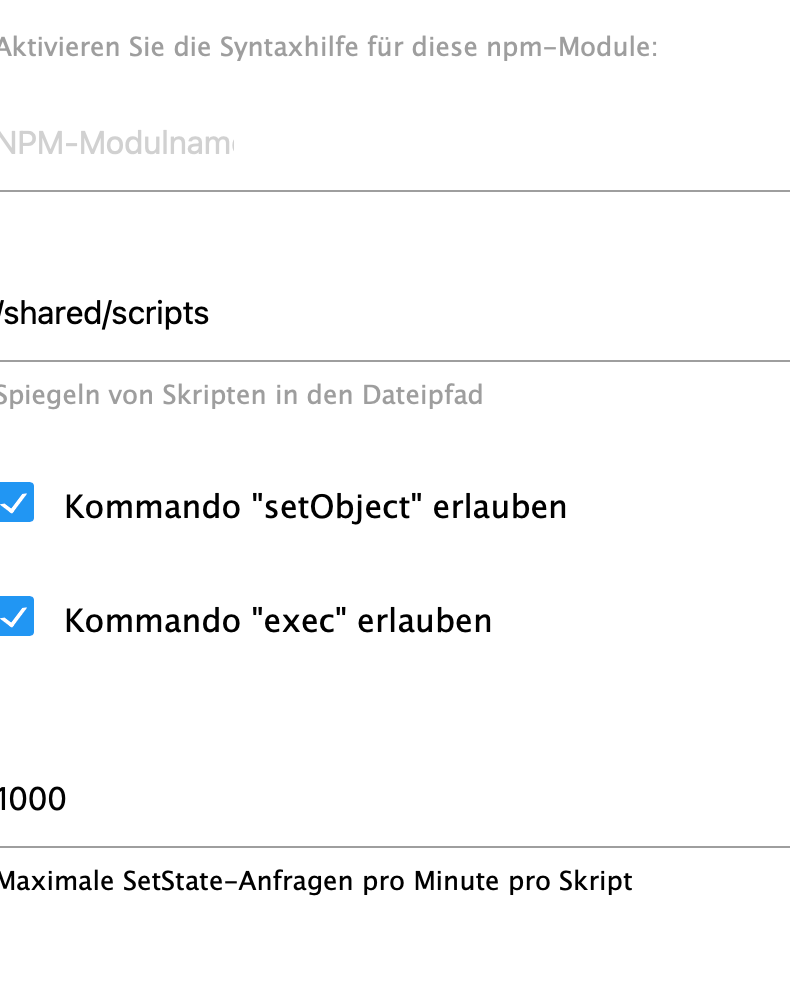
Da anschalten.
Erklärung du hast oben mit curl getestet. Jetzt führe das Srkipt curl auf der Kommandozeile aus und versucht es auf dem Weg, wenn da auch der Fehler kommt bin ich überfragt.
Bei request und axios sieht es aus, als wenn der zurückkommende Header falsch wäre und davon hab ich keine Ahnung.
-
@steinche sagte in [gelöst] Meteohub Daten, XML parsen, JSON durchsuchen:
Please enable "Enable Exec" option in instance settings
Please enable "Enable Exec" option in instance settings
Da anschalten.
Erklärung du hast oben mit curl getestet. Jetzt führe das Srkipt curl auf der Kommandozeile aus und versucht es auf dem Weg, wenn da auch der Fehler kommt bin ich überfragt.
Bei request und axios sieht es aus, als wenn der zurückkommende Header falsch wäre und davon hab ich keine Ahnung.
@ticaki said in [gelöst] Meteohub Daten, XML parsen, JSON durchsuchen:
@steinche sagte in [gelöst] Meteohub Daten, XML parsen, JSON durchsuchen:
Please enable "Enable Exec" option in instance settings
Please enable "Enable Exec" option in instance settings
Da anschalten.
Das hatte ich gefunden und angehakt ;)
Erklärung du hast oben mit curl getestet. Jetzt führe das Srkipt curl auf der Kommandozeile aus und versucht es auf dem Weg, wenn da auch der Fehler kommt bin ich überfragt.
Als wenn ich
curl http://192.168.75.9/meteograph.cgi?text=allxmlauf der Konsole des ioBrokers ausführe, bekomme ich die Daten, meintest Du das? Oder kann ich da auch das Script ausführen?
-
@ticaki said in [gelöst] Meteohub Daten, XML parsen, JSON durchsuchen:
@steinche sagte in [gelöst] Meteohub Daten, XML parsen, JSON durchsuchen:
Please enable "Enable Exec" option in instance settings
Please enable "Enable Exec" option in instance settings
Da anschalten.
Das hatte ich gefunden und angehakt ;)
Erklärung du hast oben mit curl getestet. Jetzt führe das Srkipt curl auf der Kommandozeile aus und versucht es auf dem Weg, wenn da auch der Fehler kommt bin ich überfragt.
Als wenn ich
curl http://192.168.75.9/meteograph.cgi?text=allxmlauf der Konsole des ioBrokers ausführe, bekomme ich die Daten, meintest Du das? Oder kann ich da auch das Script ausführen?
@steinche sagte in [gelöst] Meteohub Daten, XML parsen, JSON durchsuchen:
Oder kann ich da auch das Script ausführen?
Nein falsch verstanden. Das Skript im ioBroker macht es jetzt so wie du, nur ohne Anzeige. Ich wollte dir nur erklären was ich versuche zu tun.
Das Skript führt jetzt
curl http://192.168.75.9/meteograph.cgi?text=allxmlaus und übernimmt das ergebnis. (wenn ich nix falsch gemacht habe)
-
@ticaki said in [gelöst] Meteohub Daten, XML parsen, JSON durchsuchen:
@steinche sagte in [gelöst] Meteohub Daten, XML parsen, JSON durchsuchen:
Please enable "Enable Exec" option in instance settings
Please enable "Enable Exec" option in instance settings
Da anschalten.
Das hatte ich gefunden und angehakt ;)
Erklärung du hast oben mit curl getestet. Jetzt führe das Srkipt curl auf der Kommandozeile aus und versucht es auf dem Weg, wenn da auch der Fehler kommt bin ich überfragt.
Als wenn ich
curl http://192.168.75.9/meteograph.cgi?text=allxmlauf der Konsole des ioBrokers ausführe, bekomme ich die Daten, meintest Du das? Oder kann ich da auch das Script ausführen?
-
@ticaki said in [gelöst] Meteohub Daten, XML parsen, JSON durchsuchen:
@steinche sagte in [gelöst] Meteohub Daten, XML parsen, JSON durchsuchen:
Please enable "Enable Exec" option in instance settings
Please enable "Enable Exec" option in instance settings
Da anschalten.
Das hatte ich gefunden und angehakt ;)
Erklärung du hast oben mit curl getestet. Jetzt führe das Srkipt curl auf der Kommandozeile aus und versucht es auf dem Weg, wenn da auch der Fehler kommt bin ich überfragt.
Als wenn ich
curl http://192.168.75.9/meteograph.cgi?text=allxmlauf der Konsole des ioBrokers ausführe, bekomme ich die Daten, meintest Du das? Oder kann ich da auch das Script ausführen?
Allerdings request jetzt auch nicht so schwer, wenn du einen normalen get haben möchtest
const request = require('request');
request('http://www.google.com', function (error, response, body) {
  console.error('error:', error); // Print the error if one occurred
  console.log('statusCode:', response && response.statusCode); // Print the response status code if a response was received
  console.log('body:', body); // Print the HTML for the Google homepage.
});
Der Inhalt befindet sich dann in body, da asynchrone verarbeitung muss man innerhalb der callback funktion weitermachen (also da wo body ausgegeben wird)
-
Allerdings request jetzt auch nicht so schwer, wenn du einen normalen get haben möchtest
const request = require('request');
request('http://www.google.com', function (error, response, body) {
  console.error('error:', error); // Print the error if one occurred
  console.log('statusCode:', response && response.statusCode); // Print the response status code if a response was received
  console.log('body:', body); // Print the HTML for the Google homepage.
});
Der Inhalt befindet sich dann in body, da asynchrone verarbeitung muss man innerhalb der callback funktion weitermachen (also da wo body ausgegeben wird)
@oliverio
So ist es im ursprünglichen Script und das funktioniert nicht da scheinbar ein Fehler im Rückgabeheader ist, davon hab ich keinen Plan.


Hey! Du scheinst an dieser Unterhaltung interessiert zu sein, hast aber noch kein Konto.
Hast du es satt, bei jedem Besuch durch die gleichen Beiträge zu scrollen? Wenn du dich für ein Konto anmeldest, kommst du immer genau dorthin zurück, wo du zuvor warst, und kannst dich über neue Antworten benachrichtigen lassen (entweder per E-Mail oder Push-Benachrichtigung). Du kannst auch Lesezeichen speichern und Beiträge positiv bewerten, um anderen Community-Mitgliedern deine Wertschätzung zu zeigen.
Mit deinem Input könnte dieser Beitrag noch besser werden 💗
Registrieren AnmeldenSupport us
358
Online33.0k
Benutzer83.5k
Themen1.3m
Beiträge