




Adapter Updates dauern sehr lange
-
Hallo Zusammen
Mir ist letztens mal aufgefallen, dass Updates von Adaptern bei mir jetzt sehr lange dauern. Ich habe gestern über die Console mit iob upgrade 14 Adapter aktualisiert. das hat bestimmt 30 Minuten gedauert. Früher war das eine Sache von Sekunden einen Adapter zu aktualisieren. Vllt. auch mal 1 Minute. Ich kann leider nicht genau sagen seit wann das so ist.
iobroker läuft bei mir unter Proxmox auf einem NUC. Die VM hat dabei 2 Sokets, 2 Cores und 4 GB RAM. Ich glaube ja fast nicht, dass es an der Hardware liegt. Ich habe schon mehrfach den iob fixer durchlaufen lassen.
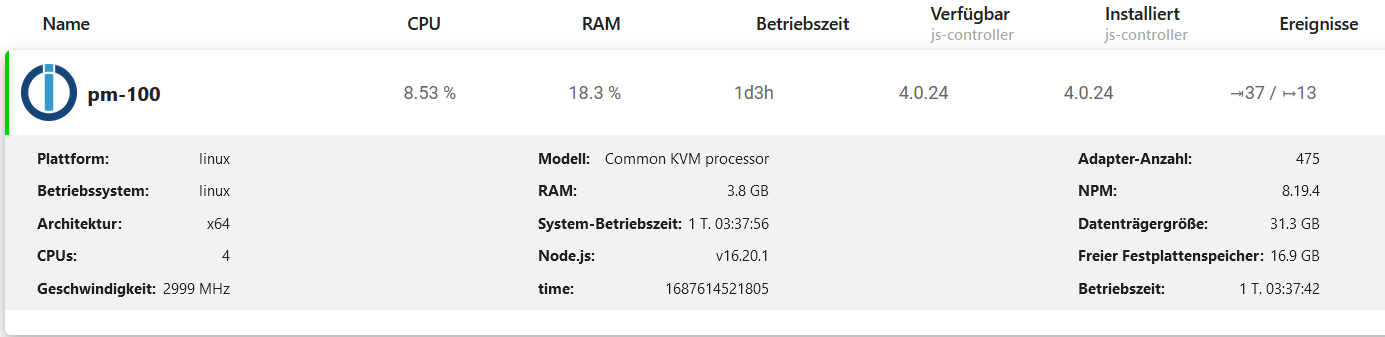
Es laufen ca. 45 Instanzen.
Woran könnte das liegen?
Viele Grüße
Jens
-
Hallo Zusammen
Mir ist letztens mal aufgefallen, dass Updates von Adaptern bei mir jetzt sehr lange dauern. Ich habe gestern über die Console mit iob upgrade 14 Adapter aktualisiert. das hat bestimmt 30 Minuten gedauert. Früher war das eine Sache von Sekunden einen Adapter zu aktualisieren. Vllt. auch mal 1 Minute. Ich kann leider nicht genau sagen seit wann das so ist.
iobroker läuft bei mir unter Proxmox auf einem NUC. Die VM hat dabei 2 Sokets, 2 Cores und 4 GB RAM. Ich glaube ja fast nicht, dass es an der Hardware liegt. Ich habe schon mehrfach den iob fixer durchlaufen lassen.
Es laufen ca. 45 Instanzen.
Woran könnte das liegen?
Viele Grüße
Jens
-
======================= SUMMARY ======================= v.2023-04-16 Operatingsystem: Ubuntu 18.04.6 LTS Kernel: 4.15.0-212-generic Installation: kvm Timezone: zone: Europe/Berlin (CEST, +0200) User-ID: 1000 X-Server: false Boot Target: graphical.target Pending OS-Updates: 0 Pending iob updates: 0 Nodejs-Installation: /usr/bin/nodejs v16.20.1 /usr/bin/node v16.20.1 /usr/bin/npm 8.19.4 /usr/bin/npx 8.19.4 Recommended versions are nodejs 18.x.y and npm 9.x.y Your nodejs installation is correct MEMORY: total used free shared buff/cache available Mem: 4.0G 3.0G 530M 974K 476M 777M Swap: 4.0G 72M 4.0G Total: 8.1G 3.1G 4.5G Active iob-Instances: 38 Active repo(s): Stable (default) ioBroker Core: js-controller 4.0.24 admin 6.3.5 ioBroker Status: iobroker is running on this host. Objects type: jsonl States type: jsonl Status admin and web instance: + system.adapter.admin.0 : admin : pm-100 - enabled, port: 8081, bind: 0.0.0.0, run as: admin + system.adapter.web.0 : web : pm-100 - enabled, port: 8082, bind: 0.0.0.0, run as: admin Objects: 16321 States: 13900 Size of iob-Database: 34M /opt/iobroker/iobroker-data/objects.jsonl 11M /opt/iobroker/iobroker-data/objects.json.migrated 11M /opt/iobroker/iobroker-data/objects.json.bak.migrated 0 /opt/iobroker/iobroker-data/objects.json.broken 5.7M /opt/iobroker/iobroker-data/states.jsonl 1.4M /opt/iobroker/iobroker-data/states.json.migrated 1.4M /opt/iobroker/iobroker-data/states.json.bak.migrated 0 /opt/iobroker/iobroker-data/states.json.broken =================== END OF SUMMARY ==================== -
======================= SUMMARY ======================= v.2023-04-16 Operatingsystem: Ubuntu 18.04.6 LTS Kernel: 4.15.0-212-generic Installation: kvm Timezone: zone: Europe/Berlin (CEST, +0200) User-ID: 1000 X-Server: false Boot Target: graphical.target Pending OS-Updates: 0 Pending iob updates: 0 Nodejs-Installation: /usr/bin/nodejs v16.20.1 /usr/bin/node v16.20.1 /usr/bin/npm 8.19.4 /usr/bin/npx 8.19.4 Recommended versions are nodejs 18.x.y and npm 9.x.y Your nodejs installation is correct MEMORY: total used free shared buff/cache available Mem: 4.0G 3.0G 530M 974K 476M 777M Swap: 4.0G 72M 4.0G Total: 8.1G 3.1G 4.5G Active iob-Instances: 38 Active repo(s): Stable (default) ioBroker Core: js-controller 4.0.24 admin 6.3.5 ioBroker Status: iobroker is running on this host. Objects type: jsonl States type: jsonl Status admin and web instance: + system.adapter.admin.0 : admin : pm-100 - enabled, port: 8081, bind: 0.0.0.0, run as: admin + system.adapter.web.0 : web : pm-100 - enabled, port: 8082, bind: 0.0.0.0, run as: admin Objects: 16321 States: 13900 Size of iob-Database: 34M /opt/iobroker/iobroker-data/objects.jsonl 11M /opt/iobroker/iobroker-data/objects.json.migrated 11M /opt/iobroker/iobroker-data/objects.json.bak.migrated 0 /opt/iobroker/iobroker-data/objects.json.broken 5.7M /opt/iobroker/iobroker-data/states.jsonl 1.4M /opt/iobroker/iobroker-data/states.json.migrated 1.4M /opt/iobroker/iobroker-data/states.json.bak.migrated 0 /opt/iobroker/iobroker-data/states.json.broken =================== END OF SUMMARY ====================Dein Betriebssystem ist total veraltet und wurde abgekündigt.
Installier da was lebendes.Und spendier da etwas mehr Arbeitsspeicher und CPU-Power.
-
Dein Betriebssystem ist total veraltet und wurde abgekündigt.
Installier da was lebendes.Und spendier da etwas mehr Arbeitsspeicher und CPU-Power.
Hallo @thomas-braun
Danke. Ich habe jetzt Ubuntu 22 und iobroker neu installiert und via backitup alles wiederhergestellt. Auch wenn ich gar nicht so recht glauben kann, dass es an der Ubuntu-Version liegen kann ... jetzt geht Adapter-Installation und Update wieder ruckzuck :)
-
Hallo @thomas-braun
Danke. Ich habe jetzt Ubuntu 22 und iobroker neu installiert und via backitup alles wiederhergestellt. Auch wenn ich gar nicht so recht glauben kann, dass es an der Ubuntu-Version liegen kann ... jetzt geht Adapter-Installation und Update wieder ruckzuck :)
@nevermind sagte in Adapter Updates dauern sehr lange:
Auch wenn ich gar nicht so recht glauben kann, dass es an der Ubuntu-Version liegen kann
Ich schon. Bzw. an dem ganzen frischen Zeug was da automatisch dann mitkommt.
Lass die jetzige Version (Ich hoffe 22.04) nicht ebenso versumpfen.
iob diagschaut jetzt wie aus?
-
@nevermind sagte in Adapter Updates dauern sehr lange:
Auch wenn ich gar nicht so recht glauben kann, dass es an der Ubuntu-Version liegen kann
Ich schon. Bzw. an dem ganzen frischen Zeug was da automatisch dann mitkommt.
Lass die jetzige Version (Ich hoffe 22.04) nicht ebenso versumpfen.
iob diagschaut jetzt wie aus?
Ich gelobe Besserung :)
Skript v.2023-04-16 *** BASE SYSTEM *** Architecture : x86_64 Docker : false Virtualization : kvm Distributor ID: Ubuntu Description: Ubuntu 22.04.2 LTS Release: 22.04 Codename: jammy PRETTY_NAME="Ubuntu 22.04.2 LTS" NAME="Ubuntu" VERSION_ID="22.04" VERSION="22.04.2 LTS (Jammy Jellyfish)" VERSION_CODENAME=jammy ID=ubuntu ID_LIKE=debian HOME_URL="https://www.ubuntu.com/" SUPPORT_URL="https://help.ubuntu.com/" BUG_REPORT_URL="https://bugs.launchpad.net/ubuntu/" PRIVACY_POLICY_URL="https://www.ubuntu.com/legal/terms-and-policies/privacy-policy" UBUNTU_CODENAME=jammy Systemuptime and Load: 21:42:41 up 8 min, 2 users, load average: 0.33, 0.39, 0.23 CPU threads: 8 *** Time and Time Zones *** Local time: Sat 2023-06-24 21:42:41 UTC Universal time: Sat 2023-06-24 21:42:41 UTC RTC time: Sat 2023-06-24 21:42:41 Time zone: Etc/UTC (UTC, +0000) System clock synchronized: yes NTP service: active RTC in local TZ: no *** User and Groups *** jenlau /home/jenlau jenlau adm cdrom sudo dip plugdev lxd iobroker *** X-Server-Setup *** X-Server: false Desktop: Terminal: tty Boot Target: graphical.target *** MEMORY *** total used free shared buff/cache available Mem: 7.9G 2.5G 4.5G 1.0M 910M 5.2G Swap: 4.1G 0B 4.1G Total: 12G 2.5G 8.6G 7937 M total memory 2505 M used memory 335 M active memory 2752 M inactive memory 4520 M free memory 54 M buffer memory 855 M swap cache 4095 M total swap 0 M used swap 4095 M free swap *** FILESYSTEM *** Filesystem Type Size Used Avail Use% Mounted on tmpfs tmpfs 794M 1.1M 793M 1% /run /dev/sda2 ext4 32G 11G 20G 35% / tmpfs tmpfs 3.9G 0 3.9G 0% /dev/shm tmpfs tmpfs 5.0M 0 5.0M 0% /run/lock tmpfs tmpfs 794M 4.0K 794M 1% /run/user/1000 Messages concerning ext4 filesystem in dmesg: [Sat Jun 24 21:34:21 2023] EXT4-fs (sda2): mounted filesystem with ordered data mode. Opts: (null). Quota mode: none. [Sat Jun 24 21:34:22 2023] EXT4-fs (sda2): re-mounted. Opts: (null). Quota mode: none. Show mounted filesystems (real ones only): TARGET SOURCE FSTYPE OPTIONS / /dev/sda2 ext4 rw,relatime |-/snap/core20/1822 /dev/loop0 squashfs ro,nodev,relatime,errors=continue |-/snap/snapd/18357 /dev/loop1 squashfs ro,nodev,relatime,errors=continue |-/snap/lxd/24322 /dev/loop2 squashfs ro,nodev,relatime,errors=continue |-/snap/snapd/19457 /dev/loop3 squashfs ro,nodev,relatime,errors=continue `-/snap/core20/1950 /dev/loop4 squashfs ro,nodev,relatime,errors=continue Files in neuralgic directories: /var: 799M /var/ 522M /var/lib 343M /var/lib/snapd 242M /var/cache 229M /var/cache/apt Archived and active journals take up 32.0M in the file system. /opt/iobroker/backups: 4.0K /opt/iobroker/backups/ /opt/iobroker/iobroker-data: 568M /opt/iobroker/iobroker-data/ 296M /opt/iobroker/iobroker-data/history 214M /opt/iobroker/iobroker-data/files 52M /opt/iobroker/iobroker-data/files/javascript.admin 45M /opt/iobroker/iobroker-data/files/devices.admin/static The five largest files in iobroker-data are: 35M /opt/iobroker/iobroker-data/files/devices.admin/static/js/main.24f2bb56.js.map 31M /opt/iobroker/iobroker-data/objects.jsonl 28M /opt/iobroker/iobroker-data/states.jsonl 19M /opt/iobroker/iobroker-data/files/iot.admin/static/js/main.2975a411.js.map 8.9M /opt/iobroker/iobroker-data/files/scenes.admin/static/js/2.7de3299d.chunk.js.map *** NodeJS-Installation *** /usr/bin/nodejs v18.16.1 /usr/bin/node v18.16.1 /usr/bin/npm 9.5.1 /usr/bin/npx 9.5.1 nodejs: Installed: 18.16.1-deb-1nodesource1 Candidate: 18.16.1-deb-1nodesource1 Version table: *** 18.16.1-deb-1nodesource1 500 500 https://deb.nodesource.com/node_18.x jammy/main amd64 Packages 100 /var/lib/dpkg/status 12.22.9~dfsg-1ubuntu3 500 500 http://de.archive.ubuntu.com/ubuntu jammy/universe amd64 Packages Temp directories causing npm8 problem: 0 No problems detected *** ioBroker-Installation *** ioBroker Status iobroker is running on this host. Objects type: jsonl States type: jsonl MULTIHOSTSERVICE/enabled: false Core adapters versions js-controller: 4.0.24 admin: 6.3.5 javascript: 7.0.3 Adapters from github: 0 Adapter State + system.adapter.admin.0 : admin : iobroker - enabled, port: 8081, bind: 0.0.0.0, run as: admin system.adapter.alias-manager.0 : alias-manager : iobroker - disabled + system.adapter.backitup.0 : backitup : iobroker - enabled + system.adapter.ble.0 : ble : iobroker - enabled + system.adapter.chromecast.0 : chromecast : iobroker - enabled + system.adapter.cloud.0 : cloud : iobroker - enabled system.adapter.daswetter.0 : daswetter : iobroker - enabled + system.adapter.deconz.0 : deconz : iobroker - enabled, port: 80 system.adapter.devices.0 : devices : iobroker - disabled system.adapter.discovery.0 : discovery : iobroker - disabled + system.adapter.email.0 : email : iobroker - enabled system.adapter.feiertage.0 : feiertage : iobroker - disabled system.adapter.flot.0 : flot : iobroker - disabled + system.adapter.history.0 : history : iobroker - enabled + system.adapter.hm-rega.0 : hm-rega : iobroker - enabled + system.adapter.hm-rpc.0 : hm-rpc : iobroker - enabled, port: 0 + system.adapter.hm-rpc.1 : hm-rpc : iobroker - enabled, port: 0 system.adapter.hmip.1 : hmip : iobroker - disabled system.adapter.hmip.2 : hmip : iobroker - disabled + system.adapter.influxdb.0 : influxdb : iobroker - enabled, port: 8086 + system.adapter.info.0 : info : iobroker - enabled + system.adapter.iot.0 : iot : iobroker - enabled + system.adapter.javascript.0 : javascript : iobroker - enabled + system.adapter.linkeddevices.0 : linkeddevices : iobroker - enabled system.adapter.lovelace.0 : lovelace : iobroker - disabled, port: 8091, bind: 0.0.0.0, run as: admin + system.adapter.milight-smart-light.0 : milight-smart-light : iobroker - enabled + system.adapter.mqtt.0 : mqtt : iobroker - enabled, port: 1884, bind: 0.0.0.0 + system.adapter.mqtt.1 : mqtt : iobroker - enabled, port: 1883, bind: 0.0.0.0 + system.adapter.nanoleaf-lightpanels.0 : nanoleaf-lightpanels : iobroker - enabled, port: 16021 + system.adapter.net-tools.0 : net-tools : iobroker - enabled system.adapter.node-red.0 : node-red : iobroker - disabled, port: 1880, bind: 0.0.0.0 + system.adapter.proxmox.0 : proxmox : iobroker - enabled, port: 8006 + system.adapter.pushover.0 : pushover : iobroker - enabled + system.adapter.sayit.0 : sayit : iobroker - enabled + system.adapter.sayit.1 : sayit : iobroker - enabled + system.adapter.sayit.2 : sayit : iobroker - enabled + system.adapter.sayit.3 : sayit : iobroker - enabled + system.adapter.sayit.4 : sayit : iobroker - enabled + system.adapter.scenes.0 : scenes : iobroker - enabled + system.adapter.simple-api.0 : simple-api : iobroker - enabled, port: 8087, bind: 192.168.20.21, run as: admin + system.adapter.sonoff.0 : sonoff : iobroker - enabled, port: 1883, bind: 0.0.0.0 system.adapter.sql.0 : sql : iobroker - disabled, port: 3306 + system.adapter.tankerkoenig.0 : tankerkoenig : iobroker - enabled + system.adapter.telegram.0 : telegram : iobroker - enabled, port: 8443, bind: 0.0.0.0 + system.adapter.terminal.0 : terminal : iobroker - enabled, port: 8088, bind: 0.0.0.0, run as: admin + system.adapter.unifi.0 : unifi : iobroker - enabled system.adapter.vis.0 : vis : iobroker - enabled + system.adapter.web.0 : web : iobroker - enabled, port: 8082, bind: 0.0.0.0, run as: admin + instance is alive Enabled adapters with bindings + system.adapter.admin.0 : admin : iobroker - enabled, port: 8081, bind: 0.0.0.0, run as: admin + system.adapter.deconz.0 : deconz : iobroker - enabled, port: 80 + system.adapter.hm-rpc.0 : hm-rpc : iobroker - enabled, port: 0 + system.adapter.hm-rpc.1 : hm-rpc : iobroker - enabled, port: 0 + system.adapter.influxdb.0 : influxdb : iobroker - enabled, port: 8086 + system.adapter.mqtt.0 : mqtt : iobroker - enabled, port: 1884, bind: 0.0.0.0 + system.adapter.mqtt.1 : mqtt : iobroker - enabled, port: 1883, bind: 0.0.0.0 + system.adapter.nanoleaf-lightpanels.0 : nanoleaf-lightpanels : iobroker - enabled, port: 16021 + system.adapter.proxmox.0 : proxmox : iobroker - enabled, port: 8006 + system.adapter.simple-api.0 : simple-api : iobroker - enabled, port: 8087, bind: 192.168.20.21, run as: admin + system.adapter.sonoff.0 : sonoff : iobroker - enabled, port: 1883, bind: 0.0.0.0 + system.adapter.telegram.0 : telegram : iobroker - enabled, port: 8443, bind: 0.0.0.0 + system.adapter.terminal.0 : terminal : iobroker - enabled, port: 8088, bind: 0.0.0.0, run as: admin + system.adapter.web.0 : web : iobroker - enabled, port: 8082, bind: 0.0.0.0, run as: admin ioBroker-Repositories Stable (default): http://download.iobroker.net/sources-dist.json Beta (latest) : http://download.iobroker.net/sources-dist-latest.json Active repo(s): Stable (default) Installed ioBroker-Instances Used repository: Stable (default) Adapter "accuweather" : 1.2.4 , installed 1.2.4 Adapter "admin" : 6.3.5 , installed 6.3.5 Adapter "alias-manager": 1.2.4 , installed 1.2.4 Adapter "backitup" : 2.6.23 , installed 2.6.23 Adapter "ble" : 0.13.0 , installed 0.13.0 Adapter "chromecast" : 3.0.3 , installed 3.0.3 Adapter "cloud" : 4.4.1 , installed 4.4.1 Adapter "daswetter" : 3.1.8 , installed 3.1.8 Adapter "deconz" : 1.3.21 , installed 1.3.21 Adapter "devices" : 1.1.5 , installed 1.1.5 Adapter "discovery" : 3.1.0 , installed 3.1.0 Adapter "email" : 1.2.0 , installed 1.2.0 Adapter "feiertage" : 1.1.0 , installed 1.1.0 Adapter "flot" : 1.12.0 , installed 1.12.0 Adapter "history" : 2.2.4 , installed 2.2.4 Adapter "hm-rega" : 3.0.46 , installed 3.0.46 Adapter "hm-rpc" : 1.15.18 , installed 1.15.18 Adapter "hmip" : 1.20.0 , installed 1.20.0 Adapter "influxdb" : 3.2.0 , installed 3.2.0 Adapter "info" : 1.9.26 , installed 1.9.26 Adapter "iot" : 1.14.5 , installed 1.14.5 Adapter "javascript" : 7.0.3 , installed 7.0.3 Controller "js-controller": 4.0.24 , installed 4.0.24 Adapter "linkeddevices": 1.5.5 , installed 1.5.5 Adapter "lovelace" : 3.0.1 , installed 3.0.1 Adapter "milight-smart-light": 1.2.2, installed 1.2.2 Adapter "mqtt" : 4.1.1 , installed 4.1.1 Adapter "nanoleaf-lightpanels": 1.3.1, installed 1.3.1 Adapter "net-tools" : 0.2.0 , installed 0.2.0 Adapter "node-red" : 4.0.3 , installed 4.0.3 Adapter "proxmox" : 1.3.4 , installed 1.3.4 Adapter "pushover" : 3.0.3 , installed 3.0.3 Adapter "sayit" : 3.0.5 , installed 3.0.5 Adapter "scenes" : 2.3.9 , installed 2.3.9 Adapter "simple-api" : 2.7.2 , installed 2.7.2 Adapter "socketio" : 4.2.0 , installed 4.2.0 Adapter "sonoff" : 2.5.3 , installed 2.5.3 Adapter "sql" : 2.2.0 , installed 2.2.0 Adapter "tankerkoenig" : 3.3.7 , installed 3.3.7 Adapter "telegram" : 1.15.6 , installed 1.15.6 Adapter "terminal" : 1.0.0 , installed 1.0.0 Adapter "unifi" : 0.5.10 , installed 0.6.3 Adapter "vis" : 1.4.16 , installed 1.4.16 Adapter "vis-history" : 1.0.0 , installed 1.0.0 Adapter "vis-timeandweather": 1.2.2, installed 1.2.2 Adapter "web" : 4.3.0 , installed 4.3.0 Adapter "ws" : 1.3.0 , installed 1.3.0 Objects and States Please stand by - This may take a while Objects: 16590 States: 14210 *** OS-Repositories and Updates *** Hit:1 http://de.archive.ubuntu.com/ubuntu jammy InRelease Hit:2 http://de.archive.ubuntu.com/ubuntu jammy-updates InRelease Hit:3 http://de.archive.ubuntu.com/ubuntu jammy-backports InRelease Hit:4 https://deb.nodesource.com/node_18.x jammy InRelease Hit:5 http://de.archive.ubuntu.com/ubuntu jammy-security InRelease Hit:6 https://packagecloud.io/ookla/speedtest-cli/ubuntu jammy InRelease Reading package lists... Pending Updates: 0 *** Listening Ports *** Active Internet connections (only servers) Proto Recv-Q Send-Q Local Address Foreign Address State User Inode PID/Program name tcp 0 0 127.0.0.1:9001 0.0.0.0:* LISTEN 1001 21831 663/iobroker.js-con tcp 0 0 127.0.0.1:9000 0.0.0.0:* LISTEN 1001 22886 663/iobroker.js-con tcp 0 0 127.0.0.53:53 0.0.0.0:* LISTEN 102 21413 642/systemd-resolve tcp 0 0 192.168.20.21:2010 0.0.0.0:* LISTEN 1001 23355 1215/io.hm-rpc.1 tcp 0 0 0.0.0.0:1883 0.0.0.0:* LISTEN 1001 25244 1260/io.sonoff.0 tcp 0 0 0.0.0.0:1884 0.0.0.0:* LISTEN 1001 25206 1230/io.mqtt.0 tcp 0 0 0.0.0.0:2001 0.0.0.0:* LISTEN 1001 22171 1200/io.hm-rpc.0 tcp 0 0 0.0.0.0:111 0.0.0.0:* LISTEN 0 19644 1/init tcp 0 0 0.0.0.0:22 0.0.0.0:* LISTEN 0 20281 694/sshd: /usr/sbin tcp 0 0 192.168.20.21:8087 0.0.0.0:* LISTEN 1001 29940 3217/io.simple-api. tcp6 0 0 :::8081 :::* LISTEN 1001 21968 777/io.admin.0 tcp6 0 0 :::8082 :::* LISTEN 1001 30748 3752/io.web.0 tcp6 0 0 :::8088 :::* LISTEN 1001 30083 3486/io.terminal.0 tcp6 0 0 :::111 :::* LISTEN 0 396 1/init tcp6 0 0 :::22 :::* LISTEN 0 20301 694/sshd: /usr/sbin udp 0 0 0.0.0.0:56985 0.0.0.0:* 1001 26500 2132/io.milight-sma udp 0 0 127.0.0.53:53 0.0.0.0:* 102 21412 642/systemd-resolve udp 0 0 192.168.20.21:68 0.0.0.0:* 101 22682 640/systemd-network udp 0 0 0.0.0.0:111 0.0.0.0:* 0 2832 1/init udp 0 0 0.0.0.0:5353 0.0.0.0:* 1001 23275 1152/io.chromecast. udp 0 0 0.0.0.0:1900 0.0.0.0:* 1001 26533 2165/io.nanoleaf-li udp 0 0 0.0.0.0:1900 0.0.0.0:* 1001 26064 1383/io.deconz.0 udp6 0 0 :::111 :::* 0 19231 1/init udp6 0 0 :::1900 :::* 1001 26065 1383/io.deconz.0 *** Log File - Last 25 Lines *** 2023-06-24 21:36:40.116 - info: sayit.4 (3177) Upload announce mp3 files 2023-06-24 21:36:43.012 - info: host.iobroker instance system.adapter.simple-api.0 started with pid 3217 2023-06-24 21:36:43.781 - info: simple-api.0 (3217) starting. Version 2.7.2 in /opt/iobroker/node_modules/iobroker.simple-api, node: v18.16.1, js-controller: 4.0.24 2023-06-24 21:36:43.795 - info: simple-api.0 (3217) simpleAPI server listening on port 8087 2023-06-24 21:36:43.796 - info: simple-api.0 (3217) Allow states only when user is owner: false 2023-06-24 21:36:43.803 - info: simple-api.0 (3217) http server listening on port 8087 2023-06-24 21:36:47.016 - info: host.iobroker instance system.adapter.tankerkoenig.0 started with pid 3441 2023-06-24 21:36:47.954 - info: tankerkoenig.0 (3441) starting. Version 3.3.7 in /opt/iobroker/node_modules/iobroker.tankerkoenig, node: v18.16.1, js-controller: 4.0.24 2023-06-24 21:36:47.979 - info: tankerkoenig.0 (3441) Adapter is already in daemon mode 2023-06-24 21:36:47.980 - info: tankerkoenig.0 (3441) Sync time set to 15 minutes or 900000 ms 2023-06-24 21:36:50.820 - info: tankerkoenig.0 (3441) Start first request 2023-06-24 21:36:51.012 - info: host.iobroker instance system.adapter.terminal.0 started with pid 3486 2023-06-24 21:36:52.103 - info: terminal.0 (3486) starting. Version 1.0.0 in /opt/iobroker/node_modules/iobroker.terminal, node: v18.16.1, js-controller: 4.0.24 2023-06-24 21:36:52.130 - info: terminal.0 (3486) http server listening on port 8088 2023-06-24 21:36:55.681 - info: vis.0 (3719) starting. Version 1.4.16 in /opt/iobroker/node_modules/iobroker.vis, node: v18.16.1, js-controller: 4.0.24 2023-06-24 21:36:55.940 - info: vis.0 (3719) vis license is OK. 2023-06-24 21:36:56.608 - info: vis.0 (3719) Terminated (NO_ERROR): Without reason 2023-06-24 21:36:57.160 - info: host.iobroker instance system.adapter.vis.0 terminated while should be started once 2023-06-24 21:36:59.012 - info: host.iobroker instance system.adapter.web.0 started with pid 3752 2023-06-24 21:36:59.897 - info: web.0 (3752) starting. Version 4.3.0 in /opt/iobroker/node_modules/iobroker.web, node: v18.16.1, js-controller: 4.0.24 2023-06-24 21:37:00.057 - info: web.0 (3752) socket.io server listening on port 8082 2023-06-24 21:37:00.074 - info: web.0 (3752) http server listening on port 8082 2023-06-24 21:41:13.138 - info: javascript.0 (1078) script.js.Küche.Awtrix.awtrix2: 486 2023-06-24 21:42:06.403 - info: web.0 (3752) ==> Connected system.user.admin from ::ffff:192.168.20.146 2023-06-24 21:42:08.760 - info: web.0 (3752) ==> Connected system.user.admin from ::ffff:192.168.20.32 -
Ich gelobe Besserung :)
Skript v.2023-04-16 *** BASE SYSTEM *** Architecture : x86_64 Docker : false Virtualization : kvm Distributor ID: Ubuntu Description: Ubuntu 22.04.2 LTS Release: 22.04 Codename: jammy PRETTY_NAME="Ubuntu 22.04.2 LTS" NAME="Ubuntu" VERSION_ID="22.04" VERSION="22.04.2 LTS (Jammy Jellyfish)" VERSION_CODENAME=jammy ID=ubuntu ID_LIKE=debian HOME_URL="https://www.ubuntu.com/" SUPPORT_URL="https://help.ubuntu.com/" BUG_REPORT_URL="https://bugs.launchpad.net/ubuntu/" PRIVACY_POLICY_URL="https://www.ubuntu.com/legal/terms-and-policies/privacy-policy" UBUNTU_CODENAME=jammy Systemuptime and Load: 21:42:41 up 8 min, 2 users, load average: 0.33, 0.39, 0.23 CPU threads: 8 *** Time and Time Zones *** Local time: Sat 2023-06-24 21:42:41 UTC Universal time: Sat 2023-06-24 21:42:41 UTC RTC time: Sat 2023-06-24 21:42:41 Time zone: Etc/UTC (UTC, +0000) System clock synchronized: yes NTP service: active RTC in local TZ: no *** User and Groups *** jenlau /home/jenlau jenlau adm cdrom sudo dip plugdev lxd iobroker *** X-Server-Setup *** X-Server: false Desktop: Terminal: tty Boot Target: graphical.target *** MEMORY *** total used free shared buff/cache available Mem: 7.9G 2.5G 4.5G 1.0M 910M 5.2G Swap: 4.1G 0B 4.1G Total: 12G 2.5G 8.6G 7937 M total memory 2505 M used memory 335 M active memory 2752 M inactive memory 4520 M free memory 54 M buffer memory 855 M swap cache 4095 M total swap 0 M used swap 4095 M free swap *** FILESYSTEM *** Filesystem Type Size Used Avail Use% Mounted on tmpfs tmpfs 794M 1.1M 793M 1% /run /dev/sda2 ext4 32G 11G 20G 35% / tmpfs tmpfs 3.9G 0 3.9G 0% /dev/shm tmpfs tmpfs 5.0M 0 5.0M 0% /run/lock tmpfs tmpfs 794M 4.0K 794M 1% /run/user/1000 Messages concerning ext4 filesystem in dmesg: [Sat Jun 24 21:34:21 2023] EXT4-fs (sda2): mounted filesystem with ordered data mode. Opts: (null). Quota mode: none. [Sat Jun 24 21:34:22 2023] EXT4-fs (sda2): re-mounted. Opts: (null). Quota mode: none. Show mounted filesystems (real ones only): TARGET SOURCE FSTYPE OPTIONS / /dev/sda2 ext4 rw,relatime |-/snap/core20/1822 /dev/loop0 squashfs ro,nodev,relatime,errors=continue |-/snap/snapd/18357 /dev/loop1 squashfs ro,nodev,relatime,errors=continue |-/snap/lxd/24322 /dev/loop2 squashfs ro,nodev,relatime,errors=continue |-/snap/snapd/19457 /dev/loop3 squashfs ro,nodev,relatime,errors=continue `-/snap/core20/1950 /dev/loop4 squashfs ro,nodev,relatime,errors=continue Files in neuralgic directories: /var: 799M /var/ 522M /var/lib 343M /var/lib/snapd 242M /var/cache 229M /var/cache/apt Archived and active journals take up 32.0M in the file system. /opt/iobroker/backups: 4.0K /opt/iobroker/backups/ /opt/iobroker/iobroker-data: 568M /opt/iobroker/iobroker-data/ 296M /opt/iobroker/iobroker-data/history 214M /opt/iobroker/iobroker-data/files 52M /opt/iobroker/iobroker-data/files/javascript.admin 45M /opt/iobroker/iobroker-data/files/devices.admin/static The five largest files in iobroker-data are: 35M /opt/iobroker/iobroker-data/files/devices.admin/static/js/main.24f2bb56.js.map 31M /opt/iobroker/iobroker-data/objects.jsonl 28M /opt/iobroker/iobroker-data/states.jsonl 19M /opt/iobroker/iobroker-data/files/iot.admin/static/js/main.2975a411.js.map 8.9M /opt/iobroker/iobroker-data/files/scenes.admin/static/js/2.7de3299d.chunk.js.map *** NodeJS-Installation *** /usr/bin/nodejs v18.16.1 /usr/bin/node v18.16.1 /usr/bin/npm 9.5.1 /usr/bin/npx 9.5.1 nodejs: Installed: 18.16.1-deb-1nodesource1 Candidate: 18.16.1-deb-1nodesource1 Version table: *** 18.16.1-deb-1nodesource1 500 500 https://deb.nodesource.com/node_18.x jammy/main amd64 Packages 100 /var/lib/dpkg/status 12.22.9~dfsg-1ubuntu3 500 500 http://de.archive.ubuntu.com/ubuntu jammy/universe amd64 Packages Temp directories causing npm8 problem: 0 No problems detected *** ioBroker-Installation *** ioBroker Status iobroker is running on this host. Objects type: jsonl States type: jsonl MULTIHOSTSERVICE/enabled: false Core adapters versions js-controller: 4.0.24 admin: 6.3.5 javascript: 7.0.3 Adapters from github: 0 Adapter State + system.adapter.admin.0 : admin : iobroker - enabled, port: 8081, bind: 0.0.0.0, run as: admin system.adapter.alias-manager.0 : alias-manager : iobroker - disabled + system.adapter.backitup.0 : backitup : iobroker - enabled + system.adapter.ble.0 : ble : iobroker - enabled + system.adapter.chromecast.0 : chromecast : iobroker - enabled + system.adapter.cloud.0 : cloud : iobroker - enabled system.adapter.daswetter.0 : daswetter : iobroker - enabled + system.adapter.deconz.0 : deconz : iobroker - enabled, port: 80 system.adapter.devices.0 : devices : iobroker - disabled system.adapter.discovery.0 : discovery : iobroker - disabled + system.adapter.email.0 : email : iobroker - enabled system.adapter.feiertage.0 : feiertage : iobroker - disabled system.adapter.flot.0 : flot : iobroker - disabled + system.adapter.history.0 : history : iobroker - enabled + system.adapter.hm-rega.0 : hm-rega : iobroker - enabled + system.adapter.hm-rpc.0 : hm-rpc : iobroker - enabled, port: 0 + system.adapter.hm-rpc.1 : hm-rpc : iobroker - enabled, port: 0 system.adapter.hmip.1 : hmip : iobroker - disabled system.adapter.hmip.2 : hmip : iobroker - disabled + system.adapter.influxdb.0 : influxdb : iobroker - enabled, port: 8086 + system.adapter.info.0 : info : iobroker - enabled + system.adapter.iot.0 : iot : iobroker - enabled + system.adapter.javascript.0 : javascript : iobroker - enabled + system.adapter.linkeddevices.0 : linkeddevices : iobroker - enabled system.adapter.lovelace.0 : lovelace : iobroker - disabled, port: 8091, bind: 0.0.0.0, run as: admin + system.adapter.milight-smart-light.0 : milight-smart-light : iobroker - enabled + system.adapter.mqtt.0 : mqtt : iobroker - enabled, port: 1884, bind: 0.0.0.0 + system.adapter.mqtt.1 : mqtt : iobroker - enabled, port: 1883, bind: 0.0.0.0 + system.adapter.nanoleaf-lightpanels.0 : nanoleaf-lightpanels : iobroker - enabled, port: 16021 + system.adapter.net-tools.0 : net-tools : iobroker - enabled system.adapter.node-red.0 : node-red : iobroker - disabled, port: 1880, bind: 0.0.0.0 + system.adapter.proxmox.0 : proxmox : iobroker - enabled, port: 8006 + system.adapter.pushover.0 : pushover : iobroker - enabled + system.adapter.sayit.0 : sayit : iobroker - enabled + system.adapter.sayit.1 : sayit : iobroker - enabled + system.adapter.sayit.2 : sayit : iobroker - enabled + system.adapter.sayit.3 : sayit : iobroker - enabled + system.adapter.sayit.4 : sayit : iobroker - enabled + system.adapter.scenes.0 : scenes : iobroker - enabled + system.adapter.simple-api.0 : simple-api : iobroker - enabled, port: 8087, bind: 192.168.20.21, run as: admin + system.adapter.sonoff.0 : sonoff : iobroker - enabled, port: 1883, bind: 0.0.0.0 system.adapter.sql.0 : sql : iobroker - disabled, port: 3306 + system.adapter.tankerkoenig.0 : tankerkoenig : iobroker - enabled + system.adapter.telegram.0 : telegram : iobroker - enabled, port: 8443, bind: 0.0.0.0 + system.adapter.terminal.0 : terminal : iobroker - enabled, port: 8088, bind: 0.0.0.0, run as: admin + system.adapter.unifi.0 : unifi : iobroker - enabled system.adapter.vis.0 : vis : iobroker - enabled + system.adapter.web.0 : web : iobroker - enabled, port: 8082, bind: 0.0.0.0, run as: admin + instance is alive Enabled adapters with bindings + system.adapter.admin.0 : admin : iobroker - enabled, port: 8081, bind: 0.0.0.0, run as: admin + system.adapter.deconz.0 : deconz : iobroker - enabled, port: 80 + system.adapter.hm-rpc.0 : hm-rpc : iobroker - enabled, port: 0 + system.adapter.hm-rpc.1 : hm-rpc : iobroker - enabled, port: 0 + system.adapter.influxdb.0 : influxdb : iobroker - enabled, port: 8086 + system.adapter.mqtt.0 : mqtt : iobroker - enabled, port: 1884, bind: 0.0.0.0 + system.adapter.mqtt.1 : mqtt : iobroker - enabled, port: 1883, bind: 0.0.0.0 + system.adapter.nanoleaf-lightpanels.0 : nanoleaf-lightpanels : iobroker - enabled, port: 16021 + system.adapter.proxmox.0 : proxmox : iobroker - enabled, port: 8006 + system.adapter.simple-api.0 : simple-api : iobroker - enabled, port: 8087, bind: 192.168.20.21, run as: admin + system.adapter.sonoff.0 : sonoff : iobroker - enabled, port: 1883, bind: 0.0.0.0 + system.adapter.telegram.0 : telegram : iobroker - enabled, port: 8443, bind: 0.0.0.0 + system.adapter.terminal.0 : terminal : iobroker - enabled, port: 8088, bind: 0.0.0.0, run as: admin + system.adapter.web.0 : web : iobroker - enabled, port: 8082, bind: 0.0.0.0, run as: admin ioBroker-Repositories Stable (default): http://download.iobroker.net/sources-dist.json Beta (latest) : http://download.iobroker.net/sources-dist-latest.json Active repo(s): Stable (default) Installed ioBroker-Instances Used repository: Stable (default) Adapter "accuweather" : 1.2.4 , installed 1.2.4 Adapter "admin" : 6.3.5 , installed 6.3.5 Adapter "alias-manager": 1.2.4 , installed 1.2.4 Adapter "backitup" : 2.6.23 , installed 2.6.23 Adapter "ble" : 0.13.0 , installed 0.13.0 Adapter "chromecast" : 3.0.3 , installed 3.0.3 Adapter "cloud" : 4.4.1 , installed 4.4.1 Adapter "daswetter" : 3.1.8 , installed 3.1.8 Adapter "deconz" : 1.3.21 , installed 1.3.21 Adapter "devices" : 1.1.5 , installed 1.1.5 Adapter "discovery" : 3.1.0 , installed 3.1.0 Adapter "email" : 1.2.0 , installed 1.2.0 Adapter "feiertage" : 1.1.0 , installed 1.1.0 Adapter "flot" : 1.12.0 , installed 1.12.0 Adapter "history" : 2.2.4 , installed 2.2.4 Adapter "hm-rega" : 3.0.46 , installed 3.0.46 Adapter "hm-rpc" : 1.15.18 , installed 1.15.18 Adapter "hmip" : 1.20.0 , installed 1.20.0 Adapter "influxdb" : 3.2.0 , installed 3.2.0 Adapter "info" : 1.9.26 , installed 1.9.26 Adapter "iot" : 1.14.5 , installed 1.14.5 Adapter "javascript" : 7.0.3 , installed 7.0.3 Controller "js-controller": 4.0.24 , installed 4.0.24 Adapter "linkeddevices": 1.5.5 , installed 1.5.5 Adapter "lovelace" : 3.0.1 , installed 3.0.1 Adapter "milight-smart-light": 1.2.2, installed 1.2.2 Adapter "mqtt" : 4.1.1 , installed 4.1.1 Adapter "nanoleaf-lightpanels": 1.3.1, installed 1.3.1 Adapter "net-tools" : 0.2.0 , installed 0.2.0 Adapter "node-red" : 4.0.3 , installed 4.0.3 Adapter "proxmox" : 1.3.4 , installed 1.3.4 Adapter "pushover" : 3.0.3 , installed 3.0.3 Adapter "sayit" : 3.0.5 , installed 3.0.5 Adapter "scenes" : 2.3.9 , installed 2.3.9 Adapter "simple-api" : 2.7.2 , installed 2.7.2 Adapter "socketio" : 4.2.0 , installed 4.2.0 Adapter "sonoff" : 2.5.3 , installed 2.5.3 Adapter "sql" : 2.2.0 , installed 2.2.0 Adapter "tankerkoenig" : 3.3.7 , installed 3.3.7 Adapter "telegram" : 1.15.6 , installed 1.15.6 Adapter "terminal" : 1.0.0 , installed 1.0.0 Adapter "unifi" : 0.5.10 , installed 0.6.3 Adapter "vis" : 1.4.16 , installed 1.4.16 Adapter "vis-history" : 1.0.0 , installed 1.0.0 Adapter "vis-timeandweather": 1.2.2, installed 1.2.2 Adapter "web" : 4.3.0 , installed 4.3.0 Adapter "ws" : 1.3.0 , installed 1.3.0 Objects and States Please stand by - This may take a while Objects: 16590 States: 14210 *** OS-Repositories and Updates *** Hit:1 http://de.archive.ubuntu.com/ubuntu jammy InRelease Hit:2 http://de.archive.ubuntu.com/ubuntu jammy-updates InRelease Hit:3 http://de.archive.ubuntu.com/ubuntu jammy-backports InRelease Hit:4 https://deb.nodesource.com/node_18.x jammy InRelease Hit:5 http://de.archive.ubuntu.com/ubuntu jammy-security InRelease Hit:6 https://packagecloud.io/ookla/speedtest-cli/ubuntu jammy InRelease Reading package lists... Pending Updates: 0 *** Listening Ports *** Active Internet connections (only servers) Proto Recv-Q Send-Q Local Address Foreign Address State User Inode PID/Program name tcp 0 0 127.0.0.1:9001 0.0.0.0:* LISTEN 1001 21831 663/iobroker.js-con tcp 0 0 127.0.0.1:9000 0.0.0.0:* LISTEN 1001 22886 663/iobroker.js-con tcp 0 0 127.0.0.53:53 0.0.0.0:* LISTEN 102 21413 642/systemd-resolve tcp 0 0 192.168.20.21:2010 0.0.0.0:* LISTEN 1001 23355 1215/io.hm-rpc.1 tcp 0 0 0.0.0.0:1883 0.0.0.0:* LISTEN 1001 25244 1260/io.sonoff.0 tcp 0 0 0.0.0.0:1884 0.0.0.0:* LISTEN 1001 25206 1230/io.mqtt.0 tcp 0 0 0.0.0.0:2001 0.0.0.0:* LISTEN 1001 22171 1200/io.hm-rpc.0 tcp 0 0 0.0.0.0:111 0.0.0.0:* LISTEN 0 19644 1/init tcp 0 0 0.0.0.0:22 0.0.0.0:* LISTEN 0 20281 694/sshd: /usr/sbin tcp 0 0 192.168.20.21:8087 0.0.0.0:* LISTEN 1001 29940 3217/io.simple-api. tcp6 0 0 :::8081 :::* LISTEN 1001 21968 777/io.admin.0 tcp6 0 0 :::8082 :::* LISTEN 1001 30748 3752/io.web.0 tcp6 0 0 :::8088 :::* LISTEN 1001 30083 3486/io.terminal.0 tcp6 0 0 :::111 :::* LISTEN 0 396 1/init tcp6 0 0 :::22 :::* LISTEN 0 20301 694/sshd: /usr/sbin udp 0 0 0.0.0.0:56985 0.0.0.0:* 1001 26500 2132/io.milight-sma udp 0 0 127.0.0.53:53 0.0.0.0:* 102 21412 642/systemd-resolve udp 0 0 192.168.20.21:68 0.0.0.0:* 101 22682 640/systemd-network udp 0 0 0.0.0.0:111 0.0.0.0:* 0 2832 1/init udp 0 0 0.0.0.0:5353 0.0.0.0:* 1001 23275 1152/io.chromecast. udp 0 0 0.0.0.0:1900 0.0.0.0:* 1001 26533 2165/io.nanoleaf-li udp 0 0 0.0.0.0:1900 0.0.0.0:* 1001 26064 1383/io.deconz.0 udp6 0 0 :::111 :::* 0 19231 1/init udp6 0 0 :::1900 :::* 1001 26065 1383/io.deconz.0 *** Log File - Last 25 Lines *** 2023-06-24 21:36:40.116 - info: sayit.4 (3177) Upload announce mp3 files 2023-06-24 21:36:43.012 - info: host.iobroker instance system.adapter.simple-api.0 started with pid 3217 2023-06-24 21:36:43.781 - info: simple-api.0 (3217) starting. Version 2.7.2 in /opt/iobroker/node_modules/iobroker.simple-api, node: v18.16.1, js-controller: 4.0.24 2023-06-24 21:36:43.795 - info: simple-api.0 (3217) simpleAPI server listening on port 8087 2023-06-24 21:36:43.796 - info: simple-api.0 (3217) Allow states only when user is owner: false 2023-06-24 21:36:43.803 - info: simple-api.0 (3217) http server listening on port 8087 2023-06-24 21:36:47.016 - info: host.iobroker instance system.adapter.tankerkoenig.0 started with pid 3441 2023-06-24 21:36:47.954 - info: tankerkoenig.0 (3441) starting. Version 3.3.7 in /opt/iobroker/node_modules/iobroker.tankerkoenig, node: v18.16.1, js-controller: 4.0.24 2023-06-24 21:36:47.979 - info: tankerkoenig.0 (3441) Adapter is already in daemon mode 2023-06-24 21:36:47.980 - info: tankerkoenig.0 (3441) Sync time set to 15 minutes or 900000 ms 2023-06-24 21:36:50.820 - info: tankerkoenig.0 (3441) Start first request 2023-06-24 21:36:51.012 - info: host.iobroker instance system.adapter.terminal.0 started with pid 3486 2023-06-24 21:36:52.103 - info: terminal.0 (3486) starting. Version 1.0.0 in /opt/iobroker/node_modules/iobroker.terminal, node: v18.16.1, js-controller: 4.0.24 2023-06-24 21:36:52.130 - info: terminal.0 (3486) http server listening on port 8088 2023-06-24 21:36:55.681 - info: vis.0 (3719) starting. Version 1.4.16 in /opt/iobroker/node_modules/iobroker.vis, node: v18.16.1, js-controller: 4.0.24 2023-06-24 21:36:55.940 - info: vis.0 (3719) vis license is OK. 2023-06-24 21:36:56.608 - info: vis.0 (3719) Terminated (NO_ERROR): Without reason 2023-06-24 21:36:57.160 - info: host.iobroker instance system.adapter.vis.0 terminated while should be started once 2023-06-24 21:36:59.012 - info: host.iobroker instance system.adapter.web.0 started with pid 3752 2023-06-24 21:36:59.897 - info: web.0 (3752) starting. Version 4.3.0 in /opt/iobroker/node_modules/iobroker.web, node: v18.16.1, js-controller: 4.0.24 2023-06-24 21:37:00.057 - info: web.0 (3752) socket.io server listening on port 8082 2023-06-24 21:37:00.074 - info: web.0 (3752) http server listening on port 8082 2023-06-24 21:41:13.138 - info: javascript.0 (1078) script.js.Küche.Awtrix.awtrix2: 486 2023-06-24 21:42:06.403 - info: web.0 (3752) ==> Connected system.user.admin from ::ffff:192.168.20.146 2023-06-24 21:42:08.760 - info: web.0 (3752) ==> Connected system.user.admin from ::ffff:192.168.20.32Bis auf die nicht gesetzte Zeitzone passt das.
-
Bis auf die nicht gesetzte Zeitzone passt das.

Hey! Du scheinst an dieser Unterhaltung interessiert zu sein, hast aber noch kein Konto.
Hast du es satt, bei jedem Besuch durch die gleichen Beiträge zu scrollen? Wenn du dich für ein Konto anmeldest, kommst du immer genau dorthin zurück, wo du zuvor warst, und kannst dich über neue Antworten benachrichtigen lassen (entweder per E-Mail oder Push-Benachrichtigung). Du kannst auch Lesezeichen speichern und Beiträge positiv bewerten, um anderen Community-Mitgliedern deine Wertschätzung zu zeigen.
Mit deinem Input könnte dieser Beitrag noch besser werden 💗
Registrieren Anmelden230
Online33.0k
Benutzer83.5k
Themen1.3m
Beiträge