




[gelöst] Admin deinstalliert, Neuinstallation geht nicht
-
Hallo zusammen, nun möchte ich doch mal fragen:
Ich hatte bis gestern den normalen Admin und den Admin-beta parallel drauf und das bekannte Problem mit dem flot Adapter, zumindest gehe ich davon aus, denn zum Testen komme ich nicht mehr.
Da ich in der Admin-Beta noch in die Adapterliste gekommen bin, hatte ich versucht, den Standard-Admin downzugraden… was leider nicht geklappt hat. (ggf. gibts da noch Probleme in der Beta?) Ich weiß nicht, was mich dann zu später Stunde geritten hat, aber ich hatte daraufhin die Idee, den Standard Admin zu deinstallieren um ihn anschließend neu zu installieren.. alles über die Admin-Beta. Jedoch hatte ich dann schon beim deinstallieren gelesen, 2 Instanzen gefunden, beide gelöscht. Also waren somit beide Admins weg ?! Ich dachte, das Beta läut komplett eingeständig...
Wäre ja alles halb so wild, wenn ich den Admin über die Konsole neu installieren könnte, nur klappt das nicht. Ich hatte ja mit Node6 bei Adapterinstallationen stets duzende Fehlermeldungen, aber zum Schluss stand immer Fehlercode 0 da und alles lief.
Wenn ich nun aber den Admin aus der Konsole installieren will, kommt dies alles mit Exit Status 1 und nix ist installiert:
root@debian:/opt/iobroker# npm install iobroker.admin@2.0.7

> epoll@0.1.22 install /opt/iobroker/node_modules/epoll
> node-gyp rebuild

gyp ERR! build error
gyp ERR! stack Error: not found: make
gyp ERR! stack     at getNotFoundError (/usr/lib/node_modules/npm/node_modules/which/which.js:14:12)
gyp ERR! stack     at F (/usr/lib/node_modules/npm/node_modules/which/which.js:69:19)
gyp ERR! stack     at E (/usr/lib/node_modules/npm/node_modules/which/which.js:81:29)
gyp ERR! stack     at /usr/lib/node_modules/npm/node_modules/which/which.js:90:16
gyp ERR! stack     at /usr/lib/node_modules/npm/node_modules/which/node_modules/isexe/index.js:44:5
gyp ERR! stack     at /usr/lib/node_modules/npm/node_modules/which/node_modules/isexe/access.js:8:5
gyp ERR! stack     at FSReqWrap.oncomplete (fs.js:123:15)
gyp ERR! System Linux 4.9.0-4-amd64
gyp ERR! command "/usr/bin/node" "/usr/lib/node_modules/npm/node_modules/node-gyp/bin/node-gyp.js" "rebuild"
gyp ERR! cwd /opt/iobroker/node_modules/epoll
gyp ERR! node -v v6.12.2
gyp ERR! node-gyp -v v3.4.0
gyp ERR! not ok

> unix-dgram@0.2.3 install /opt/iobroker/node_modules/unix-dgram
> node-gyp rebuild

gyp ERR! build error
gyp ERR! stack Error: not found: make
gyp ERR! stack     at getNotFoundError (/usr/lib/node_modules/npm/node_modules/which/which.js:14:12)
gyp ERR! stack     at F (/usr/lib/node_modules/npm/node_modules/which/which.js:69:19)
gyp ERR! stack     at E (/usr/lib/node_modules/npm/node_modules/which/which.js:81:29)
gyp ERR! stack     at /usr/lib/node_modules/npm/node_modules/which/which.js:90:16
gyp ERR! stack     at /usr/lib/node_modules/npm/node_modules/which/node_modules/isexe/index.js:44:5
gyp ERR! stack     at /usr/lib/node_modules/npm/node_modules/which/node_modules/isexe/access.js:8:5
gyp ERR! stack     at FSReqWrap.oncomplete (fs.js:123:15)
gyp ERR! System Linux 4.9.0-4-amd64
gyp ERR! command "/usr/bin/node" "/usr/lib/node_modules/npm/node_modules/node-gyp/bin/node-gyp.js" "rebuild"
gyp ERR! cwd /opt/iobroker/node_modules/unix-dgram
gyp ERR! node -v v6.12.2
gyp ERR! node-gyp -v v3.4.0
gyp ERR! not ok

> ursa@0.9.4 install /opt/iobroker/node_modules/ursa
> node-gyp rebuild

gyp ERR! build error
gyp ERR! stack Error: not found: make
gyp ERR! stack     at getNotFoundError (/usr/lib/node_modules/npm/node_modules/which/which.js:14:12)
gyp ERR! stack     at F (/usr/lib/node_modules/npm/node_modules/which/which.js:69:19)
gyp ERR! stack     at E (/usr/lib/node_modules/npm/node_modules/which/which.js:81:29)
gyp ERR! stack     at /usr/lib/node_modules/npm/node_modules/which/which.js:90:16
gyp ERR! stack     at /usr/lib/node_modules/npm/node_modules/which/node_modules/isexe/index.js:44:5
gyp ERR! stack     at /usr/lib/node_modules/npm/node_modules/which/node_modules/isexe/access.js:8:5
gyp ERR! stack     at FSReqWrap.oncomplete (fs.js:123:15)
gyp ERR! System Linux 4.9.0-4-amd64
gyp ERR! command "/usr/bin/node" "/usr/lib/node_modules/npm/node_modules/node-gyp/bin/node-gyp.js" "rebuild"
gyp ERR! cwd /opt/iobroker/node_modules/ursa
gyp ERR! node -v v6.12.2
gyp ERR! node-gyp -v v3.4.0
gyp ERR! not ok

> usb@1.3.1 install /opt/iobroker/node_modules/usb
> node-pre-gyp install --fallback-to-build

node-pre-gyp ERR! Tried to download(404): https://github.com/tessel/node-usb/releases/download/1.3.1/usb_bindings-v1.3.1-node-v48-linux-x64.tar.gz
node-pre-gyp ERR! Pre-built binaries not found for usb@1.3.1 and node@6.12.2 (node-v48 ABI, glibc) (falling back to source compile with node-gyp)
gyp ERR! build error
gyp ERR! stack Error: not found: make
gyp ERR! stack     at getNotFoundError (/opt/iobroker/node_modules/npm/node_modules/which/which.js:14:12)
gyp ERR! stack     at F (/opt/iobroker/node_modules/npm/node_modules/which/which.js:69:19)
gyp ERR! stack     at E (/opt/iobroker/node_modules/npm/node_modules/which/which.js:81:29)
gyp ERR! stack     at /opt/iobroker/node_modules/npm/node_modules/which/which.js:90:16
gyp ERR! stack     at /opt/iobroker/node_modules/npm/node_modules/which/node_modules/isexe/index.js:44:5
gyp ERR! stack     at /opt/iobroker/node_modules/npm/node_modules/which/node_modules/isexe/access.js:8:5
gyp ERR! stack     at FSReqWrap.oncomplete (fs.js:123:15)
gyp ERR! System Linux 4.9.0-4-amd64
gyp ERR! command "/usr/bin/node" "/opt/iobroker/node_modules/npm/node_modules/node-gyp/bin/node-gyp.js" "build" "--fallback-to-build" "--module=/opt/iobroker/node_modules/usb/src/binding/usb_bindings.node" "--module_name=usb_bindings" "--module_path=/opt/iobroker/node_modules/usb/src/binding"
gyp ERR! cwd /opt/iobroker/node_modules/usb
gyp ERR! node -v v6.12.2
gyp ERR! node-gyp -v v3.6.0
gyp ERR! not ok
node-pre-gyp ERR! build error
node-pre-gyp ERR! stack Error: Failed to execute '/usr/bin/node /opt/iobroker/node_modules/npm/node_modules/node-gyp/bin/node-gyp.js build --fallback-to-build --module=/opt/iobroker/node_modules/usb/src/binding/usb_bindings.node --module_name=usb_bindings --module_path=/opt/iobroker/node_modules/usb/src/binding' (1)
node-pre-gyp ERR! stack     at ChildProcess. <anonymous>(/opt/iobroker/node_modules/node-pre-gyp/lib/util/compile.js:83:29)
node-pre-gyp ERR! stack     at emitTwo (events.js:106:13)
node-pre-gyp ERR! stack     at ChildProcess.emit (events.js:191:7)
node-pre-gyp ERR! stack     at maybeClose (internal/child_process.js:920:16)
node-pre-gyp ERR! stack     at Process.ChildProcess._handle.onexit (internal/child_process.js:230:5)
node-pre-gyp ERR! System Linux 4.9.0-4-amd64
node-pre-gyp ERR! command "/usr/bin/node" "/opt/iobroker/node_modules/.bin/node-pre-gyp" "install" "--fallback-to-build"
node-pre-gyp ERR! cwd /opt/iobroker/node_modules/usb
node-pre-gyp ERR! node -v v6.12.2
node-pre-gyp ERR! node-pre-gyp -v v0.6.39
node-pre-gyp ERR! not ok
Failed to execute '/usr/bin/node /opt/iobroker/node_modules/npm/node_modules/node-gyp/bin/node-gyp.js build --fallback-to-build --module=/opt/iobroker/node_modules/usb/src/binding/usb_bindings.node --module_name=usb_bindings --module_path=/opt/iobroker/node_modules/usb/src/binding' (1)

> bluetooth-hci-socket@0.5.1 install /opt/iobroker/node_modules/bluetooth-hci-socket
> node-gyp rebuild

gyp ERR! build error
gyp ERR! stack Error: not found: make
gyp ERR! stack     at getNotFoundError (/usr/lib/node_modules/npm/node_modules/which/which.js:14:12)
gyp ERR! stack     at F (/usr/lib/node_modules/npm/node_modules/which/which.js:69:19)
gyp ERR! stack     at E (/usr/lib/node_modules/npm/node_modules/which/which.js:81:29)
gyp ERR! stack     at /usr/lib/node_modules/npm/node_modules/which/which.js:90:16
gyp ERR! stack     at /usr/lib/node_modules/npm/node_modules/which/node_modules/isexe/index.js:44:5
gyp ERR! stack     at /usr/lib/node_modules/npm/node_modules/which/node_modules/isexe/access.js:8:5
gyp ERR! stack     at FSReqWrap.oncomplete (fs.js:123:15)
gyp ERR! System Linux 4.9.0-4-amd64
gyp ERR! command "/usr/bin/node" "/usr/lib/node_modules/npm/node_modules/node-gyp/bin/node-gyp.js" "rebuild"
gyp ERR! cwd /opt/iobroker/node_modules/bluetooth-hci-socket
gyp ERR! node -v v6.12.2
gyp ERR! node-gyp -v v3.4.0
gyp ERR! not ok

> mdns@2.3.4 install /opt/iobroker/node_modules/mdns
> node-gyp rebuild

gyp ERR! build error
gyp ERR! stack Error: not found: make
gyp ERR! stack     at getNotFoundError (/usr/lib/node_modules/npm/node_modules/which/which.js:14:12)
gyp ERR! stack     at F (/usr/lib/node_modules/npm/node_modules/which/which.js:69:19)
gyp ERR! stack     at E (/usr/lib/node_modules/npm/node_modules/which/which.js:81:29)
gyp ERR! stack     at /usr/lib/node_modules/npm/node_modules/which/which.js:90:16
gyp ERR! stack     at /usr/lib/node_modules/npm/node_modules/which/node_modules/isexe/index.js:44:5
gyp ERR! stack     at /usr/lib/node_modules/npm/node_modules/which/node_modules/isexe/access.js:8:5
gyp ERR! stack     at FSReqWrap.oncomplete (fs.js:123:15)
gyp ERR! System Linux 4.9.0-4-amd64
gyp ERR! command "/usr/bin/node" "/usr/lib/node_modules/npm/node_modules/node-gyp/bin/node-gyp.js" "rebuild"
gyp ERR! cwd /opt/iobroker/node_modules/mdns
gyp ERR! node -v v6.12.2
gyp ERR! node-gyp -v v3.4.0
gyp ERR! not ok
iobroker@1.0.0 /opt/iobroker
└── (empty)

npm WARN optional SKIPPING OPTIONAL DEPENDENCY: xpc-connection@~0.1.4 (node_modules/iobroker.radar/node_modules/noble/node_modules/xpc-connection):
npm WARN notsup SKIPPING OPTIONAL DEPENDENCY: Unsupported platform for xpc-connection@0.1.4: wanted {"os":"darwin","arch":"any"} (current: {"os":"linux","arch":"x64"})
npm WARN optional SKIPPING OPTIONAL DEPENDENCY: xpc-connection@~0.1.4 (node_modules/noble/node_modules/xpc-connection):
npm WARN notsup SKIPPING OPTIONAL DEPENDENCY: Unsupported platform for xpc-connection@0.1.4: wanted {"os":"darwin","arch":"any"} (current: {"os":"linux","arch":"x64"})
npm WARN optional SKIPPING OPTIONAL DEPENDENCY: epoll@0.1.22 (node_modules/epoll):
npm WARN optional SKIPPING OPTIONAL DEPENDENCY: epoll@0.1.22 install: `node-gyp rebuild`
npm WARN optional SKIPPING OPTIONAL DEPENDENCY: Exit status 1
npm WARN optional SKIPPING OPTIONAL DEPENDENCY: unix-dgram@0.2.3 (node_modules/unix-dgram):
npm WARN optional SKIPPING OPTIONAL DEPENDENCY: unix-dgram@0.2.3 install: `node-gyp rebuild`
npm WARN optional SKIPPING OPTIONAL DEPENDENCY: Exit status 1
npm WARN optional SKIPPING OPTIONAL DEPENDENCY: ursa@0.9.4 (node_modules/ursa):
npm WARN optional SKIPPING OPTIONAL DEPENDENCY: ursa@0.9.4 install: `node-gyp rebuild`
npm WARN optional SKIPPING OPTIONAL DEPENDENCY: Exit status 1
npm WARN optional SKIPPING OPTIONAL DEPENDENCY: usb@1.3.1 (node_modules/usb):
npm WARN optional SKIPPING OPTIONAL DEPENDENCY: usb@1.3.1 install: `node-pre-gyp install --fallback-to-build`
npm WARN optional SKIPPING OPTIONAL DEPENDENCY: Exit status 1
npm WARN optional SKIPPING OPTIONAL DEPENDENCY: bluetooth-hci-socket@0.5.1 (node_modules/bluetooth-hci-socket):
npm WARN optional SKIPPING OPTIONAL DEPENDENCY: bluetooth-hci-socket@0.5.1 install: `node-gyp rebuild`
npm WARN optional SKIPPING OPTIONAL DEPENDENCY: Exit status 1
npm WARN optional SKIPPING OPTIONAL DEPENDENCY: mdns@2.3.4 (node_modules/mdns):
npm WARN optional SKIPPING OPTIONAL DEPENDENCY: mdns@2.3.4 install: `node-gyp rebuild`
npm WARN optional SKIPPING OPTIONAL DEPENDENCY: Exit status 1</anonymous>
ich hatte anschließend schon npm install make ausgeführt, da ich das aus der Fehlermeldung gelesen habe… da ging auch nix, build-essentials installieren hat auch nix geholfen (ja ich bin kein Linux Experte :-D)
Node 6 habe ich auch nochmal installiert, mit npm cache clean --- nix.
Momentan bin ich ein wenig ratlos. Ggf. sollte ich mal ein Backup einspielen, was aber ein paar Tage alt ist. Am neuesten ist ggf ein Backup vom kompletten iobroker Ornder, gibts da ggf. einen Ornder, den ich einzeln nehmen kann ?
Schön wäre es natürlich, ich bekomme das alles so hin, dass es optimalerweise ohne Fehlermeldungen läuft...
Danke schon mal und Gruß,
Holger
-
Hattest du den Adapter oder die Instanz gelöscht.
Und ja! Admin und admin-beta sind zwei verschiedene Adapter.
Mach mal bitte deinen npm cache leer.
cd /opt/iobroker sudo npm cache clean sudo npm install iobroker.admin@2.0.7 sudo iobroker restart admin -
dass es 2 Adapter sind, davon ging ich auch aus… ich hatte dann bei den Adaptern auf den Mülleimer geklickt hinter dem Standard Admin.0 (hatte auch nur ein Admin.0 - V3.0.1 !!), während ich in der Admin-Beta (V3.0.8.!) war. Anschließend im Ausgabefenster stand dann, dass 2 Instanzen gelöscht werden und gleich ging auch im Beta nichts mehr !
Deine Befehle habe ich ausgeführt, gleiches Ergebnis. Momentan verwirrt mich folgendes:
Ich hatte anfangs node.js neu installiert, aber vergessen, die Version anzugeben. Deshalb wurde die 9.xx installiert. Diese habe ich natürlich direkt wieder runtergeschmissen mit
sudo apt-get remove nodejs
anschließend:
curl -sL https://deb.nodesource.com/setup_6.x | bash -
apt-get install -y nodejs
Dies scheint alles geklappt zu haben, nur wenn ich dann node -v eingebe, kommt immer noch V 9.2.1 ?! NPM jedoch 3.10.10
EDIT: Ich IDIOT, man sollte nicht nur den Adapter installieren, sondern auch iobroker add admin ausführen :-D
Nun geht erstmal der normale Admin, werde aber sogleich mit der netten Meldung begrüßt:
"ioBroker unterstützt die LTS Versionen 4, 6 und 8 von node.js. Bitte aktualisieren Sie die verwendete node.js Version ("v9.2.1") auf dem Rechner "debian" auf eine unterstützte Version. Wir empfehlen die Verwendung von node.js 6."
-
nochmal alles durchgeführt mit dem selben Ergebnis. Was läuft hier falsch ???
root@debian:/opt/iobroker# apt-get remove nodejs
Paketlisten werden gelesen… Fertig
Abhängigkeitsbaum wird aufgebaut.
Statusinformationen werden eingelesen.... Fertig
Die folgenden Pakete werden ENTFERNT:
nodejs
0 aktualisiert, 0 neu installiert, 1 zu entfernen und 1 nicht aktualisiert.
Nach dieser Operation werden 44,8 MB Plattenplatz freigegeben.
Möchten Sie fortfahren? [J/n] J
(Lese Datenbank … 138929 Dateien und Verzeichnisse sind derzeit installiert.)
Entfernen von nodejs (6.12.3-1nodesource1) ...
dpkg: Warnung: Während Entfernens von nodejs ist Verzeichnis »/usr/lib/node_modules/npm/node_modules/node-gyp/gyp/pylib/gyp/generator« nicht leer, wird daher nicht gelöscht
Trigger für man-db (2.7.6.1-2) werden verarbeitet ...
<<<<<<<<<<<<<<<<<<<<<<<<<<<<<<<<<<<<<< Das Verzeichnis der Warnung hatte ich nun mal manuell gelöscht
root@debian:/opt/iobroker# curl -sL https://deb.nodesource.com/setup_6.x | bash -
Installing the NodeSource Node.js v6.x repo…
Populating apt-get cache...
- apt-get update
Ign:1 http://debian.inf.tu-dresden.de/debian stretch InRelease
OK:2 http://security.debian.org/debian-security stretch/updates InRelease
OK:3 http://debian.inf.tu-dresden.de/debian stretch-updates InRelease
OK:4 http://debian.inf.tu-dresden.de/debian stretch Release
OK:5 https://deb.nodesource.com/node_6.x stretch InRelease
Paketlisten werden gelesen... Fertig
Confirming "stretch" is supported...
- curl -sLf -o /dev/null 'https://deb.nodesource.com/node_6.x/dis ... ch/Release'
Adding the NodeSource signing key to your keyring...
- curl -s https://deb.nodesource.com/gpgkey/nodesource.gpg.key | apt-key add -
OK
Creating apt sources list file for the NodeSource Node.js v6.x repo...
-
echo 'deb https://deb.nodesource.com/node_6.x stretch main' > /etc/apt/sources.list.d/nodesource.list
-
echo 'deb-src https://deb.nodesource.com/node_6.x stretch main' >> /etc/apt/sources.list.d/nodesource.list
Running
apt-get updatefor you...- apt-get update
OK:1 http://security.debian.org/debian-security stretch/updates InRelease
Ign:2 http://debian.inf.tu-dresden.de/debian stretch InRelease
OK:3 http://debian.inf.tu-dresden.de/debian stretch-updates InRelease
OK:4 http://debian.inf.tu-dresden.de/debian stretch Release
OK:5 https://deb.nodesource.com/node_6.x stretch InRelease
Paketlisten werden gelesen... Fertig
Run
apt-get install nodejs(as root) to install Node.js v6.x and npmroot@debian:/opt/iobroker# apt-get install -y nodejs
Paketlisten werden gelesen… Fertig
Abhängigkeitsbaum wird aufgebaut.
Statusinformationen werden eingelesen.... Fertig
Die folgenden NEUEN Pakete werden installiert:
nodejs
0 aktualisiert, 1 neu installiert, 0 zu entfernen und 1 nicht aktualisiert.
Es müssen noch 0 B von 9.937 kB an Archiven heruntergeladen werden.
Nach dieser Operation werden 44,8 MB Plattenplatz zusätzlich benutzt.
Vormals nicht ausgewähltes Paket nodejs wird gewählt.
(Lese Datenbank ... 135931 Dateien und Verzeichnisse sind derzeit installiert.)
Vorbereitung zum Entpacken von .../nodejs_6.12.3-1nodesource1_amd64.deb ...
Entpacken von nodejs (6.12.3-1nodesource1) ...
nodejs (6.12.3-1nodesource1) wird eingerichtet ...
Trigger für man-db (2.7.6.1-2) werden verarbeitet ...
root@debian:/opt/iobroker# node -v
v9.2.1
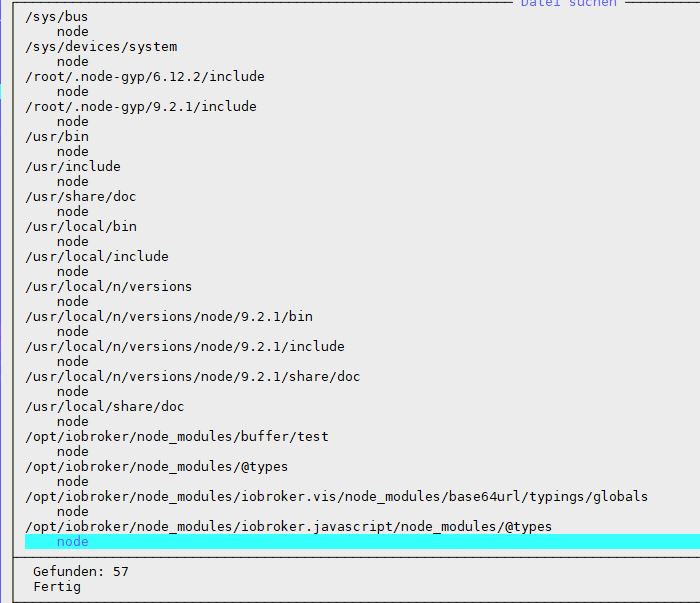
Ich kenn mich da nicht aus, aber kann es sein, dass ich die 9er Version noch irgendwo anders installiert habe, was dann höher wirkt ? Ich bin der Meinung, dass die Version auch nach Apt-get remove nodejs da steht…
EDIT: siehe Bild: ich habe mal mit dem midnight commander nach "node" gesucht... da steht was von beiden Versionen :-(
1566_node.jpg -
dazu muss ich wohl noch sagen, dass ich bisher immer anfangs su eingegeben habe, da sudo nicht funktioniert hat… die letzten 2 Wochen hatte auch alles gut geklappt soweit. Ich befürchte aber, dass das keine gute Idee war... Sudo habe ich nun nachinstalliert.
EDIT:
nach einigen googlen habe ich die 9er Version vollständig löschen können:
apt-get remove nodejs
---- zusätzlich:
sudo rm -rf /usr/local/bin/npm /usr/local/share/man/man1/node* /usr/local/lib/dtrace/node.d ~/.npm ~/.node-gyp /opt/local/bin/node opt/local/include/node /opt/local/lib/node_modules
sudo rm -rf /usr/local/lib/node*
sudo rm -rf /usr/local/include/node*
sudo rm -rf /usr/local/bin/node*
anschließend nochmal die 6er drüber und alles ist gut.
muss nun mal sehen, ob ich iobroker irgendwie in den user bekomme, denke dass der moentan komplett auf root läuft ?

Hey! Du scheinst an dieser Unterhaltung interessiert zu sein, hast aber noch kein Konto.
Hast du es satt, bei jedem Besuch durch die gleichen Beiträge zu scrollen? Wenn du dich für ein Konto anmeldest, kommst du immer genau dorthin zurück, wo du zuvor warst, und kannst dich über neue Antworten benachrichtigen lassen (entweder per E-Mail oder Push-Benachrichtigung). Du kannst auch Lesezeichen speichern und Beiträge positiv bewerten, um anderen Community-Mitgliedern deine Wertschätzung zu zeigen.
Mit deinem Input könnte dieser Beitrag noch besser werden 💗
Registrieren Anmelden373
Online33.0k
Benutzer83.5k
Themen1.3m
Beiträge