Skip to content
  • Home
  • Recent
  • Tags
  • 0 Unread 0
  • Categories
  • Unreplied
  • Popular
  • GitHub
  • Docu
  • Hilfe
Skins
  • Light
  • Brite
  • Cerulean
  • Cosmo
  • Flatly
  • Journal
  • Litera
  • Lumen
  • Lux
  • Materia
  • Minty
  • Morph
  • Pulse
  • Sandstone
  • Simplex
  • Sketchy
  • Spacelab
  • United
  • Yeti
  • Zephyr
  • Dark
  • Cyborg
  • Darkly
  • Quartz
  • Slate
  • Solar
  • Superhero
  • Vapor

  • Default (No Skin)
  • No Skin
Collapse
ioBroker Logo

Community Forum

donate donate
  1. ioBroker Community Home
  2. Deutsch
  3. Skripten / Logik
  4. Nochmal Waschmaschine (Blockly)
NEWS

  • Monatsrückblick Januar/Februar 2026 ist online!
    BluefoxB
    Bluefox
    16
    1
    247

  • Jahresrückblick 2025 – unser neuer Blogbeitrag ist online! ✨
    BluefoxB
    Bluefox
    17
    1
    4.6k

  • Neuer Blogbeitrag: Monatsrückblick - Dezember 2025 🎄
    BluefoxB
    Bluefox
    13
    1
    1.3k

Nochmal Waschmaschine (Blockly)

Scheduled Pinned Locked Moved Skripten / Logik
153 Posts 18 Posters 33.8k Views 4 Watching
  • Oldest to Newest
  • Newest to Oldest
  • Most Votes
Reply
  • Reply as topic
Log in to reply
This topic has been deleted. Only users with topic management privileges can see it.
  • rantanplanR Offline
    rantanplanR Offline
    rantanplan
    wrote on last edited by
    #11

    @totocotonio:

    @peoples:

    Also:

    • Wenn Power > 5 dann Objekt Waschmaschine fertig auf False

    • Wenn Power < 3 und Objekt Waschmaschine Fertig = False dann Objekt Waschmaschine fertig auf True `

    Ich verstehe das nicht `

    Hallo

    Hier ein einfaches Beispiel.
    147_beispiel.png

    Hier der Export.

    ! ````
    <xml xmlns="http://www.w3.org/1999/xhtml"><block type="on_ext" id="n)UklDS{=z!-#^HfL@Ly" x="113" y="13"><mutation items="1"></mutation>
    <field name="CONDITION">ne</field>

    <value name="OID0"><shadow type="field_oid" id="@Uda~stBc8L/=2DFzrvo"><field name="oid">hm-rpc.0.LEQ0661170.2.POWER</field></shadow></value> 
    <statement name="STATEMENT"><block type="controls_if" id="Z5|[vDkx-;wE)n{g3h5A"><mutation elseif="1"></mutation>
        <value name="IF0"><block type="logic_operation" id="NOVG1{{6R.;TAAh#v:UO" inline="false"><field name="OP">AND</field>
            <value name="A"><block type="logic_compare" id="RDf^,X[TFQ#jOw9*+|a|"><field name="OP">GT</field>
                <value name="A"><block type="get_value" id="Y}z?|,]x;.[Y?nmoB_s/"><field name="ATTR">val</field>
                    <field name="OID">hm-rpc.0.LEQ0661170.2.POWER</field></block></value> 
                <value name="B"><block type="math_number" id="+|Yj%~7wLv8n4e4dH./g"><field name="NUM">5</field></block></value></block></value> 
            <value name="B"><block type="logic_compare" id=")}{w;ZbwB)k3txT,A;=#"><field name="OP">EQ</field>
                <value name="A"><block type="variables_get" id="(,AD).kgi^qHh}cu]j:M"><field name="VAR">WaschAn</field></block></value> 
                <value name="B"><block type="logic_boolean" id="z_W;~p[!3,i7T%Fz9ta."><field name="BOOL">FALSE</field></block></value></block></value></block></value> 
        <statement name="DO0"><block type="variables_set" id="-_[mZ.jf6;k3vvEBbLYC"><field name="VAR">WaschAn</field>
            <value name="VALUE"><block type="logic_boolean" id="G/q*p]xf4ro}^~?xKTM:"><field name="BOOL">TRUE</field></block></value> 
            <next><block type="procedures_callnoreturn" id="=!*WIp};Ta`)XeMMk,iR"><mutation name="Melden"><arg name="Meldetext"></arg></mutation> 
                <value name="ARG0"><block type="text" id="{QcAY3oi:,FGG.929?TS"><field name="TEXT">Waschmaschine AN</field></block></value></block></next></block></statement> 
        <value name="IF1"><block type="logic_operation" id="ITf[:#D]rT*N(OE9k(])" inline="false"><field name="OP">AND</field>
            <value name="A"><block type="logic_compare" id="TpC0To:j6|8MzRy1.f2k"><field name="OP">LT</field>
                <value name="A"><block type="get_value" id="T=u6bL/a/n!;dBAIYw6}"><field name="ATTR">val</field>
                    <field name="OID">hm-rpc.0.LEQ0661170.2.POWER</field></block></value> 
                <value name="B"><block type="math_number" id="G7qj]rc!Em08Z:ZUsn5x"><field name="NUM">3</field></block></value></block></value> 
            <value name="B"><block type="logic_compare" id="8rTp8F1^XtG_[nleJ@G3"><field name="OP">EQ</field>
                <value name="A"><block type="variables_get" id="-miKNKLh812Z_Q6aA;G~"><field name="VAR">WaschAn</field></block></value> 
                <value name="B"><block type="logic_boolean" id="-RVml^-rH[c*)cCu4}oV"><field name="BOOL">TRUE</field></block></value></block></value></block></value> 
        <statement name="DO1"><block type="variables_set" id="2F*KuYnW55cS.-Q(0KV`"><field name="VAR">WaschAn</field>
            <value name="VALUE"><block type="logic_boolean" id="Uw!(4OXcncoe,#OVlx|L"><field name="BOOL">FALSE</field></block></value> 
            <next><block type="procedures_callnoreturn" id="B`l`+_QZ59(g^%)j}HaL"><mutation name="Melden"><arg name="Meldetext"></arg></mutation> 
                <value name="ARG0"><block type="text" id="(]@zEC}t.vRad}u(e.jr"><field name="TEXT">Waschmaschine AUS</field></block></value></block></next></block></statement></block></statement></block> 
    

    <block type="procedures_defnoreturn" id="V.vrK8jxU~DFp7hok4hj" x="562" y="388"><mutation><arg name="Meldetext"></arg></mutation>
    <field name="NAME">Melden</field>
    <comment pinned="false" h="80" w="160">Beschreibe diese Funktion …</comment>
    <statement name="STACK"><block type="telegram" id="qeXSX4ZqV)9r]%/aF^c-"><value name="MESSAGE"><shadow type="text" id="B[gXJTVryMHY0%3dMM-V"><field name="TEXT">text</field></shadow>
    <block type="variables_get" id="Vv@sYq]5EIaZ7]yd2=,U"><field name="VAR">Meldetext</field></block></value></block></statement></block></xml>

    ! ````

    Grüße

    Rantanplan

    CCU3 / MS Server 2019(VM) / Scripten mit Blockly

    1 Reply Last reply
    0
    • totocotonioT Offline
      totocotonioT Offline
      totocotonio
      wrote on last edited by
      #12

      @muckel:

      Hallo Totocotonio!

      Ich habe das damals so realisiert.

      Wenn die WM fertig ist verbraucht sie noch etwas Strom.

      Ansage alle 10 Min. bis sie händisch ausgeschaltet ist.

      Importiere dir das Blockly und passe es für dich an.

      [ `

      Hi Muckel,

      danke für script.

      Du fragst ja das Objekt ab, das du ja vorher ja bestimmt angelegt hast.

      Aber mit was hast du das objekt gefüllt und woher.

      Gruß totocotonio `

      Gruß Totocotonio

      Bin noch Anfänger in Sachen IO-Broker und lerne gerne dazu. :P

      1 Reply Last reply
      0
      • M Offline
        M Offline
        muckel
        wrote on last edited by
        #13

        das ist nur ein script in der CCU.

        fragt die mA ab und gibt den wert EIN/AUS weiter.

        im iobroker sende ich nur die mitteilung auf meine sonos.

        solange bis mA=0 (händisch ausgeschaltet)

        du machst es ähnlich im iobroker mit den mA werten.

        das kannst du ja lassen.

        nimm nur den loop aus meinem script, dann ist das ewige wiederholen vorbei.

        Liebe Grüße

        1 Reply Last reply
        0
        • totocotonioT Offline
          totocotonioT Offline
          totocotonio
          wrote on last edited by
          #14

          @rantanplan:

          @totocotonio:

          @peoples:

          Also:

          • Wenn Power > 5 dann Objekt Waschmaschine fertig auf False

          • Wenn Power < 3 und Objekt Waschmaschine Fertig = False dann Objekt Waschmaschine fertig auf Tr `
            Hi, danke für Deine Antwort .

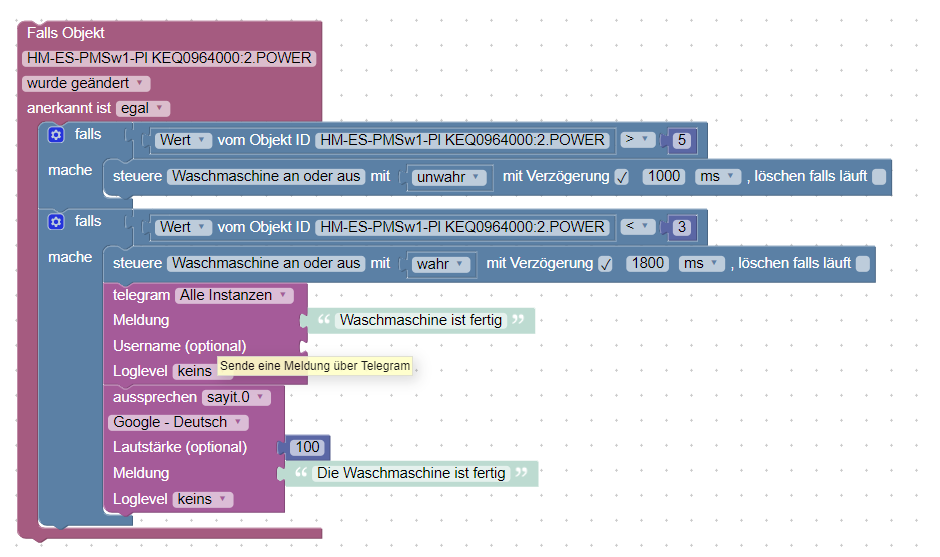
          Ich hätte aber noch eine Frage, ich habe mein Gerät angepasst.

          Woher kommt das Wasch an.

          Und wie kann ich denn jetzt sehen ob der Datenpunkt false oder true ist, denn das brauche ich ja zu Visualisierung
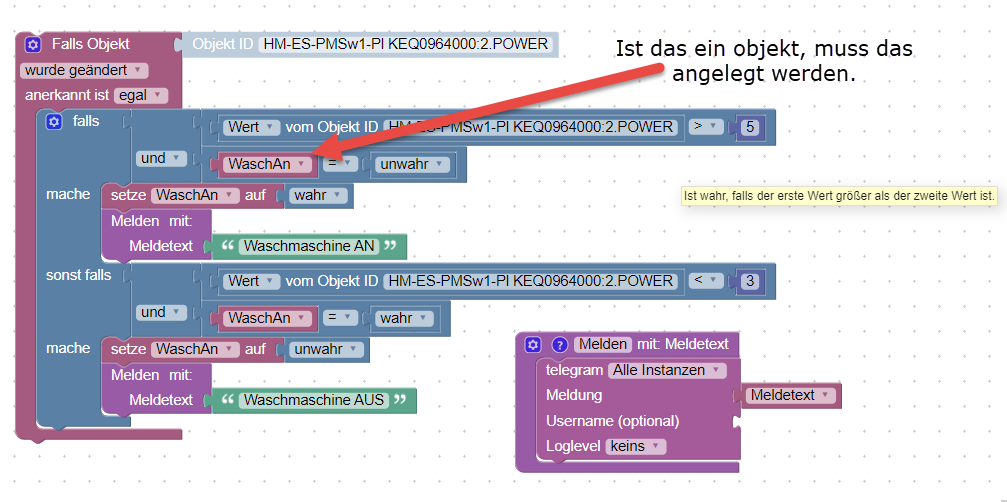
          1626_waschmaschine_fertig_blockly.png

          Gruß Totocotonio

          Bin noch Anfänger in Sachen IO-Broker und lerne gerne dazu. :P

          1 Reply Last reply
          0
          • totocotonioT Offline
            totocotonioT Offline
            totocotonio
            wrote on last edited by
            #15

            @muckel:

            nimm nur den loop aus meinem script, dann ist das ewige wiederholen vorbei. `

            Also du meinst das "wiederhole so lange" soll ich reinsetzten?

            oder muss das ausführen auch hinein.

            Entschuldige meine lästige Fragerei.

            Wäre das so richtig:
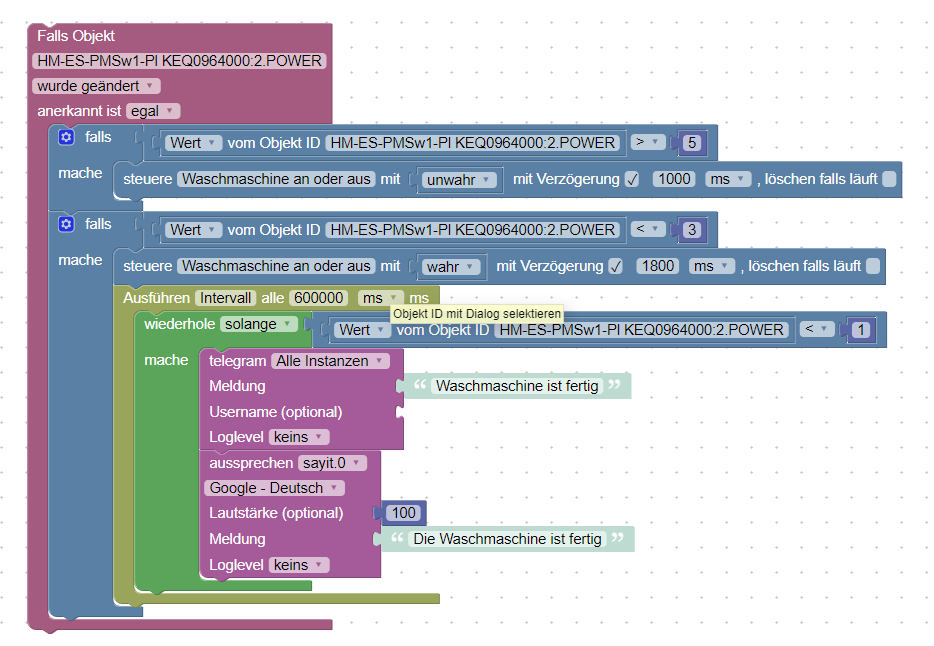
            1626_waschmaschine_ferig_blockly_mit_loop.png

            gruß totocotonio

            Gruß Totocotonio

            Bin noch Anfänger in Sachen IO-Broker und lerne gerne dazu. :P

            1 Reply Last reply
            0
            • M Offline
              M Offline
              muckel
              wrote on last edited by
              #16

              eigentlich nur das wiederhole solange.

              dein abfragescript scheint ja zu funktionieren

              das war ja anfangs deine frage, oder?

              1 Reply Last reply
              0
              • totocotonioT Offline
                totocotonioT Offline
                totocotonio
                wrote on last edited by
                #17

                @muckel:

                eigentlich nur das wiederhole solange.

                dein abfragescript scheint ja zu funktionieren

                das war ja anfangs deine frage, oder? `

                Genau,

                Schau dir mal das Blockly an.
                1626_waschmaschine_ferig_blockly_mit_loop.png

                Gruß Totocotonio

                Bin noch Anfänger in Sachen IO-Broker und lerne gerne dazu. :P

                1 Reply Last reply
                0
                • M Offline
                  M Offline
                  muckel
                  wrote on last edited by
                  #18

                  sollte passen.

                  allerdings kommt der text auch alle 10 minuten.

                  möchtest du das?

                  1 Reply Last reply
                  0
                  • totocotonioT Offline
                    totocotonioT Offline
                    totocotonio
                    wrote on last edited by
                    #19

                    Hmmmm, :roll:

                    das ist eine gute Frage. :oops:

                    Vielleicht um uns zu Nerven, das ich oder meine Frau endlich in den Keller gehen

                    um die Maschine auszuschalten :lol:

                    Oder ich müsste noch eine Schleife einbauen, das der Text nur einmal kommt.

                    Gruß totocotonio

                    Gruß Totocotonio

                    Bin noch Anfänger in Sachen IO-Broker und lerne gerne dazu. :P

                    1 Reply Last reply
                    0
                    • rantanplanR Offline
                      rantanplanR Offline
                      rantanplan
                      wrote on last edited by
                      #20

                      @totocotonio:

                      Und wie kann ich denn jetzt sehen ob der Datenpunkt false oder true ist, denn das brauche ich ja zu Visualisierung

                      waschmaschine fertig `

                      In dem Beispiel habe ich eine lokale Variable erstellt. (Schau mal unter "Variablen")

                      Du hast doch schon eine globale Variable "Waschmaschine an oder aus". Die musst Du natürlich nehmen.

                      Grüße

                      Rantanplan

                      CCU3 / MS Server 2019(VM) / Scripten mit Blockly

                      1 Reply Last reply
                      0
                      • rantanplanR Offline
                        rantanplanR Offline
                        rantanplan
                        wrote on last edited by
                        #21

                        @totocotonio:

                        Hmmmm, :roll:

                        das ist eine gute Frage. :oops:

                        Vielleicht um uns zu Nerven, das ich oder meine Frau endlich in den Keller gehen

                        um die Maschine auszuschalten :lol:

                        Oder ich müsste noch eine Schleife einbauen, das der Text nur einmal kommt.

                        Gruß totocotonio `

                        Vor allem kommt die Meldung, wenn einmal gestartet IMMER ALLE 10 Min. :shock:

                        Da gibt es auch einen "Stop Baustein" ;)

                        Hast Du schon mal hier im Forum nach "Blocky" gesucht?

                        Da gibt es schon etliche Beispiele die Dir weiterhelfen würden.

                        Grüße

                        Rantanplan

                        CCU3 / MS Server 2019(VM) / Scripten mit Blockly

                        1 Reply Last reply
                        0
                        • M Offline
                          M Offline
                          muckel
                          wrote on last edited by
                          #22

                          @totocotonio:

                          Hmmmm, :roll:

                          das ist eine gute Frage. :oops:

                          Vielleicht um uns zu Nerven, das ich oder meine Frau endlich in den Keller gehen

                          um die Maschine auszuschalten :lol:

                          Oder ich müsste noch eine Schleife einbauen, das der Text nur einmal kommt.

                          Gruß totocotonio `

                          Genau deswegen hab ich die schleife eingebaut. ;)

                          viel spaß

                          1 Reply Last reply
                          0
                          • totocotonioT Offline
                            totocotonioT Offline
                            totocotonio
                            wrote on last edited by
                            #23

                            @rantanplan:

                            @totocotonio:

                            Und wie kann ich denn jetzt sehen ob der Datenpunkt false oder true ist, denn das brauche ich ja zu Visualisierung

                            waschmaschine fertig `

                            In dem Beispiel habe ich eine lokale Variable erstellt. (Schau mal unter "Variablen")

                            Du hast doch schon eine globale Variable "Waschmaschine an oder aus". Die musst Du natürlich nehmen.

                            Grüße `

                            Hi,

                            das heißt anstatt der Variablen muss ich dort mein Objekt einfügen (Objekt ID) ist das richtig.

                            Wie hasst du denn die variable erstellt und wofür ist sie da wenn ich fragen darf?

                            Gruß totocotonio

                            Gruß Totocotonio

                            Bin noch Anfänger in Sachen IO-Broker und lerne gerne dazu. :P

                            1 Reply Last reply
                            0
                            • totocotonioT Offline
                              totocotonioT Offline
                              totocotonio
                              wrote on last edited by
                              #24

                              @rantanplan:

                              @totocotonio:

                              Und wie kann ich denn jetzt sehen ob der Datenpunkt false oder true ist, denn das brauche ich ja zu Visualisierung

                              waschmaschine fertig `

                              In dem Beispiel habe ich eine lokale Variable erstellt. (Schau mal unter "Variablen")

                              Du hast doch schon eine globale Variable "Waschmaschine an oder aus". Die musst Du natürlich nehmen.

                              Grüße `

                              Hi,

                              das heißt anstatt der Variablen muss ich dort mein Objekt einfügen (Objekt ID) ist das richtig, oder wie bekomme ich mein Objekt dort hinein?

                              Ich habe keine Variable, das ist ein objekt das in Ojekte unter Javascript.0 erstellt habe, ist das richtig, denn in den Variablen sehe ich es nicht.

                              Wie hast du denn die variable erstellt und wofür ist sie da wenn ich fragen darf?

                              Gruß totocotonio

                              Gruß Totocotonio

                              Bin noch Anfänger in Sachen IO-Broker und lerne gerne dazu. :P

                              1 Reply Last reply
                              0
                              • rantanplanR Offline
                                rantanplanR Offline
                                rantanplan
                                wrote on last edited by
                                #25

                                @totocotonio:

                                das heißt anstatt der Variablen muss ich dort mein Objekt einfügen (Objekt ID) ist das richtig, oder wie bekomme ich mein Objekt dort hinein? `

                                Hast Du doch schon in einem Deiner Beispiele gemacht.

                                @totocotonio:

                                Ich habe keine Variable, das ist ein objekt das in Ojekte unter Javascript.0 erstellt habe, ist das richtig, denn in den Variablen sehe ich es nicht. `
                                In ioBroker ist ALLES ein Objekt. Auch "Variablen". Dein angelegtes Objekt ist eine globale Variable.

                                @totocotonio:

                                Wie hast du denn die variable erstellt und wofür ist sie da wenn ich fragen darf? `
                                Zum Fragen stellen ist ja das Forum da ;)

                                Baustein aus Rubrik "Variablen" nehmen und das kleine Pfeilchen anklicken.
                                147_beispiel.png

                                Das ist dann aber eine lokale Variable. Also nur innerhalb des Scripts gültig.

                                Grüße

                                Rantanplan

                                CCU3 / MS Server 2019(VM) / Scripten mit Blockly

                                1 Reply Last reply
                                0
                                • N Offline
                                  N Offline
                                  nibblerrick
                                  wrote on last edited by
                                  #26

                                  Also mein Waschmaschinenscript habe ich auch so aehnlich aufgebaut. Hab die Grenze bei zwei Watt gesetzt.

                                  Vielleicht hilft das ja:

                                  ! <xml 1999/xmlns="<URL url=" http:/www.w3.org/xhtml"="">http://www.w3.org/1999/xhtml">
                                  ! <block type="on_ext" id="+~FZ]^313(!,0orOb:.d" x="63" y="113"><mutation items="1"></mutation>
                                  ! <field name="CONDITION">ne</field>
                                  ! <value name="OID0"><shadow type="field_oid" id="DBf=j,X9.Xt{v2,qLmD"><field name="oid">hm-rpc.0.LEQ0272555.2.POWER</field></shadow></value> ! <statement name="STATEMENT"><block type="controls_if" id="Jf9BU.fKF4|(CmS4P3bZ"><value name="IF0"><block type="logic_compare" id="l6qH8Hb;zY;g7T7YbL7z"><field name="OP">GT</field> ! <value name="A"><block type="get_value" id="XW4=;LO@4RT^1|dYD6Q{"><field name="ATTR">val</field> ! <field name="OID">hm-rpc.0.LEQ0272555.2.POWER</field></block></value> ! <value name="B"><block type="math_number" id="2,4P:%vo#++y5:h?H8Yl"><field name="NUM">2</field></block></value></block></value> ! <statement name="DO0"><block type="variables_set" id="Sk=bU|(H2o!?E7;R68am"><field name="VAR">Waschmaschine_fertig</field> ! <value name="VALUE"><block type="logic_boolean" id="BhIS1qLN]ZB-PM{O9-dw"><field name="BOOL">FALSE</field></block></value></block></statement> ! <next><block type="controls_if" id="LJk^}%QOJBqZUFS^[5Q"><value name="IF0"><block type="logic_compare" id="e~8|2p6T0a~fM7])OCT"><field name="OP">LT</field>
                                  ! <value name="A"><block type="get_value" id="uESY=k5ZNc4wT.vIbuf7"><field name="ATTR">val</field>
                                  ! <field name="OID">hm-rpc.0.LEQ0272555.2.POWER</field></block></value>
                                  ! <value name="B"><block type="math_number" id="nOZ[W6d7.mKZ7e/!ozdY"><field name="NUM">2</field></block></value></block></value>
                                  ! <statement name="DO0"><block type="controls_if" id="Gcwd(dS(uyQ44u_Mvv:R"><value name="IF0"><block type="logic_operation" id="Au[ISqPYggwpZ?;h-h%r"><field name="OP">AND</field>
                                  ! <value name="A"><block type="logic_compare" id=".E6[+B8[LBF=u8lgxS~p"><field name="OP">LT</field>
                                  ! <value name="A"><block type="get_value" id="YeYOK7seN!c[j^Q
                                  ;i5u"><field name="ATTR">val</field>
                                  ! <field name="OID">hm-rpc.0.LEQ0272555.2.POWER</field></block></value>
                                  ! <value name="B"><block type="math_number" id="*l4O;]9`3f@9EtW?6Bnf"><field name="NUM">2</field></block></value></block></value>
                                  ! <value name="B"><block type="logic_compare" id=";duj[3)d;%WWd6Qs.["><field name="OP">EQ</field>
                                  ! <value name="A"><block type="variables_get" id="QzU{tskKdN(L4]54:Jdt"><field name="VAR">Waschmaschine_fertig</field></block></value>
                                  ! <value name="B"><block type="logic_boolean" id="6Hqi.`)?k?43IGxkFAmp"><field name="BOOL">FALSE</field></block></value></block></value></block></value>
                                  ! <statement name="DO0"><block type="telegram" id="JpOLb2LUVs~rt:D(oC/r"><field name="LOG">log</field>
                                  ! <value name="MESSAGE"><shadow type="text" id="hFwE8@rHbnt}.5,1^G%m"><field name="TEXT">Waschmaschine fertig</field></shadow></value>
                                  ! <next><block type="pushover" id="GKF9FH,KF8M4KYE@^=V2"><field name="SOUND">incoming</field>
                                  ! <field name="PRIORITY">0</field>
                                  ! <field name="LOG">log</field>
                                  ! <value name="MESSAGE"><shadow type="text" id=",8Z1WxvEH{1nBbIL/3+?"><field name="TEXT">Waschmaschine fertig</field></shadow></value>
                                  ! <value name="TITLE"><block type="text" id="wYisr/I#nZBP}``F|Vb#"><field name="TEXT">Meldung Waschmaschine</field></block></value></block></next></block></statement>
                                  ! <next><block type="variables_set" id="r8vCn@JdH0~_w3ZJj~t2"><field name="VAR">Waschmaschine_fertig</field>
                                  ! <value name="VALUE"><block type="logic_boolean" id="Z?,^}m^@FS,jx~(RLuN."><field name="BOOL">TRUE</field></block></value></block></next></block></statement></block></next></block></statement></block></xml>
                                  3803_firefox_2017-11-01_21-25-00.png

                                  1 Reply Last reply
                                  0
                                  • rantanplanR Offline
                                    rantanplanR Offline
                                    rantanplan
                                    wrote on last edited by
                                    #27

                                    Hallo nibblerrick

                                    Kleine Anmerkung.

                                    Das "falls …..." OHNE die Und-Bedingung, kann wohl weg.

                                    Grüße

                                    Rantanplan

                                    CCU3 / MS Server 2019(VM) / Scripten mit Blockly

                                    1 Reply Last reply
                                    0
                                    • N Offline
                                      N Offline
                                      nibblerrick
                                      wrote on last edited by
                                      #28

                                      Ja jetzt wo du es sagst, das habe ich wohl versehentlich doppelt gemoppelt. Danke :-)

                                      1 Reply Last reply
                                      0
                                      • totocotonioT Offline
                                        totocotonioT Offline
                                        totocotonio
                                        wrote on last edited by
                                        #29

                                        @rantanplan:

                                        @totocotonio:

                                        das heißt anstatt der Variablen muss ich dort mein Objekt einfügen (Objekt ID) ist das richtig, oder wie bekomme ich mein Objekt dort hinein? `

                                        Hast Du doch schon in einem Deiner Beispiele gemacht.

                                        @totocotonio:

                                        Ich habe keine Variable, das ist ein objekt das in Ojekte unter Javascript.0 erstellt habe, ist das richtig, denn in den Variablen sehe ich es nicht. `
                                        In ioBroker ist ALLES ein Objekt. Auch "Variablen". Dein angelegtes Objekt ist eine globale Variable.

                                        @totocotonio:

                                        Wie hast du denn die variable erstellt und wofür ist sie da wenn ich fragen darf? `
                                        Zum Fragen stellen ist ja das Forum da ;)

                                        Baustein aus Rubrik "Variablen" nehmen und das kleine Pfeilchen anklicken.

                                        Beispiel.PNG

                                        Das ist dann aber eine lokale Variable. Also nur innerhalb des Scripts gültig.

                                        Grüße `

                                        Hi,

                                        danke für deine Hilfe.

                                        Welchen Baustein muss ich dann da nehmen, um das Objekt(Waschmaschine fertig)

                                        das ich ja unter Javascript.0 erstellt habe, einzubinden.

                                        Egal was ich da raussuche als Baustein lässt sich dort wo du "Wasch an" stehen hast nichts

                                        einbinden oder soll ich in Javascript.0 ein objekt mit "WaschAN" erstellen.

                                        Da brauch ich nochmal Hilfe

                                        Gruß totocotonio

                                        Gruß Totocotonio

                                        Bin noch Anfänger in Sachen IO-Broker und lerne gerne dazu. :P

                                        1 Reply Last reply
                                        0
                                        • totocotonioT Offline
                                          totocotonioT Offline
                                          totocotonio
                                          wrote on last edited by
                                          #30

                                          @nibblerrick:

                                          Also mein Waschmaschinenscript habe ich auch so aehnlich aufgebaut. Hab die Grenze bei zwei Watt gesetzt.

                                          Vielleicht hilft das ja: `

                                          Hi,

                                          danke für Deine Hilfe.

                                          Kommt bei Dir Meldung nur einmal.

                                          Bei mir lockert die Maschine auf, dann hast du das gleiche Problem wie ich

                                          am Anfang.

                                          Gruß Totocotonio

                                          Gruß Totocotonio

                                          Bin noch Anfänger in Sachen IO-Broker und lerne gerne dazu. :P

                                          1 Reply Last reply
                                          0
                                          Reply
                                          • Reply as topic
                                          Log in to reply
                                          • Oldest to Newest
                                          • Newest to Oldest
                                          • Most Votes


                                          Support us

                                          ioBroker
                                          Community Adapters
                                          Donate

                                          279

                                          Online

                                          32.7k

                                          Users

                                          82.5k

                                          Topics

                                          1.3m

                                          Posts
                                          Community
                                          Impressum | Datenschutz-Bestimmungen | Nutzungsbedingungen | Einwilligungseinstellungen
                                          ioBroker Community 2014-2025
                                          logo
                                          • Login

                                          • Don't have an account? Register

                                          • Login or register to search.
                                          • First post
                                            Last post
                                          0
                                          • Home
                                          • Recent
                                          • Tags
                                          • Unread 0
                                          • Categories
                                          • Unreplied
                                          • Popular
                                          • GitHub
                                          • Docu
                                          • Hilfe