




Dyson pure Hot&cool link
-
Auch von mir noch mal die Nachfrage:
Hat jemand einen Weg gefunden die Dyson - Luftreiniger (und ähnliches) einzubinden.
(einen Alexa-Skill gibt es ja nun) `
Schau mal hier:
viewtopic.php?f=20&t=15021#p156936
Gruß
Holger
-
Hallo, ich hab es mit dieser lib hier gemacht:
https://github.com/auchenberg/dyson-purelink
und in einem JavaScript integriert.
var DysonPureLink = require('../../dyson-purelink')

createState("Dyson.On", false);
createState("Dyson.Off", false);
createState("Dyson.Rotation", false);
createState("Dyson.FanSpeed", 10);
createState("Dyson.Auto", false);

var pureLink = new DysonPureLink("xxx@xxx.de", "xxxxxxx");

var dyson;

pureLink.getDevices().then(devices => {
    if(!devices)
    {
        log('No devices found');
    }
    else
    {
        dyson = devices[0];
    }
}).catch(err => console.error(err))

on({id: "javascript.0.Dyson.On", val: true}, function (obj)
{

    dyson.turnOn();

    setState("javascript.0.Dyson.On", false);
});

on({id: "javascript.0.Dyson.Off", val: true}, function (obj)
{
    dyson.turnOff();

    setState("javascript.0.Dyson.Off", false);
});

on({id: "javascript.0.Dyson.Rotation"}, function (obj)
{
    dyson.setRotation(obj.state.val);
});

on({id: "javascript.0.Dyson.FanSpeed"}, function (obj)
{
    dyson.setFanSpeed(obj.state.val * 10);
});

on({id: "javascript.0.Dyson.Auto"}, function (obj)
{
    dyson.setAuto(obj.state.val);
});

/*pureLink.getDevices().then(devices => {

    if(!devices) {
        log('No devices found');
        return
    }
    // Get status
    devices[0].getTemperature().then(t => log('getTemperature', t))
    devices[0].getAirQuality().then(t => log('getAirQuality', t))
    devices[0].getRelativeHumidity().then(t => log('getRelativeHumidity', t))
    devices[0].getFanStatus().then(t => log('getFanStatus', t))
    devices[0].getFanSpeed().then(t => log('getFanSpeed', t))
    devices[0].getRotationStatus().then(t => log('getRotationStatus', t))
    devices[0].getAutoOnStatus().then(t => log('getAutoOnStatus', t))
*/
    // Actions
    //devices[0].turnOff();
    //devices[0].setRotation(true).then(t => console.log('setRotation', t))
    //devices[0].setFanSpeed(100).then(t => console.log('setFanSpeed', t))

//})
Gruß
-
Hallo, ich habe heute versucht den Dyson-purelink adapter von auchenberg zu installieren, aber ich bekomme immer bei der Installation die Meldung.
"$ ./iobroker url "https://github.com/auchenberg/dyson-purelink.git"
install https://github.com/auchenberg/dyson-purelink/tarball/master
npm install https://github.com/auchenberg/dyson-purelink/tarball/master --unsafe-perm --production --save --prefix "/opt/iobroker" (System call)
npm
 WARN optional SKIPPING OPTIONAL DEPENDENCY: osx-temperature-sensor@1.0.3 (node_modules/osx-temperature-sensor):npm WARN
notsup SKIPPING OPTIONAL DEPENDENCY: Unsupported platform for osx-temperature-sensor@1.0.3: wanted {"os":"darwin","arch":"any"} (current: {"os":"linux","arch":"arm"})npm
 WARN optional SKIPPING OPTIONAL DEPENDENCY: xpc-connection@0.1.4 (node_modules/xpc-connection):npm WARN notsup SKIPPING OPTIONAL DEPENDENCY: Unsupported platform for xpc-connection@0.1.4: wanted {"os":"darwin","arch":"any"} (current: {"os":"linux","arch":"arm"})"
Was muss ich machen das es funktioniert. Oder ist der Adapter schon für den aktuellen ioBroker zu alt.
Gruß
-
Hallo, ich habe heute versucht den Dyson-purelink adapter von auchenberg zu installieren, aber ich bekomme immer bei der Installation die Meldung.
"$ ./iobroker url "https://github.com/auchenberg/dyson-purelink.git"
install https://github.com/auchenberg/dyson-purelink/tarball/master
npm install https://github.com/auchenberg/dyson-purelink/tarball/master --unsafe-perm --production --save --prefix "/opt/iobroker" (System call)
npm
 WARN optional SKIPPING OPTIONAL DEPENDENCY: osx-temperature-sensor@1.0.3 (node_modules/osx-temperature-sensor):npm WARN
notsup SKIPPING OPTIONAL DEPENDENCY: Unsupported platform for osx-temperature-sensor@1.0.3: wanted {"os":"darwin","arch":"any"} (current: {"os":"linux","arch":"arm"})npm
 WARN optional SKIPPING OPTIONAL DEPENDENCY: xpc-connection@0.1.4 (node_modules/xpc-connection):npm WARN notsup SKIPPING OPTIONAL DEPENDENCY: Unsupported platform for xpc-connection@0.1.4: wanted {"os":"darwin","arch":"any"} (current: {"os":"linux","arch":"arm"})"
Was muss ich machen das es funktioniert. Oder ist der Adapter schon für den aktuellen ioBroker zu alt.
Gruß
@Kludi
Den Dyson kann man prima über den Umweg über den HAM Adapter steuern:https://forum.iobroker.net/topic/13509/aufruf-iobroker-ham-homebridge-accessory-manager-testen/240
So sehen dann die Objekte aus:

Gruß
Holger -
@Kludi
Den Dyson kann man prima über den Umweg über den HAM Adapter steuern:https://forum.iobroker.net/topic/13509/aufruf-iobroker-ham-homebridge-accessory-manager-testen/240
So sehen dann die Objekte aus:
Gruß
Holger@holgerwolf Danke für deine schnelle Antwort. Ich habe den HAM Adapter installiert.
Ich bekomme nur keine Objekte.
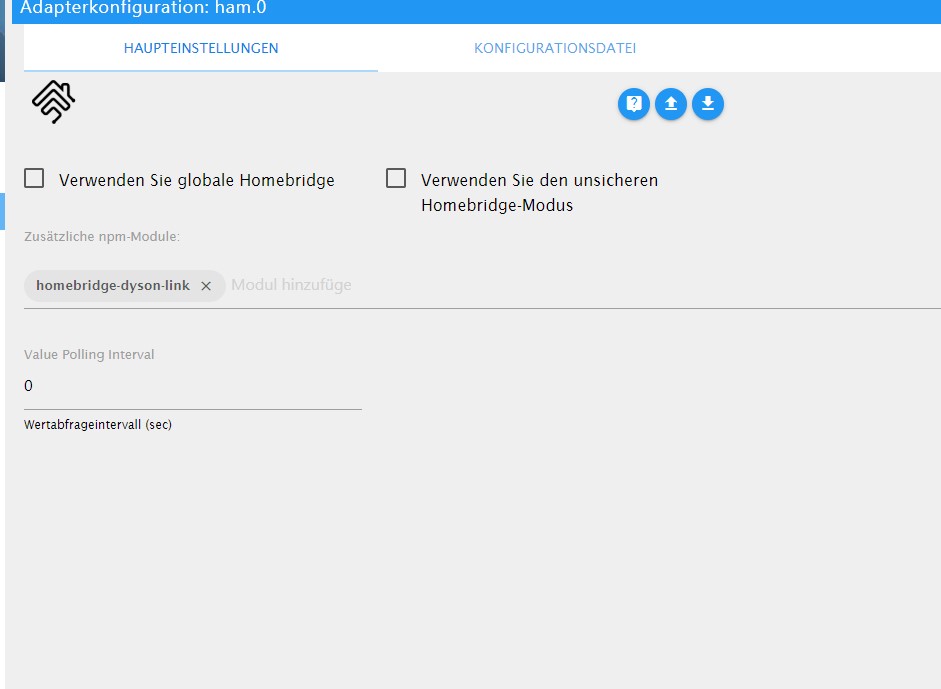
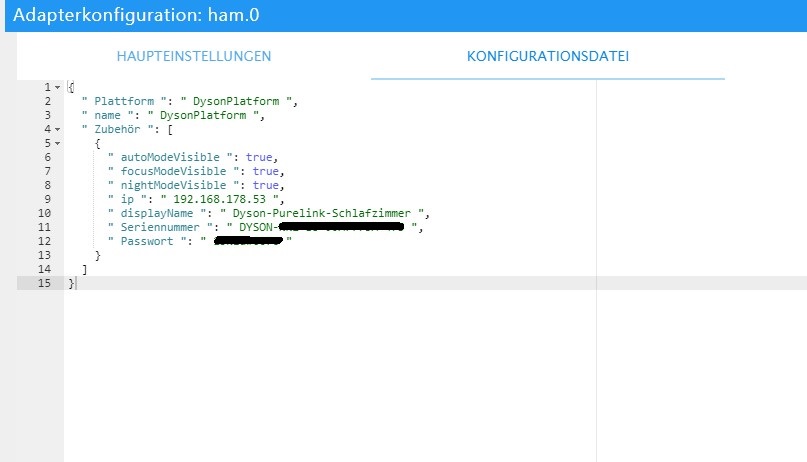
Was mache ich falsch?
Gruß
-
Hallo,
Danke noch mal für den Tipp.
Ich habe jetzt den HAM Adapter zum laufen bekommen und ich habe es auch geschafft das die Ganzen Objekte da sind. Ich hatte noch einige Fehler im JavaScript gehabt. (ich hatte es nie gelernt)Jetzt habe ich alle Objekte von Dyson-purelink nur habe ich keine werte.
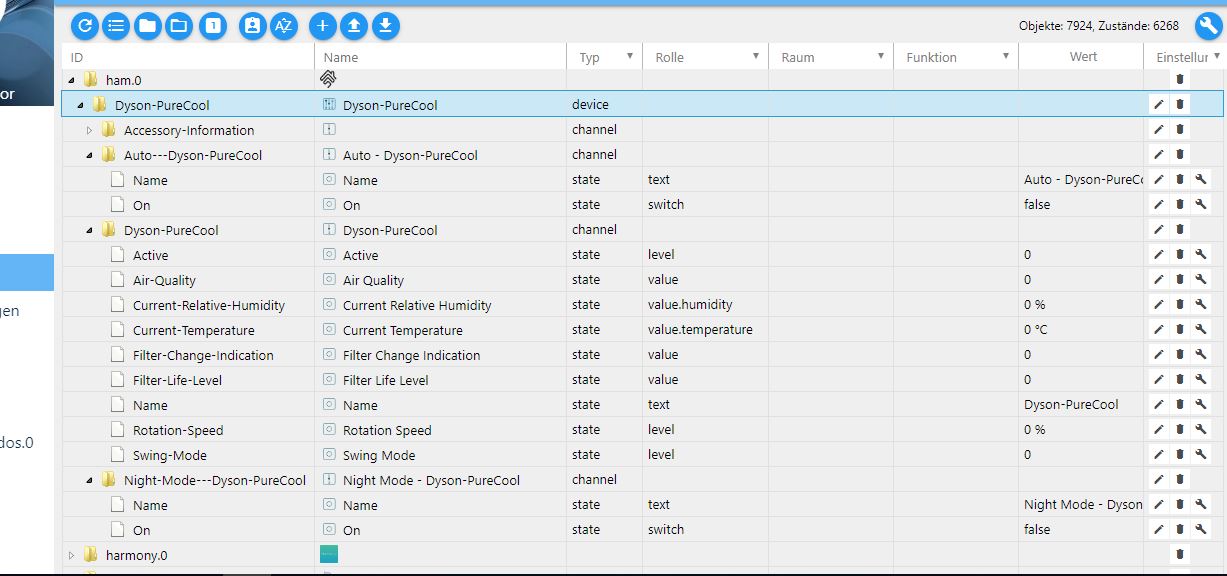
{
  "platforms": [
    {
      "platform": "DysonPlatform",
      "name": "DysonPlatform",
      "email": "xxxxxxx@xxx.de",
      "password": "xxxx",
      "country": "DE",
      "accessories": [
        {
          "ip": "192.168.178.53",
          "displayName": "Dyson-PureCool",
          "serialNumber": "DYSON-xxx-EU-xxxxxxxx-xxx",
          "password": "xxxx"
        }
      ]
    }
  ]
}
Was muss ich noch machen das ich meine Werte habe?
Gruß Kludi
-
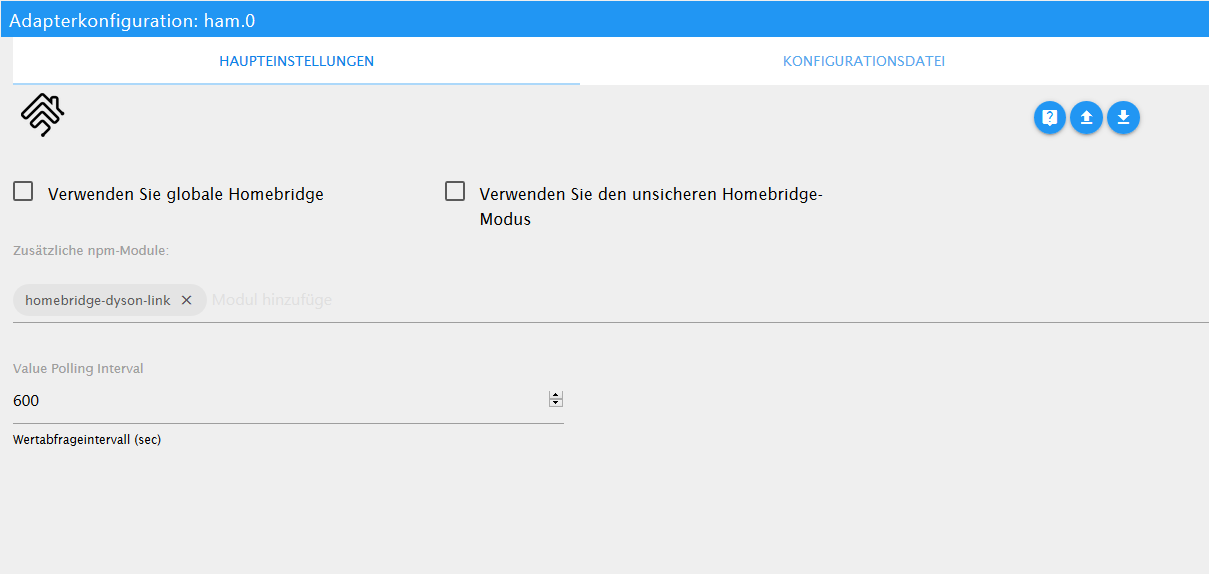
So sehen meine Einstellunge aus:
{
  "platforms": [
    {
      "platform": "DysonPlatform",
      "name": "DysonPlatform",
      "email": "xx@xx.com",
      "password": "xyz",
      "country": "DE",
      "accessories": [
        {
          "ip": "192.168.178.152",
          "displayName": "Dyson-Wohnzimmer",
          "serialNumber": "DYSON-NN2-EU-xxxx-475",
          "password": "xyz"
        }
      ]
    }
  ],
  "description": "Add configuration for your accessories or platforms according to the docs of the plugins.",
  "accessories": []
}
Ich denke es liegt am Polling Wert....
-
So sehen meine Einstellunge aus:
{
  "platforms": [
    {
      "platform": "DysonPlatform",
      "name": "DysonPlatform",
      "email": "xx@xx.com",
      "password": "xyz",
      "country": "DE",
      "accessories": [
        {
          "ip": "192.168.178.152",
          "displayName": "Dyson-Wohnzimmer",
          "serialNumber": "DYSON-NN2-EU-xxxx-475",
          "password": "xyz"
        }
      ]
    }
  ],
  "description": "Add configuration for your accessories or platforms according to the docs of the plugins.",
  "accessories": []
}
Ich denke es liegt am Polling Wert....
@holgerwolf Danke ich habe dein JavaScript übernommen.
Leider bleibt der HAM-Adapter nicht Grün wechselt immer wieder hin und her.
Wenn ich das richtig in den Log's verstanden habe hat der mit meinem Zugangsdaten Probleme.host.tinkerboard 2019-06-09 20:00:24.313 error instance system.adapter.ham.0 terminated with code 0 (OK) host.tinkerboard 2019-06-09 20:00:24.313 error Caught by controller[4]: at Socket.emit (events.js:211:7) code: 4 } host.tinkerboard 2019-06-09 20:00:24.313 error Caught by controller[4]: at emitOne (events.js:116:13) host.tinkerboard 2019-06-09 20:00:24.313 error Caught by controller[4]: at Socket.ondata (_stream_readable.js:639:20) host.tinkerboard 2019-06-09 20:00:24.313 error Caught by controller[4]: at Writable.write (/opt/iobroker/node_modules/iobroker.ham/node_modules/readable-stream/lib/_stream_writable.js:334:11) host.tinkerboard 2019-06-09 20:00:24.312 error Caught by controller[4]: at writeOrBuffer (/opt/iobroker/node_modules/iobroker.ham/node_modules/readable-stream/lib/_stream_writable.js:417:5) host.tinkerboard 2019-06-09 20:00:24.312 error Caught by controller[4]: at doWrite (/opt/iobroker/node_modules/iobroker.ham/node_modules/readable-stream/lib/_stream_writable.js:428:64) host.tinkerboard 2019-06-09 20:00:24.312 error Caught by controller[4]: at Writable.writable._write (/opt/iobroker/node_modules/iobroker.ham/node_modules/mqtt/lib/client.js:271:5) host.tinkerboard 2019-06-09 20:00:24.312 error Caught by controller[4]: at work (/opt/iobroker/node_modules/iobroker.ham/node_modules/mqtt/lib/client.js:261:12) host.tinkerboard 2019-06-09 20:00:24.312 error Caught by controller[4]: at MqttClient._handlePacket (/opt/iobroker/node_modules/iobroker.ham/node_modules/mqtt/lib/client.js:319:12) host.tinkerboard 2019-06-09 20:00:24.312 error Caught by controller[4]: at MqttClient._handleConnack (/opt/iobroker/node_modules/iobroker.ham/node_modules/mqtt/lib/client.js:877:15) host.tinkerboard 2019-06-09 20:00:24.312 error Caught by controller[4]: { Error: Connection refused: Bad username or password host.tinkerboard 2019-06-09 20:00:24.312 error Caught by controller[3]: HAP Warning: Characteristic 000000BF-0000-1000-8000-0026BB765291 not in required or optional characteristics for service 000000B7-0000-1000-8000-0026BB765291. Adding anyway. host.tinkerboard 2019-06-09 20:00:24.312 error Caught by controller[2]: [2019-6-9 20:00:22] Warning: skipping plugin found at '/usr/lib/node_modules/homebridge-dyson-link' since we already loaded the same plugin from '/opt/iobroker/node_modules/io host.tinkerboard 2019-06-09 20:00:24.312 error Caught by controller[1]: [2019-6-9 20:00:22] Plugin /opt/iobroker/node_modules/homebridge-plugin-wrapper package.json does not contain the keyword 'homebridge-plugin'. host.tinkerboard 2019-06-09 20:00:24.311 error Caught by controller[0]: [2019-6-9 20:00:21] Plugin /opt/iobroker/node_modules/iobroker.ham/node_modules/homebridge-plugin-wrapper package.json does not contain the keyword 'homebridge-plugin'. ham.0 2019-06-09 20:00:24.269 error uncaught exception: Connection refused: Bad username or password host.tinkerboard 2019-06-09 19:59:50.182 error instance system.adapter.ham.0 terminated with code 0 (OK) Caught 2019-06-09 19:59:50.182 error by controller[4]: at Socket.emit (events.js:211:7) code: 4 } Caught 2019-06-09 19:59:50.182 error by controller[4]: at emitOne (events.js:116:13) Caught 2019-06-09 19:59:50.182 error by controller[4]: at Socket.ondata (_stream_readable.js:639:20) Caught 2019-06-09 19:59:50.182 error by controller[4]: at Writable.write (/opt/iobroker/node_modules/iobroker.ham/node_modules/readable-stream/lib/_stream_writable.js:334:11) Caught 2019-06-09 19:59:50.182 error by controller[4]: at writeOrBuffer (/opt/iobroker/node_modules/iobroker.ham/node_modules/readable-stream/lib/_stream_writable.js:417:5) Caught 2019-06-09 19:59:50.182 error by controller[4]: at doWrite (/opt/iobroker/node_modules/iobroker.ham/node_modules/readable-stream/lib/_stream_writable.js:428:64) Caught 2019-06-09 19:59:50.182 error by controller[4]: at Writable.writable._write (/opt/iobroker/node_modules/iobroker.ham/node_modules/mqtt/lib/client.js:271:5) Caught 2019-06-09 19:59:50.182 error by controller[4]: at work (/opt/iobroker/node_modules/iobroker.ham/node_modules/mqtt/lib/client.js:261:12) Caught 2019-06-09 19:59:50.182 error by controller[4]: at MqttClient._handlePacket (/opt/iobroker/node_modules/iobroker.ham/node_modules/mqtt/lib/client.js:319:12) Caught 2019-06-09 19:59:50.182 error by controller[4]: at MqttClient._handleConnack (/opt/iobroker/node_modules/iobroker.ham/node_modules/mqtt/lib/client.js:877:15) Caught 2019-06-09 19:59:50.182 error by controller[4]: { Error: Connection refused: Bad username or password Caught 2019-06-09 19:59:50.182 error by controller[3]: HAP Warning: Characteristic 000000BF-0000-1000-8000-0026BB765291 not in required or optional characteristics for service 000000B7-0000-1000-8000-0026BB765291. Adding anyway. Caught 2019-06-09 19:59:50.181 error by controller[2]: [2019-6-9 19:59:48] Warning: skipping plugin found at '/usr/lib/node_modules/homebridge-dyson-link' since we already loaded the same plugin from '/opt/iobroker/node_modules/iobroker Caught 2019-06-09 19:59:50.181 error by controller[1]: [2019-6-9 19:59:47] Plugin /opt/iobroker/node_modules/homebridge-plugin-wrapper package.json does not contain the keyword 'homebridge-plugin'. Caught 2019-06-09 19:59:50.181 error by controller[0]: [2019-6-9 19:59:47] Plugin /opt/iobroker/node_modules/iobroker.ham/node_modules/homebridge-plugin-wrapper package.json does not contain the keyword 'homebridge-plugin'. ham.0 2019-06-09 19:59:50.145 error at Socket.emit (events.js:211:7) ham.0 2019-06-09 19:59:50.145 error at emitOne (events.js:116:13) ham.0 2019-06-09 19:59:50.145 error at Socket.ondata (_stream_readable.js:639:20) ham.0 2019-06-09 19:59:50.145 error at Writable.write (/opt/iobroker/node_modules/iobroker.ham/node_modules/readable-stream/lib/_stream_writable.js:334:11) ham.0 2019-06-09 19:59:50.145 error at writeOrBuffer (/opt/iobroker/node_modules/iobroker.ham/node_modules/readable-stream/lib/_stream_writable.js:417:5) ham.0 2019-06-09 19:59:50.145 error at doWrite (/opt/iobroker/node_modules/iobroker.ham/node_modules/readable-stream/lib/_stream_writable.js:428:64) ham.0 2019-06-09 19:59:50.145 error at Writable.writable._write (/opt/iobroker/node_modules/iobroker.ham/node_modules/mqtt/lib/client.js:271:5) ham.0 2019-06-09 19:59:50.145 error at work (/opt/iobroker/node_modules/iobroker.ham/node_modules/mqtt/lib/client.js:261:12) ham.0 2019-06-09 19:59:50.145 error at MqttClient._handlePacket (/opt/iobroker/node_modules/iobroker.ham/node_modules/mqtt/lib/client.js:319:12) ham.0 2019-06-09 19:59:50.145 error at MqttClient._handleConnack (/opt/iobroker/node_modules/iobroker.ham/node_modules/mqtt/lib/client.js:877:15) ham.0 2019-06-09 19:59:50.145 error Error: Connection refused: Bad username or password ham.0 2019-06-09 19:59:50.145 error uncaught exception: Connection refused: Bad username or passwordAber meine Zugangsdaten stimmen, sonnst hätte ich ja auch mit der Dyson app. Probleme.
Ich danke dir noch mal das du dir das anschaust.Gruß Kludi
-
Vielleicht weil das ein wenig verwirrend ist. Oben in Kombi mit der E-Mail Adresse muss das PW aus dem Dyson Web Login rein. Unten bei der Seriennummer das WLAN PW vom Dyson. Das vom Aufkleber.
Gruss
Holger -
@holgerwolf Das ist ja interessant darauf wehre ich nie drauf gekommen. Das Password vom Aufkleber zu nehmen.
Super jetzt habe ich werte, hat ein bissen gedauert bis er die anzeigt.
Ich denke das liegt am Polling.
Aber ich kann daraus nicht steuern oder habe ich immer noch ein Fehler?
Gruß Kludi
-
Vielleicht weil das ein wenig verwirrend ist. Oben in Kombi mit der E-Mail Adresse muss das PW aus dem Dyson Web Login rein. Unten bei der Seriennummer das WLAN PW vom Dyson. Das vom Aufkleber.
Gruss
Holger@holgerwolf Sorry ich muss dich noch mal stören.
Kann das sein wenn der Lüfter auf Auto seht, dass man dann keine neuen Werte bekommt und auch nicht eingreifen bzw. steuern kann?Gruß Kludi
-
@holgerwolf Sorry ich muss dich noch mal stören.
Kann das sein wenn der Lüfter auf Auto seht, dass man dann keine neuen Werte bekommt und auch nicht eingreifen bzw. steuern kann?Gruß Kludi
@Kludi
Bei mir geht das. Ich kann mich aber auch erinnern, das es eine Einstellung in der App gibt um im Automatikmode Strom zu sparen. Irgendwas mit dauernde Luftmessung oder so. Das habe ich aus und vielleicht schaltet das auch das WLAN ab?Gruß
Holger -
@Kludi
Bei mir geht das. Ich kann mich aber auch erinnern, das es eine Einstellung in der App gibt um im Automatikmode Strom zu sparen. Irgendwas mit dauernde Luftmessung oder so. Das habe ich aus und vielleicht schaltet das auch das WLAN ab?Gruß
Holger@holgerwolf
Hallo, ich hab's mach deiner Anleitung hinbekommen meinen Dyson zu steuern.
Wie hadt du deine VIS dazu gebastelt? -
@holgerwolf
Hallo, ich hab's mach deiner Anleitung hinbekommen meinen Dyson zu steuern.
Wie hadt du deine VIS dazu gebastelt?@RobertM
Nix großartiges: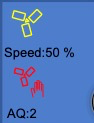
Oben die Geschwindigkeit per Popup:
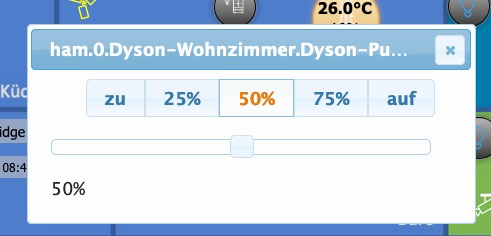
Unten einfacher Schalter für das Schwenken.
-
Moin, kann mir einer sagen wie und womit was genau angesteuert werden muss/kann?
bin hier etwas am verzweifeln!
habe den Dyson Pure Cool (Modell 438 (nicht der link!))An/Aus fuktioniert mit "setze Activ auf (false oder true)",
Lüftergeschwindigkeit funktioniert mit "setze Rotation-Speed (Wert 10-100)",
Nachtmodus funktioniert mit "setze Night-Mode On (false oder true)",Das wars auch schon was ich momentan gesteuert bekomme,
den Auto Modus kann ich zB. nicht mit "setze Auto On (false oder true)" steuern, ob true oder false, bei mir ändert sich nichts am Gerät,
würde gerne noch die Drehung aktivieren, aber entweder versuche ich es mit dem falschen Objekt oder benutze falsche Werte,
gleiches mit der Position des Lüfters.Edit: die schaltung des Luftstromes, von vorne oder hinten, würde ich auch gerne steuern

Ich wäre für Hilfe sehr dankbar
-
Moin, kann mir einer sagen wie und womit was genau angesteuert werden muss/kann?
bin hier etwas am verzweifeln!
habe den Dyson Pure Cool (Modell 438 (nicht der link!))An/Aus fuktioniert mit "setze Activ auf (false oder true)",
Lüftergeschwindigkeit funktioniert mit "setze Rotation-Speed (Wert 10-100)",
Nachtmodus funktioniert mit "setze Night-Mode On (false oder true)",Das wars auch schon was ich momentan gesteuert bekomme,
den Auto Modus kann ich zB. nicht mit "setze Auto On (false oder true)" steuern, ob true oder false, bei mir ändert sich nichts am Gerät,
würde gerne noch die Drehung aktivieren, aber entweder versuche ich es mit dem falschen Objekt oder benutze falsche Werte,
gleiches mit der Position des Lüfters.Edit: die schaltung des Luftstromes, von vorne oder hinten, würde ich auch gerne steuern
Ich wäre für Hilfe sehr dankbar
Das selbe problem habe ich auch.
Sobalt der Dyson Pure Cool auf Auto seht kann man den nicht mehr über den HAM Adapter steuern. Ich habe leider für dich keine lösung.
Ich hoffe immer noch das jemand den Dyson Adapter wieder an leben bringt.Gruß Kludi



Hello! It looks like you're interested in this conversation, but you don't have an account yet.
Getting fed up of having to scroll through the same posts each visit? When you register for an account, you'll always come back to exactly where you were before, and choose to be notified of new replies (either via email, or push notification). You'll also be able to save bookmarks and upvote posts to show your appreciation to other community members.
With your input, this post could be even better 💗
Register Login296
Online32.7k
Users82.6k
Topics1.3m
Posts