




viessmannapi-Adapter baut keine Verbindung zum Server auf
-
@nobbiman sagte in viessmannapi-Adapter baut keine Verbindung zum Server auf:
Hat jemand eine Idee, wie ich weiter vorgehen kann?
Den ioB-Host
uns erstmal dazu zeigen was du so hast
die Full Ausgabe von
iob diagkein Ansatz führt zu einer Verbindung.
und ein Debug Log davon ( Logstufe bei der Instanz auf DEBUG stellen )
hier posten in Code-Tags </>
@glasfaser sagte in viessmannapi-Adapter baut keine Verbindung zum Server auf:
iob diag
======================= SUMMARY =======================
                        v.2023-10-10


 Static hostname: RasPi-ioBroker
       Icon name: computer
Operating System: Debian GNU/Linux 12 (bookworm)
          Kernel: Linux 6.1.0-rpi4-rpi-v8
    Architecture: arm64

Installation:           native
Kernel:                 aarch64
Userland:               arm64
Timezone:               Europe/Berlin (CET, +0100)
User-ID:                1000
X-Server:               false
Boot Target:            multi-user.target

Pending OS-Updates:     60
Pending iob updates:    0

Nodejs-Installation:    /usr/bin/nodejs         v18.18.2
                        /usr/bin/node           v18.18.2
                        /usr/bin/npm            9.8.1
                        /usr/bin/npx            9.8.1
                        /usr/bin/corepack       0.19.0

Recommended versions are nodejs 18.19.0 and npm 10.2.3
Your nodejs installation is correct

MEMORY:
               total        used        free      shared  buff/cache   available
Mem:            4.0G        1.7G        1.2G        249K        1.2G        2.2G
Swap:           104M        2.4M        102M
Total:          4.1G        1.7G        1.3G

Active iob-Instances:   16
Active repo(s): stable

ioBroker Core:          js-controller           5.0.17
                        admin                   6.13.16

ioBroker Status:        iobroker is running on this host.


Objects type: jsonl
States  type: jsonl

Status admin and web instance:
+ system.adapter.admin.0                  : admin                 : RasPi-ioBroker                           -  enabled, port: 8081, bind: 192.168.2.193, run as: admin
+ system.adapter.web.0                    : web                   : RasPi-ioBroker                           -  enabled, port: 8082, bind: 0.0.0.0, run as: admin

Objects:                18544
States:                 15996

Size of iob-Database:

48M     /opt/iobroker/iobroker-data/objects.jsonl
6.8M    /opt/iobroker/iobroker-data/states.jsonl


=================== END OF SUMMARY ====================
Nun möchte ich nichtunnötig Arbeit machen. Gerade hatte ich noch eine andere Idee.
Die entstehenden Daten speichere ich in eine Influx-Datei. Die Einstellungen habe ich nun geändert und speichere die Daten nun nur bei Veränderungen auf (minimals nach 300s).
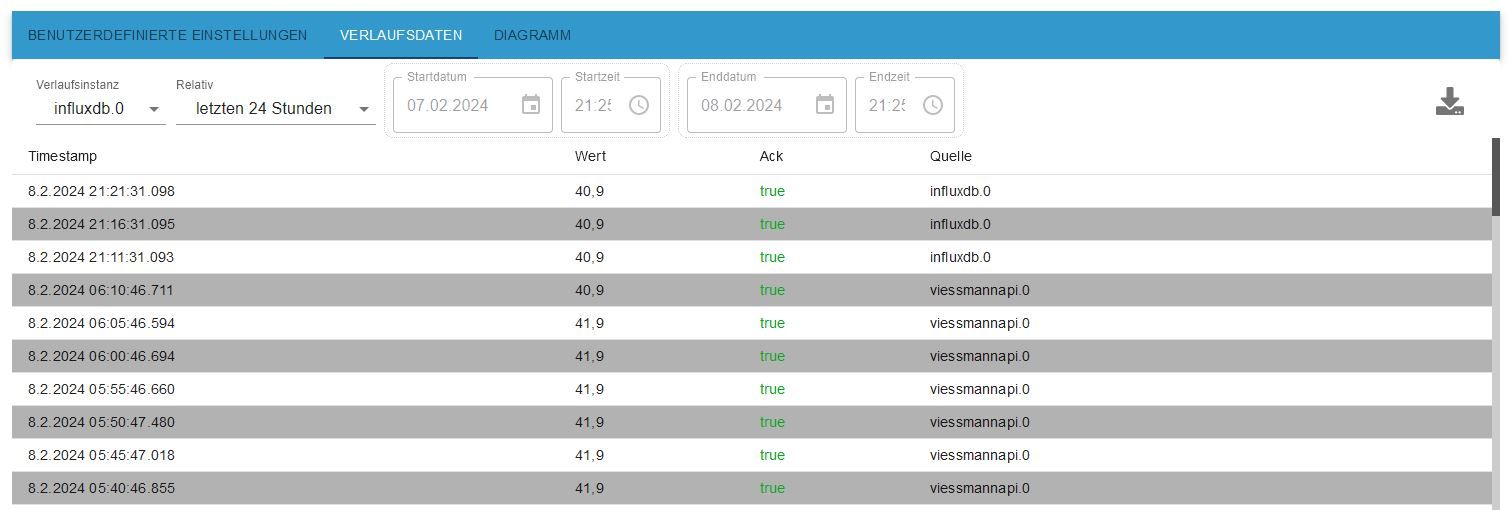
Sobald ich die diese Änderung speicherte, begann die Datenaufzeichnung (siehe Screenshots).
Interessanterweise lautet die Datenquelle in der Tabelle nun nicht mehr "viessmannapi.0", sondern "influxdb.0".
Ich habe zu wenig Ahnung von den Zusammenhängen, interessieren würden sie mich aber schon.
Warum wechselt nun die Quelle?
Die Daten verarbeite ich unter Grafana, dort sind erste (neue) Daten mit waagerechten Verbindungslinien zu sehen.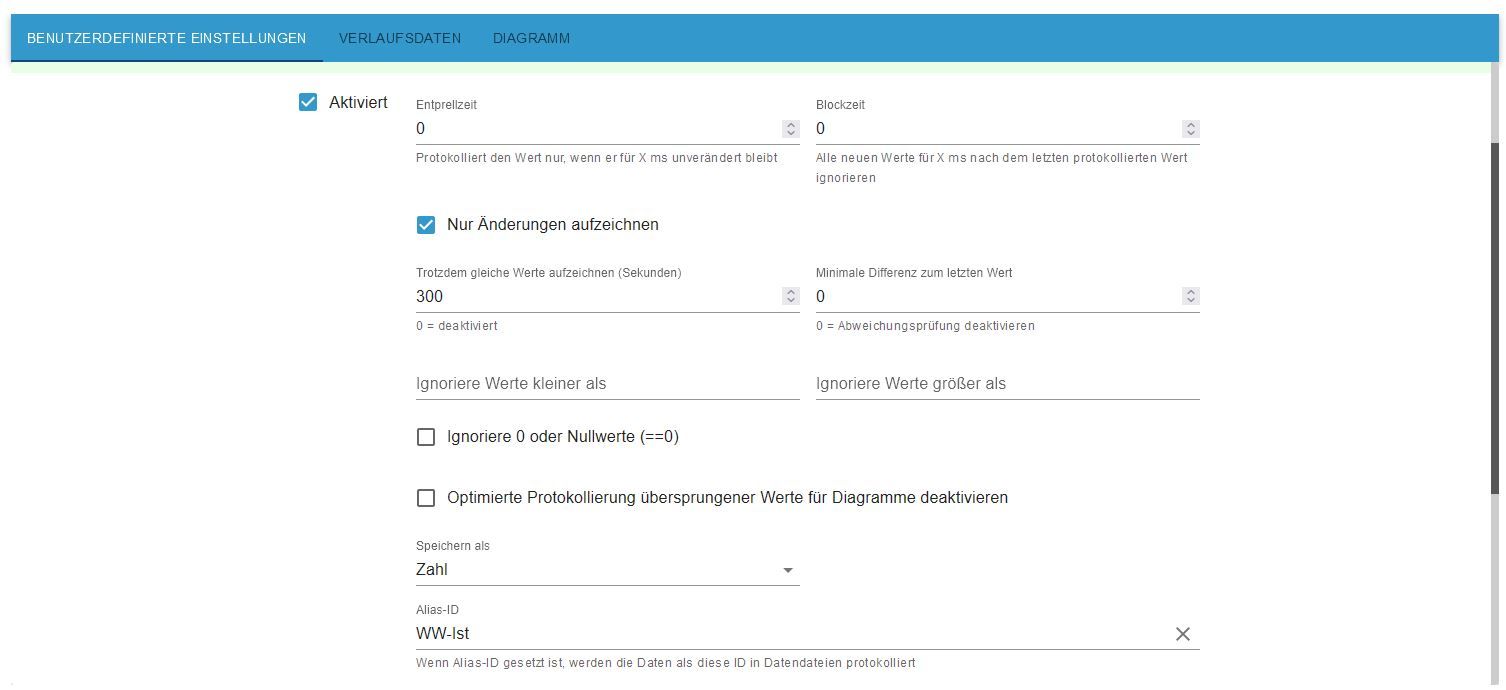
-
@glasfaser sagte in viessmannapi-Adapter baut keine Verbindung zum Server auf:
iob diag
======================= SUMMARY =======================
                        v.2023-10-10


 Static hostname: RasPi-ioBroker
       Icon name: computer
Operating System: Debian GNU/Linux 12 (bookworm)
          Kernel: Linux 6.1.0-rpi4-rpi-v8
    Architecture: arm64

Installation:           native
Kernel:                 aarch64
Userland:               arm64
Timezone:               Europe/Berlin (CET, +0100)
User-ID:                1000
X-Server:               false
Boot Target:            multi-user.target

Pending OS-Updates:     60
Pending iob updates:    0

Nodejs-Installation:    /usr/bin/nodejs         v18.18.2
                        /usr/bin/node           v18.18.2
                        /usr/bin/npm            9.8.1
                        /usr/bin/npx            9.8.1
                        /usr/bin/corepack       0.19.0

Recommended versions are nodejs 18.19.0 and npm 10.2.3
Your nodejs installation is correct

MEMORY:
               total        used        free      shared  buff/cache   available
Mem:            4.0G        1.7G        1.2G        249K        1.2G        2.2G
Swap:           104M        2.4M        102M
Total:          4.1G        1.7G        1.3G

Active iob-Instances:   16
Active repo(s): stable

ioBroker Core:          js-controller           5.0.17
                        admin                   6.13.16

ioBroker Status:        iobroker is running on this host.


Objects type: jsonl
States  type: jsonl

Status admin and web instance:
+ system.adapter.admin.0                  : admin                 : RasPi-ioBroker                           -  enabled, port: 8081, bind: 192.168.2.193, run as: admin
+ system.adapter.web.0                    : web                   : RasPi-ioBroker                           -  enabled, port: 8082, bind: 0.0.0.0, run as: admin

Objects:                18544
States:                 15996

Size of iob-Database:

48M     /opt/iobroker/iobroker-data/objects.jsonl
6.8M    /opt/iobroker/iobroker-data/states.jsonl


=================== END OF SUMMARY ====================
Nun möchte ich nichtunnötig Arbeit machen. Gerade hatte ich noch eine andere Idee.
Die entstehenden Daten speichere ich in eine Influx-Datei. Die Einstellungen habe ich nun geändert und speichere die Daten nun nur bei Veränderungen auf (minimals nach 300s).
Sobald ich die diese Änderung speicherte, begann die Datenaufzeichnung (siehe Screenshots).
Interessanterweise lautet die Datenquelle in der Tabelle nun nicht mehr "viessmannapi.0", sondern "influxdb.0".
Ich habe zu wenig Ahnung von den Zusammenhängen, interessieren würden sie mich aber schon.
Warum wechselt nun die Quelle?
Die Daten verarbeite ich unter Grafana, dort sind erste (neue) Daten mit waagerechten Verbindungslinien zu sehen. @nobbiman sagte in viessmannapi-Adapter baut keine Verbindung zum Server auf:
Gerade hatte ich noch eine andere Idee.
Bitte erst die Daten liefern !
nicht die
SUMMARY
sondern die Full Ausgabe die am Anfang kommt
und dann noch
@glasfaser sagte in viessmannapi-Adapter baut keine Verbindung zum Server auf:
und ein Debug Log davon ( Logstufe bei der Instanz auf DEBUG stellen )und
Pending OS-Updates: 60
v18.18.2ist auch Pflegebedürftig !
-
@nobbiman sagte in viessmannapi-Adapter baut keine Verbindung zum Server auf:
Gerade hatte ich noch eine andere Idee.
Bitte erst die Daten liefern !
nicht die
SUMMARY
sondern die Full Ausgabe die am Anfang kommt
und dann noch
@glasfaser sagte in viessmannapi-Adapter baut keine Verbindung zum Server auf:
und ein Debug Log davon ( Logstufe bei der Instanz auf DEBUG stellen )und
Pending OS-Updates: 60
v18.18.2ist auch Pflegebedürftig !
@glasfaser ```
======== Start marking the full check here =========Skript v.2023-10-10 *** BASE SYSTEM *** Static hostname: RasPi-ioBroker Icon name: computer Operating System: Debian GNU/Linux 12 (bookworm) Kernel: Linux 6.1.0-rpi4-rpi-v8 Architecture: arm64 Model : Raspberry Pi 4 Model B Rev 1.5 Docker : false Virtualization : none Kernel : aarch64 Userland : arm64 Systemuptime and Load: 21:40:51 up 22 days, 9:07, 2 users, load average: 1.19, 0.62, 0.48 CPU threads: 4 *** RASPBERRY THROTTLING *** Current issues: No throttling issues detected. Previously detected issues: No throttling issues detected. *** Time and Time Zones *** Local time: Thu 2024-02-08 21:40:51 CET Universal time: Thu 2024-02-08 20:40:51 UTC RTC time: n/a Time zone: Europe/Berlin (CET, +0100) System clock synchronized: yes NTP service: active RTC in local TZ: no *** User and Groups *** pi /home/pi pi adm dialout cdrom sudo audio video plugdev games users input render netdev gpio i2c spi iobroker *** X-Server-Setup *** X-Server: false Desktop: Terminal: tty Boot Target: multi-user.target *** MEMORY *** total used free shared buff/cache available Mem: 4.0G 1.7G 1.2G 245K 1.2G 2.2G Swap: 104M 2.4M 102M Total: 4.1G 1.7G 1.3G 3792 M total memory 1660 M used memory 1627 M active memory 880 M inactive memory 1098 M free memory 116 M buffer memory 992 M swap cache 99 M total swap 2 M used swap 97 M free swap Raspberry only: oom events: 0 lifetime oom required: 0 Mbytes total time in oom handler: 0 ms max time spent in oom handler: 0 ms *** FAILED SERVICES *** UNIT LOAD ACTIVE SUB DESCRIPTION 0 loaded units listed. *** FILESYSTEM *** Filesystem Type Size Used Avail Use% Mounted on udev devtmpfs 1.6G 0 1.6G 0% /dev tmpfs tmpfs 380M 1.2M 379M 1% /run /dev/sda2 ext4 459G 8.5G 432G 2% / tmpfs tmpfs 1.9G 0 1.9G 0% /dev/shm tmpfs tmpfs 5.0M 16K 5.0M 1% /run/lock /dev/sda1 vfat 510M 61M 450M 12% /boot/firmware tmpfs tmpfs 380M 0 380M 0% /run/user/1000 Messages concerning ext4 filesystem in dmesg: [Wed Jan 17 12:33:36 2024] Kernel command line: coherent_pool=1M 8250.nr_uarts=0 snd_bcm2835.enable_headphones=0 snd_bcm2835.enable_headphones=1 snd_bcm2835.enable_hdmi=1 snd_bcm2835.enable_hdmi=0 smsc95xx.macaddr=E4:5F:01:A4:AD:F2 vc_mem.mem_base=0x3eb00000 vc_mem.mem_size=0x3ff00000 console=ttyS0,115200 console=tty1 root=PARTUUID=4fe6d7de-02 rootfstype=ext4 fsck.repair=yes rootwait cfg80211.ieee80211_regdom=GB [Wed Jan 17 12:33:41 2024] EXT4-fs (sda2): mounted filesystem with ordered data mode. Quota mode: none. [Wed Jan 17 12:33:44 2024] EXT4-fs (sda2): re-mounted. Quota mode: none. Show mounted filesystems \(real ones only\): TARGET SOURCE FSTYPE OPTIONS / /dev/sda2 ext4 rw,noatime `-/boot/firmware /dev/sda1 vfat rw,relatime,fmask=0022,dmask=0022,codepage=437,iocharset=ascii,shortname=mixed,errors=remount-ro Files in neuralgic directories: /var: 4.6G /var/ 3.4G /var/lib 3.2G /var/lib/influxdb/engine/data/e1e7e131406c61a4/autogen 3.2G /var/lib/influxdb/engine/data/e1e7e131406c61a4 3.2G /var/lib/influxdb/engine/data Archived and active journals take up 682.9M in the file system. /opt/iobroker/backups: 109M /opt/iobroker/backups/ /opt/iobroker/iobroker-data: 314M /opt/iobroker/iobroker-data/ 172M /opt/iobroker/iobroker-data/files 85M /opt/iobroker/iobroker-data/backup-objects 67M /opt/iobroker/iobroker-data/files/javascript.admin 48M /opt/iobroker/iobroker-data/files/javascript.admin/static The five largest files in iobroker-data are: 48M /opt/iobroker/iobroker-data/objects.jsonl 22M /opt/iobroker/iobroker-data/files/web.admin/static/js/main.c05ba1d3.js.map 22M /opt/iobroker/iobroker-data/files/modbus.admin/static/js/main.578d79d9.js.map 9.4M /opt/iobroker/iobroker-data/states.jsonl 8.8M /opt/iobroker/iobroker-data/files/modbus.admin/static/js/main.578d79d9.js USB-Devices by-id: USB-Sticks - Avoid direct links to /dev/* in your adapter setups, please always prefer the links 'by-id': find: '/dev/serial/by-id/': No such file or directory *** NodeJS-Installation *** /usr/bin/nodejs v18.18.2 /usr/bin/node v18.18.2 /usr/bin/npm 9.8.1 /usr/bin/npx 9.8.1 /usr/bin/corepack 0.19.0 nodejs: Installed: 18.18.2-1nodesource1 Candidate: 18.19.0+dfsg-6~deb12u1 Version table: 18.19.0+dfsg-6~deb12u1 500 500 http://deb.debian.org/debian-security bookworm-security/main arm64 Packages 18.19.0-1nodesource1 500 500 https://deb.nodesource.com/node_18.x nodistro/main arm64 Packages *** 18.18.2-1nodesource1 500 500 https://deb.nodesource.com/node_18.x nodistro/main arm64 Packages 100 /var/lib/dpkg/status 18.18.1-1nodesource1 500 500 https://deb.nodesource.com/node_18.x nodistro/main arm64 Packages 18.18.0-1nodesource1 500 500 https://deb.nodesource.com/node_18.x nodistro/main arm64 Packages 18.17.1-1nodesource1 500 500 https://deb.nodesource.com/node_18.x nodistro/main arm64 Packages 18.17.0-1nodesource1 500 500 https://deb.nodesource.com/node_18.x nodistro/main arm64 Packages 18.16.1-1nodesource1 500 500 https://deb.nodesource.com/node_18.x nodistro/main arm64 Packages 18.16.0-1nodesource1 500 500 https://deb.nodesource.com/node_18.x nodistro/main arm64 Packages 18.15.0-1nodesource1 500 500 https://deb.nodesource.com/node_18.x nodistro/main arm64 Packages 18.14.2-1nodesource1 500 500 https://deb.nodesource.com/node_18.x nodistro/main arm64 Packages 18.14.1-1nodesource1 500 500 https://deb.nodesource.com/node_18.x nodistro/main arm64 Packages 18.14.0-1nodesource1 500 500 https://deb.nodesource.com/node_18.x nodistro/main arm64 Packages 18.13.0+dfsg1-1 500 500 http://deb.debian.org/debian bookworm/main arm64 Packages 18.13.0-1nodesource1 500 500 https://deb.nodesource.com/node_18.x nodistro/main arm64 Packages 18.12.0-1nodesource1 500 500 https://deb.nodesource.com/node_18.x nodistro/main arm64 Packages 18.11.0-1nodesource1 500 500 https://deb.nodesource.com/node_18.x nodistro/main arm64 Packages 18.10.0-1nodesource1 500 500 https://deb.nodesource.com/node_18.x nodistro/main arm64 Packages 18.9.1-1nodesource1 500 500 https://deb.nodesource.com/node_18.x nodistro/main arm64 Packages 18.9.0-1nodesource1 500 500 https://deb.nodesource.com/node_18.x nodistro/main arm64 Packages 18.8.0-1nodesource1 500 500 https://deb.nodesource.com/node_18.x nodistro/main arm64 Packages 18.7.0-1nodesource1 500 500 https://deb.nodesource.com/node_18.x nodistro/main arm64 Packages 18.6.0-1nodesource1 500 500 https://deb.nodesource.com/node_18.x nodistro/main arm64 Packages 18.5.0-1nodesource1 500 500 https://deb.nodesource.com/node_18.x nodistro/main arm64 Packages 18.4.0-1nodesource1 500 500 https://deb.nodesource.com/node_18.x nodistro/main arm64 Packages 18.3.0-1nodesource1 500 500 https://deb.nodesource.com/node_18.x nodistro/main arm64 Packages 18.2.0-1nodesource1 500 500 https://deb.nodesource.com/node_18.x nodistro/main arm64 Packages 18.1.0-1nodesource1 500 500 https://deb.nodesource.com/node_18.x nodistro/main arm64 Packages 18.0.0-1nodesource1 500 500 https://deb.nodesource.com/node_18.x nodistro/main arm64 Packages Temp directories causing npm8 problem: 0 No problems detected Errors in npm tree: *** ioBroker-Installation *** ioBroker Status iobroker is running on this host. Objects type: jsonl States type: jsonl Core adapters versions js-controller: 5.0.17 admin: 6.13.16 javascript: 7.1.6 Adapters from github: 1 Adapter State + system.adapter.admin.0 : admin : RasPi-ioBroker - enabled, port: 8081, bind: 192.168.2.193, run as: admin + system.adapter.backitup.0 : backitup : RasPi-ioBroker - enabled system.adapter.bmw.0 : bmw : RasPi-ioBroker - disabled + system.adapter.controme.0 : controme : RasPi-ioBroker - enabled + system.adapter.discovery.0 : discovery : RasPi-ioBroker - enabled system.adapter.fhem.0 : fhem : RasPi-ioBroker - enabled, port: 7072 + system.adapter.growatt.0 : growatt : RasPi-ioBroker - enabled + system.adapter.history.0 : history : RasPi-ioBroker - enabled + system.adapter.influxdb.0 : influxdb : RasPi-ioBroker - enabled, port: 8086 + system.adapter.influxdb.1 : influxdb : RasPi-ioBroker - enabled, port: 8086 + system.adapter.javascript.0 : javascript : RasPi-ioBroker - enabled system.adapter.jeelink.0 : jeelink : RasPi-ioBroker - disabled system.adapter.modbus.0 : modbus : RasPi-ioBroker - disabled + system.adapter.mqtt-client.0 : mqtt-client : RasPi-ioBroker - enabled, port: 1883 system.adapter.powerfox2.0 : powerfox2 : RasPi-ioBroker - enabled + system.adapter.pvforecast.0 : pvforecast : RasPi-ioBroker - enabled system.adapter.shelly.0 : shelly : RasPi-ioBroker - disabled, port: 1882, bind: 0.0.0.0 + system.adapter.sourceanalytix.0 : sourceanalytix : RasPi-ioBroker - enabled + system.adapter.viessmannapi.0 : viessmannapi : RasPi-ioBroker - enabled system.adapter.vis-materialdesign.0 : vis-materialdesign : RasPi-ioBroker - enabled system.adapter.vis.0 : vis : RasPi-ioBroker - enabled + system.adapter.web.0 : web : RasPi-ioBroker - enabled, port: 8082, bind: 0.0.0.0, run as: admin + instance is alive Enabled adapters with bindings + system.adapter.admin.0 : admin : RasPi-ioBroker - enabled, port: 8081, bind: 192.168.2.193, run as: admin system.adapter.fhem.0 : fhem : RasPi-ioBroker - enabled, port: 7072 + system.adapter.influxdb.0 : influxdb : RasPi-ioBroker - enabled, port: 8086 + system.adapter.influxdb.1 : influxdb : RasPi-ioBroker - enabled, port: 8086 + system.adapter.mqtt-client.0 : mqtt-client : RasPi-ioBroker - enabled, port: 1883 + system.adapter.web.0 : web : RasPi-ioBroker - enabled, port: 8082, bind: 0.0.0.0, run as: admin ioBroker-Repositories stable : http://download.iobroker.net/sources-dist.json beta : http://download.iobroker.net/sources-dist-latest.json Active repo(s): stable Installed ioBroker-Instances Used repository: stable Adapter "admin" : 6.13.16 , installed 6.13.16 Adapter "backitup" : 2.9.8 , installed 2.9.8 Adapter "bmw" : 2.5.7 , installed 2.5.7 Adapter "discovery" : 4.2.0 , installed 4.2.0 Adapter "fhem" : 2.0.5 , installed 2.0.5 Adapter "growatt" : 3.2.1 , installed 3.2.1 Adapter "history" : 3.0.1 , installed 3.0.1 Adapter "influxdb" : 3.2.0 , installed 3.2.0 Adapter "javascript" : 7.1.6 , installed 7.1.6 Adapter "jeelink" : 1.2.3 , installed 1.2.3 Controller "js-controller": 5.0.17 , installed 5.0.17 Adapter "modbus" : 6.1.0 , installed 6.1.0 Adapter "mqtt-client" : 1.7.0 , installed 1.7.0 Adapter "powerfox2" : 0.0.14 , installed 0.0.14 Adapter "pvforecast" : 2.9.1 , installed 2.9.1 Adapter "shelly" : 6.6.1 , installed 6.6.1 Adapter "simple-api" : 2.7.2 , installed 2.7.2 Adapter "socketio" : 6.6.0 , installed 6.6.0 Adapter "viessmannapi" : 2.3.0 , installed 2.3.0 Adapter "vis" : 1.5.4 , installed 1.5.4 Adapter "vis-materialdesign": 0.5.9, installed 0.5.9 Adapter "web" : 6.2.3 , installed 6.2.3 Adapter "ws" : 2.5.10 , installed 2.5.10 Objects and States Please stand by - This may take a while Objects: 18544 States: 15986 *** OS-Repositories and Updates *** W: https://packages.grafana.com/oss/deb/dists/stable/InRelease: Key is stored in legacy trusted.gpg keyring (/etc/apt/trusted.gpg), see the DEPRECATION section in apt-key(8) for details. Hit:1 http://archive.raspberrypi.com/debian bookworm InRelease Hit:2 http://deb.debian.org/debian bookworm InRelease Hit:3 http://deb.debian.org/debian-security bookworm-security InRelease Hit:4 http://deb.debian.org/debian bookworm-updates InRelease Hit:5 https://repos.influxdata.com/debian stable InRelease Hit:6 https://deb.nodesource.com/node_18.x nodistro InRelease Hit:7 https://apt.grafana.com stable InRelease Hit:8 https://packages.grafana.com/oss/deb stable InRelease Reading package lists... W: https://packages.grafana.com/oss/deb/dists/stable/InRelease: Key is stored in legacy trusted.gpg keyring (/etc/apt/trusted.gpg), see the DEPRECATION section in apt-key(8) for details. Pending Updates: 60 *** Listening Ports *** Active Internet connections (only servers) Proto Recv-Q Send-Q Local Address Foreign Address State User Inode PID/Program name tcp 0 0 127.0.0.1:9001 0.0.0.0:* LISTEN 1001 8801245 558677/iobroker.js- tcp 0 0 127.0.0.1:9000 0.0.0.0:* LISTEN 1001 8801252 558677/iobroker.js- tcp 0 0 0.0.0.0:1880 0.0.0.0:* LISTEN 1000 13639 549/node-red tcp 0 0 0.0.0.0:22 0.0.0.0:* LISTEN 0 16443 698/sshd: /usr/sbin tcp 0 0 192.168.2.193:8081 0.0.0.0:* LISTEN 1001 8802669 558696/io.admin.0 tcp6 0 0 :::8082 :::* LISTEN 1001 8804614 558905/io.web.0 tcp6 0 0 :::8086 :::* LISTEN 999 16495 751/influxd tcp6 0 0 :::22 :::* LISTEN 0 16445 698/sshd: /usr/sbin tcp6 0 0 :::3000 :::* LISTEN 106 14587 832/grafana udp 0 0 0.0.0.0:37202 0.0.0.0:* 104 13465 538/avahi-daemon: r udp 0 0 0.0.0.0:5353 0.0.0.0:* 104 13463 538/avahi-daemon: r udp6 0 0 :::45510 :::* 104 13466 538/avahi-daemon: r udp6 0 0 fe80::491c:1119:38b:546 :::* 0 13623 634/NetworkManager udp6 0 0 :::5353 :::* 104 13464 538/avahi-daemon: r *** Log File - Last 25 Lines *** 2024-02-08 21:42:02.761 - warn: fhem.0 (562215) CHECK id: fhem.0.info.Info.alive 2024-02-08 21:42:02.761 - warn: fhem.0 (562215) CHECK id: fhem.0.info.Info.numberDevicesFHEMignored 2024-02-08 21:42:02.762 - warn: fhem.0 (562215) CHECK id: fhem.0.info.Info.lastWarn 2024-02-08 21:42:02.762 - warn: fhem.0 (562215) CHECK id: fhem.0.info.Info.lastError 2024-02-08 21:42:02.763 - warn: fhem.0 (562215) CHECK id: fhem.0.info.Info.lastInfo 2024-02-08 21:42:02.763 - warn: fhem.0 (562215) CHECK id: fhem.0.info.Info.lastSend2ioB 2024-02-08 21:42:02.764 - warn: fhem.0 (562215) CHECK id: fhem.0.info.Info.lastIOBout 2024-02-08 21:42:02.782 - info: fhem.0 (562215) > Date of main.js = 01.07.23 - fhem.0.info.Info.buildDate 2024-02-08 21:42:02.784 - info: fhem.0 (562215) > room of fhem.x.info.Configurations.onlySyncRoom exist = false - fhem.0.info.Info.roomioBroker 2024-02-08 21:42:02.786 - info: fhem.0 (562215) > Number devices of FHEM (jsonlist2) = 347 - fhem.0.info.Info.numberDevicesFHEM 2024-02-08 21:42:02.787 - info: fhem.0 (562215) > Number devices of FHEM (synchronized) = 339 - fhem.0.info.Info.numberDevicesFHEMsync 2024-02-08 21:42:02.788 - info: fhem.0 (562215) > Number of objects IOB out (detected) = 0 - fhem.0.info.Info.numberObjectsIOBout 2024-02-08 21:42:02.788 - info: fhem.0 (562215) > Number of objects IOB out (subscribe) = 0 - fhem.0.info.Info.numberObjectsIOBoutSub 2024-02-08 21:42:02.789 - info: fhem.0 (562215) > Number of objects IOB in = 6967 - fhem.0.info.Info.numberObjectsIOBin 2024-02-08 21:42:02.792 - info: fhem.0 (562215) > FHEM alive = true - fhem.0.info.Info.alive 2024-02-08 21:42:02.826 - info: fhem.0 (562215) > Number devices of FHEM (ignored) = 2 - fhem.0.info.Info.numberDevicesFHEMignored 2024-02-08 21:42:02.827 - info: fhem.0 (562215) > lastWarn = ----- not in use - info.Configurations.advancedFunction(false) - fhem.0.info.Info.lastWarn 2024-02-08 21:42:02.828 - info: fhem.0 (562215) > lastError = ----- not in use - info.Configurations.advancedFunction(false) - fhem.0.info.Info.lastError 2024-02-08 21:42:02.830 - info: fhem.0 (562215) > lastInfo = ----- not in use - info.Configurations.advancedFunction(false) - fhem.0.info.Info.lastInfo 2024-02-08 21:42:02.830 - info: fhem.0 (562215) > lastSend2ioB = ----- not in use - info.Configurations.advancedFunction(false) - fhem.0.info.Info.lastSend2ioB 2024-02-08 21:42:02.831 - info: fhem.0 (562215) > lastIOBout = ----- not in use - info.Configurations.advancedFunction(false) - fhem.0.info.Info.lastIOBout 2024-02-08 21:42:02.833 - warn: fhem.0 (562215) > more info FHEM Adapter visit https://github.com/iobroker-community-adapters/ioBroker.fhem/blob/master/docs/de/README.md 2024-02-08 21:42:02.833 - info: fhem.0 (562215) END ===== Synchronised FHEM in 31048 ms :-) 2024-02-08 21:42:03.925 - info: powerfox2.0 (563443) starting. Version 0.0.14 in /opt/iobroker/node_modules/iobroker.powerfox2, node: v18.18.2, js-controller: 5.0.17 2024-02-08 21:42:06.504 - info: powerfox2.0 (563443) Terminated (NO_ERROR): Without reason============ Mark until here for C&P =============
iob diag has finished.
Debug Log von welcher Quelle? -
@glasfaser ```
======== Start marking the full check here =========Skript v.2023-10-10 *** BASE SYSTEM *** Static hostname: RasPi-ioBroker Icon name: computer Operating System: Debian GNU/Linux 12 (bookworm) Kernel: Linux 6.1.0-rpi4-rpi-v8 Architecture: arm64 Model : Raspberry Pi 4 Model B Rev 1.5 Docker : false Virtualization : none Kernel : aarch64 Userland : arm64 Systemuptime and Load: 21:40:51 up 22 days, 9:07, 2 users, load average: 1.19, 0.62, 0.48 CPU threads: 4 *** RASPBERRY THROTTLING *** Current issues: No throttling issues detected. Previously detected issues: No throttling issues detected. *** Time and Time Zones *** Local time: Thu 2024-02-08 21:40:51 CET Universal time: Thu 2024-02-08 20:40:51 UTC RTC time: n/a Time zone: Europe/Berlin (CET, +0100) System clock synchronized: yes NTP service: active RTC in local TZ: no *** User and Groups *** pi /home/pi pi adm dialout cdrom sudo audio video plugdev games users input render netdev gpio i2c spi iobroker *** X-Server-Setup *** X-Server: false Desktop: Terminal: tty Boot Target: multi-user.target *** MEMORY *** total used free shared buff/cache available Mem: 4.0G 1.7G 1.2G 245K 1.2G 2.2G Swap: 104M 2.4M 102M Total: 4.1G 1.7G 1.3G 3792 M total memory 1660 M used memory 1627 M active memory 880 M inactive memory 1098 M free memory 116 M buffer memory 992 M swap cache 99 M total swap 2 M used swap 97 M free swap Raspberry only: oom events: 0 lifetime oom required: 0 Mbytes total time in oom handler: 0 ms max time spent in oom handler: 0 ms *** FAILED SERVICES *** UNIT LOAD ACTIVE SUB DESCRIPTION 0 loaded units listed. *** FILESYSTEM *** Filesystem Type Size Used Avail Use% Mounted on udev devtmpfs 1.6G 0 1.6G 0% /dev tmpfs tmpfs 380M 1.2M 379M 1% /run /dev/sda2 ext4 459G 8.5G 432G 2% / tmpfs tmpfs 1.9G 0 1.9G 0% /dev/shm tmpfs tmpfs 5.0M 16K 5.0M 1% /run/lock /dev/sda1 vfat 510M 61M 450M 12% /boot/firmware tmpfs tmpfs 380M 0 380M 0% /run/user/1000 Messages concerning ext4 filesystem in dmesg: [Wed Jan 17 12:33:36 2024] Kernel command line: coherent_pool=1M 8250.nr_uarts=0 snd_bcm2835.enable_headphones=0 snd_bcm2835.enable_headphones=1 snd_bcm2835.enable_hdmi=1 snd_bcm2835.enable_hdmi=0 smsc95xx.macaddr=E4:5F:01:A4:AD:F2 vc_mem.mem_base=0x3eb00000 vc_mem.mem_size=0x3ff00000 console=ttyS0,115200 console=tty1 root=PARTUUID=4fe6d7de-02 rootfstype=ext4 fsck.repair=yes rootwait cfg80211.ieee80211_regdom=GB [Wed Jan 17 12:33:41 2024] EXT4-fs (sda2): mounted filesystem with ordered data mode. Quota mode: none. [Wed Jan 17 12:33:44 2024] EXT4-fs (sda2): re-mounted. Quota mode: none. Show mounted filesystems \(real ones only\): TARGET SOURCE FSTYPE OPTIONS / /dev/sda2 ext4 rw,noatime `-/boot/firmware /dev/sda1 vfat rw,relatime,fmask=0022,dmask=0022,codepage=437,iocharset=ascii,shortname=mixed,errors=remount-ro Files in neuralgic directories: /var: 4.6G /var/ 3.4G /var/lib 3.2G /var/lib/influxdb/engine/data/e1e7e131406c61a4/autogen 3.2G /var/lib/influxdb/engine/data/e1e7e131406c61a4 3.2G /var/lib/influxdb/engine/data Archived and active journals take up 682.9M in the file system. /opt/iobroker/backups: 109M /opt/iobroker/backups/ /opt/iobroker/iobroker-data: 314M /opt/iobroker/iobroker-data/ 172M /opt/iobroker/iobroker-data/files 85M /opt/iobroker/iobroker-data/backup-objects 67M /opt/iobroker/iobroker-data/files/javascript.admin 48M /opt/iobroker/iobroker-data/files/javascript.admin/static The five largest files in iobroker-data are: 48M /opt/iobroker/iobroker-data/objects.jsonl 22M /opt/iobroker/iobroker-data/files/web.admin/static/js/main.c05ba1d3.js.map 22M /opt/iobroker/iobroker-data/files/modbus.admin/static/js/main.578d79d9.js.map 9.4M /opt/iobroker/iobroker-data/states.jsonl 8.8M /opt/iobroker/iobroker-data/files/modbus.admin/static/js/main.578d79d9.js USB-Devices by-id: USB-Sticks - Avoid direct links to /dev/* in your adapter setups, please always prefer the links 'by-id': find: '/dev/serial/by-id/': No such file or directory *** NodeJS-Installation *** /usr/bin/nodejs v18.18.2 /usr/bin/node v18.18.2 /usr/bin/npm 9.8.1 /usr/bin/npx 9.8.1 /usr/bin/corepack 0.19.0 nodejs: Installed: 18.18.2-1nodesource1 Candidate: 18.19.0+dfsg-6~deb12u1 Version table: 18.19.0+dfsg-6~deb12u1 500 500 http://deb.debian.org/debian-security bookworm-security/main arm64 Packages 18.19.0-1nodesource1 500 500 https://deb.nodesource.com/node_18.x nodistro/main arm64 Packages *** 18.18.2-1nodesource1 500 500 https://deb.nodesource.com/node_18.x nodistro/main arm64 Packages 100 /var/lib/dpkg/status 18.18.1-1nodesource1 500 500 https://deb.nodesource.com/node_18.x nodistro/main arm64 Packages 18.18.0-1nodesource1 500 500 https://deb.nodesource.com/node_18.x nodistro/main arm64 Packages 18.17.1-1nodesource1 500 500 https://deb.nodesource.com/node_18.x nodistro/main arm64 Packages 18.17.0-1nodesource1 500 500 https://deb.nodesource.com/node_18.x nodistro/main arm64 Packages 18.16.1-1nodesource1 500 500 https://deb.nodesource.com/node_18.x nodistro/main arm64 Packages 18.16.0-1nodesource1 500 500 https://deb.nodesource.com/node_18.x nodistro/main arm64 Packages 18.15.0-1nodesource1 500 500 https://deb.nodesource.com/node_18.x nodistro/main arm64 Packages 18.14.2-1nodesource1 500 500 https://deb.nodesource.com/node_18.x nodistro/main arm64 Packages 18.14.1-1nodesource1 500 500 https://deb.nodesource.com/node_18.x nodistro/main arm64 Packages 18.14.0-1nodesource1 500 500 https://deb.nodesource.com/node_18.x nodistro/main arm64 Packages 18.13.0+dfsg1-1 500 500 http://deb.debian.org/debian bookworm/main arm64 Packages 18.13.0-1nodesource1 500 500 https://deb.nodesource.com/node_18.x nodistro/main arm64 Packages 18.12.0-1nodesource1 500 500 https://deb.nodesource.com/node_18.x nodistro/main arm64 Packages 18.11.0-1nodesource1 500 500 https://deb.nodesource.com/node_18.x nodistro/main arm64 Packages 18.10.0-1nodesource1 500 500 https://deb.nodesource.com/node_18.x nodistro/main arm64 Packages 18.9.1-1nodesource1 500 500 https://deb.nodesource.com/node_18.x nodistro/main arm64 Packages 18.9.0-1nodesource1 500 500 https://deb.nodesource.com/node_18.x nodistro/main arm64 Packages 18.8.0-1nodesource1 500 500 https://deb.nodesource.com/node_18.x nodistro/main arm64 Packages 18.7.0-1nodesource1 500 500 https://deb.nodesource.com/node_18.x nodistro/main arm64 Packages 18.6.0-1nodesource1 500 500 https://deb.nodesource.com/node_18.x nodistro/main arm64 Packages 18.5.0-1nodesource1 500 500 https://deb.nodesource.com/node_18.x nodistro/main arm64 Packages 18.4.0-1nodesource1 500 500 https://deb.nodesource.com/node_18.x nodistro/main arm64 Packages 18.3.0-1nodesource1 500 500 https://deb.nodesource.com/node_18.x nodistro/main arm64 Packages 18.2.0-1nodesource1 500 500 https://deb.nodesource.com/node_18.x nodistro/main arm64 Packages 18.1.0-1nodesource1 500 500 https://deb.nodesource.com/node_18.x nodistro/main arm64 Packages 18.0.0-1nodesource1 500 500 https://deb.nodesource.com/node_18.x nodistro/main arm64 Packages Temp directories causing npm8 problem: 0 No problems detected Errors in npm tree: *** ioBroker-Installation *** ioBroker Status iobroker is running on this host. Objects type: jsonl States type: jsonl Core adapters versions js-controller: 5.0.17 admin: 6.13.16 javascript: 7.1.6 Adapters from github: 1 Adapter State + system.adapter.admin.0 : admin : RasPi-ioBroker - enabled, port: 8081, bind: 192.168.2.193, run as: admin + system.adapter.backitup.0 : backitup : RasPi-ioBroker - enabled system.adapter.bmw.0 : bmw : RasPi-ioBroker - disabled + system.adapter.controme.0 : controme : RasPi-ioBroker - enabled + system.adapter.discovery.0 : discovery : RasPi-ioBroker - enabled system.adapter.fhem.0 : fhem : RasPi-ioBroker - enabled, port: 7072 + system.adapter.growatt.0 : growatt : RasPi-ioBroker - enabled + system.adapter.history.0 : history : RasPi-ioBroker - enabled + system.adapter.influxdb.0 : influxdb : RasPi-ioBroker - enabled, port: 8086 + system.adapter.influxdb.1 : influxdb : RasPi-ioBroker - enabled, port: 8086 + system.adapter.javascript.0 : javascript : RasPi-ioBroker - enabled system.adapter.jeelink.0 : jeelink : RasPi-ioBroker - disabled system.adapter.modbus.0 : modbus : RasPi-ioBroker - disabled + system.adapter.mqtt-client.0 : mqtt-client : RasPi-ioBroker - enabled, port: 1883 system.adapter.powerfox2.0 : powerfox2 : RasPi-ioBroker - enabled + system.adapter.pvforecast.0 : pvforecast : RasPi-ioBroker - enabled system.adapter.shelly.0 : shelly : RasPi-ioBroker - disabled, port: 1882, bind: 0.0.0.0 + system.adapter.sourceanalytix.0 : sourceanalytix : RasPi-ioBroker - enabled + system.adapter.viessmannapi.0 : viessmannapi : RasPi-ioBroker - enabled system.adapter.vis-materialdesign.0 : vis-materialdesign : RasPi-ioBroker - enabled system.adapter.vis.0 : vis : RasPi-ioBroker - enabled + system.adapter.web.0 : web : RasPi-ioBroker - enabled, port: 8082, bind: 0.0.0.0, run as: admin + instance is alive Enabled adapters with bindings + system.adapter.admin.0 : admin : RasPi-ioBroker - enabled, port: 8081, bind: 192.168.2.193, run as: admin system.adapter.fhem.0 : fhem : RasPi-ioBroker - enabled, port: 7072 + system.adapter.influxdb.0 : influxdb : RasPi-ioBroker - enabled, port: 8086 + system.adapter.influxdb.1 : influxdb : RasPi-ioBroker - enabled, port: 8086 + system.adapter.mqtt-client.0 : mqtt-client : RasPi-ioBroker - enabled, port: 1883 + system.adapter.web.0 : web : RasPi-ioBroker - enabled, port: 8082, bind: 0.0.0.0, run as: admin ioBroker-Repositories stable : http://download.iobroker.net/sources-dist.json beta : http://download.iobroker.net/sources-dist-latest.json Active repo(s): stable Installed ioBroker-Instances Used repository: stable Adapter "admin" : 6.13.16 , installed 6.13.16 Adapter "backitup" : 2.9.8 , installed 2.9.8 Adapter "bmw" : 2.5.7 , installed 2.5.7 Adapter "discovery" : 4.2.0 , installed 4.2.0 Adapter "fhem" : 2.0.5 , installed 2.0.5 Adapter "growatt" : 3.2.1 , installed 3.2.1 Adapter "history" : 3.0.1 , installed 3.0.1 Adapter "influxdb" : 3.2.0 , installed 3.2.0 Adapter "javascript" : 7.1.6 , installed 7.1.6 Adapter "jeelink" : 1.2.3 , installed 1.2.3 Controller "js-controller": 5.0.17 , installed 5.0.17 Adapter "modbus" : 6.1.0 , installed 6.1.0 Adapter "mqtt-client" : 1.7.0 , installed 1.7.0 Adapter "powerfox2" : 0.0.14 , installed 0.0.14 Adapter "pvforecast" : 2.9.1 , installed 2.9.1 Adapter "shelly" : 6.6.1 , installed 6.6.1 Adapter "simple-api" : 2.7.2 , installed 2.7.2 Adapter "socketio" : 6.6.0 , installed 6.6.0 Adapter "viessmannapi" : 2.3.0 , installed 2.3.0 Adapter "vis" : 1.5.4 , installed 1.5.4 Adapter "vis-materialdesign": 0.5.9, installed 0.5.9 Adapter "web" : 6.2.3 , installed 6.2.3 Adapter "ws" : 2.5.10 , installed 2.5.10 Objects and States Please stand by - This may take a while Objects: 18544 States: 15986 *** OS-Repositories and Updates *** W: https://packages.grafana.com/oss/deb/dists/stable/InRelease: Key is stored in legacy trusted.gpg keyring (/etc/apt/trusted.gpg), see the DEPRECATION section in apt-key(8) for details. Hit:1 http://archive.raspberrypi.com/debian bookworm InRelease Hit:2 http://deb.debian.org/debian bookworm InRelease Hit:3 http://deb.debian.org/debian-security bookworm-security InRelease Hit:4 http://deb.debian.org/debian bookworm-updates InRelease Hit:5 https://repos.influxdata.com/debian stable InRelease Hit:6 https://deb.nodesource.com/node_18.x nodistro InRelease Hit:7 https://apt.grafana.com stable InRelease Hit:8 https://packages.grafana.com/oss/deb stable InRelease Reading package lists... W: https://packages.grafana.com/oss/deb/dists/stable/InRelease: Key is stored in legacy trusted.gpg keyring (/etc/apt/trusted.gpg), see the DEPRECATION section in apt-key(8) for details. Pending Updates: 60 *** Listening Ports *** Active Internet connections (only servers) Proto Recv-Q Send-Q Local Address Foreign Address State User Inode PID/Program name tcp 0 0 127.0.0.1:9001 0.0.0.0:* LISTEN 1001 8801245 558677/iobroker.js- tcp 0 0 127.0.0.1:9000 0.0.0.0:* LISTEN 1001 8801252 558677/iobroker.js- tcp 0 0 0.0.0.0:1880 0.0.0.0:* LISTEN 1000 13639 549/node-red tcp 0 0 0.0.0.0:22 0.0.0.0:* LISTEN 0 16443 698/sshd: /usr/sbin tcp 0 0 192.168.2.193:8081 0.0.0.0:* LISTEN 1001 8802669 558696/io.admin.0 tcp6 0 0 :::8082 :::* LISTEN 1001 8804614 558905/io.web.0 tcp6 0 0 :::8086 :::* LISTEN 999 16495 751/influxd tcp6 0 0 :::22 :::* LISTEN 0 16445 698/sshd: /usr/sbin tcp6 0 0 :::3000 :::* LISTEN 106 14587 832/grafana udp 0 0 0.0.0.0:37202 0.0.0.0:* 104 13465 538/avahi-daemon: r udp 0 0 0.0.0.0:5353 0.0.0.0:* 104 13463 538/avahi-daemon: r udp6 0 0 :::45510 :::* 104 13466 538/avahi-daemon: r udp6 0 0 fe80::491c:1119:38b:546 :::* 0 13623 634/NetworkManager udp6 0 0 :::5353 :::* 104 13464 538/avahi-daemon: r *** Log File - Last 25 Lines *** 2024-02-08 21:42:02.761 - warn: fhem.0 (562215) CHECK id: fhem.0.info.Info.alive 2024-02-08 21:42:02.761 - warn: fhem.0 (562215) CHECK id: fhem.0.info.Info.numberDevicesFHEMignored 2024-02-08 21:42:02.762 - warn: fhem.0 (562215) CHECK id: fhem.0.info.Info.lastWarn 2024-02-08 21:42:02.762 - warn: fhem.0 (562215) CHECK id: fhem.0.info.Info.lastError 2024-02-08 21:42:02.763 - warn: fhem.0 (562215) CHECK id: fhem.0.info.Info.lastInfo 2024-02-08 21:42:02.763 - warn: fhem.0 (562215) CHECK id: fhem.0.info.Info.lastSend2ioB 2024-02-08 21:42:02.764 - warn: fhem.0 (562215) CHECK id: fhem.0.info.Info.lastIOBout 2024-02-08 21:42:02.782 - info: fhem.0 (562215) > Date of main.js = 01.07.23 - fhem.0.info.Info.buildDate 2024-02-08 21:42:02.784 - info: fhem.0 (562215) > room of fhem.x.info.Configurations.onlySyncRoom exist = false - fhem.0.info.Info.roomioBroker 2024-02-08 21:42:02.786 - info: fhem.0 (562215) > Number devices of FHEM (jsonlist2) = 347 - fhem.0.info.Info.numberDevicesFHEM 2024-02-08 21:42:02.787 - info: fhem.0 (562215) > Number devices of FHEM (synchronized) = 339 - fhem.0.info.Info.numberDevicesFHEMsync 2024-02-08 21:42:02.788 - info: fhem.0 (562215) > Number of objects IOB out (detected) = 0 - fhem.0.info.Info.numberObjectsIOBout 2024-02-08 21:42:02.788 - info: fhem.0 (562215) > Number of objects IOB out (subscribe) = 0 - fhem.0.info.Info.numberObjectsIOBoutSub 2024-02-08 21:42:02.789 - info: fhem.0 (562215) > Number of objects IOB in = 6967 - fhem.0.info.Info.numberObjectsIOBin 2024-02-08 21:42:02.792 - info: fhem.0 (562215) > FHEM alive = true - fhem.0.info.Info.alive 2024-02-08 21:42:02.826 - info: fhem.0 (562215) > Number devices of FHEM (ignored) = 2 - fhem.0.info.Info.numberDevicesFHEMignored 2024-02-08 21:42:02.827 - info: fhem.0 (562215) > lastWarn = ----- not in use - info.Configurations.advancedFunction(false) - fhem.0.info.Info.lastWarn 2024-02-08 21:42:02.828 - info: fhem.0 (562215) > lastError = ----- not in use - info.Configurations.advancedFunction(false) - fhem.0.info.Info.lastError 2024-02-08 21:42:02.830 - info: fhem.0 (562215) > lastInfo = ----- not in use - info.Configurations.advancedFunction(false) - fhem.0.info.Info.lastInfo 2024-02-08 21:42:02.830 - info: fhem.0 (562215) > lastSend2ioB = ----- not in use - info.Configurations.advancedFunction(false) - fhem.0.info.Info.lastSend2ioB 2024-02-08 21:42:02.831 - info: fhem.0 (562215) > lastIOBout = ----- not in use - info.Configurations.advancedFunction(false) - fhem.0.info.Info.lastIOBout 2024-02-08 21:42:02.833 - warn: fhem.0 (562215) > more info FHEM Adapter visit https://github.com/iobroker-community-adapters/ioBroker.fhem/blob/master/docs/de/README.md 2024-02-08 21:42:02.833 - info: fhem.0 (562215) END ===== Synchronised FHEM in 31048 ms :-) 2024-02-08 21:42:03.925 - info: powerfox2.0 (563443) starting. Version 0.0.14 in /opt/iobroker/node_modules/iobroker.powerfox2, node: v18.18.2, js-controller: 5.0.17 2024-02-08 21:42:06.504 - info: powerfox2.0 (563443) Terminated (NO_ERROR): Without reason============ Mark until here for C&P =============
iob diag has finished.
Debug Log von welcher Quelle?@nobbiman sagte in viessmannapi-Adapter baut keine Verbindung zum Server auf:
Debug Log von welcher Quelle?
Du hast doch ein Problem mit
viessmannapi-Adapter
also beim " viessmannapi-Adapter" ...
@glasfaser sagte in viessmannapi-Adapter baut keine Verbindung zum Server auf:
und ein Debug Log davon ( Logstufe bei der Instanz auf DEBUG stellen )wird auch davon die Ausgabe / Log benötigt !
-
@glasfaser ```
======== Start marking the full check here =========Skript v.2023-10-10 *** BASE SYSTEM *** Static hostname: RasPi-ioBroker Icon name: computer Operating System: Debian GNU/Linux 12 (bookworm) Kernel: Linux 6.1.0-rpi4-rpi-v8 Architecture: arm64 Model : Raspberry Pi 4 Model B Rev 1.5 Docker : false Virtualization : none Kernel : aarch64 Userland : arm64 Systemuptime and Load: 21:40:51 up 22 days, 9:07, 2 users, load average: 1.19, 0.62, 0.48 CPU threads: 4 *** RASPBERRY THROTTLING *** Current issues: No throttling issues detected. Previously detected issues: No throttling issues detected. *** Time and Time Zones *** Local time: Thu 2024-02-08 21:40:51 CET Universal time: Thu 2024-02-08 20:40:51 UTC RTC time: n/a Time zone: Europe/Berlin (CET, +0100) System clock synchronized: yes NTP service: active RTC in local TZ: no *** User and Groups *** pi /home/pi pi adm dialout cdrom sudo audio video plugdev games users input render netdev gpio i2c spi iobroker *** X-Server-Setup *** X-Server: false Desktop: Terminal: tty Boot Target: multi-user.target *** MEMORY *** total used free shared buff/cache available Mem: 4.0G 1.7G 1.2G 245K 1.2G 2.2G Swap: 104M 2.4M 102M Total: 4.1G 1.7G 1.3G 3792 M total memory 1660 M used memory 1627 M active memory 880 M inactive memory 1098 M free memory 116 M buffer memory 992 M swap cache 99 M total swap 2 M used swap 97 M free swap Raspberry only: oom events: 0 lifetime oom required: 0 Mbytes total time in oom handler: 0 ms max time spent in oom handler: 0 ms *** FAILED SERVICES *** UNIT LOAD ACTIVE SUB DESCRIPTION 0 loaded units listed. *** FILESYSTEM *** Filesystem Type Size Used Avail Use% Mounted on udev devtmpfs 1.6G 0 1.6G 0% /dev tmpfs tmpfs 380M 1.2M 379M 1% /run /dev/sda2 ext4 459G 8.5G 432G 2% / tmpfs tmpfs 1.9G 0 1.9G 0% /dev/shm tmpfs tmpfs 5.0M 16K 5.0M 1% /run/lock /dev/sda1 vfat 510M 61M 450M 12% /boot/firmware tmpfs tmpfs 380M 0 380M 0% /run/user/1000 Messages concerning ext4 filesystem in dmesg: [Wed Jan 17 12:33:36 2024] Kernel command line: coherent_pool=1M 8250.nr_uarts=0 snd_bcm2835.enable_headphones=0 snd_bcm2835.enable_headphones=1 snd_bcm2835.enable_hdmi=1 snd_bcm2835.enable_hdmi=0 smsc95xx.macaddr=E4:5F:01:A4:AD:F2 vc_mem.mem_base=0x3eb00000 vc_mem.mem_size=0x3ff00000 console=ttyS0,115200 console=tty1 root=PARTUUID=4fe6d7de-02 rootfstype=ext4 fsck.repair=yes rootwait cfg80211.ieee80211_regdom=GB [Wed Jan 17 12:33:41 2024] EXT4-fs (sda2): mounted filesystem with ordered data mode. Quota mode: none. [Wed Jan 17 12:33:44 2024] EXT4-fs (sda2): re-mounted. Quota mode: none. Show mounted filesystems \(real ones only\): TARGET SOURCE FSTYPE OPTIONS / /dev/sda2 ext4 rw,noatime `-/boot/firmware /dev/sda1 vfat rw,relatime,fmask=0022,dmask=0022,codepage=437,iocharset=ascii,shortname=mixed,errors=remount-ro Files in neuralgic directories: /var: 4.6G /var/ 3.4G /var/lib 3.2G /var/lib/influxdb/engine/data/e1e7e131406c61a4/autogen 3.2G /var/lib/influxdb/engine/data/e1e7e131406c61a4 3.2G /var/lib/influxdb/engine/data Archived and active journals take up 682.9M in the file system. /opt/iobroker/backups: 109M /opt/iobroker/backups/ /opt/iobroker/iobroker-data: 314M /opt/iobroker/iobroker-data/ 172M /opt/iobroker/iobroker-data/files 85M /opt/iobroker/iobroker-data/backup-objects 67M /opt/iobroker/iobroker-data/files/javascript.admin 48M /opt/iobroker/iobroker-data/files/javascript.admin/static The five largest files in iobroker-data are: 48M /opt/iobroker/iobroker-data/objects.jsonl 22M /opt/iobroker/iobroker-data/files/web.admin/static/js/main.c05ba1d3.js.map 22M /opt/iobroker/iobroker-data/files/modbus.admin/static/js/main.578d79d9.js.map 9.4M /opt/iobroker/iobroker-data/states.jsonl 8.8M /opt/iobroker/iobroker-data/files/modbus.admin/static/js/main.578d79d9.js USB-Devices by-id: USB-Sticks - Avoid direct links to /dev/* in your adapter setups, please always prefer the links 'by-id': find: '/dev/serial/by-id/': No such file or directory *** NodeJS-Installation *** /usr/bin/nodejs v18.18.2 /usr/bin/node v18.18.2 /usr/bin/npm 9.8.1 /usr/bin/npx 9.8.1 /usr/bin/corepack 0.19.0 nodejs: Installed: 18.18.2-1nodesource1 Candidate: 18.19.0+dfsg-6~deb12u1 Version table: 18.19.0+dfsg-6~deb12u1 500 500 http://deb.debian.org/debian-security bookworm-security/main arm64 Packages 18.19.0-1nodesource1 500 500 https://deb.nodesource.com/node_18.x nodistro/main arm64 Packages *** 18.18.2-1nodesource1 500 500 https://deb.nodesource.com/node_18.x nodistro/main arm64 Packages 100 /var/lib/dpkg/status 18.18.1-1nodesource1 500 500 https://deb.nodesource.com/node_18.x nodistro/main arm64 Packages 18.18.0-1nodesource1 500 500 https://deb.nodesource.com/node_18.x nodistro/main arm64 Packages 18.17.1-1nodesource1 500 500 https://deb.nodesource.com/node_18.x nodistro/main arm64 Packages 18.17.0-1nodesource1 500 500 https://deb.nodesource.com/node_18.x nodistro/main arm64 Packages 18.16.1-1nodesource1 500 500 https://deb.nodesource.com/node_18.x nodistro/main arm64 Packages 18.16.0-1nodesource1 500 500 https://deb.nodesource.com/node_18.x nodistro/main arm64 Packages 18.15.0-1nodesource1 500 500 https://deb.nodesource.com/node_18.x nodistro/main arm64 Packages 18.14.2-1nodesource1 500 500 https://deb.nodesource.com/node_18.x nodistro/main arm64 Packages 18.14.1-1nodesource1 500 500 https://deb.nodesource.com/node_18.x nodistro/main arm64 Packages 18.14.0-1nodesource1 500 500 https://deb.nodesource.com/node_18.x nodistro/main arm64 Packages 18.13.0+dfsg1-1 500 500 http://deb.debian.org/debian bookworm/main arm64 Packages 18.13.0-1nodesource1 500 500 https://deb.nodesource.com/node_18.x nodistro/main arm64 Packages 18.12.0-1nodesource1 500 500 https://deb.nodesource.com/node_18.x nodistro/main arm64 Packages 18.11.0-1nodesource1 500 500 https://deb.nodesource.com/node_18.x nodistro/main arm64 Packages 18.10.0-1nodesource1 500 500 https://deb.nodesource.com/node_18.x nodistro/main arm64 Packages 18.9.1-1nodesource1 500 500 https://deb.nodesource.com/node_18.x nodistro/main arm64 Packages 18.9.0-1nodesource1 500 500 https://deb.nodesource.com/node_18.x nodistro/main arm64 Packages 18.8.0-1nodesource1 500 500 https://deb.nodesource.com/node_18.x nodistro/main arm64 Packages 18.7.0-1nodesource1 500 500 https://deb.nodesource.com/node_18.x nodistro/main arm64 Packages 18.6.0-1nodesource1 500 500 https://deb.nodesource.com/node_18.x nodistro/main arm64 Packages 18.5.0-1nodesource1 500 500 https://deb.nodesource.com/node_18.x nodistro/main arm64 Packages 18.4.0-1nodesource1 500 500 https://deb.nodesource.com/node_18.x nodistro/main arm64 Packages 18.3.0-1nodesource1 500 500 https://deb.nodesource.com/node_18.x nodistro/main arm64 Packages 18.2.0-1nodesource1 500 500 https://deb.nodesource.com/node_18.x nodistro/main arm64 Packages 18.1.0-1nodesource1 500 500 https://deb.nodesource.com/node_18.x nodistro/main arm64 Packages 18.0.0-1nodesource1 500 500 https://deb.nodesource.com/node_18.x nodistro/main arm64 Packages Temp directories causing npm8 problem: 0 No problems detected Errors in npm tree: *** ioBroker-Installation *** ioBroker Status iobroker is running on this host. Objects type: jsonl States type: jsonl Core adapters versions js-controller: 5.0.17 admin: 6.13.16 javascript: 7.1.6 Adapters from github: 1 Adapter State + system.adapter.admin.0 : admin : RasPi-ioBroker - enabled, port: 8081, bind: 192.168.2.193, run as: admin + system.adapter.backitup.0 : backitup : RasPi-ioBroker - enabled system.adapter.bmw.0 : bmw : RasPi-ioBroker - disabled + system.adapter.controme.0 : controme : RasPi-ioBroker - enabled + system.adapter.discovery.0 : discovery : RasPi-ioBroker - enabled system.adapter.fhem.0 : fhem : RasPi-ioBroker - enabled, port: 7072 + system.adapter.growatt.0 : growatt : RasPi-ioBroker - enabled + system.adapter.history.0 : history : RasPi-ioBroker - enabled + system.adapter.influxdb.0 : influxdb : RasPi-ioBroker - enabled, port: 8086 + system.adapter.influxdb.1 : influxdb : RasPi-ioBroker - enabled, port: 8086 + system.adapter.javascript.0 : javascript : RasPi-ioBroker - enabled system.adapter.jeelink.0 : jeelink : RasPi-ioBroker - disabled system.adapter.modbus.0 : modbus : RasPi-ioBroker - disabled + system.adapter.mqtt-client.0 : mqtt-client : RasPi-ioBroker - enabled, port: 1883 system.adapter.powerfox2.0 : powerfox2 : RasPi-ioBroker - enabled + system.adapter.pvforecast.0 : pvforecast : RasPi-ioBroker - enabled system.adapter.shelly.0 : shelly : RasPi-ioBroker - disabled, port: 1882, bind: 0.0.0.0 + system.adapter.sourceanalytix.0 : sourceanalytix : RasPi-ioBroker - enabled + system.adapter.viessmannapi.0 : viessmannapi : RasPi-ioBroker - enabled system.adapter.vis-materialdesign.0 : vis-materialdesign : RasPi-ioBroker - enabled system.adapter.vis.0 : vis : RasPi-ioBroker - enabled + system.adapter.web.0 : web : RasPi-ioBroker - enabled, port: 8082, bind: 0.0.0.0, run as: admin + instance is alive Enabled adapters with bindings + system.adapter.admin.0 : admin : RasPi-ioBroker - enabled, port: 8081, bind: 192.168.2.193, run as: admin system.adapter.fhem.0 : fhem : RasPi-ioBroker - enabled, port: 7072 + system.adapter.influxdb.0 : influxdb : RasPi-ioBroker - enabled, port: 8086 + system.adapter.influxdb.1 : influxdb : RasPi-ioBroker - enabled, port: 8086 + system.adapter.mqtt-client.0 : mqtt-client : RasPi-ioBroker - enabled, port: 1883 + system.adapter.web.0 : web : RasPi-ioBroker - enabled, port: 8082, bind: 0.0.0.0, run as: admin ioBroker-Repositories stable : http://download.iobroker.net/sources-dist.json beta : http://download.iobroker.net/sources-dist-latest.json Active repo(s): stable Installed ioBroker-Instances Used repository: stable Adapter "admin" : 6.13.16 , installed 6.13.16 Adapter "backitup" : 2.9.8 , installed 2.9.8 Adapter "bmw" : 2.5.7 , installed 2.5.7 Adapter "discovery" : 4.2.0 , installed 4.2.0 Adapter "fhem" : 2.0.5 , installed 2.0.5 Adapter "growatt" : 3.2.1 , installed 3.2.1 Adapter "history" : 3.0.1 , installed 3.0.1 Adapter "influxdb" : 3.2.0 , installed 3.2.0 Adapter "javascript" : 7.1.6 , installed 7.1.6 Adapter "jeelink" : 1.2.3 , installed 1.2.3 Controller "js-controller": 5.0.17 , installed 5.0.17 Adapter "modbus" : 6.1.0 , installed 6.1.0 Adapter "mqtt-client" : 1.7.0 , installed 1.7.0 Adapter "powerfox2" : 0.0.14 , installed 0.0.14 Adapter "pvforecast" : 2.9.1 , installed 2.9.1 Adapter "shelly" : 6.6.1 , installed 6.6.1 Adapter "simple-api" : 2.7.2 , installed 2.7.2 Adapter "socketio" : 6.6.0 , installed 6.6.0 Adapter "viessmannapi" : 2.3.0 , installed 2.3.0 Adapter "vis" : 1.5.4 , installed 1.5.4 Adapter "vis-materialdesign": 0.5.9, installed 0.5.9 Adapter "web" : 6.2.3 , installed 6.2.3 Adapter "ws" : 2.5.10 , installed 2.5.10 Objects and States Please stand by - This may take a while Objects: 18544 States: 15986 *** OS-Repositories and Updates *** W: https://packages.grafana.com/oss/deb/dists/stable/InRelease: Key is stored in legacy trusted.gpg keyring (/etc/apt/trusted.gpg), see the DEPRECATION section in apt-key(8) for details. Hit:1 http://archive.raspberrypi.com/debian bookworm InRelease Hit:2 http://deb.debian.org/debian bookworm InRelease Hit:3 http://deb.debian.org/debian-security bookworm-security InRelease Hit:4 http://deb.debian.org/debian bookworm-updates InRelease Hit:5 https://repos.influxdata.com/debian stable InRelease Hit:6 https://deb.nodesource.com/node_18.x nodistro InRelease Hit:7 https://apt.grafana.com stable InRelease Hit:8 https://packages.grafana.com/oss/deb stable InRelease Reading package lists... W: https://packages.grafana.com/oss/deb/dists/stable/InRelease: Key is stored in legacy trusted.gpg keyring (/etc/apt/trusted.gpg), see the DEPRECATION section in apt-key(8) for details. Pending Updates: 60 *** Listening Ports *** Active Internet connections (only servers) Proto Recv-Q Send-Q Local Address Foreign Address State User Inode PID/Program name tcp 0 0 127.0.0.1:9001 0.0.0.0:* LISTEN 1001 8801245 558677/iobroker.js- tcp 0 0 127.0.0.1:9000 0.0.0.0:* LISTEN 1001 8801252 558677/iobroker.js- tcp 0 0 0.0.0.0:1880 0.0.0.0:* LISTEN 1000 13639 549/node-red tcp 0 0 0.0.0.0:22 0.0.0.0:* LISTEN 0 16443 698/sshd: /usr/sbin tcp 0 0 192.168.2.193:8081 0.0.0.0:* LISTEN 1001 8802669 558696/io.admin.0 tcp6 0 0 :::8082 :::* LISTEN 1001 8804614 558905/io.web.0 tcp6 0 0 :::8086 :::* LISTEN 999 16495 751/influxd tcp6 0 0 :::22 :::* LISTEN 0 16445 698/sshd: /usr/sbin tcp6 0 0 :::3000 :::* LISTEN 106 14587 832/grafana udp 0 0 0.0.0.0:37202 0.0.0.0:* 104 13465 538/avahi-daemon: r udp 0 0 0.0.0.0:5353 0.0.0.0:* 104 13463 538/avahi-daemon: r udp6 0 0 :::45510 :::* 104 13466 538/avahi-daemon: r udp6 0 0 fe80::491c:1119:38b:546 :::* 0 13623 634/NetworkManager udp6 0 0 :::5353 :::* 104 13464 538/avahi-daemon: r *** Log File - Last 25 Lines *** 2024-02-08 21:42:02.761 - warn: fhem.0 (562215) CHECK id: fhem.0.info.Info.alive 2024-02-08 21:42:02.761 - warn: fhem.0 (562215) CHECK id: fhem.0.info.Info.numberDevicesFHEMignored 2024-02-08 21:42:02.762 - warn: fhem.0 (562215) CHECK id: fhem.0.info.Info.lastWarn 2024-02-08 21:42:02.762 - warn: fhem.0 (562215) CHECK id: fhem.0.info.Info.lastError 2024-02-08 21:42:02.763 - warn: fhem.0 (562215) CHECK id: fhem.0.info.Info.lastInfo 2024-02-08 21:42:02.763 - warn: fhem.0 (562215) CHECK id: fhem.0.info.Info.lastSend2ioB 2024-02-08 21:42:02.764 - warn: fhem.0 (562215) CHECK id: fhem.0.info.Info.lastIOBout 2024-02-08 21:42:02.782 - info: fhem.0 (562215) > Date of main.js = 01.07.23 - fhem.0.info.Info.buildDate 2024-02-08 21:42:02.784 - info: fhem.0 (562215) > room of fhem.x.info.Configurations.onlySyncRoom exist = false - fhem.0.info.Info.roomioBroker 2024-02-08 21:42:02.786 - info: fhem.0 (562215) > Number devices of FHEM (jsonlist2) = 347 - fhem.0.info.Info.numberDevicesFHEM 2024-02-08 21:42:02.787 - info: fhem.0 (562215) > Number devices of FHEM (synchronized) = 339 - fhem.0.info.Info.numberDevicesFHEMsync 2024-02-08 21:42:02.788 - info: fhem.0 (562215) > Number of objects IOB out (detected) = 0 - fhem.0.info.Info.numberObjectsIOBout 2024-02-08 21:42:02.788 - info: fhem.0 (562215) > Number of objects IOB out (subscribe) = 0 - fhem.0.info.Info.numberObjectsIOBoutSub 2024-02-08 21:42:02.789 - info: fhem.0 (562215) > Number of objects IOB in = 6967 - fhem.0.info.Info.numberObjectsIOBin 2024-02-08 21:42:02.792 - info: fhem.0 (562215) > FHEM alive = true - fhem.0.info.Info.alive 2024-02-08 21:42:02.826 - info: fhem.0 (562215) > Number devices of FHEM (ignored) = 2 - fhem.0.info.Info.numberDevicesFHEMignored 2024-02-08 21:42:02.827 - info: fhem.0 (562215) > lastWarn = ----- not in use - info.Configurations.advancedFunction(false) - fhem.0.info.Info.lastWarn 2024-02-08 21:42:02.828 - info: fhem.0 (562215) > lastError = ----- not in use - info.Configurations.advancedFunction(false) - fhem.0.info.Info.lastError 2024-02-08 21:42:02.830 - info: fhem.0 (562215) > lastInfo = ----- not in use - info.Configurations.advancedFunction(false) - fhem.0.info.Info.lastInfo 2024-02-08 21:42:02.830 - info: fhem.0 (562215) > lastSend2ioB = ----- not in use - info.Configurations.advancedFunction(false) - fhem.0.info.Info.lastSend2ioB 2024-02-08 21:42:02.831 - info: fhem.0 (562215) > lastIOBout = ----- not in use - info.Configurations.advancedFunction(false) - fhem.0.info.Info.lastIOBout 2024-02-08 21:42:02.833 - warn: fhem.0 (562215) > more info FHEM Adapter visit https://github.com/iobroker-community-adapters/ioBroker.fhem/blob/master/docs/de/README.md 2024-02-08 21:42:02.833 - info: fhem.0 (562215) END ===== Synchronised FHEM in 31048 ms :-) 2024-02-08 21:42:03.925 - info: powerfox2.0 (563443) starting. Version 0.0.14 in /opt/iobroker/node_modules/iobroker.powerfox2, node: v18.18.2, js-controller: 5.0.17 2024-02-08 21:42:06.504 - info: powerfox2.0 (563443) Terminated (NO_ERROR): Without reason============ Mark until here for C&P =============
iob diag has finished.
Debug Log von welcher Quelle?@nobbiman sagte in viessmannapi-Adapter baut keine Verbindung zum Server auf:
Candidate: 18.19.0+dfsg-6~deb12u1
Wie schon geschrieben ... ist dein System Pflegebedürfig !
Besonders dieses !!!
siehe hier dazu :
https://forum.iobroker.net/topic/71478/plötzliche-probleme-durch-nodejs-dfsg-version-npm-fehlt -
@nobbiman sagte in viessmannapi-Adapter baut keine Verbindung zum Server auf:
Debug Log von welcher Quelle?
Du hast doch ein Problem mit
viessmannapi-Adapter
also beim " viessmannapi-Adapter" ...
@glasfaser sagte in viessmannapi-Adapter baut keine Verbindung zum Server auf:
und ein Debug Log davon ( Logstufe bei der Instanz auf DEBUG stellen )wird auch davon die Ausgabe / Log benötigt !
@glasfaser Ich fragte nach der Quelle, da ich unter "Protokolle" keinen Eintrag für den Adapter viessmannapi habe, das alleine kommt mir komisch vor.
Eigentlich benötige ich keine geloggten Daten aus "viessmannapi", Alle Daten speichere ich in der Influxdb.
warum auch immer bisher als Quelle viessmannapi.0 ist/war, verstehe ich nicht.
Mittlerweile habe ich festgestellt, dass die nun geloggten Werte konstant sind, kann ja auch nicht anders sein, wenn keine Verbindung zum Viessmann-Server besteht.Nun doch noch nach erneutem Adapterstart:
416 Log-Größe: 3.1 MB Zeit Nachricht viessmannapi.0 2024-02-08 22:00:13.183 error {"error":"server_error","error_description":"Unexpected server error"} viessmannapi.0 2024-02-08 22:00:13.182 error AxiosError: Request failed with status code 500 viessmannapi.0 2024-02-08 22:00:06.489 error Please check username/password and deactivated Google Captcha in the Viessmann Settings viessmannapi.0 2024-02-08 22:00:05.181 info starting. Version 2.3.0 in /opt/iobroker/node_modules/iobroker.viessmannapi, node: v18.18.2, js-controller: 5.0.17 viessmannapi.0 2024-02-08 21:59:58.975 info terminating viessmannapi.0 2024-02-08 21:59:58.473 info Terminated (ADAPTER_REQUESTED_TERMINATION): Without reason viessmannapi.0 2024-02-08 21:59:58.470 info terminating viessmannapi.0 2024-02-08 21:59:58.464 info Got terminate signal TERMINATE_YOURSELF -
@glasfaser Ich fragte nach der Quelle, da ich unter "Protokolle" keinen Eintrag für den Adapter viessmannapi habe, das alleine kommt mir komisch vor.
Eigentlich benötige ich keine geloggten Daten aus "viessmannapi", Alle Daten speichere ich in der Influxdb.
warum auch immer bisher als Quelle viessmannapi.0 ist/war, verstehe ich nicht.
Mittlerweile habe ich festgestellt, dass die nun geloggten Werte konstant sind, kann ja auch nicht anders sein, wenn keine Verbindung zum Viessmann-Server besteht.Nun doch noch nach erneutem Adapterstart:
416 Log-Größe: 3.1 MB Zeit Nachricht viessmannapi.0 2024-02-08 22:00:13.183 error {"error":"server_error","error_description":"Unexpected server error"} viessmannapi.0 2024-02-08 22:00:13.182 error AxiosError: Request failed with status code 500 viessmannapi.0 2024-02-08 22:00:06.489 error Please check username/password and deactivated Google Captcha in the Viessmann Settings viessmannapi.0 2024-02-08 22:00:05.181 info starting. Version 2.3.0 in /opt/iobroker/node_modules/iobroker.viessmannapi, node: v18.18.2, js-controller: 5.0.17 viessmannapi.0 2024-02-08 21:59:58.975 info terminating viessmannapi.0 2024-02-08 21:59:58.473 info Terminated (ADAPTER_REQUESTED_TERMINATION): Without reason viessmannapi.0 2024-02-08 21:59:58.470 info terminating viessmannapi.0 2024-02-08 21:59:58.464 info Got terminate signal TERMINATE_YOURSELFDein Threadtitel ist
viessmannapi-Adapter baut keine Verbindung zum Server auf
und #
der Viessmann-Adapter bekommt seit heute, 8.2.2024, 6:10 Uhr, keine Verbindung mehr zum Server.
was hat das mit Quelle und Influx zu tun .
Bitte ein DEBUG Ausgabe , eine Info Ausgabe bringt nicht viel .
Nur ein
Request failed with status code 500
und
Please check username/password
Synology 918+ 16GB - ioBroker in Docker v9 , VISO auf Trekstor Primebook C13 13,3" , Hikvision Domkameras mit Surveillance Station .. CCU RaspberryMatic in Synology VM .. Zigbee CC2538+CC2592 .. Sonoff .. KNX .. Modbus ..
-
Dein Threadtitel ist
viessmannapi-Adapter baut keine Verbindung zum Server auf
und #
der Viessmann-Adapter bekommt seit heute, 8.2.2024, 6:10 Uhr, keine Verbindung mehr zum Server.
was hat das mit Quelle und Influx zu tun .
Bitte ein DEBUG Ausgabe , eine Info Ausgabe bringt nicht viel .
Nur ein
Request failed with status code 500
und
Please check username/password
@glasfaser sagte in viessmannapi-Adapter baut keine Verbindung zum Server auf:
Please check username/password
u d dazu gab es doch gerade paar Threads.
password neu eingeben und speichern war die Lösung, glaube ich.@nobbiman
Das ändert aber gar nichts daran, dass@glasfaser sagte in viessmannapi-Adapter baut keine Verbindung zum Server auf:
dein System Pflegebedürfig !
ist und der Fehler
@glasfaser sagte in viessmannapi-Adapter baut keine Verbindung zum Server auf:
siehe hier dazu :
https://forum.iobroker.net/topic/71478/plötzliche-probleme-durch-nodejs-dfsg-version-npm-fehltdurchaus auch eine Ursache sein könnte
-
@glasfaser sagte in viessmannapi-Adapter baut keine Verbindung zum Server auf:
Please check username/password
u d dazu gab es doch gerade paar Threads.
password neu eingeben und speichern war die Lösung, glaube ich.@nobbiman
Das ändert aber gar nichts daran, dass@glasfaser sagte in viessmannapi-Adapter baut keine Verbindung zum Server auf:
dein System Pflegebedürfig !
ist und der Fehler
@glasfaser sagte in viessmannapi-Adapter baut keine Verbindung zum Server auf:
siehe hier dazu :
https://forum.iobroker.net/topic/71478/plötzliche-probleme-durch-nodejs-dfsg-version-npm-fehltdurchaus auch eine Ursache sein könnte
@homoran PW neu eingeben, das war tatsächlich die Lösung, die Verbindung steht wieder.
"Ein paar Threads": Ich habe tatsächlich nicht gründlich gesucht - mea culpaUm die Systempflege werde ich mich noch kümmern
Danke an alle, die geholfen haben!
-
@homoran PW neu eingeben, das war tatsächlich die Lösung, die Verbindung steht wieder.
"Ein paar Threads": Ich habe tatsächlich nicht gründlich gesucht - mea culpaUm die Systempflege werde ich mich noch kümmern
Danke an alle, die geholfen haben!

Hey! Du scheinst an dieser Unterhaltung interessiert zu sein, hast aber noch kein Konto.
Hast du es satt, bei jedem Besuch durch die gleichen Beiträge zu scrollen? Wenn du dich für ein Konto anmeldest, kommst du immer genau dorthin zurück, wo du zuvor warst, und kannst dich über neue Antworten benachrichtigen lassen (entweder per E-Mail oder Push-Benachrichtigung). Du kannst auch Lesezeichen speichern und Beiträge positiv bewerten, um anderen Community-Mitgliedern deine Wertschätzung zu zeigen.
Mit deinem Input könnte dieser Beitrag noch besser werden 💗
Registrieren AnmeldenSupport us
397
Online33.0k
Benutzer83.5k
Themen1.3m
Beiträge