




[gelöst] 'unvollständige' Adapter nach Master Umzug
-
Moin zusammen,
ich habe gestern Abend den großen Schritt gewagt meinen Master von der bisherigen Raspi4B HW in einen Proxmox Container umzuziehen. Einige Slaves gab es bereits vorher in derselben Proxmox Instanz.
Mit einigem kleineren Geholpere (wahrscheinlich war ich mal wieder nur zu ungeduldig bis der neue Master alle Adapter aus dem Netz nachgezogen hatte), läuft die Umgebung dann nun soweit auch wieder, inkl. VIS Frontend - wobei ich da den Adapter allerdings komplett neu installieren musste. Da der neue Master-Container direkt die IP des Raspis geerbt hat, sind auch weiterhin alle Master-Slave Anbindungen vorhanden und funktionieren.
Nun habe ich aber heute morgen, bei genauerem Hinsehen, bei den Adaptern auf einem der Slaves folgendes festgestellt:
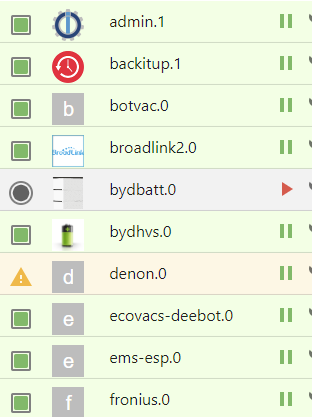
Wie man sieht, fehlen (fast) überall die Icons zu den Adaptern (die Liste ist noch länger). Ich hatte dem gestern Abend noch keine so hohe Bedeutung beigemessen, da ja alle grün sind und auch funktionieren. Allerdings stelle ich nun fest, dass man leider bei diesen Adaptern nicht mehr auf die Adaptereinstellungen kommt:
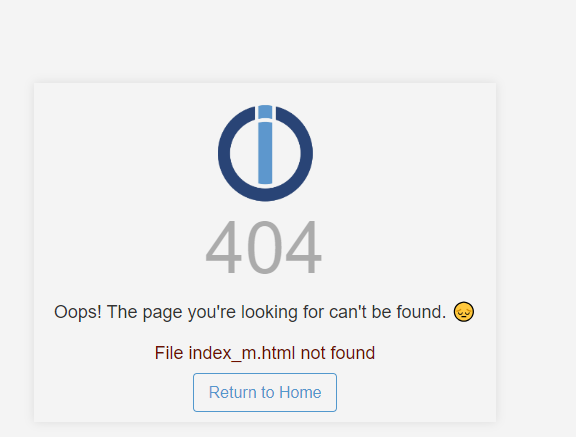
Ein iob fix auf dem master und auch auf dem slave haben leider keine Abhilfe geschaffen.
Bei einem Test konnte ich das mit einem Downgrade und dann wieder einem Upgrade bei einem Adapter fixen, aber das ist natürlich recht umständlich.
Edit: ein weiterer Test ergab, dass die Einstellungen auch wieder aufrufbar sind (und auch das Icon zurück kommt), wenn ich den Adapter auf den Master umziehe. - Evtl. ist das Ganze dann doch eher ein "Luxusproblem" ;-)
Edit - Edit: Und dabei fange ich an mir die Frage zu stellen, wozu ich (weil nun eh' alles auf einer Kiste läuft) die Slaves überhaupt noch weiter unterhalten sollte ;-)Auf den Systemen ist alles up-to-date und iob diag auf dem slave sagt das:
======================= SUMMARY =======================
                        v.2023-10-10


 Static hostname: iodataslave
       Icon name: computer-container
         Chassis: container ☐
  Virtualization: lxc
Operating System: Debian GNU/Linux 12 (bookworm)
          Kernel: Linux 6.2.16-19-pve
    Architecture: x86-64

Installation:           lxc
Kernel:                 x86_64
Userland:               amd64
Timezone:               Europe/Berlin (CET, +0100)
User-ID:                1000
X-Server:               false
Boot Target:            graphical.target

Pending OS-Updates:     0
Pending iob updates:    0

Nodejs-Installation:    /usr/bin/nodejs         v18.18.2
                        /usr/bin/node           v18.18.2
                        /usr/bin/npm            9.8.1
                        /usr/bin/npx            9.8.1
                        /usr/bin/corepack       0.19.0

Recommended versions are nodejs  and npm
Your nodejs installation is correct

MEMORY:
               total        used        free      shared  buff/cache   available
Mem:            2.6G        1.3G        934M         61K        403M        1.3G
Swap:           1.1G        901K        1.1G
Total:          3.7G        1.3G        2.0G

Active iob-Instances:   36
Active repo(s): Stable (default)

ioBroker Core:          js-controller           5.0.12
                        admin                   6.12.0

ioBroker Status:        iobroker is running on this host.

At least one iobroker host is running.

Objects type: jsonl
States  type: jsonl

Status admin and web instance:
+ system.adapter.admin.0                  : admin                 : raspberrypi                              -  enabled, port: 8081, bind: 0.0.0.0, run as: admin
+ system.adapter.admin.1                  : admin                 : proxodataslave                           -  enabled, port: 8081, bind: 0.0.0.0, run as: admin
+ system.adapter.web.0                    : web                   : raspberrypi                              -  enabled, port: 8082, bind: 0.0.0.0, run as: admin
+ system.adapter.web.1                    : web                   : proxodataslave                           -  enabled, port: 8082, bind: 0.0.0.0, run as: admin

Objects:                16087
States:                 14259

Size of iob-Database:

3.2M    /opt/iobroker/iobroker-data/objects.jsonl
168K    /opt/iobroker/iobroker-data/states.jsonl


=================== END OF SUMMARY ====================
Und auf dem Master das:
======================= SUMMARY =======================
                        v.2023-10-10


 Static hostname: iobroker
       Icon name: computer-container
         Chassis: container ☐
  Virtualization: lxc
Operating System: Debian GNU/Linux 12 (bookworm)
          Kernel: Linux 6.2.16-19-pve
    Architecture: x86-64

Installation:           lxc
Kernel:                 x86_64
Userland:               amd64
Timezone:               Europe/Berlin (CET, +0100)
User-ID:                1000
X-Server:               false
Boot Target:            graphical.target

Pending OS-Updates:     0
Pending iob updates:    0

Nodejs-Installation:    /usr/bin/nodejs         v18.18.2
                        /usr/bin/node           v18.18.2
                        /usr/bin/npm            9.8.1
                        /usr/bin/npx            9.8.1
                        /usr/bin/corepack       0.19.0

Recommended versions are nodejs  and npm
Your nodejs installation is correct

MEMORY:
               total        used        free      shared  buff/cache   available
Mem:            5.3G        2.1G        2.7G        106K        385M        3.1G
Swap:           4.2G        609M        3.6G
Total:          9.5G        2.7G        6.3G

Active iob-Instances:   36
Active repo(s): Stable (default)

ioBroker Core:          js-controller           5.0.12
                        admin                   6.12.0

ioBroker Status:        iobroker is running on this host.


Objects type: jsonl
States  type: jsonl

Status admin and web instance:
+ system.adapter.admin.0                  : admin                 : raspberrypi                              -  enabled, port: 8081, bind: 0.0.0.0, run as: admin
+ system.adapter.admin.1                  : admin                 : proxodataslave                           -  enabled, port: 8081, bind: 0.0.0.0, run as: admin
+ system.adapter.web.0                    : web                   : raspberrypi                              -  enabled, port: 8082, bind: 0.0.0.0, run as: admin
+ system.adapter.web.1                    : web                   : proxodataslave                           -  enabled, port: 8082, bind: 0.0.0.0, run as: admin

Objects:                16087
States:                 14259

Size of iob-Database:

21M     /opt/iobroker/iobroker-data/objects.jsonl
24M     /opt/iobroker/iobroker-data/states.jsonl


=================== END OF SUMMARY ====================
Hat da jemand einen Ratschlag wie man das evtl. ganzheitlich gefixed bekommt, oder werden dafür ggf. weitere Infos benötigt?
Pedder
All @Proxmox/Trixie auf HP Elitedesk 800 G4; Zigbee: ZigStar (LAN), ~110Devices
Unifi, Motioneye/3Reolinks, PiHole, Bosch CS7800i via BBQKees/EMS-ESP, Fronius/BYD 11kWp via Modbus
Under construction: Smart-WoMo auf Raspi4 -
Moin zusammen,
ich habe gestern Abend den großen Schritt gewagt meinen Master von der bisherigen Raspi4B HW in einen Proxmox Container umzuziehen. Einige Slaves gab es bereits vorher in derselben Proxmox Instanz.
Mit einigem kleineren Geholpere (wahrscheinlich war ich mal wieder nur zu ungeduldig bis der neue Master alle Adapter aus dem Netz nachgezogen hatte), läuft die Umgebung dann nun soweit auch wieder, inkl. VIS Frontend - wobei ich da den Adapter allerdings komplett neu installieren musste. Da der neue Master-Container direkt die IP des Raspis geerbt hat, sind auch weiterhin alle Master-Slave Anbindungen vorhanden und funktionieren.
Nun habe ich aber heute morgen, bei genauerem Hinsehen, bei den Adaptern auf einem der Slaves folgendes festgestellt:
Wie man sieht, fehlen (fast) überall die Icons zu den Adaptern (die Liste ist noch länger). Ich hatte dem gestern Abend noch keine so hohe Bedeutung beigemessen, da ja alle grün sind und auch funktionieren. Allerdings stelle ich nun fest, dass man leider bei diesen Adaptern nicht mehr auf die Adaptereinstellungen kommt:
Ein iob fix auf dem master und auch auf dem slave haben leider keine Abhilfe geschaffen.
Bei einem Test konnte ich das mit einem Downgrade und dann wieder einem Upgrade bei einem Adapter fixen, aber das ist natürlich recht umständlich.
Edit: ein weiterer Test ergab, dass die Einstellungen auch wieder aufrufbar sind (und auch das Icon zurück kommt), wenn ich den Adapter auf den Master umziehe. - Evtl. ist das Ganze dann doch eher ein "Luxusproblem" ;-)
Edit - Edit: Und dabei fange ich an mir die Frage zu stellen, wozu ich (weil nun eh' alles auf einer Kiste läuft) die Slaves überhaupt noch weiter unterhalten sollte ;-)Auf den Systemen ist alles up-to-date und iob diag auf dem slave sagt das:
======================= SUMMARY =======================
                        v.2023-10-10


 Static hostname: iodataslave
       Icon name: computer-container
         Chassis: container ☐
  Virtualization: lxc
Operating System: Debian GNU/Linux 12 (bookworm)
          Kernel: Linux 6.2.16-19-pve
    Architecture: x86-64

Installation:           lxc
Kernel:                 x86_64
Userland:               amd64
Timezone:               Europe/Berlin (CET, +0100)
User-ID:                1000
X-Server:               false
Boot Target:            graphical.target

Pending OS-Updates:     0
Pending iob updates:    0

Nodejs-Installation:    /usr/bin/nodejs         v18.18.2
                        /usr/bin/node           v18.18.2
                        /usr/bin/npm            9.8.1
                        /usr/bin/npx            9.8.1
                        /usr/bin/corepack       0.19.0

Recommended versions are nodejs  and npm
Your nodejs installation is correct

MEMORY:
               total        used        free      shared  buff/cache   available
Mem:            2.6G        1.3G        934M         61K        403M        1.3G
Swap:           1.1G        901K        1.1G
Total:          3.7G        1.3G        2.0G

Active iob-Instances:   36
Active repo(s): Stable (default)

ioBroker Core:          js-controller           5.0.12
                        admin                   6.12.0

ioBroker Status:        iobroker is running on this host.

At least one iobroker host is running.

Objects type: jsonl
States  type: jsonl

Status admin and web instance:
+ system.adapter.admin.0                  : admin                 : raspberrypi                              -  enabled, port: 8081, bind: 0.0.0.0, run as: admin
+ system.adapter.admin.1                  : admin                 : proxodataslave                           -  enabled, port: 8081, bind: 0.0.0.0, run as: admin
+ system.adapter.web.0                    : web                   : raspberrypi                              -  enabled, port: 8082, bind: 0.0.0.0, run as: admin
+ system.adapter.web.1                    : web                   : proxodataslave                           -  enabled, port: 8082, bind: 0.0.0.0, run as: admin

Objects:                16087
States:                 14259

Size of iob-Database:

3.2M    /opt/iobroker/iobroker-data/objects.jsonl
168K    /opt/iobroker/iobroker-data/states.jsonl


=================== END OF SUMMARY ====================
Und auf dem Master das:
======================= SUMMARY =======================
                        v.2023-10-10


 Static hostname: iobroker
       Icon name: computer-container
         Chassis: container ☐
  Virtualization: lxc
Operating System: Debian GNU/Linux 12 (bookworm)
          Kernel: Linux 6.2.16-19-pve
    Architecture: x86-64

Installation:           lxc
Kernel:                 x86_64
Userland:               amd64
Timezone:               Europe/Berlin (CET, +0100)
User-ID:                1000
X-Server:               false
Boot Target:            graphical.target

Pending OS-Updates:     0
Pending iob updates:    0

Nodejs-Installation:    /usr/bin/nodejs         v18.18.2
                        /usr/bin/node           v18.18.2
                        /usr/bin/npm            9.8.1
                        /usr/bin/npx            9.8.1
                        /usr/bin/corepack       0.19.0

Recommended versions are nodejs  and npm
Your nodejs installation is correct

MEMORY:
               total        used        free      shared  buff/cache   available
Mem:            5.3G        2.1G        2.7G        106K        385M        3.1G
Swap:           4.2G        609M        3.6G
Total:          9.5G        2.7G        6.3G

Active iob-Instances:   36
Active repo(s): Stable (default)

ioBroker Core:          js-controller           5.0.12
                        admin                   6.12.0

ioBroker Status:        iobroker is running on this host.


Objects type: jsonl
States  type: jsonl

Status admin and web instance:
+ system.adapter.admin.0                  : admin                 : raspberrypi                              -  enabled, port: 8081, bind: 0.0.0.0, run as: admin
+ system.adapter.admin.1                  : admin                 : proxodataslave                           -  enabled, port: 8081, bind: 0.0.0.0, run as: admin
+ system.adapter.web.0                    : web                   : raspberrypi                              -  enabled, port: 8082, bind: 0.0.0.0, run as: admin
+ system.adapter.web.1                    : web                   : proxodataslave                           -  enabled, port: 8082, bind: 0.0.0.0, run as: admin

Objects:                16087
States:                 14259

Size of iob-Database:

21M     /opt/iobroker/iobroker-data/objects.jsonl
24M     /opt/iobroker/iobroker-data/states.jsonl


=================== END OF SUMMARY ====================
Hat da jemand einen Ratschlag wie man das evtl. ganzheitlich gefixed bekommt, oder werden dafür ggf. weitere Infos benötigt?
@pedder007 ich klicke die jetzt eben alle durch, dann hat sich das ;-)
-
Moin zusammen,
ich habe gestern Abend den großen Schritt gewagt meinen Master von der bisherigen Raspi4B HW in einen Proxmox Container umzuziehen. Einige Slaves gab es bereits vorher in derselben Proxmox Instanz.
Mit einigem kleineren Geholpere (wahrscheinlich war ich mal wieder nur zu ungeduldig bis der neue Master alle Adapter aus dem Netz nachgezogen hatte), läuft die Umgebung dann nun soweit auch wieder, inkl. VIS Frontend - wobei ich da den Adapter allerdings komplett neu installieren musste. Da der neue Master-Container direkt die IP des Raspis geerbt hat, sind auch weiterhin alle Master-Slave Anbindungen vorhanden und funktionieren.
Nun habe ich aber heute morgen, bei genauerem Hinsehen, bei den Adaptern auf einem der Slaves folgendes festgestellt:
Wie man sieht, fehlen (fast) überall die Icons zu den Adaptern (die Liste ist noch länger). Ich hatte dem gestern Abend noch keine so hohe Bedeutung beigemessen, da ja alle grün sind und auch funktionieren. Allerdings stelle ich nun fest, dass man leider bei diesen Adaptern nicht mehr auf die Adaptereinstellungen kommt:
Ein iob fix auf dem master und auch auf dem slave haben leider keine Abhilfe geschaffen.
Bei einem Test konnte ich das mit einem Downgrade und dann wieder einem Upgrade bei einem Adapter fixen, aber das ist natürlich recht umständlich.
Edit: ein weiterer Test ergab, dass die Einstellungen auch wieder aufrufbar sind (und auch das Icon zurück kommt), wenn ich den Adapter auf den Master umziehe. - Evtl. ist das Ganze dann doch eher ein "Luxusproblem" ;-)
Edit - Edit: Und dabei fange ich an mir die Frage zu stellen, wozu ich (weil nun eh' alles auf einer Kiste läuft) die Slaves überhaupt noch weiter unterhalten sollte ;-)Auf den Systemen ist alles up-to-date und iob diag auf dem slave sagt das:
======================= SUMMARY =======================
                        v.2023-10-10


 Static hostname: iodataslave
       Icon name: computer-container
         Chassis: container ☐
  Virtualization: lxc
Operating System: Debian GNU/Linux 12 (bookworm)
          Kernel: Linux 6.2.16-19-pve
    Architecture: x86-64

Installation:           lxc
Kernel:                 x86_64
Userland:               amd64
Timezone:               Europe/Berlin (CET, +0100)
User-ID:                1000
X-Server:               false
Boot Target:            graphical.target

Pending OS-Updates:     0
Pending iob updates:    0

Nodejs-Installation:    /usr/bin/nodejs         v18.18.2
                        /usr/bin/node           v18.18.2
                        /usr/bin/npm            9.8.1
                        /usr/bin/npx            9.8.1
                        /usr/bin/corepack       0.19.0

Recommended versions are nodejs  and npm
Your nodejs installation is correct

MEMORY:
               total        used        free      shared  buff/cache   available
Mem:            2.6G        1.3G        934M         61K        403M        1.3G
Swap:           1.1G        901K        1.1G
Total:          3.7G        1.3G        2.0G

Active iob-Instances:   36
Active repo(s): Stable (default)

ioBroker Core:          js-controller           5.0.12
                        admin                   6.12.0

ioBroker Status:        iobroker is running on this host.

At least one iobroker host is running.

Objects type: jsonl
States  type: jsonl

Status admin and web instance:
+ system.adapter.admin.0                  : admin                 : raspberrypi                              -  enabled, port: 8081, bind: 0.0.0.0, run as: admin
+ system.adapter.admin.1                  : admin                 : proxodataslave                           -  enabled, port: 8081, bind: 0.0.0.0, run as: admin
+ system.adapter.web.0                    : web                   : raspberrypi                              -  enabled, port: 8082, bind: 0.0.0.0, run as: admin
+ system.adapter.web.1                    : web                   : proxodataslave                           -  enabled, port: 8082, bind: 0.0.0.0, run as: admin

Objects:                16087
States:                 14259

Size of iob-Database:

3.2M    /opt/iobroker/iobroker-data/objects.jsonl
168K    /opt/iobroker/iobroker-data/states.jsonl


=================== END OF SUMMARY ====================
Und auf dem Master das:
======================= SUMMARY =======================
                        v.2023-10-10


 Static hostname: iobroker
       Icon name: computer-container
         Chassis: container ☐
  Virtualization: lxc
Operating System: Debian GNU/Linux 12 (bookworm)
          Kernel: Linux 6.2.16-19-pve
    Architecture: x86-64

Installation:           lxc
Kernel:                 x86_64
Userland:               amd64
Timezone:               Europe/Berlin (CET, +0100)
User-ID:                1000
X-Server:               false
Boot Target:            graphical.target

Pending OS-Updates:     0
Pending iob updates:    0

Nodejs-Installation:    /usr/bin/nodejs         v18.18.2
                        /usr/bin/node           v18.18.2
                        /usr/bin/npm            9.8.1
                        /usr/bin/npx            9.8.1
                        /usr/bin/corepack       0.19.0

Recommended versions are nodejs  and npm
Your nodejs installation is correct

MEMORY:
               total        used        free      shared  buff/cache   available
Mem:            5.3G        2.1G        2.7G        106K        385M        3.1G
Swap:           4.2G        609M        3.6G
Total:          9.5G        2.7G        6.3G

Active iob-Instances:   36
Active repo(s): Stable (default)

ioBroker Core:          js-controller           5.0.12
                        admin                   6.12.0

ioBroker Status:        iobroker is running on this host.


Objects type: jsonl
States  type: jsonl

Status admin and web instance:
+ system.adapter.admin.0                  : admin                 : raspberrypi                              -  enabled, port: 8081, bind: 0.0.0.0, run as: admin
+ system.adapter.admin.1                  : admin                 : proxodataslave                           -  enabled, port: 8081, bind: 0.0.0.0, run as: admin
+ system.adapter.web.0                    : web                   : raspberrypi                              -  enabled, port: 8082, bind: 0.0.0.0, run as: admin
+ system.adapter.web.1                    : web                   : proxodataslave                           -  enabled, port: 8082, bind: 0.0.0.0, run as: admin

Objects:                16087
States:                 14259

Size of iob-Database:

21M     /opt/iobroker/iobroker-data/objects.jsonl
24M     /opt/iobroker/iobroker-data/states.jsonl


=================== END OF SUMMARY ====================
Hat da jemand einen Ratschlag wie man das evtl. ganzheitlich gefixed bekommt, oder werden dafür ggf. weitere Infos benötigt?
@pedder007 sagte in [gelöst] 'unvollständige' Adapter nach Master Umzug:
Edit - Edit: Und dabei fange ich an mir die Frage zu stellen, wozu ich (weil nun eh' alles auf einer Kiste läuft) die Slaves überhaupt noch weiter unterhalten sollte
Moin,
ja, das hatte ich mich auch schon gefragt, nicht erst in diesem Thread, nutze alle
SlaveRessourcen für den Master und fahre nur eine Instanz, macht das tägliche Leben (Updates) auch einfacher ;)VG
Bernd -
@pedder007 sagte in [gelöst] 'unvollständige' Adapter nach Master Umzug:
Edit - Edit: Und dabei fange ich an mir die Frage zu stellen, wozu ich (weil nun eh' alles auf einer Kiste läuft) die Slaves überhaupt noch weiter unterhalten sollte
Moin,
ja, das hatte ich mich auch schon gefragt, nicht erst in diesem Thread, nutze alle
SlaveRessourcen für den Master und fahre nur eine Instanz, macht das tägliche Leben (Updates) auch einfacher ;)VG
Bernd@dp20eic tja, manchmal braucht die Erkenntnis ein wenig Zeit ;-)
Ich habe eben noch einen weiteren Slave eliminiert, die Lstgs-Daten bekommt man ja alle über den Proxmox Adapter und das Script starten im Motioneye Container geht tatsächlich (natürlich ;-) ) auch über den Linux Adapter

Ich hatte hier 'früher' 4 Raspis laufen und was ging mir das ganze Updaten und sichern (incl. Clone) irgendwann mal auf den Keks ...

Dann ne'n gebrauchten HP EliteDesk G4 mini geschossen und los gings mit Proxmox.
Allerdings stellt sich dann nun, da ja nun alles da drauf ist heraus, dass die vorhandenen 8GB RAM natürlich da auch schon wieder knapp werden. Mal sehen, die nächste Generation (dann mit 16GB) ist gebraucht ja auch nicht mehr so teuer.... -
@pedder007 sagte in [gelöst] 'unvollständige' Adapter nach Master Umzug:
Edit - Edit: Und dabei fange ich an mir die Frage zu stellen, wozu ich (weil nun eh' alles auf einer Kiste läuft) die Slaves überhaupt noch weiter unterhalten sollte
Moin,
ja, das hatte ich mich auch schon gefragt, nicht erst in diesem Thread, nutze alle
SlaveRessourcen für den Master und fahre nur eine Instanz, macht das tägliche Leben (Updates) auch einfacher ;)VG
Bernd@dp20eic ich nochmal :-)
Ich habe jetzt gerade herumrecherchiert, da ich in den anderen Containern ioBroker gerne noch sauber entfernen würde.
Gibt es da irgendetwas wie ein Script oder ein Set von Shell Befehlen?
Ich habe leider nur alles mögliche darüber gefunden wie man Adapter per Command Line entfernt, aber nicht den ganzen ioBroker.
Die Anleitungen auf Git, die ich gefunden habe, sind entweder uralt oder nur high level, also ohne konkrete Befehlszeilen. -
@dp20eic ich nochmal :-)
Ich habe jetzt gerade herumrecherchiert, da ich in den anderen Containern ioBroker gerne noch sauber entfernen würde.
Gibt es da irgendetwas wie ein Script oder ein Set von Shell Befehlen?
Ich habe leider nur alles mögliche darüber gefunden wie man Adapter per Command Line entfernt, aber nicht den ganzen ioBroker.
Die Anleitungen auf Git, die ich gefunden habe, sind entweder uralt oder nur high level, also ohne konkrete Befehlszeilen.@pedder007 sagte in [gelöst] 'unvollständige' Adapter nach Master Umzug:
Ich habe jetzt gerade herumrecherchiert,
Moin,
vor wenigen Tagen war das hier schon einmal ein Thema -> https://forum.iobroker.net/topic/69750/multihost-zurück-zum-singelhost?_=1698991646270
Suchet so werdet Ihr finden :)
VG
Bernd -
@pedder007 sagte in [gelöst] 'unvollständige' Adapter nach Master Umzug:
Ich habe jetzt gerade herumrecherchiert,
Moin,
vor wenigen Tagen war das hier schon einmal ein Thema -> https://forum.iobroker.net/topic/69750/multihost-zurück-zum-singelhost?_=1698991646270
Suchet so werdet Ihr finden :)
VG
Bernd@dp20eic ja, ich hatte dann nun auch das hier gefunden: https://forum.iobroker.net/topic/52456/iobroker-restlos-deinstallieren/4?_=1699011743223
Danke Dir
Hello! It looks like you're interested in this conversation, but you don't have an account yet.
Getting fed up of having to scroll through the same posts each visit? When you register for an account, you'll always come back to exactly where you were before, and choose to be notified of new replies (either via email, or push notification). You'll also be able to save bookmarks and upvote posts to show your appreciation to other community members.
With your input, this post could be even better 💗
Register Login618
Online32.8k
Users82.7k
Topics1.3m
Posts