




Sonoff Adapter gelb / Hichi Stromzähler Lesekopf
-
Hallo,
ich wollte eigentlich nach dieser Anleitung den Hichi WLAN Lesekopf per MQTT in iobroker einbinden.
https://www.smarthomejetzt.de/stromzaehler-mit-wifi-ir-lesekopf-smart-machen-und-in-iobroker-einbinden/
(Einzige Besonderheit: IObroker läuft unter Proxmox).Der Sonoff Adapter bleibt aber dauerhaft gelb.
Ich habe mich schon durch diesen etwas undurchsichtigen thread gewühlt:
https://forum.iobroker.net/topic/46008/sonoff-adapter-bleibt-gelb-solved/4?page=1iobroker list instances+ system.adapter.admin.0 : admin : iobroker - enabled, port: 8081, bind: 0.0.0.0, run as: admin + system.adapter.backitup.0 : backitup : iobroker - enabled + system.adapter.discovery.0 : discovery : iobroker - enabled + system.adapter.influxdb.0 : influxdb : iobroker - enabled, port: 8086 + system.adapter.mbus.0 : mbus : iobroker - enabled, port: 3493 + system.adapter.modbus.0 : modbus : iobroker - enabled + system.adapter.modbus.1 : modbus : iobroker - enabledda taucht der Sonoff Adapter leider gar nicht auf.
Telemetrieperiode im Lesekopf ist auf 10s gestellt.
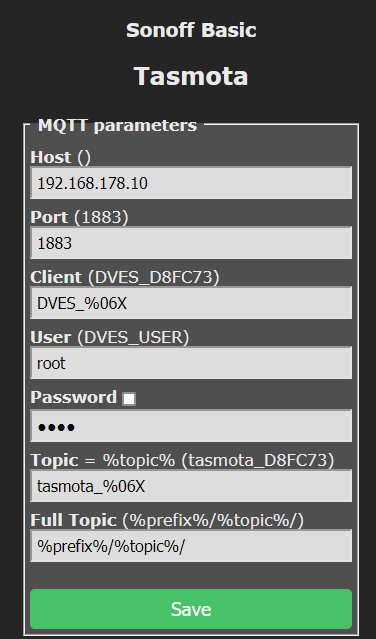
Bei IP Adresse ist die IP Adresse, die ich im Unitymedia Router ausgelesen habe, eingetragen.
Bzw. unter ip a:root@iobroker:~# ip a 1: lo: <LOOPBACK,UP,LOWER_UP> mtu 65536 qdisc noqueue state UNKNOWN group default qlen 1000 link/loopback 00:00:00:00:00:00 brd 00:00:00:00:00:00 inet 127.0.0.1/8 scope host lo valid_lft forever preferred_lft forever inet6 ::1/128 scope host valid_lft forever preferred_lft forever 2: eth0@if12: <BROADCAST,MULTICAST,UP,LOWER_UP> mtu 1500 qdisc noqueue state UP group default qlen 1000 link/ether e6:c6:bc:26:58:ee brd ff:ff:ff:ff:ff:ff link-netnsid 0 inet 192.168.178.10/24 metric 1024 brd 192.168.178.255 scope global dynamic eth0 valid_lft 1980sec preferred_lft 1980sec inet6 fe80::e4c6:bcff:fe26:58ee/64 scope link valid_lft forever preferred_lft foreverSonoff Adapter Einstellungen:
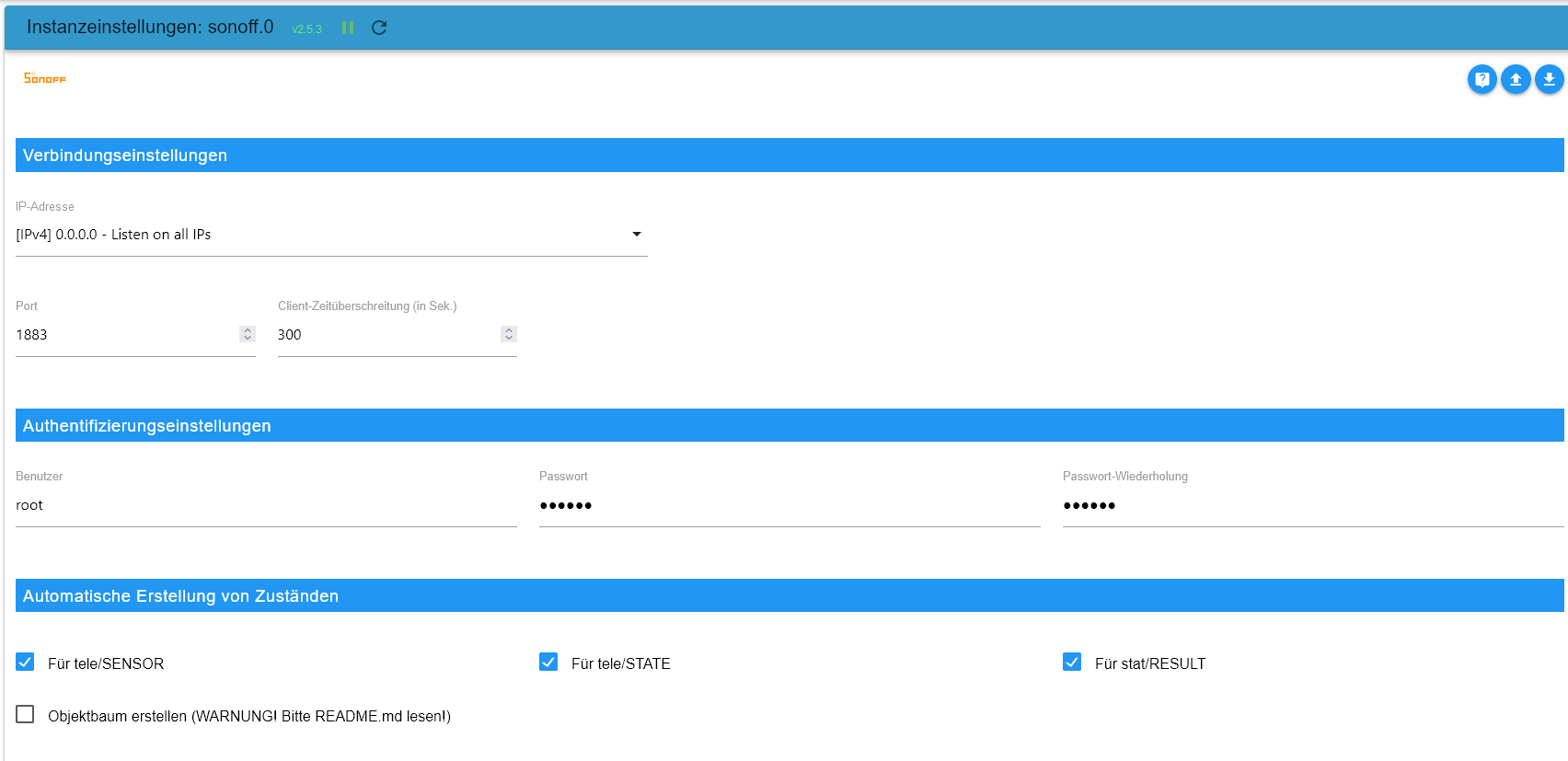
Es ist kein MQTT broker installiert, 1883 sollte also frei sein.Die Lesekopf Konsole wirft aus:
09:16:33.516 RSL: STATE = {"Time":"2023-09-17T09:16:33","Uptime":"0T00:16:29","UptimeSec":989,"Heap":20,"SleepMode":"Dynamic","Sleep":50,"LoadAvg":19,"MqttCount":0,"POWER":"ON","Wifi":{"AP":1,"SSId":"UMPS","BSSId":"AC:22:05:47:DE:70","Channel":6,"Mode":"11n","RSSI":100,"Signal":-33,"LinkCount":1,"Downtime":"0T00:01:18"}}
09:16:33.522 RSL: SENSOR = {"Time":"2023-09-17T09:16:33","Haus   ":{"zählerstand_total":3209.183,"Einspeisung_total":5.852,"aktuelle_wirkleistung":160.9}}
09:16:37.279 MQT: Attempting connection...
09:16:37.288 MQT: Connect failed to 192.168.178.10:1883, rc -2. Retry in 120 sec
09:16:43.511 RSL: STATE = {"Time":"2023-09-17T09:16:43","Uptime":"0T00:16:39","UptimeSec":999,"Heap":20,"SleepMode":"Dynamic","Sleep":50,"LoadAvg":19,"MqttCount":0,"POWER":"ON","Wifi":{"AP":1,"SSId":"UMPS","BSSId":"AC:22:05:47:DE:70","Channel":6,"Mode":"11n","RSSI":100,"Signal":-33,"LinkCount":1,"Downtime":"0T00:01:18"}}
09:16:43.517 RSL: SENSOR = {"Time":"2023-09-17T09:16:43","Haus   ":{"zählerstand_total":3209.183,"Einspeisung_total":5.852,"aktuelle_wirkleistung":160.9}}
Hello! It looks like you're interested in this conversation, but you don't have an account yet.
Getting fed up of having to scroll through the same posts each visit? When you register for an account, you'll always come back to exactly where you were before, and choose to be notified of new replies (either via email, or push notification). You'll also be able to save bookmarks and upvote posts to show your appreciation to other community members.
With your input, this post could be even better 💗
Register Login570
Online32.7k
Users82.6k
Topics1.3m
Posts