




[gelöst] Backitup "Error: self-signed certificate"
-
... wie so oft kommt "plötzlich und unerwartet" ein Fehler ... wie so oft ist man der festen Überzeugung, dass man selbst nicht der Auslöser ist ... wie so oft sitzt das Prolem dann doch vom Rechner ... schaun'mer mal:
Backitup funktioniert bis gestern einwandfrei. Der ioBroker (incl. Zigbee, Javascript) wird ohne Fehler auf dem QNAP NAS gespeichert, die CCU nicht, siehe Protokoll des Adapters:
Started ccu ...
[DEBUG] [mount] - noserverino option: false
[DEBUG] [mount] - cifs-mount command: "sudo mount -t cifs -o username=admin,password=****,rw,uid=iobroker,gid=iobroker,file_mode=0777,dir_mode=0777,vers=3.0 //192.168.178.25/Multimedia/backupDir/Homematic /opt/iobroker/backups"
[DEBUG] [mount] - first mount attempt with smb option failed. try next mount attempt without smb option ...
[DEBUG] [mount] - cifs-mount command: "sudo mount -t cifs -o username=admin,password=****,rw,uid=iobroker,gid=iobroker,file_mode=0777,dir_mode=0777 //192.168.178.25/Multimedia/backupDir/Homematic /opt/iobroker/backups"
[DEBUG] [mount] - mount successfully completed
[DEBUG] [mount] - done
[DEBUG] [ccu] - CCU-Backup started ...
[ERROR] [ccu] - Error: self-signed certificate
Auf der Raspberrymatic habe ich das Zertifikat gelöscht und damit dann das erstellen von einem neuem Zertifikat ausgelöst (so habe ich das wenigstens verstanden).
... das hier steht im Debug-Log
backitup.0
	2023-07-25 15:42:48.068	error	[ccu] Error: self-signed certificate
backitup.0
	2023-07-25 15:42:48.066	error	[ccu/ccu] Error: self-signed certificate
backitup.0
	2023-07-25 15:42:47.956	debug	[ccu/ccu] CCU-Backup started ...
backitup.0
	2023-07-25 15:42:46.139	debug	[ccu/mount] done
backitup.0
	2023-07-25 15:42:46.138	debug	[ccu/mount] mount successfully completed
backitup.0
	2023-07-25 15:42:46.071	debug	[ccu/mount] cifs-mount command: "sudo mount -t cifs -o username=admin,password=****,rw,uid=iobroker,gid=iobroker,file_mode=0777,dir_mode=0777 //192.168.178.25/Multimedia/backupDir/Homematic /opt/iobroker/backups"
backitup.0
	2023-07-25 15:42:46.069	debug	[ccu/mount] first mount attempt with smb option failed. try next mount attempt without smb option ...
backitup.0
	2023-07-25 15:42:45.963	debug	[ccu/mount] cifs-mount command: "sudo mount -t cifs -o username=admin,password=****,rw,uid=iobroker,gid=iobroker,file_mode=0777,dir_mode=0777,vers=3.0 //192.168.178.25/Multimedia/backupDir/Homematic /opt/iobroker/backups"
backitup.0
	2023-07-25 15:42:45.961	debug	[ccu/mount] noserverino option: false
backitup.0
	2023-07-25 15:42:35.959	debug	Backup has started ...
backitup.0
	2023-07-25 15:42:35.896	debug	The local storage check was completed successfully. On the host "ioBroker-Raspi" are currently 5888 MB free space available!
backitup.0
	2023-07-25 15:42:33.142	debug	The local storage check was completed successfully. On the host "ioBroker-Raspi" are currently 5888 MB free space available!
backitup.0
	2023-07-25 15:42:20.173	debug	detect last backup file: iobroker_2023_07_25-11_03_56_backupiobroker.tar.gz
backitup.0
	2023-07-25 15:42:20.170	debug	detect backup file 6 from NAS: iobroker_2023_07_25-11_03_56_backupiobroker.tar.gz
backitup.0
	2023-07-25 15:42:20.169	debug	detect backup file 5 from NAS: iobroker_2023_07_25-08_38_04_backupiobroker.tar.gz
backitup.0
	2023-07-25 15:42:20.168	debug	detect backup file 4 from NAS: iobroker_2023_07_22-02_45_20_backupiobroker.tar.gz
backitup.0
	2023-07-25 15:42:20.166	debug	detect backup file 3 from NAS: iobroker_2023_07_19-02_45_20_backupiobroker.tar.gz
backitup.0
	2023-07-25 15:42:20.165	debug	detect backup file 2 from NAS: iobroker_2023_07_18-16_59_20_backupiobroker.tar.gz
backitup.0
	2023-07-25 15:42:20.163	debug	detect backup file 1 from NAS: iobroker_2023_07_18-10_59_22_backupiobroker.tar.gz
backitup.0
	2023-07-25 15:42:18.151	debug	mount successfully completed
backitup.0
	2023-07-25 15:42:17.434	debug	cifs-mount command: "sudo mount -t cifs -o username=admin,password=****,rw,uid=iobroker,gid=iobroker,file_mode=0777,dir_mode=0777,vers=3.0 //192.168.178.25/Multimedia/backupDir/ioBroker /opt/iobroker/backups"
backitup.0
	2023-07-25 15:42:17.432	debug	noserverino option: false
backitup.0
	2023-07-25 15:42:17.400	info	[ccu] backup will be activated at 02:30 every 3 day(s)
backitup.0
	2023-07-25 15:42:17.301	info	[iobroker] backup will be activated at 02:45 every 3 day(s)
backitup.0
	2023-07-25 15:42:17.236	debug	Backitup has recognized a linux system
backitup.0
	2023-07-25 15:42:17.179	info	starting. Version 2.6.23 in /opt/iobroker/node_modules/iobroker.backitup, node: v18.16.1, js-controller: 4.0.24
backitup.0
	2023-07-25 15:42:16.650	debug	Plugin sentry Initialize Plugin (enabled=true)
backitup.0
	2023-07-25 15:42:16.435	debug	States connected to redis: 0.0.0.0:9000
backitup.0
	2023-07-25 15:42:16.393	debug	States create User PubSub Client
backitup.0
	2023-07-25 15:42:16.391	debug	States create System PubSub Client
backitup.0
	2023-07-25 15:42:16.367	debug	Redis States: Use Redis connection: 0.0.0.0:9000
backitup.0
	2023-07-25 15:42:16.318	debug	Objects connected to redis: 0.0.0.0:9001
backitup.0
	2023-07-25 15:42:16.310	debug	Objects client initialize lua scripts
backitup.0
	2023-07-25 15:42:16.227	debug	Objects create User PubSub Client
backitup.0
	2023-07-25 15:42:16.225	debug	Objects create System PubSub Client
backitup.0
	2023-07-25 15:42:16.223	debug	Objects client ready ... initialize now
backitup.0
	2023-07-25 15:42:16.163	debug	Redis Objects: Use Redis connection: 0.0.0.0:9001
backitup.0
	2023-07-25 15:42:11.047	info	Terminated (ADAPTER_REQUESTED_TERMINATION): Without reason
backitup.0
	2023-07-25 15:42:11.046	debug	Plugin sentry destroyed
backitup.0
	2023-07-25 15:42:11.044	info	terminating
backitup.0
	2023-07-25 15:42:11.043	info	cleaned everything up...
backitup.0
	2023-07-25 15:42:11.040	info	Got terminate signal TERMINATE_YOURSELF
Das sind die Einstellung, die ich nicht geändert habe:
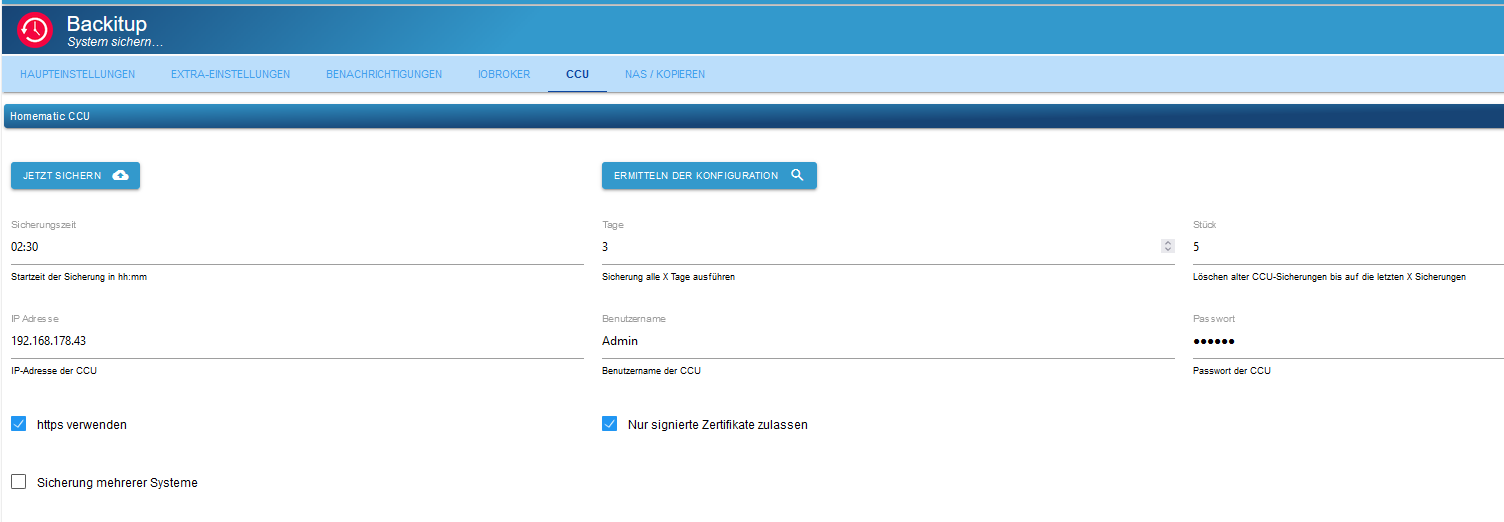
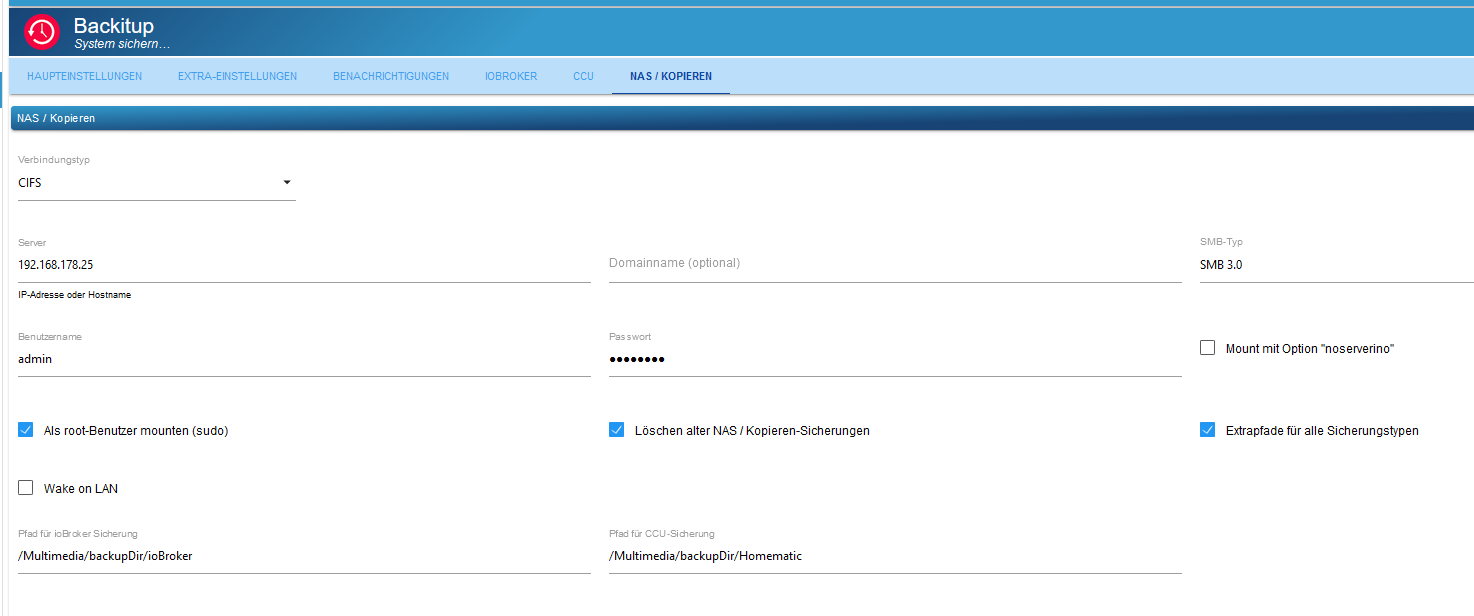
Kennt jemand die Problemlösung ? Danke vorab ...
EDIT:
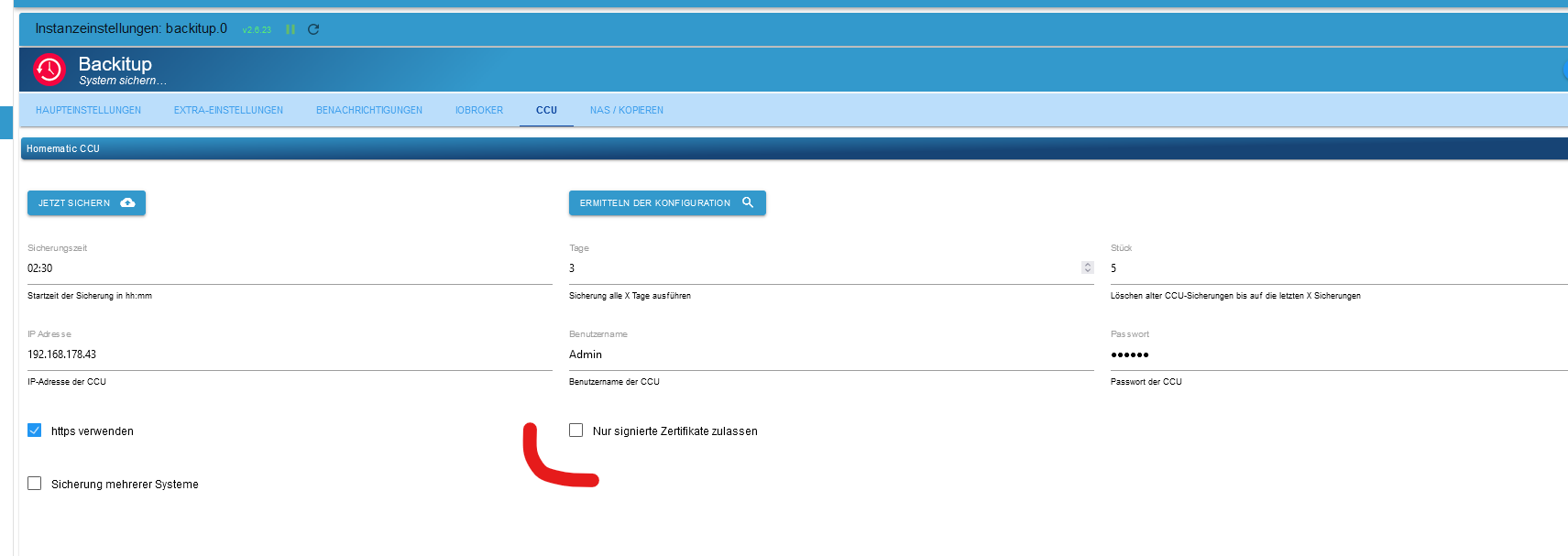
... ich habe das Häkchen abgewählt und jetzt geht es (wieder) ...
Keine Ahnung, warum das bis gestern mit Haken funktioniert hat ....


Ich kann's nicht verstehen ...

Hey! Du scheinst an dieser Unterhaltung interessiert zu sein, hast aber noch kein Konto.
Hast du es satt, bei jedem Besuch durch die gleichen Beiträge zu scrollen? Wenn du dich für ein Konto anmeldest, kommst du immer genau dorthin zurück, wo du zuvor warst, und kannst dich über neue Antworten benachrichtigen lassen (entweder per E-Mail oder Push-Benachrichtigung). Du kannst auch Lesezeichen speichern und Beiträge positiv bewerten, um anderen Community-Mitgliedern deine Wertschätzung zu zeigen.
Mit deinem Input könnte dieser Beitrag noch besser werden 💗
Registrieren Anmelden361
Online33.0k
Benutzer83.5k
Themen1.3m
Beiträge