




Hama Smartes Heizkörper-Thermostat
-
Hallo Leute,
sorry vorab, wenn ich falschen Forum poste.
ich wollte mittels CC2531 den oben genannten Thermostat via Zigbee in IoBroker verbindet, leider aber gescheitert (also Verbinden tut er, wird aber nicht erkannt). IoBroker meldet dass es ein unbekanntes Gerät sei.
Was kann ich machen?
Gibt es ein Tutorial wie man unbekannte Geräte einfügt und wie man die einzelne Funktionen freigibt?
PS: IoBroker Version: 6.2.23
GeräteInformation: _TZE200_h4cgnbzg
anbei noch ein Screenshot mit allen Device Infos.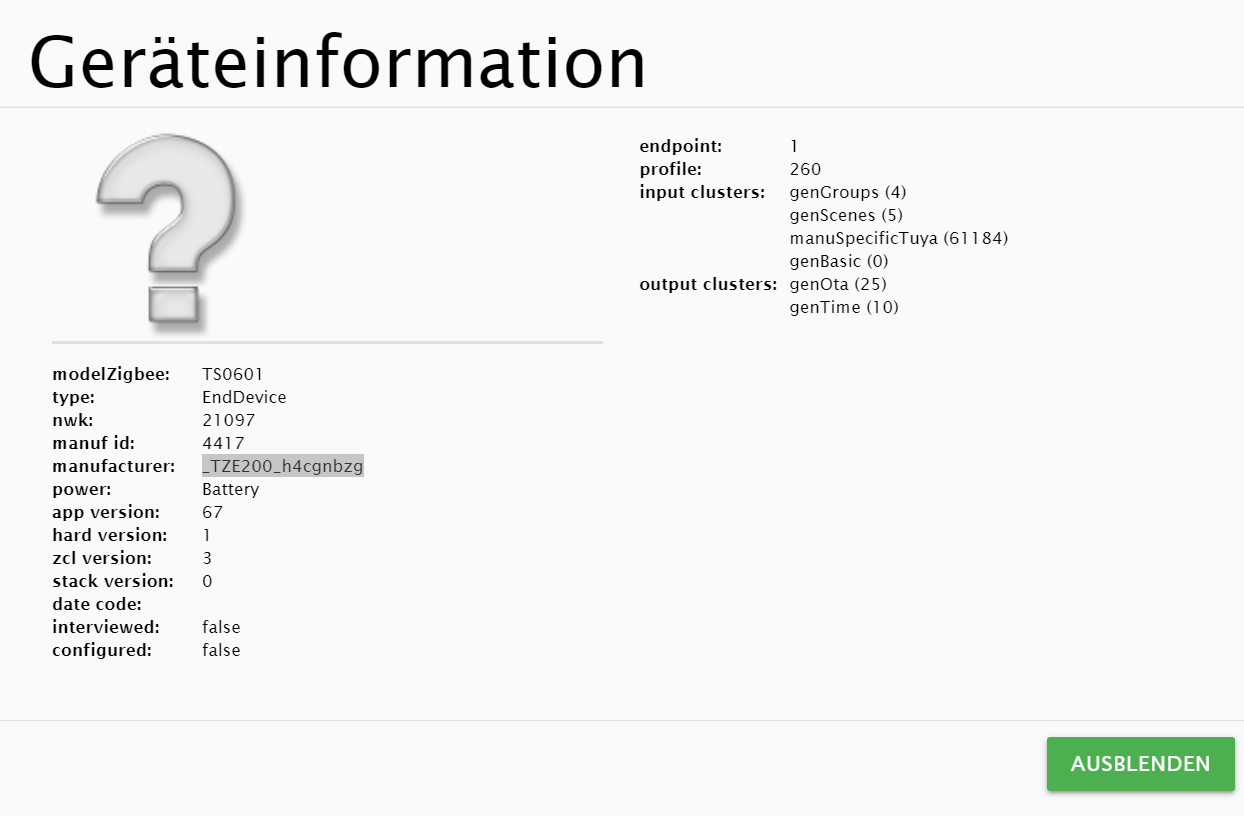
Grüße.
David. -
Hallo Leute,
sorry vorab, wenn ich falschen Forum poste.
ich wollte mittels CC2531 den oben genannten Thermostat via Zigbee in IoBroker verbindet, leider aber gescheitert (also Verbinden tut er, wird aber nicht erkannt). IoBroker meldet dass es ein unbekanntes Gerät sei.
Was kann ich machen?
Gibt es ein Tutorial wie man unbekannte Geräte einfügt und wie man die einzelne Funktionen freigibt?
PS: IoBroker Version: 6.2.23
GeräteInformation: _TZE200_h4cgnbzg
anbei noch ein Screenshot mit allen Device Infos.Grüße.
David.@david-jung
so, ich habe folgendes gemacht:die Datei: /opt/iobroker/node_modules/zigbee-herdsman-converters/devices/saswell.js
etwas erweitert, jetzt kann ich die Ist-Temperatur ablesen, so wie die Soll-Temperatur setzen/lesen.
Den Modus (heizen/auto/aus) lesen, setzen.
Ventil Status ablesen.
Und Offset für Temperatur setzen/lesen./opt/iobroker/node_modules/zigbee-herdsman-converters/devices/saswell.js
const exposes = require('../lib/exposes');
const fz = {...require('../converters/fromZigbee'), legacy: require('../lib/legacy').fromZigbee};
const tz = require('../converters/toZigbee');
const tuya = require('../lib/tuya');
const reporting = require('../lib/reporting');
const e = exposes.presets;
const ea = exposes.access;

module.exports = [
    {
        fingerprint: [{modelID: 'GbxAXL2\u0000', manufacturerName: '_TYST11_KGbxAXL2'},
            {modelID: 'uhszj9s\u0000', manufacturerName: '_TYST11_zuhszj9s'},
            {modelID: '88teujp\u0000', manufacturerName: '_TYST11_c88teujp'},
            {modelID: 'w7cahqs\u0000', manufacturerName: '_TYST11_yw7cahqs'},
            {modelID: 'w7cahqs', manufacturerName: '_TYST11_yw7cahqs'},
            {modelID: 'TS0601', manufacturerName: '_TZE200_c88teujp'},
            {modelID: 'TS0601', manufacturerName: '_TZE200_yw7cahqs'},
            {modelID: 'TS0601', manufacturerName: '_TZE200_azqp6ssj'},
            {modelID: 'TS0601', manufacturerName: '_TZE200_bvu2wnxz'},
            {modelID: 'TS0601', manufacturerName: '_TZE200_zuhszj9s'},
            {modelID: 'TS0601', manufacturerName: '_TZE200_9gvruqf5'},
            {modelID: 'TS0601', manufacturerName: '_TZE200_zr9c0day'},
        ],
        model: 'SEA801-Zigbee/SEA802-Zigbee',
        vendor: 'Saswell',
        description: 'Thermostatic radiator valve',
        whiteLabel: [{vendor: 'HiHome', model: 'WZB-TRVL'}, {vendor: 'Hama', model: '00176592'},
            {vendor: 'RTX', model: 'ZB-RT1'}],
        fromZigbee: [fz.saswell_thermostat, fz.ignore_tuya_set_time, fz.ignore_basic_report, fz.legacy.tuya_thermostat_weekly_schedule],
        toZigbee: [tz.saswell_thermostat_current_heating_setpoint, tz.saswell_thermostat_mode, tz.saswell_thermostat_away,
            tz.saswell_thermostat_child_lock, tz.saswell_thermostat_window_detection, tz.saswell_thermostat_frost_detection,
            tz.saswell_thermostat_calibration, tz.saswell_thermostat_anti_scaling, tz.tuya_thermostat_weekly_schedule],
        onEvent: tuya.onEventSetTime,
        meta: {
            thermostat: {
                weeklyScheduleMaxTransitions: 4,
                weeklyScheduleSupportedModes: [1], // bits: 0-heat present, 1-cool present (dec: 1-heat,2-cool,3-heat+cool)
                weeklyScheduleConversion: 'saswell',
            },
        },
        configure: async (device, coordinatorEndpoint, logger) => {
            const endpoint = device.getEndpoint(1);
            await reporting.bind(endpoint, coordinatorEndpoint, ['genBasic']);
        },
        exposes: [e.battery_low(), e.window_detection(), e.child_lock(),
            exposes.binary('heating', ea.STATE, 'ON', 'OFF').withDescription('Device valve is open or closed (heating or not)'),
            exposes.climate()
                .withSetpoint('current_heating_setpoint', 5, 30, 0.5, ea.STATE_SET).withLocalTemperature(ea.STATE)
                .withSystemMode(['off', 'heat', 'auto'], ea.STATE_SET)
                // Range is -6 - 6 and step 1: https://github.com/Koenkk/zigbee2mqtt/issues/11777
                .withLocalTemperatureCalibration(-6, 6, 1, ea.STATE_SET)
                .withAwayMode()],
    },
	{
		/*added by djung 10.11.2022*/
	fingerprint: [{modelID: 'TS0601', manufacturerName: '_TZE200_h4cgnbzg'}],
        model: 'HZ',
        vendor: 'HAMA',
        description: 'Thermostatic radiator valve',
        whiteLabel: [{vendor: 'Hama', model: 'XXXxxxXXX'},],
        fromZigbee: [fz.saswell_thermostat],
        toZigbee: [tz.saswell_thermostat_current_heating_setpoint, tz.saswell_thermostat_mode,
            tz.saswell_thermostat_calibration],
        onEvent: tuya.onEventSetTime,
        configure: async (device, coordinatorEndpoint, logger) => {
            const endpoint = device.getEndpoint(1);
            await reporting.bind(endpoint, coordinatorEndpoint, ['genBasic']);
        },
        exposes: [
			e.battery_low(),
			/*e.switch(),*/
			/*e.lock(),*/
			exposes.binary('heating', ea.STATE, 'ON', 'OFF').withDescription('Device valve is open or closed (heating or not)'),

            exposes.climate()
                .withSetpoint('current_heating_setpoint', 5, 30, 0.5, ea.STATE_SET).withLocalTemperature(ea.STATE)
                .withSystemMode(['off', 'heat', 'auto'], ea.STATE_SET)
                // Range is -6 - 6 and step 1: https://github.com/Koenkk/zigbee2mqtt/issues/11777
                .withLocalTemperatureCalibration(-6, 6, 1, ea.STATE_SET)
                ],
    },
];
soll man das irgendwo auf github oder so noch posten? Wenn ja, bitte zeigen wo =)
Grüße.
David.

Hello! It looks like you're interested in this conversation, but you don't have an account yet.
Getting fed up of having to scroll through the same posts each visit? When you register for an account, you'll always come back to exactly where you were before, and choose to be notified of new replies (either via email, or push notification). You'll also be able to save bookmarks and upvote posts to show your appreciation to other community members.
With your input, this post could be even better 💗
Register LoginSupport us
566
Online32.8k
Users82.7k
Topics1.3m
Posts