




WioBrowser Skalierung einstellen
-
Einstellung der Browserskalierung WioBroser Adapter
Wenn der Windows Fullscreenbrowser WebView2 eine zu große Darstellung anzeigt, kann man unter Objekte->WioBroser->web->datenpunkt zoom den wert änder:
1 = 100%
0.5 = 50%
0.75 = 75%
2 = 200%
1.5 = 150% u.s.w.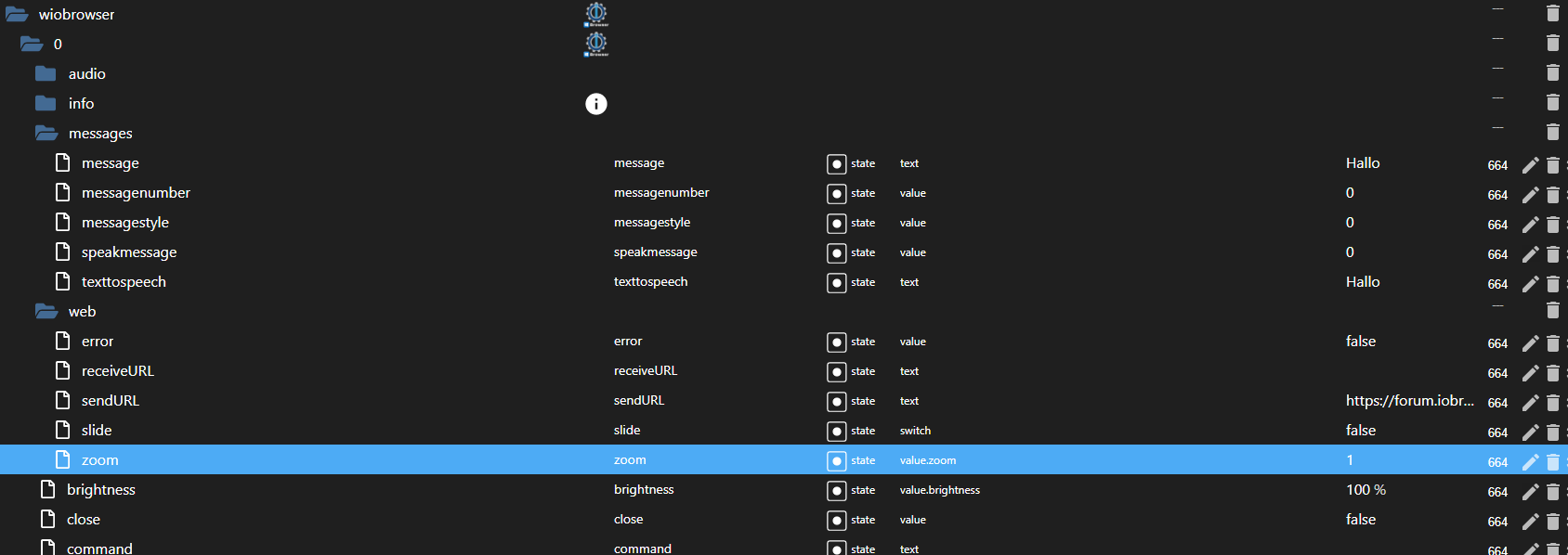
Sollte die Darstellung im Browser etwas unscharf sein unter Window Anzeige -> Skalierung und Anordung püfen ob mehr als 100% eingestellt ist.
Danke @Wal
Hello! It looks like you're interested in this conversation, but you don't have an account yet.
Getting fed up of having to scroll through the same posts each visit? When you register for an account, you'll always come back to exactly where you were before, and choose to be notified of new replies (either via email, or push notification). You'll also be able to save bookmarks and upvote posts to show your appreciation to other community members.
With your input, this post could be even better 💗
Register LoginSupport us
577
Online32.7k
Users82.6k
Topics1.3m
Posts