



Skip to content
  • Home
  • Recent
  • Tags
  • 0 Unread 0
  • Categories
  • Unreplied
  • Popular
  • GitHub
  • Docu
  • Hilfe
Skins
  • Light
  • Brite
  • Cerulean
  • Cosmo
  • Flatly
  • Journal
  • Litera
  • Lumen
  • Lux
  • Materia
  • Minty
  • Morph
  • Pulse
  • Sandstone
  • Simplex
  • Sketchy
  • Spacelab
  • United
  • Yeti
  • Zephyr
  • Dark
  • Cyborg
  • Darkly
  • Quartz
  • Slate
  • Solar
  • Superhero
  • Vapor

  • Default (No Skin)
  • No Skin
Collapse
ioBroker Logo

Community Forum

donate donate
  1. ioBroker Community Home
  2. Deutsch
  3. Visualisierung
  4. [Gelöst] Hintergrund Farbe automatisch ändern

NEWS

  • Monatsrückblick Januar/Februar 2026 ist online!
    BluefoxB
    Bluefox
    18
    1
    771

  • Jahresrückblick 2025 – unser neuer Blogbeitrag ist online! ✨
    BluefoxB
    Bluefox
    18
    1
    6.2k

  • Neuer Blogbeitrag: Monatsrückblick - Dezember 2025 🎄
    BluefoxB
    Bluefox
    13
    1
    1.5k

[Gelöst] Hintergrund Farbe automatisch ändern

Scheduled Pinned Locked Moved Visualisierung
vis
2 Posts 2 Posters 509 Views 2 Watching
  • Oldest to Newest
  • Newest to Oldest
  • Most Votes
Reply
  • Reply as topic
Log in to reply
This topic has been deleted. Only users with topic management privileges can see it.
  • Horst BöttcherH Offline
    Horst BöttcherH Offline
    Horst Böttcher
    wrote on last edited by Horst Böttcher
    #1

    Wie kann man den Border Hintergrund automatisch ändern lassen
    zb. xxx kwh in Grün xxxx kwh in Gelb und xxx kwh in Rot
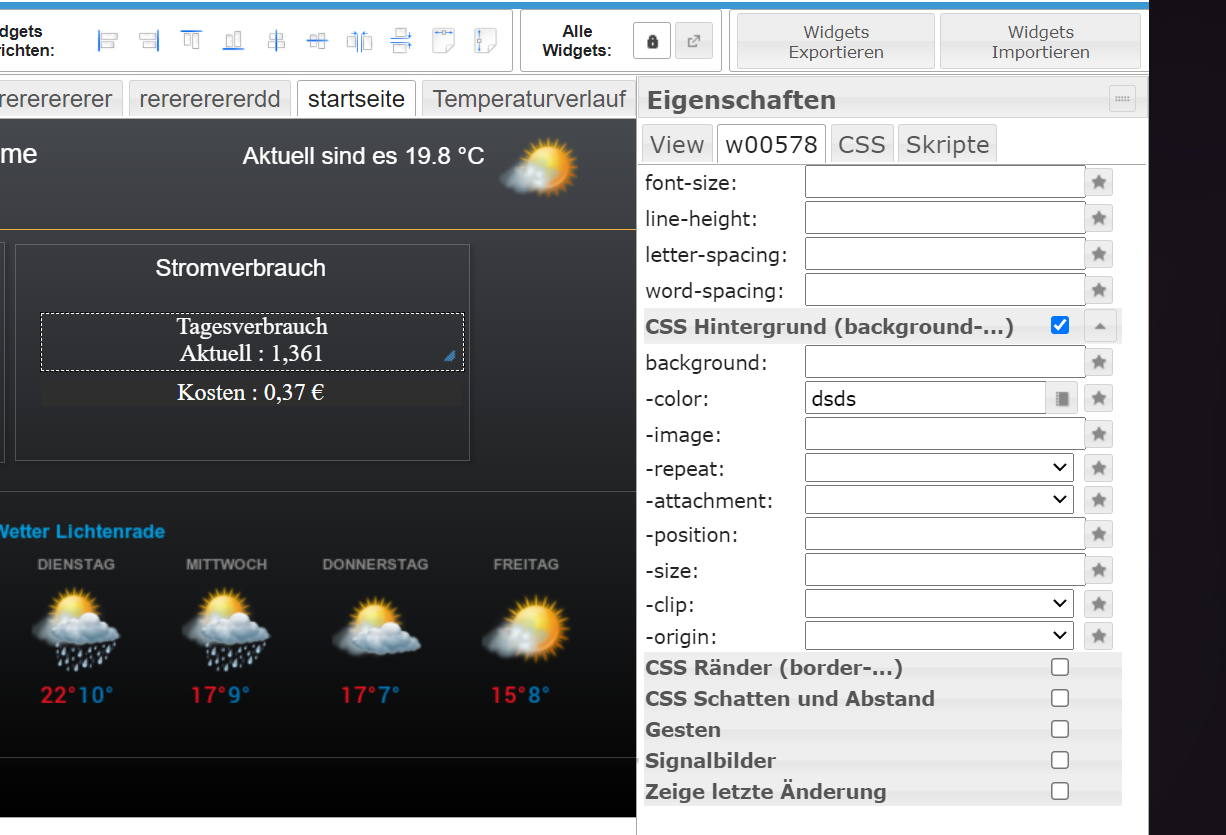
    4460877c938b04993302e5bcf246e4f1.png

    ioBroker auf Proxmox (Debian) auf LENOVO PC Thinkcentre als Produktivsystem

    liv-in-skyL 1 Reply Last reply
    0
    • Horst BöttcherH Horst Böttcher

      Wie kann man den Border Hintergrund automatisch ändern lassen
      zb. xxx kwh in Grün xxxx kwh in Gelb und xxx kwh in Rot

      4460877c938b04993302e5bcf246e4f1.png

      liv-in-skyL Offline
      liv-in-skyL Offline
      liv-in-sky
      wrote on last edited by
      #2

      @horst-böttcher

      das macht man über ein binding

      dabei definiert man unter border-hintergrund einen dp, der in einer formel abgefragt wird - die geschweiften klammern sind wichtig

      z.b.

      {val:alias.0.Allgemein.Aussentemperatur.Temperatur; val>=23&&val<29? "#D47DD7": val>=29? "red": "#0edd32"}
      

      wenn der wert val (entspricht inhalt des dp) größer 23 und kleiner 29 ist wähle die farbe "#D47DD7 sonst wenn wert größer gleich 29 wähle farbe "red" ansonsten wähle farbe #0edd32 (alles kleiner gleich 23)

      das ist ein beispiel von mir - du musst deinen dp eingeben, deine werte und farben definieren

      nach einem gelösten Thread wäre es sinnvoll dies in der Überschrift des ersten Posts einzutragen [gelöst]-... Bitte benutzt das Voting rechts unten im Beitrag wenn er euch geholfen hat. Forum-Tools: PicPick https://picpick.app/en/download/ und ScreenToGif https://www.screentogif.com/downloads.html

      1 Reply Last reply
      1

      Hello! It looks like you're interested in this conversation, but you don't have an account yet.

      Getting fed up of having to scroll through the same posts each visit? When you register for an account, you'll always come back to exactly where you were before, and choose to be notified of new replies (either via email, or push notification). You'll also be able to save bookmarks and upvote posts to show your appreciation to other community members.

      With your input, this post could be even better 💗

      Register Login
      Reply
      • Reply as topic
      Log in to reply
      • Oldest to Newest
      • Newest to Oldest
      • Most Votes


      Support us

      ioBroker
      Community Adapters
      Donate

      548

      Online

      32.8k

      Users

      82.7k

      Topics

      1.3m

      Posts
      Community
      Impressum | Datenschutz-Bestimmungen | Nutzungsbedingungen | Einwilligungseinstellungen
      ioBroker Community 2014-2025
      logo
      • Login

      • Don't have an account? Register

      • Login or register to search.
      • First post
        Last post
      0
      • Home
      • Recent
      • Tags
      • Unread 0
      • Categories
      • Unreplied
      • Popular
      • GitHub
      • Docu
      • Hilfe
