




IoBroker.yahka (iOS, Homekit)
-
@dnk:Отлично! Спасибо! Все правильно установилось.
Сконфигурировал бридж (Bridge Properties).
Добавил устройство (Add Device), добавил свойства устройства (Device Properties). Все отлично, мост и устройство привязалось и отобразилось в приложении Дом на iOS. Конечно надо ввести PIN указанный в настройках Bridge.
Далее добавляю сервис (Add Service):
И тут куча вопросов, почему их можно добавлять несколько и что означают все параметры:
Service name - если я правильно понял, назначается имя объекта в Homekit. Или имя сервиса… Какого сервиса?
Service type - тип объекта или сервиса в Homekit, влияет на отображаемый в приложении тип обьекта? (переключатель, вентилятор, датчик и т.п.)
Service Subtype - тут вообще непонимание, это имя (ID) объекта в системе iobroker? или подтип основного сервиса?, что еще более не понятно.
Далее ниже идет Characteristics Table и тут вообще все непонятно :D
точнее я понимаю, что это видимо и есть конвертация состояний объекта, но пока эксперименты ни к чему не привели, надо пример использования.
<u>Кто-нибудь продвинулся дальше? Может показать пример настройки какого-нить объекта?</u>
P.S. Судя по количеству опций, типов объекта и кастомизации - потенциал заложен огромный, что очень радует. `
Я вот здесь нашёл несколько картинок -
Замечательно. Разобрался, по сути начальная настройка элементарная, я много лишнего пытался указать.
НО! Делаю инструкцию на русском с картинками, начал заводить датчики и выключатели, и в какой то момент при сохранении и перезапуске начал получать в логах:
rasp 2017-01-21 13:42:21.990 info host.rasp Restart adapter system.adapter.yahka.0 because enabled
rasp 2017-01-21 13:42:21.989 error host.rasp instance system.adapter.yahka.0 terminated with code 0 (OK)
rasp 2017-01-21 13:42:19.920 info host.rasp instance system.adapter.yahka.0 started with pid 1631
И все. Приплыли. Покопался в папках и настройках, не нашел ничего необычного :(
Откатил все изменения, не помогло. Почитал немецкий форум, вообще ничего непонятно :)
Что делать?
-
@dnk:Драйвер ioBroker.yahka
Объекты iobroker показывает как homekit устройства, что позволяет нативно из iOS через приложение Дом управлять/считывать состояние объектов.
На текущий момент в разработке.
Я его установил https://github.com/jensweigele/ioBroker.yahka
Настроил Bridge.
Не запускается, в логах:
rasp 2017-01-19 23:25:12.290 error host.rasp startInstance yahka.0: cannot find start file!
Кто более-менее разбирается в этом, давайте вместе постулируем логами и отзывами разработчика, чтобы быстрее допилить до рабочего состояния, т.к. я надеялся на homekit/homekit2 - но они брошены разработчиком. `
Тебе надо ставить его с npmcd /opt/iobroker sudo npm i iobroker.yahka --production iobroker add yahka ```` `Что то не хочет он так ставиться. Что ему надо? Под спойлером всё с терминала.
! root@DietPi:~# cd /opt/iobroker
! root@DietPi:/opt/iobroker# sudo npm i iobroker.yahka –production
!
! > curve25519-n@1.1.0 install /opt/iobroker/node_modules/iobroker.yahka/node_modules/hap-nodejs/node_modules/curve25519-n
! > node-gyp rebuild
! gyp ERR! build error
! gyp ERR! stack Error: not found: make
! gyp ERR! stack at getNotFoundError (/usr/lib/node_modules/npm/node_modules/which/which.js:14:12)
! gyp ERR! stack at F (/usr/lib/node_modules/npm/node_modules/which/which.js:69:19)
! gyp ERR! stack at E (/usr/lib/node_modules/npm/node_modules/which/which.js:81:29)
! gyp ERR! stack at /usr/lib/node_modules/npm/node_modules/which/which.js:90:16
! gyp ERR! stack at /usr/lib/node_modules/npm/node_modules/which/node_modules/isexe/index.js:44:5
! gyp ERR! stack at /usr/lib/node_modules/npm/node_modules/which/node_modules/isexe/access.js:8:5
! gyp ERR! stack at FSReqWrap.oncomplete (fs.js:82:15)
! gyp ERR! System Linux 3.4.113-sun8i
! gyp ERR! command "/usr/bin/nodejs" "/usr/lib/node_modules/npm/node_modules/node-gyp/bin/node-gyp.js" "rebuild"
! gyp ERR! cwd /opt/iobroker/node_modules/iobroker.yahka/node_modules/hap-nodejs/node_modules/curve25519-n
! gyp ERR! node -v v4.7.2
! gyp ERR! node-gyp -v v3.4.0
! gyp ERR! not ok
! > ed25519@0.0.4 install /opt/iobroker/node_modules/iobroker.yahka/node_modules/hap-nodejs/node_modules/ed25519
! > node-gyp rebuild
! gyp ERR! build error
! gyp ERR! stack Error: not found: make
! gyp ERR! stack at getNotFoundError (/usr/lib/node_modules/npm/node_modules/which/which.js:14:12)
! gyp ERR! stack at F (/usr/lib/node_modules/npm/node_modules/which/which.js:69:19)
! gyp ERR! stack at E (/usr/lib/node_modules/npm/node_modules/which/which.js:81:29)
! gyp ERR! stack at /usr/lib/node_modules/npm/node_modules/which/which.js:90:16
! gyp ERR! stack at /usr/lib/node_modules/npm/node_modules/which/node_modules/isexe/index.js:44:5
! gyp ERR! stack at /usr/lib/node_modules/npm/node_modules/which/node_modules/isexe/access.js:8:5
! gyp ERR! stack at FSReqWrap.oncomplete (fs.js:82:15)
! gyp ERR! System Linux 3.4.113-sun8i
! gyp ERR! command "/usr/bin/nodejs" "/usr/lib/node_modules/npm/node_modules/node-gyp/bin/node-gyp.js" "rebuild"
! gyp ERR! cwd /opt/iobroker/node_modules/iobroker.yahka/node_modules/hap-nodejs/node_modules/ed25519
! gyp ERR! node -v v4.7.2
! gyp ERR! node-gyp -v v3.4.0
! gyp ERR! not ok
! > mdns@2.3.3 install /opt/iobroker/node_modules/iobroker.yahka/node_modules/hap-nodejs/node_modules/mdns
! > node-gyp rebuild
! gyp ERR! build error
! gyp ERR! stack Error: not found: make
! gyp ERR! stack at getNotFoundError (/usr/lib/node_modules/npm/node_modules/which/which.js:14:12)
! gyp ERR! stack at F (/usr/lib/node_modules/npm/node_modules/which/which.js:69:19)
! gyp ERR! stack at E (/usr/lib/node_modules/npm/node_modules/which/which.js:81:29)
! gyp ERR! stack at /usr/lib/node_modules/npm/node_modules/which/which.js:90:16
! gyp ERR! stack at /usr/lib/node_modules/npm/node_modules/which/node_modules/isexe/index.js:44:5
! gyp ERR! stack at /usr/lib/node_modules/npm/node_modules/which/node_modules/isexe/access.js:8:5
! gyp ERR! stack at FSReqWrap.oncomplete (fs.js:82:15)
! gyp ERR! System Linux 3.4.113-sun8i
! gyp ERR! command "/usr/bin/nodejs" "/usr/lib/node_modules/npm/node_modules/node-gyp/bin/node-gyp.js" "rebuild"
! gyp ERR! cwd /opt/iobroker/node_modules/iobroker.yahka/node_modules/hap-nodejs/node_modules/mdns
! gyp ERR! node -v v4.7.2
! gyp ERR! node-gyp -v v3.4.0
! gyp ERR! not ok
! npm ERR! Linux 3.4.113-sun8i
! npm ERR! argv "/usr/bin/nodejs" "/usr/bin/npm" "i" "iobroker.yahka" "--production"
! npm ERR! node v4.7.2
! npm ERR! npm v2.15.11
! npm ERR! code ELIFECYCLE
! npm ERR! curve25519-n@1.1.0 install:node-gyp rebuild
! npm ERR! Exit status 1
! npm ERR!
! npm ERR! Failed at the curve25519-n@1.1.0 install script 'node-gyp rebuild'.
! npm ERR! This is most likely a problem with the curve25519-n package,
! npm ERR! not with npm itself.
! npm ERR! Tell the author that this fails on your system:
! npm ERR! node-gyp rebuild
! npm ERR! You can get information on how to open an issue for this project with:
! npm ERR! npm bugs curve25519-n
! npm ERR! Or if that isn't available, you can get their info via:
! npm ERR!
! npm ERR! npm owner ls curve25519-n
! npm ERR! There is likely additional logging output above.
! npm ERR! Please include the following file with any support request:
! npm ERR! /opt/iobroker/npm-debug.log
! root@DietPi:/opt/iobroker#
Вот эти библиотеки sudo apt-get install libavahi-compat-libdnssd-dev установил всё ок. -
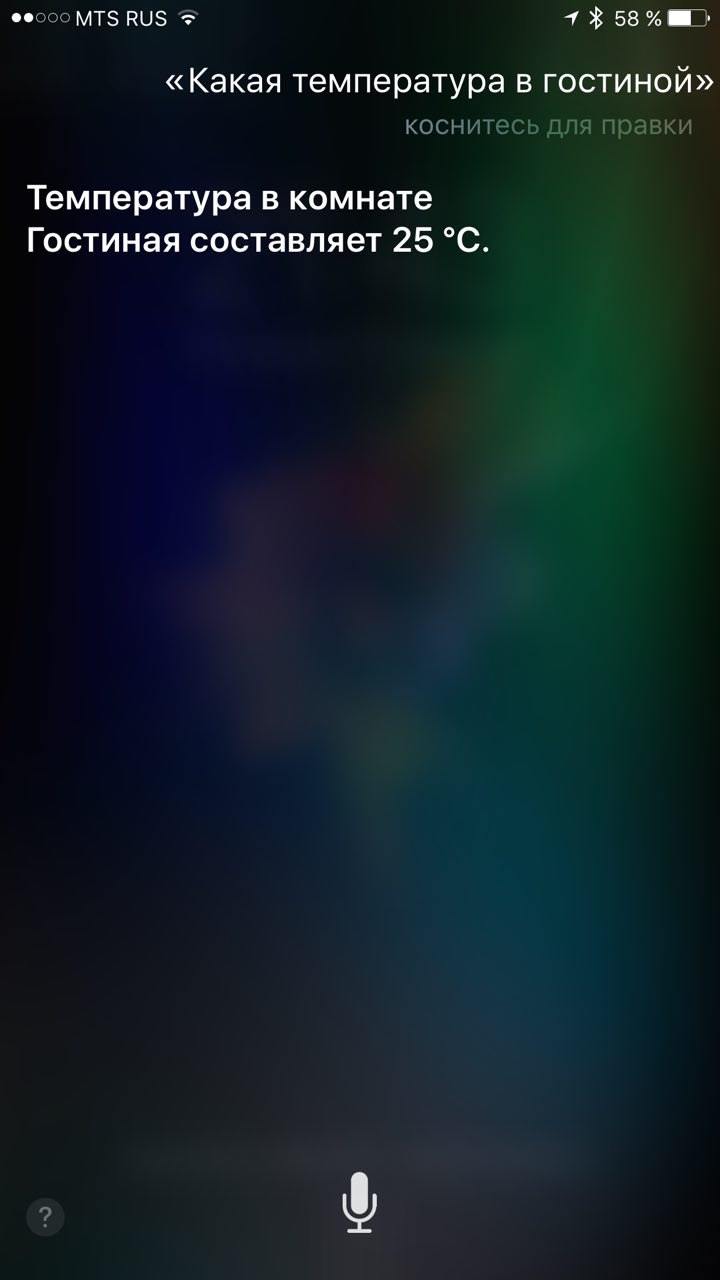
Разобрался. Все работает. На команды Сири отвечает.
Yahka – homekit adapter
sudo apt-get install libavahi-compat-libdnssd-dev
cd /opt/iobroker
sudo npm i iobroker.yahka –production --unsafe perm
iobroker add yahka
Конфигурация Bridge:
Указать свой mac-address, заполнить остальные поля (необязательно). Указать пин-код
Добавление устройств:
Add device - device properties - заполнить.
Тип: sensor
Add service
Заполнить service name - оно будет отображаться как имя сенсора в HomeKit
Service type: тип сенсора
Например, Temperature sensor
Параметры: currentTemperature:
inOutfunction: ioBroker.State
inOutParams: ссылка на объект в iobroker, который должен отображаться (например, javascript.0.temperature)
Настройка AppleTV 4 или iPhone/iPad IOS10:
Запустить приложение Дом.
Находясь в одной wi-fi сети с сенсором, Добавить аксессуар
Должен появится yahka0 бридж - ввести пин-код.
Создать "комнаты" (аналог папок), переместить туда сенсоры.
Siri автоматически понимает голосовые команды "какая температура\влажность в <комната>"
Текущие проблемы yahka:
Обновление происходит при нажатии на сенсор в Дом.
Не поддерживаются отрицательные значения (минусовая температура, например).
Не поддерживаются дробные значения.
2155_img_2017-02-18.jpg -
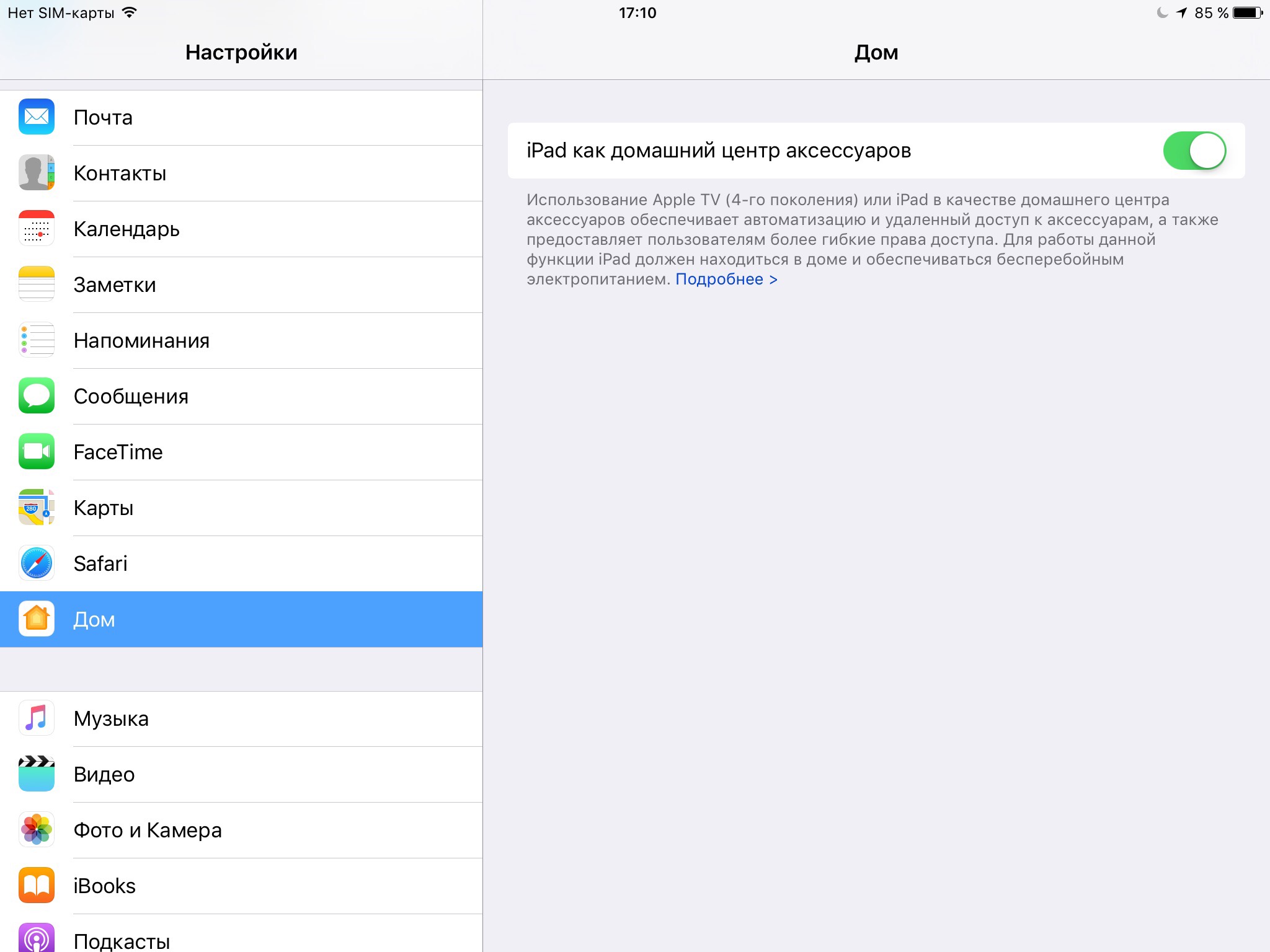
Для того, чтобы на iPhone работать удаленно вне домашней сети с приложением Home, Apple рекомендует использовать Apple TV 4го поколения, но глубоко в подробностях настроек написано, что можно и iPad использовать с условием, что стоит 10я и выше версия прошивки. Для этого нужно просто в настройках iPad включить функцию: "iPad как домашний центр аксессуаров", ну и соответственно должен оставаться в домашней сети.
2001_img_2533.png
2001_img_2534.png
2001_img_2540.jpg -
Разобрался. Все работает. На команды Сири отвечает.
Yahka – homekit adapter
sudo apt-get install libavahi-compat-libdnssd-dev
cd /opt/iobroker
sudo npm i iobroker.yahka –production --unsafe perm
iobroker add yahka
Конфигурация Bridge:
Указать свой mac-address, заполнить остальные поля (необязательно). Указать пин-код
[ `
Mac адрес указал, все поля проставил. Драйвер горит зеленым - но в приложении бридж HomeKit не видится!
Что еще можно попробовать?
-
Такая же ерунда, если яшку только установил, и не добавлял устройств то мост определяется и устанавливается, стоит добавить устройство и мост перестает отвечать, помогает только удаление и навая установка в iobrokere, как это исправить? версия яшки 0.9.1
-
А у меня почему-то совсем не ставится.
Пишет вот такую ерунду:$ ./iobroker add yahka --host SmartHouse NPM version: 6.4.1 npm install iobroker.yahka --production --save --prefix "C:/iobroker" (System call) gyp ERR! configure error gyp ERR! stack Error: Can't find Python executable "python", you can set the PYTHON env variable. gyp ERR! stack at PythonFinder.failNoPython (C:\Program Files\nodejs\node_modules\npm\node_modules\node-gyp\lib\configure.js:484:19) gyp ERR! stack at PythonFinder.<anonymous> (C:\Program Files\nodejs\node_modules\npm\node_modules\node-gyp\lib\configure.js:509:16) gyp ERR! stack at C:\Program Files\nodejs\node_modules\npm\node_modules\graceful-fs\polyfills.js:284:29 gyp ERR! stack at FSReqWrap.oncomplete (fs.js:154:21) gyp ERR! System Windows_NT 10.0.16299 gyp ERR! command "C:\\Program Files\\nodejs\\node.exe" "C:\\Program Files\\nodejs\\node_modules\\npm\\node_modules\\node-gyp\\bin\\node-gyp.js" "rebuild" gyp ERR! cwd C:\iobroker\node_modules\iobroker.yahka\node_modules\curve25519-n gyp ERR! node -v v10.13.0 gyp ERR! node-gyp -v v3.8.0gyp ERR! not ok npm ERR! code ELIFECYCLE npm ERR! errno 1 npm ERR! curve25519-n@1.4.0 install: `node-gyp rebuild` npm ERR! Exit status 1 npm ERR! npm ERR! Failed at the curve25519-n@1.4.0 install script.npm ERR! This is probably not a problem with npm. There is likely additional logging output above. npm ERR! A complete log of this run can be found in:npm ERR! C:\WINDOWS\system32\config\systemprofile\AppData\Roaming\npm-cache\_logs\2019-04-04T19_00_43_394Z-debug.log host.SmartHouse install adapter yahka NPM version: 6.4.1 npm install iobroker.yahka --production --save --prefix "C:/iobroker" (System call) gyp ERR! configure error gyp ERR! stack Error: Can't find Python executable "python", you can set the PYTHON env variable. gyp ERR! stack at PythonFinder.failNoPython (C:\Program Files\nodejs\node_modules\npm\node_modules\node-gyp\lib\configure.js:484:19) gyp ERR! stack at PythonFinder.<anonymous> (C:\Program Files\nodejs\node_modules\npm\node_modules\node-gyp\lib\configure.js:509:16) gyp ERR! stack at C:\Program Files\nodejs\node_modules\npm\node_modules\graceful-fs\polyfills.js:284:29 gyp ERR! stack at FSReqWrap.oncomplete (fs.js:154:21) gyp ERR! System Windows_NT 10.0.16299 gyp ERR! command "C:\\Program Files\\nodejs\\node.exe" "C:\\Program Files\\nodejs\\node_modules\\npm\\node_modules\\node-gyp\\bin\\node-gyp.js" "rebuild" gyp ERR! cwd C:\iobroker\node_modules\iobroker.yahka\node_modules\curve25519-ngyp ERR! node -v v10.13.0 gyp ERR! node-gyp -v v3.8.0 gyp ERR! not ok npm ERR! code ELIFECYCLE npm ERR! errno 1 npm ERR! curve25519-n@1.4.0 install: `node-gyp rebuild`npm ERR! Exit status 1 npm ERR! npm ERR! Failed at the curve25519-n@1.4.0 install script.npm ERR! This is probably not a problem with npm. There is likely additional logging output above. npm ERR! A complete log of this run can be found in:npm ERR! C:\WINDOWS\system32\config\systemprofile\AppData\Roaming\npm-cache\_logs\2019-04-04T19_01_11_758Z-debug.log host.SmartHouse install adapter yahka NPM version: 6.4.1 npm install iobroker.yahka --production --save --prefix "C:/iobroker" (System call) gyp ERR! configure error gyp ERR! stack Error: Can't find Python executable "python", you can set the PYTHON env variable.gyp ERR! stack at PythonFinder.failNoPython (C:\Program Files\nodejs\node_modules\npm\node_modules\node-gyp\lib\configure.js:484:19) gyp ERR! stack at PythonFinder.<anonymous> (C:\Program Files\nodejs\node_modules\npm\node_modules\node-gyp\lib\configure.js:509:16) gyp ERR! stack at C:\Program Files\nodejs\node_modules\npm\node_modules\graceful-fs\polyfills.js:284:29gyp ERR! stack at FSReqWrap.oncomplete (fs.js:154:21) gyp ERR! System Windows_NT 10.0.16299 gyp ERR! command "C:\\Program Files\\nodejs\\node.exe" "C:\\Program Files\\nodejs\\node_modules\\npm\\node_modules\\node-gyp\\bin\\node-gyp.js" "rebuild"gyp ERR! cwd C:\iobroker\node_modules\iobroker.yahka\node_modules\curve25519-ngyp ERR! node -v v10.13.0 gyp ERR! node-gyp -v v3.8.0 gyp ERR! not ok npm ERR! code ELIFECYCLEnpm ERR! errno 1 npm ERR! curve25519-n@1.4.0 install: `node-gyp rebuild`npm ERR! Exit status 1 npm ERR! npm ERR! Failed at the curve25519-n@1.4.0 install script.npm ERR! This is probably not a problem with npm. There is likely additional logging output above. npm ERR! A complete log of this run can be found in:npm ERR! C:\WINDOWS\system32\config\systemprofile\AppData\Roaming\npm-cache\_logs\2019-04-04T19_01_37_821Z-debug.log host.SmartHouse install adapter yahka ERROR: host.SmartHouse Cannot install yahka ERROR: process exited with code 13И как результат вот такое сообщение сверху: Выполнено с ошибкой: host.SmartHouse Cannot install yahka
Куда копать?



Hey! Du scheinst an dieser Unterhaltung interessiert zu sein, hast aber noch kein Konto.
Hast du es satt, bei jedem Besuch durch die gleichen Beiträge zu scrollen? Wenn du dich für ein Konto anmeldest, kommst du immer genau dorthin zurück, wo du zuvor warst, und kannst dich über neue Antworten benachrichtigen lassen (entweder per E-Mail oder Push-Benachrichtigung). Du kannst auch Lesezeichen speichern und Beiträge positiv bewerten, um anderen Community-Mitgliedern deine Wertschätzung zu zeigen.
Mit deinem Input könnte dieser Beitrag noch besser werden 💗
Registrieren AnmeldenSupport us
398
Online33.0k
Benutzer83.5k
Themen1.3m
Beiträge