




[VIS] Keine Aktualisierung mehr
-
Systemdata Bitte Ausfüllen Hardwaresystem: Pi4 Arbeitsspeicher: 4GB Festplattenart: SD-Karte Betriebssystem: Raspian Node-Version: 12.22.0 Nodejs-Version: 12.22.0 NPM-Version: 6.14.11 Installationsart: Skript Image genutzt: Nein Hallo zusammen,
seit einiger Zeit habe ich das problem, das sich einiges nicht mehr im VIS aktualisiert.
Beispiele sind ein Javascript, welches zwar ausgeführt wird aber im VIS nichts anzeigt -> erstes Bild
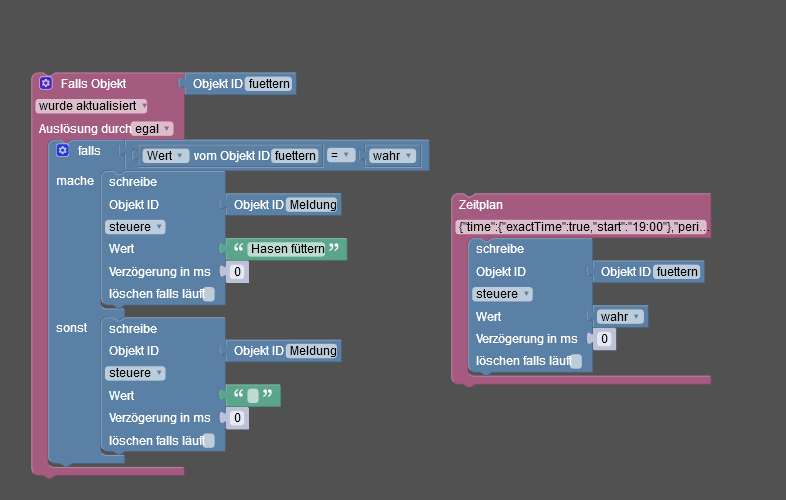
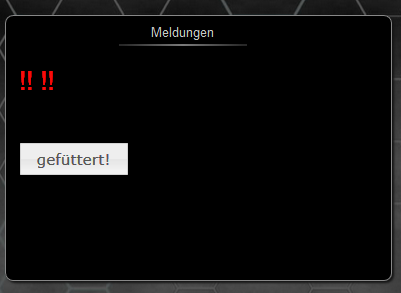
Hier wird die Meldung nicht ausgegeben, sondern es bleiben die !! !! stehen.
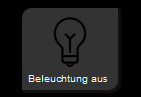
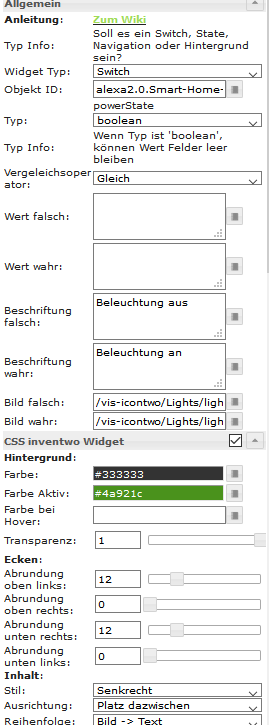
Und die Icontwo widgets funktionieren zwar, ändern aber nicht mehr den Status, beispiel wenn der State true ist, sollte es Grün sein und die Beschriftung sich ändern.
Ich habe schon den PI mehrmals geupdatet, die Adapter aktualisiert und der Pi wird auch 2x am Tag neugestart über nen crontab.
Was kann ich noch tun?
EDIT:
Nachdem ich jetzt Chromium nochmal erneut per ALT+F4 ausm Kiosk-mode beendet habe und ihn manuell nochmal gestartet, funktioniert es jetzt.Ich kann dies aber nach wie vor nicht nachvollziehen, da wie gesagt der komplette Pi 2x am tag neu gestartet wird und im Anschluss sich Chromium im Kiosk-mode öffnet.
EDIT2:
Jetzt funktioniert es nicht mehr. Das selbe Problem wie oben beschrieben.EDIT3:
Nach dem diese Meldung kommt, gehts nicht mehr. hab jetzt in der Console des Browsers geschaut.
Error: Error: can't create states object for hm-rpc.0.LEQ1483852.1.TEMPERATURE(TypeError: Cannot read property 'toFixed' of undefined): "TypeError: Cannot read property 'toFixed' of undefined\n at update (http://localhost:8082/vis/widgets/vis-material-advanced/js/vis-material-advanced.js:263:52)\n at a.<anonymous> (http://localhost:8082/vis/widgets/vis-material-advanced/js/vis-material-advanced.js:270:17)\n at a.t.dispatch (http://localhost:8082/vis/lib/js/can.custom.min.js:18:1252)\n at Object.stop (http://localhost:8082/vis/lib/js/can.custom.min.js:44:451)\n at a._setAttrs (http://localhost:8082/vis/lib/js/can.custom.min.js:48:4021)\n at attr (http://localhost:8082/vis/lib/js/can.custom.min.js:48:1571)\n at Object.updateState (http://localhost:8082/vis/js/vis.js:2899:29)\n at http://localhost:8082/vis/js/vis.js:3456:21\n at http://localhost:8082/vis/js/vis.js:3668:9" -
Systemdata Bitte Ausfüllen Hardwaresystem: Pi4 Arbeitsspeicher: 4GB Festplattenart: SD-Karte Betriebssystem: Raspian Node-Version: 12.22.0 Nodejs-Version: 12.22.0 NPM-Version: 6.14.11 Installationsart: Skript Image genutzt: Nein Hallo zusammen,
seit einiger Zeit habe ich das problem, das sich einiges nicht mehr im VIS aktualisiert.
Beispiele sind ein Javascript, welches zwar ausgeführt wird aber im VIS nichts anzeigt -> erstes Bild
Hier wird die Meldung nicht ausgegeben, sondern es bleiben die !! !! stehen.
Und die Icontwo widgets funktionieren zwar, ändern aber nicht mehr den Status, beispiel wenn der State true ist, sollte es Grün sein und die Beschriftung sich ändern.
Ich habe schon den PI mehrmals geupdatet, die Adapter aktualisiert und der Pi wird auch 2x am Tag neugestart über nen crontab.
Was kann ich noch tun?
EDIT:
Nachdem ich jetzt Chromium nochmal erneut per ALT+F4 ausm Kiosk-mode beendet habe und ihn manuell nochmal gestartet, funktioniert es jetzt.Ich kann dies aber nach wie vor nicht nachvollziehen, da wie gesagt der komplette Pi 2x am tag neu gestartet wird und im Anschluss sich Chromium im Kiosk-mode öffnet.
EDIT2:
Jetzt funktioniert es nicht mehr. Das selbe Problem wie oben beschrieben.EDIT3:
Nach dem diese Meldung kommt, gehts nicht mehr. hab jetzt in der Console des Browsers geschaut.
Error: Error: can't create states object for hm-rpc.0.LEQ1483852.1.TEMPERATURE(TypeError: Cannot read property 'toFixed' of undefined): "TypeError: Cannot read property 'toFixed' of undefined\n at update (http://localhost:8082/vis/widgets/vis-material-advanced/js/vis-material-advanced.js:263:52)\n at a.<anonymous> (http://localhost:8082/vis/widgets/vis-material-advanced/js/vis-material-advanced.js:270:17)\n at a.t.dispatch (http://localhost:8082/vis/lib/js/can.custom.min.js:18:1252)\n at Object.stop (http://localhost:8082/vis/lib/js/can.custom.min.js:44:451)\n at a._setAttrs (http://localhost:8082/vis/lib/js/can.custom.min.js:48:4021)\n at attr (http://localhost:8082/vis/lib/js/can.custom.min.js:48:1571)\n at Object.updateState (http://localhost:8082/vis/js/vis.js:2899:29)\n at http://localhost:8082/vis/js/vis.js:3456:21\n at http://localhost:8082/vis/js/vis.js:3668:9"Hier gibt es schon lösungsanätze, leider halfen die nicht.
https://forum.iobroker.net/topic/12117/einige-vis-widgets-aktualisieren-sich-nicht/41

Hello! It looks like you're interested in this conversation, but you don't have an account yet.
Getting fed up of having to scroll through the same posts each visit? When you register for an account, you'll always come back to exactly where you were before, and choose to be notified of new replies (either via email, or push notification). You'll also be able to save bookmarks and upvote posts to show your appreciation to other community members.
With your input, this post could be even better 💗
Register LoginSupport us
359
Online32.8k
Users82.7k
Topics1.3m
Posts