




JSON Parsen Weenect CAT 2 mit 2 GPSTracker
-
Hallo liebes Forum,
leider komme ich alleine nicht mehr weiter.
Ich habe von https://github.com/rsewell97/Weenect-GPS-requests das Python Script in eine virtuelle Python Umgebung eingebunden und diese funktioniert auch.Den Rückgabewert schreibe ich komplett in eine Variable als String und passe es an.
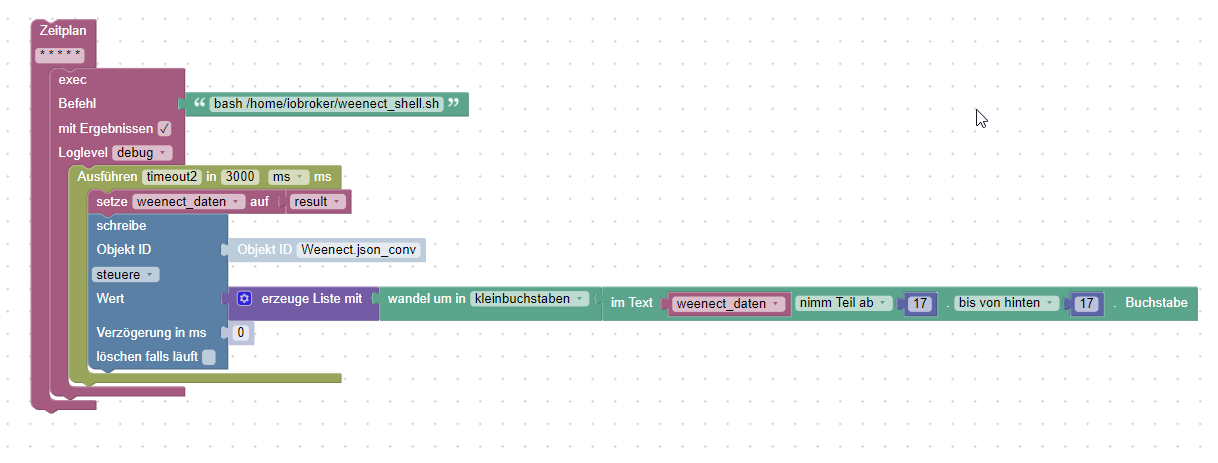
Mit dem Javscript werden die Punkte ausgelesen und ggf erstellt.
const idJson = 'javascript.3.Weenect.json_conv'/*Weenect json conv*/;
const path = 'Weenect.';
const js = 'javascript.3.';

on(idJson, function(dp) { // triggert bei Wertänderung
   let obj = JSON.parse(dp.state.val);
   for(let prop in obj) {
      if(existsState(js + path + prop)) setState(path + prop, obj[prop], true);
      else createState(path + prop, obj[prop], {type: typeof obj[prop]});
   }
});
Soweit konnte ich mir helfen-
Leider habe ich bei folgender Konstellation in der JSON Struktur ein Problem:
"name":"dropsy",
   "nb_geofence_out":0,
   "need_upgrade":false,

//Problem ab hier!
"position":[
      {
         "battery":100,
         "cellid":"26202-0262-84e6",
         "cid":0,
         "confidence":"none",
         "date_server":"2020-11-21t10:19:56+00:00",
         "date_tracker":"2020-11-21t09:00:41+00:00",
         "direction":0,
         "geofence_name":"daheim",
         "gsm":28,
         "id":"xexx",
         "is_online":true,
         "lac":0,
         "last_message":"2020-11-21t10:19:56+00:00",
         "latitude":xxxxx,
         "longitude":xxxxxxxx,
         "mcc":0,
         "mnc":0,
         "original_battery":99,
         "pdop":xxxx,
         "radius":xxx,
         "satellites":7,
         "speed":0.3,
         "type":"cmd-t",
         "valid_signal":true
      }
   ],
//bis hier -> WIRD NICHT RICHTIG AUSGELESEN

   "remaining_days":361,
   "report_appli_notification":true,
   "report_mail_notification":true,
   "report_sms_notification":false,
HIer steht nur

Leider fehlen mir hier die Kenntnisse das Script richtig anzupassen.
Kann mir jemand helfen wie ich die Unterstruktur ausgelesen bekomme? -
Hallo liebes Forum,
leider komme ich alleine nicht mehr weiter.
Ich habe von https://github.com/rsewell97/Weenect-GPS-requests das Python Script in eine virtuelle Python Umgebung eingebunden und diese funktioniert auch.Den Rückgabewert schreibe ich komplett in eine Variable als String und passe es an.
Mit dem Javscript werden die Punkte ausgelesen und ggf erstellt.
const idJson = 'javascript.3.Weenect.json_conv'/*Weenect json conv*/;
const path = 'Weenect.';
const js = 'javascript.3.';

on(idJson, function(dp) { // triggert bei Wertänderung
   let obj = JSON.parse(dp.state.val);
   for(let prop in obj) {
      if(existsState(js + path + prop)) setState(path + prop, obj[prop], true);
      else createState(path + prop, obj[prop], {type: typeof obj[prop]});
   }
});
Soweit konnte ich mir helfen-
Leider habe ich bei folgender Konstellation in der JSON Struktur ein Problem:
"name":"dropsy",
   "nb_geofence_out":0,
   "need_upgrade":false,

//Problem ab hier!
"position":[
      {
         "battery":100,
         "cellid":"26202-0262-84e6",
         "cid":0,
         "confidence":"none",
         "date_server":"2020-11-21t10:19:56+00:00",
         "date_tracker":"2020-11-21t09:00:41+00:00",
         "direction":0,
         "geofence_name":"daheim",
         "gsm":28,
         "id":"xexx",
         "is_online":true,
         "lac":0,
         "last_message":"2020-11-21t10:19:56+00:00",
         "latitude":xxxxx,
         "longitude":xxxxxxxx,
         "mcc":0,
         "mnc":0,
         "original_battery":99,
         "pdop":xxxx,
         "radius":xxx,
         "satellites":7,
         "speed":0.3,
         "type":"cmd-t",
         "valid_signal":true
      }
   ],
//bis hier -> WIRD NICHT RICHTIG AUSGELESEN

   "remaining_days":361,
   "report_appli_notification":true,
   "report_mail_notification":true,
   "report_sms_notification":false,
HIer steht nur
Leider fehlen mir hier die Kenntnisse das Script richtig anzupassen.
Kann mir jemand helfen wie ich die Unterstruktur ausgelesen bekomme?Leider komme ich hier alleine nicht weiter.
Ich habe schon einige Dinge probiert und bekomme folgende Daten ausgelesen aber leider nicht wirklich in Datenpunkte.
geschrieben.
Ich hoffe mir kann jemand helfen.Was klappt ist, dass ich folgende Daten (JSON aber nicht wirklich) in ein Datenpunkt geschrieben bekomme:
Weenect: Logging in...Available trackers for user: hxxxxx@xxxxx.de: ['12xxxx', '14xxxx']TRACKER 12xxxx | Position{'activation_date': '2020-11-17T16:52:59.521918', 'activation_result': None, 'area_appli_notification': True, 'area_mail_notification': False, 'area_sms_notification': False, 'battery_appli_notification': True, 'battery_charged': 2, 'battery_mail_notification': False, 'battery_sms_notification': False, 'battery_threshold': 30, 'button_appli_notification': True, 'button_mail_notification': True, 'button_sms_notification': False, 'buttons': [{'active': False, 'id': 379201, 'message': '', 'name': None, 'number': 1, 'tracker_id': 12xxxxx}, {'active': False, 'id': 37xxxx, 'message': '', 'name': None, 'number': 2, 'tracker_id': 12xxxx}, {'active': False, 'id': 37xxxx, 'message': '', 'name': None, 'number': 3, 'tracker_id': 12xxxx}], 'call_directly': True, 'call_low_threshold': 420, 'call_max_threshold': 600, 'call_notification': 0, 'call_usage': 0, 'color': None, 'creation_date': '2020-11-17T16:52:59.523833', 'enable_ai': False, 'enable_ai_spec': '', 'expiration_date': '2021-11-17T16:57:52.609756', 'features': ['sos_button', 'mode_gsensor', 'mode_selection', 'ringing', 'vibrate', 'activity_tracking', 'super_tracking'], 'firmware': 'cat3', 'first_connection_date': '2021-03-26T12:56:07.111559', 'force_subscription': False, 'freq_mode': '30S', 'geofence_mode': 'normal', 'geofence_number': 0, 'had_subscription': True, 'has_activity_tracking': False, 'icon': None, 'id': 12xxxx, 'imei': 86xxxx, 'last_change': None, 'last_freq_mode': '30S', 'last_request': None, 'last_sensor_mode': 'normal', 'mail_contacts': [{'id': 13xxxx, 'mail': 'txxx@xxxx.de', 'number': 1, 'tracker_id': 12xxxx}], 'name': 'Dropsy', 'nb_geofence_out': 0, 'need_upgrade': False, 'position': [{'battery': 97, 'cellid': '26202-xxxx-xxxx', 'cid': 0, 'confidence': None, 'date_server': '2021-04-01T10:13:29+00:00', 'date_tracker': '2021-04-01T10:06:40+00:00', 'direction': 257, 'geofence_name': None, 'gsm': 24, 'id': '60659b31fafdd859c5a49550', 'is_online': True, 'lac': 0, 'last_message': '2021-04-01T10:13:29+00:00', 'latitude': xx.0200087, 'longitude': xx.2693651, 'mcc': 0, 'mnc': 0, 'original_battery': 77, 'pdop': 0.82, 'radius': 19, 'satellites': 9, 'speed': 2.0, 'type': 'CMD-T', 'valid_signal': True}], 'remaining_days': 230, 'report_appli_notification': True, 'report_mail_notification': True, 'report_sms_notification': False, 'retailer_id': 32, 'sales_data': {'kind': 'cat2', 'vendor': 'Amazon', 'vendor_id': 32, 'warranty': 'default'}, 'sensor_mode': 'normal', 'sim': '891xxxxx', 'sms_contacts': [{'id': 1380883, 'number': 1, 'phone': '+4917xxxx', 'tracker_id': 126957}], 'sos_appli_notification': True, 'sos_mail_notification': False, 'sos_mode': 'direct', 'sos_phone': '+4917xxxx', 'sos_sms_notification': False, 'spy_sos': False, 'subscription': {'amount': 5990, 'amount_gbp': 5500, 'cancel_explanation': None, 'cancel_reason': None, 'canceled_at': None, 'created_at': '2020-11-17T16:55:26.471136', 'currency': 'EUR', 'id': 129885, 'is_under_commitment_period': False, 'max_tracker_nb': 1, 'next_charge_at': '2021-11-17T16:57:52.609756', 'offer_id': 3, 'option_status': True, 'payment_mean': 'gocardless', 'period': 12, 'site': 'weenect', 'status': 'active', 'trackers': [12xxxx], 'updated_at': '2020-11-17T17:01:44.458764', 'user_id': 159235}, 'timezone': 'Etc/UTC', 'type': 'cat2', 'user': {'activate_sponsoring': True, 'address': 'Am Pionierübungsplatrz 14', 'city': 'Mainz Kastel', 'connection_date': '2021-04-01T10:15:32.477318', 'contact_mail': '', 'country': 'CH', 'creation_date': '2020-09-22T09:06:10.288055', 'disable_history': False, 'firstname': 'Hxxx', 'id': 159235, 'is_admin': False, 'is_b2b': False, 'is_security': False, 'language': 'de', 'last_connection_date': '2021-04-01T10:15:18.049631', 'lastname': 'Petexxxxxx', 'mail': 'hxxx@xxxx.de', 'need_subscription': True, 'optin': False, 'phone': '+491xxxx', 'postal_code': '55xxxx', 'preferred_metric_system': 'km', 'product_review_link': 'https://www.amazon.de/review/create-review/ref=cm_cr_pr_wr_but_top?ie=UTF8&nodxxxin=xxxxx', 'promo_code': None, 'role_retailer_id': 0, 'role_site': None, 'short_code': None, 'site': 'weenect', 'sms': 0, 'sponsorship_benefit': 0, 'sponsorship_gain_amount': 0, 'valid': None, 'white_label': None}, 'valid_signal': True, 'warranty_end': '2022-11-17T16:52:59.521918', 'warranty_start': '2020-11-17T16:52:59.521918'}TRACKER 142781 | Position{'activation_date': '2021-03-31T10:04:35.549527', 'activation_result': None, 'area_appli_notification': True, 'area_mail_notification': True, 'area_sms_notification': False, 'battery_appli_notification': True, 'battery_charged': 2, 'battery_mail_notification': True, 'battery_sms_notification': False, 'battery_threshold': 30, 'button_appli_notification': True, 'button_mail_notification': True, 'button_sms_notification': False, 'buttons': [{'active': False, 'id': 42xxxx, 'message': '', 'name': None, 'number': 1, 'tracker_id': 142781}, {'active': False, 'id': 426563, 'message': '', 'name': None, 'number': 2, 'tracker_id': 142781}, {'active': False, 'id': 426564, 'message': '', 'name': None, 'number': 3, 'tracker_id': 14xxxx}], 'call_directly': True, 'call_low_threshold': 420, 'call_max_threshold': 600, 'call_notification': 0, 'call_usage': 0, 'color': None, 'creation_date': '2021-03-31T10:04:35.551726', 'enable_ai': False, 'enable_ai_spec': '', 'expiration_date': '2023-03-31T10:12:46.220916', 'features': ['sos_button', 'mode_gsensor', 'mode_selection', 'ringing', 'vibrate', 'activity_tracking', 'super_tracking'], 'firmware': 'cat3', 'first_connection_date': '2021-03-31T10:13:52.180955', 'force_subscription': False, 'freq_mode': '1M', 'geofence_mode': 'normal', 'geofence_number': 0, 'had_subscription': True, 'has_activity_tracking': False, 'icon': None, 'id': 142781, 'imei': 860xxxxx, 'last_change': None, 'last_freq_mode': '1M', 'last_request': None, 'last_sensor_mode': 'normal', 'mail_contacts': [{'id': 1395071, 'mail': 'hxxxx@xxxx.de', 'number': 1, 'tracker_id': 14xxxx}], 'name': 'Dropsy_2', 'nb_geofence_out': 0, 'need_upgrade': False, 'position': [{'battery': 100, 'cellid': '26202-0262-84E6', 'cid': 0, 'confidence': None, 'date_server': '2021-03-31T14:31:18+00:00', 'date_tracker': '2021-03-31T11:16:16+00:00', 'direction': 0, 'geofence_name': None, 'gsm': 27, 'id': '60645a0c47874f6a19b0ffb0', 'is_online': False, 'lac': 0, 'last_message': '2021-03-31T14:31:18+00:00', 'latitude': 50.0202528, 'longitude': 8.2703911, 'mcc': 0, 'mnc': 0, 'original_battery': 93, 'pdop': 99.9, 'radius': 13, 'satellites': 3, 'speed': 0.0, 'type': 'ALM-R', 'valid_signal': False}], 'remaining_days': 728, 'report_appli_notification': True, 'report_mail_notification': True, 'report_sms_notification': False, 'retailer_id': 32, 'sales_data': {'kind': 'cat2', 'vendor': 'Amazon', 'vendor_id': 32, 'warranty': 'default'}, 'sensor_mode': 'normal', 'sim': '891xxxx', 'sms_contacts': [{'id': 1385200, 'number': 1, 'phone': '+491743144114', 'tracker_id': 142781}], 'sos_appli_notification': False, 'sos_mail_notification': False, 'sos_mode': 'full-sos', 'sos_phone': '+491743144114', 'sos_sms_notification': False, 'spy_sos': False, 'subscription': {'amount': 8990, 'amount_gbp': 6483, 'cancel_explanation': None, 'cancel_reason': None, 'canceled_at': None, 'created_at': '2021-03-31T10:05:16.842782', 'currency': 'EUR', 'id': 143652, 'is_under_commitment_period': False, 'max_tracker_nb': 1, 'next_charge_at': '2023-03-31T10:12:46.220916', 'offer_id': 4, 'option_status': True, 'payment_mean': 'hipay', 'period': 24, 'site': 'weenect', 'status': 'active', 'trackers': [142781], 'updated_at': '2021-03-31T10:12:46.230082', 'user_id': 159235}, 'timezone': 'Etc/UTC', 'type': 'cat2', 'user': {'activate_sponsoring': True, 'address': 'Am xxxx', 'city': 'xxxxx', 'connection_date': '2021-04-01T10:15:32.477318', 'contact_mail': '', 'country': 'xxxx', 'creation_date': '2020-09-22T09:06:10.288055', 'disable_history': False, 'firstname': 'Hxxx', 'id': 1xxxx, 'is_admin': False, 'is_b2b': False, 'is_security': False, 'language': 'de', 'last_connection_date': '2021-04-01T10:15:18.049631', 'lastname': 'Pxxxx', 'mail': 'hxxx@xxxx.de', 'need_subscription': True, 'optin': False, 'phone': '+49xxxx', 'postal_code': '55252', 'preferred_metric_system': 'km', 'product_review_link': 'https://www.amazon.de/review/create-review/ref=xxxxx', 'promo_code': None, 'role_retailer_id': 0, 'role_site': None, 'short_code': None, 'site': 'weenect', 'sms': 0, 'sponsorship_benefit': 0, 'sponsorship_gain_amount': 0, 'valid': None, 'white_label': None}, 'valid_signal': False, 'warranty_end': '2023-03-31T10:04:35.549527', 'warranty_start': '2021-03-31T10:04:35.549527'}Wenn ich dies in https://jsonparseronline.com/ eingeben bekomme ich ein Fehler:

Nun habe ich folgende Dinge probiert:
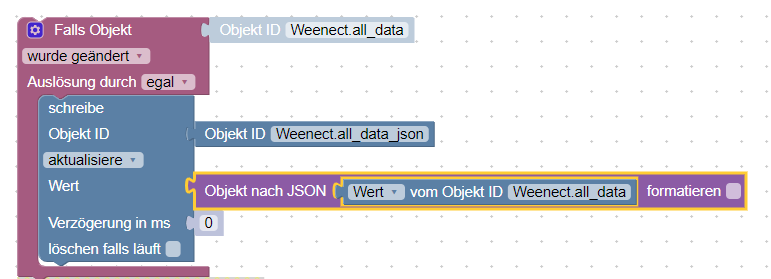
Das mach daraus auch für mich nichts verwertbares nur mit /n Zeilenumbrüchen......
"Weenect: Logging in...\nAvailable trackers for user: hxxx@xxxxxx.de: ['12xxxx', '1xxxx']\nTRACKER 1xxxx | Position\n{'activation_date': '2020-11-17T16:52:59.521918',\n 'activation_result': None,\n 'area_appli_notification': True,\n 'area_mail_notification': False,\n 'area_sms_notification': False,\n 'battery_appli_notification': True,\n 'battery_charged': 2,\n 'battery_mail_notification': False,\n 'battery_sms_notificatiDann habe ich es mit Scripten probiert um mal 2 Werte ins Log zu schreiben:
 '*/15 * * * * *'

 var objekt = 'javascript.0.Weenect.all_data'/*Weenect all data*/;
 var json_body =(JSON.stringify(objekt));
 log(json_body.original_battery); //
 log(json_body.activation_date); //
Leider kenne ich mich mit JSON gar nicht aus.
Ich möchte eigentlich nur jeweils 3 Datenpunkte für beide Tracker auslesen, also insgesamt 6 Werte
position.latitude
position.longitude
position.battery
jeweis für jeden Tracker.......Ich hoffe mir kann jemand helfen, bin am verzweifeln.
Lieben Dank!!! Heiner
-
Hallo liebes Forum,
leider komme ich alleine nicht mehr weiter.
Ich habe von https://github.com/rsewell97/Weenect-GPS-requests das Python Script in eine virtuelle Python Umgebung eingebunden und diese funktioniert auch.Den Rückgabewert schreibe ich komplett in eine Variable als String und passe es an.
Mit dem Javscript werden die Punkte ausgelesen und ggf erstellt.
const idJson = 'javascript.3.Weenect.json_conv'/*Weenect json conv*/;
const path = 'Weenect.';
const js = 'javascript.3.';

on(idJson, function(dp) { // triggert bei Wertänderung
   let obj = JSON.parse(dp.state.val);
   for(let prop in obj) {
      if(existsState(js + path + prop)) setState(path + prop, obj[prop], true);
      else createState(path + prop, obj[prop], {type: typeof obj[prop]});
   }
});
Soweit konnte ich mir helfen-
Leider habe ich bei folgender Konstellation in der JSON Struktur ein Problem:
"name":"dropsy",
   "nb_geofence_out":0,
   "need_upgrade":false,

//Problem ab hier!
"position":[
      {
         "battery":100,
         "cellid":"26202-0262-84e6",
         "cid":0,
         "confidence":"none",
         "date_server":"2020-11-21t10:19:56+00:00",
         "date_tracker":"2020-11-21t09:00:41+00:00",
         "direction":0,
         "geofence_name":"daheim",
         "gsm":28,
         "id":"xexx",
         "is_online":true,
         "lac":0,
         "last_message":"2020-11-21t10:19:56+00:00",
         "latitude":xxxxx,
         "longitude":xxxxxxxx,
         "mcc":0,
         "mnc":0,
         "original_battery":99,
         "pdop":xxxx,
         "radius":xxx,
         "satellites":7,
         "speed":0.3,
         "type":"cmd-t",
         "valid_signal":true
      }
   ],
//bis hier -> WIRD NICHT RICHTIG AUSGELESEN

   "remaining_days":361,
   "report_appli_notification":true,
   "report_mail_notification":true,
   "report_sms_notification":false,
HIer steht nur
Leider fehlen mir hier die Kenntnisse das Script richtig anzupassen.
Kann mir jemand helfen wie ich die Unterstruktur ausgelesen bekomme?@heiner1976 sagte in JSON Unterstruktur nur Teilweise ausgelesen:
Hallo liebes Forum,
leider komme ich alleine nicht mehr weiter.
Ich habe von https://github.com/rsewell97/Weenect-GPS-requests das Python Script in eine virtuelle Python Umgebung eingebunden und diese funktioniert auch.Den Rückgabewert schreibe ich komplett in eine Variable als String und passe es an.
Mit dem Javscript werden die Punkte ausgelesen und ggf erstellt.
const idJson = 'javascript.3.Weenect.json_conv'/*Weenect json conv*/;
const path = 'Weenect.';
const js = 'javascript.3.';

on(idJson, function(dp) { // triggert bei Wertänderung
   let obj = JSON.parse(dp.state.val);
   for(let prop in obj) {
      if(existsState(js + path + prop)) setState(path + prop, obj[prop], true);
      else createState(path + prop, obj[prop], {type: typeof obj[prop]});
   }
});
Soweit konnte ich mir helfen-
Leider habe ich bei folgender Konstellation in der JSON Struktur ein Problem:
"name":"dropsy",
   "nb_geofence_out":0,
   "need_upgrade":false,

//Problem ab hier!
"position":[
      {
         "battery":100,
         "cellid":"26202-0262-84e6",
         "cid":0,
         "confidence":"none",
         "date_server":"2020-11-21t10:19:56+00:00",
         "date_tracker":"2020-11-21t09:00:41+00:00",
         "direction":0,
         "geofence_name":"daheim",
         "gsm":28,
         "id":"xexx",
         "is_online":true,
         "lac":0,
         "last_message":"2020-11-21t10:19:56+00:00",
         "latitude":xxxxx,
         "longitude":xxxxxxxx,
         "mcc":0,
         "mnc":0,
         "original_battery":99,
         "pdop":xxxx,
         "radius":xxx,
         "satellites":7,
         "speed":0.3,
         "type":"cmd-t",
         "valid_signal":true
      }
   ],
//bis hier -> WIRD NICHT RICHTIG AUSGELESEN

   "remaining_days":361,
   "report_appli_notification":true,
   "report_mail_notification":true,
   "report_sms_notification":false,
HIer steht nur
Leider fehlen mir hier die Kenntnisse das Script richtig anzupassen.
Kann mir jemand helfen wie ich die Unterstruktur ausgelesen bekomme?position ist ein array of objects.
also position[0], position[1], usw
aktuell befindet sich nur ein objekt im array, welches mit index 0 adressiert wird
jeweils darunter dann die attribute battery,cellid, usw. diese wären dann wie folgt zu adressierenobj.position[0].batteryda musst du nochmal eine separate schleife machen und dir überlegen, wie du dann den datenpunktnamen durch nummerierst oder benamst.
nach deiner logik müsste es dann so heißenjavascript.3.Weenect.position.0.batterydie länge des array kann so abgefragt werden
obj.position.length -
@heiner1976 sagte in JSON Unterstruktur nur Teilweise ausgelesen:
Hallo liebes Forum,
leider komme ich alleine nicht mehr weiter.
Ich habe von https://github.com/rsewell97/Weenect-GPS-requests das Python Script in eine virtuelle Python Umgebung eingebunden und diese funktioniert auch.Den Rückgabewert schreibe ich komplett in eine Variable als String und passe es an.
Mit dem Javscript werden die Punkte ausgelesen und ggf erstellt.
const idJson = 'javascript.3.Weenect.json_conv'/*Weenect json conv*/;
const path = 'Weenect.';
const js = 'javascript.3.';

on(idJson, function(dp) { // triggert bei Wertänderung
   let obj = JSON.parse(dp.state.val);
   for(let prop in obj) {
      if(existsState(js + path + prop)) setState(path + prop, obj[prop], true);
      else createState(path + prop, obj[prop], {type: typeof obj[prop]});
   }
});
Soweit konnte ich mir helfen-
Leider habe ich bei folgender Konstellation in der JSON Struktur ein Problem:
"name":"dropsy",
   "nb_geofence_out":0,
   "need_upgrade":false,

//Problem ab hier!
"position":[
      {
         "battery":100,
         "cellid":"26202-0262-84e6",
         "cid":0,
         "confidence":"none",
         "date_server":"2020-11-21t10:19:56+00:00",
         "date_tracker":"2020-11-21t09:00:41+00:00",
         "direction":0,
         "geofence_name":"daheim",
         "gsm":28,
         "id":"xexx",
         "is_online":true,
         "lac":0,
         "last_message":"2020-11-21t10:19:56+00:00",
         "latitude":xxxxx,
         "longitude":xxxxxxxx,
         "mcc":0,
         "mnc":0,
         "original_battery":99,
         "pdop":xxxx,
         "radius":xxx,
         "satellites":7,
         "speed":0.3,
         "type":"cmd-t",
         "valid_signal":true
      }
   ],
//bis hier -> WIRD NICHT RICHTIG AUSGELESEN

   "remaining_days":361,
   "report_appli_notification":true,
   "report_mail_notification":true,
   "report_sms_notification":false,
HIer steht nur
Leider fehlen mir hier die Kenntnisse das Script richtig anzupassen.
Kann mir jemand helfen wie ich die Unterstruktur ausgelesen bekomme?position ist ein array of objects.
also position[0], position[1], usw
aktuell befindet sich nur ein objekt im array, welches mit index 0 adressiert wird
jeweils darunter dann die attribute battery,cellid, usw. diese wären dann wie folgt zu adressierenobj.position[0].batteryda musst du nochmal eine separate schleife machen und dir überlegen, wie du dann den datenpunktnamen durch nummerierst oder benamst.
nach deiner logik müsste es dann so heißenjavascript.3.Weenect.position.0.batterydie länge des array kann so abgefragt werden
obj.position.length@oliverio
Hallo Olivero,
leider komme ich nicht weiter.........bin langsam am verzweifeln.........Habe die Möglichkeit per Python entweder alle API- Daten abzurufen, da habe ich dies probiert:
Alle möglichen Daten: (JSON ähnlich) habe ich in in ein Datenpunkt geschrieben bekomme:
Weenect: Logging in...Available trackers for user: hxxx@pxxxl.de: ['12xxxx', '14xxxx']TRACKER 12xxxx | Position{'activation_date': '2020-11-17T16:52:59.521918', 'activation_result': None, 'area_appli_notification': True, 'area_mail_notification': False, 'area_sms_notification': False, 'battery_appli_notification': True, 'battery_charged': 2, 'battery_mail_notification': False, 'battery_sms_notification': False, 'battery_threshold': 30, 'button_appli_notification': True, 'button_mail_notification': True, 'button_sms_notification': False, 'buttons': [{'active': False, 'id': 379201, 'message': '', 'name': None, 'number': 1, 'tracker_id': 12xxxxx}, {'active': False, 'id': 37xxxx, 'message': '', 'name': None, 'number': 2, 'tracker_id': 12xxxx}, {'active': False, 'id': 37xxxx, 'message': '', 'name': None, 'number': 3, 'tracker_id': 12xxxx}], 'call_directly': True, 'call_low_threshold': 420, 'call_max_threshold': 600, 'call_notification': 0, 'call_usage': 0, 'color': None, 'creation_date': '2020-11-17T16:52:59.523833', 'enable_ai': False, 'enable_ai_spec': '', 'expiration_date': '2021-11-17T16:57:52.609756', 'features': ['sos_button', 'mode_gsensor', 'mode_selection', 'ringing', 'vibrate', 'activity_tracking', 'super_tracking'], 'firmware': 'cat3', 'first_connection_date': '2021-03-26T12:56:07.111559', 'force_subscription': False, 'freq_mode': '30S', 'geofence_mode': 'normal', 'geofence_number': 0, 'had_subscription': True, 'has_activity_tracking': False, 'icon': None, 'id': 12xxxx, 'imei': 86xxxx, 'last_change': None, 'last_freq_mode': '30S', 'last_request': None, 'last_sensor_mode': 'normal', 'mail_contacts': [{'id': 13xxxx, 'mail': 'txxx@xxxx.de', 'number': 1, 'tracker_id': 12xxxx}], 'name': 'Dropsy', 'nb_geofence_out': 0, 'need_upgrade': False, 'position': [{'battery': 97, 'cellid': '26202-xxxx-xxxx', 'cid': 0, 'confidence': None, 'date_server': '2021-04-01T10:13:29+00:00', 'date_tracker': '2021-04-01T10:06:40+00:00', 'direction': 257, 'geofence_name': None, 'gsm': 24, 'id': '60659b31fafdd859c5a49550', 'is_online': True, 'lac': 0, 'last_message': '2021-04-01T10:13:29+00:00', 'latitude': xx.0200087, 'longitude': xx.2693651, 'mcc': 0, 'mnc': 0, 'original_battery': 77, 'pdop': 0.82, 'radius': 19, 'satellites': 9, 'speed': 2.0, 'type': 'CMD-T', 'valid_signal': True}], 'remaining_days': 230, 'report_appli_notification': True, 'report_mail_notification': True, 'report_sms_notification': False, 'retailer_id': 32, 'sales_data': {'kind': 'cat2', 'vendor': 'Amazon', 'vendor_id': 32, 'warranty': 'default'}, 'sensor_mode': 'normal', 'sim': '891xxxxx', 'sms_contacts': [{'id': 1380883, 'number': 1, 'phone': '+4917xxxx', 'tracker_id': 126957}], 'sos_appli_notification': True, 'sos_mail_notification': False, 'sos_mode': 'direct', 'sos_phone': '+4917xxxx', 'sos_sms_notification': False, 'spy_sos': False, 'subscription': {'amount': 5990, 'amount_gbp': 5500, 'cancel_explanation': None, 'cancel_reason': None, 'canceled_at': None, 'created_at': '2020-11-17T16:55:26.471136', 'currency': 'EUR', 'id': 129885, 'is_under_commitment_period': False, 'max_tracker_nb': 1, 'next_charge_at': '2021-11-17T16:57:52.609756', 'offer_id': 3, 'option_status': True, 'payment_mean': 'gocardless', 'period': 12, 'site': 'weenect', 'status': 'active', 'trackers': [12xxxx], 'updated_at': '2020-11-17T17:01:44.458764', 'user_id': 159235}, 'timezone': 'Etc/UTC', 'type': 'cat2', 'user': {'activate_sponsoring': True, 'address': 'Am Pionierübungsplatrz 14', 'city': 'Mainz Kastel', 'connection_date': '2021-04-01T10:15:32.477318', 'contact_mail': '', 'country': 'CH', 'creation_date': '2020-09-22T09:06:10.288055', 'disable_history': False, 'firstname': 'Henrik', 'id': 159235, 'is_admin': False, 'is_b2b': False, 'is_security': False, 'language': 'de', 'last_connection_date': '2021-04-01T10:15:18.049631', 'lastname': 'Petexxxxxx', 'mail': 'hxxx@xxxx.de', 'need_subscription': True, 'optin': False, 'phone': '+491xxxx', 'postal_code': '55xxxx', 'preferred_metric_system': 'km', 'product_review_link': 'https://www.amazon.de/review/create-review/ref=cm_cr_pr_wr_but_top?ie=UTF8&nodxxxin=xxxxx', 'promo_code': None, 'role_retailer_id': 0, 'role_site': None, 'short_code': None, 'site': 'weenect', 'sms': 0, 'sponsorship_benefit': 0, 'sponsorship_gain_amount': 0, 'valid': None, 'white_label': None}, 'valid_signal': True, 'warranty_end': '2022-11-17T16:52:59.521918', 'warranty_start': '2020-11-17T16:52:59.521918'}TRACKER 142781 | Position{'activation_date': '2021-03-31T10:04:35.549527', 'activation_result': None, 'area_appli_notification': True, 'area_mail_notification': True, 'area_sms_notification': False, 'battery_appli_notification': True, 'battery_charged': 2, 'battery_mail_notification': True, 'battery_sms_notification': False, 'battery_threshold': 30, 'button_appli_notification': True, 'button_mail_notification': True, 'button_sms_notification': False, 'buttons': [{'active': False, 'id': 42xxxx, 'message': '', 'name': None, 'number': 1, 'tracker_id': 142781}, {'active': False, 'id': 426563, 'message': '', 'name': None, 'number': 2, 'tracker_id': 142781}, {'active': False, 'id': 426564, 'message': '', 'name': None, 'number': 3, 'tracker_id': 14xxxx}], 'call_directly': True, 'call_low_threshold': 420, 'call_max_threshold': 600, 'call_notification': 0, 'call_usage': 0, 'color': None, 'creation_date': '2021-03-31T10:04:35.551726', 'enable_ai': False, 'enable_ai_spec': '', 'expiration_date': '2023-03-31T10:12:46.220916', 'features': ['sos_button', 'mode_gsensor', 'mode_selection', 'ringing', 'vibrate', 'activity_tracking', 'super_tracking'], 'firmware': 'cat3', 'first_connection_date': '2021-03-31T10:13:52.180955', 'force_subscription': False, 'freq_mode': '1M', 'geofence_mode': 'normal', 'geofence_number': 0, 'had_subscription': True, 'has_activity_tracking': False, 'icon': None, 'id': 142781, 'imei': 860xxxxx, 'last_change': None, 'last_freq_mode': '1M', 'last_request': None, 'last_sensor_mode': 'normal', 'mail_contacts': [{'id': 1395071, 'mail': 'hxxxx@xxxx.de', 'number': 1, 'tracker_id': 14xxxx}], 'name': 'Dropsy_2', 'nb_geofence_out': 0, 'need_upgrade': False, 'position': [{'battery': 100, 'cellid': '26202-0262-84E6', 'cid': 0, 'confidence': None, 'date_server': '2021-03-31T14:31:18+00:00', 'date_tracker': '2021-03-31T11:16:16+00:00', 'direction': 0, 'geofence_name': None, 'gsm': 27, 'id': '60645a0c47874f6a19b0ffb0', 'is_online': False, 'lac': 0, 'last_message': '2021-03-31T14:31:18+00:00', 'latitude': 50.0202528, 'longitude': 8.2703911, 'mcc': 0, 'mnc': 0, 'original_battery': 93, 'pdop': 99.9, 'radius': 13, 'satellites': 3, 'speed': 0.0, 'type': 'ALM-R', 'valid_signal': False}], 'remaining_days': 728, 'report_appli_notification': True, 'report_mail_notification': True, 'report_sms_notification': False, 'retailer_id': 32, 'sales_data': {'kind': 'cat2', 'vendor': 'Amazon', 'vendor_id': 32, 'warranty': 'default'}, 'sensor_mode': 'normal', 'sim': '891xxxx', 'sms_contacts': [{'id': 1385200, 'number': 1, 'phone': '+491743144114', 'tracker_id': 142781}], 'sos_appli_notification': False, 'sos_mail_notification': False, 'sos_mode': 'full-sos', 'sos_phone': '+491743144114', 'sos_sms_notification': False, 'spy_sos': False, 'subscription': {'amount': 8990, 'amount_gbp': 6483, 'cancel_explanation': None, 'cancel_reason': None, 'canceled_at': None, 'created_at': '2021-03-31T10:05:16.842782', 'currency': 'EUR', 'id': 143652, 'is_under_commitment_period': False, 'max_tracker_nb': 1, 'next_charge_at': '2023-03-31T10:12:46.220916', 'offer_id': 4, 'option_status': True, 'payment_mean': 'hipay', 'period': 24, 'site': 'weenect', 'status': 'active', 'trackers': [142781], 'updated_at': '2021-03-31T10:12:46.230082', 'user_id': 159235}, 'timezone': 'Etc/UTC', 'type': 'cat2', 'user': {'activate_sponsoring': True, 'address': 'Am xxxx', 'city': 'xxxxx', 'connection_date': '2021-04-01T10:15:32.477318', 'contact_mail': '', 'country': 'xxxx', 'creation_date': '2020-09-22T09:06:10.288055', 'disable_history': False, 'firstname': 'Hxxx', 'id': 1xxxx, 'is_admin': False, 'is_b2b': False, 'is_security': False, 'language': 'de', 'last_connection_date': '2021-04-01T10:15:18.049631', 'lastname': 'Pxxxx', 'mail': 'hxxx@xxxx.de', 'need_subscription': True, 'optin': False, 'phone': '+49xxxx', 'postal_code': '55252', 'preferred_metric_system': 'km', 'product_review_link': 'https://www.amazon.de/review/create-review/ref=xxxxx', 'promo_code': None, 'role_retailer_id': 0, 'role_site': None, 'short_code': None, 'site': 'weenect', 'sms': 0, 'sponsorship_benefit': 0, 'sponsorship_gain_amount': 0, 'valid': None, 'white_label': None}, 'valid_signal': False, 'warranty_end': '2023-03-31T10:04:35.549527', 'warranty_start': '2021-03-31T10:04:35.549527'}Wenn ich dies in https://jsonparseronline.com/ eingeben bekomme ich ein Fehler:
Nun habe ich folgende Dinge probiert:
Das mach daraus auch für mich nichts verwertbares nur mit /n Zeilenumbrüchen......
"Weenect: Logging in...\nAvailable trackers for user: hxxx@xxxxxx.de: ['12xxxx', '1xxxx']\nTRACKER 1xxxx | Position\n{'activation_date': '2020-11-17T16:52:59.521918',\n 'activation_result': None,\n 'area_appli_notification': True,\n 'area_mail_notification': False,\n 'area_sms_notification': False,\n 'battery_appli_notification': True,\n 'battery_charged': 2,\n 'battery_mail_notification': False,\n 'battery_sms_notificati...................................................................................uswDann habe ich es mit Scripten probiert um mal 2 Werte ins Log zu schreiben:
 '*/15 * * * * *'

 var objekt = 'javascript.0.Weenect.all_data'/*Weenect all data*/;
 var json_body =(JSON.stringify(objekt));
 log(json_body.original_battery); //
 log(json_body.activation_date); //
Da kam im LOG "undefined" an ?
Leider kenne ich mich mit JSON gar nicht aus.
Ich möchte eigentlich nur jeweils 3 Datenpunkte für beide Tracker auslesen, also insgesamt 6 Werte
position.latitude
position.longitude
position.battery
jeweis für jeden Tracker.......Ich hoffe mir kann jemand helfen ------
Ich habe auch versucht über eine andere Pythonabfrage die nur Positionen zurückgibt und ich das nötige rauszuschneiden um zu parsen zum Erfolg zu kommen....
Lieder schneide ich immer feste Werte und die Rückgabe ändert sich in der Anzahl der Zeichen.
Rückgabe (leider bei 2 Trackern immer in unterschiedlicher länge :-(:Weenect: Logging in... Available trackers for user: hxxxx@pxxx.de: ['1xxx', '14xxx'] TRACKER 12xxx | Position {'battery': 82, 'cellid': '26202-0262-84E6', 'cid': 0, 'confidence': None, 'date_server': '2021-04-01T19:07:02+00:00', 'date_tracker': '2021-04-01T19:07:01+00:00', 'direction': 0, 'geofence_name': None, 'gsm': 24, 'id': '606619xxxxxx', 'is_online': True, 'lac': 0, 'last_message': '2021-04-01T19:02:58+00:00', 'latitude': 5x.0196883, 'longitude': x.2699167, 'mcc': 0, 'mnc': 0, 'original_battery': 63, 'pdop': 0.8, 'radius': 17, 'satellites': 10, 'speed': 0.3, 'type': 'CMD-T', 'valid_signal': True} TRACKER 1xxx | Position {'battery': 100, 'cellid': '26202-0262-84E6', 'cid': 0, 'confidence': None, 'date_server': '2021-04-01T19:05:11+00:00', 'date_tracker': '2021-03-31T11:16:16+00:00', 'direction': 0, 'geofence_name': None, 'gsm': 21, 'id': '606614bcfafdd859c721686a', 'is_online': True, 'lac': 0, 'last_message': '2021-04-01T19:05:11+00:00', 'latitude': 5x.0202183, 'longitude': x.27048, 'mcc': 0, 'mnc': 0, 'original_battery': 94, 'pdop': 99.9, 'radius': 17, 'satellites': 0, 'speed': 0.0, 'type': 'CMD-T', 'valid_signal': False}Was ich brauche:
latitude
longitude
battery
jeweis für jeden Tracker.......Mit einem hab ich es leienhaft hinbekommen , leider mit 2 nicht :(
var timeout2, weenect_daten, result, weenect_daten_clean, weenect_daten_cleaned,weenect_daten_clean2, weenect_daten_cleaned2,weenect_daten2;

schedule("*/15 * * * * *", function () {
  exec('bash /home/iobroker/pos_get_sh.sh', function (error, result, stderr) {
      timeout2 = setTimeout(function () {
      weenect_daten = result.replace(/'/g,'"');
      weenect_daten_clean = weenect_daten.replace(/none/i,'"unbekannt"');
      weenect_daten_cleaned = weenect_daten_clean.replace(/none/i,'"unbekannt"');
      weenect_daten_clean2 = weenect_daten_cleaned.replace(/none/i,'"unbekannt"');
      weenect_daten_cleaned2 = weenect_daten_clean2.replace(/none/i,'"unbekannt"');
        //setState("javascript.0.Weenect.js_buff",(weenect_daten.slice(123, weenect_daten.length - 564).toLowerCase()), true);
        //setState("javascript.0.Weenect.js_clean",(weenect_daten_clean.slice(123, weenect_daten_clean.length - 564).toLowerCase()), true);
        setState("javascript.0.Weenect.js_Tracker1",(weenect_daten_cleaned.slice(123, weenect_daten_cleaned.length - 564).toLowerCase()), true);
        //setState("javascript.0.Weenect.js_buff2",(weenect_daten.slice(698, weenect_daten.length - 0).toLowerCase()), true);
        //setState("javascript.0.Weenect.js_clean2",(weenect_daten_clean.slice(698, weenect_daten_clean.length - 0).toLowerCase()), true);
        setState("javascript.0.Weenect.js_Tracker2",(weenect_daten_cleaned2.slice(698, weenect_daten_cleaned2.length - 0).toLowerCase()), true);
    }, 1000);
  });
});
Mit einem Tracker geht das ganz gutl, das die Katze klingelt, wenn Sie sich in die nähe der Strasse begibt und ist genervt und kommt heim/zurück. Dies funktioniert bis dato sehr gut. Bimmeln nervt und sie geht weg von der Gefahrenzone.
Da der Akku schnell leer ist ( Modus 30s / GPS ca. 1,5 Tage) und ich zu Opa und Oma muss über Ostern, habe ich mir einen 2. Tracker gekauft. Leider bekomme ich es aber aufgrund der variablen Zeichenzahl nichtt mehrhin. brrrrr.Ich hoffe mir kann jemand helfen, bin am verzweifeln.
Lieben Dank!!! Heiner
-
@oliverio
Hallo Olivero,
leider komme ich nicht weiter.........bin langsam am verzweifeln.........Habe die Möglichkeit per Python entweder alle API- Daten abzurufen, da habe ich dies probiert:
Alle möglichen Daten: (JSON ähnlich) habe ich in in ein Datenpunkt geschrieben bekomme:
Weenect: Logging in...Available trackers for user: hxxx@pxxxl.de: ['12xxxx', '14xxxx']TRACKER 12xxxx | Position{'activation_date': '2020-11-17T16:52:59.521918', 'activation_result': None, 'area_appli_notification': True, 'area_mail_notification': False, 'area_sms_notification': False, 'battery_appli_notification': True, 'battery_charged': 2, 'battery_mail_notification': False, 'battery_sms_notification': False, 'battery_threshold': 30, 'button_appli_notification': True, 'button_mail_notification': True, 'button_sms_notification': False, 'buttons': [{'active': False, 'id': 379201, 'message': '', 'name': None, 'number': 1, 'tracker_id': 12xxxxx}, {'active': False, 'id': 37xxxx, 'message': '', 'name': None, 'number': 2, 'tracker_id': 12xxxx}, {'active': False, 'id': 37xxxx, 'message': '', 'name': None, 'number': 3, 'tracker_id': 12xxxx}], 'call_directly': True, 'call_low_threshold': 420, 'call_max_threshold': 600, 'call_notification': 0, 'call_usage': 0, 'color': None, 'creation_date': '2020-11-17T16:52:59.523833', 'enable_ai': False, 'enable_ai_spec': '', 'expiration_date': '2021-11-17T16:57:52.609756', 'features': ['sos_button', 'mode_gsensor', 'mode_selection', 'ringing', 'vibrate', 'activity_tracking', 'super_tracking'], 'firmware': 'cat3', 'first_connection_date': '2021-03-26T12:56:07.111559', 'force_subscription': False, 'freq_mode': '30S', 'geofence_mode': 'normal', 'geofence_number': 0, 'had_subscription': True, 'has_activity_tracking': False, 'icon': None, 'id': 12xxxx, 'imei': 86xxxx, 'last_change': None, 'last_freq_mode': '30S', 'last_request': None, 'last_sensor_mode': 'normal', 'mail_contacts': [{'id': 13xxxx, 'mail': 'txxx@xxxx.de', 'number': 1, 'tracker_id': 12xxxx}], 'name': 'Dropsy', 'nb_geofence_out': 0, 'need_upgrade': False, 'position': [{'battery': 97, 'cellid': '26202-xxxx-xxxx', 'cid': 0, 'confidence': None, 'date_server': '2021-04-01T10:13:29+00:00', 'date_tracker': '2021-04-01T10:06:40+00:00', 'direction': 257, 'geofence_name': None, 'gsm': 24, 'id': '60659b31fafdd859c5a49550', 'is_online': True, 'lac': 0, 'last_message': '2021-04-01T10:13:29+00:00', 'latitude': xx.0200087, 'longitude': xx.2693651, 'mcc': 0, 'mnc': 0, 'original_battery': 77, 'pdop': 0.82, 'radius': 19, 'satellites': 9, 'speed': 2.0, 'type': 'CMD-T', 'valid_signal': True}], 'remaining_days': 230, 'report_appli_notification': True, 'report_mail_notification': True, 'report_sms_notification': False, 'retailer_id': 32, 'sales_data': {'kind': 'cat2', 'vendor': 'Amazon', 'vendor_id': 32, 'warranty': 'default'}, 'sensor_mode': 'normal', 'sim': '891xxxxx', 'sms_contacts': [{'id': 1380883, 'number': 1, 'phone': '+4917xxxx', 'tracker_id': 126957}], 'sos_appli_notification': True, 'sos_mail_notification': False, 'sos_mode': 'direct', 'sos_phone': '+4917xxxx', 'sos_sms_notification': False, 'spy_sos': False, 'subscription': {'amount': 5990, 'amount_gbp': 5500, 'cancel_explanation': None, 'cancel_reason': None, 'canceled_at': None, 'created_at': '2020-11-17T16:55:26.471136', 'currency': 'EUR', 'id': 129885, 'is_under_commitment_period': False, 'max_tracker_nb': 1, 'next_charge_at': '2021-11-17T16:57:52.609756', 'offer_id': 3, 'option_status': True, 'payment_mean': 'gocardless', 'period': 12, 'site': 'weenect', 'status': 'active', 'trackers': [12xxxx], 'updated_at': '2020-11-17T17:01:44.458764', 'user_id': 159235}, 'timezone': 'Etc/UTC', 'type': 'cat2', 'user': {'activate_sponsoring': True, 'address': 'Am Pionierübungsplatrz 14', 'city': 'Mainz Kastel', 'connection_date': '2021-04-01T10:15:32.477318', 'contact_mail': '', 'country': 'CH', 'creation_date': '2020-09-22T09:06:10.288055', 'disable_history': False, 'firstname': 'Henrik', 'id': 159235, 'is_admin': False, 'is_b2b': False, 'is_security': False, 'language': 'de', 'last_connection_date': '2021-04-01T10:15:18.049631', 'lastname': 'Petexxxxxx', 'mail': 'hxxx@xxxx.de', 'need_subscription': True, 'optin': False, 'phone': '+491xxxx', 'postal_code': '55xxxx', 'preferred_metric_system': 'km', 'product_review_link': 'https://www.amazon.de/review/create-review/ref=cm_cr_pr_wr_but_top?ie=UTF8&nodxxxin=xxxxx', 'promo_code': None, 'role_retailer_id': 0, 'role_site': None, 'short_code': None, 'site': 'weenect', 'sms': 0, 'sponsorship_benefit': 0, 'sponsorship_gain_amount': 0, 'valid': None, 'white_label': None}, 'valid_signal': True, 'warranty_end': '2022-11-17T16:52:59.521918', 'warranty_start': '2020-11-17T16:52:59.521918'}TRACKER 142781 | Position{'activation_date': '2021-03-31T10:04:35.549527', 'activation_result': None, 'area_appli_notification': True, 'area_mail_notification': True, 'area_sms_notification': False, 'battery_appli_notification': True, 'battery_charged': 2, 'battery_mail_notification': True, 'battery_sms_notification': False, 'battery_threshold': 30, 'button_appli_notification': True, 'button_mail_notification': True, 'button_sms_notification': False, 'buttons': [{'active': False, 'id': 42xxxx, 'message': '', 'name': None, 'number': 1, 'tracker_id': 142781}, {'active': False, 'id': 426563, 'message': '', 'name': None, 'number': 2, 'tracker_id': 142781}, {'active': False, 'id': 426564, 'message': '', 'name': None, 'number': 3, 'tracker_id': 14xxxx}], 'call_directly': True, 'call_low_threshold': 420, 'call_max_threshold': 600, 'call_notification': 0, 'call_usage': 0, 'color': None, 'creation_date': '2021-03-31T10:04:35.551726', 'enable_ai': False, 'enable_ai_spec': '', 'expiration_date': '2023-03-31T10:12:46.220916', 'features': ['sos_button', 'mode_gsensor', 'mode_selection', 'ringing', 'vibrate', 'activity_tracking', 'super_tracking'], 'firmware': 'cat3', 'first_connection_date': '2021-03-31T10:13:52.180955', 'force_subscription': False, 'freq_mode': '1M', 'geofence_mode': 'normal', 'geofence_number': 0, 'had_subscription': True, 'has_activity_tracking': False, 'icon': None, 'id': 142781, 'imei': 860xxxxx, 'last_change': None, 'last_freq_mode': '1M', 'last_request': None, 'last_sensor_mode': 'normal', 'mail_contacts': [{'id': 1395071, 'mail': 'hxxxx@xxxx.de', 'number': 1, 'tracker_id': 14xxxx}], 'name': 'Dropsy_2', 'nb_geofence_out': 0, 'need_upgrade': False, 'position': [{'battery': 100, 'cellid': '26202-0262-84E6', 'cid': 0, 'confidence': None, 'date_server': '2021-03-31T14:31:18+00:00', 'date_tracker': '2021-03-31T11:16:16+00:00', 'direction': 0, 'geofence_name': None, 'gsm': 27, 'id': '60645a0c47874f6a19b0ffb0', 'is_online': False, 'lac': 0, 'last_message': '2021-03-31T14:31:18+00:00', 'latitude': 50.0202528, 'longitude': 8.2703911, 'mcc': 0, 'mnc': 0, 'original_battery': 93, 'pdop': 99.9, 'radius': 13, 'satellites': 3, 'speed': 0.0, 'type': 'ALM-R', 'valid_signal': False}], 'remaining_days': 728, 'report_appli_notification': True, 'report_mail_notification': True, 'report_sms_notification': False, 'retailer_id': 32, 'sales_data': {'kind': 'cat2', 'vendor': 'Amazon', 'vendor_id': 32, 'warranty': 'default'}, 'sensor_mode': 'normal', 'sim': '891xxxx', 'sms_contacts': [{'id': 1385200, 'number': 1, 'phone': '+491743144114', 'tracker_id': 142781}], 'sos_appli_notification': False, 'sos_mail_notification': False, 'sos_mode': 'full-sos', 'sos_phone': '+491743144114', 'sos_sms_notification': False, 'spy_sos': False, 'subscription': {'amount': 8990, 'amount_gbp': 6483, 'cancel_explanation': None, 'cancel_reason': None, 'canceled_at': None, 'created_at': '2021-03-31T10:05:16.842782', 'currency': 'EUR', 'id': 143652, 'is_under_commitment_period': False, 'max_tracker_nb': 1, 'next_charge_at': '2023-03-31T10:12:46.220916', 'offer_id': 4, 'option_status': True, 'payment_mean': 'hipay', 'period': 24, 'site': 'weenect', 'status': 'active', 'trackers': [142781], 'updated_at': '2021-03-31T10:12:46.230082', 'user_id': 159235}, 'timezone': 'Etc/UTC', 'type': 'cat2', 'user': {'activate_sponsoring': True, 'address': 'Am xxxx', 'city': 'xxxxx', 'connection_date': '2021-04-01T10:15:32.477318', 'contact_mail': '', 'country': 'xxxx', 'creation_date': '2020-09-22T09:06:10.288055', 'disable_history': False, 'firstname': 'Hxxx', 'id': 1xxxx, 'is_admin': False, 'is_b2b': False, 'is_security': False, 'language': 'de', 'last_connection_date': '2021-04-01T10:15:18.049631', 'lastname': 'Pxxxx', 'mail': 'hxxx@xxxx.de', 'need_subscription': True, 'optin': False, 'phone': '+49xxxx', 'postal_code': '55252', 'preferred_metric_system': 'km', 'product_review_link': 'https://www.amazon.de/review/create-review/ref=xxxxx', 'promo_code': None, 'role_retailer_id': 0, 'role_site': None, 'short_code': None, 'site': 'weenect', 'sms': 0, 'sponsorship_benefit': 0, 'sponsorship_gain_amount': 0, 'valid': None, 'white_label': None}, 'valid_signal': False, 'warranty_end': '2023-03-31T10:04:35.549527', 'warranty_start': '2021-03-31T10:04:35.549527'}Wenn ich dies in https://jsonparseronline.com/ eingeben bekomme ich ein Fehler:
Nun habe ich folgende Dinge probiert:
Das mach daraus auch für mich nichts verwertbares nur mit /n Zeilenumbrüchen......
"Weenect: Logging in...\nAvailable trackers for user: hxxx@xxxxxx.de: ['12xxxx', '1xxxx']\nTRACKER 1xxxx | Position\n{'activation_date': '2020-11-17T16:52:59.521918',\n 'activation_result': None,\n 'area_appli_notification': True,\n 'area_mail_notification': False,\n 'area_sms_notification': False,\n 'battery_appli_notification': True,\n 'battery_charged': 2,\n 'battery_mail_notification': False,\n 'battery_sms_notificati...................................................................................uswDann habe ich es mit Scripten probiert um mal 2 Werte ins Log zu schreiben:
 '*/15 * * * * *'

 var objekt = 'javascript.0.Weenect.all_data'/*Weenect all data*/;
 var json_body =(JSON.stringify(objekt));
 log(json_body.original_battery); //
 log(json_body.activation_date); //
Da kam im LOG "undefined" an ?
Leider kenne ich mich mit JSON gar nicht aus.
Ich möchte eigentlich nur jeweils 3 Datenpunkte für beide Tracker auslesen, also insgesamt 6 Werte
position.latitude
position.longitude
position.battery
jeweis für jeden Tracker.......Ich hoffe mir kann jemand helfen ------
Ich habe auch versucht über eine andere Pythonabfrage die nur Positionen zurückgibt und ich das nötige rauszuschneiden um zu parsen zum Erfolg zu kommen....
Lieder schneide ich immer feste Werte und die Rückgabe ändert sich in der Anzahl der Zeichen.
Rückgabe (leider bei 2 Trackern immer in unterschiedlicher länge :-(:Weenect: Logging in... Available trackers for user: hxxxx@pxxx.de: ['1xxx', '14xxx'] TRACKER 12xxx | Position {'battery': 82, 'cellid': '26202-0262-84E6', 'cid': 0, 'confidence': None, 'date_server': '2021-04-01T19:07:02+00:00', 'date_tracker': '2021-04-01T19:07:01+00:00', 'direction': 0, 'geofence_name': None, 'gsm': 24, 'id': '606619xxxxxx', 'is_online': True, 'lac': 0, 'last_message': '2021-04-01T19:02:58+00:00', 'latitude': 5x.0196883, 'longitude': x.2699167, 'mcc': 0, 'mnc': 0, 'original_battery': 63, 'pdop': 0.8, 'radius': 17, 'satellites': 10, 'speed': 0.3, 'type': 'CMD-T', 'valid_signal': True} TRACKER 1xxx | Position {'battery': 100, 'cellid': '26202-0262-84E6', 'cid': 0, 'confidence': None, 'date_server': '2021-04-01T19:05:11+00:00', 'date_tracker': '2021-03-31T11:16:16+00:00', 'direction': 0, 'geofence_name': None, 'gsm': 21, 'id': '606614bcfafdd859c721686a', 'is_online': True, 'lac': 0, 'last_message': '2021-04-01T19:05:11+00:00', 'latitude': 5x.0202183, 'longitude': x.27048, 'mcc': 0, 'mnc': 0, 'original_battery': 94, 'pdop': 99.9, 'radius': 17, 'satellites': 0, 'speed': 0.0, 'type': 'CMD-T', 'valid_signal': False}Was ich brauche:
latitude
longitude
battery
jeweis für jeden Tracker.......Mit einem hab ich es leienhaft hinbekommen , leider mit 2 nicht :(
var timeout2, weenect_daten, result, weenect_daten_clean, weenect_daten_cleaned,weenect_daten_clean2, weenect_daten_cleaned2,weenect_daten2;

schedule("*/15 * * * * *", function () {
  exec('bash /home/iobroker/pos_get_sh.sh', function (error, result, stderr) {
      timeout2 = setTimeout(function () {
      weenect_daten = result.replace(/'/g,'"');
      weenect_daten_clean = weenect_daten.replace(/none/i,'"unbekannt"');
      weenect_daten_cleaned = weenect_daten_clean.replace(/none/i,'"unbekannt"');
      weenect_daten_clean2 = weenect_daten_cleaned.replace(/none/i,'"unbekannt"');
      weenect_daten_cleaned2 = weenect_daten_clean2.replace(/none/i,'"unbekannt"');
        //setState("javascript.0.Weenect.js_buff",(weenect_daten.slice(123, weenect_daten.length - 564).toLowerCase()), true);
        //setState("javascript.0.Weenect.js_clean",(weenect_daten_clean.slice(123, weenect_daten_clean.length - 564).toLowerCase()), true);
        setState("javascript.0.Weenect.js_Tracker1",(weenect_daten_cleaned.slice(123, weenect_daten_cleaned.length - 564).toLowerCase()), true);
        //setState("javascript.0.Weenect.js_buff2",(weenect_daten.slice(698, weenect_daten.length - 0).toLowerCase()), true);
        //setState("javascript.0.Weenect.js_clean2",(weenect_daten_clean.slice(698, weenect_daten_clean.length - 0).toLowerCase()), true);
        setState("javascript.0.Weenect.js_Tracker2",(weenect_daten_cleaned2.slice(698, weenect_daten_cleaned2.length - 0).toLowerCase()), true);
    }, 1000);
  });
});
Mit einem Tracker geht das ganz gutl, das die Katze klingelt, wenn Sie sich in die nähe der Strasse begibt und ist genervt und kommt heim/zurück. Dies funktioniert bis dato sehr gut. Bimmeln nervt und sie geht weg von der Gefahrenzone.
Da der Akku schnell leer ist ( Modus 30s / GPS ca. 1,5 Tage) und ich zu Opa und Oma muss über Ostern, habe ich mir einen 2. Tracker gekauft. Leider bekomme ich es aber aufgrund der variablen Zeichenzahl nichtt mehrhin. brrrrr.Ich hoffe mir kann jemand helfen, bin am verzweifeln.
Lieben Dank!!! Heiner
@heiner1976 sagte in JSON Unterstruktur nur Teilweise ausgelesen:
@oliverio
Hallo Olivero,
leider komme ich nicht weiter.........bin langsam am verzweifeln.........Habe die Möglichkeit per Python entweder alle API- Daten abzurufen, da habe ich dies probiert:
Alle möglichen Daten: (JSON ähnlich) habe ich in in ein Datenpunkt geschrieben bekomme:
Weenect: Logging in...Available trackers for user: hxxx@pxxxl.de: ['12xxxx', '14xxxx']TRACKER 12xxxx | Position{'activation_date': '2020-11-17T16:52:59.521918', 'activation_result': None, 'area_appli_notification': True, 'area_mail_notification': False, 'area_sms_notification': False, 'battery_appli_notification': True, 'battery_charged': 2, 'battery_mail_notification': False, 'battery_sms_notification': False, 'battery_threshold': 30, 'button_appli_notification': True, 'button_mail_notification': True, 'button_sms_notification': False, 'buttons': [{'active': False, 'id': 379201, 'message': '', 'name': None, 'number': 1, 'tracker_id': 12xxxxx}, {'active': False, 'id': 37xxxx, 'message': '', 'name': None, 'number': 2, 'tracker_id': 12xxxx}, {'active': False, 'id': 37xxxx, 'message': '', 'name': None, 'number': 3, 'tracker_id': 12xxxx}], 'call_directly': True, 'call_low_threshold': 420, 'call_max_threshold': 600, 'call_notification': 0, 'call_usage': 0, 'color': None, 'creation_date': '2020-11-17T16:52:59.523833', 'enable_ai': False, 'enable_ai_spec': '', 'expiration_date': '2021-11-17T16:57:52.609756', 'features': ['sos_button', 'mode_gsensor', 'mode_selection', 'ringing', 'vibrate', 'activity_tracking', 'super_tracking'], 'firmware': 'cat3', 'first_connection_date': '2021-03-26T12:56:07.111559', 'force_subscription': False, 'freq_mode': '30S', 'geofence_mode': 'normal', 'geofence_number': 0, 'had_subscription': True, 'has_activity_tracking': False, 'icon': None, 'id': 12xxxx, 'imei': 86xxxx, 'last_change': None, 'last_freq_mode': '30S', 'last_request': None, 'last_sensor_mode': 'normal', 'mail_contacts': [{'id': 13xxxx, 'mail': 'txxx@xxxx.de', 'number': 1, 'tracker_id': 12xxxx}], 'name': 'Dropsy', 'nb_geofence_out': 0, 'need_upgrade': False, 'position': [{'battery': 97, 'cellid': '26202-xxxx-xxxx', 'cid': 0, 'confidence': None, 'date_server': '2021-04-01T10:13:29+00:00', 'date_tracker': '2021-04-01T10:06:40+00:00', 'direction': 257, 'geofence_name': None, 'gsm': 24, 'id': '60659b31fafdd859c5a49550', 'is_online': True, 'lac': 0, 'last_message': '2021-04-01T10:13:29+00:00', 'latitude': xx.0200087, 'longitude': xx.2693651, 'mcc': 0, 'mnc': 0, 'original_battery': 77, 'pdop': 0.82, 'radius': 19, 'satellites': 9, 'speed': 2.0, 'type': 'CMD-T', 'valid_signal': True}], 'remaining_days': 230, 'report_appli_notification': True, 'report_mail_notification': True, 'report_sms_notification': False, 'retailer_id': 32, 'sales_data': {'kind': 'cat2', 'vendor': 'Amazon', 'vendor_id': 32, 'warranty': 'default'}, 'sensor_mode': 'normal', 'sim': '891xxxxx', 'sms_contacts': [{'id': 1380883, 'number': 1, 'phone': '+4917xxxx', 'tracker_id': 126957}], 'sos_appli_notification': True, 'sos_mail_notification': False, 'sos_mode': 'direct', 'sos_phone': '+4917xxxx', 'sos_sms_notification': False, 'spy_sos': False, 'subscription': {'amount': 5990, 'amount_gbp': 5500, 'cancel_explanation': None, 'cancel_reason': None, 'canceled_at': None, 'created_at': '2020-11-17T16:55:26.471136', 'currency': 'EUR', 'id': 129885, 'is_under_commitment_period': False, 'max_tracker_nb': 1, 'next_charge_at': '2021-11-17T16:57:52.609756', 'offer_id': 3, 'option_status': True, 'payment_mean': 'gocardless', 'period': 12, 'site': 'weenect', 'status': 'active', 'trackers': [12xxxx], 'updated_at': '2020-11-17T17:01:44.458764', 'user_id': 159235}, 'timezone': 'Etc/UTC', 'type': 'cat2', 'user': {'activate_sponsoring': True, 'address': 'Am Pionierübungsplatrz 14', 'city': 'Mainz Kastel', 'connection_date': '2021-04-01T10:15:32.477318', 'contact_mail': '', 'country': 'CH', 'creation_date': '2020-09-22T09:06:10.288055', 'disable_history': False, 'firstname': 'Henrik', 'id': 159235, 'is_admin': False, 'is_b2b': False, 'is_security': False, 'language': 'de', 'last_connection_date': '2021-04-01T10:15:18.049631', 'lastname': 'Petexxxxxx', 'mail': 'hxxx@xxxx.de', 'need_subscription': True, 'optin': False, 'phone': '+491xxxx', 'postal_code': '55xxxx', 'preferred_metric_system': 'km', 'product_review_link': 'https://www.amazon.de/review/create-review/ref=cm_cr_pr_wr_but_top?ie=UTF8&nodxxxin=xxxxx', 'promo_code': None, 'role_retailer_id': 0, 'role_site': None, 'short_code': None, 'site': 'weenect', 'sms': 0, 'sponsorship_benefit': 0, 'sponsorship_gain_amount': 0, 'valid': None, 'white_label': None}, 'valid_signal': True, 'warranty_end': '2022-11-17T16:52:59.521918', 'warranty_start': '2020-11-17T16:52:59.521918'}TRACKER 142781 | Position{'activation_date': '2021-03-31T10:04:35.549527', 'activation_result': None, 'area_appli_notification': True, 'area_mail_notification': True, 'area_sms_notification': False, 'battery_appli_notification': True, 'battery_charged': 2, 'battery_mail_notification': True, 'battery_sms_notification': False, 'battery_threshold': 30, 'button_appli_notification': True, 'button_mail_notification': True, 'button_sms_notification': False, 'buttons': [{'active': False, 'id': 42xxxx, 'message': '', 'name': None, 'number': 1, 'tracker_id': 142781}, {'active': False, 'id': 426563, 'message': '', 'name': None, 'number': 2, 'tracker_id': 142781}, {'active': False, 'id': 426564, 'message': '', 'name': None, 'number': 3, 'tracker_id': 14xxxx}], 'call_directly': True, 'call_low_threshold': 420, 'call_max_threshold': 600, 'call_notification': 0, 'call_usage': 0, 'color': None, 'creation_date': '2021-03-31T10:04:35.551726', 'enable_ai': False, 'enable_ai_spec': '', 'expiration_date': '2023-03-31T10:12:46.220916', 'features': ['sos_button', 'mode_gsensor', 'mode_selection', 'ringing', 'vibrate', 'activity_tracking', 'super_tracking'], 'firmware': 'cat3', 'first_connection_date': '2021-03-31T10:13:52.180955', 'force_subscription': False, 'freq_mode': '1M', 'geofence_mode': 'normal', 'geofence_number': 0, 'had_subscription': True, 'has_activity_tracking': False, 'icon': None, 'id': 142781, 'imei': 860xxxxx, 'last_change': None, 'last_freq_mode': '1M', 'last_request': None, 'last_sensor_mode': 'normal', 'mail_contacts': [{'id': 1395071, 'mail': 'hxxxx@xxxx.de', 'number': 1, 'tracker_id': 14xxxx}], 'name': 'Dropsy_2', 'nb_geofence_out': 0, 'need_upgrade': False, 'position': [{'battery': 100, 'cellid': '26202-0262-84E6', 'cid': 0, 'confidence': None, 'date_server': '2021-03-31T14:31:18+00:00', 'date_tracker': '2021-03-31T11:16:16+00:00', 'direction': 0, 'geofence_name': None, 'gsm': 27, 'id': '60645a0c47874f6a19b0ffb0', 'is_online': False, 'lac': 0, 'last_message': '2021-03-31T14:31:18+00:00', 'latitude': 50.0202528, 'longitude': 8.2703911, 'mcc': 0, 'mnc': 0, 'original_battery': 93, 'pdop': 99.9, 'radius': 13, 'satellites': 3, 'speed': 0.0, 'type': 'ALM-R', 'valid_signal': False}], 'remaining_days': 728, 'report_appli_notification': True, 'report_mail_notification': True, 'report_sms_notification': False, 'retailer_id': 32, 'sales_data': {'kind': 'cat2', 'vendor': 'Amazon', 'vendor_id': 32, 'warranty': 'default'}, 'sensor_mode': 'normal', 'sim': '891xxxx', 'sms_contacts': [{'id': 1385200, 'number': 1, 'phone': '+491743144114', 'tracker_id': 142781}], 'sos_appli_notification': False, 'sos_mail_notification': False, 'sos_mode': 'full-sos', 'sos_phone': '+491743144114', 'sos_sms_notification': False, 'spy_sos': False, 'subscription': {'amount': 8990, 'amount_gbp': 6483, 'cancel_explanation': None, 'cancel_reason': None, 'canceled_at': None, 'created_at': '2021-03-31T10:05:16.842782', 'currency': 'EUR', 'id': 143652, 'is_under_commitment_period': False, 'max_tracker_nb': 1, 'next_charge_at': '2023-03-31T10:12:46.220916', 'offer_id': 4, 'option_status': True, 'payment_mean': 'hipay', 'period': 24, 'site': 'weenect', 'status': 'active', 'trackers': [142781], 'updated_at': '2021-03-31T10:12:46.230082', 'user_id': 159235}, 'timezone': 'Etc/UTC', 'type': 'cat2', 'user': {'activate_sponsoring': True, 'address': 'Am xxxx', 'city': 'xxxxx', 'connection_date': '2021-04-01T10:15:32.477318', 'contact_mail': '', 'country': 'xxxx', 'creation_date': '2020-09-22T09:06:10.288055', 'disable_history': False, 'firstname': 'Hxxx', 'id': 1xxxx, 'is_admin': False, 'is_b2b': False, 'is_security': False, 'language': 'de', 'last_connection_date': '2021-04-01T10:15:18.049631', 'lastname': 'Pxxxx', 'mail': 'hxxx@xxxx.de', 'need_subscription': True, 'optin': False, 'phone': '+49xxxx', 'postal_code': '55252', 'preferred_metric_system': 'km', 'product_review_link': 'https://www.amazon.de/review/create-review/ref=xxxxx', 'promo_code': None, 'role_retailer_id': 0, 'role_site': None, 'short_code': None, 'site': 'weenect', 'sms': 0, 'sponsorship_benefit': 0, 'sponsorship_gain_amount': 0, 'valid': None, 'white_label': None}, 'valid_signal': False, 'warranty_end': '2023-03-31T10:04:35.549527', 'warranty_start': '2021-03-31T10:04:35.549527'}Wenn ich dies in https://jsonparseronline.com/ eingeben bekomme ich ein Fehler:
Nun habe ich folgende Dinge probiert:
Das mach daraus auch für mich nichts verwertbares nur mit /n Zeilenumbrüchen......
"Weenect: Logging in...\nAvailable trackers for user: hxxx@xxxxxx.de: ['12xxxx', '1xxxx']\nTRACKER 1xxxx | Position\n{'activation_date': '2020-11-17T16:52:59.521918',\n 'activation_result': None,\n 'area_appli_notification': True,\n 'area_mail_notification': False,\n 'area_sms_notification': False,\n 'battery_appli_notification': True,\n 'battery_charged': 2,\n 'battery_mail_notification': False,\n 'battery_sms_notificati...................................................................................uswDann habe ich es mit Scripten probiert um mal 2 Werte ins Log zu schreiben:
 '*/15 * * * * *'

 var objekt = 'javascript.0.Weenect.all_data'/*Weenect all data*/;
 var json_body =(JSON.stringify(objekt));
 log(json_body.original_battery); //
 log(json_body.activation_date); //
Da kam im LOG "undefined" an ?
Leider kenne ich mich mit JSON gar nicht aus.
Ich möchte eigentlich nur jeweils 3 Datenpunkte für beide Tracker auslesen, also insgesamt 6 Werte
position.latitude
position.longitude
position.battery
jeweis für jeden Tracker.......Ich hoffe mir kann jemand helfen ------
Ich habe auch versucht über eine andere Pythonabfrage die nur Positionen zurückgibt und ich das nötige rauszuschneiden um zu parsen zum Erfolg zu kommen....
Lieder schneide ich immer feste Werte und die Rückgabe ändert sich in der Anzahl der Zeichen.
Rückgabe (leider bei 2 Trackern immer in unterschiedlicher länge :-(:Weenect: Logging in... Available trackers for user: hxxxx@pxxx.de: ['1xxx', '14xxx'] TRACKER 12xxx | Position {'battery': 82, 'cellid': '26202-0262-84E6', 'cid': 0, 'confidence': None, 'date_server': '2021-04-01T19:07:02+00:00', 'date_tracker': '2021-04-01T19:07:01+00:00', 'direction': 0, 'geofence_name': None, 'gsm': 24, 'id': '606619xxxxxx', 'is_online': True, 'lac': 0, 'last_message': '2021-04-01T19:02:58+00:00', 'latitude': 5x.0196883, 'longitude': x.2699167, 'mcc': 0, 'mnc': 0, 'original_battery': 63, 'pdop': 0.8, 'radius': 17, 'satellites': 10, 'speed': 0.3, 'type': 'CMD-T', 'valid_signal': True} TRACKER 1xxx | Position {'battery': 100, 'cellid': '26202-0262-84E6', 'cid': 0, 'confidence': None, 'date_server': '2021-04-01T19:05:11+00:00', 'date_tracker': '2021-03-31T11:16:16+00:00', 'direction': 0, 'geofence_name': None, 'gsm': 21, 'id': '606614bcfafdd859c721686a', 'is_online': True, 'lac': 0, 'last_message': '2021-04-01T19:05:11+00:00', 'latitude': 5x.0202183, 'longitude': x.27048, 'mcc': 0, 'mnc': 0, 'original_battery': 94, 'pdop': 99.9, 'radius': 17, 'satellites': 0, 'speed': 0.0, 'type': 'CMD-T', 'valid_signal': False}Was ich brauche:
latitude
longitude
battery
jeweis für jeden Tracker.......Mit einem hab ich es leienhaft hinbekommen , leider mit 2 nicht :(
var timeout2, weenect_daten, result, weenect_daten_clean, weenect_daten_cleaned,weenect_daten_clean2, weenect_daten_cleaned2,weenect_daten2;

schedule("*/15 * * * * *", function () {
  exec('bash /home/iobroker/pos_get_sh.sh', function (error, result, stderr) {
      timeout2 = setTimeout(function () {
      weenect_daten = result.replace(/'/g,'"');
      weenect_daten_clean = weenect_daten.replace(/none/i,'"unbekannt"');
      weenect_daten_cleaned = weenect_daten_clean.replace(/none/i,'"unbekannt"');
      weenect_daten_clean2 = weenect_daten_cleaned.replace(/none/i,'"unbekannt"');
      weenect_daten_cleaned2 = weenect_daten_clean2.replace(/none/i,'"unbekannt"');
        //setState("javascript.0.Weenect.js_buff",(weenect_daten.slice(123, weenect_daten.length - 564).toLowerCase()), true);
        //setState("javascript.0.Weenect.js_clean",(weenect_daten_clean.slice(123, weenect_daten_clean.length - 564).toLowerCase()), true);
        setState("javascript.0.Weenect.js_Tracker1",(weenect_daten_cleaned.slice(123, weenect_daten_cleaned.length - 564).toLowerCase()), true);
        //setState("javascript.0.Weenect.js_buff2",(weenect_daten.slice(698, weenect_daten.length - 0).toLowerCase()), true);
        //setState("javascript.0.Weenect.js_clean2",(weenect_daten_clean.slice(698, weenect_daten_clean.length - 0).toLowerCase()), true);
        setState("javascript.0.Weenect.js_Tracker2",(weenect_daten_cleaned2.slice(698, weenect_daten_cleaned2.length - 0).toLowerCase()), true);
    }, 1000);
  });
});
Mit einem Tracker geht das ganz gutl, das die Katze klingelt, wenn Sie sich in die nähe der Strasse begibt und ist genervt und kommt heim/zurück. Dies funktioniert bis dato sehr gut. Bimmeln nervt und sie geht weg von der Gefahrenzone.
Da der Akku schnell leer ist ( Modus 30s / GPS ca. 1,5 Tage) und ich zu Opa und Oma muss über Ostern, habe ich mir einen 2. Tracker gekauft. Leider bekomme ich es aber aufgrund der variablen Zeichenzahl nichtt mehrhin. brrrrr.Ich hoffe mir kann jemand helfen, bin am verzweifeln.
Lieben Dank!!! Heiner
Wieder neues anderes problem. Kann erst frühestens Montag Abend wieder richtig schauen
-
@heiner1976 sagte in JSON Unterstruktur nur Teilweise ausgelesen:
@oliverio
Hallo Olivero,
leider komme ich nicht weiter.........bin langsam am verzweifeln.........Habe die Möglichkeit per Python entweder alle API- Daten abzurufen, da habe ich dies probiert:
Alle möglichen Daten: (JSON ähnlich) habe ich in in ein Datenpunkt geschrieben bekomme:
Weenect: Logging in...Available trackers for user: hxxx@pxxxl.de: ['12xxxx', '14xxxx']TRACKER 12xxxx | Position{'activation_date': '2020-11-17T16:52:59.521918', 'activation_result': None, 'area_appli_notification': True, 'area_mail_notification': False, 'area_sms_notification': False, 'battery_appli_notification': True, 'battery_charged': 2, 'battery_mail_notification': False, 'battery_sms_notification': False, 'battery_threshold': 30, 'button_appli_notification': True, 'button_mail_notification': True, 'button_sms_notification': False, 'buttons': [{'active': False, 'id': 379201, 'message': '', 'name': None, 'number': 1, 'tracker_id': 12xxxxx}, {'active': False, 'id': 37xxxx, 'message': '', 'name': None, 'number': 2, 'tracker_id': 12xxxx}, {'active': False, 'id': 37xxxx, 'message': '', 'name': None, 'number': 3, 'tracker_id': 12xxxx}], 'call_directly': True, 'call_low_threshold': 420, 'call_max_threshold': 600, 'call_notification': 0, 'call_usage': 0, 'color': None, 'creation_date': '2020-11-17T16:52:59.523833', 'enable_ai': False, 'enable_ai_spec': '', 'expiration_date': '2021-11-17T16:57:52.609756', 'features': ['sos_button', 'mode_gsensor', 'mode_selection', 'ringing', 'vibrate', 'activity_tracking', 'super_tracking'], 'firmware': 'cat3', 'first_connection_date': '2021-03-26T12:56:07.111559', 'force_subscription': False, 'freq_mode': '30S', 'geofence_mode': 'normal', 'geofence_number': 0, 'had_subscription': True, 'has_activity_tracking': False, 'icon': None, 'id': 12xxxx, 'imei': 86xxxx, 'last_change': None, 'last_freq_mode': '30S', 'last_request': None, 'last_sensor_mode': 'normal', 'mail_contacts': [{'id': 13xxxx, 'mail': 'txxx@xxxx.de', 'number': 1, 'tracker_id': 12xxxx}], 'name': 'Dropsy', 'nb_geofence_out': 0, 'need_upgrade': False, 'position': [{'battery': 97, 'cellid': '26202-xxxx-xxxx', 'cid': 0, 'confidence': None, 'date_server': '2021-04-01T10:13:29+00:00', 'date_tracker': '2021-04-01T10:06:40+00:00', 'direction': 257, 'geofence_name': None, 'gsm': 24, 'id': '60659b31fafdd859c5a49550', 'is_online': True, 'lac': 0, 'last_message': '2021-04-01T10:13:29+00:00', 'latitude': xx.0200087, 'longitude': xx.2693651, 'mcc': 0, 'mnc': 0, 'original_battery': 77, 'pdop': 0.82, 'radius': 19, 'satellites': 9, 'speed': 2.0, 'type': 'CMD-T', 'valid_signal': True}], 'remaining_days': 230, 'report_appli_notification': True, 'report_mail_notification': True, 'report_sms_notification': False, 'retailer_id': 32, 'sales_data': {'kind': 'cat2', 'vendor': 'Amazon', 'vendor_id': 32, 'warranty': 'default'}, 'sensor_mode': 'normal', 'sim': '891xxxxx', 'sms_contacts': [{'id': 1380883, 'number': 1, 'phone': '+4917xxxx', 'tracker_id': 126957}], 'sos_appli_notification': True, 'sos_mail_notification': False, 'sos_mode': 'direct', 'sos_phone': '+4917xxxx', 'sos_sms_notification': False, 'spy_sos': False, 'subscription': {'amount': 5990, 'amount_gbp': 5500, 'cancel_explanation': None, 'cancel_reason': None, 'canceled_at': None, 'created_at': '2020-11-17T16:55:26.471136', 'currency': 'EUR', 'id': 129885, 'is_under_commitment_period': False, 'max_tracker_nb': 1, 'next_charge_at': '2021-11-17T16:57:52.609756', 'offer_id': 3, 'option_status': True, 'payment_mean': 'gocardless', 'period': 12, 'site': 'weenect', 'status': 'active', 'trackers': [12xxxx], 'updated_at': '2020-11-17T17:01:44.458764', 'user_id': 159235}, 'timezone': 'Etc/UTC', 'type': 'cat2', 'user': {'activate_sponsoring': True, 'address': 'Am Pionierübungsplatrz 14', 'city': 'Mainz Kastel', 'connection_date': '2021-04-01T10:15:32.477318', 'contact_mail': '', 'country': 'CH', 'creation_date': '2020-09-22T09:06:10.288055', 'disable_history': False, 'firstname': 'Henrik', 'id': 159235, 'is_admin': False, 'is_b2b': False, 'is_security': False, 'language': 'de', 'last_connection_date': '2021-04-01T10:15:18.049631', 'lastname': 'Petexxxxxx', 'mail': 'hxxx@xxxx.de', 'need_subscription': True, 'optin': False, 'phone': '+491xxxx', 'postal_code': '55xxxx', 'preferred_metric_system': 'km', 'product_review_link': 'https://www.amazon.de/review/create-review/ref=cm_cr_pr_wr_but_top?ie=UTF8&nodxxxin=xxxxx', 'promo_code': None, 'role_retailer_id': 0, 'role_site': None, 'short_code': None, 'site': 'weenect', 'sms': 0, 'sponsorship_benefit': 0, 'sponsorship_gain_amount': 0, 'valid': None, 'white_label': None}, 'valid_signal': True, 'warranty_end': '2022-11-17T16:52:59.521918', 'warranty_start': '2020-11-17T16:52:59.521918'}TRACKER 142781 | Position{'activation_date': '2021-03-31T10:04:35.549527', 'activation_result': None, 'area_appli_notification': True, 'area_mail_notification': True, 'area_sms_notification': False, 'battery_appli_notification': True, 'battery_charged': 2, 'battery_mail_notification': True, 'battery_sms_notification': False, 'battery_threshold': 30, 'button_appli_notification': True, 'button_mail_notification': True, 'button_sms_notification': False, 'buttons': [{'active': False, 'id': 42xxxx, 'message': '', 'name': None, 'number': 1, 'tracker_id': 142781}, {'active': False, 'id': 426563, 'message': '', 'name': None, 'number': 2, 'tracker_id': 142781}, {'active': False, 'id': 426564, 'message': '', 'name': None, 'number': 3, 'tracker_id': 14xxxx}], 'call_directly': True, 'call_low_threshold': 420, 'call_max_threshold': 600, 'call_notification': 0, 'call_usage': 0, 'color': None, 'creation_date': '2021-03-31T10:04:35.551726', 'enable_ai': False, 'enable_ai_spec': '', 'expiration_date': '2023-03-31T10:12:46.220916', 'features': ['sos_button', 'mode_gsensor', 'mode_selection', 'ringing', 'vibrate', 'activity_tracking', 'super_tracking'], 'firmware': 'cat3', 'first_connection_date': '2021-03-31T10:13:52.180955', 'force_subscription': False, 'freq_mode': '1M', 'geofence_mode': 'normal', 'geofence_number': 0, 'had_subscription': True, 'has_activity_tracking': False, 'icon': None, 'id': 142781, 'imei': 860xxxxx, 'last_change': None, 'last_freq_mode': '1M', 'last_request': None, 'last_sensor_mode': 'normal', 'mail_contacts': [{'id': 1395071, 'mail': 'hxxxx@xxxx.de', 'number': 1, 'tracker_id': 14xxxx}], 'name': 'Dropsy_2', 'nb_geofence_out': 0, 'need_upgrade': False, 'position': [{'battery': 100, 'cellid': '26202-0262-84E6', 'cid': 0, 'confidence': None, 'date_server': '2021-03-31T14:31:18+00:00', 'date_tracker': '2021-03-31T11:16:16+00:00', 'direction': 0, 'geofence_name': None, 'gsm': 27, 'id': '60645a0c47874f6a19b0ffb0', 'is_online': False, 'lac': 0, 'last_message': '2021-03-31T14:31:18+00:00', 'latitude': 50.0202528, 'longitude': 8.2703911, 'mcc': 0, 'mnc': 0, 'original_battery': 93, 'pdop': 99.9, 'radius': 13, 'satellites': 3, 'speed': 0.0, 'type': 'ALM-R', 'valid_signal': False}], 'remaining_days': 728, 'report_appli_notification': True, 'report_mail_notification': True, 'report_sms_notification': False, 'retailer_id': 32, 'sales_data': {'kind': 'cat2', 'vendor': 'Amazon', 'vendor_id': 32, 'warranty': 'default'}, 'sensor_mode': 'normal', 'sim': '891xxxx', 'sms_contacts': [{'id': 1385200, 'number': 1, 'phone': '+491743144114', 'tracker_id': 142781}], 'sos_appli_notification': False, 'sos_mail_notification': False, 'sos_mode': 'full-sos', 'sos_phone': '+491743144114', 'sos_sms_notification': False, 'spy_sos': False, 'subscription': {'amount': 8990, 'amount_gbp': 6483, 'cancel_explanation': None, 'cancel_reason': None, 'canceled_at': None, 'created_at': '2021-03-31T10:05:16.842782', 'currency': 'EUR', 'id': 143652, 'is_under_commitment_period': False, 'max_tracker_nb': 1, 'next_charge_at': '2023-03-31T10:12:46.220916', 'offer_id': 4, 'option_status': True, 'payment_mean': 'hipay', 'period': 24, 'site': 'weenect', 'status': 'active', 'trackers': [142781], 'updated_at': '2021-03-31T10:12:46.230082', 'user_id': 159235}, 'timezone': 'Etc/UTC', 'type': 'cat2', 'user': {'activate_sponsoring': True, 'address': 'Am xxxx', 'city': 'xxxxx', 'connection_date': '2021-04-01T10:15:32.477318', 'contact_mail': '', 'country': 'xxxx', 'creation_date': '2020-09-22T09:06:10.288055', 'disable_history': False, 'firstname': 'Hxxx', 'id': 1xxxx, 'is_admin': False, 'is_b2b': False, 'is_security': False, 'language': 'de', 'last_connection_date': '2021-04-01T10:15:18.049631', 'lastname': 'Pxxxx', 'mail': 'hxxx@xxxx.de', 'need_subscription': True, 'optin': False, 'phone': '+49xxxx', 'postal_code': '55252', 'preferred_metric_system': 'km', 'product_review_link': 'https://www.amazon.de/review/create-review/ref=xxxxx', 'promo_code': None, 'role_retailer_id': 0, 'role_site': None, 'short_code': None, 'site': 'weenect', 'sms': 0, 'sponsorship_benefit': 0, 'sponsorship_gain_amount': 0, 'valid': None, 'white_label': None}, 'valid_signal': False, 'warranty_end': '2023-03-31T10:04:35.549527', 'warranty_start': '2021-03-31T10:04:35.549527'}Wenn ich dies in https://jsonparseronline.com/ eingeben bekomme ich ein Fehler:
Nun habe ich folgende Dinge probiert:
Das mach daraus auch für mich nichts verwertbares nur mit /n Zeilenumbrüchen......
"Weenect: Logging in...\nAvailable trackers for user: hxxx@xxxxxx.de: ['12xxxx', '1xxxx']\nTRACKER 1xxxx | Position\n{'activation_date': '2020-11-17T16:52:59.521918',\n 'activation_result': None,\n 'area_appli_notification': True,\n 'area_mail_notification': False,\n 'area_sms_notification': False,\n 'battery_appli_notification': True,\n 'battery_charged': 2,\n 'battery_mail_notification': False,\n 'battery_sms_notificati...................................................................................uswDann habe ich es mit Scripten probiert um mal 2 Werte ins Log zu schreiben:
 '*/15 * * * * *'

 var objekt = 'javascript.0.Weenect.all_data'/*Weenect all data*/;
 var json_body =(JSON.stringify(objekt));
 log(json_body.original_battery); //
 log(json_body.activation_date); //
Da kam im LOG "undefined" an ?
Leider kenne ich mich mit JSON gar nicht aus.
Ich möchte eigentlich nur jeweils 3 Datenpunkte für beide Tracker auslesen, also insgesamt 6 Werte
position.latitude
position.longitude
position.battery
jeweis für jeden Tracker.......Ich hoffe mir kann jemand helfen ------
Ich habe auch versucht über eine andere Pythonabfrage die nur Positionen zurückgibt und ich das nötige rauszuschneiden um zu parsen zum Erfolg zu kommen....
Lieder schneide ich immer feste Werte und die Rückgabe ändert sich in der Anzahl der Zeichen.
Rückgabe (leider bei 2 Trackern immer in unterschiedlicher länge :-(:Weenect: Logging in... Available trackers for user: hxxxx@pxxx.de: ['1xxx', '14xxx'] TRACKER 12xxx | Position {'battery': 82, 'cellid': '26202-0262-84E6', 'cid': 0, 'confidence': None, 'date_server': '2021-04-01T19:07:02+00:00', 'date_tracker': '2021-04-01T19:07:01+00:00', 'direction': 0, 'geofence_name': None, 'gsm': 24, 'id': '606619xxxxxx', 'is_online': True, 'lac': 0, 'last_message': '2021-04-01T19:02:58+00:00', 'latitude': 5x.0196883, 'longitude': x.2699167, 'mcc': 0, 'mnc': 0, 'original_battery': 63, 'pdop': 0.8, 'radius': 17, 'satellites': 10, 'speed': 0.3, 'type': 'CMD-T', 'valid_signal': True} TRACKER 1xxx | Position {'battery': 100, 'cellid': '26202-0262-84E6', 'cid': 0, 'confidence': None, 'date_server': '2021-04-01T19:05:11+00:00', 'date_tracker': '2021-03-31T11:16:16+00:00', 'direction': 0, 'geofence_name': None, 'gsm': 21, 'id': '606614bcfafdd859c721686a', 'is_online': True, 'lac': 0, 'last_message': '2021-04-01T19:05:11+00:00', 'latitude': 5x.0202183, 'longitude': x.27048, 'mcc': 0, 'mnc': 0, 'original_battery': 94, 'pdop': 99.9, 'radius': 17, 'satellites': 0, 'speed': 0.0, 'type': 'CMD-T', 'valid_signal': False}Was ich brauche:
latitude
longitude
battery
jeweis für jeden Tracker.......Mit einem hab ich es leienhaft hinbekommen , leider mit 2 nicht :(
var timeout2, weenect_daten, result, weenect_daten_clean, weenect_daten_cleaned,weenect_daten_clean2, weenect_daten_cleaned2,weenect_daten2;

schedule("*/15 * * * * *", function () {
  exec('bash /home/iobroker/pos_get_sh.sh', function (error, result, stderr) {
      timeout2 = setTimeout(function () {
      weenect_daten = result.replace(/'/g,'"');
      weenect_daten_clean = weenect_daten.replace(/none/i,'"unbekannt"');
      weenect_daten_cleaned = weenect_daten_clean.replace(/none/i,'"unbekannt"');
      weenect_daten_clean2 = weenect_daten_cleaned.replace(/none/i,'"unbekannt"');
      weenect_daten_cleaned2 = weenect_daten_clean2.replace(/none/i,'"unbekannt"');
        //setState("javascript.0.Weenect.js_buff",(weenect_daten.slice(123, weenect_daten.length - 564).toLowerCase()), true);
        //setState("javascript.0.Weenect.js_clean",(weenect_daten_clean.slice(123, weenect_daten_clean.length - 564).toLowerCase()), true);
        setState("javascript.0.Weenect.js_Tracker1",(weenect_daten_cleaned.slice(123, weenect_daten_cleaned.length - 564).toLowerCase()), true);
        //setState("javascript.0.Weenect.js_buff2",(weenect_daten.slice(698, weenect_daten.length - 0).toLowerCase()), true);
        //setState("javascript.0.Weenect.js_clean2",(weenect_daten_clean.slice(698, weenect_daten_clean.length - 0).toLowerCase()), true);
        setState("javascript.0.Weenect.js_Tracker2",(weenect_daten_cleaned2.slice(698, weenect_daten_cleaned2.length - 0).toLowerCase()), true);
    }, 1000);
  });
});
Mit einem Tracker geht das ganz gutl, das die Katze klingelt, wenn Sie sich in die nähe der Strasse begibt und ist genervt und kommt heim/zurück. Dies funktioniert bis dato sehr gut. Bimmeln nervt und sie geht weg von der Gefahrenzone.
Da der Akku schnell leer ist ( Modus 30s / GPS ca. 1,5 Tage) und ich zu Opa und Oma muss über Ostern, habe ich mir einen 2. Tracker gekauft. Leider bekomme ich es aber aufgrund der variablen Zeichenzahl nichtt mehrhin. brrrrr.Ich hoffe mir kann jemand helfen, bin am verzweifeln.
Lieben Dank!!! Heiner
Wieder neues anderes problem. Kann erst frühestens Montag Abend wieder richtig schauen
@oliverio
Erstmal Danke für die Hilfe
Ich habe es hinbekommen.Heute Abend werde ich den Weg hier beschreiben.
Mit diesem Blockly hole ich die Daten und wandle ich sie in lesbares JSON um.
...sagt mir Payload to large.....
Sorry kann ich nicht hochladen..
???
als Javascript:var originalText, suchText, tauschText, Text2, AnzZeichenSuchtext, timeout, MeinText, Stelle, pos_daten, result, neuerText, klammerauf1, klammerauf2, Teil_1, Teil_2, klammerzu1, klammerzu2, Tracker1, Tracker2, timeout2; // Beschreibe diese Funktion … async function changeText(originalText, suchText, tauschText) { Text2 = originalText; AnzZeichenSuchtext = suchText.length; Stelle = Text2.indexOf(suchText) + 1; while (Stelle > 0) { if (Stelle == 1) { // steht am Textanfang Teil_1 = tauschText; } else { Teil_1 = Text2.slice(0, Stelle - 1); } Teil_2 = Text2.slice(((Stelle + AnzZeichenSuchtext) - 1), Text2.length); Text2 = [Teil_1,tauschText,Teil_2].join(''); Stelle = Text2.indexOf(suchText) + 1; } return Text2; } on({id: 'javascript.0.Weenect.buttons.get_pos_butt', change: "any"}, async function (obj) { var value = obj.state.val; var oldValue = obj.oldState.val; exec('bash /home/iobroker/pos_get_sh.sh', async function (error, result, stderr) { timeout = setTimeout(async function () { pos_daten = result; setState("javascript.0.Weenect.js_rohdaten"/*Weenect.js_rohdaten*/, pos_daten, true); }, 1000); }); MeinText = String(pos_daten).toLowerCase(); if (!!MeinText.length) { neuerText = await changeText(MeinText, '\'', '"'); neuerText = await changeText(neuerText, 'none', '"unbekannt"'); } klammerauf1 = neuerText.indexOf('{') + 1; klammerauf2 = neuerText.lastIndexOf('{') + 1; klammerzu1 = neuerText.indexOf('}') + 1; klammerzu2 = neuerText.lastIndexOf('}') + 1; Tracker1 = neuerText.slice((klammerauf1 - 1), klammerzu1); Tracker2 = neuerText.slice((klammerauf2 - 1), klammerzu2); console.log(('Daten Tracker 1')); console.log(('Daten Tracker 2')); await wait(500); timeout2 = setTimeout(async function () { setStateDelayed('javascript.0.Weenect.js_Tracker1', Tracker1, true, 0, false); setStateDelayed('javascript.0.Weenect.js_Tracker2', Tracker2, true, 0, false); }, 1000); });Dann hole ich jeweils für einen Tracker die Daten raus und schreibe sie in die Objekte.
const idJson = 'javascript.0.Weenect.js_Tracker1';
const path = 'Weenect.Tracker1.';
const js = 'javascript.0.';
on(idJson, function(dp) { // triggert bei Wertänderung
   let obj = JSON.parse(dp.state.val);
   for(let prop in obj) {
      if(existsState(js + path + prop)) setState(path + prop, obj[prop], true);
      else createState(path + prop, obj[prop], {type: typeof obj[prop]});
   }
});

Hey! Du scheinst an dieser Unterhaltung interessiert zu sein, hast aber noch kein Konto.
Hast du es satt, bei jedem Besuch durch die gleichen Beiträge zu scrollen? Wenn du dich für ein Konto anmeldest, kommst du immer genau dorthin zurück, wo du zuvor warst, und kannst dich über neue Antworten benachrichtigen lassen (entweder per E-Mail oder Push-Benachrichtigung). Du kannst auch Lesezeichen speichern und Beiträge positiv bewerten, um anderen Community-Mitgliedern deine Wertschätzung zu zeigen.
Mit deinem Input könnte dieser Beitrag noch besser werden 💗
Registrieren AnmeldenSupport us
184
Online33.0k
Benutzer83.5k
Themen1.3m
Beiträge