




Alexa2.0 (3.1.2) Steuerung über Commands nicht möglich
-
Nachdem ich nun meinen Docker ioBroker auf einem Synology installiert habe, möchte ich per Alexa2.0 - Version 3.1.2 meine Alexa Geräte (Bose Soundbar 700 + Echo Dot mit Uhr) steuern.
Nach dem Login wird mir angezeigt das die Cookies aktuell sind und heute zuletzt aktualisiert wurden.
Versuche ich nun über Commands bei einem der beiden Geräte "speak" zu nutzen, tut sich nichts. Der eingegebene Wert wird nach ein paar Sekunden rot und die Geräte geben keinen Mucks von sich.
Selbes Spiel mit den Player-Funktionen wie z.B. controlNext oder ControlPause, auch hier pausiert oder schaltet die Musik nicht weiter.
Die Werte mediaProgress aktualisieren sich einwandfrei sekündlich und zeigen die genauen Sekunden des aktuellen Lieds an. Der Titel, Album und Interpret passt ebenfalls.Ich habe schon alle erdenklichen Dinge probiert, den Adapter neuinstalliert, Instanz gelöscht und neu angelegt, zwei Alexa Geräte ausprobiert, alles ohne Erfolg.
Im Log sehe ich nur folgenden Hinweis:
alexa2.0	2020-05-25 13:42:52.125	info	(1781) Device-type:A30YDR2MK8HMRV (GUARD_EARCON,SOUND_SETTINGS,SUPPORTS_LOCALE,I_HEART_RADIO,FAR_FIELD_WAKE_WORD,PERSISTENT_CONNECTION,UPDATE_WIFI,EQUALIZER_CONTROLLER_MIDRANGE,ACTIVE_AFTER_FRO,T
alexa2.0	2020-05-25 13:42:52.125	info	(1781) Report to developer as GitHub issue with details for device. Please grab full next line pot. from logfile on disk if cutted
alexa2.0	2020-05-25 13:42:52.124	info	(1781) Unknown Device, but enabling commands, Try it and report back if commands work.
alexa2.0	2020-05-25 13:42:52.123	info	(1781) Device-type:AVN2TMX8MU2YM (CHANGE_NAME,PANDORA,AUDIO_PLAYER,SUPPORTS_CONNECTED_HOME_CLOUD_ONLY,REMINDERS,LAMBDA_DOWNCHANNEL,AMAZON_MUSIC,VOLUME_SETTING,I_HEART_RADIO,MUSIC_SKILL,TUNE_IN)
alexa2.0	2020-05-25 13:42:52.122	info	(1781) Report to developer as GitHub issue with details for device. Please grab full next line pot. from logfile on disk if cutted
alexa2.0	2020-05-25 13:42:52.122	info	(1781) Unknown Device, but enabling commands, Try it and report back if commands work.
alexa2.0	2020-05-25 13:42:52.119	info	(1781) Device-type:A2WFDCBDEXOXR8 (GOLDFISH,SLEEP,MICROPHONE,AUDIO_PLAYER,SOUND_SETTINGS,SUPPORTS_CONNECTED_HOME_CLOUD_ONLY,REMINDERS,I_HEART_RADIO,PERSISTENT_CONNECTION,TUNE_IN,KINDLE_BOOKS,DERE
alexa2.0	2020-05-25 13:42:52.119	info	(1781) Report to developer as GitHub issue with details for device. Please grab full next line pot. from logfile on disk if cutted
alexa2.0	2020-05-25 13:42:52.118	info	(1781) Unknown Device, but enabling commands, Try it and report back if commands work.
alexa2.0	2020-05-25 13:42:49.777	info	(1781) Alexa-Push-Connection established. Disable Polling
alexa2.0	2020-05-25 13:42:47.051	info	(1781) Proxy IP not set, use first network interface (192.168.178.50) instead
alexa2.0	2020-05-25 13:42:46.789	info	(1781) starting. Version 3.1.2 in /opt/iobroker/node_modules/iobroker.alexa2, node: v10.20.1
Ein Issue bei Github habe ich bereits geöffnet.
Hat jemand eine Idee, wieso ich keines der Geräte steuern kann?
Mir geht es hauptsächlich um das speak commando. -
Nachdem ich nun meinen Docker ioBroker auf einem Synology installiert habe, möchte ich per Alexa2.0 - Version 3.1.2 meine Alexa Geräte (Bose Soundbar 700 + Echo Dot mit Uhr) steuern.
Nach dem Login wird mir angezeigt das die Cookies aktuell sind und heute zuletzt aktualisiert wurden.
Versuche ich nun über Commands bei einem der beiden Geräte "speak" zu nutzen, tut sich nichts. Der eingegebene Wert wird nach ein paar Sekunden rot und die Geräte geben keinen Mucks von sich.
Selbes Spiel mit den Player-Funktionen wie z.B. controlNext oder ControlPause, auch hier pausiert oder schaltet die Musik nicht weiter.
Die Werte mediaProgress aktualisieren sich einwandfrei sekündlich und zeigen die genauen Sekunden des aktuellen Lieds an. Der Titel, Album und Interpret passt ebenfalls.Ich habe schon alle erdenklichen Dinge probiert, den Adapter neuinstalliert, Instanz gelöscht und neu angelegt, zwei Alexa Geräte ausprobiert, alles ohne Erfolg.
Im Log sehe ich nur folgenden Hinweis:
alexa2.0	2020-05-25 13:42:52.125	info	(1781) Device-type:A30YDR2MK8HMRV (GUARD_EARCON,SOUND_SETTINGS,SUPPORTS_LOCALE,I_HEART_RADIO,FAR_FIELD_WAKE_WORD,PERSISTENT_CONNECTION,UPDATE_WIFI,EQUALIZER_CONTROLLER_MIDRANGE,ACTIVE_AFTER_FRO,T
alexa2.0	2020-05-25 13:42:52.125	info	(1781) Report to developer as GitHub issue with details for device. Please grab full next line pot. from logfile on disk if cutted
alexa2.0	2020-05-25 13:42:52.124	info	(1781) Unknown Device, but enabling commands, Try it and report back if commands work.
alexa2.0	2020-05-25 13:42:52.123	info	(1781) Device-type:AVN2TMX8MU2YM (CHANGE_NAME,PANDORA,AUDIO_PLAYER,SUPPORTS_CONNECTED_HOME_CLOUD_ONLY,REMINDERS,LAMBDA_DOWNCHANNEL,AMAZON_MUSIC,VOLUME_SETTING,I_HEART_RADIO,MUSIC_SKILL,TUNE_IN)
alexa2.0	2020-05-25 13:42:52.122	info	(1781) Report to developer as GitHub issue with details for device. Please grab full next line pot. from logfile on disk if cutted
alexa2.0	2020-05-25 13:42:52.122	info	(1781) Unknown Device, but enabling commands, Try it and report back if commands work.
alexa2.0	2020-05-25 13:42:52.119	info	(1781) Device-type:A2WFDCBDEXOXR8 (GOLDFISH,SLEEP,MICROPHONE,AUDIO_PLAYER,SOUND_SETTINGS,SUPPORTS_CONNECTED_HOME_CLOUD_ONLY,REMINDERS,I_HEART_RADIO,PERSISTENT_CONNECTION,TUNE_IN,KINDLE_BOOKS,DERE
alexa2.0	2020-05-25 13:42:52.119	info	(1781) Report to developer as GitHub issue with details for device. Please grab full next line pot. from logfile on disk if cutted
alexa2.0	2020-05-25 13:42:52.118	info	(1781) Unknown Device, but enabling commands, Try it and report back if commands work.
alexa2.0	2020-05-25 13:42:49.777	info	(1781) Alexa-Push-Connection established. Disable Polling
alexa2.0	2020-05-25 13:42:47.051	info	(1781) Proxy IP not set, use first network interface (192.168.178.50) instead
alexa2.0	2020-05-25 13:42:46.789	info	(1781) starting. Version 3.1.2 in /opt/iobroker/node_modules/iobroker.alexa2, node: v10.20.1
Ein Issue bei Github habe ich bereits geöffnet.
Hat jemand eine Idee, wieso ich keines der Geräte steuern kann?
Mir geht es hauptsächlich um das speak commando.@nils50122
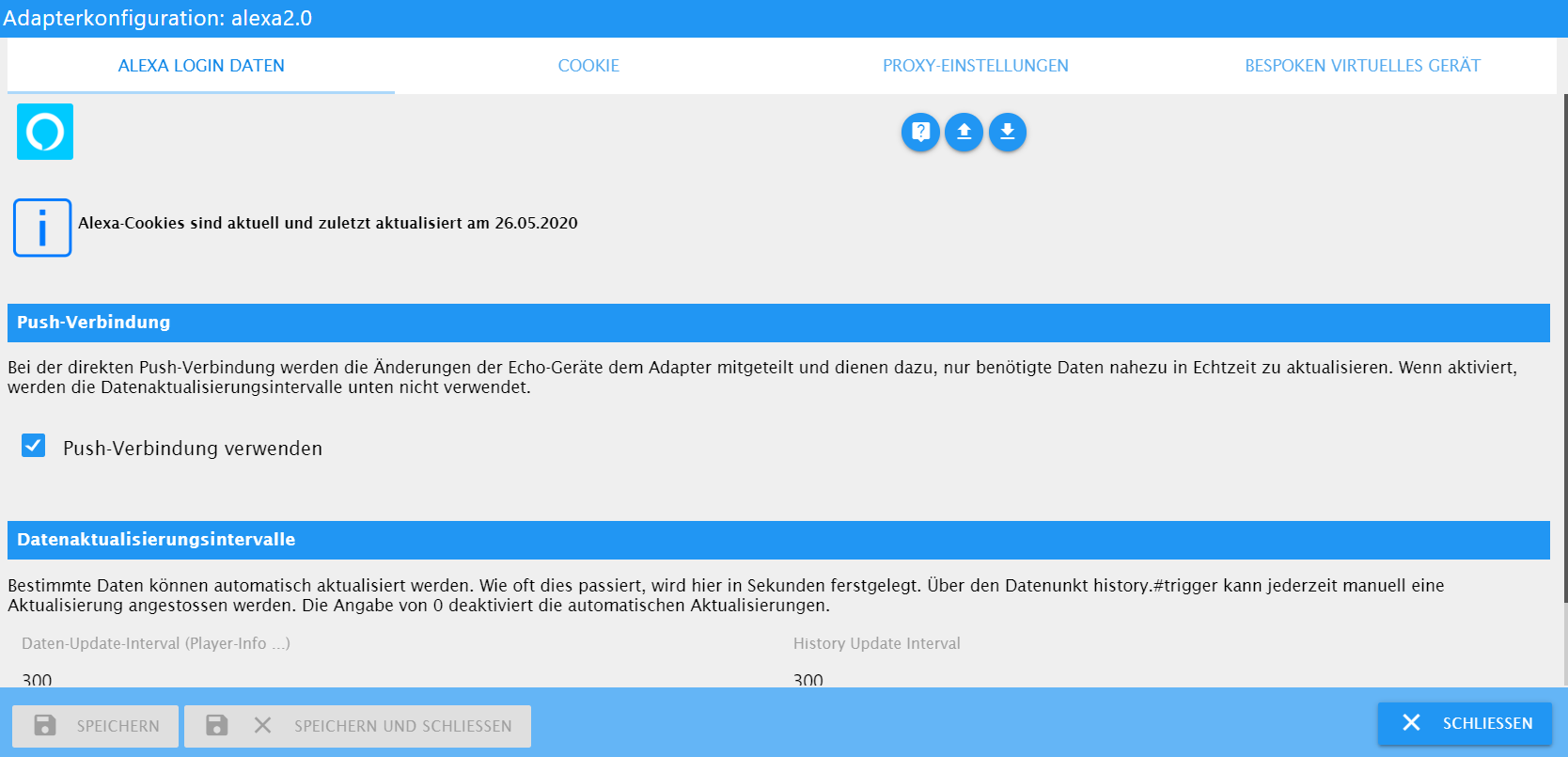
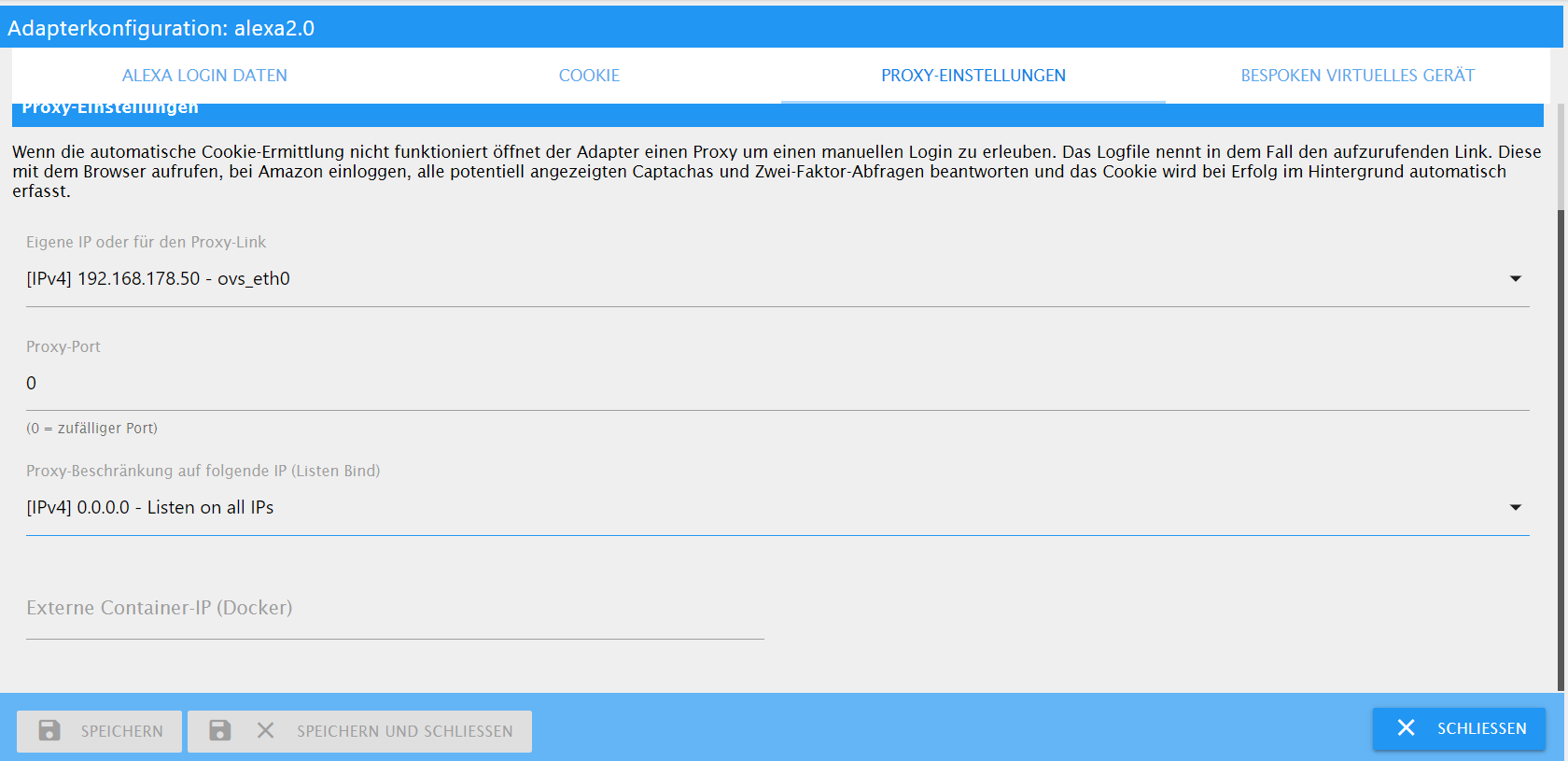
Wie sehen deine Adapter Einstellungen aus?
Zeig mal Screenshots.
Im Log meckert er irgendwas wegen Proxy IP. -
Anbei das Debug-Log (vielleicht hilft es ja) nach ausführen des Speak Commands.
host.buanet-iobroker1 2020-05-27 11:19:04.641 info Restart adapter system.adapter.alexa2.0 because enabled host.buanet-iobroker1 2020-05-27 11:19:04.641 error instance system.adapter.alexa2.0 terminated with code 156 (156) alexa2.0 2020-05-27 11:19:04.242 debug (8122) Alexa-Remote WS-MQTT: Close: 1005: alexa2.0 2020-05-27 11:19:04.123 warn (8122) Got terminate signal. Checking desired PID: 8137 vs own PID 8122 alexa2.0 2020-05-27 11:19:04.120 info (8122) Terminated (START_IMMEDIATELY_AFTER_STOP): Without reason alexa2.0 2020-05-27 11:19:04.119 info (8122) terminating alexa2.0 2020-05-27 11:19:04.116 warn (8122) Got terminate signal. Checking desired PID: 0 vs own PID 8122 host.buanet-iobroker1 2020-05-27 11:19:04.113 info instance system.adapter.alexa2.0 started with pid 8137 alexa2.0 2020-05-27 11:18:48.261 debug (8122) Alexa-Remote: Response: {"message":null} alexa2.0 2020-05-27 11:18:46.873 debug (8122) Alexa-Remote: Sending Request with {"host":"alexa.amazon.de","path":"/api/media/state?deviceSerialNumber=3a959138c8ca4254bcf51d390da4f0d2&deviceType=AVN2TMX8MU2YM&screenWidth=1392&_=15905711268 alexa2.0 2020-05-27 11:18:46.872 debug (8122) Alexa-Remote: No authentication check needed (time elapsed 11210) alexa2.0 2020-05-27 11:18:46.871 debug (8122) Alexa-Remote: Response: {"playerInfo":{"hint":null,"infoText":{"header":null,"headerSubtext1":null,"multiLineMode":false,"subText1":"Nora Van Elken","subText2":"Dance Brandneu","title":"I Wanna alexa2.0 2020-05-27 11:18:45.732 debug (8122) Alexa-Remote: Sending Request with {"host":"alexa.amazon.de","path":"/api/np/player?deviceSerialNumber=3a959138c8ca4254bcf51d390da4f0d2&deviceType=AVN2TMX8MU2YM&screenWidth=1392&_=1590571125732 alexa2.0 2020-05-27 11:18:45.732 debug (8122) Alexa-Remote: No authentication check needed (time elapsed 10070) alexa2.0 2020-05-27 11:18:44.731 debug (8122) Schedule new Player Update in 1000ms alexa2.0 2020-05-27 11:18:44.730 debug (8122) Alexa-Push-Connection Audio Player State change for 3a959138c8ca4254bcf51d390da4f0d2 -> PLAYING alexa2.0 2020-05-27 11:18:44.729 debug (8122) Alexa-Remote WS-MQTT: Command PUSH_AUDIO_PLAYER_STATE: { "destinationUserId": "AT38QD94LUX2S", "dopplerId": { "deviceType": "AVN2TMX8MU2YM", "deviceSerialNumber": "3a959 alexa2.0 2020-05-27 11:18:44.675 debug (8122) Alexa-Push-Connection Device Volume change for 3a959138c8ca4254bcf51d390da4f0d2 -> 12/false alexa2.0 2020-05-27 11:18:44.673 debug (8122) Alexa-Remote WS-MQTT: Command PUSH_VOLUME_CHANGE: { "destinationUserId": "AT38QD94LUX2S", "dopplerId": { "deviceType": "AVN2TMX8MU2YM", "deviceSerialNumber": "3a959138c8 alexa2.0 2020-05-27 11:18:40.819 debug (8122) Alexa-Remote: Response: {"bluetoothStates":[{"deviceSerialNumber":"5e5712e7dee848b3a82a3b61482a1682","deviceType":"A2WFDCBDEXOXR8","friendlyName":null,"gadgetPaired":false,"online":false,"paire alexa2.0 2020-05-27 11:18:40.306 debug (8122) Alexa-Remote: Sending Request with {"host":"alexa.amazon.de","path":"/api/bluetooth?cached=true&_=1590571120306","method":"GET","timeout":10000,"headers":{}} alexa2.0 2020-05-27 11:18:40.305 debug (8122) Alexa-Remote: No authentication check needed (time elapsed 4643) alexa2.0 2020-05-27 11:18:40.303 debug (8122) Ignore Device 8B5CC4C76B26496AB1311B1D858EBE57 because is App-Type alexa2.0 2020-05-27 11:18:40.302 info (8122) Device-type:A30YDR2MK8HMRV (TUNE_IN,VOICE_TRAINING,DISPLAY_BRIGHTNESS_ADJUST,DREAM_TRAINING,EQUALIZER_CONTROLLER_TREBLE,DS_VOLUME_SETTING,MICROPHONE,EQUALIZER_CONTROLLER_MIDRANGE,FAR_FIELD_ alexa2.0 2020-05-27 11:18:40.301 info (8122) Report to developer as GitHub issue with details for device. Please grab full next line pot. from logfile on disk if cutted alexa2.0 2020-05-27 11:18:40.300 info (8122) Unknown Device, but enabling commands, Try it and report back if commands work. alexa2.0 2020-05-27 11:18:40.299 info (8122) Device-type:AVN2TMX8MU2YM (TUNE_IN,VOLUME_SETTING,I_HEART_RADIO,MUSIC_SKILL,CHANGE_NAME,AUDIO_PLAYER,REMINDERS,LAMBDA_DOWNCHANNEL,SUPPORTS_CONNECTED_HOME_CLOUD_ONLY,PANDORA,AMAZON_MUSIC) alexa2.0 2020-05-27 11:18:40.299 info (8122) Report to developer as GitHub issue with details for device. Please grab full next line pot. from logfile on disk if cutted alexa2.0 2020-05-27 11:18:40.298 info (8122) Unknown Device, but enabling commands, Try it and report back if commands work. alexa2.0 2020-05-27 11:18:40.295 info (8122) Device-type:A2WFDCBDEXOXR8 (TUNE_IN,VOLUME_SETTING,KINDLE_BOOKS,DREAM_TRAINING,GOLDFISH,SOUND_SETTINGS,AUDIO_PLAYER,REMINDERS,DIALOG_INTERFACE_VERSION,SUPPORTS_CONNECTED_HOME_CLOUD_ONLY,AMA alexa2.0 2020-05-27 11:18:40.294 info (8122) Report to developer as GitHub issue with details for device. Please grab full next line pot. from logfile on disk if cutted alexa2.0 2020-05-27 11:18:40.294 info (8122) Unknown Device, but enabling commands, Try it and report back if commands work. alexa2.0 2020-05-27 11:18:40.291 debug (8122) Alexa-Remote: Response: {"devices":[{"accountName":"Soundbar","appDeviceList":[],"capabilities":["TUNE_IN","VOLUME_SETTING","KINDLE_BOOKS","DREAM_TRAINING","GOLDFISH","SOUND_SETTINGS","AUDIO_PL alexa2.0 2020-05-27 11:18:40.106 debug (8122) Alexa-Remote: Response: {"activities":[{"_disambiguationId":null,"activityStatus":"DISCARDED_NON_DEVICE_DIRECTED_INTENT","creationTimestamp":1590439504271,"description":"{\"summary\":\"sechs uh alexa2.0 2020-05-27 11:18:39.874 debug (8122) Alexa-Remote: Sending Request with {"host":"alexa.amazon.de","path":"/api/devices-v2/device?cached=true&_=1590571119874","method":"GET","timeout":10000,"headers":{}} alexa2.0 2020-05-27 11:18:39.874 debug (8122) Alexa-Remote: No authentication check needed (time elapsed 4212) alexa2.0 2020-05-27 11:18:39.871 debug (8122) Alexa-Remote: Sending Request with {"host":"alexa.amazon.de","path":"/api/activities?startTime=&size=3&offset=1","method":"GET","timeout":10000,"headers":{}} alexa2.0 2020-05-27 11:18:39.871 debug (8122) Alexa-Remote: No authentication check needed (time elapsed 4209) alexa2.0 2020-05-27 11:18:37.869 info (8122) Alexa-Push-Connection established. Disable Polling alexa2.0 2020-05-27 11:18:37.868 debug (8122) Alexa-Remote WS-MQTT: Initialization completed alexa2.0 2020-05-27 11:18:37.868 debug (8122) Alexa-Remote WS-MQTT: Received Pong alexa2.0 2020-05-27 11:18:37.737 debug (8122) Alexa-Remote WS-MQTT: Send First Ping alexa2.0 2020-05-27 11:18:37.735 debug (8122) Alexa-Remote WS-MQTT: Initialization Msg 4 (Register Connection) sent alexa2.0 2020-05-27 11:18:37.608 debug (8122) Alexa-Remote WS-MQTT: Initialization Msg 2+3 sent alexa2.0 2020-05-27 11:18:37.598 debug (8122) Alexa-Remote WS-MQTT: Initialization Msg 1 sent alexa2.0 2020-05-27 11:18:37.597 debug (8122) Alexa-Remote WS-MQTT: Open: https://dp-gw-na.amazon.de/?x-amz-device-type=ALEGCNGL9K0HM&x-amz-device-serial=262-2396570-4559017-1590571117066 alexa2.0 2020-05-27 11:18:37.346 debug (8122) Alexa-Remote: Sending Request with {"host":"alexa.amazon.de","path":"/api/behaviors/automations?limit=2000","method":"GET","timeout":10000,"headers":{}} alexa2.0 2020-05-27 11:18:37.345 debug (8122) Alexa-Remote: No authentication check needed (time elapsed 1683) alexa2.0 2020-05-27 11:18:37.344 debug (8122) Alexa-Remote: Response: [{"id":"AMAZON_MUSIC","displayName":"Amazon Music","description":"Music provider","supportedProperties":["Alexa.Music.PlaySearchPhrase"],"supportedTriggers":[],"supporte alexa2.0 2020-05-27 11:18:37.078 debug (8122) Alexa-Remote: Sending Request with {"host":"alexa.amazon.de","path":"/api/behaviors/entities?skillId=amzn1.ask.1p.music","method":"GET","timeout":10000,"headers":{"Routines-Version":"1.1.210292 alexa2.0 2020-05-27 11:18:37.077 debug (8122) Alexa-Remote: No authentication check needed (time elapsed 1415) alexa2.0 2020-05-27 11:18:37.063 debug (8122) Alexa-Remote: Response: {"notifications":[{"alarmTime":0,"automationId":null,"createdDate":1588925522230,"deferredAtTime":null,"deliveryType":null,"deviceName":null,"deviceSerialNumber":"5e5712 alexa2.0 2020-05-27 11:18:36.922 debug (8122) Alexa-Remote: Sending Request with {"host":"alexa.amazon.de","path":"/api/notifications?cached=true&_=1590571116922","method":"GET","timeout":10000,"headers":{}} alexa2.0 2020-05-27 11:18:36.921 debug (8122) Alexa-Remote: No authentication check needed (time elapsed 1259) alexa2.0 2020-05-27 11:18:36.920 debug (8122) Alexa-Remote: Response: {"bluetoothStates":[{"deviceSerialNumber":"5e5712e7dee848b3a82a3b61482a1682","deviceType":"A2WFDCBDEXOXR8","friendlyName":null,"gadgetPaired":false,"online":false,"paire alexa2.0 2020-05-27 11:18:36.427 debug (8122) Alexa-Remote: Sending Request with {"host":"alexa.amazon.de","path":"/api/bluetooth?cached=true&_=1590571116427","method":"GET","timeout":10000,"headers":{}} alexa2.0 2020-05-27 11:18:36.427 debug (8122) Alexa-Remote: No authentication check needed (time elapsed 765) alexa2.0 2020-05-27 11:18:36.426 debug (8122) Alexa-Remote: Response: {"wakeWords":[{"active":true,"deviceSerialNumber":"G091470400270763","deviceType":"A30YDR2MK8HMRV","midFieldState":null,"wakeWord":"ALEXA"}]} alexa2.0 2020-05-27 11:18:36.270 debug (8122) Alexa-Remote: Sending Request with {"host":"alexa.amazon.de","path":"/api/wake-word?_=1590571116270","method":"GET","timeout":10000,"headers":{}} alexa2.0 2020-05-27 11:18:36.269 debug (8122) Alexa-Remote: No authentication check needed (time elapsed 607) alexa2.0 2020-05-27 11:18:36.267 debug (8122) Alexa-Remote: Response: {"devices":[{"accountName":"Soundbar","appDeviceList":[],"capabilities":["PERSISTENT_CONNECTION","CUSTOM_ALARM_TONE","KINDLE_BOOKS","SLEEP","SOUND_SETTINGS","DIALOG_INTE alexa2.0 2020-05-27 11:18:35.929 debug (8122) Alexa-Remote: Sending Request with {"host":"alexa.amazon.de","path":"/api/devices-v2/device?cached=true&_=1590571115929","method":"GET","timeout":10000,"headers":{}} alexa2.0 2020-05-27 11:18:35.929 debug (8122) Alexa-Remote: No authentication check needed (time elapsed 267) alexa2.0 2020-05-27 11:18:35.927 debug (8122) Alexa-Remote: Response: [{"commsId":"amzn1.comms.id.person.amzn1~amzn1.account.AFKA3THV2WNC2MBLWL6N2VGGOWOA","directedId":"amzn1.account.AFKA3THV2WNC2MBLWL6N2VGGOWOA","phoneCountryCode":"49","p alexa2.0 2020-05-27 11:18:35.663 debug (8122) Alexa-Remote: Sending Request with {"host":"alexa-comms-mobile-service.amazon.de","path":"/accounts","method":"GET","timeout":10000,"headers":{}} alexa2.0 2020-05-27 11:18:35.662 debug (8122) Alexa-Remote: No authentication check needed (time elapsed 0) alexa2.0 2020-05-27 11:18:35.661 debug (8122) Alexa-Remote: Authentication checked: true alexa2.0 2020-05-27 11:18:35.660 debug (8122) Alexa-Remote: Response: {"authentication":{"authenticated":true,"canAccessPrimeMusicContent":true,"customerEmail":"xxx@hotmail.de","customerId":"xxxx","customerName" alexa2.0 2020-05-27 11:18:35.457 debug (8122) Alexa-Remote: Sending Request with {"host":"alexa.amazon.de","path":"/api/bootstrap?version=0","method":"GET","timeout":10000,"headers":{}} alexa2.0 2020-05-27 11:18:35.455 debug (8122) Alexa-Remote: cookie was provided alexa2.0 2020-05-27 11:18:35.454 debug (8122) Alexa-Remote: Use as Base-URL: alexa.amazon.de alexa2.0 2020-05-27 11:18:35.454 debug (8122) Alexa-Remote: Use as Login-Amazon-URL: amazon.de alexa2.0 2020-05-27 11:18:35.453 debug (8122) Alexa-Remote: Use as User-Agent: Mozilla/5.0 (X11; Linux x86_64) AppleWebKit/537.36 (KHTML, like Gecko) Chrome/51.0.2704.103 Safari/537.36 alexa2.0 2020-05-27 11:18:35.179 info (8122) starting. Version 3.1.2 in /opt/iobroker/node_modules/iobroker.alexa2, node: v10.20.1 host.buanet-iobroker1 2020-05-27 11:18:34.098 info Restart adapter system.adapter.alexa2.0 because enabled host.buanet-iobroker1 2020-05-27 11:18:34.097 error instance system.adapter.alexa2.0 terminated with code 156 (156) alexa2.0 2020-05-27 11:18:33.693 debug (8107) Alexa-Remote WS-MQTT: Close: 1005: alexa2.0 2020-05-27 11:18:33.577 warn (8107) Got terminate signal. Checking desired PID: 8122 vs own PID 8107 alexa2.0 2020-05-27 11:18:33.574 info (8107) Terminated (START_IMMEDIATELY_AFTER_STOP): Without reason alexa2.0 2020-05-27 11:18:33.573 info (8107) terminating alexa2.0 2020-05-27 11:18:33.570 warn (8107) Got terminate signal. Checking desired PID: 0 vs own PID 8107 host.buanet-iobroker1 2020-05-27 11:18:33.567 info instance system.adapter.alexa2.0 started with pid 8122 alexa2.0 2020-05-27 11:18:10.667 debug (8107) Alexa-Remote: Response: {"bluetoothStates":[{"deviceSerialNumber":"5e5712e7dee848b3a82a3b61482a1682","deviceType":"A2WFDCBDEXOXR8","friendlyName":null,"gadgetPaired":false,"online":false,"paire alexa2.0 2020-05-27 11:18:10.128 debug (8107) Alexa-Remote: Sending Request with {"host":"alexa.amazon.de","path":"/api/bluetooth?cached=true&_=1590571090128","method":"GET","timeout":10000,"headers":{}} alexa2.0 2020-05-27 11:18:10.127 debug (8107) Alexa-Remote: No authentication check needed (time elapsed 4681) alexa2.0 2020-05-27 11:18:10.126 debug (8107) Ignore Device 8B5CC4C76B26496AB1311B1D858EBE57 because is App-Type alexa2.0 2020-05-27 11:18:10.124 info (8107) Device-type:A30YDR2MK8HMRV (TUNE_IN,VOICE_TRAINING,DISPLAY_BRIGHTNESS_ADJUST,DREAM_TRAINING,EQUALIZER_CONTROLLER_TREBLE,DS_VOLUME_SETTING,MICROPHONE,EQUALIZER_CONTROLLER_MIDRANGE,FAR_FIELD_ alexa2.0 2020-05-27 11:18:10.124 info (8107) Report to developer as GitHub issue with details for device. Please grab full next line pot. from logfile on disk if cutted alexa2.0 2020-05-27 11:18:10.124 info (8107) Unknown Device, but enabling commands, Try it and report back if commands work. alexa2.0 2020-05-27 11:18:10.122 info (8107) Device-type:AVN2TMX8MU2YM (TUNE_IN,VOLUME_SETTING,I_HEART_RADIO,MUSIC_SKILL,CHANGE_NAME,AUDIO_PLAYER,REMINDERS,LAMBDA_DOWNCHANNEL,SUPPORTS_CONNECTED_HOME_CLOUD_ONLY,PANDORA,AMAZON_MUSIC) alexa2.0 2020-05-27 11:18:10.122 info (8107) Report to developer as GitHub issue with details for device. Please grab full next line pot. from logfile on disk if cutted alexa2.0 2020-05-27 11:18:10.121 info (8107) Unknown Device, but enabling commands, Try it and report back if commands work. alexa2.0 2020-05-27 11:18:10.119 info (8107) Device-type:A2WFDCBDEXOXR8 (TUNE_IN,VOLUME_SETTING,KINDLE_BOOKS,DREAM_TRAINING,GOLDFISH,SOUND_SETTINGS,AUDIO_PLAYER,REMINDERS,DIALOG_INTERFACE_VERSION,SUPPORTS_CONNECTED_HOME_CLOUD_ONLY,AMA alexa2.0 2020-05-27 11:18:10.118 info (8107) Report to developer as GitHub issue with details for device. Please grab full next line pot. from logfile on disk if cutted alexa2.0 2020-05-27 11:18:10.118 info (8107) Unknown Device, but enabling commands, Try it and report back if commands work. alexa2.0 2020-05-27 11:18:10.114 debug (8107) Alexa-Remote: Response: {"devices":[{"accountName":"Soundbar","appDeviceList":[],"capabilities":["TUNE_IN","VOLUME_SETTING","KINDLE_BOOKS","DREAM_TRAINING","GOLDFISH","SOUND_SETTINGS","AUDIO_PL alexa2.0 2020-05-27 11:18:09.941 debug (8107) Alexa-Remote: Response: {"activities":[{"_disambiguationId":null,"activityStatus":"DISCARDED_NON_DEVICE_DIRECTED_INTENT","creationTimestamp":1590439504271,"description":"{\"summary\":\"sechs uh alexa2.0 2020-05-27 11:18:09.712 debug (8107) Alexa-Remote: Sending Request with {"host":"alexa.amazon.de","path":"/api/devices-v2/device?cached=true&_=1590571089712","method":"GET","timeout":10000,"headers":{}} alexa2.0 2020-05-27 11:18:09.711 debug (8107) Alexa-Remote: No authentication check needed (time elapsed 4265) alexa2.0 2020-05-27 11:18:09.709 debug (8107) Alexa-Remote: Sending Request with {"host":"alexa.amazon.de","path":"/api/activities?startTime=&size=3&offset=1","method":"GET","timeout":10000,"headers":{}} alexa2.0 2020-05-27 11:18:09.708 debug (8107) Alexa-Remote: No authentication check needed (time elapsed 4262) alexa2.0 2020-05-27 11:18:07.706 info (8107) Alexa-Push-Connection established. Disable Polling alexa2.0 2020-05-27 11:18:07.705 debug (8107) Alexa-Remote WS-MQTT: Initialization completed alexa2.0 2020-05-27 11:18:07.705 debug (8107) Alexa-Remote WS-MQTT: Received Pong alexa2.0 2020-05-27 11:18:07.558 debug (8107) Alexa-Remote WS-MQTT: Send First Ping alexa2.0 2020-05-27 11:18:07.556 debug (8107) Alexa-Remote WS-MQTT: Initialization Msg 4 (Register Connection) sent alexa2.0 2020-05-27 11:18:07.431 debug (8107) Alexa-Remote WS-MQTT: Initialization Msg 2+3 sent alexa2.0 2020-05-27 11:18:07.421 debug (8107) Alexa-Remote WS-MQTT: Initialization Msg 1 sent alexa2.0 2020-05-27 11:18:07.420 debug (8107) Alexa-Remote WS-MQTT: Open: https://dp-gw-na.amazon.de/?x-amz-device-type=ALEGCNGL9K0HM&x-amz-device-serial=262-2396570-4559017-1590571086888 alexa2.0 2020-05-27 11:18:07.182 debug (8107) Alexa-Remote: Sending Request with {"host":"alexa.amazon.de","path":"/api/behaviors/automations?limit=2000","method":"GET","timeout":10000,"headers":{}} alexa2.0 2020-05-27 11:18:07.181 debug (8107) Alexa-Remote: No authentication check needed (time elapsed 1735) alexa2.0 2020-05-27 11:18:07.180 debug (8107) Alexa-Remote: Response: [{"id":"AMAZON_MUSIC","displayName":"Amazon Music","description":"Music provider","supportedProperties":["Alexa.Music.PlaySearchPhrase"],"supportedTriggers":[],"supporte alexa2.0 2020-05-27 11:18:06.904 debug (8107) Alexa-Remote: Sending Request with {"host":"alexa.amazon.de","path":"/api/behaviors/entities?skillId=amzn1.ask.1p.music","method":"GET","timeout":10000,"headers":{"Routines-Version":"1.1.210292 alexa2.0 2020-05-27 11:18:06.902 debug (8107) Alexa-Remote: No authentication check needed (time elapsed 1456) alexa2.0 2020-05-27 11:18:06.884 debug (8107) Alexa-Remote: Response: {"notifications":[{"alarmTime":0,"automationId":null,"createdDate":1588925522230,"deferredAtTime":null,"deliveryType":null,"deviceName":null,"deviceSerialNumber":"5e5712 alexa2.0 2020-05-27 11:18:06.739 debug (8107) Alexa-Remote: Sending Request with {"host":"alexa.amazon.de","path":"/api/notifications?cached=true&_=1590571086739","method":"GET","timeout":10000,"headers":{}} alexa2.0 2020-05-27 11:18:06.738 debug (8107) Alexa-Remote: No authentication check needed (time elapsed 1292) alexa2.0 2020-05-27 11:18:06.736 debug (8107) Alexa-Remote: Response: {"bluetoothStates":[{"deviceSerialNumber":"5e5712e7dee848b3a82a3b61482a1682","deviceType":"A2WFDCBDEXOXR8","friendlyName":null,"gadgetPaired":false,"online":false,"paire alexa2.0 2020-05-27 11:18:06.233 debug (8107) Alexa-Remote: Sending Request with {"host":"alexa.amazon.de","path":"/api/bluetooth?cached=true&_=1590571086233","method":"GET","timeout":10000,"headers":{}} alexa2.0 2020-05-27 11:18:06.233 debug (8107) Alexa-Remote: No authentication check needed (time elapsed 787) alexa2.0 2020-05-27 11:18:06.231 debug (8107) Alexa-Remote: Response: {"wakeWords":[{"active":true,"deviceSerialNumber":"G091470400270763","deviceType":"A30YDR2MK8HMRV","midFieldState":null,"wakeWord":"ALEXA"}]} alexa2.0 2020-05-27 11:18:06.069 debug (8107) Alexa-Remote: Sending Request with {"host":"alexa.amazon.de","path":"/api/wake-word?_=1590571086069","method":"GET","timeout":10000,"headers":{}} alexa2.0 2020-05-27 11:18:06.069 debug (8107) Alexa-Remote: No authentication check needed (time elapsed 623) alexa2.0 2020-05-27 11:18:06.066 debug (8107) Alexa-Remote: Response: {"devices":[{"accountName":"Soundbar","appDeviceList":[],"capabilities":["MUSIC_SKILL","AUDIBLE","AMAZON_MUSIC","I_HEART_RADIO","CUSTOM_ALARM_TONE","SOUND_SETTINGS","VOL alexa2.0 2020-05-27 11:18:05.706 debug (8107) Alexa-Remote: Sending Request with {"host":"alexa.amazon.de","path":"/api/devices-v2/device?cached=true&_=1590571085705","method":"GET","timeout":10000,"headers":{}} alexa2.0 2020-05-27 11:18:05.705 debug (8107) Alexa-Remote: No authentication check needed (time elapsed 259) alexa2.0 2020-05-27 11:18:05.704 debug (8107) Alexa-Remote: Response: [{"commsId":"amzn1.comms.id.person.amzn1~amzn1.account.AFKA3THV2WNC2MBLWL6N2VGGOWOA","directedId":"amzn1.account.AFKA3THV2WNC2MBLWL6N2VGGOWOA","phoneCountryCode":"49","p alexa2.0 2020-05-27 11:18:05.448 debug (8107) Alexa-Remote: Sending Request with {"host":"alexa-comms-mobile-service.amazon.de","path":"/accounts","method":"GET","timeout":10000,"headers":{}} alexa2.0 2020-05-27 11:18:05.447 debug (8107) Alexa-Remote: No authentication check needed (time elapsed 1) alexa2.0 2020-05-27 11:18:05.446 debug (8107) Alexa-Remote: Authentication checked: true alexa2.0 2020-05-27 11:18:05.445 debug (8107) Alexa-Remote: Response: {"authentication":{"authenticated":true,"canAccessPrimeMusicContent":true,"customerEmail":"xxxx@hotmail.de","customerId":"xxxx","customerName" alexa2.0 2020-05-27 11:18:05.147 debug (8107) Alexa-Remote: Sending Request with {"host":"alexa.amazon.de","path":"/api/bootstrap?version=0","method":"GET","timeout":10000,"headers":{}} alexa2.0 2020-05-27 11:18:05.145 debug (8107) Alexa-Remote: cookie was provided alexa2.0 2020-05-27 11:18:05.144 debug (8107) Alexa-Remote: Use as Base-URL: alexa.amazon.de alexa2.0 2020-05-27 11:18:05.144 debug (8107) Alexa-Remote: Use as Login-Amazon-URL: amazon.de alexa2.0 2020-05-27 11:18:05.143 debug (8107) Alexa-Remote: Use as User-Agent: Mozilla/5.0 (X11; Linux x86_64) AppleWebKit/537.36 (KHTML, like Gecko) Chrome/51.0.2704.103 Safari/537.36 alexa2.0 2020-05-27 11:18:04.861 info (8107) starting. Version 3.1.2 in /opt/iobroker/node_modules/iobroker.alexa2, node: v10.20.1 host.buanet-iobroker1 2020-05-27 11:18:03.550 info Restart adapter system.adapter.alexa2.0 because enabled host.buanet-iobroker1 2020-05-27 11:18:03.550 error instance system.adapter.alexa2.0 terminated with code 156 (156) alexa2.0 2020-05-27 11:18:03.143 debug (8092) Alexa-Remote WS-MQTT: Close: 1005: alexa2.0 2020-05-27 11:18:03.028 warn (8092) Got terminate signal. Checking desired PID: 8107 vs own PID 8092 alexa2.0 2020-05-27 11:18:03.025 info (8092) Terminated (START_IMMEDIATELY_AFTER_STOP): Without reason alexa2.0 2020-05-27 11:18:03.024 info (8092) terminating alexa2.0 2020-05-27 11:18:03.021 warn (8092) Got terminate signal. Checking desired PID: 0 vs own PID 8092 host.buanet-iobroker1 2020-05-27 11:18:03.018 info instance system.adapter.alexa2.0 started with pid 8107 alexa2.0 2020-05-27 11:17:39.776 debug (8092) Alexa-Remote: Response: {"bluetoothStates":[{"deviceSerialNumber":"5e5712e7dee848b3a82a3b61482a1682","deviceType":"A2WFDCBDEXOXR8","friendlyName":null,"gadgetPaired":false,"online":false,"paire alexa2.0 2020-05-27 11:17:39.279 debug (8092) Alexa-Remote: Sending Request with {"host":"alexa.amazon.de","path":"/api/bluetooth?cached=true&_=1590571059279","method":"GET","timeout":10000,"headers":{}} alexa2.0 2020-05-27 11:17:39.278 debug (8092) Alexa-Remote: No authentication check needed (time elapsed 4683) alexa2.0 2020-05-27 11:17:39.277 debug (8092) Ignore Device 8B5CC4C76B26496AB1311B1D858EBE57 because is App-Type alexa2.0 2020-05-27 11:17:39.275 info (8092) Device-type:A30YDR2MK8HMRV (GUARD_EARCON,SOUND_SETTINGS,SUPPORTS_LOCALE,I_HEART_RADIO,FAR_FIELD_WAKE_WORD,PERSISTENT_CONNECTION,UPDATE_WIFI,EQUALIZER_CONTROLLER_MIDRANGE,ACTIVE_AFTER_FRO,TU alexa2.0 2020-05-27 11:17:39.275 info (8092) Report to developer as GitHub issue with details for device. Please grab full next line pot. from logfile on disk if cutted alexa2.0 2020-05-27 11:17:39.274 info (8092) Unknown Device, but enabling commands, Try it and report back if commands work. alexa2.0 2020-05-27 11:17:39.273 info (8092) Device-type:AVN2TMX8MU2YM (CHANGE_NAME,PANDORA,AUDIO_PLAYER,SUPPORTS_CONNECTED_HOME_CLOUD_ONLY,REMINDERS,LAMBDA_DOWNCHANNEL,AMAZON_MUSIC,VOLUME_SETTING,I_HEART_RADIO,MUSIC_SKILL,TUNE_IN) alexa2.0 2020-05-27 11:17:39.272 info (8092) Report to developer as GitHub issue with details for device. Please grab full next line pot. from logfile on disk if cutted alexa2.0 2020-05-27 11:17:39.272 info (8092) Unknown Device, but enabling commands, Try it and report back if commands work. alexa2.0 2020-05-27 11:17:39.269 info (8092) Device-type:A2WFDCBDEXOXR8 (GOLDFISH,SLEEP,MICROPHONE,AUDIO_PLAYER,SOUND_SETTINGS,SUPPORTS_CONNECTED_HOME_CLOUD_ONLY,REMINDERS,I_HEART_RADIO,PERSISTENT_CONNECTION,TUNE_IN,KINDLE_BOOKS,DEREG alexa2.0 2020-05-27 11:17:39.269 info (8092) Report to developer as GitHub issue with details for device. Please grab full next line pot. from logfile on disk if cutted alexa2.0 2020-05-27 11:17:39.268 info (8092) Unknown Device, but enabling commands, Try it and report back if commands work. alexa2.0 2020-05-27 11:17:39.264 debug (8092) Alexa-Remote: Response: {"devices":[{"accountName":"Soundbar","appDeviceList":[],"capabilities":["GOLDFISH","SLEEP","MICROPHONE","AUDIO_PLAYER","SOUND_SETTINGS","SUPPORTS_CONNECTED_HOME_CLOUD_O alexa2.0 2020-05-27 11:17:39.102 debug (8092) Alexa-Remote: Response: {"activities":[{"_disambiguationId":null,"activityStatus":"DISCARDED_NON_DEVICE_DIRECTED_INTENT","creationTimestamp":1590439504271,"description":"{\"summary\":\"sechs uh alexa2.0 2020-05-27 11:17:38.873 debug (8092) Alexa-Remote: Sending Request with {"host":"alexa.amazon.de","path":"/api/devices-v2/device?cached=true&_=1590571058873","method":"GET","timeout":10000,"headers":{}} alexa2.0 2020-05-27 11:17:38.872 debug (8092) Alexa-Remote: No authentication check needed (time elapsed 4277) alexa2.0 2020-05-27 11:17:38.870 debug (8092) Alexa-Remote: Sending Request with {"host":"alexa.amazon.de","path":"/api/activities?startTime=&size=3&offset=1","method":"GET","timeout":10000,"headers":{}} alexa2.0 2020-05-27 11:17:38.869 debug (8092) Alexa-Remote: No authentication check needed (time elapsed 4274) alexa2.0 2020-05-27 11:17:36.868 info (8092) Alexa-Push-Connection established. Disable Polling alexa2.0 2020-05-27 11:17:36.867 debug (8092) Alexa-Remote WS-MQTT: Initialization completed alexa2.0 2020-05-27 11:17:36.866 debug (8092) Alexa-Remote WS-MQTT: Received Pong alexa2.0 2020-05-27 11:17:36.733 debug (8092) Alexa-Remote WS-MQTT: Send First Ping alexa2.0 2020-05-27 11:17:36.731 debug (8092) Alexa-Remote WS-MQTT: Initialization Msg 4 (Register Connection) sent alexa2.0 2020-05-27 11:17:36.606 debug (8092) Alexa-Remote WS-MQTT: Initialization Msg 2+3 sent alexa2.0 2020-05-27 11:17:36.596 debug (8092) Alexa-Remote WS-MQTT: Initialization Msg 1 sent alexa2.0 2020-05-27 11:17:36.595 debug (8092) Alexa-Remote WS-MQTT: Open: https://dp-gw-na.amazon.de/?x-amz-device-type=ALEGCNGL9K0HM&x-amz-device-serial=262-2396570-4559017-1590571056053 alexa2.0 2020-05-27 11:17:36.325 debug (8092) Alexa-Remote: Sending Request with {"host":"alexa.amazon.de","path":"/api/behaviors/automations?limit=2000","method":"GET","timeout":10000,"headers":{}} alexa2.0 2020-05-27 11:17:36.324 debug (8092) Alexa-Remote: No authentication check needed (time elapsed 1729) alexa2.0 2020-05-27 11:17:36.323 debug (8092) Alexa-Remote: Response: [{"id":"AMAZON_MUSIC","displayName":"Amazon Music","description":"Music provider","supportedProperties":["Alexa.Music.PlaySearchPhrase"],"supportedTriggers":[],"supporte alexa2.0 2020-05-27 11:17:36.064 debug (8092) Alexa-Remote: Sending Request with {"host":"alexa.amazon.de","path":"/api/behaviors/entities?skillId=amzn1.ask.1p.music","method":"GET","timeout":10000,"headers":{"Routines-Version":"1.1.210292 alexa2.0 2020-05-27 11:17:36.064 debug (8092) Alexa-Remote: No authentication check needed (time elapsed 1469) alexa2.0 2020-05-27 11:17:36.050 debug (8092) Alexa-Remote: Response: {"notifications":[{"alarmTime":0,"automationId":null,"createdDate":1588925522230,"deferredAtTime":null,"deliveryType":null,"deviceName":null,"deviceSerialNumber":"5e5712 alexa2.0 2020-05-27 11:17:35.912 debug (8092) Alexa-Remote: Sending Request with {"host":"alexa.amazon.de","path":"/api/notifications?cached=true&_=1590571055912","method":"GET","timeout":10000,"headers":{}} alexa2.0 2020-05-27 11:17:35.912 debug (8092) Alexa-Remote: No authentication check needed (time elapsed 1316) alexa2.0 2020-05-27 11:17:35.910 debug (8092) Alexa-Remote: Response: {"bluetoothStates":[{"deviceSerialNumber":"5e5712e7dee848b3a82a3b61482a1682","deviceType":"A2WFDCBDEXOXR8","friendlyName":null,"gadgetPaired":false,"online":false,"paire alexa2.0 2020-05-27 11:17:35.412 debug (8092) Alexa-Remote: Sending Request with {"host":"alexa.amazon.de","path":"/api/bluetooth?cached=true&_=1590571055412","method":"GET","timeout":10000,"headers":{}} alexa2.0 2020-05-27 11:17:35.412 debug (8092) Alexa-Remote: No authentication check needed (time elapsed 817) alexa2.0 2020-05-27 11:17:35.411 debug (8092) Alexa-Remote: Response: {"wakeWords":[{"active":true,"deviceSerialNumber":"G091470400270763","deviceType":"A30YDR2MK8HMRV","midFieldState":null,"wakeWord":"ALEXA"}]} alexa2.0 2020-05-27 11:17:35.246 debug (8092) Alexa-Remote: Sending Request with {"host":"alexa.amazon.de","path":"/api/wake-word?_=1590571055246","method":"GET","timeout":10000,"headers":{}} alexa2.0 2020-05-27 11:17:35.245 debug (8092) Alexa-Remote: No authentication check needed (time elapsed 650) alexa2.0 2020-05-27 11:17:35.242 debug (8092) Alexa-Remote: Response: {"devices":[{"accountName":"Soundbar","appDeviceList":[],"capabilities":["AUDIO_PLAYER","MUSIC_SKILL","SUPPORTS_CONNECTED_HOME_CLOUD_ONLY","AUDIBLE","CUSTOM_ALARM_TONE", alexa2.0 2020-05-27 11:17:34.841 debug (8092) Alexa-Remote: Sending Request with {"host":"alexa.amazon.de","path":"/api/devices-v2/device?cached=true&_=1590571054841","method":"GET","timeout":10000,"headers":{}} alexa2.0 2020-05-27 11:17:34.840 debug (8092) Alexa-Remote: No authentication check needed (time elapsed 245) alexa2.0 2020-05-27 11:17:34.839 debug (8092) Alexa-Remote: Response: [{"commsId":"amzn1.comms.id.person.amzn1~amzn1.account.AFKA3THV2WNC2MBLWL6N2VGGOWOA","directedId":"amzn1.account.AFKA3THV2WNC2MBLWL6N2VGGOWOA","phoneCountryCode":"49","p alexa2.0 2020-05-27 11:17:34.597 debug (8092) Alexa-Remote: Sending Request with {"host":"alexa-comms-mobile-service.amazon.de","path":"/accounts","method":"GET","timeout":10000,"headers":{}} alexa2.0 2020-05-27 11:17:34.596 debug (8092) Alexa-Remote: No authentication check needed (time elapsed 1) alexa2.0 2020-05-27 11:17:34.595 debug (8092) Alexa-Remote: Authentication checked: true alexa2.0 2020-05-27 11:17:34.590 debug (8092) Alexa-Remote: Response: {"authentication":{"authenticated":true,"canAccessPrimeMusicContent":true,"customerEmail":"xxxx@hotmail.de","customerId":"xxxx","customerName" alexa2.0 2020-05-27 11:17:34.370 debug (8092) Alexa-Remote: Sending Request with {"host":"alexa.amazon.de","path":"/api/bootstrap?version=0","method":"GET","timeout":10000,"headers":{}} alexa2.0 2020-05-27 11:17:34.368 debug (8092) Alexa-Remote: cookie was provided alexa2.0 2020-05-27 11:17:34.367 debug (8092) Alexa-Remote: Use as Base-URL: alexa.amazon.de alexa2.0 2020-05-27 11:17:34.367 debug (8092) Alexa-Remote: Use as Login-Amazon-URL: amazon.de alexa2.0 2020-05-27 11:17:34.366 debug (8092) Alexa-Remote: Use as User-Agent: Mozilla/5.0 (X11; Linux x86_64) AppleWebKit/537.36 (KHTML, like Gecko) Chrome/51.0.2704.103 Safari/537.36 alexa2.0 2020-05-27 11:17:34.085 info (8092) starting. Version 3.1.2 in /opt/iobroker/node_modules/iobroker.alexa2, node: v10.20.1 host.buanet-iobroker1 2020-05-27 11:17:33.003 info Restart adapter system.adapter.alexa2.0 because enabled host.buanet-iobroker1 2020-05-27 11:17:33.003 error instance system.adapter.alexa2.0 terminated with code 156 (156) alexa2.0 2020-05-27 11:17:32.603 debug (8077) Alexa-Remote WS-MQTT: Close: 1005: alexa2.0 2020-05-27 11:17:32.485 warn (8077) Got terminate signal. Checking desired PID: 8092 vs own PID 8077 alexa2.0 2020-05-27 11:17:32.482 info (8077) Terminated (START_IMMEDIATELY_AFTER_STOP): Without reason alexa2.0 2020-05-27 11:17:32.481 info (8077) terminating alexa2.0 2020-05-27 11:17:32.478 warn (8077) Got terminate signal. Checking desired PID: 0 vs own PID 8077 -
Ich hab an und ab mal das gleiche Problem, so wie auch heute (nach einem Update auf node: v12.17.0 und js-controller: 3.1.4 mal wieder.
Wenn ich den Adapter stoppe und wieder starte, ist es reines Glück, wenn die Alexa "Outputs" funktionieren. Was mir jedoch aufgefallen ist: Wenn ich den Adapter stoppe, ein paar Minuten (<5) warte und wieder neu starte, geht es danach meistens. Eben im Log ist mir dabei noch folgendes aufgefallen:
2020-05-31 16:23:59.531  - info: alexa2.0 (6464) Subscribing to states...
2020-05-31 16:23:59.533  - info: alexa2.0 (6464) Deleting the following states: ["Echo-Devices.G09147040134034N.Timer.nextTimerDate"]
Nur, wenn die beiden Zeilen nach dem Start des Adapters auftauchen geht auch die Sprachausgabe wie sie soll.
Vielleicht ist da irgendeine Art Throttling beim Amazon aktiv? In einer Issue auf Git wird von einem hohen Datenaufkommen im Zusammenhang mit einem abgelaufenen Cookie berichtet.
-
Bitte mal in der 3.2.0 schauen ob es weiter auftritt und wenn dann bitte Logs senden. Ja es gab mal in einer früheren Version Probleme mit zu vielen Requests und Throttling von Amazon , aber die 3.1.2 sollte das nicht haben ... aber jetzt machen wir mal bei 3.2.0 weiter
-
Mal eine Frage - was kann hiermit gemeint sein? Die Gruppe habe ich heute neu eingerichtet und sie sieht von denRAW Daten genauso aus wie alle Gruppen nur schalten tut sie nicht und es kommt die folgende Fehlermeldung.
alexa2.0	2020-06-21 08:54:02.275	error	(2348) Datatype for Smart-Home-Devices.xxxxxxxxxxxxxxxxxxxxxxxxxxxxcd078.powerState differs from expected, ignore state change! Please write correct datatype (boolean)
alexa2.0	2020-06-21 08:53:26.826	error	(2348) Datatype for Smart-Home-Devices.xxxxxxxxxxxxxxxxxxxxxxxxxxxxxxxxxxxxcd078.powerState differs from expected, ignore state change! Please write correct datatype (boolean)
{ "from": "system.adapter.alexa2.0", "user": "system.user.admin", "ts": 1592717454074, "common": { "name": "powerState", "type": "boolean", "role": "switch", "read": true, "write": true }, "native": { "valueTrue": "ON", "valueFalse": "OFF", "actionTrue": "turnOn", "actionFalse": "turnOff", "supportedActions": [ "turnOn", "turnOff" ] }, "acl": { "object": 1636, "owner": "system.user.admin", "ownerGroup": "system.group.administrator", "state": 1636 }, "_id": "alexa2.0.Smart-Home-Devices.xxxxxxxxxxxxxxxxxxxxxxxxxxxxxxx078.powerState", "type": "state" }Das ist interessant - hat sich gerade erledigt. Offensichtlich wird bei der Erstanlage des Gruppen Datenpunkt "powerstate" dort standard mäßig eine "0" reingeschrieben.
Ich habe die "0" jetzt mit "false" händisch geändert und nun schaltet der DP ganz normal true/false und auch ohne Fehlermeldung. Kann das sein, das da ein Fehler im Adapter 3.2.4 drin ist?
ioBroker (since 2018) auf Intel Core i3-5005U NUC und Windwos10 Pro
-
Mal eine Frage - was kann hiermit gemeint sein? Die Gruppe habe ich heute neu eingerichtet und sie sieht von denRAW Daten genauso aus wie alle Gruppen nur schalten tut sie nicht und es kommt die folgende Fehlermeldung.
alexa2.0	2020-06-21 08:54:02.275	error	(2348) Datatype for Smart-Home-Devices.xxxxxxxxxxxxxxxxxxxxxxxxxxxxcd078.powerState differs from expected, ignore state change! Please write correct datatype (boolean)
alexa2.0	2020-06-21 08:53:26.826	error	(2348) Datatype for Smart-Home-Devices.xxxxxxxxxxxxxxxxxxxxxxxxxxxxxxxxxxxxcd078.powerState differs from expected, ignore state change! Please write correct datatype (boolean)
{ "from": "system.adapter.alexa2.0", "user": "system.user.admin", "ts": 1592717454074, "common": { "name": "powerState", "type": "boolean", "role": "switch", "read": true, "write": true }, "native": { "valueTrue": "ON", "valueFalse": "OFF", "actionTrue": "turnOn", "actionFalse": "turnOff", "supportedActions": [ "turnOn", "turnOff" ] }, "acl": { "object": 1636, "owner": "system.user.admin", "ownerGroup": "system.group.administrator", "state": 1636 }, "_id": "alexa2.0.Smart-Home-Devices.xxxxxxxxxxxxxxxxxxxxxxxxxxxxxxx078.powerState", "type": "state" }Das ist interessant - hat sich gerade erledigt. Offensichtlich wird bei der Erstanlage des Gruppen Datenpunkt "powerstate" dort standard mäßig eine "0" reingeschrieben.
Ich habe die "0" jetzt mit "false" händisch geändert und nun schaltet der DP ganz normal true/false und auch ohne Fehlermeldung. Kann das sein, das da ein Fehler im Adapter 3.2.4 drin ist?
@JB_Sullivan Wäre bisher noch nicht aufgetreten. Da bräuchte ich ein komplettes Debug Log vom Adapter start ... am besten zuerst ein GitHub Issue anlegen, dann email schicken an iobroker@fischer-ka.de mit dem Log UND Verweis auf das Github Issue




Hey! Du scheinst an dieser Unterhaltung interessiert zu sein, hast aber noch kein Konto.
Hast du es satt, bei jedem Besuch durch die gleichen Beiträge zu scrollen? Wenn du dich für ein Konto anmeldest, kommst du immer genau dorthin zurück, wo du zuvor warst, und kannst dich über neue Antworten benachrichtigen lassen (entweder per E-Mail oder Push-Benachrichtigung). Du kannst auch Lesezeichen speichern und Beiträge positiv bewerten, um anderen Community-Mitgliedern deine Wertschätzung zu zeigen.
Mit deinem Input könnte dieser Beitrag noch besser werden 💗
Registrieren Anmelden533
Online33.0k
Benutzer83.6k
Themen1.3m
Beiträge