Skip to content
  • Home
  • Recent
  • Tags
  • 0 Unread 0
  • Categories
  • Unreplied
  • Popular
  • GitHub
  • Docu
  • Hilfe
Skins
  • Light
  • Brite
  • Cerulean
  • Cosmo
  • Flatly
  • Journal
  • Litera
  • Lumen
  • Lux
  • Materia
  • Minty
  • Morph
  • Pulse
  • Sandstone
  • Simplex
  • Sketchy
  • Spacelab
  • United
  • Yeti
  • Zephyr
  • Dark
  • Cyborg
  • Darkly
  • Quartz
  • Slate
  • Solar
  • Superhero
  • Vapor

  • Default (No Skin)
  • No Skin
Collapse
ioBroker Logo

Community Forum

donate donate
  1. ioBroker Community Home
  2. Deutsch
  3. Tester
  4. jarvis v2.2.0 - just another remarkable vis
NEWS

  • UPDATE 31.10.: Amazon Alexa - ioBroker Skill läuft aus ?
    apollon77A
    apollon77
    48
    3
    8.8k

  • Monatsrückblick – September 2025
    BluefoxB
    Bluefox
    13
    1
    2.2k

  • Neues Video "KI im Smart Home" - ioBroker plus n8n
    BluefoxB
    Bluefox
    16
    1
    3.4k

jarvis v2.2.0 - just another remarkable vis
Scheduled Pinned Locked Moved Tester
jarvismaterialmaterial uimaterialdesignvisvisualisierungvisualization
6.1k Posts 316 Posters 4.2m Views 273 Watching
  • Oldest to Newest
  • Newest to Oldest
  • Most Votes
Reply
  • Reply as topic
Log in to reply
This topic has been deleted. Only users with topic management privileges can see it.
  • M MCU

    @ceel
    Man kann nochmal die alte Variante testen mit

    httpAdr = httpAdr.replace('"',"%22");
    httpAdr = httpAdr.replace('"',"%22");
    

    https://www.synology-forum.de/threads/mjpeg-stream-und-jpeg-snapshot-ueber-web-api-abfragen.84259/
    https://de.wikipedia.org/wiki/URL-Encoding

    Bei dem Link aus deinem State kann es auch ein Video sein?

    <video id="player" height="360" width="640" controls preload="none" autoplay>
        <source src="http://192.168.178.3:5000/webapi/entry.cgi?api=SYNO.SurveillanceStation.Stream.VideoStreaming&version=1&method=Stream&format=mjpeg&cameraId=2&StmKey=%2284bbf39bXXXX6aa86124b531%22" type="application/x-mpegURL" />
    </video>
    

    https://www.w3schools.com/html/html5_video.asp

    C Offline
    C Offline
    Ceel
    wrote on last edited by Ceel
    #4829

    @mcu
    httpAdr = httpAdr.replace('"',"%22");
    httpAdr = httpAdr.replace('"',"%22");
    hat tatsächlich funktioniert

    Das mit dem Video hat nicht funktioniert!

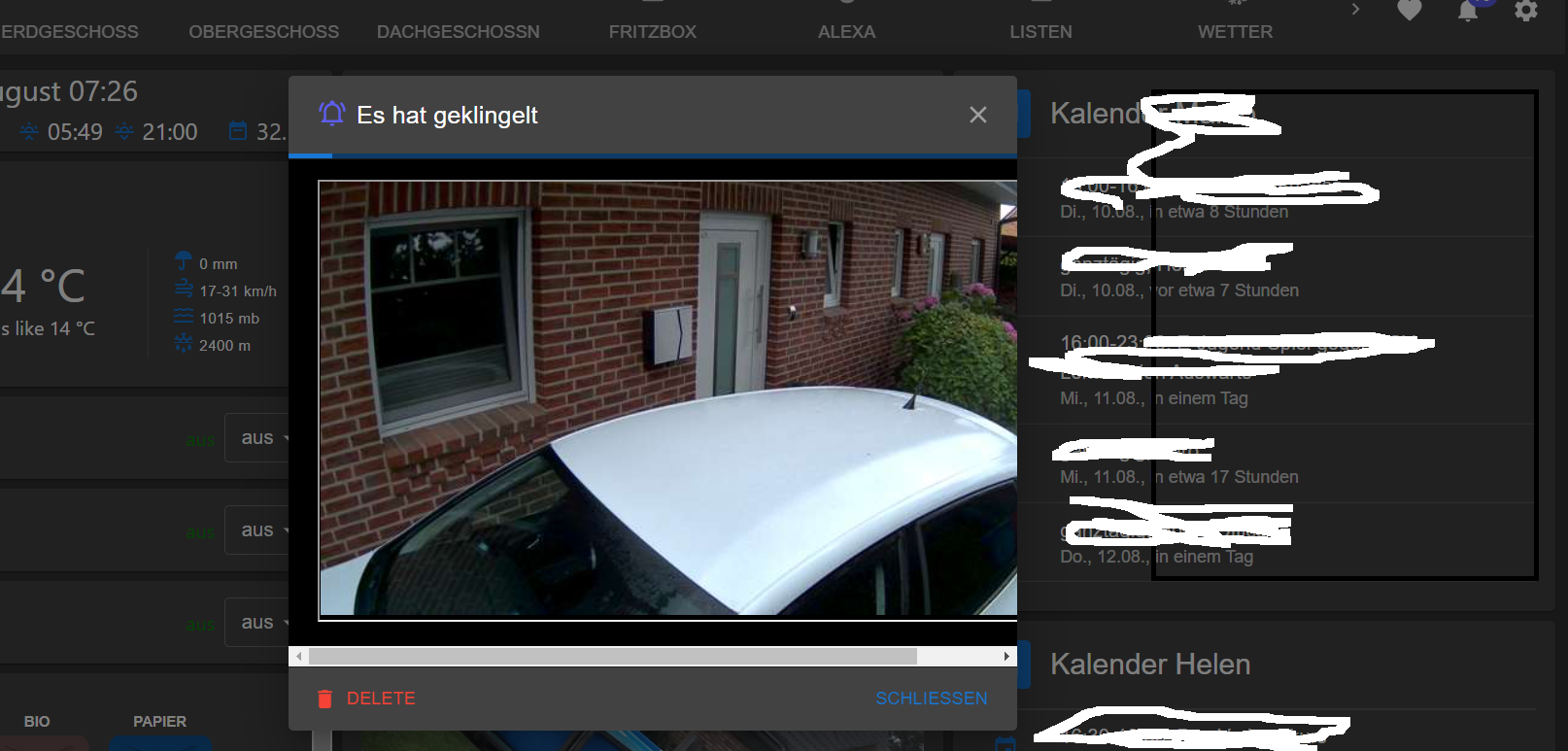
    jetzt habe ich aber das Problem mit der Größe des Popups
    popup.png

    1 Reply Last reply
    0
    • M Online
      M Online
      MCU
      wrote on last edited by MCU
      #4830

      @ceel Stell mal width auf 100% und height auf auto.

      width="100% height="auto"
      oder
      width="90%" height="auto"
      

      NUC i7 64GB mit Proxmox ---- Jarvis Infos Aktualisierungen der Doku auf Instagram verfolgen -> mcuiobroker Instagram
      Wenn Euch mein Vorschlag geholfen hat, bitte rechts "^" klicken.

      C 1 Reply Last reply
      0
      • M MCU

        @ceel Stell mal width auf 100% und height auf auto.

        width="100% height="auto"
        oder
        width="90%" height="auto"
        
        C Offline
        C Offline
        Ceel
        wrote on last edited by Ceel
        #4831

        @mcu said in jarvis v2.2.0 - just another remarkable vis:

        width="90%" height="auto"

        dann ist das Bild und das Popup noch kleiner

        100% hatte ich auch schon getestet
        genauso wie ohne width und height

        M 1 Reply Last reply
        0
        • C Ceel

          @mcu said in jarvis v2.2.0 - just another remarkable vis:

          width="90%" height="auto"

          dann ist das Bild und das Popup noch kleiner

          100% hatte ich auch schon getestet
          genauso wie ohne width und height

          M Online
          M Online
          MCU
          wrote on last edited by
          #4832

          @ceel Was möchtest du denn erreichen? Das Bild ist doch jetzt da?

          NUC i7 64GB mit Proxmox ---- Jarvis Infos Aktualisierungen der Doku auf Instagram verfolgen -> mcuiobroker Instagram
          Wenn Euch mein Vorschlag geholfen hat, bitte rechts "^" klicken.

          C 1 Reply Last reply
          0
          • M MCU

            @ceel Was möchtest du denn erreichen? Das Bild ist doch jetzt da?

            C Offline
            C Offline
            Ceel
            wrote on last edited by
            #4833

            @MCU ja das bild ist da.
            nur das Popup Fenster ist zu klein
            nicht breit genug

            M 1 Reply Last reply
            0
            • C Ceel

              @MCU ja das bild ist da.
              nur das Popup Fenster ist zu klein
              nicht breit genug

              M Online
              M Online
              MCU
              wrote on last edited by
              #4834

              @ceel Breiter geht es nicht. Du siehst doch 90%. Und unten ist der Scrollbalken. Den kann man nach rechts schieben und man sieht den Rest.

              NUC i7 64GB mit Proxmox ---- Jarvis Infos Aktualisierungen der Doku auf Instagram verfolgen -> mcuiobroker Instagram
              Wenn Euch mein Vorschlag geholfen hat, bitte rechts "^" klicken.

              C 1 Reply Last reply
              0
              • M MCU

                @ceel Breiter geht es nicht. Du siehst doch 90%. Und unten ist der Scrollbalken. Den kann man nach rechts schieben und man sieht den Rest.

                C Offline
                C Offline
                Ceel
                wrote on last edited by
                #4835

                @mcu
                Achso OK
                weil du gesagt hattest das sich die Breite je nach iframe automatisch anpasst

                1 Reply Last reply
                0
                • M Online
                  M Online
                  MCU
                  wrote on last edited by
                  #4836

                  @ceel Wenn du dir das Popup auf dem PC anschaust, wird es komplett angezeigt?

                  NUC i7 64GB mit Proxmox ---- Jarvis Infos Aktualisierungen der Doku auf Instagram verfolgen -> mcuiobroker Instagram
                  Wenn Euch mein Vorschlag geholfen hat, bitte rechts "^" klicken.

                  C 1 Reply Last reply
                  0
                  • M MCU

                    @ceel Wenn du dir das Popup auf dem PC anschaust, wird es komplett angezeigt?

                    C Offline
                    C Offline
                    Ceel
                    wrote on last edited by
                    #4837

                    @MCU nein
                    so wie im screenshot

                    M 1 Reply Last reply
                    0
                    • C Ceel

                      @MCU nein
                      so wie im screenshot

                      M Online
                      M Online
                      MCU
                      wrote on last edited by
                      #4838

                      @ceel Stellst du bitte das Script rein, welches jetzt funktioniert. Danke.

                      NUC i7 64GB mit Proxmox ---- Jarvis Infos Aktualisierungen der Doku auf Instagram verfolgen -> mcuiobroker Instagram
                      Wenn Euch mein Vorschlag geholfen hat, bitte rechts "^" klicken.

                      C 1 Reply Last reply
                      0
                      • M MCU

                        @ceel Stellst du bitte das Script rein, welches jetzt funktioniert. Danke.

                        C Offline
                        C Offline
                        Ceel
                        wrote on last edited by
                        #4839

                        Das fertige Script sieht jetzt so aus:

                        var jarvisNotify = {};
                        jarvisNotify.title = "Es hat geklingelt";
                        let httpAdr = getState('synology.0.SurveillanceStation.cameras.Eingang.linkMjpegHttpPath').val;
                        httpAdr = httpAdr.replace('"',"%22");
                        httpAdr = httpAdr.replace('"',"%22");
                        jarvisNotify.message= '<iFrame src="'+ String(httpAdr) +'" height="358" width="642"></iFrame>';
                        jarvisNotify.state = "unread";          //Damit bleibt die Benachrichtigung auch nach POPUP ungelesen und wird oben angezeigt mit der Zahl
                        jarvisNotify.criticality = "none";      // error,warning,info,success
                        jarvisNotify.display ="popup";          //drawer,snackbar,popup, none für focusTab
                        jarvisNotify.autoHideDuration = 180000;  //5000ms -> 5 Sekunden
                        jarvisNotify.snackbarOrigin = {};       //"snackbarOrigin": { "horizontal": "...", "vertical": "" }, 
                                                                // optional, applies when display is snackbar, { horizontal: 'center' | 'left' | 'right', vertical: 'bottom' | 'top' }
                        jarvisNotify.icon = "bell-ring-outline"; //mdi Iconify
                        jarvisNotify.iconColor = "#5D5DED";
                        jarvisNotify.backgroundColor = "black";
                        jarvisNotify.fontColor = "white";
                        jarvisNotify.focusTab = ""; //focus a certain tab
                        console.log(jarvisNotify.message);
                        setState('jarvis.0.addNotification',JSON.stringify(jarvisNotify));
                        
                        1 Reply Last reply
                        0
                        • T Offline
                          T Offline
                          tp1de
                          wrote on last edited by
                          #4840

                          Hallo, gibt es inzwischen die Funktion / Möglichkeit eigene Gewerke anzulegen?

                          Ich möchte z.B. für meine Heizungsanlage bzw. Warmwasserbereitung ein oder zwei Gewerke anlegen um die Datenpunkte nicht unter "Heizung" zuzuordnen (sehr unübersichtlich).

                          Könnte ich in einem Script die dazugehörigen Geräte, Datenpunkte und ggfs. die dazugehörigen Layouts erstellen?

                          M 1 Reply Last reply
                          0
                          • M Online
                            M Online
                            MCU
                            wrote on last edited by MCU
                            #4841

                            Feste Background-Colors für die TABs: (v2.2.X)

                            f03f7483-54a4-484b-b889-2b5dcdb2d89d-image.png
                            Styles

                            .jarvis-Tab-home {
                             background-color: blue;
                            }
                            .jarvis-Tab-bad {
                             background-color: lightblue;
                            }
                            .jarvis-Tab-flur {
                             background-color: orange;
                            }
                            .jarvis-Tab-büro {
                             background-color: lightgreen;
                            }
                            
                            .jarvis-Tab-küche {
                             background-color: #ff00ff;
                            }
                            

                            NUC i7 64GB mit Proxmox ---- Jarvis Infos Aktualisierungen der Doku auf Instagram verfolgen -> mcuiobroker Instagram
                            Wenn Euch mein Vorschlag geholfen hat, bitte rechts "^" klicken.

                            M 1 Reply Last reply
                            0
                            • T tp1de

                              Hallo, gibt es inzwischen die Funktion / Möglichkeit eigene Gewerke anzulegen?

                              Ich möchte z.B. für meine Heizungsanlage bzw. Warmwasserbereitung ein oder zwei Gewerke anlegen um die Datenpunkte nicht unter "Heizung" zuzuordnen (sehr unübersichtlich).

                              Könnte ich in einem Script die dazugehörigen Geräte, Datenpunkte und ggfs. die dazugehörigen Layouts erstellen?

                              M Online
                              M Online
                              MCU
                              wrote on last edited by
                              #4842

                              @tp1de
                              Gibt es als Feature-Request, wird, glaube ich, aber nicht mehr in v2.2.x realisiert. Mit v3 vielleicht, abwarten.
                              https://github.com/Zefau/ioBroker.jarvis/issues/188

                              NUC i7 64GB mit Proxmox ---- Jarvis Infos Aktualisierungen der Doku auf Instagram verfolgen -> mcuiobroker Instagram
                              Wenn Euch mein Vorschlag geholfen hat, bitte rechts "^" klicken.

                              T 1 Reply Last reply
                              0
                              • M MCU

                                @tp1de
                                Gibt es als Feature-Request, wird, glaube ich, aber nicht mehr in v2.2.x realisiert. Mit v3 vielleicht, abwarten.
                                https://github.com/Zefau/ioBroker.jarvis/issues/188

                                T Offline
                                T Offline
                                tp1de
                                wrote on last edited by
                                #4843

                                @mcu Danke für die schnelle Antwort - Schade :disappointed:

                                1 Reply Last reply
                                0
                                • C Offline
                                  C Offline
                                  Ceel
                                  wrote on last edited by
                                  #4844

                                  Moin
                                  ist es möglich eigene Icons in Base64 zu vergrößern oder zu verkleinern?
                                  Habe die Icons auf 24x24 reduziert und als base64 umcodiert, aber sie sind immer noch größer als die normalen.

                                  M 1 Reply Last reply
                                  0
                                  • C Ceel

                                    Moin
                                    ist es möglich eigene Icons in Base64 zu vergrößern oder zu verkleinern?
                                    Habe die Icons auf 24x24 reduziert und als base64 umcodiert, aber sie sind immer noch größer als die normalen.

                                    M Online
                                    M Online
                                    MCU
                                    wrote on last edited by
                                    #4845

                                    @ceel
                                    Stellst du bitte die Daten zur Verfügung:
                                    Icon als base64 in Code-Tags (</>).
                                    Die Einträge in jarvis im Gerät zum Icon und Icon-Stil.

                                    NUC i7 64GB mit Proxmox ---- Jarvis Infos Aktualisierungen der Doku auf Instagram verfolgen -> mcuiobroker Instagram
                                    Wenn Euch mein Vorschlag geholfen hat, bitte rechts "^" klicken.

                                    C 1 Reply Last reply
                                    0
                                    • M MCU

                                      @ceel
                                      Stellst du bitte die Daten zur Verfügung:
                                      Icon als base64 in Code-Tags (</>).
                                      Die Einträge in jarvis im Gerät zum Icon und Icon-Stil.

                                      C Offline
                                      C Offline
                                      Ceel
                                      wrote on last edited by Ceel
                                      #4846

                                      @mcu
                                      Hi
                                      Bei Icon habe ich dieses drinnen stehen:

                                      data:image/png;base64,iVBORw0KGgoAAAANSUhEUgAAABgAAAAVCAYAAABc6S4mAAAAAXNSR0IArs4c6QAAAARnQU1BAACxjwv8YQUAAAAJcEhZcwAADsMAAA7DAcdvqGQAAAG8SURBVEhL7ZTPK8NxGMc/m7Iooyg7oFyUFBc5uCijJRf/AHFS3+3gIAcSChcltdpBjZTIxcWvdljJjyguLpSDK8uPrET50bye7zaZ7bvvsBvvevV+9nyez/N8P/t8N0upFlxUSm2GfM4
                                      

                                      Bei Icon Stil steht nichts

                                      M 1 Reply Last reply
                                      0
                                      • C Ceel

                                        @mcu
                                        Hi
                                        Bei Icon habe ich dieses drinnen stehen:

                                        data:image/png;base64,iVBORw0KGgoAAAANSUhEUgAAABgAAAAVCAYAAABc6S4mAAAAAXNSR0IArs4c6QAAAARnQU1BAACxjwv8YQUAAAAJcEhZcwAADsMAAA7DAcdvqGQAAAG8SURBVEhL7ZTPK8NxGMc/m7Iooyg7oFyUFBc5uCijJRf/AHFS3+3gIAcSChcltdpBjZTIxcWvdljJjyguLpSDK8uPrET50bye7zaZ7bvvsBvvevV+9nyez/N8P/t8N0upFlxUSm2GfM4
                                        

                                        Bei Icon Stil steht nichts

                                        M Online
                                        M Online
                                        MCU
                                        wrote on last edited by MCU
                                        #4847

                                        @ceel sagte in jarvis v2.2.0 - just another remarkable vis:

                                        data:image/png;base64,iVBORw0KGgoAAAANSUhEUgAAABgAAAAVCAYAAABc6S4mAAAAAXNSR0IArs4c6QAAAARnQU1BAACxjwv8YQUAAAAJcEhZcwAADsMAAA7DAcdvqGQAAAG8SURBVEhL7ZTPK8NxGMc/m7Iooyg7oFyUFBc5uCijJRf/AHFS3+3gIAcSChcltdpBjZTIxcWvdljJjyguLpSDK8uPrET50bye7zaZ7bvvsBvvevV+9nyez/N8P/t8N0upFlxUSm2GfM4

                                        Bitte in Codetags! Icon wird nicht angezeigt.

                                        97ef9627-2c1c-49ec-a49a-4f107d9cb20d-image.png
                                        Anklicken und einfügen.

                                        NUC i7 64GB mit Proxmox ---- Jarvis Infos Aktualisierungen der Doku auf Instagram verfolgen -> mcuiobroker Instagram
                                        Wenn Euch mein Vorschlag geholfen hat, bitte rechts "^" klicken.

                                        C 1 Reply Last reply
                                        0
                                        • M MCU

                                          @ceel sagte in jarvis v2.2.0 - just another remarkable vis:

                                          data:image/png;base64,iVBORw0KGgoAAAANSUhEUgAAABgAAAAVCAYAAABc6S4mAAAAAXNSR0IArs4c6QAAAARnQU1BAACxjwv8YQUAAAAJcEhZcwAADsMAAA7DAcdvqGQAAAG8SURBVEhL7ZTPK8NxGMc/m7Iooyg7oFyUFBc5uCijJRf/AHFS3+3gIAcSChcltdpBjZTIxcWvdljJjyguLpSDK8uPrET50bye7zaZ7bvvsBvvevV+9nyez/N8P/t8N0upFlxUSm2GfM4

                                          Bitte in Codetags! Icon wird nicht angezeigt.
                                          97ef9627-2c1c-49ec-a49a-4f107d9cb20d-image.png
                                          Anklicken und einfügen.

                                          C Offline
                                          C Offline
                                          Ceel
                                          wrote on last edited by
                                          #4848

                                          @mcu so besser?

                                          M 1 Reply Last reply
                                          0
                                          Reply
                                          • Reply as topic
                                          Log in to reply
                                          • Oldest to Newest
                                          • Newest to Oldest
                                          • Most Votes


                                          Support us

                                          ioBroker
                                          Community Adapters
                                          Donate

                                          340

                                          Online

                                          32.4k

                                          Users

                                          81.5k

                                          Topics

                                          1.3m

                                          Posts
                                          Community
                                          Impressum | Datenschutz-Bestimmungen | Nutzungsbedingungen | Einwilligungseinstellungen
                                          ioBroker Community 2014-2025
                                          logo
                                          • Login

                                          • Don't have an account? Register

                                          • Login or register to search.
                                          • First post
                                            Last post
                                          0
                                          • Home
                                          • Recent
                                          • Tags
                                          • Unread 0
                                          • Categories
                                          • Unreplied
                                          • Popular
                                          • GitHub
                                          • Docu
                                          • Hilfe