



Skip to content
  • Home
  • Recent
  • Tags
  • 0 Unread 0
  • Categories
  • Unreplied
  • Popular
  • GitHub
  • Docu
  • Hilfe
Skins
  • Light
  • Brite
  • Cerulean
  • Cosmo
  • Flatly
  • Journal
  • Litera
  • Lumen
  • Lux
  • Materia
  • Minty
  • Morph
  • Pulse
  • Sandstone
  • Simplex
  • Sketchy
  • Spacelab
  • United
  • Yeti
  • Zephyr
  • Dark
  • Cyborg
  • Darkly
  • Quartz
  • Slate
  • Solar
  • Superhero
  • Vapor

  • Default (No Skin)
  • No Skin
Collapse
ioBroker Logo

Community Forum

donate donate
  1. ioBroker Community Home
  2. Deutsch
  3. Hardware
  4. Kamera mit POE

NEWS

  • Monatsrückblick Januar/Februar 2026 ist online!
    BluefoxB
    Bluefox
    18
    1
    683

  • Jahresrückblick 2025 – unser neuer Blogbeitrag ist online! ✨
    BluefoxB
    Bluefox
    18
    1
    5.8k

  • Neuer Blogbeitrag: Monatsrückblick - Dezember 2025 🎄
    BluefoxB
    Bluefox
    13
    1
    1.5k

Kamera mit POE

Scheduled Pinned Locked Moved Hardware
kamera
64 Posts 15 Posters 7.2k Views 15 Watching
  • Oldest to Newest
  • Newest to Oldest
  • Most Votes
Reply
  • Reply as topic
Log in to reply
This topic has been deleted. Only users with topic management privileges can see it.
  • D Offline
    D Offline
    derdominik
    wrote on last edited by
    #61

    @chucky666 said in Kamera mit POE:

    @derdominik
    Hallo
    welchen http link von der Reolink hast du ?

    ich bekomme zwar ein bild angezeigt aber es aktualisiert sich nicht alleine. Ich habe meine alte Kamera nur gegen die neue Reolink getauscht ,IP angepasst .

    leider klappt es nicht

    mir würde es mit dem Snapshot im VIs reichen

    Ich habe die URL aus https://reolink.com/wp-content/uploads/2017/01/Reolink-CGI-command-v1.61.pdf - die "Snap" URL.

    http://​(ip address)​/cgi-bin/api.cgi?cmd=Snap&channel=0&rs=​(any combination ofnumbers and letters)​&user=​(user name)​&password=​(user password)
    (Every time you refresh the website it will snap a new picture)

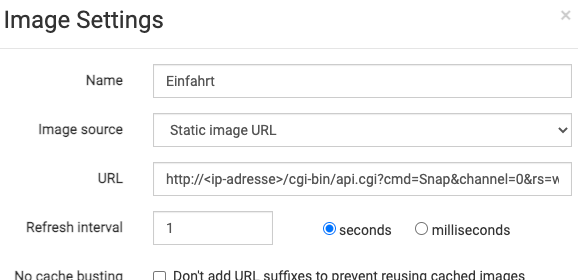
    Von alleine aktualisiert sich das nicht. Im VIS und HabPanel gibt es beim "Image" Modul einen Punkt "Refresh Interval".
    fb6e2db7-f5b9-4515-a0cb-cac6420815f0-image.png

    Damit hast du dann sekündlich ein neues statisches Bild.

    chucky666C 1 Reply Last reply
    0
    • D derdominik

      @chucky666 said in Kamera mit POE:

      @derdominik
      Hallo
      welchen http link von der Reolink hast du ?

      ich bekomme zwar ein bild angezeigt aber es aktualisiert sich nicht alleine. Ich habe meine alte Kamera nur gegen die neue Reolink getauscht ,IP angepasst .

      leider klappt es nicht

      mir würde es mit dem Snapshot im VIs reichen

      Ich habe die URL aus https://reolink.com/wp-content/uploads/2017/01/Reolink-CGI-command-v1.61.pdf - die "Snap" URL.

      http://​(ip address)​/cgi-bin/api.cgi?cmd=Snap&channel=0&rs=​(any combination ofnumbers and letters)​&user=​(user name)​&password=​(user password)
      (Every time you refresh the website it will snap a new picture)

      Von alleine aktualisiert sich das nicht. Im VIS und HabPanel gibt es beim "Image" Modul einen Punkt "Refresh Interval".

      fb6e2db7-f5b9-4515-a0cb-cac6420815f0-image.png

      Damit hast du dann sekündlich ein neues statisches Bild.

      chucky666C Online
      chucky666C Online
      chucky666
      wrote on last edited by
      #62

      @derdominik
      danke für deine Antwort

      1 sec klappt bei nicht , trotz lan Kabel . Kann man bei Reolink selber noch was optimieren?

      D 1 Reply Last reply
      0
      • chucky666C chucky666

        @derdominik
        danke für deine Antwort

        1 sec klappt bei nicht , trotz lan Kabel . Kann man bei Reolink selber noch was optimieren?

        D Offline
        D Offline
        derdominik
        wrote on last edited by
        #63

        @chucky666 said in Kamera mit POE:

        @derdominik
        danke für deine Antwort

        1 sec klappt bei nicht , trotz lan Kabel . Kann man bei Reolink selber noch was optimieren?

        Was klappt denn nicht?

        chucky666C 1 Reply Last reply
        0
        • D derdominik

          @chucky666 said in Kamera mit POE:

          @derdominik
          danke für deine Antwort

          1 sec klappt bei nicht , trotz lan Kabel . Kann man bei Reolink selber noch was optimieren?

          Was klappt denn nicht?

          chucky666C Online
          chucky666C Online
          chucky666
          wrote on last edited by chucky666
          #64

          @derdominik 1 sec geht nicht , 2 sec geht

          Ich versuche es nochmal anders .

          Danke dir

          1 Reply Last reply
          0

          Hello! It looks like you're interested in this conversation, but you don't have an account yet.

          Getting fed up of having to scroll through the same posts each visit? When you register for an account, you'll always come back to exactly where you were before, and choose to be notified of new replies (either via email, or push notification). You'll also be able to save bookmarks and upvote posts to show your appreciation to other community members.

          With your input, this post could be even better 💗

          Register Login
          Reply
          • Reply as topic
          Log in to reply
          • Oldest to Newest
          • Newest to Oldest
          • Most Votes


          Support us

          ioBroker
          Community Adapters
          Donate

          553

          Online

          32.7k

          Users

          82.6k

          Topics

          1.3m

          Posts
          Community
          Impressum | Datenschutz-Bestimmungen | Nutzungsbedingungen | Einwilligungseinstellungen
          ioBroker Community 2014-2025
          logo
          • Login

          • Don't have an account? Register

          • Login or register to search.
          • First post
            Last post
          0
          • Home
          • Recent
          • Tags
          • Unread 0
          • Categories
          • Unreplied
          • Popular
          • GitHub
          • Docu
          • Hilfe