



Skip to content
  • Home
  • Recent
  • Tags
  • 0 Unread 0
  • Categories
  • Unreplied
  • Popular
  • GitHub
  • Docu
  • Hilfe
Skins
  • Light
  • Brite
  • Cerulean
  • Cosmo
  • Flatly
  • Journal
  • Litera
  • Lumen
  • Lux
  • Materia
  • Minty
  • Morph
  • Pulse
  • Sandstone
  • Simplex
  • Sketchy
  • Spacelab
  • United
  • Yeti
  • Zephyr
  • Dark
  • Cyborg
  • Darkly
  • Quartz
  • Slate
  • Solar
  • Superhero
  • Vapor

  • Default (No Skin)
  • No Skin
Collapse
ioBroker Logo

Community Forum

donate donate
  1. ioBroker Community Home
  2. Deutsch
  3. ioBroker Allgemein
  4. Forecast.solar mit dem Systeminfo Adapter

NEWS

  • Monatsrückblick Januar/Februar 2026 ist online!
    BluefoxB
    Bluefox
    18
    1
    696

  • Jahresrückblick 2025 – unser neuer Blogbeitrag ist online! ✨
    BluefoxB
    Bluefox
    18
    1
    5.8k

  • Neuer Blogbeitrag: Monatsrückblick - Dezember 2025 🎄
    BluefoxB
    Bluefox
    13
    1
    1.5k

Forecast.solar mit dem Systeminfo Adapter

Scheduled Pinned Locked Moved ioBroker Allgemein
systeminfosolarjson
188 Posts 15 Posters 29.3k Views 16 Watching
  • Oldest to Newest
  • Newest to Oldest
  • Most Votes
Reply
  • Reply as topic
Log in to reply
This topic has been deleted. Only users with topic management privileges can see it.
  • JB_SullivanJ JB_Sullivan

    @gargano

    Welche Version hat dein js-engine? Ich habe 5.0.12.

    Mit dem Code wird mir Zeile 113 (watts3) unterstrichen, das dass falsch sein soll

    javascript.0	2021-03-09 12:52:04.412	error	(3804) at process._tickCallback (internal/process/next_tick.js:68:7)
    javascript.0	2021-03-09 12:52:04.411	error	(3804) at script.js.Solar.SolarForcast:133:5
    javascript.0	2021-03-09 12:52:04.411	error	(3804) at makeTable (script.js.Solar.SolarForcast:113:65)
    javascript.0	2021-03-09 12:52:04.408	error	(3804) script.js.Solar.SolarForcast: ReferenceError: watts3 is not defined
    
    GarganoG Offline
    GarganoG Offline
    Gargano
    wrote on last edited by Gargano
    #103

    @jb_sullivan ja, wirf mal das watts3 raus:

    graphTimeData.push(watts1[n].Leistung + watts2[n].Leistung);
    

    Das ist von mir, ich benutze das um die Einstrahlung der Sonne in die Fenster zu schätzen und habe da 3 Seiten

    JB_SullivanJ 1 Reply Last reply
    0
    • GarganoG Gargano

      @jb_sullivan ja, wirf mal das watts3 raus:

      graphTimeData.push(watts1[n].Leistung + watts2[n].Leistung);
      

      Das ist von mir, ich benutze das um die Einstrahlung der Sonne in die Fenster zu schätzen und habe da 3 Seiten

      JB_SullivanJ Offline
      JB_SullivanJ Offline
      JB_Sullivan
      wrote on last edited by
      #104

      @gargano

      Schräg - sieht schon ziemlich gut aus - aber irgendwas ist ja immer 😲

      Vorher fand ich die Time Line etwas aufgeräumter. Beim rüber hoovern mit der Maus bekommt man ja auch eine Legende mit Zeiten angezeigt. Von daher bedarf es für mich nicht unbedingt einer X-Achse mit allen Zeiten.

      ALT:

      2b59350a-5187-4d4b-bf94-244f5238474a-image.png

      NEU:

      2c978857-6655-42ce-a7b7-97671427073b-image.png

      ioBroker (since 2018) auf Intel Core i3-5005U NUC und Windwos10 Pro

      GarganoG 1 Reply Last reply
      0
      • JB_SullivanJ JB_Sullivan

        @gargano

        Schräg - sieht schon ziemlich gut aus - aber irgendwas ist ja immer 😲

        Vorher fand ich die Time Line etwas aufgeräumter. Beim rüber hoovern mit der Maus bekommt man ja auch eine Legende mit Zeiten angezeigt. Von daher bedarf es für mich nicht unbedingt einer X-Achse mit allen Zeiten.

        ALT:

        2b59350a-5187-4d4b-bf94-244f5238474a-image.png

        NEU:

        2c978857-6655-42ce-a7b7-97671427073b-image.png

        GarganoG Offline
        GarganoG Offline
        Gargano
        wrote on last edited by
        #105

        @jb_sullivan Das macht der JsonChart von alleine.
        Schau mal in den Editor Porperties der x-Achse. Evtl. kannst Du da noch was einstellen. Oder ganz weglassen

        JB_SullivanJ 1 Reply Last reply
        0
        • GarganoG Gargano

          @jb_sullivan Das macht der JsonChart von alleine.
          Schau mal in den Editor Porperties der x-Achse. Evtl. kannst Du da noch was einstellen. Oder ganz weglassen

          JB_SullivanJ Offline
          JB_SullivanJ Offline
          JB_Sullivan
          wrote on last edited by JB_Sullivan
          #106

          @gargano

          Einfach über die Widget Konfiguration scheint es nur begrenzt zu gehen. Allerdings kann man da wohl wieder was mit Code tweaken erzwingen wenn man spezielle Zeitabschnitte (z.B. Tag) haben will - aber da bin ich wieder raus.

          86733fb1-532d-4185-945c-05fab820ecb8-image.png

          EDIT: Ich sehe gerade die json Tabelle gibt es mit dem neuen Code nicht mehr? Der Datenpunkt ist leer.

          ioBroker (since 2018) auf Intel Core i3-5005U NUC und Windwos10 Pro

          GarganoG 1 Reply Last reply
          0
          • JB_SullivanJ JB_Sullivan

            @gargano

            Einfach über die Widget Konfiguration scheint es nur begrenzt zu gehen. Allerdings kann man da wohl wieder was mit Code tweaken erzwingen wenn man spezielle Zeitabschnitte (z.B. Tag) haben will - aber da bin ich wieder raus.

            86733fb1-532d-4185-945c-05fab820ecb8-image.png

            EDIT: Ich sehe gerade die json Tabelle gibt es mit dem neuen Code nicht mehr? Der Datenpunkt ist leer.

            GarganoG Offline
            GarganoG Offline
            Gargano
            wrote on last edited by
            #107

            @jb_sullivan Sorry, hab da was zuviel auskommentiert. Ich habs in dem Code oben geändert ab Zeile 102

            JB_SullivanJ 1 Reply Last reply
            0
            • GarganoG Gargano

              @jb_sullivan Sorry, hab da was zuviel auskommentiert. Ich habs in dem Code oben geändert ab Zeile 102

              JB_SullivanJ Offline
              JB_SullivanJ Offline
              JB_Sullivan
              wrote on last edited by
              #108

              @gargano

              Jupp, geht wieder 👍

              ioBroker (since 2018) auf Intel Core i3-5005U NUC und Windwos10 Pro

              1 Reply Last reply
              0
              • GarganoG Offline
                GarganoG Offline
                Gargano
                wrote on last edited by Gargano
                #109

                @jb_sullivan Hab noch etwas rumgespielt , Es geht auch 'stacked'
                c4e1866b-a15d-4d84-a157-ef415f043e36-grafik.png

                Du kannst auch noch die Sekunden in der X-Achse wegfallen lassen : Zeile 117 die 12 in 5 ändern

                let time = watts1[n].Uhrzeit.substr(11, 5);
                
                JB_SullivanJ 1 Reply Last reply
                0
                • GarganoG Gargano

                  @jb_sullivan Hab noch etwas rumgespielt , Es geht auch 'stacked'
                  c4e1866b-a15d-4d84-a157-ef415f043e36-grafik.png

                  Du kannst auch noch die Sekunden in der X-Achse wegfallen lassen : Zeile 117 die 12 in 5 ändern

                  let time = watts1[n].Uhrzeit.substr(11, 5);
                  
                  JB_SullivanJ Offline
                  JB_SullivanJ Offline
                  JB_Sullivan
                  wrote on last edited by
                  #110

                  @gargano

                  gestapelt ist auch cool - Da bekommt man in einem Balken quasi die Werte für OST / West angezeigt?

                  ioBroker (since 2018) auf Intel Core i3-5005U NUC und Windwos10 Pro

                  GarganoG 1 Reply Last reply
                  0
                  • JB_SullivanJ JB_Sullivan

                    @gargano

                    gestapelt ist auch cool - Da bekommt man in einem Balken quasi die Werte für OST / West angezeigt?

                    GarganoG Offline
                    GarganoG Offline
                    Gargano
                    wrote on last edited by Gargano
                    #111

                    @jb_sullivan ja.

                    const SolarJSON1        = "javascript.0.SolarForecast.JSON1";
                    const SolarJSON2        = "javascript.0.SolarForecast.JSON2";
                    const SolarJSONAll1        = "javascript.0.SolarForecast.JSONAll1";
                    const SolarJSONAll2        = "javascript.0.SolarForecast.JSONAll2";
                    const SolarJSONGraphAll1        = "javascript.0.SolarForecast.JSONGraphAll1";
                    const SolarJSONGraphAll2        = "javascript.0.SolarForecast.JSONGraphAll2";
                    const SolarJSONTable    = "javascript.0.SolarForecast.JSONTable";
                    const SolarJSONGraph    = "javascript.0.SolarForecast.JSONGraph";
                     
                    const creatStateList = [
                        {name :SolarJSON1, type:"string", role : "value"},
                        {name :SolarJSON2, type:"string", role : "value"},
                        {name :SolarJSONAll1, type:"string", role : "value"},
                        {name :SolarJSONAll2, type:"string", role : "value"},
                        {name :SolarJSONGraphAll1, type:"string", role : "value"},
                        {name :SolarJSONGraphAll2, type:"string", role : "value"},
                        {name :SolarJSONTable, type:"string", role : "value"},
                        {name :SolarJSONGraph, type:"string", role : "value"}
                    ]
                     
                     
                    creatStateList.forEach (function(item) {
                        createState(item.name, { 
                            type: item.type,
                            min: 0,
                            def: 0,
                            role: item.role
                        });
                    });
                     
                    var request = require('request');
                    var options1 = {url: 'https://api.forecast.solar/estimate/xx.35/xx.24/40/90/7.26', method: 'GET', headers: { 'User-Agent': 'request' }};
                    var options2 = {url: 'https://api.forecast.solar/estimate/xx.35/xx.24/40/-90/2.64', method: 'GET', headers: { 'User-Agent': 'request' }};
                     
                     
                    var urls = [
                      {myUrl:options1,mySolarJSON:SolarJSON1,mySolarJSONAll:SolarJSONAll1,mySolarJSONGraphAll:SolarJSONGraphAll1},
                      {myUrl:options2,mySolarJSON:SolarJSON2,mySolarJSONAll:SolarJSONAll2,mySolarJSONGraphAll:SolarJSONGraphAll2}
                    ]
                     
                    var promises = urls.map(myAsyncRequest);
                    schedule('6 6-22 * * *', getSolar);
                     
                    getSolar();
                     
                     
                    function myAsyncRequest(myUrl) {
                      log('Request '+myUrl.myUrl.url);
                      return new Promise((resolve, reject) => {
                         request(myUrl.myUrl.url, function(error, response, body) {
                            if (!error && response.statusCode == 200) {
                                let today = formatDate(new Date(), 'YYYY-MM-DD');
                                let watts = JSON.parse(body).result.watts;
                                setState(myUrl.mySolarJSONAll, JSON.stringify(watts), true);
                                let table = [];
                                for(let time in watts) {
                                    let pos1 = time.indexOf(':00:00');
                                    let pos2 = time.indexOf(':30:00');
                                    if((pos1 != -1) || (pos2 != -1)) {
                                        let entry = {};
                                        entry.Uhrzeit = time;
                                        entry.Leistung = watts[time];
                                        table.push(entry);
                                    }
                                }  
                                log ('JSON: '+myUrl.mySolarJSON);
                                setState(myUrl.mySolarJSON, JSON.stringify(table), true);
                            // make GraphTable
                     
                                let graphTimeData = [];
                     
                                    for(let time in watts) {
                                        let graphEntry ={};
                                        graphEntry.t = Date.parse(time);
                                        graphEntry.y = watts[time];
                                        graphTimeData.push(graphEntry);
                                } 
                                var graph = {};
                                var graphData ={};
                                var graphAllData = [];
                                graphData.data = graphTimeData;
                                graphAllData.push(graphData);
                                graph.graphs=graphAllData;
                                setState(myUrl.mySolarJSONGraphAll, JSON.stringify(graph), true);
                     
                                resolve (body);
                            }
                        });  
                      })
                    }
                     
                    function makeTable () {
                        log ('MakeTable');
                        let watts1 = JSON.parse(getState(SolarJSON1).val);
                        let watts2 = JSON.parse(getState(SolarJSON2).val); 
                        log ('Items: '+watts1.length);
                        let today = formatDate(new Date(), 'YYYY-MM-DD');
                        let table = [];
                        let graphTimeData = [];
                    	let axisLabels = [];
                    	
                        for(var n=0;n<watts1.length;n++) {
                                let entry = {};
                                let graphEntry ={};
                                let thisTime = watts1[n].Uhrzeit;
                                entry.Uhrzeit = watts1[n].Uhrzeit;
                                entry.Leistung1 = watts1[n].Leistung;
                                entry.Leistung2 = watts2[n].Leistung;
                                entry.Summe = watts1[n].Leistung + watts2[n].Leistung;
                                table.push(entry);
                    			 /*
                                graphEntry.t = Date.parse(thisTime);
                                graphEntry.y = watts1[n].Leistung + watts2[n].Leistung;
                                graphTimeData.push(graphEntry);	
                    			graphTimeData.push(watts1[n].Leistung + watts2[n].Leistung);
                                let time = watts1[n].Uhrzeit.substr(11, 12);
                                axisLabels.push(time);
                    			*/		
                        } 
                    	
                    	let graphTimeData1 = [];
                        for(var n=0;n<watts1.length;n++) {
                        	graphTimeData1.push(watts1[n].Leistung);
                            let time = watts1[n].Uhrzeit.substr(11,5);
                            axisLabels.push(time);		
                        } 
                     
                    	let graphTimeData2 = [];
                        for(var n=0;n<watts2.length;n++) {
                       		graphTimeData2.push(watts2[n].Leistung);	
                        } 
                    
                     
                        var graph = {};
                        var graphAllData = [];
                        var graphData = {"legendText": "West","yAxis_id": 1,"type": "bar","displayOrder": 1,"barIsStacked": true,"color":"green","barStackId":1,"datalabel_rotation":-90,"datalabel_color":"lightgreen","datalabel_fontSize":10};
                        graphData.data = graphTimeData1;
                        graphAllData.push(graphData);
                    	graphData = {"legendText": "Ost","yAxis_id": 1,"type": "bar","displayOrder": 1,"barIsStacked": true,"color":"red","barStackId":1,"datalabel_rotation":-90,"datalabel_color":"lightblue","datalabel_fontSize":10};
                        graphData.data = graphTimeData2;
                        graphAllData.push(graphData);
                        graph.graphs=graphAllData;
                    	graph.axisLabels =  axisLabels;
                        setState(SolarJSONTable, JSON.stringify(table), true);
                        setState(SolarJSONGraph, JSON.stringify(graph), true);
                    }
                     
                    function getSolar() {
                      Promise.all(promises)
                      .then(function(bodys) {
                        console.log("All url loaded");
                        makeTable();
                      })
                    }


                    Bei "legendText" musst Du noch schauen , welcher Ost und West ist

                    JB_SullivanJ 1 Reply Last reply
                    0
                    • GarganoG Gargano

                      @jb_sullivan ja.

                      const SolarJSON1        = "javascript.0.SolarForecast.JSON1";
                      const SolarJSON2        = "javascript.0.SolarForecast.JSON2";
                      const SolarJSONAll1        = "javascript.0.SolarForecast.JSONAll1";
                      const SolarJSONAll2        = "javascript.0.SolarForecast.JSONAll2";
                      const SolarJSONGraphAll1        = "javascript.0.SolarForecast.JSONGraphAll1";
                      const SolarJSONGraphAll2        = "javascript.0.SolarForecast.JSONGraphAll2";
                      const SolarJSONTable    = "javascript.0.SolarForecast.JSONTable";
                      const SolarJSONGraph    = "javascript.0.SolarForecast.JSONGraph";
                       
                      const creatStateList = [
                          {name :SolarJSON1, type:"string", role : "value"},
                          {name :SolarJSON2, type:"string", role : "value"},
                          {name :SolarJSONAll1, type:"string", role : "value"},
                          {name :SolarJSONAll2, type:"string", role : "value"},
                          {name :SolarJSONGraphAll1, type:"string", role : "value"},
                          {name :SolarJSONGraphAll2, type:"string", role : "value"},
                          {name :SolarJSONTable, type:"string", role : "value"},
                          {name :SolarJSONGraph, type:"string", role : "value"}
                      ]
                       
                       
                      creatStateList.forEach (function(item) {
                          createState(item.name, { 
                              type: item.type,
                              min: 0,
                              def: 0,
                              role: item.role
                          });
                      });
                       
                      var request = require('request');
                      var options1 = {url: 'https://api.forecast.solar/estimate/xx.35/xx.24/40/90/7.26', method: 'GET', headers: { 'User-Agent': 'request' }};
                      var options2 = {url: 'https://api.forecast.solar/estimate/xx.35/xx.24/40/-90/2.64', method: 'GET', headers: { 'User-Agent': 'request' }};
                       
                       
                      var urls = [
                        {myUrl:options1,mySolarJSON:SolarJSON1,mySolarJSONAll:SolarJSONAll1,mySolarJSONGraphAll:SolarJSONGraphAll1},
                        {myUrl:options2,mySolarJSON:SolarJSON2,mySolarJSONAll:SolarJSONAll2,mySolarJSONGraphAll:SolarJSONGraphAll2}
                      ]
                       
                      var promises = urls.map(myAsyncRequest);
                      schedule('6 6-22 * * *', getSolar);
                       
                      getSolar();
                       
                       
                      function myAsyncRequest(myUrl) {
                        log('Request '+myUrl.myUrl.url);
                        return new Promise((resolve, reject) => {
                           request(myUrl.myUrl.url, function(error, response, body) {
                              if (!error && response.statusCode == 200) {
                                  let today = formatDate(new Date(), 'YYYY-MM-DD');
                                  let watts = JSON.parse(body).result.watts;
                                  setState(myUrl.mySolarJSONAll, JSON.stringify(watts), true);
                                  let table = [];
                                  for(let time in watts) {
                                      let pos1 = time.indexOf(':00:00');
                                      let pos2 = time.indexOf(':30:00');
                                      if((pos1 != -1) || (pos2 != -1)) {
                                          let entry = {};
                                          entry.Uhrzeit = time;
                                          entry.Leistung = watts[time];
                                          table.push(entry);
                                      }
                                  }  
                                  log ('JSON: '+myUrl.mySolarJSON);
                                  setState(myUrl.mySolarJSON, JSON.stringify(table), true);
                              // make GraphTable
                       
                                  let graphTimeData = [];
                       
                                      for(let time in watts) {
                                          let graphEntry ={};
                                          graphEntry.t = Date.parse(time);
                                          graphEntry.y = watts[time];
                                          graphTimeData.push(graphEntry);
                                  } 
                                  var graph = {};
                                  var graphData ={};
                                  var graphAllData = [];
                                  graphData.data = graphTimeData;
                                  graphAllData.push(graphData);
                                  graph.graphs=graphAllData;
                                  setState(myUrl.mySolarJSONGraphAll, JSON.stringify(graph), true);
                       
                                  resolve (body);
                              }
                          });  
                        })
                      }
                       
                      function makeTable () {
                          log ('MakeTable');
                          let watts1 = JSON.parse(getState(SolarJSON1).val);
                          let watts2 = JSON.parse(getState(SolarJSON2).val); 
                          log ('Items: '+watts1.length);
                          let today = formatDate(new Date(), 'YYYY-MM-DD');
                          let table = [];
                          let graphTimeData = [];
                      	let axisLabels = [];
                      	
                          for(var n=0;n<watts1.length;n++) {
                                  let entry = {};
                                  let graphEntry ={};
                                  let thisTime = watts1[n].Uhrzeit;
                                  entry.Uhrzeit = watts1[n].Uhrzeit;
                                  entry.Leistung1 = watts1[n].Leistung;
                                  entry.Leistung2 = watts2[n].Leistung;
                                  entry.Summe = watts1[n].Leistung + watts2[n].Leistung;
                                  table.push(entry);
                      			 /*
                                  graphEntry.t = Date.parse(thisTime);
                                  graphEntry.y = watts1[n].Leistung + watts2[n].Leistung;
                                  graphTimeData.push(graphEntry);	
                      			graphTimeData.push(watts1[n].Leistung + watts2[n].Leistung);
                                  let time = watts1[n].Uhrzeit.substr(11, 12);
                                  axisLabels.push(time);
                      			*/		
                          } 
                      	
                      	let graphTimeData1 = [];
                          for(var n=0;n<watts1.length;n++) {
                          	graphTimeData1.push(watts1[n].Leistung);
                              let time = watts1[n].Uhrzeit.substr(11,5);
                              axisLabels.push(time);		
                          } 
                       
                      	let graphTimeData2 = [];
                          for(var n=0;n<watts2.length;n++) {
                         		graphTimeData2.push(watts2[n].Leistung);	
                          } 
                      
                       
                          var graph = {};
                          var graphAllData = [];
                          var graphData = {"legendText": "West","yAxis_id": 1,"type": "bar","displayOrder": 1,"barIsStacked": true,"color":"green","barStackId":1,"datalabel_rotation":-90,"datalabel_color":"lightgreen","datalabel_fontSize":10};
                          graphData.data = graphTimeData1;
                          graphAllData.push(graphData);
                      	graphData = {"legendText": "Ost","yAxis_id": 1,"type": "bar","displayOrder": 1,"barIsStacked": true,"color":"red","barStackId":1,"datalabel_rotation":-90,"datalabel_color":"lightblue","datalabel_fontSize":10};
                          graphData.data = graphTimeData2;
                          graphAllData.push(graphData);
                          graph.graphs=graphAllData;
                      	graph.axisLabels =  axisLabels;
                          setState(SolarJSONTable, JSON.stringify(table), true);
                          setState(SolarJSONGraph, JSON.stringify(graph), true);
                      }
                       
                      function getSolar() {
                        Promise.all(promises)
                        .then(function(bodys) {
                          console.log("All url loaded");
                          makeTable();
                        })
                      }


                      Bei "legendText" musst Du noch schauen , welcher Ost und West ist

                      JB_SullivanJ Offline
                      JB_SullivanJ Offline
                      JB_Sullivan
                      wrote on last edited by
                      #112

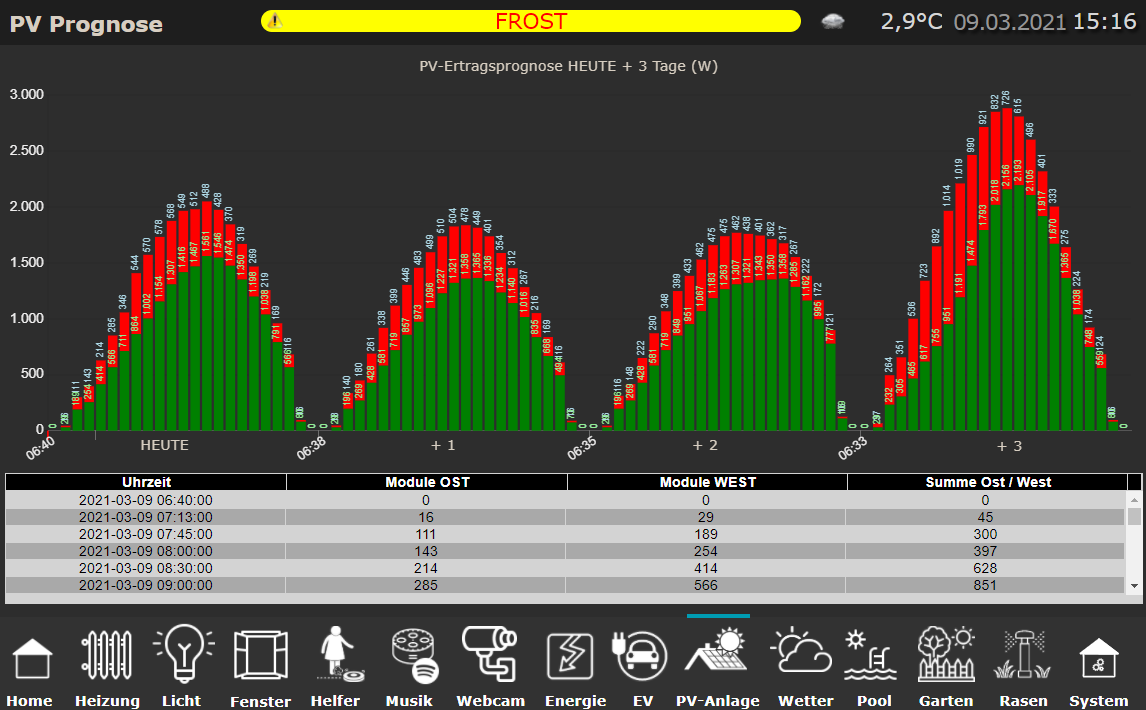
                      @gargano MEGA !!!

                      Da kann man gleich sehen wann von welcher Dachseite mit welchem Ertrag zu rechnen ist 👍 👍
                      c7878ba5-9c6d-427e-9832-c6e83aec44da-image.png

                      ioBroker (since 2018) auf Intel Core i3-5005U NUC und Windwos10 Pro

                      GarganoG 1 Reply Last reply
                      0
                      • JB_SullivanJ JB_Sullivan

                        @gargano MEGA !!!

                        Da kann man gleich sehen wann von welcher Dachseite mit welchem Ertrag zu rechnen ist 👍 👍

                        c7878ba5-9c6d-427e-9832-c6e83aec44da-image.png

                        GarganoG Offline
                        GarganoG Offline
                        Gargano
                        wrote on last edited by
                        #113

                        @jb_sullivan Wie hast Du denn die x-Achse hinbekommen ?
                        Ich hab oben nochmal geändert wegen Legende , wenn Du magst

                        JB_SullivanJ 1 Reply Last reply
                        0
                        • GarganoG Gargano

                          @jb_sullivan Wie hast Du denn die x-Achse hinbekommen ?
                          Ich hab oben nochmal geändert wegen Legende , wenn Du magst

                          JB_SullivanJ Offline
                          JB_SullivanJ Offline
                          JB_Sullivan
                          wrote on last edited by
                          #114

                          @gargano

                          X-Achse ist getrickst - "Heute +1 , +2, +3" sind einfache VIS Textfelder und die Werte habe ich im Widget begrenzt.
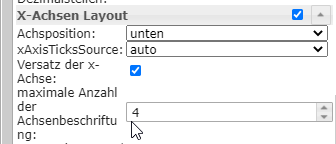
                          1ede39d2-daf4-4449-abf0-dd82cddd0b27-image.png

                          Wie kann man die Darstellung drehen? Also die Stapelwerte mit der höheren Wertigkeit (WEST) nach hinten und die niederen (OST) nach vorne?

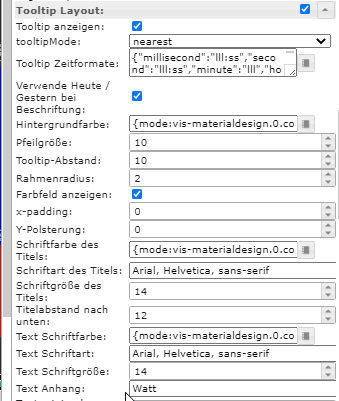
                          Außerdem scheint im Widget ein kleiner BUG zu sein. Wenn man im Tooltip Layout "text Anhang" auswählt und etwas einträgt, wird das nirgends hinzu gefügt.

                          ioBroker (since 2018) auf Intel Core i3-5005U NUC und Windwos10 Pro

                          GarganoG 2 Replies Last reply
                          0
                          • JB_SullivanJ JB_Sullivan

                            @gargano

                            X-Achse ist getrickst - "Heute +1 , +2, +3" sind einfache VIS Textfelder und die Werte habe ich im Widget begrenzt.

                            1ede39d2-daf4-4449-abf0-dd82cddd0b27-image.png

                            Wie kann man die Darstellung drehen? Also die Stapelwerte mit der höheren Wertigkeit (WEST) nach hinten und die niederen (OST) nach vorne?

                            Außerdem scheint im Widget ein kleiner BUG zu sein. Wenn man im Tooltip Layout "text Anhang" auswählt und etwas einträgt, wird das nirgends hinzu gefügt.

                            GarganoG Offline
                            GarganoG Offline
                            Gargano
                            wrote on last edited by
                            #115

                            @jb_sullivan Also oben und unten vertauschen ?

                            Einfach displayOrder ändern in 2 und 1 in Zeile 136 und 139

                            1 Reply Last reply
                            0
                            • JB_SullivanJ JB_Sullivan

                              @gargano

                              X-Achse ist getrickst - "Heute +1 , +2, +3" sind einfache VIS Textfelder und die Werte habe ich im Widget begrenzt.

                              1ede39d2-daf4-4449-abf0-dd82cddd0b27-image.png

                              Wie kann man die Darstellung drehen? Also die Stapelwerte mit der höheren Wertigkeit (WEST) nach hinten und die niederen (OST) nach vorne?

                              Außerdem scheint im Widget ein kleiner BUG zu sein. Wenn man im Tooltip Layout "text Anhang" auswählt und etwas einträgt, wird das nirgends hinzu gefügt.

                              GarganoG Offline
                              GarganoG Offline
                              Gargano
                              wrote on last edited by
                              #116

                              @jb_sullivan ToolTip Anhang geht auch im Script :

                              "tooltip_AppendText": " kWh"

                              Wieder in Zeile 136 und 139 voranstellen.

                              JB_SullivanJ 1 Reply Last reply
                              0
                              • GarganoG Gargano

                                @jb_sullivan ToolTip Anhang geht auch im Script :

                                "tooltip_AppendText": " kWh"

                                Wieder in Zeile 136 und 139 voranstellen.

                                JB_SullivanJ Offline
                                JB_SullivanJ Offline
                                JB_Sullivan
                                wrote on last edited by
                                #117

                                @gargano

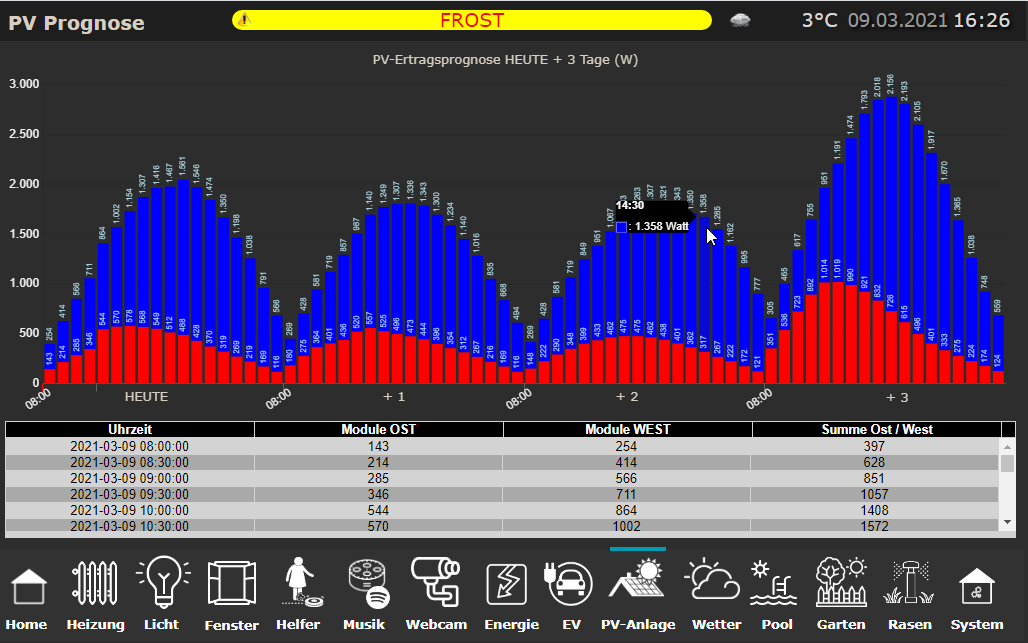
                                Ich bin glücklich !!!! Super alles so wie ich es mir vorgestellt hatte - PERFEKT !!!

                                Deine Änderungen haben auch gegriffen - aber trotzdem bleibt aus dem Widget heraus der BUG bestehen das er die Eingabe nicht annimmt. Wenn man es über Script macht so wie du oben geschrieben hast - dann funktioniert es. Aber wie gesagt aus dem Widget heraus nicht (zumindest bei mir)
                                6e70ccd8-0a12-4867-93fb-ee656fe2b2e8-image.png

                                e9469eaa-1b0a-4ebc-8138-a280ecb3d53b-image.png

                                ioBroker (since 2018) auf Intel Core i3-5005U NUC und Windwos10 Pro

                                GarganoG G 2 Replies Last reply
                                0
                                • JB_SullivanJ JB_Sullivan

                                  @gargano

                                  Ich bin glücklich !!!! Super alles so wie ich es mir vorgestellt hatte - PERFEKT !!!

                                  Deine Änderungen haben auch gegriffen - aber trotzdem bleibt aus dem Widget heraus der BUG bestehen das er die Eingabe nicht annimmt. Wenn man es über Script macht so wie du oben geschrieben hast - dann funktioniert es. Aber wie gesagt aus dem Widget heraus nicht (zumindest bei mir)

                                  6e70ccd8-0a12-4867-93fb-ee656fe2b2e8-image.png

                                  e9469eaa-1b0a-4ebc-8138-a280ecb3d53b-image.png

                                  GarganoG Offline
                                  GarganoG Offline
                                  Gargano
                                  wrote on last edited by
                                  #118

                                  @jb_sullivan Das Widget ist vom Scrounger.
                                  Wenn Du magst, kannst ein Issue im Github aufmachen.

                                  JB_SullivanJ 1 Reply Last reply
                                  0
                                  • GarganoG Gargano

                                    @jb_sullivan Das Widget ist vom Scrounger.
                                    Wenn Du magst, kannst ein Issue im Github aufmachen.

                                    JB_SullivanJ Offline
                                    JB_SullivanJ Offline
                                    JB_Sullivan
                                    wrote on last edited by
                                    #119

                                    @gargano

                                    Ja werde ich mal machen. Was mir gerade auffällt - hast du noch was an den Zeiten geändert?

                                    Bei dem Diagramm weiter oben (#112) hat das Diagramm quasi genau so begonnen und geendet, wie aus den Rohdaten auch kommt - jetzt sind alle Diagramme fix von 8:00 bis 16:30 Uhr formatiert.

                                    ioBroker (since 2018) auf Intel Core i3-5005U NUC und Windwos10 Pro

                                    GarganoG 1 Reply Last reply
                                    0
                                    • JB_SullivanJ JB_Sullivan

                                      @gargano

                                      Ja werde ich mal machen. Was mir gerade auffällt - hast du noch was an den Zeiten geändert?

                                      Bei dem Diagramm weiter oben (#112) hat das Diagramm quasi genau so begonnen und geendet, wie aus den Rohdaten auch kommt - jetzt sind alle Diagramme fix von 8:00 bis 16:30 Uhr formatiert.

                                      GarganoG Offline
                                      GarganoG Offline
                                      Gargano
                                      wrote on last edited by
                                      #120

                                      @jb_sullivan Man kann ja nur die Summe von gleichen Zeiten bilden. Daher die Begrenzung auf 00:00 und 30:00. War ja früher auch so.
                                      Wenn Du mal schaust , wie die Rohdaten ausschauen und eine evtl. Ungenauigkeit in den Zeiten verschmerzen kannst, dann kommentiere die Zeilen 59

                                       if((pos1 != -1) || (pos2 != -1)) {
                                      

                                      und 64 aus.

                                       }
                                      
                                      JB_SullivanJ 1 Reply Last reply
                                      0
                                      • GarganoG Gargano

                                        @jb_sullivan Man kann ja nur die Summe von gleichen Zeiten bilden. Daher die Begrenzung auf 00:00 und 30:00. War ja früher auch so.
                                        Wenn Du mal schaust , wie die Rohdaten ausschauen und eine evtl. Ungenauigkeit in den Zeiten verschmerzen kannst, dann kommentiere die Zeilen 59

                                         if((pos1 != -1) || (pos2 != -1)) {
                                        

                                        und 64 aus.

                                         }
                                        
                                        JB_SullivanJ Offline
                                        JB_SullivanJ Offline
                                        JB_Sullivan
                                        wrote on last edited by
                                        #121

                                        @gargano wenn ich das so auskomatiere, spuckt mir der script Editor den folgenden Fehler aus.

                                        3d3226d7-3776-40a1-b545-cc818dce2030-image.png

                                        ioBroker (since 2018) auf Intel Core i3-5005U NUC und Windwos10 Pro

                                        GarganoG 1 Reply Last reply
                                        0
                                        • JB_SullivanJ JB_Sullivan

                                          @gargano wenn ich das so auskomatiere, spuckt mir der script Editor den folgenden Fehler aus.

                                          3d3226d7-3776-40a1-b545-cc818dce2030-image.png

                                          GarganoG Offline
                                          GarganoG Offline
                                          Gargano
                                          wrote on last edited by Gargano
                                          #122

                                          @jb_sullivan Zeig mal bitte den Code.
                                          (nur die beiden Zeilen auskommentieren mit //. Nicht den ganzen Block)

                                          JB_SullivanJ 2 Replies Last reply
                                          0

                                          Hello! It looks like you're interested in this conversation, but you don't have an account yet.

                                          Getting fed up of having to scroll through the same posts each visit? When you register for an account, you'll always come back to exactly where you were before, and choose to be notified of new replies (either via email, or push notification). You'll also be able to save bookmarks and upvote posts to show your appreciation to other community members.

                                          With your input, this post could be even better 💗

                                          Register Login
                                          Reply
                                          • Reply as topic
                                          Log in to reply
                                          • Oldest to Newest
                                          • Newest to Oldest
                                          • Most Votes


                                          Support us

                                          ioBroker
                                          Community Adapters
                                          Donate
                                          FAQ Cloud / IOT
                                          HowTo: Node.js-Update
                                          HowTo: Backup/Restore
                                          Downloads
                                          BLOG

                                          617

                                          Online

                                          32.7k

                                          Users

                                          82.6k

                                          Topics

                                          1.3m

                                          Posts
                                          Community
                                          Impressum | Datenschutz-Bestimmungen | Nutzungsbedingungen | Einwilligungseinstellungen
                                          ioBroker Community 2014-2025
                                          logo
                                          • Login

                                          • Don't have an account? Register

                                          • Login or register to search.
                                          • First post
                                            Last post
                                          0
                                          • Home
                                          • Recent
                                          • Tags
                                          • Unread 0
                                          • Categories
                                          • Unreplied
                                          • Popular
                                          • GitHub
                                          • Docu
                                          • Hilfe