Skip to content
  • Home
  • Recent
  • Tags
  • 0 Unread 0
  • Categories
  • Unreplied
  • Popular
  • GitHub
  • Docu
  • Hilfe
Skins
  • Light
  • Brite
  • Cerulean
  • Cosmo
  • Flatly
  • Journal
  • Litera
  • Lumen
  • Lux
  • Materia
  • Minty
  • Morph
  • Pulse
  • Sandstone
  • Simplex
  • Sketchy
  • Spacelab
  • United
  • Yeti
  • Zephyr
  • Dark
  • Cyborg
  • Darkly
  • Quartz
  • Slate
  • Solar
  • Superhero
  • Vapor

  • Default (No Skin)
  • No Skin
Collapse
ioBroker Logo

Community Forum

donate donate
  1. ioBroker Community Home
  2. Deutsch
  3. Skripten / Logik
  4. Optimierungsanfrage für Timer-Skript (Blockly)

NEWS

  • Neuer ioBroker-Blog online: Monatsrückblick März/April 2026
    BluefoxB
    Bluefox
    8
    1
    1.7k

  • Verwendung von KI bitte immer deutlich kennzeichnen
    HomoranH
    Homoran
    10
    1
    677

  • Monatsrückblick Januar/Februar 2026 ist online!
    BluefoxB
    Bluefox
    18
    1
    1.2k

Optimierungsanfrage für Timer-Skript (Blockly)

Scheduled Pinned Locked Moved Skripten / Logik
blockly
10 Posts 4 Posters 934 Views 2 Watching
  • Oldest to Newest
  • Newest to Oldest
  • Most Votes
Reply
  • Reply as topic
Log in to reply
This topic has been deleted. Only users with topic management privileges can see it.
  • surfer09S Offline
    surfer09S Offline
    surfer09
    wrote on last edited by
    #1

    Hallo zusammen,

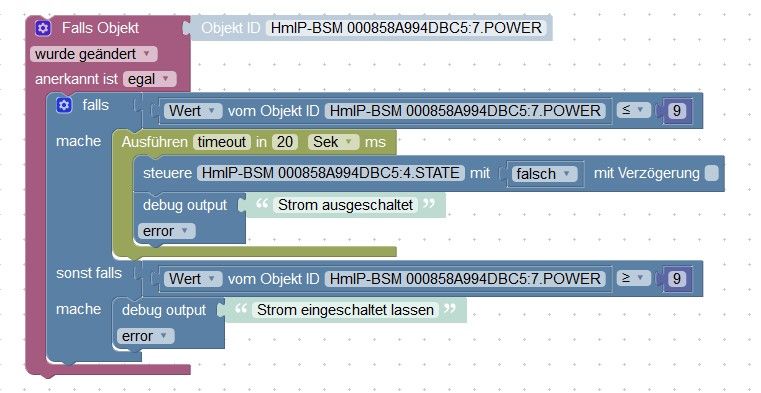
    ich habe mir ein Skript gebastelt, welches nach einer bestimmten Zeit bei Unterschreitung von Wert X den Aktor ausschaltet. Das Skript an sich läuft soweit auch gut, allerdings gibts noch ein Problem, welches vielleicht mit einer kleineren Optimierung am Skript auch behoben werden kann.
    Schaltet der Aktor bei Unterschreitung von Wert X ab, wird nach der Abschaltung das Skript noch einmal ausgeführt, weil sich der Wert nochmal auf 0 ändert. Vielleicht hat noch jemand eine Idee um das auch noch abzustellen?!

    code_text
    <xml xmlns="http://www.w3.org/1999/xhtml">
      <variables>
        <variable type="undefined" id="timeout">timeout</variable>
      </variables>
      <block type="on_ext" id="yda9ZPzvLr@8v$KoYpSC" x="163" y="113">
        <mutation items="1"></mutation>
        <field name="CONDITION">ne</field>
        <field name="ACK_CONDITION"></field>
        <value name="OID0">
          <shadow type="field_oid" id="#/Ff33;-k4L`2Gw8$@@1">
            <field name="oid">hm-rpc.1.000858A994DBC5.7.POWER</field>
          </shadow>
        </value>
        <statement name="STATEMENT">
          <block type="controls_if" id="}jyQ--#8Qext%.U.a^MA">
            <mutation elseif="1"></mutation>
            <value name="IF0">
              <block type="logic_compare" id="q=e#[NDbCDX?rkWh/gQb">
                <field name="OP">LTE</field>
                <value name="A">
                  <block type="get_value" id="r.a-qapyxREKEx_h:Um?">
                    <field name="ATTR">val</field>
                    <field name="OID">hm-rpc.1.000858A994DBC5.7.POWER</field>
                  </block>
                </value>
                <value name="B">
                  <block type="math_number" id="(;$r$)r1(gfK+(%QOIn3">
                    <field name="NUM">9</field>
                  </block>
                </value>
              </block>
            </value>
            <statement name="DO0">
              <block type="timeouts_settimeout" id="K*kOLM#;7WARS[El8RAB">
                <field name="NAME">timeout</field>
                <field name="DELAY">20</field>
                <field name="UNIT">sec</field>
                <statement name="STATEMENT">
                  <block type="control" id="BOY4U=CinfrBe^kq3l;J">
                    <mutation delay_input="false"></mutation>
                    <field name="OID">hm-rpc.1.000858A994DBC5.4.STATE</field>
                    <field name="WITH_DELAY">FALSE</field>
                    <value name="VALUE">
                      <block type="logic_boolean" id="F*6Uh!Dos,l%}Hgh9(G.">
                        <field name="BOOL">FALSE</field>
                      </block>
                    </value>
                    <next>
                      <block type="debug" id="YIBbFir`%EhT`J0P2L.6">
                        <field name="Severity">error</field>
                        <value name="TEXT">
                          <shadow type="text" id="_LJsub0`3ruvdnnU^OA?">
                            <field name="TEXT">Strom ausgeschaltet</field>
                          </shadow>
                        </value>
                      </block>
                    </next>
                  </block>
                </statement>
              </block>
            </statement>
            <value name="IF1">
              <block type="logic_compare" id="lRzfn=!-Ifx0WNyc0+*Z">
                <field name="OP">GTE</field>
                <value name="A">
                  <block type="get_value" id="fz_TURmFVl}/ZybN,uPc">
                    <field name="ATTR">val</field>
                    <field name="OID">hm-rpc.1.000858A994DBC5.7.POWER</field>
                  </block>
                </value>
                <value name="B">
                  <block type="math_number" id="Uu%.?#plT;0]VUz|M!?G">
                    <field name="NUM">9</field>
                  </block>
                </value>
              </block>
            </value>
            <statement name="DO1">
              <block type="debug" id="Wvfk5s#mhKNvs8Km*P(+">
                <field name="Severity">error</field>
                <value name="TEXT">
                  <shadow type="text" id="D=3i/@2GR2s-y)!wsXx?">
                    <field name="TEXT">Strom eingeschaltet lassen</field>
                  </shadow>
                </value>
              </block>
            </statement>
          </block>
        </statement>
      </block>
    </xml>!


    Skript.jpg

    Danke!

    Gruß surfer ;-)

    IO-Broker Master/Slave auf Windows 11 64bit, NPM 10.9.7, Node 22.22.2 js-controller 7.0.7

    paul53P 1 Reply Last reply
    0
    • surfer09S surfer09

      Hallo zusammen,

      ich habe mir ein Skript gebastelt, welches nach einer bestimmten Zeit bei Unterschreitung von Wert X den Aktor ausschaltet. Das Skript an sich läuft soweit auch gut, allerdings gibts noch ein Problem, welches vielleicht mit einer kleineren Optimierung am Skript auch behoben werden kann.
      Schaltet der Aktor bei Unterschreitung von Wert X ab, wird nach der Abschaltung das Skript noch einmal ausgeführt, weil sich der Wert nochmal auf 0 ändert. Vielleicht hat noch jemand eine Idee um das auch noch abzustellen?!

      code_text
      <xml xmlns="http://www.w3.org/1999/xhtml">
        <variables>
          <variable type="undefined" id="timeout">timeout</variable>
        </variables>
        <block type="on_ext" id="yda9ZPzvLr@8v$KoYpSC" x="163" y="113">
          <mutation items="1"></mutation>
          <field name="CONDITION">ne</field>
          <field name="ACK_CONDITION"></field>
          <value name="OID0">
            <shadow type="field_oid" id="#/Ff33;-k4L`2Gw8$@@1">
              <field name="oid">hm-rpc.1.000858A994DBC5.7.POWER</field>
            </shadow>
          </value>
          <statement name="STATEMENT">
            <block type="controls_if" id="}jyQ--#8Qext%.U.a^MA">
              <mutation elseif="1"></mutation>
              <value name="IF0">
                <block type="logic_compare" id="q=e#[NDbCDX?rkWh/gQb">
                  <field name="OP">LTE</field>
                  <value name="A">
                    <block type="get_value" id="r.a-qapyxREKEx_h:Um?">
                      <field name="ATTR">val</field>
                      <field name="OID">hm-rpc.1.000858A994DBC5.7.POWER</field>
                    </block>
                  </value>
                  <value name="B">
                    <block type="math_number" id="(;$r$)r1(gfK+(%QOIn3">
                      <field name="NUM">9</field>
                    </block>
                  </value>
                </block>
              </value>
              <statement name="DO0">
                <block type="timeouts_settimeout" id="K*kOLM#;7WARS[El8RAB">
                  <field name="NAME">timeout</field>
                  <field name="DELAY">20</field>
                  <field name="UNIT">sec</field>
                  <statement name="STATEMENT">
                    <block type="control" id="BOY4U=CinfrBe^kq3l;J">
                      <mutation delay_input="false"></mutation>
                      <field name="OID">hm-rpc.1.000858A994DBC5.4.STATE</field>
                      <field name="WITH_DELAY">FALSE</field>
                      <value name="VALUE">
                        <block type="logic_boolean" id="F*6Uh!Dos,l%}Hgh9(G.">
                          <field name="BOOL">FALSE</field>
                        </block>
                      </value>
                      <next>
                        <block type="debug" id="YIBbFir`%EhT`J0P2L.6">
                          <field name="Severity">error</field>
                          <value name="TEXT">
                            <shadow type="text" id="_LJsub0`3ruvdnnU^OA?">
                              <field name="TEXT">Strom ausgeschaltet</field>
                            </shadow>
                          </value>
                        </block>
                      </next>
                    </block>
                  </statement>
                </block>
              </statement>
              <value name="IF1">
                <block type="logic_compare" id="lRzfn=!-Ifx0WNyc0+*Z">
                  <field name="OP">GTE</field>
                  <value name="A">
                    <block type="get_value" id="fz_TURmFVl}/ZybN,uPc">
                      <field name="ATTR">val</field>
                      <field name="OID">hm-rpc.1.000858A994DBC5.7.POWER</field>
                    </block>
                  </value>
                  <value name="B">
                    <block type="math_number" id="Uu%.?#plT;0]VUz|M!?G">
                      <field name="NUM">9</field>
                    </block>
                  </value>
                </block>
              </value>
              <statement name="DO1">
                <block type="debug" id="Wvfk5s#mhKNvs8Km*P(+">
                  <field name="Severity">error</field>
                  <value name="TEXT">
                    <shadow type="text" id="D=3i/@2GR2s-y)!wsXx?">
                      <field name="TEXT">Strom eingeschaltet lassen</field>
                    </shadow>
                  </value>
                </block>
              </statement>
            </block>
          </statement>
        </block>
      </xml>!


      Skript.jpg

      Danke!

      Gruß surfer ;-)

      paul53P Offline
      paul53P Offline
      paul53
      wrote on last edited by paul53
      #2

      @surfer09
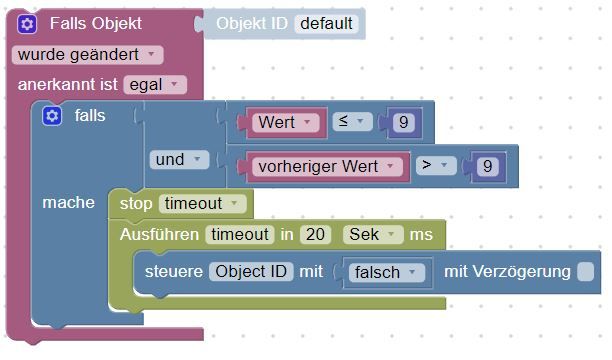
      Wert und vorheriger Wert findet man unter Trigger.

      Blockly_temp.JPG

      Bitte verzichtet auf Chat-Nachrichten, denn die Handhabung ist grauenhaft !
      Produktiv: Asus PN 42 / N100 / 8 GB / 500 GB

      surfer09S 1 Reply Last reply
      0
      • paul53P paul53

        @surfer09
        Wert und vorheriger Wert findet man unter Trigger.

        Blockly_temp.JPG

        surfer09S Offline
        surfer09S Offline
        surfer09
        wrote on last edited by
        #3

        @paul53 : Danke Paul!! :-)

        IO-Broker Master/Slave auf Windows 11 64bit, NPM 10.9.7, Node 22.22.2 js-controller 7.0.7

        1 Reply Last reply
        0
        • K Offline
          K Offline
          kg36304
          wrote on last edited by
          #4

          Hallo,

          ist zwar schon ne weile her aber wo bekomme ich dieses vermaledeite "und" Modul her?

          Finde es nirgends in den Vorlagen bei Blockly.

          Danke.

          1 Reply Last reply
          0
          • O Offline
            O Offline
            oFbEQnpoLKKl6mbY5e13
            wrote on last edited by
            #5

            Das dürfe das "und" aus Logik sein. Die Darstellung kenne ich auch nicht.

            paul53P 1 Reply Last reply
            0
            • K Offline
              K Offline
              kg36304
              wrote on last edited by
              #6

              dachte ich auch, aber das ist komplett anders mit der Fläche davor und dem doppelten Ausgang. :-(

              1 Reply Last reply
              0
              • O Offline
                O Offline
                oFbEQnpoLKKl6mbY5e13
                wrote on last edited by oFbEQnpoLKKl6mbY5e13
                #7

                Das ist nur die Darstellung. In dem Fall zwei "und" zusammengesteckt.

                1 Reply Last reply
                0
                • O oFbEQnpoLKKl6mbY5e13

                  Das dürfe das "und" aus Logik sein. Die Darstellung kenne ich auch nicht.

                  paul53P Offline
                  paul53P Offline
                  paul53
                  wrote on last edited by
                  #8

                  @oFbEQnpoLKKl6mbY5e13 sagte:

                  Das dürfe das "und" aus Logik sein.

                  Ja, und rechte Maustaste über dem Block und "externe Eingänge" auswählen.

                  Bitte verzichtet auf Chat-Nachrichten, denn die Handhabung ist grauenhaft !
                  Produktiv: Asus PN 42 / N100 / 8 GB / 500 GB

                  1 Reply Last reply
                  0
                  • O Offline
                    O Offline
                    oFbEQnpoLKKl6mbY5e13
                    wrote on last edited by
                    #9

                    Danke, das ist eine sehr viel bessere Darstellung!

                    1 Reply Last reply
                    0
                    • K Offline
                      K Offline
                      kg36304
                      wrote on last edited by
                      #10

                      Hi, wollte nur kurz Danke sagen. Das war der richtige Tipp.
                      Und wieder was gelernt, merci.

                      1 Reply Last reply
                      0

                      Hello! It looks like you're interested in this conversation, but you don't have an account yet.

                      Getting fed up of having to scroll through the same posts each visit? When you register for an account, you'll always come back to exactly where you were before, and choose to be notified of new replies (either via email, or push notification). You'll also be able to save bookmarks and upvote posts to show your appreciation to other community members.

                      With your input, this post could be even better 💗

                      Register Login
                      Reply
                      • Reply as topic
                      Log in to reply
                      • Oldest to Newest
                      • Newest to Oldest
                      • Most Votes


                      Support us

                      ioBroker
                      Community Adapters
                      Donate

                      388

                      Online

                      32.9k

                      Users

                      83.0k

                      Topics

                      1.3m

                      Posts
                      Community
                      Impressum | Datenschutz-Bestimmungen | Nutzungsbedingungen | Einwilligungseinstellungen
                      ioBroker Community 2014-2025
                      logo
                      • Login

                      • Don't have an account? Register

                      • Login or register to search.
                      • First post
                        Last post
                      0
                      • Home
                      • Recent
                      • Tags
                      • Unread 0
                      • Categories
                      • Unreplied
                      • Popular
                      • GitHub
                      • Docu
                      • Hilfe