




Драйвер ioBroker MySensors

-
Bluefox переделал немного библиотеку, чтобы как и говорил ранее, добавлялись новые датчики, которые по умолчанию не входят в список.
файл main.js
! ```
/* jshint -W097 */// jshint strict:false /*jslint node: true */ "use strict"; ! // you have to require the utils module and call adapter function var utils = require(__dirname + '/lib/utils'); // Get common adapter utils var serialport; var Parses = require('sensors'); var MySensors = require(__dirname + '/lib/mysensors'); var getMeta = require(__dirname + '/lib/getmeta').getMetaInfo; var getMeta2 = require(__dirname + '/lib/getmeta').getMetaInfo2; ! var adapter = utils.adapter('mysensors'); var devices = {}; var mySensorsInterface; var floatRegEx = /^[+-]?\d+(\.\d*)$/; var inclusionOn = false; var inclusionTimeout = false; ! var config = {}; ! try { serialport = require('serialport');//.SerialPort; } catch (e) { console.warn('Serial port is not available'); } ! //принимаем и обрабатываем сообщения adapter.on('message', function (obj) { if (obj) { switch (obj.command) { case 'listUart': if (obj.callback) { if (serialport) { // read all found serial ports serialport.list(function (err, ports) { adapter.log.info('List of port: ' + JSON.stringify(ports)); adapter.sendTo(obj.from, obj.command, ports, obj.callback); }); } else { adapter.log.warn('Module serialport is not available'); adapter.sendTo(obj.from, obj.command, [{comName: 'Not available'}], obj.callback); } } ! break; } } }); ! // is called when adapter shuts down - callback has to be called under any circumstances! adapter.on('unload', function (callback) { adapter.setState('info.connection', false, true); try { if (mySensorsInterface) mySensorsInterface.destroy(); mySensorsInterface = null; callback(); } catch (e) { callback(); } }); ! // is called if a subscribed state changes adapter.on('stateChange', function (id, state) { if (!state || state.ack || !mySensorsInterface) return; ! // Warning, state can be null if it was deleted adapter.log.debug('stateChange ' + id + ' ' + JSON.stringify(state)); ! if (id === adapter.namespace + '.inclusionOn') { setInclusionState(state.val); } else // output to mysensors if (devices[id] && devices[id].type == 'state') { if (typeof state.val === 'boolean') state.val = state.val ? 1 : 0; if (state.val === 'true') state.val = 1; if (state.val === 'false') state.val = 0; ! mySensorsInterface.write( devices[id].native.id + ';' + devices[id].native.childId + ';1;0;' + devices[id].native.varTypeNum + ';' + state.val, devices[id].native.ip); } }); ! adapter.on('objectChange', function (id, obj) { if (!obj) { if (devices[id]) delete devices[id]; } else { if (obj.native.id !== undefined && obj.native.childId !== undefined && obj.native.subType !== undefined) { devices[id] = obj; } } }); ! // is called when databases are connected and adapter received configuration. // start here! adapter.on('ready', function () { main(); }); ! // start here! adapter.on('unload', function () { adapter.setState('inclusionOn', false, true); }); ! var presentationDone = false; ! function setInclusionState(val) { val = val === 'true' || val === true || val === 1 || val === '1'; inclusionOn = val; ! if (inclusionTimeout) clearTimeout(inclusionTimeout); inclusionTimeout = null; ! if (inclusionOn && adapter.config.inclusionTimeout) { inclusionTimeout = setTimeout(function () { inclusionOn = false; adapter.setState('inclusionOn', false, true); }, adapter.config.inclusionTimeout); } } ! function processPresentation(data, ip, port) { var result = Parses.parse(data.toString()); ! //var result = [{ // id: lineParts[0], // childId: lineParts[1], // type: Values.types[lineParts[2]], // ack: lineParts[3] === '1', // payload: lineParts[5] // subType: Values.subTypes[result.type][lineParts[4]]; //}]; ! if (!result || !result.length) { adapter.log.warn('Cannot parse data: ' + data); return null; } ! for (var i = 0; i < result.length; i++) { adapter.log.debug('Got: ' + JSON.stringify(result[i])); if (result[i].type === 'presentation' && result[i].subType) { adapter.log.debug('Сообщение Презетация'); presentationDone = true; var found = false; for (var id in devices) { adapter.log.debug('id = ' + id); if ((!ip || ip === devices[id].native.ip) && devices[id].native.id == result[i].id && devices[id].native.childId == result[i].childId && devices[id].native.subType == result[i].subType) { found = true; adapter.log.debug('Найден id = ' + id); break; } } ! // Add new node if (!found) { adapter.log.debug('Не найден id. Добавляем новый узел'); var objs = getMeta(result[i], ip, port, config[ip || 'serial']); for (var j = 0; j < objs.length; j++) { adapter.log.debug('Проверка ' + devices[adapter.namespace + '.' + objs[j]._id]); if (!devices[adapter.namespace + '.' + objs[j]._id]) { devices[adapter.namespace + '.' + objs[j]._id] = objs[j]; adapter.log.info('Add new object: ' + objs[j]._id + ' - ' + objs[j].common.name); adapter.setObject(objs[j]._id, objs[j], function (err) { if (err) adapter.log.error(err); }); } } } // проверяем, есть ли принятая переменная в объектах } else if (result[i].type === 'set' && result[i].subType) { adapter.log.debug('Тип "set". Ищем переменную в базе...'); var found = false; var id_found; // сюда сохраним id совпавший по параметрам id и childId for (var id in devices) { if ((!ip || ip === devices[id].native.ip) && devices[id].native.id == result[i].id && devices[id].native.childId == result[i].childId && devices[id].native.varType == result[i].subType) { found = true; adapter.log.debug('Найден id = ' + id); break; } if (devices[id].native.id == result[i].id && devices[id].native.childId == result[i].childId){ id_found = id; adapter.log.debug('Сохранили id_found с совпавшими id и childId'); adapter.log.debug('devices[id_found].native.id = ' + devices[id_found].native.id); adapter.log.debug('devices[id_found].native.childId = ' + devices[id_found].native.childId); } adapter.log.debug('Объект не найден!!!'); } // Добавляем новую переменную в существующий узел if (!found) { adapter.log.debug('Не найден id. Добавляем новую переменную'); var common_name = devices[id_found].common.name.split('.'); var objs = getMeta2(result[i], ip, port, config[ip || 'serial'],devices[id_found].native.subType,common_name[0]); if (!devices[adapter.namespace + '.' + objs[0]._id]) { devices[adapter.namespace + '.' + objs[0]._id] = objs[0]; adapter.log.info('Add new object: ' + objs[0]._id + ' - ' + objs[0].common.name); adapter.setObject(objs[0]._id, objs[0], function (err) { if (err) adapter.log.error(err); }); } } } else { // try to convert value var val = result[i].payload; if (floatRegEx.test(val)) val = parseFloat(val); if (val === 'true') val = true; if (val === 'false') val = false; result[i].payload = val; } } return result; } /* function syncObjects(index, cb) { if (typeof index === 'function') { cb = index; index = 0; } ! index = index || 0; ! if (!adapter.config.devices || index >= adapter.config.devices.length) { cb && cb(); return; } ! var id = adapter.config.devices[index].name.replace(/[.\s]+/g, '_'); ! adapter.getObject(id, function (err, obj) { if (err) adapter.log.error(err); ! // if new or changed if (!obj || JSON.stringify(obj.native) !== JSON.stringify(adapter.config.devices[index])) { adapter.setObject(id, { common: { name: adapter.config.devices[index].name, def: false, type: 'boolean', // нужный тип надо подставить read: 'true', write: 'true', // нужный режим надо подставить role: 'state', desc: obj ? obj.common.desc : 'Variable from mySensors' }, type: 'state', native: adapter.config.devices[index] }, function (err) { // Sync Rooms adapter.deleteStateFromEnum('rooms', '', '', id, function () { if (adapter.config.devices[index].room) { adapter.addStateToEnum('rooms', adapter.config.devices[index].room, '', '', id); } }); ! if (err) adapter.log.error(err); if (!obj) { adapter.log.debug('Create state ' + id); ! // if new object => create state adapter.setState(id, null, true, function () { setTimeout(function () { syncObjects(index + 1, cb); }, 0); }); } else { adapter.log.debug('Update state ' + id); setTimeout(function () { syncObjects(index + 1, cb); }, 0); } }); } else { setTimeout(function () { syncObjects(index + 1, cb); }, 0); } }); } ! function deleteStates(states, cb) { if (!states || !states.length) { cb && cb(); return; } var id = states.pop(); adapter.log.debug('Delete state ' + id); adapter.delForeignObject(id, function (err) { adapter.deleteStateFromEnum('rooms', '', '', id); ! if (err) adapter.log.error(err); ! adapter.delForeignState(id, function (err) { if (err) adapter.log.error(err); ! setTimeout(function () { deleteStates(states, cb); }, 0); }) }); } */ function main() { adapter.getState('inclusionOn', function (err, state) { setInclusionState(state ? state.val : false); }); ! // read current existing objects (прочитать текущие существующие объекты) adapter.getForeignObjects(adapter.namespace + '.*', 'state', function (err, states) { // subscribe on changes adapter.subscribeStates('*'); adapter.subscribeObjects('*'); devices = states; ! if (!devices[adapter.namespace + '.info.connection'] || !devices[adapter.namespace + '.info.connection'].common || (devices[adapter.namespace + '.info.connection'].common.type === 'boolean' && adapter.config.type !== 'serial') || (devices[adapter.namespace + '.info.connection'].common.type !== 'boolean' && adapter.config.type === 'serial')) { adapter.setForeignObject(adapter.namespace + '.info.connection', { "_id": "info.connection", "type": "state", "common": { "role": "indicator.connected", "name": adapter.config.type === 'serial' ? 'If connected to my sensors' : 'List of connected gateways', "type": adapter.config.type === 'serial' ? 'boolean' : 'string', "read": true, "write": false, "def": false }, "native": { ! } }, function (err) { if (err) adapter.log.error(err); }); } ! mySensorsInterface = new MySensors(adapter.config, adapter.log, function (error) { // if object created mySensorsInterface.write('0;0;3;0;14;Gateway startup complete'); ! // process received data mySensorsInterface.on('data', function (data, ip, port) { var result = processPresentation(data, ip, port); // update configuration if presentation received ! if (!result) return; ! for (var i = 0; i < result.length; i++) { if (result[i].type === 'set') { adapter.log.debug('Тип сообщения: set'); // If set quality if (result[i].subType == 77) { adapter.log.debug('subType = 77'); for (var id in devices) { if (devices[id].native && (!ip || ip == devices[id].native.ip) && devices[id].native.id == result[i].id && devices[id].native.childId == result[i].childId) { adapter.log.debug('Set quality of ' + (devices[id].common.name || id) + ' ' + result[i].childId + ': ' + result[i].payload + ' ' + typeof result[i].payload); adapter.setState(id, {q: typeof result[i].payload}, true); } } } else { if (result[i].subType === 'V_LIGHT') result[i].subType = 'V_STATUS'; if (result[i].subType === 'V_DIMMER') result[i].subType = 'V_PERCENTAGE'; ! for (var id in devices) { adapter.log.debug(devices[id].native.varType + ' /// ' + result[i].subType); if (devices[id].native && (!ip || ip == devices[id].native.ip) && devices[id].native.id == result[i].id && devices[id].native.childId == result[i].childId && devices[id].native.varType == result[i].subType) { ! if (devices[id].common.type == 'boolean') { result[i].payload = result[i].payload === 'true' || result[i].payload === true || result[i].payload === '1' || result[i].payload === 1; } adapter.log.debug('Set value ' + (devices[id].common.name || id) + ' ' + result[i].childId + ': ' + result[i].payload + ' ' + typeof result[i].payload); adapter.setState(id, result[i].payload, true); break; } } } } else if(result[i].type === 'internal') { var saveValue = false; adapter.log.debug('Внутреннее сообщение'); switch (result[i].subType) { case 'I_BATTERY_LEVEL': // 0 Use this to report the battery level (in percent 0-100). adapter.log.info('Battery level ' + (ip ? ' from ' + ip + ' ': '') + ':' + result[i].payload); saveValue = true; break; ! case 'I_TIME': // 1 Sensors can request the current time from the Controller using this message. The time will be reported as the seconds since 1970 adapter.log.info('Time ' + (ip ? ' from ' + ip + ' ': '') + ':' + result[i].payload); if (!result[i].ack) { // send response: internal, ack=1 mySensorsInterface.write(result[i].id + ';' + result[i].childId + ';3;1;' + result[i].subType + ';' + Math.round(new Date().getTime() / 1000), ip); } break; ! case 'I_VERSION': // 2 Used to request gateway version from controller. adapter.log.info('Version ' + (ip ? ' from ' + ip + ' ': '') + ':' + result[i].payload); saveValue = true; if (!result[i].ack) { // send response: internal, ack=1 mySensorsInterface.write(result[i].id + ';' + result[i].childId + ';3;1;' + result[i].subType + ';' + (adapter.version || 0), ip); } break; ! case 'I_SKETCH_NAME': // 2 Used to request gateway version from controller. adapter.log.info('Name ' + (ip ? ' from ' + ip + ' ': '') + ':' + result[i].payload); saveValue = true; break; ! case 'I_INCLUSION_MODE': // 5 Start/stop inclusion mode of the Controller (1=start, 0=stop). adapter.log.info('inclusion mode ' + (ip ? ' from ' + ip + ' ': '') + ':' + result[i].payload ? 'STARTED' : 'STOPPED'); break; ! case 'I_CONFIG': // 6 Config request from node. Reply with (M)etric or (I)mperal back to sensor. result[i].payload = (result[i].payload == 'I') ? 'Imperial' : 'Metric'; adapter.log.info('Config ' + (ip ? ' from ' + ip + ' ': '') + ':' + result[i].payload); config[ip || 'serial'] = config[ip || 'serial'] || {}; config[ip || 'serial'].metric = result[i].payload; saveValue = true; break; ! case 'I_LOG_MESSAGE': // 9 Sent by the gateway to the Controller to trace-log a message adapter.log.info('Log ' + (ip ? ' from ' + ip + ' ': '') + ':' + result[i].payload); break; ! case 'I_ID_REQUEST': if (inclusionOn) { // find maximal index var maxId = 0; for (var id in devices) { if (devices[id].native && (!ip || ip == devices[id].native.ip) && devices[id].native.id > maxId) { maxId = devices[id].native.id; } } maxId++; if (!result[i].ack) { // send response: internal, ack=0, I_ID_RESPONSE mySensorsInterface.write(result[i].id + ';' + result[i].childId + ';3;0;4;' + maxId, ip); } } else { adapter.log.warn('Received I_ID_REQUEST, but inclusion mode is disabled'); } break; ! default: adapter.log.info('Received INTERNAL message: ' + result[i].subType + ': ' + result[i].payload); } ! if (saveValue) { for (var id in devices) { adapter.log.debug('2 ' + devices[id].native.varType + ' /// ' + result[i].subType); if (devices[id].native && (!ip || ip == devices[id].native.ip) && devices[id].native.id == result[i].id && devices[id].native.childId == result[i].childId && devices[id].native.varType == result[i].subType) { ! if (devices[id].common.type == 'boolean') result[i].payload = !!result[i].payload; if (devices[id].common.type == 'number') result[i].payload = parseFloat(result[i].payload); ! adapter.log.info('Set value ' + (devices[id].common.name || id) + ' ' + result[i].childId + ': ' + result[i].payload + ' ' + typeof result[i].payload); adapter.setState(id, result[i].payload, true); break; } } } ! } } }); ! mySensorsInterface.on('connectionChange', function (isConn, ip, port) { adapter.setState('info.connection', isConn, true); // try soft request if (!presentationDone && isConn) { // request metric system mySensorsInterface.write('0;0;3;0;6;get metric', ip, port); mySensorsInterface.write('0;0;3;0;19;force presentation', ip, port); setTimeout(function () { // send reboot command if still no presentation if (!presentationDone) { mySensorsInterface.write('0;0;3;0;13;force restart', ip, port); } }, 1500); } }); }); }); }
файл getmeta.js (добавил функцию)
! >![spoiler]`~~[code]~~function getMetaInfo2(packet, ip, port, config, subType, common_name) {
! config = config || {};
var type = presentation[subType];
if (!type) {
type = {
type: 'string',
role: 'state',
vars: ['V_VAR1', 'V_VAR2', 'V_VAR3', 'V_VAR4', 'V_VAR5'],
index: packet.subType
};
}
var varType = packet.subType;
var variable = vars[varType];
var id = (ip ? ip.replace(/./g, '') + '.' : '') + packet.id + '.' + packet.childId + '' + subType.replace('S_', '') + /*'.' + packet.subType + */ '.' + varType;var result = [ { _id: (ip ? ip.replace(/\./g, '_') + '.' : '') + packet.id + '.' + packet.childId + '_' + subType.replace('S_', '') + '.' + varType, common: { name: common_name ? (common_name + '.' + varType) : id, type: variable.type, role: variable.role + (type.role ? '.' + type.role : ''), min: variable.min, max: variable.max, unit: variable.unit, def: variable.def, read: variable.read, write: variable.write }, native: { ip: ip, id: packet.id, childId: packet.childId, subType: packet.subType, subTypeNum: type.index, varType: varType, varTypeNum: variable.index }, type: 'state' } ];! return result;
}
! module.exports.getMetaInfo = getMetaInfo;
module.exports.getMetaInfo2 = getMetaInfo2;[/code]`[/spoiler][/i][/i][/i][/i][/i][/i][/i][/i][/i][/i][/i][/i][/i][/i][/i][/i][/i][/i][/i][/i][/i][/i][/i][/i][/i][/i][/i][/i][/i][/i][/i][/i][/i][/i][/i][/i][/i][/i][/i][/i][/i][/i][/i][/i][/i][/i][/i][/i][/i][/i][/i][/i][/i][/i][/i][/i][/i][/i][/i][/i][/i][/i][/i][/i][/i][/i][/i][/i][/i][/i][/i][/i][/i][/i][/i][/i][/i][/i][/i] -
Почему не видит сом порт на Raspi ???
evice converter now attached to ttyUSB0
root@raspberrypi:~# dmesg
Нажмите Ctrl+A и Ctrl+C, что бы скопировать в буфер обмена и после этого нажмите мышкой в любом месте.
mysensors-0 2016-09-24 21:32:56.957 warn Module serialport is not available
mysensors-0 2016-09-24 21:32:55.643 info starting. Version 1.0.2 in /opt/iobroker/node_modules/iobroker.mysensors
host-raspberrypi 2016-09-24 21:32:53.436 info instance system.adapter.mysensors.0 started with pid 2654
host-raspberrypi 2016-09-24 21:32:51.029 info instance system.adapter.mysensors.0 terminated with code 0 (OK)
mysensors-0 2016-09-24 21:32:51.000 info terminating
host-raspberrypi 2016-09-24 21:32:50.916 info stopInstance system.adapter.mysensors.0 killing pid 2648
host-raspberrypi 2016-09-24 21:32:50.915 info stopInstance system.adapter.mysensors.0
-
Почему не видит сом порт на Raspi ???
evice converter now attached to ttyUSB0
root@raspberrypi:~# dmesg
Нажмите Ctrl+A и Ctrl+C, что бы скопировать в буфер обмена и после этого нажмите мышкой в любом месте.
mysensors-0 2016-09-24 21:32:56.957 warn Module serialport is not available
mysensors-0 2016-09-24 21:32:55.643 info starting. Version 1.0.2 in /opt/iobroker/node_modules/iobroker.mysensors
host-raspberrypi 2016-09-24 21:32:53.436 info instance system.adapter.mysensors.0 started with pid 2654
host-raspberrypi 2016-09-24 21:32:51.029 info instance system.adapter.mysensors.0 terminated with code 0 (OK)
mysensors-0 2016-09-24 21:32:51.000 info terminating
host-raspberrypi 2016-09-24 21:32:50.916 info stopInstance system.adapter.mysensors.0 killing pid 2648
host-raspberrypi 2016-09-24 21:32:50.915 info stopInstance system.adapter.mysensors.0 `
sudo apt-get update
sudo apt-get install build-essential
sudo apt-get install python2.7
-
Да установлено всё это, а СОМ порт не видит :oops:
-
Да установлено всё это, а СОМ порт не видит :oops: `
Ruf mal noch mal:cd /opt/iobroker iobroker stop mysensors npm install iobroker.mysensors --production --force iobroker upload mysensors iobroker start mysensorsDanach sollten die Ports in der Konfig drin sein.
-
Ещё пару переустановок всего и заработало :shock:
-
Ещё пару переустановок всего и заработало :shock: `
Молодец! -
Вот ни где не сказано, что inclusionON надо в Обьектах поставить в TRUE, и тогда добавляются сенсоры в Нодах.
-
Вот ни где не сказано, что inclusionON надо в Обьектах поставить в TRUE, и тогда добавляются сенсоры в Нодах. `
По идее должно управляться из настроек. Получается что не работает? -
Добрый день.
Перечитал эту ветку.
Не могу понять, почему у меня не появляются данные с нод во вкладке "объекты"?
В логе вижу, что данные идут.
` > mysensors-0 2016-10-07 15:25:29.157 info Connectedmysensors-0 2016-10-07 15:25:29.142 info disconnected
mysensors-0 2016-10-07 15:24:48.362 info List of port: [{"comName":"/dev/ttyAMA0"},{"comName":"/dev/ttyUSB0","manufacturer":"1a86","serialNumber":"1a86_USB2.0-Serial","pnpId":"usb-1a86_USB2.0-Serial-if00-port0","vendorId":"0x1a86","productI
mysensors-0 2016-10-07 15:24:29.147 info Log :TSP:SANCHK:OK
mysensors-0 2016-10-07 15:24:29.142 warn Serial data received: 0;255;3;0;9;TSP:SANCHK:OK
mysensors-0 2016-10-07 15:23:29.205 info Log :TSP:SANCHK:OK
mysensors-0 2016-10-07 15:23:29.191 warn Serial data received: 0;255;3;0;9;TSP:SANCHK:OK
mysensors-0 2016-10-07 15:23:29.157 info Connected
mysensors-0 2016-10-07 15:23:29.139 info disconnected
mysensors-0 2016-10-07 15:22:29.144 info Log :TSP:SANCHK:OK
mysensors-0 2016-10-07 15:22:29.139 warn Serial data received: 0;255;3;0;9;TSP:SANCHK:OK
mysensors-0 2016-10-07 15:22:26.284 info Log :TSP:MSG:SEND 0-0-10-10 s=3,c=1,t=2,pt=2,l=2,sg=0,ft=0,st=ok:0
mysensors-0 2016-10-07 15:22:26.264 warn Serial data received: 0;255;3;0;9;TSP:MSG:SEND 0-0-10-10 s=3,c=1,t=2,pt=2,l=2,sg=0,ft=0,st=ok:0
mysensors-0 2016-10-07 15:22:26.185 info Log :TSP:MSG:ACK msg
mysensors-0 2016-10-07 15:22:26.161 warn Serial data received: 0;255;3;0;9;TSP:MSG:ACK msg
mysensors-0 2016-10-07 15:22:26.158 info Log :TSP:MSG:READ 10-10-0 s=3,c=1,t=2,pt=2,l=2,sg=0:0
mysensors-0 2016-10-07 15:22:26.154 warn Serial data received: 0;255;3;0;9;TSP:MSG:READ 10-10-0 s=3,c=1,t=2,pt=2,l=2,sg=0:0
mysensors-0 2016-10-07 15:22:26.094 info Log :TSP:MSG:READ 10-10-0 s=3,c=1,t=2,pt=0,l=1,sg=0:0
mysensors-0 2016-10-07 15:22:26.084 warn Serial data received: 0;255;3;0;9;TSP:MSG:READ 10-10-0 s=3,c=1,t=2,pt=0,l=1,sg=0:0
mysensors-0 2016-10-07 15:22:26.024 info Log :TSP:MSG:SEND 0-0-10-10 s=2,c=1,t=2,pt=2,l=2,sg=0,ft=0,st=ok:0
mysensors-0 2016-10-07 15:22:26.014 warn Serial data received: 0;255;3;0;9;TSP:MSG:SEND 0-0-10-10 s=2,c=1,t=2,pt=2,l=2,sg=0,ft=0,st=ok:0
mysensors-0 2016-10-07 15:22:25.954 info Log :TSP:MSG:ACK msg
mysensors-0 2016-10-07 15:22:25.928 warn Serial data received: 0;255;3;0;9;TSP:MSG:ACK msg
mysensors-0 2016-10-07 15:22:25.884 info Log :TSP:MSG:READ 10-10-0 s=2,c=1,t=2,pt=2,l=2,sg=0:0
mysensors-0 2016-10-07 15:22:25.874 warn Serial data received: 0;255;3;0;9;TSP:MSG:READ 10-10-0 s=2,c=1,t=2,pt=2,l=2,sg=0:0
mysensors-0 2016-10-07 15:22:25.814 info Log :TSP:MSG:READ 10-10-0 s=3,c=1,t=2,pt=0,l=1,sg=0:0
mysensors-0 2016-10-07 15:22:25.809 warn Serial data received: 0;255;3;0;9;TSP:MSG:READ 10-10-0 s=3,c=1,t=2,pt=0,l=1,sg=0:0
mysensors-0 2016-10-07 15:22:15.577 info Log :TSP:MSG:SEND 0-0-10-138 s=3,c=1,t=2,pt=6,l=2,sg=0,ft=0,st=ok:0100
mysensors-0 2016-10-07 15:22:15.572 warn Serial data received: 0;255;3;0;9;TSP:MSG:SEND 0-0-10-138 s=3,c=1,t=2,pt=6,l=2,sg=0,ft=0,st=ok:0100
mysensors-0 2016-10-07 15:22:15.478 info Log :TSP:MSG:REL MSG
mysensors-0 2016-10-07 15:22:15.474 warn Serial data received: 0;255;3;0;9;TSP:MSG:REL MSG
mysensors-0 2016-10-07 15:22:15.449 info Log :TSP:MSG:READ 0-10-138 s=3,c=1,t=2,pt=6,l=2,sg=0:0100
mysensors-0 2016-10-07 15:22:15.435 warn Serial data received: 0;255;3;0;9;TSP:MSG:READ 0-10-138 s=3,c=1,t=2,pt=6,l=2,sg=0:0100
mysensors-0 2016-10-07 15:22:15.394 info Log :TSP:MSG:SEND 0-0-10-138 s=3,c=1,t=2,pt=6,l=2,sg=0,ft=0,st=ok:0100
mysensors-0 2016-10-07 15:22:15.369 warn Serial data received: 0;255;3;0;9;TSP:MSG:SEND 0-0-10-138 s=3,c=1,t=2,pt=6,l=2,sg=0,ft=0,st=ok:0100 `
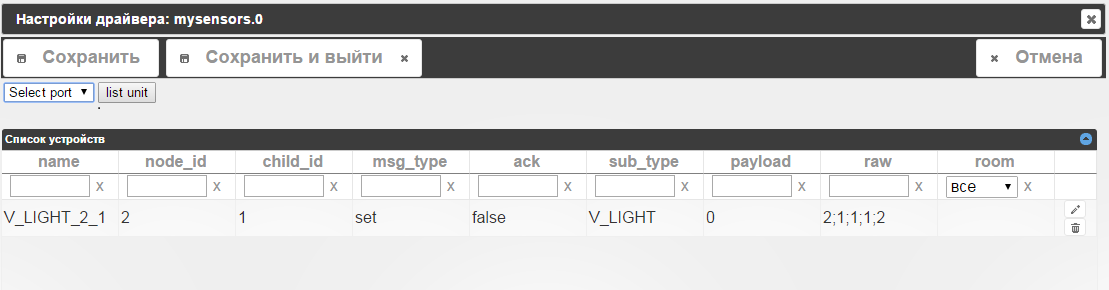
Во вкладке "настройки драйверов" mysensors adapter вижу бледную надпись
"Включить режим присваивания адресов"
Сервер на малинке.
1530_mys.png -
Добрый день.
Перечитал эту ветку.
Не могу понять, почему у меня не появляются данные с нод во вкладке "объекты"?
В логе вижу, что данные идут.
` > mysensors-0 2016-10-07 15:25:29.157 info Connectedmysensors-0 2016-10-07 15:25:29.142 info disconnected
mysensors-0 2016-10-07 15:24:48.362 info List of port: [{"comName":"/dev/ttyAMA0"},{"comName":"/dev/ttyUSB0","manufacturer":"1a86","serialNumber":"1a86_USB2.0-Serial","pnpId":"usb-1a86_USB2.0-Serial-if00-port0","vendorId":"0x1a86","productI
mysensors-0 2016-10-07 15:24:29.147 info Log :TSP:SANCHK:OK
mysensors-0 2016-10-07 15:24:29.142 warn Serial data received: 0;255;3;0;9;TSP:SANCHK:OK
mysensors-0 2016-10-07 15:23:29.205 info Log :TSP:SANCHK:OK
mysensors-0 2016-10-07 15:23:29.191 warn Serial data received: 0;255;3;0;9;TSP:SANCHK:OK
mysensors-0 2016-10-07 15:23:29.157 info Connected
mysensors-0 2016-10-07 15:23:29.139 info disconnected
mysensors-0 2016-10-07 15:22:29.144 info Log :TSP:SANCHK:OK
mysensors-0 2016-10-07 15:22:29.139 warn Serial data received: 0;255;3;0;9;TSP:SANCHK:OK
mysensors-0 2016-10-07 15:22:26.284 info Log :TSP:MSG:SEND 0-0-10-10 s=3,c=1,t=2,pt=2,l=2,sg=0,ft=0,st=ok:0
mysensors-0 2016-10-07 15:22:26.264 warn Serial data received: 0;255;3;0;9;TSP:MSG:SEND 0-0-10-10 s=3,c=1,t=2,pt=2,l=2,sg=0,ft=0,st=ok:0
mysensors-0 2016-10-07 15:22:26.185 info Log :TSP:MSG:ACK msg
mysensors-0 2016-10-07 15:22:26.161 warn Serial data received: 0;255;3;0;9;TSP:MSG:ACK msg
mysensors-0 2016-10-07 15:22:26.158 info Log :TSP:MSG:READ 10-10-0 s=3,c=1,t=2,pt=2,l=2,sg=0:0
mysensors-0 2016-10-07 15:22:26.154 warn Serial data received: 0;255;3;0;9;TSP:MSG:READ 10-10-0 s=3,c=1,t=2,pt=2,l=2,sg=0:0
mysensors-0 2016-10-07 15:22:26.094 info Log :TSP:MSG:READ 10-10-0 s=3,c=1,t=2,pt=0,l=1,sg=0:0
mysensors-0 2016-10-07 15:22:26.084 warn Serial data received: 0;255;3;0;9;TSP:MSG:READ 10-10-0 s=3,c=1,t=2,pt=0,l=1,sg=0:0
mysensors-0 2016-10-07 15:22:26.024 info Log :TSP:MSG:SEND 0-0-10-10 s=2,c=1,t=2,pt=2,l=2,sg=0,ft=0,st=ok:0
mysensors-0 2016-10-07 15:22:26.014 warn Serial data received: 0;255;3;0;9;TSP:MSG:SEND 0-0-10-10 s=2,c=1,t=2,pt=2,l=2,sg=0,ft=0,st=ok:0
mysensors-0 2016-10-07 15:22:25.954 info Log :TSP:MSG:ACK msg
mysensors-0 2016-10-07 15:22:25.928 warn Serial data received: 0;255;3;0;9;TSP:MSG:ACK msg
mysensors-0 2016-10-07 15:22:25.884 info Log :TSP:MSG:READ 10-10-0 s=2,c=1,t=2,pt=2,l=2,sg=0:0
mysensors-0 2016-10-07 15:22:25.874 warn Serial data received: 0;255;3;0;9;TSP:MSG:READ 10-10-0 s=2,c=1,t=2,pt=2,l=2,sg=0:0
mysensors-0 2016-10-07 15:22:25.814 info Log :TSP:MSG:READ 10-10-0 s=3,c=1,t=2,pt=0,l=1,sg=0:0
mysensors-0 2016-10-07 15:22:25.809 warn Serial data received: 0;255;3;0;9;TSP:MSG:READ 10-10-0 s=3,c=1,t=2,pt=0,l=1,sg=0:0
mysensors-0 2016-10-07 15:22:15.577 info Log :TSP:MSG:SEND 0-0-10-138 s=3,c=1,t=2,pt=6,l=2,sg=0,ft=0,st=ok:0100
mysensors-0 2016-10-07 15:22:15.572 warn Serial data received: 0;255;3;0;9;TSP:MSG:SEND 0-0-10-138 s=3,c=1,t=2,pt=6,l=2,sg=0,ft=0,st=ok:0100
mysensors-0 2016-10-07 15:22:15.478 info Log :TSP:MSG:REL MSG
mysensors-0 2016-10-07 15:22:15.474 warn Serial data received: 0;255;3;0;9;TSP:MSG:REL MSG
mysensors-0 2016-10-07 15:22:15.449 info Log :TSP:MSG:READ 0-10-138 s=3,c=1,t=2,pt=6,l=2,sg=0:0100
mysensors-0 2016-10-07 15:22:15.435 warn Serial data received: 0;255;3;0;9;TSP:MSG:READ 0-10-138 s=3,c=1,t=2,pt=6,l=2,sg=0:0100
mysensors-0 2016-10-07 15:22:15.394 info Log :TSP:MSG:SEND 0-0-10-138 s=3,c=1,t=2,pt=6,l=2,sg=0,ft=0,st=ok:0100
mysensors-0 2016-10-07 15:22:15.369 warn Serial data received: 0;255;3;0;9;TSP:MSG:SEND 0-0-10-138 s=3,c=1,t=2,pt=6,l=2,sg=0,ft=0,st=ok:0100 `
Во вкладке "настройки драйверов" mysensors adapter вижу бледную надпись
"Включить режим присваивания адресов"
Сервер на малинке. `
Я написал тест для драйвера и здесьhttps://github.com/ioBroker/ioBroker.my … mmands.txt
можно увидеть, как выглядит вывод в библиотеке mysensors 2.0 в апреле. Твой лог отличается от апрельского.
То что ты прислал в распечатке, это внутренний лог, который не несёт никакой информации для ioBrokera.
0 - 			node-id
255 - 		child-sensor-id
3 - 			internal
0 - 			ack
I_LOG_MESSAGE - sub-type
Payload -       TSP:MSG:READ 0-10-138 s=3,c=1,t=2,pt=6,l=2,sg=0:0100
Что значит "TSP:MSG:READ 0-10-138 s=3,c=1,t=2,pt=6,l=2,sg=0:0100" я не имею ни малейшего представления. Может стоит спросить на mySensors, что этот лог значит и почему не посылаются данные?
-
Судя по сообщениям: 0;255;3;0;9;TSP:SANCHK:OK
это приходит внутренний лог с шлюза контроллеру.
Расшифровка:
0 - адрес узла (0 это шлюз)
255 - child-sensor-id
3 - message-type "internal" (внутреннее сообщение)
0 - без подтверждения
9 - I_LOG_MESSAGE "Sent by the gateway to the Controller to trace-log a message"
далее сам текст лога в нашем случае например "TSP:SANCHK:OK"
Предполагаю, что какой то не такой скетч в шлюз залит или выставлены не те служебные настройки шлюза.
Больше похоже на какой то диагностический скетч.
что загружено в шлюз? какие настройки библиотеки mySensors выставлены?
-
Попробовал подключить NRF24L01 + напрямую к Малине, запускаю шлюз, ./bin/mysgw -d, данные с сенсоров идут прекрасно, а как их в IOBrokere принять???
Попробовал запустить шлюз с виртуальным портом, ./configure –my-gateway=serial --my-serial-is-pty --my-serial-pty=/dev/ttyUSB020, выбор порта в брокере не появляется. Мож кто уже проходил это дело?
Hey! Du scheinst an dieser Unterhaltung interessiert zu sein, hast aber noch kein Konto.
Hast du es satt, bei jedem Besuch durch die gleichen Beiträge zu scrollen? Wenn du dich für ein Konto anmeldest, kommst du immer genau dorthin zurück, wo du zuvor warst, und kannst dich über neue Antworten benachrichtigen lassen (entweder per E-Mail oder Push-Benachrichtigung). Du kannst auch Lesezeichen speichern und Beiträge positiv bewerten, um anderen Community-Mitgliedern deine Wertschätzung zu zeigen.
Mit deinem Input könnte dieser Beitrag noch besser werden 💗
Registrieren AnmeldenSupport us
304
Online33.0k
Benutzer83.5k
Themen1.3m
Beiträge