




Keine Adapter Installation mehr möglich
-
hallo,
ich habe ein komplett laufendes IOBroker System und wollte von meiner SD Karte ein Backup erstellen
….alles kein Problem. die neue SD Karte in den Raspi gesteckt, es läuft alles, aber ich kann keine Adapter installieren. Egal welchen...
wenn ich die alte SD Karte reinstecke, funktioniert auch die Installation wieder.... :shock:
hier mal die Fehlermeldung
$ ./iobroker add fritzdect --host ioBroker-RasPi Fertig mit Fehler: module.js:549 throw err; ^ Error: Cannot find module 'tap' at Function.Module._resolveFilename (module.js:547:15) at Function.Module._load (module.js:474:25) at Module.require (module.js:596:17) at require (internal/module.js:11:18) at Object. (/usr/local/lib/node_modules/npm/node_modules/update-notifier/node_modules/lazy-req:1:74) at Module._compile (module.js:652:30) at Object.Module._extensions..js (module.js:663:10) at Module.load (module.js:565:32) at tryModuleLoad (module.js:505:12) at Function.Module._load (module.js:497:3) ERROR: module.js:549 throw err; ^ Error: Cannot find module 'tap' at Function.Module._resolveFilename (module.js:547:15) at Function.Module._load (module.js:474:25) at Module.require (module.js:596:17) at require (internal/module.js:11:18) at Object. <anonymous>(/usr/local/lib/node_modules/npm/node_modules/update-notifier/node_modules/lazy-req:1:74) at Module._compile (module.js:652:30) at Object.Module._extensions..js (module.js:663:10) at Module.load (module.js:565:32) at tryModuleLoad (module.js:505:12) at Function.Module._load (module.js:497:3) ERROR: Error trying to check npm version: Error: Command failed: npm -vmodule.js:549 throw err; ^ Error: Cannot find module 'tap' at Function.Module._resolveFilename (module.js:547:15) at Function.Module._load (module.js:474:25) at Module.require (module.js:596:17) at require (internal/module.js:11:18) at Object. <anonymous>(/usr/local/lib/node_modules/npm/node_modules/update-notifier/node_modules/lazy-req:1:74) at Module._compile (module.js:652:30) at Object.Module._extensions..js (module.js:663:10) at Module.load (module.js:565:32) at tryModuleLoad (module.js:505:12) at Function.Module._load (module.js:497:3) ERROR: !!!!!!!!!!!!!!!!!!!!!!!!!!!!!!!!!!!!!!!!!!!!!!!!!!!!!!!!!!!!!!!!!!!!!!!!!Aborting install because the npm version could not be checked! Please check that npm is installed correctly. Use "npm install -g npm@4" or "npm install -g npm@>=5.7.1" to install a supported version. You need to make sure to repeat this step after installing an update to NodeJS and/or npm !!!!!!!!!!!!!!!!!!!!!!!!!!!!!!!!!!!!!!!!!!!!!!!!!!!!!!!!!!!!!!!!!!!!!!!!! ERROR: process exited with code 25</anonymous></anonymous> -
Kannst Du schreiben, wie Du Schritt für Schritt bei der Aktion vorgegangen bist?
-
Raspi aus
SD karte in Laptop -> Win32DiskImager -> image erstellt
neue SD Karte rein -> image drauf -> raspi config Filesystem erweitert, weil von 8GB auf 16GB
dann 16 GB in den Raspi und gestartet.
Es kommt ja alles, nur die Adapter installation schlägt fehl
–-----------------------------------------------------------------------------------------------
npm -v
pi@ioBroker-RasPi:/opt/iobroker $ npm -v
module.js:549
throw err;
^
Error: Cannot find module 'tap'
at Function.Module._resolveFilename (module.js:547:15)
at Function.Module._load (module.js:474:25)
at Module.require (module.js:596:17)
at require (internal/module.js:11:18)
at Object. <anonymous>(/usr/local/lib/node_modules/npm/node_modules/update-notifier/node_modules/lazy-req:1:74)
at Module._compile (module.js:652:30)
at Object.Module._extensions..js (module.js:663:10)
at Module.load (module.js:565:32)
at tryModuleLoad (module.js:505:12)
at Function.Module._load (module.js:497:3)</anonymous>
-
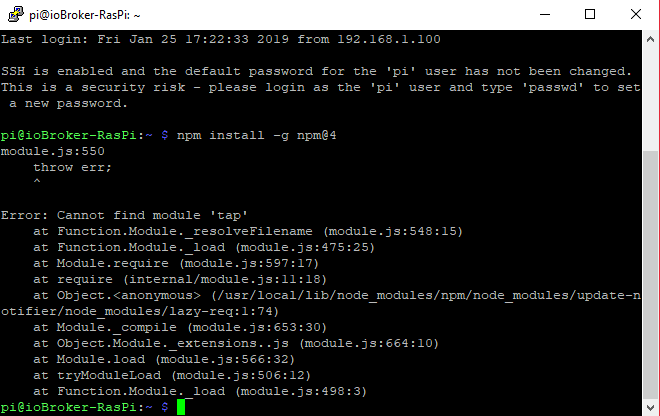
Wenn ich
npm install -g npm@4
eingebe, kommt folgendes


Hey! Du scheinst an dieser Unterhaltung interessiert zu sein, hast aber noch kein Konto.
Hast du es satt, bei jedem Besuch durch die gleichen Beiträge zu scrollen? Wenn du dich für ein Konto anmeldest, kommst du immer genau dorthin zurück, wo du zuvor warst, und kannst dich über neue Antworten benachrichtigen lassen (entweder per E-Mail oder Push-Benachrichtigung). Du kannst auch Lesezeichen speichern und Beiträge positiv bewerten, um anderen Community-Mitgliedern deine Wertschätzung zu zeigen.
Mit deinem Input könnte dieser Beitrag noch besser werden 💗
Registrieren Anmelden461
Online33.0k
Benutzer83.6k
Themen1.3m
Beiträge