




Unsupported platform for xpc-connection@0.1.4: wanted {"os":"darwin","arch":"any"}
-
Guten Morgen,
ich versuche hier eine Adapter (https://www.npmjs.com/package/tplink-smarthome-api) zu installieren, was aber scheitert.
iobroker	2018-02-02 11:58:12.347	info	exit 25
iobroker	2018-02-02 11:58:12.327	error	host.ioBroker-Pi Cannot install https://github.com/plasticrake/tplink-smarthome-api/tarball/master: 254
iobroker	2018-02-02 11:58:12.287	info	npm ERR! /npm-debug.log
iobroker	2018-02-02 11:58:12.287	info	npm ERR! Please include the following file with any support request:
iobroker	2018-02-02 11:58:12.085	info	npm ERR! enoent
iobroker	2018-02-02 11:58:12.085	info	npm ERR! enoent and is related to npm not being able to find a file.
iobroker	2018-02-02 11:58:12.085	info	npm ERR! enoent ENOENT: no such file or directory, chmod '/opt/iobroker/node_modules/tplink-smarthome-api/lib/cli.js'npm ERR! enoent This is most likely not a problem with npm itself
iobroker	2018-02-02 11:58:12.077	info	npm ERR! enoent ENOENT: no such file or directory, chmod '/opt/iobroker/node_modules/tplink-smarthome-api/lib/cli.js'
iobroker	2018-02-02 11:58:12.076	info
iobroker	2018-02-02 11:58:12.067	info	npm ERR! syscall chmod
iobroker	2018-02-02 11:58:12.067	info	npm ERR! errno -2
iobroker	2018-02-02 11:58:12.067	info	npm ERR! code ENOENT
iobroker	2018-02-02 11:58:12.067	info	npm ERR! path /opt/iobroker/node_modules/tplink-smarthome-api/lib/cli.js
iobroker	2018-02-02 11:58:12.067	info	npm ERR! npm v3.10.10
iobroker	2018-02-02 11:58:12.067	info	npm ERR! argv "/usr/bin/node" "/usr/bin/npm" "install" "https://github.com/plasticrake/tplink-smarthome-api/tarball/master" "--production" "--prefix" "/opt/iobroker"npm ERR! node v6.12.3
iobroker	2018-02-02 11:58:12.063	info	npm ERR! Linux 4.9.59-v7+
iobroker	2018-02-02 11:58:12.052	info	npm WARN notsup SKIPPING OPTIONAL DEPENDENCY: Unsupported platform for xpc-connection@0.1.4: wanted {"os":"darwin","arch":"any"} (current: {"os":"linux","arch":"arm"})
iobroker	2018-02-02 11:58:12.052	info	npm WARN optional SKIPPING OPTIONAL DEPENDENCY: xpc-connection@~0.1.4 (node_modules/noble/node_modules/xpc-connection):
iobroker	2018-02-02 11:58:12.052	info	npm WARN optional SKIPPING OPTIONAL DEPENDENCY: xpc-connection@~0.1.4 (node_modules/iobroker.radar/node_modules/noble/node_modules/xpc-connection):npm WARN notsup SKIPPING OPTIONAL DEPENDENCY: Unsupp
iobroker	2018-02-02 11:57:11.554	info	npm install https://github.com/plasticrake/tplink-smarthome-api/tarball/master --production --prefix "/opt/iobroker" (System call)
iobroker	2018-02-02 11:57:11.152	info	install https://github.com/plasticrake/tplink-smarthome-api/tarball/master
iobroker	2018-02-02 11:57:09.893	info	url "https://github.com/plasticrake/tplink-smarthome-api"
Besonders auffällig ist, das ich bei jeder Installation dieser Fehler im Log steht:
iobroker	2018-02-02 11:58:12.052	info	npm WARN notsup SKIPPING OPTIONAL DEPENDENCY: Unsupported platform for xpc-connection@0.1.4: wanted {"os":"darwin","arch":"any"} (current: {"os":"linux","arch":"arm"})
iobroker	2018-02-02 11:58:12.052	info	npm WARN optional SKIPPING OPTIONAL DEPENDENCY: xpc-connection@~0.1.4 (node_modules/noble/node_modules/xpc-connection):
Wie bekomme ich dieses Problem in den Griff? Als System läuft: ioBroker Image für Raspberry Pi2/3 Stretch mit piVCCU 20171109 - http://www.iobroker.net/docu/?page_id=7502&lang=de
-
Guten Morgen,
ich versuche hier eine Adapter (https://www.npmjs.com/package/tplink-smarthome-api) zu installieren, was aber scheitert.
iobroker	2018-02-02 11:58:12.347	info	exit 25
iobroker	2018-02-02 11:58:12.327	error	host.ioBroker-Pi Cannot install https://github.com/plasticrake/tplink-smarthome-api/tarball/master: 254
iobroker	2018-02-02 11:58:12.287	info	npm ERR! /npm-debug.log
iobroker	2018-02-02 11:58:12.287	info	npm ERR! Please include the following file with any support request:
iobroker	2018-02-02 11:58:12.085	info	npm ERR! enoent
iobroker	2018-02-02 11:58:12.085	info	npm ERR! enoent and is related to npm not being able to find a file.
iobroker	2018-02-02 11:58:12.085	info	npm ERR! enoent ENOENT: no such file or directory, chmod '/opt/iobroker/node_modules/tplink-smarthome-api/lib/cli.js'npm ERR! enoent This is most likely not a problem with npm itself
iobroker	2018-02-02 11:58:12.077	info	npm ERR! enoent ENOENT: no such file or directory, chmod '/opt/iobroker/node_modules/tplink-smarthome-api/lib/cli.js'
iobroker	2018-02-02 11:58:12.076	info
iobroker	2018-02-02 11:58:12.067	info	npm ERR! syscall chmod
iobroker	2018-02-02 11:58:12.067	info	npm ERR! errno -2
iobroker	2018-02-02 11:58:12.067	info	npm ERR! code ENOENT
iobroker	2018-02-02 11:58:12.067	info	npm ERR! path /opt/iobroker/node_modules/tplink-smarthome-api/lib/cli.js
iobroker	2018-02-02 11:58:12.067	info	npm ERR! npm v3.10.10
iobroker	2018-02-02 11:58:12.067	info	npm ERR! argv "/usr/bin/node" "/usr/bin/npm" "install" "https://github.com/plasticrake/tplink-smarthome-api/tarball/master" "--production" "--prefix" "/opt/iobroker"npm ERR! node v6.12.3
iobroker	2018-02-02 11:58:12.063	info	npm ERR! Linux 4.9.59-v7+
iobroker	2018-02-02 11:58:12.052	info	npm WARN notsup SKIPPING OPTIONAL DEPENDENCY: Unsupported platform for xpc-connection@0.1.4: wanted {"os":"darwin","arch":"any"} (current: {"os":"linux","arch":"arm"})
iobroker	2018-02-02 11:58:12.052	info	npm WARN optional SKIPPING OPTIONAL DEPENDENCY: xpc-connection@~0.1.4 (node_modules/noble/node_modules/xpc-connection):
iobroker	2018-02-02 11:58:12.052	info	npm WARN optional SKIPPING OPTIONAL DEPENDENCY: xpc-connection@~0.1.4 (node_modules/iobroker.radar/node_modules/noble/node_modules/xpc-connection):npm WARN notsup SKIPPING OPTIONAL DEPENDENCY: Unsupp
iobroker	2018-02-02 11:57:11.554	info	npm install https://github.com/plasticrake/tplink-smarthome-api/tarball/master --production --prefix "/opt/iobroker" (System call)
iobroker	2018-02-02 11:57:11.152	info	install https://github.com/plasticrake/tplink-smarthome-api/tarball/master
iobroker	2018-02-02 11:57:09.893	info	url "https://github.com/plasticrake/tplink-smarthome-api"
Besonders auffällig ist, das ich bei jeder Installation dieser Fehler im Log steht:
iobroker	2018-02-02 11:58:12.052	info	npm WARN notsup SKIPPING OPTIONAL DEPENDENCY: Unsupported platform for xpc-connection@0.1.4: wanted {"os":"darwin","arch":"any"} (current: {"os":"linux","arch":"arm"})
iobroker	2018-02-02 11:58:12.052	info	npm WARN optional SKIPPING OPTIONAL DEPENDENCY: xpc-connection@~0.1.4 (node_modules/noble/node_modules/xpc-connection):
Wie bekomme ich dieses Problem in den Griff? Als System läuft: ioBroker Image für Raspberry Pi2/3 Stretch mit piVCCU 20171109 - http://www.iobroker.net/docu/?page_id=7502&lang=de `
Was gibst du ein?npm i tplink-smarthome-api --production?
-
npm i tplink-smarthome-api --production? `
Bisher direkt aus ioBroker heraus mittels: "Installieren aus eigenem URL" und drt gebe ich die URL an. Ich probiere es jetzt aber mal aus der Shell.*Edit
Hier aus der Shell:
` > root@ioBroker-Pi:/opt/iobroker# npm i tplink-smarthome-api –productioniobroker@1.0.0 /opt/iobroker
└─┬ tplink-smarthome-api@0.22.0
├─┬ babel-runtime@6.26.0
│ ├── core-js@2.5.3
│ └── regenerator-runtime@0.11.1
├── commander@2.13.0
├── lodash.defaultto@4.14.0
├── lodash.groupby@4.6.0
├── lodash.isequal@4.5.0
├── loglevel@1.6.1
└── tplink-smarthome-crypto@1.0.0
npm WARN optional SKIPPING OPTIONAL DEPENDENCY: xpc-connection@~0.1.4 (node_modules/iobroker.radar/node_modules/noble/node_modules/xpc-connection):
npm WARN notsup SKIPPING OPTIONAL DEPENDENCY: Unsupported platform for xpc-connection@0.1.4: wanted {"os":"darwin","arch":"any"} (current: {"os":"linux","arch":"arm"})
npm WARN optional SKIPPING OPTIONAL DEPENDENCY: xpc-connection@~0.1.4 (node_modules/noble/node_modules/xpc-connection):
npm WARN notsup SKIPPING OPTIONAL DEPENDENCY: Unsupported platform for xpc-connection@0.1.4: wanted {"os":"darwin","arch":"any"} (current: {"os":"linux","arch":"arm"}) `
-
ich versuche hier eine Adapter (https://www.npmjs.com/package/tplink-smarthome-api) zu installieren, was aber scheitert. `
Das ist IMHO kein Adapter.
Oder??
GRuß
Rainer
-
Ja ich dachte… weil...
 npm install https://github.com/arteck/ioBroker.hs100/tarball/master/
iobroker@1.0.0 /opt/iobroker
└── iobroker.hs100@0.1.3

npm WARN optional SKIPPING OPTIONAL DEPENDENCY: xpc-connection@~0.1.4 (node_modules/iobroker.radar/node_modules/noble/node_modules/xpc-connection):
npm WARN notsup SKIPPING OPTIONAL DEPENDENCY: Unsupported platform for xpc-connection@0.1.4: wanted {"os":"darwin","arch":"any"} (current: {"os":"linux","arch":"arm"})
npm WARN optional SKIPPING OPTIONAL DEPENDENCY: xpc-connection@~0.1.4 (node_modules/noble/node_modules/xpc-connection):
npm WARN notsup SKIPPING OPTIONAL DEPENDENCY: Unsupported platform for xpc-connection@0.1.4: wanted {"os":"darwin","arch":"any"} (current: {"os":"linux","arch":"arm"})
host.ioBroker-Pi 2018-02-02 15:30:34.634 error instance system.adapter.hs100.0 terminated with code 0 (OK) Caught 2018-02-02 15:30:34.633 error by controller[0]: at Manager.Emitter.emit (/opt/iobroker/node_modules/socket.io-client/node_modules/component-emitter/index.js:133:20) Caught 2018-02-02 15:30:34.633 error by controller[0]: at Manager. (/opt/iobroker/node_modules/component-bind/index.js:21:15) Caught 2018-02-02 15:30:34.633 error by controller[0]: at Socket.onpacket (/opt/iobroker/node_modules/socket.io-client/lib/socket.js:236:12) Caught 2018-02-02 15:30:34.633 error by controller[0]: at Socket.onack (/opt/iobroker/node_modules/socket.io-client/lib/socket.js:312:9) Caught 2018-02-02 15:30:34.633 error by controller[0]: at Socket. (/opt/iobroker/node_modules/iobroker.js-controller/lib/adapter.js:710:25) Caught 2018-02-02 15:30:34.632 error by controller[0]: at initAdapter (/opt/iobroker/node_modules/iobroker.js-controller/lib/adapter.js:4659:18) Caught 2018-02-02 15:30:34.632 error by controller[0]: at Adapter.emit (events.js:185:7) Caught 2018-02-02 15:30:34.632 error by controller[0]: at emitNone (events.js:86:13) Caught 2018-02-02 15:30:34.632 error by controller[0]: at Adapter. (/opt/iobroker/node_modules/iobroker.hs100/main.js:27:5) Caught 2018-02-02 15:30:34.632 error by controller[0]: at main (/opt/iobroker/node_modules/iobroker.hs100/main.js:482:32) Caught 2018-02-02 15:30:34.631 error by controller[0]: TypeError: Cannot read property 'length' of undefined hs100.0 2018-02-02 15:30:34.608 info terminating hs100.0 2018-02-02 15:30:34.098 error at Manager.Emitter.emit (/opt/iobroker/node_modules/socket.io-client/node_modules/component-emitter/index.js:133:20) hs100.0 2018-02-02 15:30:34.098 error at Manager. (/opt/iobroker/node_modules/component-bind/index.js:21:15) hs100.0 2018-02-02 15:30:34.098 error at Socket.onpacket (/opt/iobroker/node_modules/socket.io-client/lib/socket.js:236:12) hs100.0 2018-02-02 15:30:34.098 error at Socket.onack (/opt/iobroker/node_modules/socket.io-client/lib/socket.js:312:9) hs100.0 2018-02-02 15:30:34.098 error at Socket. (/opt/iobroker/node_modules/iobroker.js-controller/lib/adapter.js:710:25) hs100.0 2018-02-02 15:30:34.098 error at initAdapter (/opt/iobroker/node_modules/iobroker.js-controller/lib/adapter.js:4659:18) hs100.0 2018-02-02 15:30:34.098 error at Adapter.emit (events.js:185:7) hs100.0 2018-02-02 15:30:34.098 error at emitNone (events.js:86:13) hs100.0 2018-02-02 15:30:34.098 error at Adapter. (/opt/iobroker/node_modules/iobroker.hs100/main.js:27:5) hs100.0 2018-02-02 15:30:34.098 error at main (/opt/iobroker/node_modules/iobroker.hs100/main.js:482:32) hs100.0 2018-02-02 15:30:34.098 error TypeError: Cannot read property 'length' of undefined hs100.0 2018-02-02 15:30:34.095 error uncaught exception: Cannot read property 'length' of undefined hs100.0 2018-02-02 15:30:34.050 info starting. Version 0.1.3 in /opt/iobroker/node_modules/iobroker.hs100, node: v6.12.3 iobroker 2018-02-02 15:30:31.707 info exit 0 iobroker 2018-02-02 15:30:31.697 info host.ioBroker-Pi object system.adapter.hs100.0 created host.ioBroker-Pi 2018-02-02 15:30:31.673 info instance system.adapter.hs100.0 started with pid 23970 host.ioBroker-Pi 2018-02-02 15:30:31.640 info object change system.adapter.hs100.0 iobroker 2018-02-02 15:30:31.593 info host.ioBroker-Pi object system.adapter.hs100.0.alive created iobroker 2018-02-02 15:30:31.550 info host.ioBroker-Pi object system.adapter.hs100.0.connected created iobroker 2018-02-02 15:30:31.513 info host.ioBroker-Pi object system.adapter.hs100.0.memHeapUsed created iobroker 2018-02-02 15:30:31.470 info host.ioBroker-Pi object system.adapter.hs100.0.memHeapTotal created iobroker 2018-02-02 15:30:31.417 info host.ioBroker-Pi object system.adapter.hs100.0.memRss created iobroker 2018-02-02 15:30:31.369 info host.ioBroker-Pi object system.adapter.hs100.0.uptime created iobroker 2018-02-02 15:30:31.330 info host.ioBroker-Pi object system.adapter.hs100.0.inputCount created iobroker 2018-02-02 15:30:31.291 info host.ioBroker-Pi object system.adapter.hs100.0.outputCount created iobroker 2018-02-02 15:30:31.269 info host.ioBroker-Pi create instance hs100 admin.0 2018-02-02 15:30:31.193 error change ID is empty: {"_id":null,"acl":{"object":1636,"owner":"system.user.admin","ownerGroup":"system.group.administrator"},"from":"system.host.ioBroker-Pi.cli","ts":1517585431181} iobroker 2018-02-02 15:30:31.211 info host.ioBroker-Pi object undefined created javascript.0 2018-02-02 15:30:31.203 error change ID is empty: {"_id":null,"acl":{"object":1636,"owner":"system.user.admin","ownerGroup":"system.group.administrator"},"from":"system.host.ioBroker-Pi.cli","ts":1517585431181} history.0 2018-02-02 15:30:31.198 error change ID is empty: {"_id":null,"acl":{"object":1636,"owner":"system.user.admin","ownerGroup":"system.group.administrator"},"from":"system.host.ioBroker-Pi.cli","ts":1517585431181} iobroker 2018-02-02 15:30:31.177 info host.ioBroker-Pi object system.adapter.hs100 created iobroker 2018-02-02 15:30:31.009 info upload [0] hs100.admin /opt/iobroker/node_modules/iobroker.hs100/admin/hs100.png hs100.png image/png iobroker 2018-02-02 15:30:30.894 info upload [1] hs100.admin /opt/iobroker/node_modules/iobroker.hs100/admin/index.html index.html text/html iobroker 2018-02-02 15:30:30.785 info upload [2] hs100.admin /opt/iobroker/node_modules/iobroker.hs100/admin/words.js words.js application/javascript iobroker 2018-02-02 15:30:30.747 info got /opt/iobroker/node_modules/iobroker.hs100/admin iobroker 2018-02-02 15:30:27.278 info npm install --production (System call) in "/opt/iobroker/node_modules/iobroker.hs100" iobroker 2018-02-02 15:30:27.274 info host.ioBroker-Pi install adapter hs100 iobroker 2018-02-02 15:30:25.438 info add hs100 host.ioBroker-Pi 2018-02-02 15:30:17.022 info Update repository "default" under "http://download.iobroker.net/sources-dist.json" iobroker 2018-02-02 15:30:16.558 info exit 0 iobroker 2018-02-02 15:30:16.420 info npm WARN notsup SKIPPING OPTIONAL DEPENDENCY: Unsupported platform for xpc-connection@0.1.4: wanted {"os":"darwin","arch":"any"} (current: {"os":"linux","arch":"arm"}) iobroker 2018-02-02 15:30:16.420 info npm WARN optional SKIPPING OPTIONAL DEPENDENCY: xpc-connection@~0.1.4 (node_modules/noble/node_modules/xpc-connection): iobroker 2018-02-02 15:30:16.420 info WARN optional SKIPPING OPTIONAL DEPENDENCY: xpc-connection@~0.1.4 (node_modules/iobroker.radar/node_modules/noble/node_modules/xpc-connection):npm WARN notsup SKIPPING OPTIONAL DEPENDENCY: Unsupport iobroker 2018-02-02 15:30:16.417 info npm iobroker 2018-02-02 15:29:05.614 info npm install https://github.com/arteck/ioBroker.hs100/tarball/master --production --prefix "/opt/iobroker" (System call) iobroker 2018-02-02 15:29:05.206 info install https://github.com/arteck/ioBroker.hs100/tarball/master iobroker 2018-02-02 15:29:03.972 info url "https://github.com/arteck/ioBroker.hs100.git"Wenn ich dann ein Gerät hinzufüge, überschlagen sich die Fehlermeldung, das ioBroker mit dem Anzeigen nicht mehr folgen kann.
Alles beginnt mit einem
*** "Dose nicht erreichbar: 172.26.63.111
das scrollt im hunderstel Sekundentakt durch bis es in einem
host.ioBroker-Pi	2018-02-02 15:36:52.969	info	instance system.adapter.hs100.0 terminated with code 0 (OK)
Caught	2018-02-02 15:36:52.969	error	by controller[1849]: (node:24413) UnhandledPromiseRejectionWarning: Unhandled promise rejection (rejection id: 3409): Error: TCP Timeout
Caught	2018-02-02 15:36:52.969	error	by controller[1849]: [PC Junior] device.send() Error: TCP Timeout
Caught	2018-02-02 15:36:52.969	error	by controller[1849]: TCP Timeout
Caught	2018-02-02 15:36:52.969	error	by controller[1849]: (node:24413) UnhandledPromiseRejectionWarning: Unhandled promise rejection (rejection id: 3408): Error: TCP Timeout
Caught	2018-02-02 15:36:52.969	error	by controller[1848]: [PC Junior] device.send() Error: TCP Timeout
Caught	2018-02-02 15:36:52.968	error	by controller[1848]: TCP Timeout
Caught	2018-02-02 15:36:52.968	error	by controller[1848]: (node:24413) UnhandledPromiseRejectionWarning: Unhandled promise rejection (rejection id: 3407): Error: TCP Timeout
Caught	2018-02-02 15:36:52.968	error	by controller[1848]: [PC Junior] device.send() Error: TCP Timeout
Caught	2018-02-02 15:36:52.968	error	by controller[1847]: TCP Timeout
Caught	2018-02-02 15:36:52.968	error	by controller[1846]: (node:24413) UnhandledPromiseRejectionWarning: Unhandled promise rejection (rejection id: 3406): Error: TCP Timeout
Caught	2018-02-02 15:36:52.968	error	by controller[1846]: TCP Timeout
Caught	2018-02-02 15:36:52.968	error	by controller[1846]: (node:24413) UnhandledPromiseRejectionWarning: Unhandled promise rejection (rejection id: 3405): Error: TCP Timeout
Caught	2018-02-02 15:36:52.967	error	by controller[1846]: TCP Timeout
Caught	2018-02-02 15:36:52.967	error	by controller[1846]: (node:24413) UnhandledPromiseRejectionWarning: Unhandled promise rejection (rejection id: 3404): Error: TCP Timeout
Caught	2018-02-02 15:36:52.967	error	by controller[1846]: TCP Timeout
Caught	2018-02-02 15:36:52.967	error	by controller[1846]: (node:24413) UnhandledPromiseRejectionWarning: Unhandled promise rejection (rejection id: 3403): Error: TCP Timeout
Caught	2018-02-02 15:36:52.967	error	by controller[1845]: TCP Timeout
Caught	2018-02-02 15:36:52.967	error	by controller[1845]: (node:24413) UnhandledPromiseRejectionWarning: Unhandled promise rejection (rejection id: 3402): Error: TCP Timeout
Caught	2018-02-02 15:36:52.967	error	by controller[1845]: TCP Timeout
Caught	2018-02-02 15:36:52.966	error	by controller[1845]: (node:24413) UnhandledPromiseRejectionWarning: Unhandled promise rejection (rejection id: 3401): Error: TCP Timeout
Caught	2018-02-02 15:36:52.966	error	by controller[1845]: [PC Junior] device.send() Error: TCP Timeout
Caught	2018-02-02 15:36:52.966	error	by controller[1845]: TCP Timeout
Caught	2018-02-02 15:36:52.966	error	by controller[1845]: (node:24413) UnhandledPromiseRejectionWarning: Unhandled promise rejection (rejection id: 3400): Error: TCP Timeout
Caught	2018-02-02 15:36:52.966	error	by controller[1845]: [PC Junior] device.send() Error: TCP Timeout
Caught	2018-02-02 15:36:52.966	error	by controller[1845]: TCP Timeout
und dem pausieren des Adapter endet. Dieses Theater habe ich, seit ich auf das Image gewechselt habe. Vorher liefen die 3 TP-Link problemlos.
-
Du hast irgendein npm-package, das überhaupt nichts mit ioBroker zu tun hat versucht mit in ioBroker einzubinden.
Dass das nicht gut geht ist doch klar.
Gruß
Rainer
-
Du hast irgendein npm-package, das überhaupt nichts mit ioBroker zu tun hat versucht mit in ioBroker einzubinden.
Dass das nicht gut geht ist doch klar.
Gruß
Rainer ` Diese Fehlermeldung habe ich seit dem allererstem Start. Das hat mit meinem Fehler nichts zutun, wenn er mich auch mächtig ärgert.
-
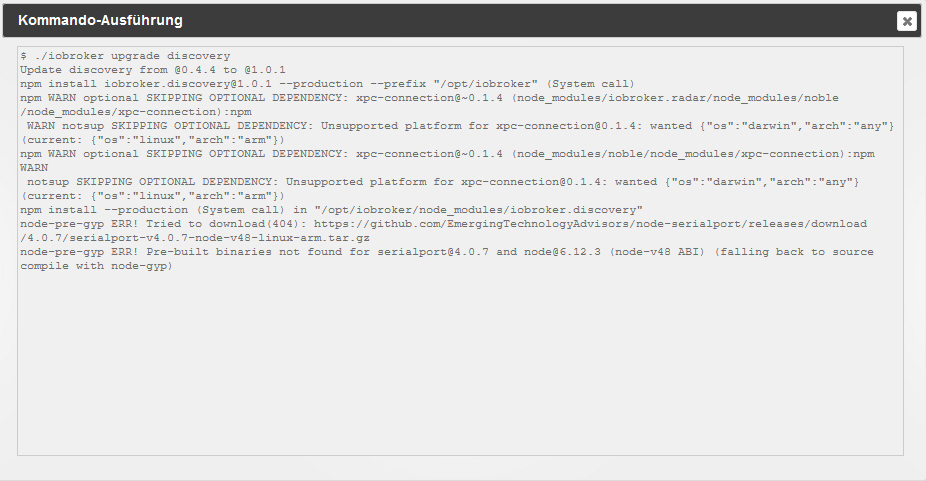
Das hatte ich am 30.01.2018, gleich nach dem erstem Start von ioBroker als ich Discovery updaten wollte.
https://www.facebook.com/groups/4404991 … 475053193/
https://www.facebook.com/groups/4404991 … 698343504/
Es hat also rein garnichts mit meinem Fehler zu tun. Dieser entstand deshalb weil ich hier gesucht habe um meine Steckdosen wieder verwenden zu können und ich zu dumm war alle 10 Seiten des Beitrages zur tplink-smarthome-api zu lesen. So habe ich nur die ersten 2 - 3 Seiten überflogen und dann versucht zu installieren. Von Erfolg gekrönt war das, wie man oben sieht zwar nicht, aber es ist auf keinen Fall die Ursache meines Problemes.
4638_1666.jpg -
Mit den Facebook-Links kann ich nichts anfangen :(
Gib mir bitte die Versionen von:
-
js-controller
-
admin
-
nodejs
-
npm
Danke
Rainer
-
-
huhu
@Homoran:Gib mir bitte die Versionen von:
- js-controller ` root@ioBroker-Pi:/home/pi# iobroker -v
1.2.3
Gib mir bitte die Versionen von:
- admin ` ioBroker admin
2.0.9
Gib mir bitte die Versionen von:
- nodejs ` root@ioBroker-Pi:/home/pi# node -v
v6.12.3
Gib mir bitte die Versionen von:
- npm ` root@ioBroker-Pi:/home/pi# npm -v
3.10.10
Danke
Rainer ` Ich danke ;)
Gruß Sven
-
Die Versionen passen.
Irgendwas übersehe ich. :(
Wanted arch = any und trotzdem sagt er not supported bei arch = arm
Aber egal; es handelt sich nur um Optional Dependencies, also nichts notwendiges.
Gruß
Rainer
-
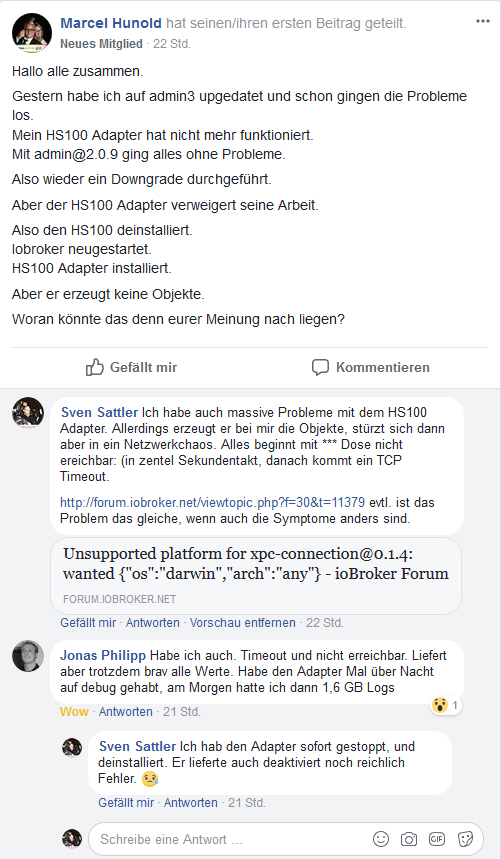
Es scheint als gebe es weitere mit einem Problem mit dem HS-100 Adapter.
https://www.facebook.com/groups/4404991 … 081562299/
4638_1670.jpg -
Ich habe mein Problem erstmal damit gelöst den Wert "Abfrage Intervall[ms]" auf "20000" zu setzen. Damit kommt es nicht mehr zu den TCP Fehlern. Möglicherweise wollen die Steckdosen nicht so häufig antworten oder sind dafür auch nicht ausgelegt.


Hey! Du scheinst an dieser Unterhaltung interessiert zu sein, hast aber noch kein Konto.
Hast du es satt, bei jedem Besuch durch die gleichen Beiträge zu scrollen? Wenn du dich für ein Konto anmeldest, kommst du immer genau dorthin zurück, wo du zuvor warst, und kannst dich über neue Antworten benachrichtigen lassen (entweder per E-Mail oder Push-Benachrichtigung). Du kannst auch Lesezeichen speichern und Beiträge positiv bewerten, um anderen Community-Mitgliedern deine Wertschätzung zu zeigen.
Mit deinem Input könnte dieser Beitrag noch besser werden 💗
Registrieren AnmeldenSupport us
184
Online33.0k
Benutzer83.5k
Themen1.3m
Beiträge