



Skip to content
  • Home
  • Aktuell
  • Tags
  • 0 Ungelesen 0
  • Kategorien
  • Unreplied
  • Beliebt
  • GitHub
  • Docu
  • Hilfe
Skins
  • Light
  • Brite
  • Cerulean
  • Cosmo
  • Flatly
  • Journal
  • Litera
  • Lumen
  • Lux
  • Materia
  • Minty
  • Morph
  • Pulse
  • Sandstone
  • Simplex
  • Sketchy
  • Spacelab
  • United
  • Yeti
  • Zephyr
  • Dark
  • Cyborg
  • Darkly
  • Quartz
  • Slate
  • Solar
  • Superhero
  • Vapor

  • Standard: (Kein Skin)
  • Kein Skin
Einklappen
ioBroker Logo

Community Forum

donate donate
  1. ioBroker Community Home
  2. English
  3. ioBroker general
  4. Node Red adapter keeps rebooting - exited with 6

NEWS

  • UPDATE 31.10.: Amazon Alexa - ioBroker Skill läuft aus ?
    apollon77A
    apollon77
    48
    3
    8.8k

  • Monatsrückblick – September 2025
    BluefoxB
    Bluefox
    13
    1
    2.2k

  • Neues Video "KI im Smart Home" - ioBroker plus n8n
    BluefoxB
    Bluefox
    16
    1
    3.3k

Node Red adapter keeps rebooting - exited with 6

Geplant Angeheftet Gesperrt Verschoben ioBroker general
6 Beiträge 2 Kommentatoren 841 Aufrufe 2 Watching
  • Älteste zuerst
  • Neuste zuerst
  • Meiste Stimmen
Antworten
  • In einem neuen Thema antworten
Anmelden zum Antworten
Dieses Thema wurde gelöscht. Nur Nutzer mit entsprechenden Rechten können es sehen.
  • M Offline
    M Offline
    Mikee123
    schrieb am zuletzt editiert von
    #1

    On a previous Windows installation, I had Node Red running without issues. I updated the PC to Windows 11, installed iobroker, and the Node Red adapter. After installing all the necessary palettes, I imported the backup of my flows which were running without issues on teh previous install. But now, Node Red keeps rebooting. In the iobroker log there is this:

    node-red.0
    2023-05-27 13:30:20.406 info node-red exited with 6

    node-red.0
    2023-05-27 13:29:48.153 warn Terminated (UNCAUGHT_EXCEPTION): Without reason

    node-red.0
    2023-05-27 13:29:48.152 info terminating

    Node Red runs fine in safe mode. I asked in the Node Red forum, but they did not know about iobroker and suggested to ask here

    mickymM 1 Antwort Letzte Antwort
    0
    • M Mikee123

      On a previous Windows installation, I had Node Red running without issues. I updated the PC to Windows 11, installed iobroker, and the Node Red adapter. After installing all the necessary palettes, I imported the backup of my flows which were running without issues on teh previous install. But now, Node Red keeps rebooting. In the iobroker log there is this:

      node-red.0
      2023-05-27 13:30:20.406 info node-red exited with 6

      node-red.0
      2023-05-27 13:29:48.153 warn Terminated (UNCAUGHT_EXCEPTION): Without reason

      node-red.0
      2023-05-27 13:29:48.152 info terminating

      Node Red runs fine in safe mode. I asked in the Node Red forum, but they did not know about iobroker and suggested to ask here

      mickymM Online
      mickymM Online
      mickym
      Most Active
      schrieb am zuletzt editiert von
      #2

      @mikee123 In safe mode - your flow is stopped - therefore you have no problems. A node (probably a hardware node) crashs NodeRed - so you have to find out which flow, which node.
      When you have started in safe mode - deactivate all flows.
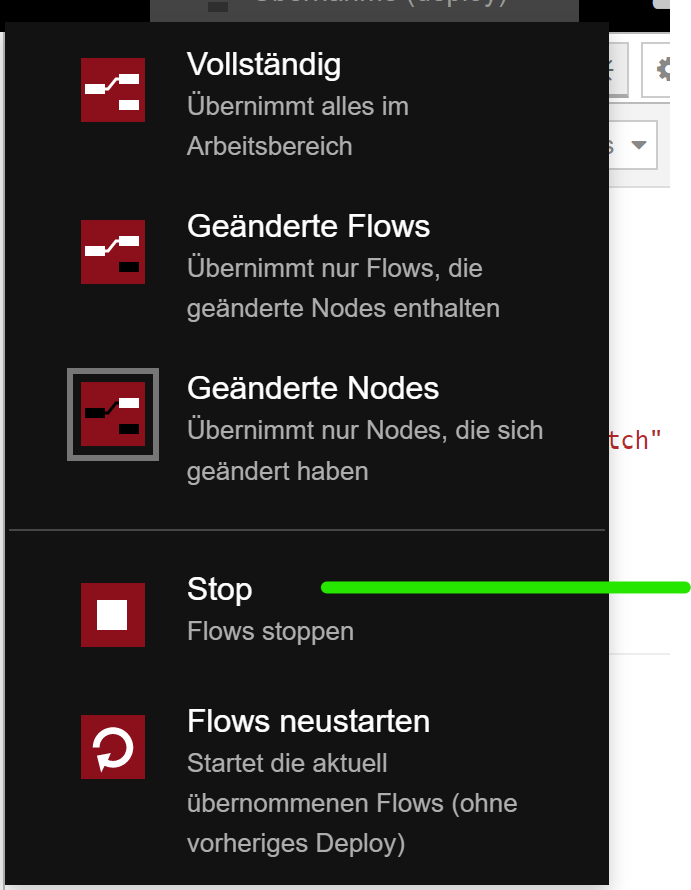
      Start the flows in general
      bf1beeb0-f8ec-45d2-87c7-0c2f6c3c83ba-image.png

      and then activate each flow and check if NR crashs. So you have to find out - which node causes the crash of the node-red adapter.

      Jeder Flow bzw. jedes Script, das ich hier poste implementiert jeder auf eigene Gefahr. Flows und Scripts können Fehler aufweisen und weder der Seitenbetreiber noch ich persönlich können hierfür haftbar gemacht werden. Das gleiche gilt für Empfehlungen aller Art.

      M 1 Antwort Letzte Antwort
      0
      • mickymM mickym

        @mikee123 In safe mode - your flow is stopped - therefore you have no problems. A node (probably a hardware node) crashs NodeRed - so you have to find out which flow, which node.
        When you have started in safe mode - deactivate all flows.
        Start the flows in general

        bf1beeb0-f8ec-45d2-87c7-0c2f6c3c83ba-image.png

        and then activate each flow and check if NR crashs. So you have to find out - which node causes the crash of the node-red adapter.

        M Offline
        M Offline
        Mikee123
        schrieb am zuletzt editiert von
        #3

        @mickym How do I activate each flow ?

        mickymM 1 Antwort Letzte Antwort
        0
        • M Mikee123

          @mickym How do I activate each flow ?

          mickymM Online
          mickymM Online
          mickym
          Most Active
          schrieb am zuletzt editiert von mickym
          #4

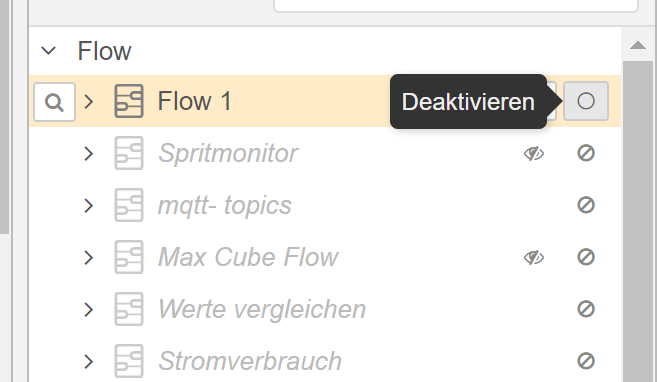
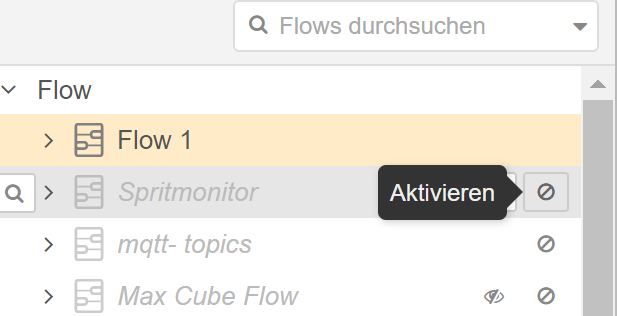
          @mikee123 when you open esch flow with double click, you habe on the lower left corner a button to activate or deactivate a flow.

          Or even more simple you can activate or deactivate flows in the info tab.
          ab8e65ab-dc46-41d7-a0d5-0b8357faf3ae-image.png
          4c706615-ac1c-46bd-804e-beb6547ccc64-image.png

          Jeder Flow bzw. jedes Script, das ich hier poste implementiert jeder auf eigene Gefahr. Flows und Scripts können Fehler aufweisen und weder der Seitenbetreiber noch ich persönlich können hierfür haftbar gemacht werden. Das gleiche gilt für Empfehlungen aller Art.

          M 1 Antwort Letzte Antwort
          0
          • mickymM mickym

            @mikee123 when you open esch flow with double click, you habe on the lower left corner a button to activate or deactivate a flow.

            Or even more simple you can activate or deactivate flows in the info tab.
            ab8e65ab-dc46-41d7-a0d5-0b8357faf3ae-image.png
            4c706615-ac1c-46bd-804e-beb6547ccc64-image.png

            M Offline
            M Offline
            Mikee123
            schrieb am zuletzt editiert von
            #5

            @mickym I found it, now I'm trying to find which flow it is... seems like all of them, whichever I activate it crashes.

            mickymM 1 Antwort Letzte Antwort
            0
            • M Mikee123

              @mickym I found it, now I'm trying to find which flow it is... seems like all of them, whichever I activate it crashes.

              mickymM Online
              mickymM Online
              mickym
              Most Active
              schrieb am zuletzt editiert von
              #6

              @mikee123 create a complete new flow then look if it works. If it is in each flow deactivate all nodes which are hardware related etc.

              Otherwise you should export all flows separately, delete all flows or flows.json and import one by one.

              Jeder Flow bzw. jedes Script, das ich hier poste implementiert jeder auf eigene Gefahr. Flows und Scripts können Fehler aufweisen und weder der Seitenbetreiber noch ich persönlich können hierfür haftbar gemacht werden. Das gleiche gilt für Empfehlungen aller Art.

              1 Antwort Letzte Antwort
              0
              Antworten
              • In einem neuen Thema antworten
              Anmelden zum Antworten
              • Älteste zuerst
              • Neuste zuerst
              • Meiste Stimmen


              Support us

              ioBroker
              Community Adapters
              Donate

              819

              Online

              32.4k

              Benutzer

              81.5k

              Themen

              1.3m

              Beiträge
              Community
              Impressum | Datenschutz-Bestimmungen | Nutzungsbedingungen | Einwilligungseinstellungen
              ioBroker Community 2014-2025
              logo
              • Anmelden

              • Du hast noch kein Konto? Registrieren

              • Anmelden oder registrieren, um zu suchen
              • Erster Beitrag
                Letzter Beitrag
              0
              • Home
              • Aktuell
              • Tags
              • Ungelesen 0
              • Kategorien
              • Unreplied
              • Beliebt
              • GitHub
              • Docu
              • Hilfe