




Adapter werden nicht insatlliert
-
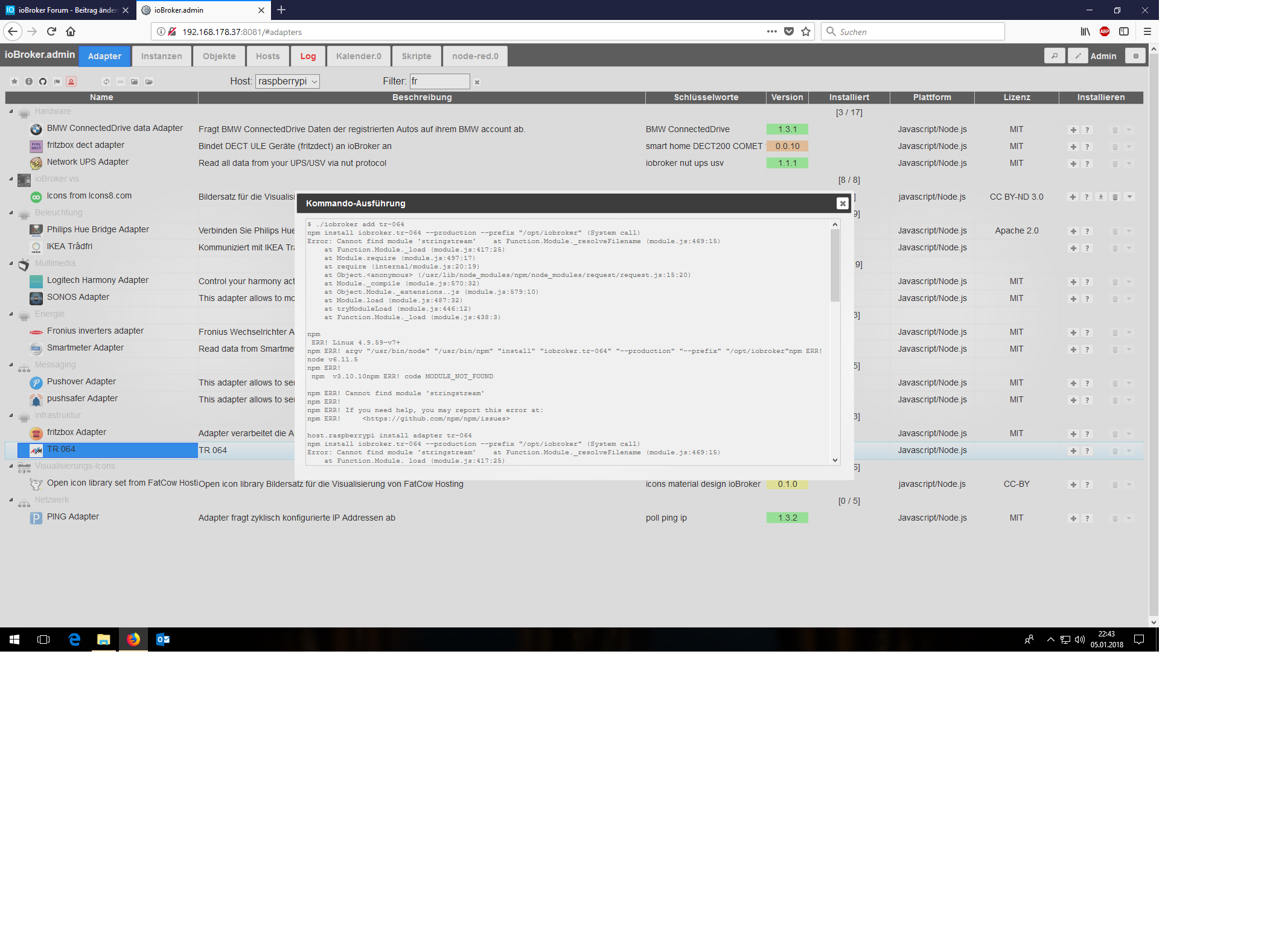
Hallo ich bekomme den Dash Adapter nicht installiert. Ebenso bekomme ich den TR-064 adapter auch nicht installiert.
Anbei ein Auszug der LOG. "sudo apt-get install libpcap-dev" habe ich auch schon ausgeführt über putty.
! iobroker 2018-01-05 20:56:19.515 info exit 13
! iobroker 2018-01-05 20:56:19.489 error host.raspberrypi Cannot install amazon-dash
! iobroker 2018-01-05 20:56:19.486 info host.raspberrypi install adapter amazon-dash
! iobroker 2018-01-05 20:56:19.451 info npm ERR! /home/npm-debug.log
! iobroker 2018-01-05 20:56:19.451 info npm ERR! Please include the following file with any support request:
! iobroker 2018-01-05 20:56:19.365 info npm ERR! There is likely additional logging output above.
! iobroker 2018-01-05 20:56:19.365 info npm ERR! npm owner ls pcap
! iobroker 2018-01-05 20:56:19.365 info npm ERR! Or if that isn't available, you can get their info via:
! iobroker 2018-01-05 20:56:19.365 info npm ERR! npm bugs pcap
! iobroker 2018-01-05 20:56:19.365 info npm ERR! You can get information on how to open an issue for this project with:
! iobroker 2018-01-05 20:56:19.365 info npm ERR! node-gyp rebuild
! iobroker 2018-01-05 20:56:19.365 info not with npm itself.npm ERR! Tell the author that this fails on your system:
! iobroker 2018-01-05 20:56:19.359 info npm ERR!
! iobroker 2018-01-05 20:56:19.359 info npm ERR! If you do, this is most likely a problem with the pcap package,
! iobroker 2018-01-05 20:56:19.359 info npm ERR! Make sure you have the latest version of node.js and npm installed.
! iobroker 2018-01-05 20:56:19.359 info npm ERR! Failed at the pcap@2.0.0 install script 'node-gyp rebuild'.
! iobroker 2018-01-05 20:56:19.359 info npm ERR!
! iobroker 2018-01-05 20:56:19.359 info npm ERR! pcap@2.0.0 install:node-gyp rebuildnpm ERR! Exit status 1
! iobroker 2018-01-05 20:56:19.357 info npm ERR! code ELIFECYCLE
! iobroker 2018-01-05 20:56:19.357 info npm ERR! npm v3.10.10
! iobroker 2018-01-05 20:56:19.357 info npm ERR! argv "/usr/bin/node" "/usr/bin/npm" "install" "iobroker.amazon-dash" "–production" "--prefix" "/opt/iobroker"npm ERR! node v6.11.5
! iobroker 2018-01-05 20:56:19.347 info npm ERR! Linux 4.9.59-v7+
! iobroker 2018-01-05 20:56:17.485 info gyp ERR! not ok
! iobroker 2018-01-05 20:56:17.485 info ERR! node -v v6.11.5gyp ERR! node-gyp -v v3.4.0
! iobroker 2018-01-05 20:56:17.466 info gyp
! iobroker 2018-01-05 20:56:17.466 info gyp ERR! cwd /opt/iobroker/node_modules/pcap
! iobroker 2018-01-05 20:56:17.466 info gyp ERR! command "/usr/bin/node" "/usr/lib/node_modules/npm/node_modules/node-gyp/bin/node-gyp.js" "rebuild"
! iobroker 2018-01-05 20:56:17.466 info gyp ERR! System Linux 4.9.59-v7+
! iobroker 2018-01-05 20:56:17.466 info ERR! stack at ChildProcess.emit (events.js:191:7)gyp ERR! stack at Process.ChildProcess._handle.onexit (internal/child_process.js:219:12)
! iobroker 2018-01-05 20:56:17.456 info gyp
! iobroker 2018-01-05 20:56:17.456 info gyp ERR! stack at emitTwo (events.js:106:13)
! iobroker 2018-01-05 20:56:17.456 info gyp ERR! stack Error:makefailed with exit code: 2gyp ERR! stack at ChildProcess.onExit (/usr/lib/node_modules/npm/node_modules/node-gyp/lib/build.js:276:23)
! iobroker 2018-01-05 20:56:17.441 info make: *** [Release/obj.target/pcap_binding/pcap_binding.o] Error 1gyp ERR! build error
! iobroker 2018-01-05 20:56:16.796 info compilation terminated.
! iobroker 2018-01-05 20:56:16.794 info ^
! iobroker 2018-01-05 20:56:16.794 info ../pcap_binding.cc:2:23: fatal error: pcap/pcap.h: No such file or directory #include
! iobroker 2018-01-05 20:56:13.394 info WARN EACCES user "root" does not have permission to access the dev dir "/root/.node-gyp/6.11.5"gyp WARN EACCES attempting to reinstall using temporary dev dir "/opt/iobroker/node_modules/pcap/.node-
! iobroker 2018-01-05 20:56:13.391 info gyp
! iobroker 2018-01-05 20:56:08.965 info ^~~~~~~~~~
! iobroker 2018-01-05 20:56:08.965 info declarator attribute((deprecated(message)))
! iobroker 2018-01-05 20:56:08.965 info /opt/iobroker/node_modules/socketwatcher/.node-gyp/6.11.5/include/node/v8config.h:333:3: note: in definition of macro ‘V8_DEPRECATED’
! iobroker 2018-01-05 20:56:08.965 info ^
! iobroker 2018-01-05 20:56:08.965 info V8_DEPRECATED("Use maybe version", Local NewInstance() const);
! iobroker 2018-01-05 20:56:08.965 info /opt/iobroker/node_modules/socketwatcher/.node-gyp/6.11.5/include/node/v8.h:3276:52: note: declared here
! iobroker 2018-01-05 20:56:08.965 info from ../socket_watcher.cpp:5:
! iobroker 2018-01-05 20:56:08.965 info from ../socket_watcher.hpp:8,
! iobroker 2018-01-05 20:56:08.965 info from ../../nan/nan.h:49,
! iobroker 2018-01-05 20:56:08.965 info from /opt/iobroker/node_modules/socketwatcher/.node-gyp/6.11.5/include/node/node.h:42,
! iobroker 2018-01-05 20:56:08.965 info In file included from /opt/iobroker/node_modules/socketwatcher/.node-gyp/6.11.5/include/node/v8.h:25:0,
! iobroker 2018-01-05 20:56:08.965 info ^
! iobroker 2018-01-05 20:56:08.965 info info.GetReturnValue().Set(cons->NewInstance());
! iobroker 2018-01-05 20:56:08.965 info ../socket_watcher.cpp: In static member function ‘static void SocketWatcher::New(const Nan::FunctionCallbackInfo&)’:../socket_watcher.cpp:104:49: warning: ‘v8::Local v8::Functi
! hm-rpc.2 2018-01-05 20:56:07.175 info xmlrpc -> 0 devices
! hm-rpc.2 2018-01-05 20:55:59.570 info xmlrpc <- listDevices ["hm-rpc.2"]
! iobroker 2018-01-05 20:55:56.010 info gyp WARN EACCES attempting to reinstall using temporary dev dir "/opt/iobroker/node_modules/socketwatcher/.node-gyp"
! iobroker 2018-01-05 20:55:56.008 info WARN EACCES user "root" does not have permission to access the dev dir "/root/.node-gyp/6.11.5"
! iobroker 2018-01-05 20:55:56.005 info gyp
! iobroker 2018-01-05 20:55:54.018 info npm WARN lifecycle iobroker.amazon-dash@0.2.7~preinstall: cannot run in wd %s %s (wd=%s) iobroker.amazon-dash@0.2.7 apt-get install libpcap-dev -y || true /opt/iobroker/node_modules/.staging/iobroker
! iobroker 2018-01-05 20:54:59.854 info npm install iobroker.amazon-dash –production --prefix "/opt/iobroker" (System call)
! iobroker 2018-01-05 20:54:59.569 info host.raspberrypi install adapter amazon-dash
! iobroker 2018-01-05 20:54:59.505 info ERR! Please include the following file with any support request:npm ERR! /home/npm-debug.log
! iobroker 2018-01-05 20:54:59.499 info npm
! iobroker 2018-01-05 20:54:59.399 info npm ERR! There is likely additional logging output above.
! iobroker 2018-01-05 20:54:59.399 info npm ERR! npm owner ls pcap
! iobroker 2018-01-05 20:54:59.399 info npm ERR! Or if that isn't available, you can get their info via:
! iobroker 2018-01-05 20:54:59.399 info npm ERR! npm bugs pcap
! iobroker 2018-01-05 20:54:59.399 info npm ERR! You can get information on how to open an issue for this project with:
! iobroker 2018-01-05 20:54:59.399 info npm ERR! node-gyp rebuild
! iobroker 2018-01-05 20:54:59.399 info not with npm itself.npm ERR! Tell the author that this fails on your system:
! iobroker 2018-01-05 20:54:59.392 info npm ERR!
! iobroker 2018-01-05 20:54:59.392 info npm ERR! If you do, this is most likely a problem with the pcap package,
! iobroker 2018-01-05 20:54:59.392 info npm ERR! Make sure you have the latest version of node.js and npm installed.
! iobroker 2018-01-05 20:54:59.392 info ERR! npm ERR! Failed at the pcap@2.0.0 install script 'node-gyp rebuild'.
! iobroker 2018-01-05 20:54:59.388 info npm
! iobroker 2018-01-05 20:54:59.388 info npm ERR! pcap@2.0.0 install:node-gyp rebuildnpm ERR! Exit status 1
! iobroker 2018-01-05 20:54:59.384 info npm ERR! code ELIFECYCLE
! iobroker 2018-01-05 20:54:59.384 info npm ERR! npm v3.10.10
! iobroker 2018-01-05 20:54:59.384 info npm ERR! argv "/usr/bin/node" "/usr/bin/npm" "install" "iobroker.amazon-dash" "--production" "--prefix" "/opt/iobroker"npm ERR! node v6.11.5
! iobroker 2018-01-05 20:54:59.374 info ERR! Linux 4.9.59-v7+
! iobroker 2018-01-05 20:54:59.371 info npm
! iobroker 2018-01-05 20:54:57.542 info gyp ERR! not ok
! iobroker 2018-01-05 20:54:57.542 info gyp ERR! node-gyp -v v3.4.0
! iobroker 2018-01-05 20:54:57.542 info gyp ERR! node -v v6.11.5
! iobroker 2018-01-05 20:54:57.542 info gyp ERR! cwd /opt/iobroker/node_modules/pcap
! iobroker 2018-01-05 20:54:57.542 info gyp ERR! command "/usr/bin/node" "/usr/lib/node_modules/npm/node_modules/node-gyp/bin/node-gyp.js" "rebuild"
! iobroker 2018-01-05 20:54:57.542 info gyp ERR! System Linux 4.9.59-v7+
! iobroker 2018-01-05 20:54:57.542 info gyp ERR! stack at Process.ChildProcess._handle.onexit (internal/child_process.js:219:12)
! iobroker 2018-01-05 20:54:57.542 info gyp ERR! stack at ChildProcess.emit (events.js:191:7)
! iobroker 2018-01-05 20:54:57.542 info gyp ERR! stack at emitTwo (events.js:106:13)
! iobroker 2018-01-05 20:54:57.542 info gyp ERR! stack at ChildProcess.onExit (/usr/lib/node_modules/npm/node_modules/node-gyp/lib/build.js:276:23)
! iobroker 2018-01-05 20:54:57.542 info gyp ERR! build error gyp ERR! stack Error:makefailed with exit code: 2
! iobroker 2018-01-05 20:54:57.488 info make: *** [Release/obj.target/pcap_binding/pcap_binding.o] Error 1
! iobroker 2018-01-05 20:54:56.822 info compilation terminated.
! iobroker 2018-01-05 20:54:56.822 info ^
! iobroker 2018-01-05 20:54:56.822 info ../pcap_binding.cc:2:23: fatal error: pcap/pcap.h: No such file or directory #include
! iobroker 2018-01-05 20:54:53.928 info user "root" does not have permission to access the dev dir "/root/.node-gyp/6.11.5"gyp WARN EACCES attempting to reinstall using temporary dev dir "/opt/iobroker/node_modules/pcap/.node-gyp"
! iobroker 2018-01-05 20:54:53.926 info WARN EACCES
! iobroker 2018-01-05 20:54:53.923 info gyp
! iobroker 2018-01-05 20:54:42.870 info ^~~~~~~~~~
! iobroker 2018-01-05 20:54:42.870 info declarator attribute((deprecated(message)))
! iobroker 2018-01-05 20:54:42.870 info /opt/iobroker/node_modules/socketwatcher/.node-gyp/6.11.5/include/node/v8config.h:333:3: note: in definition of macro ‘V8_DEPRECATED’
! iobroker 2018-01-05 20:54:42.870 info ^
! iobroker 2018-01-05 20:54:42.870 info V8_DEPRECATED("Use maybe version", Local NewInstance() const);
! iobroker 2018-01-05 20:54:42.870 info /opt/iobroker/node_modules/socketwatcher/.node-gyp/6.11.5/include/node/v8.h:3276:52: note: declared here
! iobroker 2018-01-05 20:54:42.870 info from ../socket_watcher.cpp:5:
! iobroker 2018-01-05 20:54:42.870 info from ../socket_watcher.hpp:8,
! iobroker 2018-01-05 20:54:42.870 info from ../../nan/nan.h:49,
! iobroker 2018-01-05 20:54:42.870 info In file included from /opt/iobroker/node_modules/socketwatcher/.node-gyp/6.11.5/include/node/v8.h:25:0, from /opt/iobroker/node_modules/socketwatcher/.node-gyp/6.11.5/include/node/nod
! iobroker 2018-01-05 20:54:42.868 info ^
! iobroker 2018-01-05 20:54:42.868 info info.GetReturnValue().Set(cons->NewInstance());
! iobroker 2018-01-05 20:54:42.868 info ../socket_watcher.cpp: In static member function ‘static void SocketWatcher::New(const Nan::FunctionCallbackInfo&)’:../socket_watcher.cpp:104:49: warning: ‘v8::Local v8::Functi
! iobroker 2018-01-05 20:54:37.985 info WARN EACCES user "root" does not have permission to access the dev dir "/root/.node-gyp/6.11.5"gyp WARN EACCES attempting to reinstall using temporary dev dir "/opt/iobroker/node_modules/socketwatche
! iobroker 2018-01-05 20:54:37.983 info
! iobroker 2018-01-05 20:54:37.980 info gyp
! iobroker 2018-01-05 20:54:35.312 info iobroker.amazon-dash@0.2.7~preinstall: cannot run in wd %s %s (wd=%s) iobroker.amazon-dash@0.2.7 apt-get install libpcap-dev -y || true /opt/iobroker/node_modules/.staging/iobroker.amazon-dash-eb503
! iobroker 2018-01-05 20:54:35.309 info WARN lifecycle
! iobroker 2018-01-05 20:54:35.304 info npm
! iobroker 2018-01-05 20:53:39.832 info npm install iobroker.amazon-dash –production --prefix "/opt/iobroker" (System call)
! iobroker 2018-01-05 20:53:39.572 info host.raspberrypi install adapter amazon-dash
! iobroker 2018-01-05 20:53:39.507 info npm ERR! /home/npm-debug.log
! iobroker 2018-01-05 20:53:39.507 info npm ERR! Please include the following file with any support request:
! iobroker 2018-01-05 20:53:39.428 info npm ERR! There is likely additional logging output above.
! iobroker 2018-01-05 20:53:39.428 info npm ERR! npm owner ls pcap
! iobroker 2018-01-05 20:53:39.428 info npm ERR! Or if that isn't available, you can get their info via:
! iobroker 2018-01-05 20:53:39.428 info npm ERR! npm bugs pcap
! iobroker 2018-01-05 20:53:39.428 info npm ERR! You can get information on how to open an issue for this project with:
! iobroker 2018-01-05 20:53:39.428 info npm ERR! node-gyp rebuild
! iobroker 2018-01-05 20:53:39.428 info ERR! not with npm itself.npm ERR! Tell the author that this fails on your system:
! iobroker 2018-01-05 20:53:39.418 info npm
! iobroker 2018-01-05 20:53:39.418 info npm ERR! If you do, this is most likely a problem with the pcap package,
! iobroker 2018-01-05 20:53:39.418 info npm ERR! Make sure you have the latest version of node.js and npm installed.
! iobroker 2018-01-05 20:53:39.418 info npm ERR! Failed at the pcap@2.0.0 install script 'node-gyp rebuild'.
! iobroker 2018-01-05 20:53:39.418 info npm ERR!
! iobroker 2018-01-05 20:53:39.418 info npm ERR! pcap@2.0.0 install:node-gyp rebuildnpm ERR! Exit status 1
! iobroker 2018-01-05 20:53:39.409 info npm ERR! code ELIFECYCLE
! iobroker 2018-01-05 20:53:39.409 info node v6.11.5npm ERR! npm v3.10.10
! iobroker 2018-01-05 20:53:39.407 info npm ERR!
! iobroker 2018-01-05 20:53:39.407 info npm ERR! Linux 4.9.59-v7+npm ERR! argv "/usr/bin/node" "/usr/bin/npm" "install" "iobroker.amazon-dash" "--production" "--prefix" "/opt/iobroker"
! iobroker 2018-01-05 20:53:37.756 info
! iobroker 2018-01-05 20:53:37.754 info gyp ERR! not ok
! iobroker 2018-01-05 20:53:37.754 info gyp ERR! node-gyp -v v3.4.0
! iobroker 2018-01-05 20:53:37.754 info gyp ERR! node -v v6.11.5
! iobroker 2018-01-05 20:53:37.754 info gyp ERR! cwd /opt/iobroker/node_modules/pcap
! iobroker 2018-01-05 20:53:37.754 info gyp ERR! command "/usr/bin/node" "/usr/lib/node_modules/npm/node_modules/node-gyp/bin/node-gyp.js" "rebuild"
! iobroker 2018-01-05 20:53:37.754 info gyp ERR! System Linux 4.9.59-v7+
! iobroker 2018-01-05 20:53:37.754 info gyp ERR! stack at Process.ChildProcess._handle.onexit (internal/child_process.js:219:12)
! iobroker 2018-01-05 20:53:37.754 info gyp ERR! stack at ChildProcess.emit (events.js:191:7)
! iobroker 2018-01-05 20:53:37.754 info gyp ERR! stack at ChildProcess.onExit (/usr/lib/node_modules/npm/node_modules/node-gyp/lib/build.js:276:23)gyp ERR! stack at emitTwo (events.js:106:13)
! iobroker 2018-01-05 20:53:37.749 info stack Error:makefailed with exit code: 2
! iobroker 2018-01-05 20:53:37.738 info ERR!
! iobroker 2018-01-05 20:53:37.735 info gyp
! iobroker 2018-01-05 20:53:37.725 info build error
! iobroker 2018-01-05 20:53:37.723 info ERR!
! iobroker 2018-01-05 20:53:37.721 info gyp
! iobroker 2018-01-05 20:53:37.718 info make: *** [Release/obj.target/pcap_binding/pcap_binding.o] Error 1
! iobroker 2018-01-05 20:53:37.710 info compilation terminated.
! iobroker 2018-01-05 20:53:37.710 info ^
! iobroker 2018-01-05 20:53:37.710 info ../pcap_binding.cc:2:23: fatal error: pcap/pcap.h: No such file or directory #include
! iobroker 2018-01-05 20:53:34.808 info WARN EACCES user "root" does not have permission to access the dev dir "/root/.node-gyp/6.11.5"gyp WARN EACCES attempting to reinstall using temporary dev dir "/opt/iobroker/node_modules/pcap/.node-
! iobroker 2018-01-05 20:53:34.801 info gyp
! iobroker 2018-01-05 20:53:30.337 info ^~~~~~~~~~
! iobroker 2018-01-05 20:53:30.337 info declarator attribute((deprecated(message)))
! iobroker 2018-01-05 20:53:30.337 info /opt/iobroker/node_modules/socketwatcher/.node-gyp/6.11.5/include/node/v8config.h:333:3: note: in definition of macro ‘V8_DEPRECATED’
! iobroker 2018-01-05 20:53:30.337 info ^
! iobroker 2018-01-05 20:53:30.337 info V8_DEPRECATED("Use maybe version", Local NewInstance() const);
! iobroker 2018-01-05 20:53:30.337 info /opt/iobroker/node_modules/socketwatcher/.node-gyp/6.11.5/include/node/v8.h:3276:52: note: declared here
! iobroker 2018-01-05 20:53:30.337 info from ../socket_watcher.cpp:5:
! iobroker 2018-01-05 20:53:30.337 info from ../socket_watcher.hpp:8,
! iobroker 2018-01-05 20:53:30.337 info from ../../nan/nan.h:49,
! iobroker 2018-01-05 20:53:30.337 info In file included from /opt/iobroker/node_modules/socketwatcher/.node-gyp/6.11.5/include/node/v8.h:25:0, from /opt/iobroker/node_modules/socketwatcher/.node-gyp/6.11.5/include/node/nod
! iobroker 2018-01-05 20:53:30.335 info ^
! iobroker 2018-01-05 20:53:30.335 info info.GetReturnValue().Set(cons->NewInstance());
! iobroker 2018-01-05 20:53:30.335 info ../socket_watcher.cpp: In static member function ‘static void SocketWatcher::New(const Nan::FunctionCallbackInfo&)’:../socket_watcher.cpp:104:49: warning: ‘v8::Local v8::Functi
! iobroker 2018-01-05 20:53:25.108 info EACCES attempting to reinstall using temporary dev dir "/opt/iobroker/node_modules/socketwatcher/.node-gyp"
! iobroker 2018-01-05 20:53:25.104 info gyp WARN
! iobroker 2018-01-05 20:53:25.102 info EACCES user "root" does not have permission to access the dev dir "/root/.node-gyp/6.11.5"
! iobroker 2018-01-05 20:53:25.100 info WARN
! iobroker 2018-01-05 20:53:25.098 info
! iobroker 2018-01-05 20:53:25.094 info gyp
! iobroker 2018-01-05 20:53:21.671 info WARN lifecycle iobroker.amazon-dash@0.2.7~preinstall: cannot run in wd %s %s (wd=%s) iobroker.amazon-dash@0.2.7 apt-get install libpcap-dev -y || true /opt/iobroker/node_modules/.staging/iobroker.am
! iobroker 2018-01-05 20:53:21.665 info npm
! host.raspberrypi 2018-01-05 20:52:57.658 info instance system.adapter.vis.0 terminated while should be started once
! vis.0 2018-01-05 20:52:57.117 info Uploaded. 0
! yamaha.0 2018-01-05 20:52:50.158 info starting. Version 0.3.17 in /opt/iobroker/node_modules/iobroker.yamaha, node: v6.11.5
! hm-rega.1 2018-01-05 20:52:46.452 info got state values
! hm-rega.1 2018-01-05 20:52:45.513 info request state values
! hm-rega.1 2018-01-05 20:52:45.510 info deleted 0 variables
4348_008.png
Hey! Du scheinst an dieser Unterhaltung interessiert zu sein, hast aber noch kein Konto.
Hast du es satt, bei jedem Besuch durch die gleichen Beiträge zu scrollen? Wenn du dich für ein Konto anmeldest, kommst du immer genau dorthin zurück, wo du zuvor warst, und kannst dich über neue Antworten benachrichtigen lassen (entweder per E-Mail oder Push-Benachrichtigung). Du kannst auch Lesezeichen speichern und Beiträge positiv bewerten, um anderen Community-Mitgliedern deine Wertschätzung zu zeigen.
Mit deinem Input könnte dieser Beitrag noch besser werden 💗
Registrieren Anmelden376
Online33.0k
Benutzer83.5k
Themen1.3m
Beiträge