




E-Paper 4.2inch an Wemos D1 mini
-
Hallo zusammen,
ich habe hier E-Paperdisplays 4.2 inch von Waveshare. Die wollte ich eigentlich üder Homematic ansprechen. Bei einem Display ist das noch ok. Bei mehreren geht der Duty Cycle direkt durch die Decke.
Also möchte ich es über einen Wemos d1 mini pro Display machen.
Ich habe mir mal dieses angeschaut
https://github.com/ZinggJM/GxEPD
Das funktioniert auch soweit. Die Grafiken werden auf dem Display angezeigt usw. alles gut.
ABER
Da ist der Anschluß D8 am wemos. Dort soll CS vom Display angeschlossen werden. Wenn ich das mache, bootet der Wemos nicht mehr. Also Kabel ab - booten lassen - Kabel dran.
Wie kann ich das umgehen?
Grüße
Manfred -
Hallo zusammen,
ich habe hier E-Paperdisplays 4.2 inch von Waveshare. Die wollte ich eigentlich üder Homematic ansprechen. Bei einem Display ist das noch ok. Bei mehreren geht der Duty Cycle direkt durch die Decke.
Also möchte ich es über einen Wemos d1 mini pro Display machen.
Ich habe mir mal dieses angeschaut
https://github.com/ZinggJM/GxEPD
Das funktioniert auch soweit. Die Grafiken werden auf dem Display angezeigt usw. alles gut.
ABER
Da ist der Anschluß D8 am wemos. Dort soll CS vom Display angeschlossen werden. Wenn ich das mache, bootet der Wemos nicht mehr. Also Kabel ab - booten lassen - Kabel dran.
Wie kann ich das umgehen?
Grüße
Manfred -
siehe issue über ESPEasy und Lösungsansatz mittels PNP Transistor:
https://github.com/letscontrolit/ESPEasy/issues/1042#issuecomment-791039678
VG
@dieter_p
Danke für die Idee. Es ging jetzt aber einfacher. Ich habe einfach den Datenpin umbenannt.Hier mal mein erster Skript-Entwurf.
// PartialUpdateTest : example for Waveshare 1.54", 2.31" and 2.9" e-Paper and the same e-papers from Dalian Good Display Inc.
//
// Created by Jean-Marc Zingg based on demo code from Good Display for GDEP015OC1.
//
// The e-paper displays are available from:
//
// https://www.aliexpress.com/store/product/Wholesale-1-54inch-E-Ink-display-module-with-embedded-controller-200x200-Communicate-via-SPI-interface-Supports/216233_32824535312.html
//
// http://www.buy-lcd.com/index.php?route=product/product&path=2897_8363&product_id=35120
// or https://www.aliexpress.com/store/product/E001-1-54-inch-partial-refresh-Small-size-dot-matrix-e-paper-display/600281_32815089163.html
//

// Supporting Arduino Forum Topics:
// Waveshare e-paper displays with SPI: http://forum.arduino.cc/index.php?topic=487007.0
// Good Dispay ePaper for Arduino : https://forum.arduino.cc/index.php?topic=436411.0

// mapping from Waveshare 2.9inch e-Paper to Wemos D1 mini
// BUSY -> D2, RST -> D4, DC -> D3, CS -> D8, CLK -> D5, DIN -> D7, GND -> GND, 3.3V -> 3.3V

// mapping example for AVR, UNO, NANO etc.
// BUSY -> 7, RST -> 9, DC -> 8, C S-> 10, CLK -> 13, DIN -> 11

// include library, include base class, make path known
#include <GxEPD.h>

// select the display class to use, only one

#include <GxGDEW042T2/GxGDEW042T2.h>      // 4.2" b/w

#include <ESP8266WiFi.h>
#include <ArduinoOTA.h>
#include <PubSubClient.h>

#ifndef STASSID
#define STASSID "xxxxx"
#define STAPSK  "xxxxxxxx"
#endif

const char* ssid = STASSID;
const char* password = STAPSK;

char* mqtt_client_id = "E-Paperdisplay-1";
const char* mqtt_server = "192.168.xx.xx";
const int mqtt_port = xxxx;
const char* mqtt_user = "xxxxxx";
const char* mqtt_password = "xxxxxxx";

WiFiClient espClient;
PubSubClient mqttClient(espClient);

#include <GxIO/GxIO_SPI/GxIO_SPI.h>
#include <GxIO/GxIO.h>

// FreeFonts from Adafruit_GFX
#include <Fonts/FreeMonoBold9pt7b.h>
#include <Fonts/FreeMonoBold12pt7b.h>

// for SPI pin definitions see e.g.:
// C:\Users\xxx\AppData\Local\Arduino15\packages\esp8266\hardware\esp8266\2.4.2\variants\generic\common.h

GxIO_Class io(SPI, /*CS=D0*/ 16, /*DC=D3*/ 0, /*RST=D4*/ 2); // arbitrary selection of D3(=0), D4(=2), selected for default of GxEPD_Class
GxEPD_Class display(io /*RST=D4*/ /*BUSY=D2*/); // default selection of D4(=2), D2(=4)

void setup(void)
{
  Serial.begin(115200);

  // Per WLAN mit dem Netzwerk verbinden
  Serial.print("Verbinden mit ");
  Serial.println(ssid);
  WiFi.begin(ssid, password);
  while (WiFi.status() != WL_CONNECTED) {
    delay(500);
    Serial.print(".");
  }

  ///////////////////////////////////////////
  // Anfang Update über Wlan
  ///////////////////////////////////////////

  ArduinoOTA.onStart([]() {
    String type;
    if (ArduinoOTA.getCommand() == U_FLASH) {
      type = "sketch";
    } else { // U_FS
      type = "filesystem";
    }

    // NOTE: if updating FS this would be the place to unmount FS using FS.end()
    Serial.println("Start updating " + type);
  });
  ArduinoOTA.onEnd([]() {
    Serial.println("\nEnd");
  });
  ArduinoOTA.onProgress([](unsigned int progress, unsigned int total) {
    Serial.printf("Progress: %u%%\r", (progress / (total / 100)));
  });
  ArduinoOTA.onError([](ota_error_t error) {
    Serial.printf("Error[%u]: ", error);
    if (error == OTA_AUTH_ERROR) {
      Serial.println("Auth Failed");
    } else if (error == OTA_BEGIN_ERROR) {
      Serial.println("Begin Failed");
    } else if (error == OTA_CONNECT_ERROR) {
      Serial.println("Connect Failed");
    } else if (error == OTA_RECEIVE_ERROR) {
      Serial.println("Receive Failed");
    } else if (error == OTA_END_ERROR) {
      Serial.println("End Failed");
    }
  });
  ArduinoOTA.begin();

  ///////////////////////////////////////////
  // Ende Update über Wlan
  ///////////////////////////////////////////

  // Die IP vom Webserver auf dem seriellen Monitor ausgeben
  Serial.println("");
  Serial.println("WLAN verbunden.");
  Serial.println("IP Adresse: ");
  Serial.println(WiFi.localIP());

  // MQTT Brocker
  // Mit ioBroker Mqtt verbinden
  mqttClient.setServer(mqtt_server, mqtt_port);//MQTT Server, - Port
  mqttClient.setCallback(callback);

  Serial.println();
  Serial.println("setup");
  //display.init(115200); // enable diagnostic output on Serial
  display.init(); // disable diagnostic output on Serial
  Serial.println("setup done");
  display.setTextColor(GxEPD_BLACK);
  display.setRotation(0);
  // draw background
  display.setFont(&FreeMonoBold12pt7b);
  display.update();
  display.fillScreen(GxEPD_WHITE);

}

void loop()
{


  ArduinoOTA.handle();
  ArduinoOTA.setHostname("E-Paperdisplay-1");

  // MQTT Broker
  mqttClient.loop();
  if (!mqttClient.connected()) {
    reconnectToMQTT();
  }


}

// MQTT Funktion
// *************
void reconnectToMQTT() {

  if (mqttClient.connect(mqtt_client_id , mqtt_user, mqtt_password)) {
    Serial.println("Per MQTT mit ioBroker verbunden");

//    mqttClient.publish("HH_Frischwasser/E-Paper1/alive", "0");
//    mqttClient.publish("HH_Frischwasser/E-Paper1/Info/IP Adresse", (char*) WiFi.localIP().toString().c_str());


    mqttClient.subscribe("HH_Wassertank_Aussen/HH_WT_A_Temperatur/Temperatur_am_Wassertank_Aussen");
    mqttClient.subscribe("HH_Wassertank_Innen/HH_WT_I_Temperatur/Temperatur_am_Wassertank_Innen");
    mqttClient.subscribe("HH_Wassertank_Aussen/HH_WT_A_Wassertemperatur/Wassertemperatur_Wassertank_Aussen");
    mqttClient.subscribe("HH_Wassertank_Innen/HH_WT_I_Wassertemperatur/Wassertemperatur_Wassertank_Innen");


  } else {
    Serial.print("mqtt-Verbindung fehlgeschlagen ");
    Serial.print(mqttClient.state());
    Serial.println(" versuchen es in 5 Sekunden erneut");
    // Wait 5 seconds before retrying
    delay(5000);
  }
}


// MQTT Callback
void callback(char* topic, byte* payload, unsigned int length)
{

  payload[length] = '\0';
  String strTopic = String(topic);
  String strPayload = String((char * ) payload);

  Serial.print("Nachricht angekommen [");
  Serial.print(strTopic);
  Serial.print("----");
  Serial.print(strPayload);
  Serial.print("] ");
  Serial.println();


  if (strTopic == "HH_Wassertank_Aussen/HH_WT_A_Temperatur/Temperatur_am_Wassertank_Aussen")
  {
  Serial.println(strPayload);
  uint16_t box_x = 10;
  uint16_t box_y = 15;
  uint16_t box_w = 380;
  uint16_t box_h = 20;
  uint16_t cursor_y = box_y + 16;
  display.fillRect(box_x, box_y, box_w, box_h, GxEPD_WHITE);
  display.setCursor(box_x, cursor_y);
  display.print("Aussentemperatur: "); display.setCursor(box_x + 280, cursor_y);   display.print(strPayload.toFloat()); display.print(" C");
  display.updateWindow(box_x, box_y, box_w, box_h, true);
    }


  if (strTopic == "HH_Wassertank_Innen/HH_WT_I_Temperatur/Temperatur_am_Wassertank_Innen")
  {
  Serial.println(strPayload);
  uint16_t box_x = 10;
  uint16_t box_y = 50;
  uint16_t box_w = 380;
  uint16_t box_h = 20;
  uint16_t cursor_y = box_y + 16;
  display.fillRect(box_x, box_y, box_w, box_h, GxEPD_WHITE);
  display.setCursor(box_x, cursor_y);
  display.print("Innentemperatur: "); display.setCursor(box_x + 280, cursor_y);   display.print(strPayload.toFloat()); display.print(" C");
  display.updateWindow(box_x, box_y, box_w, box_h, true);
    }


  if (strTopic == "HH_Wassertank_Aussen/HH_WT_A_Wassertemperatur/Wassertemperatur_Wassertank_Aussen")
  {
  Serial.println(strPayload);
  uint16_t box_x = 10;
  uint16_t box_y = 85;
  uint16_t box_w = 380;
  uint16_t box_h = 20;
  uint16_t cursor_y = box_y + 16;
  display.fillRect(box_x, box_y, box_w, box_h, GxEPD_WHITE);
  display.setCursor(box_x, cursor_y);
  display.print("W-Aussentemperatur: "); display.setCursor(box_x + 280, cursor_y);   display.print(strPayload.toFloat()); display.print(" C");
  display.updateWindow(box_x, box_y, box_w, box_h, true);
    }


  if (strTopic == "HH_Wassertank_Innen/HH_WT_I_Wassertemperatur/Wassertemperatur_Wassertank_Innen")
  {
  Serial.println(strPayload);
  uint16_t box_x = 10;
  uint16_t box_y = 120;
  uint16_t box_w = 380;
  uint16_t box_h = 20;
  uint16_t cursor_y = box_y + 16;
  display.fillRect(box_x, box_y, box_w, box_h, GxEPD_WHITE);
  display.setCursor(box_x, cursor_y);
  display.print("W-Innentemperatur: ");   display.setCursor(box_x + 280, cursor_y);   display.print(strPayload.toFloat()); display.print(" C");
  display.updateWindow(box_x, box_y, box_w, box_h, true);
    }

}
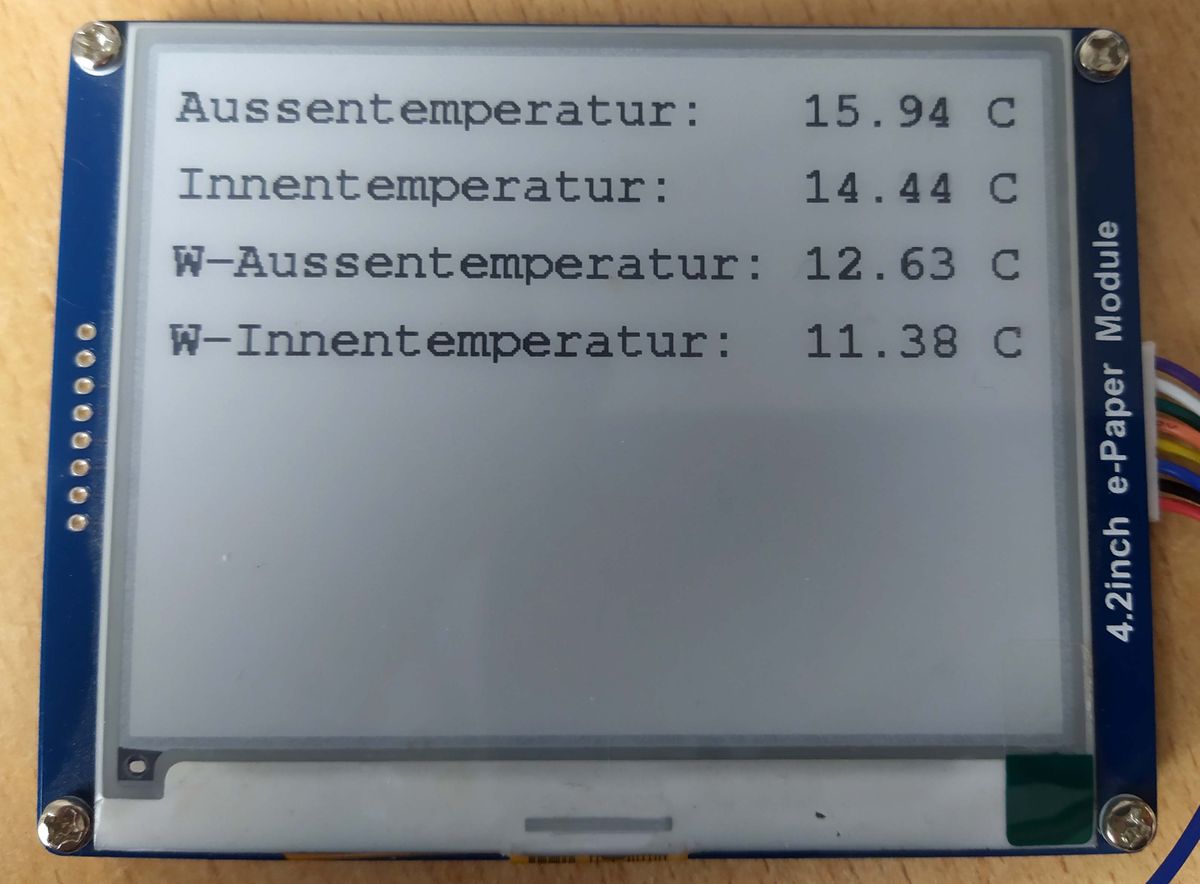
Auf dem Diaplay erscheint dann folgendes.
-
Hat event. jemand eine Idee, wie ich die Zahlen mit dem "C" Zeichen rechtsbündig bekomme?
Immer wenn ein Wert z.B. "8,23 C", also nur eine Stelle vor dem Komma wird, rückt es eine Stelle nach links.
Das ist so wie im Moment im Skript ja richtig, aber was muß ich da ändern um es rechtsbündig zu bekommen?
Hey! Du scheinst an dieser Unterhaltung interessiert zu sein, hast aber noch kein Konto.
Hast du es satt, bei jedem Besuch durch die gleichen Beiträge zu scrollen? Wenn du dich für ein Konto anmeldest, kommst du immer genau dorthin zurück, wo du zuvor warst, und kannst dich über neue Antworten benachrichtigen lassen (entweder per E-Mail oder Push-Benachrichtigung). Du kannst auch Lesezeichen speichern und Beiträge positiv bewerten, um anderen Community-Mitgliedern deine Wertschätzung zu zeigen.
Mit deinem Input könnte dieser Beitrag noch besser werden 💗
Registrieren AnmeldenSupport us
363
Online33.0k
Benutzer83.5k
Themen1.3m
Beiträge