




Frage zum cloud Adapter
-
@sören Den Iot Adapter nutze ich bereits. Nur verstehe ich nicht warum die Alexa Suche nur 2 Geräte findet
@damrak2022 Hi, ich nutze auch Alexa mit dem IOT, Raum und Funktion brauchte ich dabei nicht hinzufügen. Bei mir werden alle Geräte die ich im IOT unter Alexa Geräte hinzugefügt habe auch gefunden.
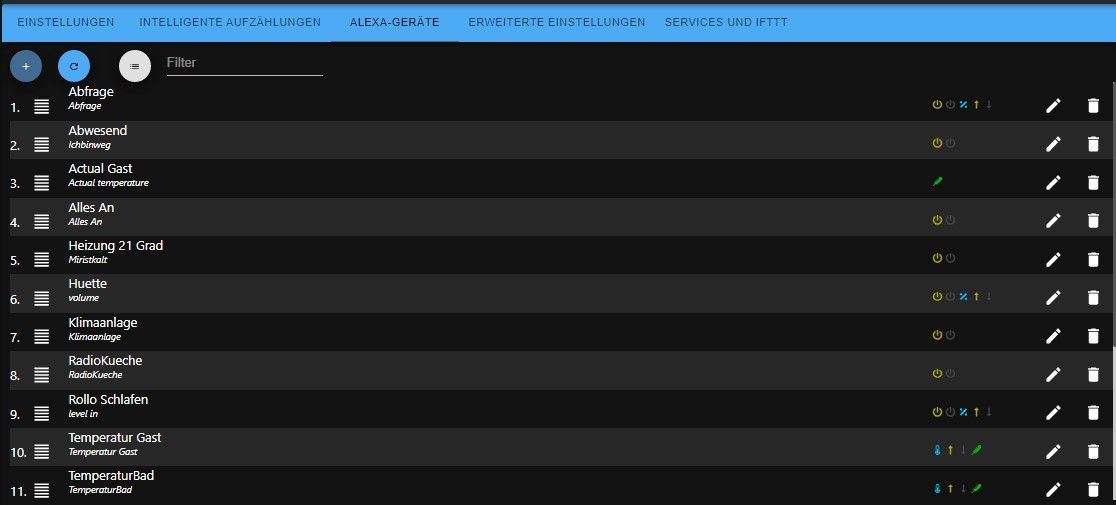
Bist du sicher das du dich genau an die Anleitung gehalten hast? Hast du den richtigen Skill aktiviert? (es gibt mehrere IObroker Skills) Benutzer Name und Passwort korrekt eingegeben?
Mal in der Alexa App unter Geräte geschaut ob die vielleicht doch schon vorhanden sind?
Irgendwelche Ausgaben im Log?Schöne Grüße Frank
-
@damrak2022 Hi, ich nutze auch Alexa mit dem IOT, Raum und Funktion brauchte ich dabei nicht hinzufügen. Bei mir werden alle Geräte die ich im IOT unter Alexa Geräte hinzugefügt habe auch gefunden.
Bist du sicher das du dich genau an die Anleitung gehalten hast? Hast du den richtigen Skill aktiviert? (es gibt mehrere IObroker Skills) Benutzer Name und Passwort korrekt eingegeben?
Mal in der Alexa App unter Geräte geschaut ob die vielleicht doch schon vorhanden sind?
Irgendwelche Ausgaben im Log?@frankyboy73 So sieht es bei mir im IOT Adapter aus und das sind auch die Geräte, welche meine Alexa App auf dem Smartphone findet.
Es müssten aber mindestens noch 3 Lampen (Hue), und mein Xiaomi Ventilator sein.
Login Daten sind definitiv korrekt und als Skill nutze ich den https://www.amazon.de/ioBroker-ioBroker … B07L66BFF9
Wo also könnte das Problem sein?Mit besten Grüßen
Andy -
@frankyboy73 So sieht es bei mir im IOT Adapter aus und das sind auch die Geräte, welche meine Alexa App auf dem Smartphone findet.
Es müssten aber mindestens noch 3 Lampen (Hue), und mein Xiaomi Ventilator sein.
Login Daten sind definitiv korrekt und als Skill nutze ich den https://www.amazon.de/ioBroker-ioBroker … B07L66BFF9
Wo also könnte das Problem sein?@damrak2022 sagte in Frage zum cloud Adapter:
So sieht es bei mir im IOT Adapter aus
Da fehlt wohl ein Screenshot?!
@damrak2022 sagte in Frage zum cloud Adapter:
Login Daten sind definitiv korrekt
Und was sagt das LOG ? Denn das LOG sagt ob die Daten korrekt sind !
@damrak2022 sagte in Frage zum cloud Adapter:
als Skill nutze ich den https://www.amazon.de/ioBroker-ioBroker … B07L66BFF9
Bitte den kompletten Link einfügen.
@damrak2022 sagte in Frage zum cloud Adapter:
Wo also könnte das Problem sein?
Das könnten wir wissen wenn Du die ganzen Sachen lieferst.
Lehrling seit 1975 !!!
Beitrag geholfen ? dann gerne ein upvote rechts unten im Beitrag klicken ;)
https://forum.iobroker.net/topic/51555/hinweise-f%C3%BCr-gute-forenbeitr%C3%A4ge -
@damrak2022 sagte in Frage zum cloud Adapter:
So sieht es bei mir im IOT Adapter aus
Da fehlt wohl ein Screenshot?!
@damrak2022 sagte in Frage zum cloud Adapter:
Login Daten sind definitiv korrekt
Und was sagt das LOG ? Denn das LOG sagt ob die Daten korrekt sind !
@damrak2022 sagte in Frage zum cloud Adapter:
als Skill nutze ich den https://www.amazon.de/ioBroker-ioBroker … B07L66BFF9
Bitte den kompletten Link einfügen.
@damrak2022 sagte in Frage zum cloud Adapter:
Wo also könnte das Problem sein?
Das könnten wir wissen wenn Du die ganzen Sachen lieferst.
2022-08-16 15:41:12.205 debug [ALEX3] Created entertainment ALEXA device: Commands iot.0 2022-08-16 15:41:12.205 debug [ALEX3] Created entertainment ALEXA device: Controls iot.0 2022-08-16 15:41:12.204 debug [ALEX3] Created entertainment ALEXA device: Player iot.0 2022-08-16 15:41:12.202 debug [ALEX3] Created entertainment ALEXA device: Player iot.0 2022-08-16 15:41:12.202 debug [ALEX3] Created entertainment ALEXA device: Player iot.0 2022-08-16 15:41:12.201 debug [ALEX3] Created entertainment ALEXA device: Sonos1 iot.0 2022-08-16 15:41:12.195 debug [ALEX3] Invalid state "0_userdata.0.Anwesenheit.Anwesenheit". Not exist or no native part. iot.0 2022-08-16 15:41:12.183 debug [ALEX3] Invalid state "0_userdata.0.Hardware.Status.AppleTV". Not exist or no native part. iot.0 2022-08-16 15:41:12.182 debug [ALEX3] Invalid state "0_userdata.0.Zeiterfassung.Imac.Imac_Tagesaktivität_History". Not exist or no native part. iot.0 2022-08-16 15:41:12.182 debug [ALEX3] Invalid state "0_userdata.0.Zeiterfassung.Imac.Imac_Tagesaktivität". Not exist or no native part. iot.0 2022-08-16 15:41:12.182 debug [ALEX3] Invalid state "0_userdata.0.Zeiterfassung.TV.TV_Wohnzimmer_Tagesaktivität_History". Not exist or no native part. iot.0 2022-08-16 15:41:12.182 debug [ALEX3] Invalid state "0_userdata.0.Zeiterfassung.TV.TV_Wohnzimmer_Tagesaktivität". Not exist or no native part. iot.0 2022-08-16 15:41:12.181 debug [ALEX3] Invalid state "0_userdata.0.Alexa_Wohnzimmer.Musik.On_Off". Not exist or no native part. iot.0 2022-08-16 15:41:12.180 debug [ALEX3] Invalid state "net-tools.0.discover". Not exist or no native part. iot.0 2022-08-16 15:41:12.179 debug [ALEX3] Invalid state "net-tools.0.localhost.ports". Not exist or no native part. iot.0 2022-08-16 15:41:12.177 debug [ALEX3] Invalid state "0_userdata.0.vis-view-8". Not exist or no native part. iot.0 2022-08-16 15:41:12.177 debug [ALEX3] Invalid state "0_userdata.0.VIS-Inventwo.SettingFarbeText1". Not exist or no native part. iot.0 2022-08-16 15:41:12.177 debug [ALEX3] Invalid state "0_userdata.0.VIS-Inventwo.SettingFarbe1". Not exist or no native part. iot.0 2022-08-16 15:41:12.177 debug [ALEX3] Invalid state "0_userdata.0.TV-Programm.TV-Umschalter". Not exist or no native part. iot.0 2022-08-16 15:41:12.176 debug [ALEX3] Invalid state "0_userdata.0.TV-Programm.TV-Script-All". Not exist or no native part. iot.0 2022-08-16 15:41:12.176 debug [ALEX3] Invalid state "0_userdata.0.TV-Programm.TV-Reminder". Not exist or no native part. iot.0 2022-08-16 15:41:12.176 debug [ALEX3] Invalid state "0_userdata.0.TV-Programm.TV-ExternZeit". Not exist or no native part. iot.0 2022-08-16 15:41:12.176 debug [ALEX3] Invalid state "0_userdata.0.Stromverbrauch.ShellyDevices". Not exist or no native part. iot.0 2022-08-16 15:41:12.175 debug [ALEX3] Invalid state "0_userdata.0.Hardware.Status.iMac". Not exist or no native part. iot.0 2022-08-16 15:41:12.175 debug [ALEX3] Invalid state "0_userdata.0.Hardware.Status.Ventilator". Not exist or no native part. iot.0 2022-08-16 15:41:12.175 debug [ALEX3] Invalid state "0_userdata.0.Hardware.Status.Raspberry". Not exist or no native part. iot.0 2022-08-16 15:41:12.175 debug [ALEX3] Invalid state "0_userdata.0.Hardware.Status.FritzboxConnected". Not exist or no native part. iot.0 2022-08-16 15:41:12.174 debug [ALEX3] Invalid state "0_userdata.0.Hardware.Status.FeFo/TV". Not exist or no native part. iot.0 2022-08-16 15:41:12.174 debug [ALEX3] Invalid state "0_userdata.0.Hardware.Status.EchoDot_Schlafzimmer". Not exist or no native part. iot.0 2022-08-16 15:41:12.174 debug [ALEX3] Invalid state "0_userdata.0.Hardware.Status.Drucker". Not exist or no native part. iot.0 2022-08-16 15:41:12.173 debug [ALEX3] Invalid state "0_userdata.0.FritzBox_Abfrage.Onlinestatus". Not exist or no native part. iot.0 2022-08-16 15:41:12.173 debug [ALEX3] Invalid state "0_userdata.0.Beleuchtung.Hue.HueSzenen". Not exist or no native part. iot.0 2022-08-16 15:41:12.170 debug [ALEX3] Invalid state "rpi2.0.raspberry.mem_gpu". Not exist or no native part. iot.0 2022-08-16 15:41:12.170 debug [ALEX3] Invalid state "rpi2.0.raspberry.mem_arm". Not exist or no native part. iot.0 2022-08-16 15:41:12.170 debug [ALEX3] Invalid state "rpi2.0.raspberry.cpu_voltage". Not exist or no native part. iot.0 2022-08-16 15:41:12.170 debug [ALEX3] Invalid state "rpi2.0.wlan.wifi_send". Not exist or no native part. iot.0 2022-08-16 15:41:12.169 debug [ALEX3] Invalid state "rpi2.0.wlan.wifi_received". Not exist or no native part. iot.0 2022-08-16 15:41:12.169 debug [ALEX3] Invalid state "rpi2.0.uptime.uptime". Not exist or no native part. iot.0 2022-08-16 15:41:12.168 debug [ALEX3] Invalid state "rpi2.0.temperature.soc_temp". Not exist or no native part. iot.0 2022-08-16 15:41:12.168 debug [ALEX3] Invalid state "rpi2.0.swap.swap_used". Not exist or no native part. iot.0 2022-08-16 15:41:12.167 debug [ALEX3] Invalid state "rpi2.0.swap.swap_total". Not exist or no native part. iot.0 2022-08-16 15:41:12.167 debug [ALEX3] Invalid state "rpi2.0.sdcard.sdcard_boot_used". Not exist or no native part. iot.0 2022-08-16 15:41:12.167 debug [ALEX3] Invalid state "rpi2.0.sdcard.sdcard_root_used". Not exist or no native part. iot.0 2022-08-16 15:41:12.166 debug [ALEX3] Invalid state "rpi2.0.sdcard.sdcard_boot_total". Not exist or no native part. iot.0 2022-08-16 15:41:12.166 debug [ALEX3] Invalid state "rpi2.0.sdcard.sdcard_root_total". Not exist or no native part. iot.0 2022-08-16 15:41:12.166 debug [ALEX3] Invalid state "rpi2.0.network.net_send". Not exist or no native part. iot.0 2022-08-16 15:41:12.165 debug [ALEX3] Invalid state "rpi2.0.network.net_received". Not exist or no native part. iot.0 2022-08-16 15:41:12.165 debug [ALEX3] Invalid state "rpi2.0.memory.memory_available". Not exist or no native part. iot.0 2022-08-16 15:41:12.165 debug [ALEX3] Invalid state "rpi2.0.memory.memory_free". Not exist or no native part. iot.0 2022-08-16 15:41:12.164 debug [ALEX3] Invalid state "rpi2.0.memory.memory_total". Not exist or no native part. iot.0 2022-08-16 15:41:12.164 debug [ALEX3] Invalid state "rpi2.0.cpu.scaling_governor". Not exist or no native part. iot.0 2022-08-16 15:41:12.163 debug [ALEX3] Invalid state "rpi2.0.cpu.load15". Not exist or no native part. iot.0 2022-08-16 15:41:12.163 debug [ALEX3] Invalid state "rpi2.0.cpu.load5". Not exist or no native part. iot.0 2022-08-16 15:41:12.163 debug [ALEX3] Invalid state "rpi2.0.cpu.load1". Not exist or no native part. iot.0 2022-08-16 15:41:12.162 debug [ALEX3] Invalid state "rpi2.0.cpu.cpu_frequency". Not exist or no native part. iot.0 2022-08-16 15:41:12.160 debug [ALEX3] Invalid state "jarvis.0.addNotification". Not exist or no native part. iot.0 2022-08-16 15:41:12.160 debug [ALEX3] Invalid state "jarvis.0.notifications". Not exist or no native part. iot.0 2022-08-16 15:41:12.160 debug [ALEX3] Invalid state "jarvis.0.css". Not exist or no native part. iot.0 2022-08-16 15:41:12.159 debug [ALEX3] Invalid state "jarvis.0.layout". Not exist or no native part. iot.0 2022-08-16 15:41:12.159 debug [ALEX3] Invalid state "jarvis.0.settings". Not exist or no native part. iot.0 2022-08-16 15:41:12.159 debug [ALEX3] Invalid state "jarvis.0.devices". Not exist or no native part. iot.0 2022-08-16 15:41:12.159 debug [ALEX3] Invalid state "jarvis.0.widgets". Not exist or no native part. iot.0 2022-08-16 15:41:12.158 debug [ALEX3] Invalid state "jarvis.0.info.pro". Not exist or no native part. iot.0 2022-08-16 15:41:12.158 debug [ALEX3] Invalid state "jarvis.0.clients.connected". Not exist or no native part. iot.0 2022-08-16 15:41:12.155 debug [ALEX3] Invalid state "admin.0.info.newsLastId". Not exist or no native part. -
2022-08-16 15:41:12.205 debug [ALEX3] Created entertainment ALEXA device: Commands iot.0 2022-08-16 15:41:12.205 debug [ALEX3] Created entertainment ALEXA device: Controls iot.0 2022-08-16 15:41:12.204 debug [ALEX3] Created entertainment ALEXA device: Player iot.0 2022-08-16 15:41:12.202 debug [ALEX3] Created entertainment ALEXA device: Player iot.0 2022-08-16 15:41:12.202 debug [ALEX3] Created entertainment ALEXA device: Player iot.0 2022-08-16 15:41:12.201 debug [ALEX3] Created entertainment ALEXA device: Sonos1 iot.0 2022-08-16 15:41:12.195 debug [ALEX3] Invalid state "0_userdata.0.Anwesenheit.Anwesenheit". Not exist or no native part. iot.0 2022-08-16 15:41:12.183 debug [ALEX3] Invalid state "0_userdata.0.Hardware.Status.AppleTV". Not exist or no native part. iot.0 2022-08-16 15:41:12.182 debug [ALEX3] Invalid state "0_userdata.0.Zeiterfassung.Imac.Imac_Tagesaktivität_History". Not exist or no native part. iot.0 2022-08-16 15:41:12.182 debug [ALEX3] Invalid state "0_userdata.0.Zeiterfassung.Imac.Imac_Tagesaktivität". Not exist or no native part. iot.0 2022-08-16 15:41:12.182 debug [ALEX3] Invalid state "0_userdata.0.Zeiterfassung.TV.TV_Wohnzimmer_Tagesaktivität_History". Not exist or no native part. iot.0 2022-08-16 15:41:12.182 debug [ALEX3] Invalid state "0_userdata.0.Zeiterfassung.TV.TV_Wohnzimmer_Tagesaktivität". Not exist or no native part. iot.0 2022-08-16 15:41:12.181 debug [ALEX3] Invalid state "0_userdata.0.Alexa_Wohnzimmer.Musik.On_Off". Not exist or no native part. iot.0 2022-08-16 15:41:12.180 debug [ALEX3] Invalid state "net-tools.0.discover". Not exist or no native part. iot.0 2022-08-16 15:41:12.179 debug [ALEX3] Invalid state "net-tools.0.localhost.ports". Not exist or no native part. iot.0 2022-08-16 15:41:12.177 debug [ALEX3] Invalid state "0_userdata.0.vis-view-8". Not exist or no native part. iot.0 2022-08-16 15:41:12.177 debug [ALEX3] Invalid state "0_userdata.0.VIS-Inventwo.SettingFarbeText1". Not exist or no native part. iot.0 2022-08-16 15:41:12.177 debug [ALEX3] Invalid state "0_userdata.0.VIS-Inventwo.SettingFarbe1". Not exist or no native part. iot.0 2022-08-16 15:41:12.177 debug [ALEX3] Invalid state "0_userdata.0.TV-Programm.TV-Umschalter". Not exist or no native part. iot.0 2022-08-16 15:41:12.176 debug [ALEX3] Invalid state "0_userdata.0.TV-Programm.TV-Script-All". Not exist or no native part. iot.0 2022-08-16 15:41:12.176 debug [ALEX3] Invalid state "0_userdata.0.TV-Programm.TV-Reminder". Not exist or no native part. iot.0 2022-08-16 15:41:12.176 debug [ALEX3] Invalid state "0_userdata.0.TV-Programm.TV-ExternZeit". Not exist or no native part. iot.0 2022-08-16 15:41:12.176 debug [ALEX3] Invalid state "0_userdata.0.Stromverbrauch.ShellyDevices". Not exist or no native part. iot.0 2022-08-16 15:41:12.175 debug [ALEX3] Invalid state "0_userdata.0.Hardware.Status.iMac". Not exist or no native part. iot.0 2022-08-16 15:41:12.175 debug [ALEX3] Invalid state "0_userdata.0.Hardware.Status.Ventilator". Not exist or no native part. iot.0 2022-08-16 15:41:12.175 debug [ALEX3] Invalid state "0_userdata.0.Hardware.Status.Raspberry". Not exist or no native part. iot.0 2022-08-16 15:41:12.175 debug [ALEX3] Invalid state "0_userdata.0.Hardware.Status.FritzboxConnected". Not exist or no native part. iot.0 2022-08-16 15:41:12.174 debug [ALEX3] Invalid state "0_userdata.0.Hardware.Status.FeFo/TV". Not exist or no native part. iot.0 2022-08-16 15:41:12.174 debug [ALEX3] Invalid state "0_userdata.0.Hardware.Status.EchoDot_Schlafzimmer". Not exist or no native part. iot.0 2022-08-16 15:41:12.174 debug [ALEX3] Invalid state "0_userdata.0.Hardware.Status.Drucker". Not exist or no native part. iot.0 2022-08-16 15:41:12.173 debug [ALEX3] Invalid state "0_userdata.0.FritzBox_Abfrage.Onlinestatus". Not exist or no native part. iot.0 2022-08-16 15:41:12.173 debug [ALEX3] Invalid state "0_userdata.0.Beleuchtung.Hue.HueSzenen". Not exist or no native part. iot.0 2022-08-16 15:41:12.170 debug [ALEX3] Invalid state "rpi2.0.raspberry.mem_gpu". Not exist or no native part. iot.0 2022-08-16 15:41:12.170 debug [ALEX3] Invalid state "rpi2.0.raspberry.mem_arm". Not exist or no native part. iot.0 2022-08-16 15:41:12.170 debug [ALEX3] Invalid state "rpi2.0.raspberry.cpu_voltage". Not exist or no native part. iot.0 2022-08-16 15:41:12.170 debug [ALEX3] Invalid state "rpi2.0.wlan.wifi_send". Not exist or no native part. iot.0 2022-08-16 15:41:12.169 debug [ALEX3] Invalid state "rpi2.0.wlan.wifi_received". Not exist or no native part. iot.0 2022-08-16 15:41:12.169 debug [ALEX3] Invalid state "rpi2.0.uptime.uptime". Not exist or no native part. iot.0 2022-08-16 15:41:12.168 debug [ALEX3] Invalid state "rpi2.0.temperature.soc_temp". Not exist or no native part. iot.0 2022-08-16 15:41:12.168 debug [ALEX3] Invalid state "rpi2.0.swap.swap_used". Not exist or no native part. iot.0 2022-08-16 15:41:12.167 debug [ALEX3] Invalid state "rpi2.0.swap.swap_total". Not exist or no native part. iot.0 2022-08-16 15:41:12.167 debug [ALEX3] Invalid state "rpi2.0.sdcard.sdcard_boot_used". Not exist or no native part. iot.0 2022-08-16 15:41:12.167 debug [ALEX3] Invalid state "rpi2.0.sdcard.sdcard_root_used". Not exist or no native part. iot.0 2022-08-16 15:41:12.166 debug [ALEX3] Invalid state "rpi2.0.sdcard.sdcard_boot_total". Not exist or no native part. iot.0 2022-08-16 15:41:12.166 debug [ALEX3] Invalid state "rpi2.0.sdcard.sdcard_root_total". Not exist or no native part. iot.0 2022-08-16 15:41:12.166 debug [ALEX3] Invalid state "rpi2.0.network.net_send". Not exist or no native part. iot.0 2022-08-16 15:41:12.165 debug [ALEX3] Invalid state "rpi2.0.network.net_received". Not exist or no native part. iot.0 2022-08-16 15:41:12.165 debug [ALEX3] Invalid state "rpi2.0.memory.memory_available". Not exist or no native part. iot.0 2022-08-16 15:41:12.165 debug [ALEX3] Invalid state "rpi2.0.memory.memory_free". Not exist or no native part. iot.0 2022-08-16 15:41:12.164 debug [ALEX3] Invalid state "rpi2.0.memory.memory_total". Not exist or no native part. iot.0 2022-08-16 15:41:12.164 debug [ALEX3] Invalid state "rpi2.0.cpu.scaling_governor". Not exist or no native part. iot.0 2022-08-16 15:41:12.163 debug [ALEX3] Invalid state "rpi2.0.cpu.load15". Not exist or no native part. iot.0 2022-08-16 15:41:12.163 debug [ALEX3] Invalid state "rpi2.0.cpu.load5". Not exist or no native part. iot.0 2022-08-16 15:41:12.163 debug [ALEX3] Invalid state "rpi2.0.cpu.load1". Not exist or no native part. iot.0 2022-08-16 15:41:12.162 debug [ALEX3] Invalid state "rpi2.0.cpu.cpu_frequency". Not exist or no native part. iot.0 2022-08-16 15:41:12.160 debug [ALEX3] Invalid state "jarvis.0.addNotification". Not exist or no native part. iot.0 2022-08-16 15:41:12.160 debug [ALEX3] Invalid state "jarvis.0.notifications". Not exist or no native part. iot.0 2022-08-16 15:41:12.160 debug [ALEX3] Invalid state "jarvis.0.css". Not exist or no native part. iot.0 2022-08-16 15:41:12.159 debug [ALEX3] Invalid state "jarvis.0.layout". Not exist or no native part. iot.0 2022-08-16 15:41:12.159 debug [ALEX3] Invalid state "jarvis.0.settings". Not exist or no native part. iot.0 2022-08-16 15:41:12.159 debug [ALEX3] Invalid state "jarvis.0.devices". Not exist or no native part. iot.0 2022-08-16 15:41:12.159 debug [ALEX3] Invalid state "jarvis.0.widgets". Not exist or no native part. iot.0 2022-08-16 15:41:12.158 debug [ALEX3] Invalid state "jarvis.0.info.pro". Not exist or no native part. iot.0 2022-08-16 15:41:12.158 debug [ALEX3] Invalid state "jarvis.0.clients.connected". Not exist or no native part. iot.0 2022-08-16 15:41:12.155 debug [ALEX3] Invalid state "admin.0.info.newsLastId". Not exist or no native part.@damrak2022 Hi, du hast ja auch nur 2 Geräte im IOT drin stehen, dann kann Alexa auch nicht mehr finden.
So wie ich das bei deinem Log sehe, kannst du die anderen Geräte nicht hinzufügen, da der Zusatz "nativ" fehlt.
Schau mal in deine Objektdaten, ob das wirklich so ist, sonst musst du das noch hinzufügen. Die wurden wohl irgendwie faslch erstellt.

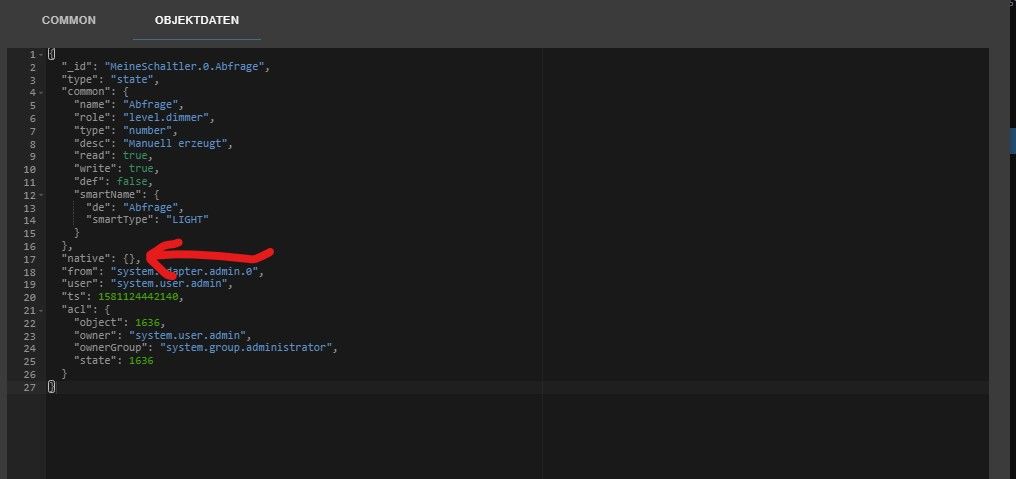
Schöne Grüße Frank
-
@damrak2022 Hi, du hast ja auch nur 2 Geräte im IOT drin stehen, dann kann Alexa auch nicht mehr finden.
So wie ich das bei deinem Log sehe, kannst du die anderen Geräte nicht hinzufügen, da der Zusatz "nativ" fehlt.
Schau mal in deine Objektdaten, ob das wirklich so ist, sonst musst du das noch hinzufügen. Die wurden wohl irgendwie faslch erstellt.
@frankyboy73 Bei meiner Deckenlampe sieht das z.B. so aus
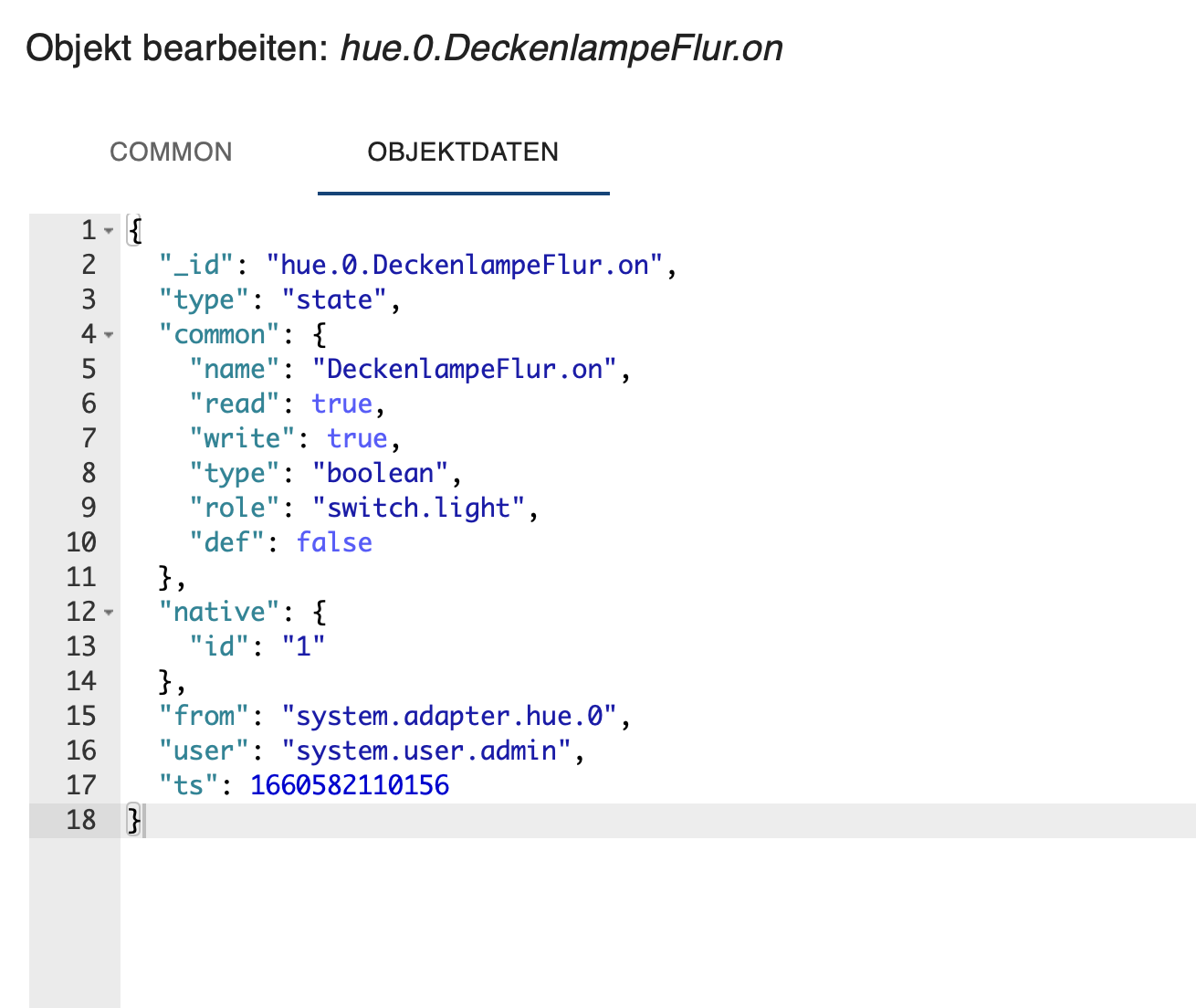
Allerdings steht das bei Dir unter Abfrage, ws ich nicht ganz verstehe. Ich habe jetzt in dem Datenpunkt Deckenlampe Flur on geschaut.
Da ich nicht soviel Geräte habe, kann ich da nicht die ganzen Hue Dinge einfach einmal komplett löschen und neu einlesen lasen, oder wie gehe ich am besten vor? -
@frankyboy73 sagte in Frage zum cloud Adapter:
So wie ich das bei deinem Log sehe, kannst du die anderen Geräte nicht hinzufügen, da der Zusatz "nativ" fehlt.
Das ist der DEBUG-Log und der sieht bei mir (bestimmt auch bei Dir) genauso "schrecklich" aus.
Fakt ist dass @Damrak2022 ja erstmal Geräte anlegen muss. Was soll Alexa denn auch finden wenn keine Geräte angelegt sind ?
Und hierzu nochmals die Anleitung ab Punkt 1 nochmal lesen und abarbeiten.Lehrling seit 1975 !!!
Beitrag geholfen ? dann gerne ein upvote rechts unten im Beitrag klicken ;)
https://forum.iobroker.net/topic/51555/hinweise-f%C3%BCr-gute-forenbeitr%C3%A4ge -
@frankyboy73 sagte in Frage zum cloud Adapter:
So wie ich das bei deinem Log sehe, kannst du die anderen Geräte nicht hinzufügen, da der Zusatz "nativ" fehlt.
Das ist der DEBUG-Log und der sieht bei mir (bestimmt auch bei Dir) genauso "schrecklich" aus.
Fakt ist dass @Damrak2022 ja erstmal Geräte anlegen muss. Was soll Alexa denn auch finden wenn keine Geräte angelegt sind ?
Und hierzu nochmals die Anleitung ab Punkt 1 nochmal lesen und abarbeiten.@djmarc75 So jetzt habe ich alle Geräte manuell in IoT hinzugefügt und könnt sie dann auch über Alexa hinzufügen.
-
@frankyboy73 sagte in Frage zum cloud Adapter:
So wie ich das bei deinem Log sehe, kannst du die anderen Geräte nicht hinzufügen, da der Zusatz "nativ" fehlt.
Das ist der DEBUG-Log und der sieht bei mir (bestimmt auch bei Dir) genauso "schrecklich" aus.
Fakt ist dass @Damrak2022 ja erstmal Geräte anlegen muss. Was soll Alexa denn auch finden wenn keine Geräte angelegt sind ?
Und hierzu nochmals die Anleitung ab Punkt 1 nochmal lesen und abarbeiten.@djmarc75 Ich muss hier noch einmal nachhaken, da mir das nicht ganz klar ist.
Ich habe ja meine Hue Lampen, und auch meinen Xiaomi Ventilator im iot Adapter hinzugefügt. Als Datenpunkt habe ich den Stehlampe.on genommen (bin gerade im Auto) kann ihn deswegen nicht ganz korrekt benennen.
Wie muss ich das jetzt machen, das ich über Alexa auch die Helligkeit oder Farbe ändern kann? Muss ich dann die Stehlampe erneut im iot Adapter mit dem Datenpunkt Brightness hinzufügen? -
@djmarc75 Ich muss hier noch einmal nachhaken, da mir das nicht ganz klar ist.
Ich habe ja meine Hue Lampen, und auch meinen Xiaomi Ventilator im iot Adapter hinzugefügt. Als Datenpunkt habe ich den Stehlampe.on genommen (bin gerade im Auto) kann ihn deswegen nicht ganz korrekt benennen.
Wie muss ich das jetzt machen, das ich über Alexa auch die Helligkeit oder Farbe ändern kann? Muss ich dann die Stehlampe erneut im iot Adapter mit dem Datenpunkt Brightness hinzufügen?@damrak2022 Hi, ja du fügst die Stehlampe mit dem Datenpunkt Brithness zusätzlich im IOT hinzu, benennst sie genau so wie das Gerät mit dem Datenpunkt On, dann wird das zu ner Gruppe zusammengefügt und bei ALexa als ein Gerät dargestellt. Eventuell mal das Gerät in der Alexa App löschen und neu suchen lassen. Du kannst zusätzlich auch noch die Farbe (Hue oder Color oder was dein Gerätetyp hat) hinzufügen. Weißwert sollte auch gehen.

Schöne Grüße Frank
-
@damrak2022 Hi, ja du fügst die Stehlampe mit dem Datenpunkt Brithness zusätzlich im IOT hinzu, benennst sie genau so wie das Gerät mit dem Datenpunkt On, dann wird das zu ner Gruppe zusammengefügt und bei ALexa als ein Gerät dargestellt. Eventuell mal das Gerät in der Alexa App löschen und neu suchen lassen. Du kannst zusätzlich auch noch die Farbe (Hue oder Color oder was dein Gerätetyp hat) hinzufügen. Weißwert sollte auch gehen.
@frankyboy73 So ganz steige ich nicht durch.
Hier zwei Screenshots, einmal von meinen Datenpunkten und einmal von den angelegten Geräten im Iot Adapter
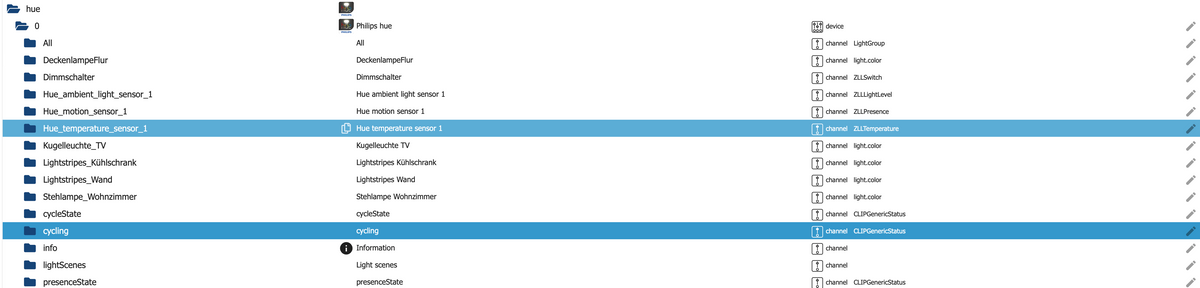
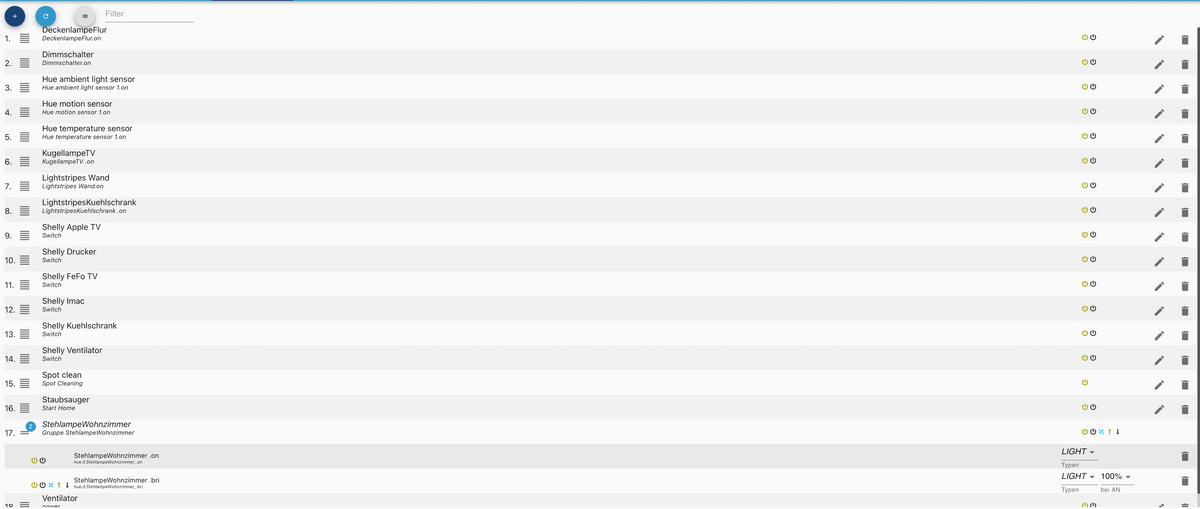
Wenn ich nun aber in der Alexa App such zeigt er mir 28 Geräte an.
Als Beispiel zeigt er mir ein und dasselbe Gerät einmal als Kugelleuchte TV und einmal als Kugellampe TV an. In meinen Datenpunkten gibt es aber nur noch Kugelleuchte TV. Woher kommt Kugellampe TV?
Dabei habe ich in der Alexa App alle Geräte gelöscht und meine Datenpunkte entmistet.Mit besten Grüßen
Andy -
@frankyboy73 So ganz steige ich nicht durch.
Hier zwei Screenshots, einmal von meinen Datenpunkten und einmal von den angelegten Geräten im Iot Adapter
Wenn ich nun aber in der Alexa App such zeigt er mir 28 Geräte an.
Als Beispiel zeigt er mir ein und dasselbe Gerät einmal als Kugelleuchte TV und einmal als Kugellampe TV an. In meinen Datenpunkten gibt es aber nur noch Kugelleuchte TV. Woher kommt Kugellampe TV?
Dabei habe ich in der Alexa App alle Geräte gelöscht und meine Datenpunkte entmistet.@damrak2022 sagte in Frage zum cloud Adapter:
Woher kommt Kugellampe TV?
Das kommt über den HUE Skill in der AlexaAPP.
Wenn iot genutzt wird dann brauch man eigentlich keine HerstellerSkills da sonst doppelt gemoppelt wird.



Hey! Du scheinst an dieser Unterhaltung interessiert zu sein, hast aber noch kein Konto.
Hast du es satt, bei jedem Besuch durch die gleichen Beiträge zu scrollen? Wenn du dich für ein Konto anmeldest, kommst du immer genau dorthin zurück, wo du zuvor warst, und kannst dich über neue Antworten benachrichtigen lassen (entweder per E-Mail oder Push-Benachrichtigung). Du kannst auch Lesezeichen speichern und Beiträge positiv bewerten, um anderen Community-Mitgliedern deine Wertschätzung zu zeigen.
Mit deinem Input könnte dieser Beitrag noch besser werden 💗
Registrieren Anmelden331
Online33.0k
Benutzer83.5k
Themen1.3m
Beiträge