




Zigbee adapter stopped running

-
@asgothian It does not work for me see my message from July 24
@ap2017 Please check if you have duplicate zigbee-herdsman-converters libraries installed, or if their permissions do not allow overwriting.
if need be, follow this method:
- stop the zigbee adapter
- remove the zigbee-herdsman-converters library
- remove the zigbee-herdsman library
- reinstall the zigbee adapter.
A.
-
@ap2017 Please check if you have duplicate zigbee-herdsman-converters libraries installed, or if their permissions do not allow overwriting.
if need be, follow this method:
- stop the zigbee adapter
- remove the zigbee-herdsman-converters library
- remove the zigbee-herdsman library
- reinstall the zigbee adapter.
A.
@asgothian Thanks, but it I don't know how to:
- remove the zigbee-herdsman-converters library
- remove the zigbee-herdsman library
- reinstall the zigbee adapter. How to reinstall? Delete and then install new adapter? Will all devices configuration stay?
-
@asgothian Thanks, but it I don't know how to:
- remove the zigbee-herdsman-converters library
- remove the zigbee-herdsman library
- reinstall the zigbee adapter. How to reinstall? Delete and then install new adapter? Will all devices configuration stay?
-
@ap2017 Please check if you have duplicate zigbee-herdsman-converters libraries installed, or if their permissions do not allow overwriting.
if need be, follow this method:
- stop the zigbee adapter
- remove the zigbee-herdsman-converters library
- remove the zigbee-herdsman library
- reinstall the zigbee adapter.
A.
-
@asgothian Do I need to reconfigure devices after swapping the CC2531 dongle and changing serial port to proper "by-id"?
@ap2017 sagte in Zigbee adapter stopped running:
@asgothian Do I need to reconfigure devices after swapping the CC2531 dongle and changing serial port to proper "by-id"?
If you swap to a different hardware, you may need to repair all devices. Just swapping the port of the identical hardware does not require a reconfiguration / repairing.
As to the earlier question. The easiest way is:
- stop the zigbee adapter
- remove the zigbee adapter through the admin interface.
- open a console, navigate to /opt/iobroker
- execute npm list | grep -e "herdsman" to see if this produces lines containing either "zigbee-herdsman" or "zigbee-herdsman-converters". if it does you can attempt to remove these via nom remove (please read the npm documentation for this)
- reinstall the zigbee adapter through the admin interface.
- start the zigbee adapter.
A.
-
@ap2017 sagte in Zigbee adapter stopped running:
@asgothian Do I need to reconfigure devices after swapping the CC2531 dongle and changing serial port to proper "by-id"?
If you swap to a different hardware, you may need to repair all devices. Just swapping the port of the identical hardware does not require a reconfiguration / repairing.
As to the earlier question. The easiest way is:
- stop the zigbee adapter
- remove the zigbee adapter through the admin interface.
- open a console, navigate to /opt/iobroker
- execute npm list | grep -e "herdsman" to see if this produces lines containing either "zigbee-herdsman" or "zigbee-herdsman-converters". if it does you can attempt to remove these via nom remove (please read the npm documentation for this)
- reinstall the zigbee adapter through the admin interface.
- start the zigbee adapter.
A.
-
@asgothian Would you recommend to switch from CC2531 to Sonoff stick based on CC2652P?
-
@ap2017 sagte in Zigbee adapter stopped running:
@asgothian Do I need to reconfigure devices after swapping the CC2531 dongle and changing serial port to proper "by-id"?
If you swap to a different hardware, you may need to repair all devices. Just swapping the port of the identical hardware does not require a reconfiguration / repairing.
As to the earlier question. The easiest way is:
- stop the zigbee adapter
- remove the zigbee adapter through the admin interface.
- open a console, navigate to /opt/iobroker
- execute npm list | grep -e "herdsman" to see if this produces lines containing either "zigbee-herdsman" or "zigbee-herdsman-converters". if it does you can attempt to remove these via nom remove (please read the npm documentation for this)
- reinstall the zigbee adapter through the admin interface.
- start the zigbee adapter.
A.
@asgothian said in Zigbee adapter stopped running:
npm list | grep -e "herdsman"
Did as you suggested, npm list | grep -e "herdsman" did not show any lines. Reinstall adapter, same errors:
2022-08-08 22:07:52.865 - info: zigbee.0 (3622) Starting Zigbee npm ...
2022-08-08 22:07:53.091 - info: zigbee.0 (3622) Installed Version: iobroker.zigbee@1.7.6
2022-08-08 22:07:53.461 - info: zigbee.0 (3622) Coordinator firmware version: {"type":"zStack12","meta":{"transportrev":2,"product":0,"majorrel":2,"minorrel":6,"maintrel":3,"revision":20190608}}
2022-08-08 22:07:53.467 - info: zigbee.0 (3622) Unable to disable LED, unsupported function.
2022-08-08 22:07:53.468 - info: zigbee.0 (3622) --> transmitPower : normal
2022-08-08 22:07:53.475 - info: zigbee.0 (3622) Currently 15 devices are joined:
2022-08-08 22:07:53.495 - info: zigbee.0 (3622) 0x90fd9ffffe2bad6b (addr 43852): LED1622G12 - IKEA TRADFRI LED bulb E26 1000 lumen, dimmable, opal white (Router)
2022-08-08 22:07:53.499 - info: zigbee.0 (3622) 0x00158d00044678ff (addr 48528): WXKG12LM - Xiaomi Aqara wireless switch (with gyroscope) (EndDevice)
2022-08-08 22:07:53.499 - info: zigbee.0 (3622) 0x00124b001f90ed15 (addr 54998): SA-003-Zigbee - eWeLink Zigbee smart plug (Router)
2022-08-08 22:07:53.500 - info: zigbee.0 (3622) 0xd0cf5efffedaa37c (addr 43246): LED1622G12 - IKEA TRADFRI LED bulb E26 1000 lumen, dimmable, opal white (Router)
2022-08-08 22:07:53.500 - info: zigbee.0 (3622) 0x000b57fffebcfc39 (addr 38662): LED1622G12 - IKEA TRADFRI LED bulb E26 1000 lumen, dimmable, opal white (Router)
2022-08-08 22:07:53.501 - info: zigbee.0 (3622) 0x00124b0022658a2b (addr 33323): SNZB-01 - SONOFF Wireless button (EndDevice)
2022-08-08 22:07:53.502 - info: zigbee.0 (3622) 0xd0cf5efffe7d475c (addr 30129): LED1622G12 - IKEA TRADFRI LED bulb E26 1000 lumen, dimmable, opal white (Router)
2022-08-08 22:07:53.502 - info: zigbee.0 (3622) 0x00158d00045a362e (addr 24701): SJCGQ11LM - Xiaomi Aqara water leak sensor (EndDevice)
2022-08-08 22:07:53.503 - info: zigbee.0 (3622) 0xbc33acfffeff263f (addr 65507): SM-AZ713 - UseeLink Smart water/gas valve (Router)
2022-08-08 22:07:53.503 - info: zigbee.0 (3622) 0x90fd9ffffe2baf88 (addr 53737): LED1622G12 - IKEA TRADFRI LED bulb E26 1000 lumen, dimmable, opal white (Router)
2022-08-08 22:07:53.504 - info: zigbee.0 (3622) 0x000b57fffe8b9e9c (addr 56023): LED1650R5 - IKEA TRADFRI LED bulb GU10 400 lumen, dimmable (Router)
2022-08-08 22:07:53.504 - info: zigbee.0 (3622) 0x00124b0022419f47 (addr 23822): SA-003-Zigbee - eWeLink Zigbee smart plug (Router)
2022-08-08 22:07:53.505 - info: zigbee.0 (3622) 0xccccccfffe939035 (addr 18190): E1525/E1745 - IKEA TRADFRI motion sensor (EndDevice)
2022-08-08 22:07:53.506 - info: zigbee.0 (3622) 0x04cf8cdf3c79009e (addr 52418): GZCGQ01LM - Xiaomi MiJia light intensity sensor (EndDevice)
2022-08-08 22:07:53.506 - info: zigbee.0 (3622) 0x00158d0006ea578f (addr 63873): SJCGQ11LM - Xiaomi Aqara water leak sensor (EndDevice)
2022-08-08 22:07:53.506 - info: zigbee.0 (3622) Zigbee started
2022-08-08 22:08:36.396 - info: web.0 (2169) ==> Connected system.user.admin from ::ffff:192.168.1.160
2022-08-08 22:08:46.528 - info: mysensors.0 (2591) STARTED
2022-08-08 22:08:46.528 - info: mysensors.0 (2591) STARTED
2022-08-08 22:08:50.188 - warn: zigbee.0 (3622) Device '0x90fd9ffffe2bad6b' announced itself
2022-08-08 22:09:09.841 - warn: zigbee.0 (3622) DeviceAvailability:Failed to ping 0x00124b001f90ed15 SA-003-Zigbee
2022-08-08 22:09:10.428 - warn: zigbee.0 (3622) DeviceAvailability:Failed to ping 0x000b57fffebcfc39 TRADFRI bulb E26 W opal 1000lm
2022-08-08 22:09:11.019 - warn: zigbee.0 (3622) DeviceAvailability:Failed to ping 0xd0cf5efffedaa37c TRADFRI bulb E26 W opal 1000lm
2022-08-08 22:09:15.005 - warn: zigbee.0 (3622) DeviceAvailability:Failed to ping 0x90fd9ffffe2baf88 TRADFRI bulb E26 W opal 1000lm
2022-08-08 22:09:15.413 - warn: zigbee.0 (3622) DeviceAvailability:Failed to ping 0xd0cf5efffe7d475c TRADFRI bulb E26 W opal 1000lm
2022-08-08 22:09:35.607 - warn: zigbee.0 (3622) Send command to 0x00124b001f90ed15 failed with: Code 205 (No network route)
2022-08-08 22:09:46.483 - info: mysensors.0 (2591) STARTED
2022-08-08 22:09:46.484 - info: mysensors.0 (2591) STARTED
2022-08-08 22:09:52.039 - warn: zigbee.0 (3622) Send command to 0x90fd9ffffe2baf88 failed with: Code 205 (No network route)
2022-08-08 22:09:55.991 - warn: zigbee.0 (3622) Send command to 0x000b57fffe8b9e9c failed with: Code 205 (No network route)
2022-08-08 22:09:56.512 - warn: zigbee.0 (3622) DeviceAvailability:Failed to ping 0x000b57fffe8b9e9c TRADFRI bulb GU10 W 400lm
2022-08-08 22:10:46.438 - info: mysensors.0 (2591) STARTED
2022-08-08 22:10:46.438 - info: mysensors.0 (2591) STARTED
Zigbee instance shows green light but devices indication/control does not work.
-
@asgothian said in Zigbee adapter stopped running:
npm list | grep -e "herdsman"
Did as you suggested, npm list | grep -e "herdsman" did not show any lines. Reinstall adapter, same errors:
2022-08-08 22:07:52.865 - info: zigbee.0 (3622) Starting Zigbee npm ...
2022-08-08 22:07:53.091 - info: zigbee.0 (3622) Installed Version: iobroker.zigbee@1.7.6
2022-08-08 22:07:53.461 - info: zigbee.0 (3622) Coordinator firmware version: {"type":"zStack12","meta":{"transportrev":2,"product":0,"majorrel":2,"minorrel":6,"maintrel":3,"revision":20190608}}
2022-08-08 22:07:53.467 - info: zigbee.0 (3622) Unable to disable LED, unsupported function.
2022-08-08 22:07:53.468 - info: zigbee.0 (3622) --> transmitPower : normal
2022-08-08 22:07:53.475 - info: zigbee.0 (3622) Currently 15 devices are joined:
2022-08-08 22:07:53.495 - info: zigbee.0 (3622) 0x90fd9ffffe2bad6b (addr 43852): LED1622G12 - IKEA TRADFRI LED bulb E26 1000 lumen, dimmable, opal white (Router)
2022-08-08 22:07:53.499 - info: zigbee.0 (3622) 0x00158d00044678ff (addr 48528): WXKG12LM - Xiaomi Aqara wireless switch (with gyroscope) (EndDevice)
2022-08-08 22:07:53.499 - info: zigbee.0 (3622) 0x00124b001f90ed15 (addr 54998): SA-003-Zigbee - eWeLink Zigbee smart plug (Router)
2022-08-08 22:07:53.500 - info: zigbee.0 (3622) 0xd0cf5efffedaa37c (addr 43246): LED1622G12 - IKEA TRADFRI LED bulb E26 1000 lumen, dimmable, opal white (Router)
2022-08-08 22:07:53.500 - info: zigbee.0 (3622) 0x000b57fffebcfc39 (addr 38662): LED1622G12 - IKEA TRADFRI LED bulb E26 1000 lumen, dimmable, opal white (Router)
2022-08-08 22:07:53.501 - info: zigbee.0 (3622) 0x00124b0022658a2b (addr 33323): SNZB-01 - SONOFF Wireless button (EndDevice)
2022-08-08 22:07:53.502 - info: zigbee.0 (3622) 0xd0cf5efffe7d475c (addr 30129): LED1622G12 - IKEA TRADFRI LED bulb E26 1000 lumen, dimmable, opal white (Router)
2022-08-08 22:07:53.502 - info: zigbee.0 (3622) 0x00158d00045a362e (addr 24701): SJCGQ11LM - Xiaomi Aqara water leak sensor (EndDevice)
2022-08-08 22:07:53.503 - info: zigbee.0 (3622) 0xbc33acfffeff263f (addr 65507): SM-AZ713 - UseeLink Smart water/gas valve (Router)
2022-08-08 22:07:53.503 - info: zigbee.0 (3622) 0x90fd9ffffe2baf88 (addr 53737): LED1622G12 - IKEA TRADFRI LED bulb E26 1000 lumen, dimmable, opal white (Router)
2022-08-08 22:07:53.504 - info: zigbee.0 (3622) 0x000b57fffe8b9e9c (addr 56023): LED1650R5 - IKEA TRADFRI LED bulb GU10 400 lumen, dimmable (Router)
2022-08-08 22:07:53.504 - info: zigbee.0 (3622) 0x00124b0022419f47 (addr 23822): SA-003-Zigbee - eWeLink Zigbee smart plug (Router)
2022-08-08 22:07:53.505 - info: zigbee.0 (3622) 0xccccccfffe939035 (addr 18190): E1525/E1745 - IKEA TRADFRI motion sensor (EndDevice)
2022-08-08 22:07:53.506 - info: zigbee.0 (3622) 0x04cf8cdf3c79009e (addr 52418): GZCGQ01LM - Xiaomi MiJia light intensity sensor (EndDevice)
2022-08-08 22:07:53.506 - info: zigbee.0 (3622) 0x00158d0006ea578f (addr 63873): SJCGQ11LM - Xiaomi Aqara water leak sensor (EndDevice)
2022-08-08 22:07:53.506 - info: zigbee.0 (3622) Zigbee started
2022-08-08 22:08:36.396 - info: web.0 (2169) ==> Connected system.user.admin from ::ffff:192.168.1.160
2022-08-08 22:08:46.528 - info: mysensors.0 (2591) STARTED
2022-08-08 22:08:46.528 - info: mysensors.0 (2591) STARTED
2022-08-08 22:08:50.188 - warn: zigbee.0 (3622) Device '0x90fd9ffffe2bad6b' announced itself
2022-08-08 22:09:09.841 - warn: zigbee.0 (3622) DeviceAvailability:Failed to ping 0x00124b001f90ed15 SA-003-Zigbee
2022-08-08 22:09:10.428 - warn: zigbee.0 (3622) DeviceAvailability:Failed to ping 0x000b57fffebcfc39 TRADFRI bulb E26 W opal 1000lm
2022-08-08 22:09:11.019 - warn: zigbee.0 (3622) DeviceAvailability:Failed to ping 0xd0cf5efffedaa37c TRADFRI bulb E26 W opal 1000lm
2022-08-08 22:09:15.005 - warn: zigbee.0 (3622) DeviceAvailability:Failed to ping 0x90fd9ffffe2baf88 TRADFRI bulb E26 W opal 1000lm
2022-08-08 22:09:15.413 - warn: zigbee.0 (3622) DeviceAvailability:Failed to ping 0xd0cf5efffe7d475c TRADFRI bulb E26 W opal 1000lm
2022-08-08 22:09:35.607 - warn: zigbee.0 (3622) Send command to 0x00124b001f90ed15 failed with: Code 205 (No network route)
2022-08-08 22:09:46.483 - info: mysensors.0 (2591) STARTED
2022-08-08 22:09:46.484 - info: mysensors.0 (2591) STARTED
2022-08-08 22:09:52.039 - warn: zigbee.0 (3622) Send command to 0x90fd9ffffe2baf88 failed with: Code 205 (No network route)
2022-08-08 22:09:55.991 - warn: zigbee.0 (3622) Send command to 0x000b57fffe8b9e9c failed with: Code 205 (No network route)
2022-08-08 22:09:56.512 - warn: zigbee.0 (3622) DeviceAvailability:Failed to ping 0x000b57fffe8b9e9c TRADFRI bulb GU10 W 400lm
2022-08-08 22:10:46.438 - info: mysensors.0 (2591) STARTED
2022-08-08 22:10:46.438 - info: mysensors.0 (2591) STARTED
Zigbee instance shows green light but devices indication/control does not work.
@ap2017 sagte in Zigbee adapter stopped running:
@asgothian said in Zigbee adapter stopped running:
npm list | grep -e "herdsman"
Did as you suggested, npm list | grep -e "herdsman" did not show any lines. Reinstall adapter, same errors:
This is what happens when the thread topic and the issue no longer match.
Your Topic says "zigbee adapter stopped running".
Now, as your log says, your zigbee adapter is running. The issue you are having is with the wifi connection. The error message "No network route" means that the device cannot be reached by the zigbee network. Please follow the usual tests for wireless issues:
- check zigbee and wifi channel overlap
- check for other 2.4 gHz issues (USB3 devices, Wireless Headphones, DECT, etc.
- check for stick and/or device placement
If you moved your devices / coordinator around give the network time to reestablish itself. This can take a few moments.
Attempt to "trigger" a reconnection manually triggering the devices. On battery powered devices, this is done by pressing the button which triggers pairing (only for short) or forcing a state change (i.e. for a door sensor to open the door). On Router devices, the best way is to remove power and return power to the device.
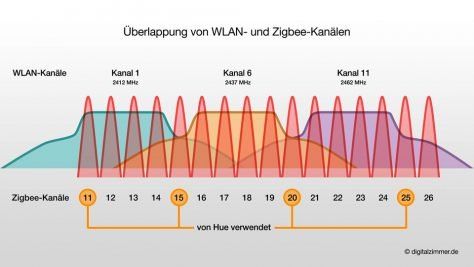
A.
p.s. A forum search for "no network route" would have gotten you this information as well.
-
@ap2017 sagte in Zigbee adapter stopped running:
@asgothian said in Zigbee adapter stopped running:
npm list | grep -e "herdsman"
Did as you suggested, npm list | grep -e "herdsman" did not show any lines. Reinstall adapter, same errors:
This is what happens when the thread topic and the issue no longer match.
Your Topic says "zigbee adapter stopped running".
Now, as your log says, your zigbee adapter is running. The issue you are having is with the wifi connection. The error message "No network route" means that the device cannot be reached by the zigbee network. Please follow the usual tests for wireless issues:
- check zigbee and wifi channel overlap
- check for other 2.4 gHz issues (USB3 devices, Wireless Headphones, DECT, etc.
- check for stick and/or device placement
If you moved your devices / coordinator around give the network time to reestablish itself. This can take a few moments.
Attempt to "trigger" a reconnection manually triggering the devices. On battery powered devices, this is done by pressing the button which triggers pairing (only for short) or forcing a state change (i.e. for a door sensor to open the door). On Router devices, the best way is to remove power and return power to the device.
A.
p.s. A forum search for "no network route" would have gotten you this information as well.
@asgothian Everything started to work. Thank you for your support

Hey! Du scheinst an dieser Unterhaltung interessiert zu sein, hast aber noch kein Konto.
Hast du es satt, bei jedem Besuch durch die gleichen Beiträge zu scrollen? Wenn du dich für ein Konto anmeldest, kommst du immer genau dorthin zurück, wo du zuvor warst, und kannst dich über neue Antworten benachrichtigen lassen (entweder per E-Mail oder Push-Benachrichtigung). Du kannst auch Lesezeichen speichern und Beiträge positiv bewerten, um anderen Community-Mitgliedern deine Wertschätzung zu zeigen.
Mit deinem Input könnte dieser Beitrag noch besser werden 💗
Registrieren AnmeldenSupport us
461
Online33.0k
Benutzer83.6k
Themen1.3m
Beiträge