




[gelöst] Upgrade Fail
-
Hallo @ all
nachdem mir mehrere Pakete (Admin, Vis, Metro, Java) zum Update angeboten wurden habe ich auf der Konsole ein ioBroker Upgrade gemacht. Das lief auch durch hatte nur viele Fehler.
Leider startet ioBroker nun nicht mehr und wirft viele komische Fehler. Ein Versuch das mit einer neuen Installation vom js-controller zu reparieren schlägt leider auch fehl.
Ich habe einen älteres Backup von davor, aber zwischendrin noch Änderungen im VIS gemacht, die ich gern behalten will. Kann man ioBroker wieder zum laufen bringen oder wenigstens meine Views in VIS retten?
! ````
C:\ioBroker>iobroker upgrade
! C:\ioBroker>node node_modules/iobroker.js-controller/iobroker.js upgrade
Cannot download json from https://raw.githubusercontent.com/PArns/ioBroker.amazon-dash/master/io-package.json. Error: Error: read ECONNRESET
Cannot download json from https://raw.githubusercontent.com/ioBroker/ioBroker.artnet/master/package.json. Error: Error: read ECONNRESET
Cannot download json from https://raw.githubusercontent.com/ioBroker/ioBroker.b-control-em/master/io-package.json. Error: Error: read ECONNRESET
Cannot download json from https://raw.githubusercontent.com/Pmant/ioBroker.botvac/master/io-package.json. Error: Error: read ECONNRESET
[Thu Sep 22 2016 11:11:38 GMT+0200 (Mitteleuropäische Sommerzeit)] Timeout by read all package.json (99) seconds
Timeout by read all package.json (99) seconds
Adapter "admin" is up to date.
Adapter "amazon-dash" is not installed.
Adapter "artnet" is not installed.
Adapter "b-control-em" is not installed.
Adapter "botvac" is not installed.
Adapter "chromecast" is not installed.
Cannot download json from https://raw.githubusercontent.com/ioBroker/ioBroker.cloud/master/io-package.json. Error: Error: read ECONNRESET
Cannot parse filehttps://raw.githubusercontent.com/ioBroker/ioBroker.cloud/master/io-package.json
Adapter "cul" is not installed.
Cannot download json from https://raw.githubusercontent.com/ioBroker/ioBroker.dwd/master/io-package.json. Error: Error: read ECONNRESET
Cannot parse filehttps://raw.githubusercontent.com/ioBroker/ioBroker.dwd/master/io-package.json
Adapter "email" is not installed.
Adapter "epson_stylus_px830" is not installed.
Adapter "fhem" is not installed.
npm install iobroker.flot --production --prefix "C:/ioBroker" (System call)
npm install --production --prefix "C:/ioBroker/node_modules/iobroker.flot" (System call)
got C:/ioBroker/node_modules/iobroker.flot/adminnter-align
got C:/ioBroker/node_modules/iobroker.flot/www
upload [1] flot.admin C:/ioBroker/node_modules/iobroker.flot/admin/index.html index.html text/html
upload [22] flot C:/ioBroker/node_modules/iobroker.flot/www/lib/js/jquery.flot.time.min.js lib/js/jquery.flot.time.min.js application/javascriptmodules\cliui\node_modules\center-align\node_modules\align-text
upload [0] flot.admin C:/ioBroker/node_modules/iobroker.flot/admin/flot.png flot.png image/png
upload [21] flot C:/ioBroker/node_modules/iobroker.flot/www/lib/js/jquery.flot.spline.min.js lib/js/jquery.flot.spline.min.js application/javascript
upload [20] flot C:/ioBroker/node_modules/iobroker.flot/www/lib/js/jquery.flot.selection.min.js lib/js/jquery.flot.selection.min.js application/javascript
upload [19] flot C:/ioBroker/node_modules/iobroker.flot/www/lib/js/jquery.flot.resize.min.js lib/js/jquery.flot.resize.min.js application/javascript
upload [18] flot C:/ioBroker/node_modules/iobroker.flot/www/lib/js/jquery.flot.pie.min.js lib/js/jquery.flot.pie.min.js application/javascript
upload [17] flot C:/ioBroker/node_modules/iobroker.flot/www/lib/js/jquery.flot.navigate.min.js lib/js/jquery.flot.navigate.min.js application/javascriptcliui\node_modules\center-align\node_modules\align-text\node_modules\kind-of\node_modules\is-buffeupload [16] flot C:/ioBroker/node_modules/iobroker.flot/www/lib/js/jquery.flot.navigate.js lib/js/jquery.flot.navigate.js application/javascript
upload [15] flot C:/ioBroker/node_modules/iobroker.flot/www/lib/js/jquery.flot.min.js lib/js/jquery.flot.min.js application/javascript
upload [14] flot C:/ioBroker/node_modules/iobroker.flot/www/lib/js/jquery.flot.hiddengraphs.js lib/js/jquery.flot.hiddengraphs.js application/javascript
upload [13] flot C:/ioBroker/node_modules/iobroker.flot/www/lib/js/jquery.flot.grow.js lib/js/jquery.flot.grow.js application/javascript
upload [12] flot C:/ioBroker/node_modules/iobroker.flot/www/lib/js/jquery.flot.categories.min.js lib/js/jquery.flot.categories.min.js application/javascript
upload [11] flot C:/ioBroker/node_modules/iobroker.flot/www/lib/js/jquery-deparam.js lib/js/jquery-deparam.js application/javascript
upload [10] flot C:/ioBroker/node_modules/iobroker.flot/www/lib/js/jqColorPicker.min.js lib/js/jqColorPicker.min.js application/javascript
upload [9] flot C:/ioBroker/node_modules/iobroker.flot/www/lib/js/curvedLines.js lib/js/curvedLines.js application/javascript
upload [8] flot C:/ioBroker/node_modules/iobroker.flot/www/js/words.js js/words.js application/javascript
upload [7] flot C:/ioBroker/node_modules/iobroker.flot/www/js/settings.js js/settings.js application/javascript
upload [6] flot C:/ioBroker/node_modules/iobroker.flot/www/js/data.js js/data.js application/javascriptnode_modules
upload [5] flot C:/ioBroker/node_modules/iobroker.flot/www/js/chart.js js/chart.js application/javascript
upload [4] flot C:/ioBroker/node_modules/iobroker.flot/www/index.html index.html text/htmlules\kind-of\node_modules\is-bufferupload [3] flot C:/ioBroker/node_modules/iobroker.flot/www/img/resetZoom.png img/resetZoom.png image/png
upload [2] flot C:/ioBroker/node_modules/iobroker.flot/www/img/favicon.png img/favicon.png image/png
upload [1] flot C:/ioBroker/node_modules/iobroker.flot/www/img/edit.svg img/edit.svg image/svg+xmld-of\node_modules\is-bufferupload [0] flot C:/ioBroker/node_modules/iobroker.flot/www/edit.html edit.html text/html
Update "system.adapter.flot.0"
Adapter "flot" updatedules\cliui\node_modules\right-align\node_modules\align-text\node_modules\longest
Adapter "feiertage" is not installed.
Adapter "fritzbox" is not installed.les\right-align\node_modules\align-text\node_modules\repeat-string
Adapter "geofency" is not installed.
Adapter "harmony" is not installed.les\wordwrap
Adapter "history" is up to date.
Cannot download json from https://raw.githubusercontent.com/ioBroker/ioBroker.hm-rega/master/io-package.json. Error: Error: read ECONNRESET
Cannot parse filehttps://raw.githubusercontent.com/ioBroker/ioBroker.hm-rega/master/io-package.json
Cannot download json from https://raw.githubusercontent.com/ioBroker/ioBroker.hm-rpc/master/io-package.json. Error: Error: read ECONNRESET\node_modules\cliui\test
Cannot parse filehttps://raw.githubusercontent.com/ioBroker/ioBroker.hm-rpc/master/io-package.json
Adapter "hue" is not installed.
Adapter "homekit" is not installed.
Adapter "homepilot" is not installed.
Adapter "hmm" is up to date.
Cannot download json from https://raw.githubusercontent.com/ioBroker/ioBroker.ical/master/io-package.json. Error: Error: read ECONNRESET
Cannot parse filehttps://raw.githubusercontent.com/ioBroker/ioBroker.ical/master/io-package.json
Adapter "icons-addictive-flavour-png" is not installed.
Adapter "icons-icons8" is not installed.
Adapter "icons-material-png" is not installed.
npm install iobroker.icons-material-svg --production --prefix "C:/ioBroker" (System call)
npm install --production --prefix "C:/ioBroker/node_modules/iobroker.icons-material-svg" (System call)
got C:/ioBroker/node_modules/iobroker.icons-material-svg/admin
upload [1] icons-material-svg.admin C:/ioBroker/node_modules/iobroker.icons-material-svg/admin/index.html index.html text/html
upload [0] icons-material-svg.admin C:/ioBroker/node_modules/iobroker.icons-material-svg/admin/icons-material-svg.png icons-material-svg.png image/png
---------------- GEKÜRZT ----------------------
Update "system.adapter.icons-material-svg.0"
Adapter "icons-material-svg" updated
Adapter "icons-mfd-png" is not installed.
Cannot download json from https://raw.githubusercontent.com/ioBroker/ioBroker.icons-mfd-svg/master/io-package.json. Error: Error: read ECONNRESET
Cannot parse filehttps://raw.githubusercontent.com/ioBroker/ioBroker.icons-mfd-svg/master/io-package.json
Adapter "icons-open-icon-library-png" is not installed.
Adapter "icons-ultimate-png" is not installed.
Adapter "influxdb" is not installed.
Cannot download json from https://raw.githubusercontent.com/ioBroker/ioBroker.javascript/master/io-package.json. Error: Error: read ECONNRESET
Cannot parse filehttps://raw.githubusercontent.com/ioBroker/ioBroker.javascript/master/io-package.json
npm install iobroker.js-controller --production --prefix "C:/ioBroker" (System call)
npm ERR! fetch failed https://registry.npmjs.org/winston-daily-rotate-file/-/winston-daily-rotate-file-1.3.1.tgz
npm WARN retry will retry, error on last attempt: Error: read ECONNRESET
npm ERR! fetch failed https://registry.npmjs.org/request/-/request-2.75.0.tgz
npm WARN retry will retry, error on last attempt: Error: read ECONNRESET
npm ERR! fetch failed https://registry.npmjs.org/winston-daily-rotate-file/-/winston-daily-rotate-file-1.3.1.tgz
npm WARN retry will retry, error on last attempt: Error: read ECONNRESET
npm ERR! fetch failed https://registry.npmjs.org/engine.io-parser/-/engine.io-parser-1.2.4.tgz
npm WARN retry will retry, error on last attempt: Error: read ECONNRESET
host.SmartHub Cannot install iobroker.js-controller: 1
! C:\ioBroker>iobroker update
! C:\ioBroker>node node_modules/iobroker.js-controller/iobroker.js update
module.js:327
throw err;
^
! Error: Cannot find module 'C:\ioBroker\node_modules\iobroker.js-controller\iobroker.js'
at Function.Module._resolveFilename (module.js:325:15)
at Function.Module._load (module.js:276:25)
at Function.Module.runMain (module.js:441:10)
at startup (node.js:134:18)
at node.js:962:3
! C:\ioBroker>iobroker update js-controller
! C:\ioBroker>node node_modules/iobroker.js-controller/iobroker.js update js-controller
module.js:327
throw err;
^
! Error: Cannot find module 'C:\ioBroker\node_modules\iobroker.js-controller\iobroker.js'
at Function.Module._resolveFilename (module.js:325:15)
at Function.Module._load (module.js:276:25)
at Function.Module.runMain (module.js:441:10)
at startup (node.js:134:18)
at node.js:962:3
! C:\ioBroker>iobroker upgrade js-controller
! C:\ioBroker>node node_modules/iobroker.js-controller/iobroker.js upgrade js-controller
module.js:327
throw err;
^
! Error: Cannot find module 'C:\ioBroker\node_modules\iobroker.js-controller\iobroker.js'
at Function.Module._resolveFilename (module.js:325:15)
at Function.Module._load (module.js:276:25)
at Function.Module.runMain (module.js:441:10)
at startup (node.js:134:18)
at node.js:962:3----------------- FIX Versuch --------------
C:\ioBroker>npm install https://github.com/ioBroker/ioBroker.js-controller/tarball/master --productionnpm ERR! fetch failed https://registry.npmjs.org/debug/-/debug-2.2.0.tgz
npm WARN retry will retry, error on last attempt: Error: read ECONNRESET
npm ERR! fetch failed https://registry.npmjs.org/engine.io-client/-/engine.io-client-1.6.11.tgz
npm WARN retry will retry, error on last attempt: Error: read ECONNRESET! > ursa@0.9.4 install C:\ioBroker\node_modules\iobroker.js-controller\node_modules\letsencrypt\node_modules\rsa-compat\node_modules\ursa
node-gyp rebuild
! |
defined npm_config_node_gyp (node "C:\Program Files\nodejs\node_modules\npm\bin\node-gyp-bin\....\node_modules\node-gyp\bin\node-gyp.js" rebuild ) else (node rebuild )
gyp ERR! configure error
gyp ERR! stack Error: Can't find Python executable "python", you can set the PYTHON env variable.
gyp ERR! stack at failNoPython (C:\Program Files\nodejs\node_modules\npm\node_modules\node-gyp\lib\configure.js:116:14)
gyp ERR! stack at C:\Program Files\nodejs\node_modules\npm\node_modules\node-gyp\lib\configure.js:71:11
gyp ERR! stack at FSReqWrap.oncomplete (fs.js:82:15)
gyp ERR! System Windows_NT 10.0.14300
gyp ERR! command "C:\Program Files\nodejs\node.exe" "C:\Program Files\nodejs\node_modules\npm\node_modules\node-gyp\bin\node-gyp.js" "rebuild"
cwd C:\ioBroker\node_modules\iobroker.js-controller\node_modules\letsencrypt\node_modules\rsa-compat\node_modules\ursa
gyp ERR! node -v v4.3.1
gyp ERR! node-gyp -v v3.0.3
gyp ERR! not ok
npm WARN optional dep failed, continuing ursa@0.9.4
npm ERR! Windows_NT 10.0.14300
npm ERR! argv "C:\Program Files\nodejs\node.exe" "C:\Program Files\nodejs\node_modules\npm\bin\npm-cli.js" "install" "https://github.com/ioBroker/ioBroker.js-controller/tarball/master" "--production"
npm ERR! node v4.3.1
npm ERR! npm v2.14.12
npm ERR! code ETARGET
! npm ERR! notarget No compatible version found: form-data@'>=2.0.0 <2.1.0'
npm ERR! notarget Valid install targets:
npm ERR! notarget ["0.0.0","0.0.2","0.0.3","0.0.4","0.0.5","0.0.6","0.0.7","0.0.8","0.0.9","0.0.10","0.1.0","0.1.1","0.1.2","0.1.3","0.1.4","0.2.0","1.0.0-rc1","1.0.0-rc2","1.0.0-rc3","1.0.0-rc4","1.0.0","1.0.1"]
npm ERR! notarget
npm ERR! notarget This is most likely not a problem with npm itself.
npm ERR! notarget In most cases you or one of your dependencies are requesting
npm ERR! notarget a package version that doesn't exist.
npm ERR! notarget
npm ERR! notarget It was specified as a dependency of 'request'
npm ERR! notarget
! npm ERR! Please include the following file with any support request:
npm ERR! C:\ioBroker\npm-debug.log
! C:\ioBroker> -
Mit Windows habe ich keinerlei Erfahrung.
Sollte mir soetwas mal passieren, wo anscheinend bei den Downloads etwas schief gelaufen ist mache ich folgendes:
Zuerst cache leeren
npm cache cleanDann ioBroker stoppen, falls es noch läuft.
cd /opt/iobroker
iobroker stop
Dann ganz brutal ioBroker neu drüberinstallieren
npm install iobroker --unsafe-permIch weiß nicht ob du das bei windoof irgendwie anpassen musst.
Viel Glück
Rainer
-
Schau die mal das hier an: http://forum.iobroker.net/viewtopic.php … =20#p34337
Und die nächsten drei Einträge.
-
Nein :-( hat leider nicht geholfen, weder cache clean noch die anderen Sachen.
Irgendwie wurde hier ganz schön was zerlegt. Wo liegen die VIS Views? Mir würde auch nur das File reichen, den Rest habe ich wie gesagt in "älteren" Versionen.
! ` > C:\ioBroker>npm install https://github.com/ioBroker/ioBroker.ad … all/master --production
npm ERR! fetch failed https://registry.npmjs.org/request/-/request-2.75.0.tgz
npm WARN retry will retry, error on last attempt: Error: read ECONNRESET
npm ERR! Windows_NT 10.0.14300
npm ERR! argv "C:\Program Files\nodejs\node.exe" "C:\Program Files\nodejs\node_modules\npm\bin\npm-cli.js" "install" "https://github.com/ioBroker/ioBroker.ad ... all/master" "--production"
npm ERR! node v4.3.1
npm ERR! npm v2.14.12
npm ERR! code ECONNRESET
npm ERR! errno ECONNRESET
npm ERR! syscall read
npm ERR! network read ECONNRESET
npm ERR! network This is most likely not a problem with npm itself
npm ERR! network and is related to network connectivity.
npm ERR! network In most cases you are behind a proxy or have bad network settings.
npm ERR! network
npm ERR! network If you are behind a proxy, please make sure that the
npm ERR! network 'proxy' config is set properly. See: 'npm help config'
npm ERR! Please include the following file with any support request:
npm ERR! C:\ioBroker\npm-debug.log
C:\ioBroker>iobroker restart admin
C:\ioBroker>node node_modules/iobroker.js-controller/iobroker.js restart admin
module.js:327
throw err;
^
Error: Cannot find module 'C:\ioBroker\node_modules\iobroker.js-controller\iobroker.js'
at Function.Module._resolveFilename (module.js:325:15)
at Function.Module._load (module.js:276:25)
at Function.Module.runMain (module.js:441:10)
at startup (node.js:134:18)
at node.js:962:3
C:\ioBroker> `
-
Da sind zwei links am Anfang deiner Fehler. Kannst Du diese anklicken und lädst Du dann zwei Dateien runter?
Entweder hast Du ein Internetproblem beim zugriff - dann dürften die Dateien sich nicht runterladen lassen,
oder Dein NPM hat einen Sockenschuss. Ich würde dann noch einmal nodejs und npm deinstallieren und installieren.
Vielleiht uach einfach den neuen Installer 0.8.0 herunterladen und ausführen.
-
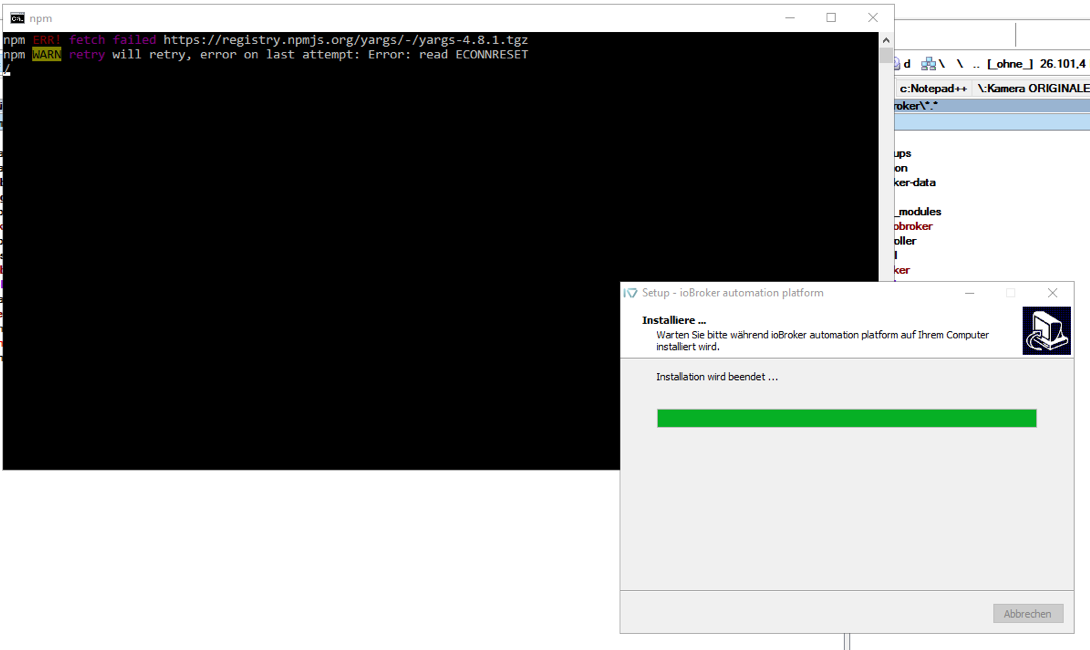
Leider hat auch der Installer ein Problem mit der Installation :-( Trotz ausgeschalteter Firewall und funktionierendem Link im Browser. Echt komisch.
1443_bildschirmfoto_2016-09-23_um_05.53.39.png -
Hallo,
alles versucht. Bereits mehrfach das Backup zurück gespielt und jeweils einzelne Sachen versucht zu updaten. Ob Admin von der Konsole oder Java aus Admin heraus. Immer bekomme ich diesen ECONNRESET Fehler. Firewall ist mittlerweile aus, Fritzbox hat keine Blacklist mehr.
Die alte Installation geht aber problemlos. Lediglich Updates machen die Installation sofort kaputt.
! ````
$ ./iobroker upgrade javascript
npm install iobroker.javascript --production --prefix "C:/ioBroker" (System call)
npm ERR! fetch failed https://registry.npmjs.org/iobroker.javascript/-/iobroker.javascript-3.0.9.tgz
npm WARN retry will retry, error on last attempt: Error: read ECONNRESET -
Bei dir ist npm oder Einstellung für npm kaputt.
Um rauszufinden was los ist. Probieren mal ein Adapter über console zu installieren. Z.b.
cd c:/iobroker
npm cache clean
npm install iobroker.ical --production --verbose --debug
Da sollte man sehen was npm versucht zu machen und was Schiff geht.
-
Hallo Blue,
ich hab mal den JavaScript Adapter versucht. Dafür gibt es auch ein Update bei mir.
! ````
! c:\ioBroker>iobroker update javascript
! c:\ioBroker>node node_modules/iobroker.js-controller/iobroker.js update javascript
update done
! c:\ioBroker>npm cache clean
! c:\ioBroker>npm install iobroker.javascript --production --verbose --debug
npm info it worked if it ends with ok
npm verb cli [ 'C:\Program Files\nodejs\node.exe',
npm verb cli 'C:\Program Files\nodejs\node_modules\npm\bin\npm-cli.js',
npm verb cli 'install',
npm verb cli 'iobroker.javascript',
npm verb cli '--production',
npm verb cli '--verbose',
npm verb cli '--debug' ]
npm info using npm@2.14.12
npm info using node@v4.3.1
npm verb install initial load of c:\ioBroker\package.json
npm verb installManyTop reading scoped package data from c:\ioBroker\node_modules\iobroker\package.json
npm verb installManyTop reading scoped package data from c:\ioBroker\node_modules\iobroker.admin\package.json
npm verb installManyTop reading scoped package data from c:\ioBroker\node_modules\iobroker.cloud\package.json
npm verb installManyTop reading scoped package data from c:\ioBroker\node_modules\iobroker.dwd\package.json
npm verb installManyTop reading scoped package data from c:\ioBroker\node_modules\iobroker.flot\package.json
npm verb installManyTop reading scoped package data from c:\ioBroker\node_modules\iobroker.history\package.json
npm verb installManyTop reading scoped package data from c:\ioBroker\node_modules\iobroker.hm-rega\package.json
npm verb installManyTop reading scoped package data from c:\ioBroker\node_modules\iobroker.hm-rpc\package.json
npm verb installManyTop reading scoped package data from c:\ioBroker\node_modules\iobroker.hmm\package.json
npm verb installManyTop reading scoped package data from c:\ioBroker\node_modules\iobroker.ical\package.json
npm verb installManyTop reading scoped package data from c:\ioBroker\node_modules\iobroker.icons-material-svg\package.json
npm verb installManyTop reading scoped package data from c:\ioBroker\node_modules\iobroker.icons-mfd-svg\package.json
npm verb installManyTop reading scoped package data from c:\ioBroker\node_modules\iobroker.javascript\package.json
npm verb installManyTop reading scoped package data from c:\ioBroker\node_modules\iobroker.js-controller\package.json
npm verb installManyTop reading scoped package data from c:\ioBroker\node_modules\iobroker.mobile\package.json
npm verb installManyTop reading scoped package data from c:\ioBroker\node_modules\iobroker.node-red\package.json
npm verb installManyTop reading scoped package data from c:\ioBroker\node_modules\iobroker.ping\package.json
npm verb installManyTop reading scoped package data from c:\ioBroker\node_modules\iobroker.rickshaw\package.json
npm verb installManyTop reading scoped package data from c:\ioBroker\node_modules\iobroker.scenes\package.json
npm verb installManyTop reading scoped package data from c:\ioBroker\node_modules\iobroker.socketio\package.json
npm verb installManyTop reading scoped package data from c:\ioBroker\node_modules\iobroker.vis\package.json
npm verb installManyTop reading scoped package data from c:\ioBroker\node_modules\iobroker.vis-bars\package.json
npm verb installManyTop reading scoped package data from c:\ioBroker\node_modules\iobroker.vis-fancyswitch\package.json
npm verb installManyTop reading scoped package data from c:\ioBroker\node_modules\iobroker.vis-google-fonts\package.json
npm verb installManyTop reading scoped package data from c:\ioBroker\node_modules\iobroker.vis-history\package.json
npm verb installManyTop reading scoped package data from c:\ioBroker\node_modules\iobroker.vis-hqwidgets\package.json
npm verb installManyTop reading scoped package data from c:\ioBroker\node_modules\iobroker.vis-jqui-mfd\package.json
npm verb installManyTop reading scoped package data from c:\ioBroker\node_modules\iobroker.vis-justgage\package.json
npm verb installManyTop reading scoped package data from c:\ioBroker\node_modules\iobroker.vis-metro\package.json
npm verb installManyTop reading scoped package data from c:\ioBroker\node_modules\iobroker.vis-timeandweather\package.json
npm verb installManyTop reading scoped package data from c:\ioBroker\node_modules\iobroker.weatherunderground\package.json
npm verb installManyTop reading scoped package data from c:\ioBroker\node_modules\iobroker.web\package.json
npm verb installManyTop reading scoped package data from c:\ioBroker\node_modules\iobroker.yr\package.json
npm verb installManyTop reading scoped package data from c:\ioBroker\node_modules\node-windows\package.json
npm info package.json iobroker.hmm@1.0.1 license should be a valid SPDX license expression
npm info package.json iobroker.vis-fancyswitch@1.0.0 license should be a valid SPDX license expression
npm verb readDependencies loading dependencies from c:\ioBroker\package.json
npm verb install iobroker.javascript is installed as 3.0.8
npm verb cache add spec iobroker.javascript
npm verb addNamed "latest" is being treated as a dist-tag for iobroker.javascript
npm info addNameTag [ 'iobroker.javascript', 'latest' ]
npm verb addNameTag registry:https://registry.npmjs.org/iobroker.javascript not in flight; fetching
npm verb request uri https://registry.npmjs.org/iobroker.javascript
npm verb request no auth needed
npm info attempt registry request try #1 at 12:06:53
npm verb request id 66a7a037bfcac7ef
npm http request GET https://registry.npmjs.org/iobroker.javascript
npm info retry will retry, error on last attempt: Error: read ECONNRESET
npm info attempt registry request try #2 at 12:07:04
npm http request GET https://registry.npmjs.org/iobroker.javascript
npm http 200 https://registry.npmjs.org/iobroker.javascript
npm verb headers { server: 'CouchDB/1.6.1 (Erlang OTP/R16B03)',
npm verb headers etag: '"4T23EDCW1OQEKTRV7SUUBRSAB"',
npm verb headers 'content-type': 'application/json',
npm verb headers 'content-encoding': 'gzip',
npm verb headers 'cache-control': 'max-age=300',
npm verb headers 'content-length': '25449',
npm verb headers 'accept-ranges': 'bytes',
npm verb headers date: 'Fri, 23 Sep 2016 10:07:04 GMT',
npm verb headers via: '1.1 varnish',
npm verb headers age: '0',
npm verb headers connection: 'keep-alive',
npm verb headers 'x-served-by': 'cache-lcy1125-LCY',
npm verb headers 'x-cache': 'HIT',
npm verb headers 'x-cache-hits': '1',
npm verb headers 'x-timer': 'S1474625224.313488,VS0,VE87',
npm verb headers vary: 'Accept-Encoding' }
npm verb get saving iobroker.javascript to C:\Users\Administrator\AppData\Roaming\npm-cache\registry.npmjs.org\iobroker.javascript.cache.json
npm verb makeDirectory C:\Users\Administrator\AppData\Roaming\npm-cache creation not in flight; initializing
npm verb makeCacheDir UID & GID are irrelevant on win32
npm verb addNamed "3.0.9" is a plain semver version for iobroker.javascript
npm verb addRemoteTarball https://registry.npmjs.org/iobroker.javascript/-/iobroker.javascript-3.0.9.tgz not in flight; adding
npm verb addRemoteTarball [ 'https://registry.npmjs.org/iobroker.javascript/-/iobroker.javascript-3.0.9.tgz',
npm verb addRemoteTarball '1ae8a1e5bdec8f8219349f5902701b13727333df' ]
npm info retry fetch attempt 1 at 12:07:04
npm info attempt registry request try #1 at 12:07:04
npm http fetch GET https://registry.npmjs.org/iobroker.javascript/-/iobroker.javascript-3.0.9.tgz
npm info retry will retry, error on last attempt: Error: read ECONNRESET
npm info attempt registry request try #2 at 12:07:14
npm http fetch GET https://registry.npmjs.org/iobroker.javascript/-/iobroker.javascript-3.0.9.tgz
npm http fetch 200 https://registry.npmjs.org/iobroker.javascript/-/iobroker.javascript-3.0.9.tgz
npm verb addTmpTarball c:\Temp\npm-4784-659649f3\registry.npmjs.org\iobroker.javascript-\iobroker.javascript-3.0.9.tgz not in flight; adding
npm verb addTmpTarball already have metadata; skipping unpack for iobroker.javascript@3.0.9
npm verb afterAdd C:\Users\Administrator\AppData\Roaming\npm-cache\iobroker.javascript\3.0.9\package\package.json not in flight; writing
npm verb afterAdd C:\Users\Administrator\AppData\Roaming\npm-cache\iobroker.javascript\3.0.9\package\package.json written
npm info install iobroker.javascript@3.0.9 into c:\ioBroker
npm info installOne iobroker.javascript@3.0.9
npm verb installOne of iobroker.javascript to c:\ioBroker not in flight; installing
npm verb makeDirectory C:\Users\Administrator\AppData\Roaming\npm-cache_locks creation not in flight; initializing
npm verb makeCacheDir UID & GID are irrelevant on win32
npm verb lock using C:\Users\Administrator\AppData\Roaming\npm-cache_locks\iobroker-javascript-efb0995626b59662.lock for c:\ioBroker\node_modules\iobroker.javascript
npm verb unbuild node_modules\iobroker.javascript
npm info preuninstall iobroker.javascript@3.0.8
npm info uninstall iobroker.javascript@3.0.8
npm verb unbuild rmStuff iobroker.javascript@3.0.8 from c:\ioBroker\node_modules
npm info postuninstall iobroker.javascript@3.0.8
npm verb gentlyRm don't care about contents; nuking c:\ioBroker\node_modules\iobroker.javascript
npm verb tar unpack C:\Users\Administrator\AppData\Roaming\npm-cache\iobroker.javascript\3.0.9\package.tgz
npm verb tar unpacking to c:\ioBroker\node_modules\iobroker.javascript
npm verb gentlyRm don't care about contents; nuking c:\ioBroker\node_modules\iobroker.javascript
npm verb write writing to c:\ioBroker\node_modules\iobroker.javascript\package.json
npm info preinstall iobroker.javascript@3.0.9
npm verb readDependencies loading dependencies from c:\ioBroker\node_modules\iobroker.javascript\package.json
npm verb readDependencies loading dependencies from c:\ioBroker\node_modules\iobroker.javascript\package.json
npm verb cache add spec suncalc@^1.7.0
npm verb addNamed ">=1.7.0 <2.0.0" is a valid semver range for suncalc
npm verb addNameRange registry:https://registry.npmjs.org/suncalc not in flight; fetching
npm verb cache add spec wake_on_lan@0.0.4
npm verb addNamed "0.0.4" is a plain semver version for wake_on_lan
npm verb addNameVersion registry:https://registry.npmjs.org/wake_on_lan not in flight; fetching
npm verb cache add spec coffee-compiler@^0.3.2
npm verb addNamed ">=0.3.2 <0.4.0" is a valid semver range for coffee-compiler
npm verb addNameRange registry:https://registry.npmjs.org/coffee-compiler not in flight; fetching
npm verb cache add spec coffee-script@>=1.10.0
npm verb addNamed ">=1.10.0" is a valid semver range for coffee-script
npm verb addNameRange registry:https://registry.npmjs.org/coffee-script not in flight; fetching
npm verb cache add spec node-schedule@1.1.1
npm verb addNamed "1.1.1" is a plain semver version for node-schedule
npm verb addNameVersion registry:https://registry.npmjs.org/node-schedule not in flight; fetching
npm verb cache add spec request@^2.74.0
npm verb addNamed ">=2.74.0 <3.0.0" is a valid semver range for request
npm verb addNameRange registry:https://registry.npmjs.org/request not in flight; fetching
npm verb request uri https://registry.npmjs.org/suncalc
npm verb request no auth needed
npm info attempt registry request try #1 at 12:07:22
npm http request GET https://registry.npmjs.org/suncalc
npm verb request uri https://registry.npmjs.org/wake_on_lan
npm verb request no auth needed
npm info attempt registry request try #1 at 12:07:22
npm http request GET https://registry.npmjs.org/wake_on_lan
npm verb request uri https://registry.npmjs.org/coffee-compiler
npm verb request no auth needed
npm info attempt registry request try #1 at 12:07:22
npm http request GET https://registry.npmjs.org/coffee-compiler
npm verb request uri https://registry.npmjs.org/coffee-script
npm verb request no auth needed
npm info attempt registry request try #1 at 12:07:22
npm http request GET https://registry.npmjs.org/coffee-script
npm verb request uri https://registry.npmjs.org/node-schedule
npm verb request no auth needed
npm info attempt registry request try #1 at 12:07:22
npm http request GET https://registry.npmjs.org/node-schedule
npm verb request uri https://registry.npmjs.org/request
npm verb request no auth needed
npm info attempt registry request try #1 at 12:07:22
npm http request GET https://registry.npmjs.org/request
npm info retry will retry, error on last attempt: Error: read ECONNRESET
npm info retry will retry, error on last attempt: Error: read ECONNRESET
npm info retry will retry, error on last attempt: Error: read ECONNRESET
npm info retry will retry, error on last attempt: Error: read ECONNRESET
npm http 200 https://registry.npmjs.org/coffee-script
npm verb headers { server: 'CouchDB/1.5.0 (Erlang OTP/R16B03)',
npm verb headers etag: '"B9642PCBO43IK4D1H1ROTZ9XH"',
npm verb headers 'content-type': 'application/json',
npm verb headers 'content-encoding': 'gzip',
npm verb headers 'cache-control': 'max-age=300',
npm verb headers 'content-length': '7429',
npm verb headers 'accept-ranges': 'bytes',
npm verb headers date: 'Fri, 23 Sep 2016 10:07:22 GMT',
npm verb headers via: '1.1 varnish',
npm verb headers age: '274',
npm verb headers connection: 'keep-alive',
npm verb headers 'x-served-by': 'cache-lcy1135-LCY',
npm verb headers 'x-cache': 'HIT',
npm verb headers 'x-cache-hits': '10',
npm verb headers 'x-timer': 'S1474625242.608731,VS0,VE0',
npm verb headers vary: 'Accept-Encoding' }
npm verb get saving coffee-script to C:\Users\Administrator\AppData\Roaming\npm-cache\registry.npmjs.org\coffee-script.cache.json
npm http 200 https://registry.npmjs.org/suncalc
npm verb headers { server: 'CouchDB/1.6.1 (Erlang OTP/R16B03)',
npm verb headers etag: '"4INJC953YMQSVE5AEXTORKOI5"',
npm verb headers 'content-type': 'application/json',
npm verb headers 'content-encoding': 'gzip',
npm verb headers 'cache-control': 'max-age=300',
npm verb headers 'content-length': '4870',
npm verb headers 'accept-ranges': 'bytes',
npm verb headers date: 'Fri, 23 Sep 2016 10:07:22 GMT',
npm verb headers via: '1.1 varnish',
npm verb headers age: '0',
npm verb headers connection: 'keep-alive',
npm verb headers 'x-served-by': 'cache-lcy1131-LCY',
npm verb headers 'x-cache': 'MISS',
npm verb headers 'x-cache-hits': '0',
npm verb headers 'x-timer': 'S1474625242.604071,VS0,VE86',
npm verb headers vary: 'Accept-Encoding' }
npm verb get saving suncalc to C:\Users\Administrator\AppData\Roaming\npm-cache\registry.npmjs.org\suncalc.cache.json
npm verb addNamed "1.7.0" is a plain semver version for suncalc
npm verb addRemoteTarball https://registry.npmjs.org/suncalc/-/suncalc-1.7.0.tgz not in flight; adding
npm verb addRemoteTarball [ 'https://registry.npmjs.org/suncalc/-/suncalc-1.7.0.tgz',
npm verb addRemoteTarball 'b1a684ae9b87be8ce46573da2b08e56298e946bc' ]
npm info retry fetch attempt 1 at 12:07:23
npm info attempt registry request try #1 at 12:07:23
npm http fetch GET https://registry.npmjs.org/suncalc/-/suncalc-1.7.0.tgz
npm verb addNamed "1.10.0" is a plain semver version for coffee-script
npm verb addRemoteTarball https://registry.npmjs.org/coffee-script/-/coffee-script-1.10.0.tgz not in flight; adding
npm verb addRemoteTarball [ 'https://registry.npmjs.org/coffee-script/-/coffee-script-1.10.0.tgz',
npm verb addRemoteTarball '12938bcf9be1948fa006f92e0c4c9e81705108c0' ]
npm info retry fetch attempt 1 at 12:07:23
npm info attempt registry request try #1 at 12:07:23
npm http fetch GET https://registry.npmjs.org/coffee-script/-/coffee-script-1.10.0.tgz
npm http fetch 200 https://registry.npmjs.org/suncalc/-/suncalc-1.7.0.tgz
npm verb addTmpTarball c:\Temp\npm-4784-659649f3\registry.npmjs.org\suncalc-\suncalc-1.7.0.tgz not in flight; adding
npm verb addTmpTarball already have metadata; skipping unpack for suncalc@1.7.0
npm verb afterAdd C:\Users\Administrator\AppData\Roaming\npm-cache\suncalc\1.7.0\package\package.json not in flight; writing
npm http fetch 200 https://registry.npmjs.org/coffee-script/-/coffee-script-1.10.0.tgz
npm verb afterAdd C:\Users\Administrator\AppData\Roaming\npm-cache\suncalc\1.7.0\package\package.json written
npm verb addTmpTarball c:\Temp\npm-4784-659649f3\registry.npmjs.org\coffee-script-\coffee-script-1.10.0.tgz not in flight; adding
npm verb addTmpTarball already have metadata; skipping unpack for coffee-script@1.10.0
npm verb afterAdd C:\Users\Administrator\AppData\Roaming\npm-cache\coffee-script\1.10.0\package\package.json not in flight; writing
npm verb afterAdd C:\Users\Administrator\AppData\Roaming\npm-cache\coffee-script\1.10.0\package\package.json written
npm info attempt registry request try #2 at 12:07:32
npm http request GET https://registry.npmjs.org/wake_on_lan
npm info attempt registry request try #2 at 12:07:32
npm http request GET https://registry.npmjs.org/coffee-compiler
npm info attempt registry request try #2 at 12:07:32
npm http request GET https://registry.npmjs.org/node-schedule
npm info attempt registry request try #2 at 12:07:32
npm http request GET https://registry.npmjs.org/request
npm info retry will retry, error on last attempt: Error: read ECONNRESET
npm info retry will retry, error on last attempt: Error: read ECONNRESET
npm http 200 https://registry.npmjs.org/wake_on_lan
npm verb headers { server: 'CouchDB/1.5.0 (Erlang OTP/R16B03)',
npm verb headers etag: '"E6EDPOMAKFXYQ1EP2ELUZEP1J"',
npm verb headers 'content-type': 'application/json',
npm verb headers 'content-encoding': 'gzip',
npm verb headers 'cache-control': 'max-age=300',
npm verb headers 'content-length': '2321',
npm verb headers 'accept-ranges': 'bytes',
npm verb headers date: 'Fri, 23 Sep 2016 10:07:32 GMT',
npm verb headers via: '1.1 varnish',
npm verb headers age: '262',
npm verb headers connection: 'keep-alive',
npm verb headers 'x-served-by': 'cache-lcy1132-LCY',
npm verb headers 'x-cache': 'HIT',
npm verb headers 'x-cache-hits': '1',
npm verb headers 'x-timer': 'S1474625252.785542,VS0,VE0',
npm verb headers vary: 'Accept-Encoding' }
npm verb get saving wake_on_lan to C:\Users\Administrator\AppData\Roaming\npm-cache\registry.npmjs.org\wake_on_lan.cache.json
npm http 200 https://registry.npmjs.org/request
npm verb headers { server: 'CouchDB/1.5.0 (Erlang OTP/R16B03)',
npm verb headers etag: '"B8JXNMXZOG5GLE1U9XPWCXKMR"',
npm verb headers 'content-type': 'application/json',
npm verb headers 'content-encoding': 'gzip',
npm verb headers 'cache-control': 'max-age=300',
npm verb headers 'content-length': '37425',
npm verb headers 'accept-ranges': 'bytes',
npm verb headers date: 'Fri, 23 Sep 2016 10:07:32 GMT',
npm verb headers via: '1.1 varnish',
npm verb headers age: '263',
npm verb headers connection: 'keep-alive',
npm verb headers 'x-served-by': 'cache-lcy1120-LCY',
npm verb headers 'x-cache': 'HIT',
npm verb headers 'x-cache-hits': '18',
npm verb headers 'x-timer': 'S1474625252.785257,VS0,VE0',
npm verb headers vary: 'Accept-Encoding' }
npm verb get saving request to C:\Users\Administrator\AppData\Roaming\npm-cache\registry.npmjs.org\request.cache.json
npm verb addRemoteTarball https://registry.npmjs.org/wake_on_lan/-/wake_on_lan-0.0.4.tgz not in flight; adding
npm verb addRemoteTarball [ 'https://registry.npmjs.org/wake_on_lan/-/wake_on_lan-0.0.4.tgz',
npm verb addRemoteTarball '4ca51f130409598aa4e38426cc3ea076d7058643' ]
npm info retry fetch attempt 1 at 12:07:33
npm info attempt registry request try #1 at 12:07:33
npm http fetch GET https://registry.npmjs.org/wake_on_lan/-/wake_on_lan-0.0.4.tgz
npm verb addNamed "2.75.0" is a plain semver version for request
npm verb addRemoteTarball https://registry.npmjs.org/request/-/request-2.75.0.tgz not in flight; adding
npm verb addRemoteTarball [ 'https://registry.npmjs.org/request/-/request-2.75.0.tgz',
npm verb addRemoteTarball 'd2b8268a286da13eaa5d01adf5d18cc90f657d93' ]
npm info retry fetch attempt 1 at 12:07:33
npm info attempt registry request try #1 at 12:07:33
npm http fetch GET https://registry.npmjs.org/request/-/request-2.75.0.tgz
npm http fetch 200 https://registry.npmjs.org/wake_on_lan/-/wake_on_lan-0.0.4.tgz
npm verb addTmpTarball c:\Temp\npm-4784-659649f3\registry.npmjs.org\wake_on_lan-\wake_on_lan-0.0.4.tgz not in flight; adding
npm verb addTmpTarball already have metadata; skipping unpack for wake_on_lan@0.0.4
npm verb afterAdd C:\Users\Administrator\AppData\Roaming\npm-cache\wake_on_lan\0.0.4\package\package.json not in flight; writing
npm verb afterAdd C:\Users\Administrator\AppData\Roaming\npm-cache\wake_on_lan\0.0.4\package\package.json written
npm http fetch 200 https://registry.npmjs.org/request/-/request-2.75.0.tgz
npm verb addTmpTarball c:\Temp\npm-4784-659649f3\registry.npmjs.org\request-\request-2.75.0.tgz not in flight; adding
npm verb addTmpTarball already have metadata; skipping unpack for request@2.75.0
npm verb afterAdd C:\Users\Administrator\AppData\Roaming\npm-cache\request\2.75.0\package\package.json not in flight; writing
npm verb afterAdd C:\Users\Administrator\AppData\Roaming\npm-cache\request\2.75.0\package\package.json written
npm info attempt registry request try #3 at 12:08:32
npm http request GET https://registry.npmjs.org/coffee-compiler
npm info attempt registry request try #3 at 12:08:32
npm http request GET https://registry.npmjs.org/node-schedule
npm http 200 https://registry.npmjs.org/coffee-compiler
npm verb headers { server: 'CouchDB/1.5.0 (Erlang OTP/R16B03)',
npm verb headers etag: '"E7T4367UTD21J86J2EKO4VZ67"',
npm verb headers 'content-type': 'application/json',
npm verb headers 'content-encoding': 'gzip',
npm verb headers 'cache-control': 'max-age=300',
npm verb headers 'content-length': '2690',
npm verb headers 'accept-ranges': 'bytes',
npm verb headers date: 'Fri, 23 Sep 2016 10:08:33 GMT',
npm verb headers via: '1.1 varnish',
npm verb headers age: '0',
npm verb headers connection: 'keep-alive',
npm verb headers 'x-served-by': 'cache-lhr6343-LHR',
npm verb headers 'x-cache': 'MISS',
npm verb headers 'x-cache-hits': '0',
npm verb headers 'x-timer': 'S1474625312.941857,VS0,VE167',
npm verb headers vary: 'Accept-Encoding' }
npm verb get saving coffee-compiler to C:\Users\Administrator\AppData\Roaming\npm-cache\registry.npmjs.org\coffee-compiler.cache.json
npm verb addNamed "0.3.2" is a plain semver version for coffee-compiler
npm verb addRemoteTarball https://registry.npmjs.org/coffee-compiler/-/coffee-compiler-0.3.2.tgz not in flight; adding
npm verb addRemoteTarball [ 'https://registry.npmjs.org/coffee-compiler/-/coffee-compiler-0.3.2.tgz',
npm verb addRemoteTarball '97310af6d963810d1cb1b5cd3e5dd57b7e2a94dc' ]
npm info retry fetch attempt 1 at 12:08:33
npm info attempt registry request try #1 at 12:08:33
npm http fetch GET https://registry.npmjs.org/coffee-compiler/-/coffee-compiler-0.3.2.tgz
npm info retry will retry, error on last attempt: Error: read ECONNRESET
npm info attempt registry request try #2 at 12:08:43
npm http fetch GET https://registry.npmjs.org/coffee-compiler/-/coffee-compiler-0.3.2.tgz
npm http fetch 200 https://registry.npmjs.org/coffee-compiler/-/coffee-compiler-0.3.2.tgz
npm verb addTmpTarball c:\Temp\npm-4784-659649f3\registry.npmjs.org\coffee-compiler-\coffee-compiler-0.3.2.tgz not in flight; adding
npm verb addTmpTarball already have metadata; skipping unpack for coffee-compiler@0.3.2
npm verb afterAdd C:\Users\Administrator\AppData\Roaming\npm-cache\coffee-compiler\0.3.2\package\package.json not in flight; writing
npm verb afterAdd C:\Users\Administrator\AppData\Roaming\npm-cache\coffee-compiler\0.3.2\package\package.json written
npm verb about to build c:\ioBroker\node_modules\iobroker.javascript
npm verb unlock done using C:\Users\Administrator\AppData\Roaming\npm-cache_locks\iobroker-javascript-efb0995626b59662.lock for c:\ioBroker\node_modules\iobroker.javascript
npm verb stack Error: read ECONNRESET
npm verb stack at exports._errnoException (util.js:870:11)
npm verb stack at TLSWrap.onread (net.js:544:26)
npm verb cwd c:\ioBroker
npm ERR! Windows_NT 10.0.14300
npm ERR! argv "C:\Program Files\nodejs\node.exe" "C:\Program Files\nodejs\node_modules\npm\bin\npm-cli.js" "install" "iobroker.javascript" "--production" "--verbose" "--debug"
npm ERR! node v4.3.1
npm ERR! npm v2.14.12
npm ERR! code ECONNRESET
npm ERR! errno ECONNRESET
npm ERR! syscall read
! npm ERR! network read ECONNRESET
npm ERR! network This is most likely not a problem with npm itself
npm ERR! network and is related to network connectivity.
npm ERR! network In most cases you are behind a proxy or have bad network settings.
npm ERR! network
npm ERR! network If you are behind a proxy, please make sure that the
npm ERR! network 'proxy' config is set properly. See: 'npm help config'
npm verb exit [ 1, true ]
npm verb unbuild node_modules\iobroker.javascript
npm info preuninstall iobroker.javascript@3.0.9
npm info uninstall iobroker.javascript@3.0.9
npm verb unbuild rmStuff iobroker.javascript@3.0.9 from c:\ioBroker\node_modules
npm info postuninstall iobroker.javascript@3.0.9
npm verb gentlyRm don't care about contents; nuking c:\ioBroker\node_modules\iobroker.javascript
! npm ERR! Please include the following file with any support request:
npm ERR! c:\ioBroker\npm-debug.log
! c:\ioBroker> -
Hallo @ all
es scheint zu gehen wenn man jeden Adapter einzeln installiert (und ioBroker neu startet).
Ich konnte jetzt alle Adapter installieren und die installation überlebt auch einen Reboot.
Auch wenn ich nicht weiß woran es lag - würde ich für mich sagen gelöst.
Danke trotzdem für die Tips.
LG und schönes Wochenende
Hey! Du scheinst an dieser Unterhaltung interessiert zu sein, hast aber noch kein Konto.
Hast du es satt, bei jedem Besuch durch die gleichen Beiträge zu scrollen? Wenn du dich für ein Konto anmeldest, kommst du immer genau dorthin zurück, wo du zuvor warst, und kannst dich über neue Antworten benachrichtigen lassen (entweder per E-Mail oder Push-Benachrichtigung). Du kannst auch Lesezeichen speichern und Beiträge positiv bewerten, um anderen Community-Mitgliedern deine Wertschätzung zu zeigen.
Mit deinem Input könnte dieser Beitrag noch besser werden 💗
Registrieren Anmelden360
Online33.0k
Benutzer83.5k
Themen1.3m
Beiträge