



Skip to content
  • Home
  • Aktuell
  • Tags
  • 0 Ungelesen 0
  • Kategorien
  • Unreplied
  • Beliebt
  • GitHub
  • Docu
  • Hilfe
Skins
  • Light
  • Brite
  • Cerulean
  • Cosmo
  • Flatly
  • Journal
  • Litera
  • Lumen
  • Lux
  • Materia
  • Minty
  • Morph
  • Pulse
  • Sandstone
  • Simplex
  • Sketchy
  • Spacelab
  • United
  • Yeti
  • Zephyr
  • Dark
  • Cyborg
  • Darkly
  • Quartz
  • Slate
  • Solar
  • Superhero
  • Vapor

  • Standard: (Kein Skin)
  • Kein Skin
Einklappen
ioBroker Logo

Community Forum

donate donate
  1. ioBroker Community Home
  2. English
  3. Visualization
  4. Visualization for Dummies

NEWS

  • Jahresrückblick 2025 – unser neuer Blogbeitrag ist online! ✨
    BluefoxB
    Bluefox
    15
    1
    546

  • Neuer Blogbeitrag: Monatsrückblick - Dezember 2025 🎄
    BluefoxB
    Bluefox
    13
    1
    622

  • Weihnachtsangebot 2025! 🎄
    BluefoxB
    Bluefox
    25
    1
    1.9k

Visualization for Dummies

Geplant Angeheftet Gesperrt Verschoben Visualization
vis
21 Beiträge 5 Kommentatoren 4.8k Aufrufe 5 Watching
  • Älteste zuerst
  • Neuste zuerst
  • Meiste Stimmen
Antworten
  • In einem neuen Thema antworten
Anmelden zum Antworten
Dieses Thema wurde gelöscht. Nur Nutzer mit entsprechenden Rechten können es sehen.
  • A ap2017

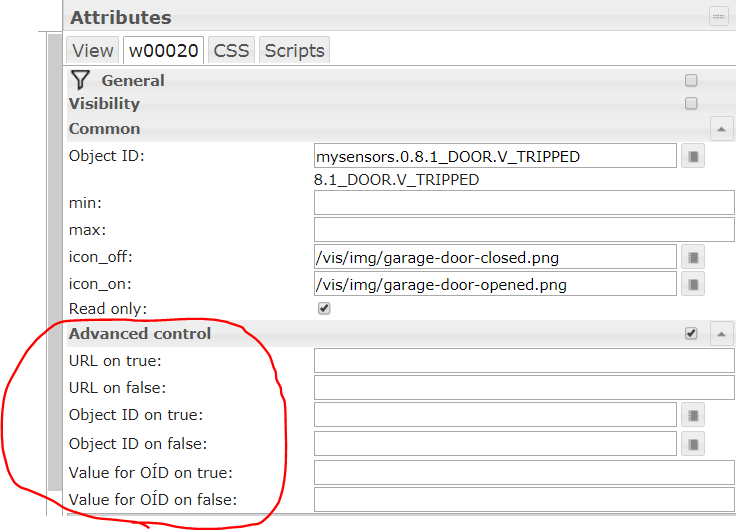
    Another question: how does Advanced Control work for basic bulb on/off widget, what is the idea behind it?

    A Offline
    A Offline
    ap2017
    schrieb am zuletzt editiert von
    #6

    @ap2017 said in Visualization for Dummies:

    Another question: how does Advanced Control work for basic bulb on/off widget, what is the idea behind it?

    For example:
    -What is the meaning of min/max values for Boolean widget?
    -What is use and syntax of URL on true or false?
    -What is the purpose of OID on true or false?
    -How value of OID on true or false can be used? Capture.PNG
    1 Antwort Letzte Antwort
    0
    • I Offline
      I Offline
      I-Punkt
      schrieb am zuletzt editiert von I-Punkt
      #7

      I don't use this particualar widget, but I will try my very best:

      min/max: here you can define other values then 0 and 1 for true and false (e.g. on your object "9" means "on" and "2" means "off" / maybe interesting for dimmer?)

      The URL can be used to send commands to a specific URL. E.g

      http://192.168.x.x/relay/0?turn=off
      

      To use this, you have to disable "read only" for the widget first, of course.

      Different Object-ID for "true" und "false". Sometimes objects can have different entrypoints/statepoints for on or off. (maybe for "on" you have to set "volume" to "10" but for "off" you have to set "play" to "stop" [weird example, but the first in my mind])

      A 2 Antworten Letzte Antwort
      0
      • I I-Punkt

        I don't use this particualar widget, but I will try my very best:

        min/max: here you can define other values then 0 and 1 for true and false (e.g. on your object "9" means "on" and "2" means "off" / maybe interesting for dimmer?)

        The URL can be used to send commands to a specific URL. E.g

        http://192.168.x.x/relay/0?turn=off
        

        To use this, you have to disable "read only" for the widget first, of course.

        Different Object-ID for "true" und "false". Sometimes objects can have different entrypoints/statepoints for on or off. (maybe for "on" you have to set "volume" to "10" but for "off" you have to set "play" to "stop" [weird example, but the first in my mind])

        A Offline
        A Offline
        ap2017
        schrieb am zuletzt editiert von ap2017
        #8

        @I-Punkt Thank you, off course. You can see from my questions that in my mind is to figure out how to setup an indicator (light) with variable color / text, so I was not thinking about control button sending command. So, advanced control is not used when "read only" is set.

        1 Antwort Letzte Antwort
        0
        • I I-Punkt

          I don't use this particualar widget, but I will try my very best:

          min/max: here you can define other values then 0 and 1 for true and false (e.g. on your object "9" means "on" and "2" means "off" / maybe interesting for dimmer?)

          The URL can be used to send commands to a specific URL. E.g

          http://192.168.x.x/relay/0?turn=off
          

          To use this, you have to disable "read only" for the widget first, of course.

          Different Object-ID for "true" und "false". Sometimes objects can have different entrypoints/statepoints for on or off. (maybe for "on" you have to set "volume" to "10" but for "off" you have to set "play" to "stop" [weird example, but the first in my mind])

          A Offline
          A Offline
          ap2017
          schrieb am zuletzt editiert von
          #9

          @I-Punkt What widget would you use for indicator changing color and text based on Boolean state?

          A 1 Antwort Letzte Antwort
          0
          • A ap2017

            @I-Punkt What widget would you use for indicator changing color and text based on Boolean state?

            A Offline
            A Offline
            ap2017
            schrieb am zuletzt editiert von ap2017
            #10

            @ap2017 said in Visualization for Dummies:

            @I-Punkt What widget would you use for indicator changing color and text based on Boolean state?

            I think I found one way to do it, not sure if efficient:

            1. use basic Bool HTML, setup it with text based on Boolean status
            2. overlay it with basic Bool SVG, set behind the Bool HTML
            3. replace default star shape in SVG expression with rectangular, something like <polygon points='0,0 200,0 200,100 0,100' style='fill:yellow; stroke:purple; stroke-width:5; fill-rule:nonzero' transform='scale(0.4)'/>

            Most likely #1 can be eliminated and done within #2, but I don't know how
            Is there description of SVG syntax applicable to VIS?

            A 1 Antwort Letzte Antwort
            0
            • A ap2017

              @ap2017 said in Visualization for Dummies:

              @I-Punkt What widget would you use for indicator changing color and text based on Boolean state?

              I think I found one way to do it, not sure if efficient:

              1. use basic Bool HTML, setup it with text based on Boolean status
              2. overlay it with basic Bool SVG, set behind the Bool HTML
              3. replace default star shape in SVG expression with rectangular, something like <polygon points='0,0 200,0 200,100 0,100' style='fill:yellow; stroke:purple; stroke-width:5; fill-rule:nonzero' transform='scale(0.4)'/>

              Most likely #1 can be eliminated and done within #2, but I don't know how
              Is there description of SVG syntax applicable to VIS?

              A Offline
              A Offline
              ap2017
              schrieb am zuletzt editiert von
              #11

              @ap2017 said in Visualization for Dummies:

              @ap2017 said in Visualization for Dummies:

              @I-Punkt What widget would you use for indicator changing color and text based on Boolean state?

              I think I found one way to do it, not sure if efficient:

              1. use basic Bool HTML, setup it with text based on Boolean status
              2. overlay it with basic Bool SVG, set behind the Bool HTML
              3. replace default star shape in SVG expression with rectangular, something like <polygon points='0,0 200,0 200,100 0,100' style='fill:yellow; stroke:purple; stroke-width:5; fill-rule:nonzero' transform='scale(0.4)'/>

              Most likely #1 can be eliminated and done within #2, but I don't know how
              Is there description of SVG syntax applicable to VIS?

              Found this https://www.w3schools.com/graphics/svg_intro.asp

              1 Antwort Letzte Antwort
              0
              • I Offline
                I Offline
                I-Punkt
                schrieb am zuletzt editiert von
                #12

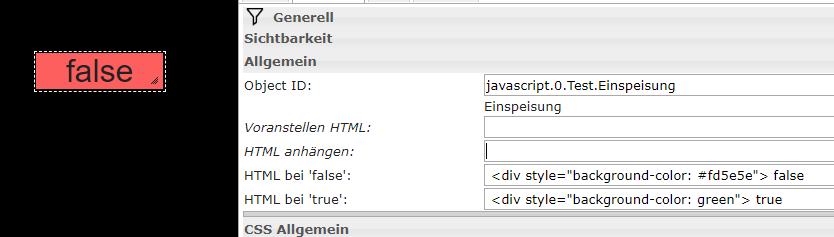
                With the HTML-Widget you can use standard Html-Codes.
                10b14c98-b146-4719-abee-67aa315e848b-image.png

                Colors can be discribe as words (red, green,...) or as Hex (#fd5e5e,....).

                A 1 Antwort Letzte Antwort
                0
                • I Offline
                  I Offline
                  I-Punkt
                  schrieb am zuletzt editiert von
                  #13

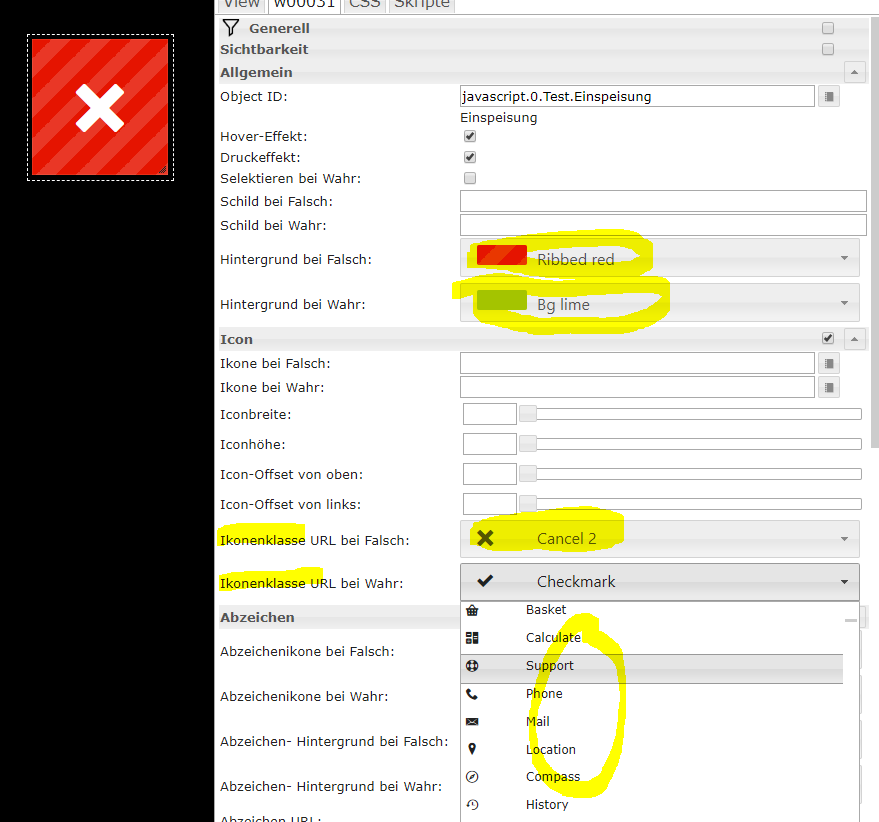
                  I often use the Metro-Widgets. Lots of settings to play with.
                  86d009c3-75fe-4886-ad7b-17cdfdcb2731-image.png

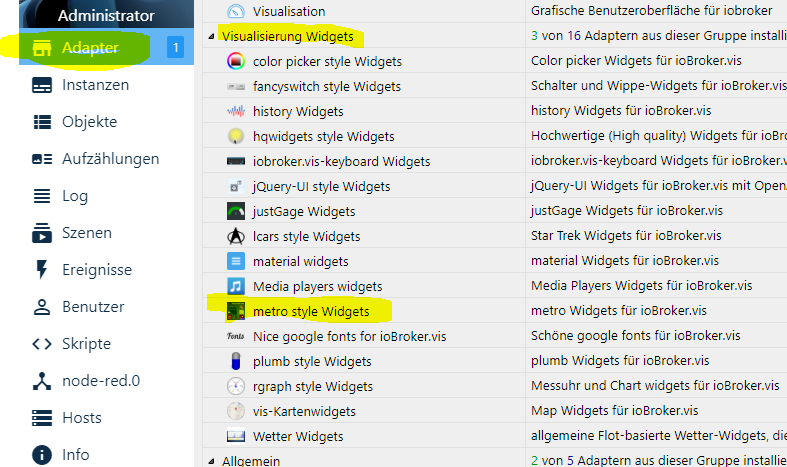
                  You have to install them first via adapters.
                  9dc71266-041c-482e-864c-4dd9c6a41199-image.png

                  A 1 Antwort Letzte Antwort
                  0
                  • I I-Punkt

                    With the HTML-Widget you can use standard Html-Codes.

                    10b14c98-b146-4719-abee-67aa315e848b-image.png

                    Colors can be discribe as words (red, green,...) or as Hex (#fd5e5e,....).

                    A Offline
                    A Offline
                    ap2017
                    schrieb am zuletzt editiert von
                    #14

                    @I-Punkt Thank you! Now we are talking, it works exactly as I wanted! What was missing here is an example that you provided since I have no experience with HTML.

                    Part of a problem with most open source efforts is that support forums or blogs are not setup to efficiently store and retrieve lessons learned information, they are typically get drowned in tons of unrelated messages. I wish IOBroker adapts different way of storing lessons learned, perhaps overseen by few senior members, cleaned up from unnecessary garbage. What you provided would go into VIS adapter section, HTML widgets example of implementation. Some day I would love to participate.

                    1 Antwort Letzte Antwort
                    0
                    • I I-Punkt

                      I often use the Metro-Widgets. Lots of settings to play with.

                      86d009c3-75fe-4886-ad7b-17cdfdcb2731-image.png

                      You have to install them first via adapters.
                      9dc71266-041c-482e-864c-4dd9c6a41199-image.png

                      A Offline
                      A Offline
                      ap2017
                      schrieb am zuletzt editiert von
                      #15

                      @I-Punkt Thank you, trying it now

                      1 Antwort Letzte Antwort
                      0
                      • I Offline
                        I Offline
                        I-Punkt
                        schrieb am zuletzt editiert von
                        #16

                        Here is another Html-Code I sometimes use for a nice Glow-Effect:
                        4f202b4b-c8b4-4b7d-bdeb-7d6a0edb660d-image.png

                        <div style="text-shadow: 0px 0px 4px #ff7575, 0px 0px 4px #ff7575, 0px 0px 4px #ff7575">
                        

                        The triple use of the same sequence (0px 0px 4px #ff7575) is only to intensify the color. One time is barely visible on black background.

                        You can find another examples here. You can combine this with other html-settings.

                        A S 2 Antworten Letzte Antwort
                        0
                        • I I-Punkt

                          Here is another Html-Code I sometimes use for a nice Glow-Effect:
                          4f202b4b-c8b4-4b7d-bdeb-7d6a0edb660d-image.png

                          <div style="text-shadow: 0px 0px 4px #ff7575, 0px 0px 4px #ff7575, 0px 0px 4px #ff7575">
                          

                          The triple use of the same sequence (0px 0px 4px #ff7575) is only to intensify the color. One time is barely visible on black background.

                          You can find another examples here. You can combine this with other html-settings.

                          A Offline
                          A Offline
                          ap2017
                          schrieb am zuletzt editiert von
                          #17

                          @I-Punkt Thank you, will try it

                          1 Antwort Letzte Antwort
                          0
                          • I I-Punkt

                            Here is another Html-Code I sometimes use for a nice Glow-Effect:
                            4f202b4b-c8b4-4b7d-bdeb-7d6a0edb660d-image.png

                            <div style="text-shadow: 0px 0px 4px #ff7575, 0px 0px 4px #ff7575, 0px 0px 4px #ff7575">
                            

                            The triple use of the same sequence (0px 0px 4px #ff7575) is only to intensify the color. One time is barely visible on black background.

                            You can find another examples here. You can combine this with other html-settings.

                            S Offline
                            S Offline
                            solarimpulse
                            schrieb am zuletzt editiert von
                            #18

                            @I-Punkt
                            Hi I-Punkt

                            What you propose is not working in my case.
                            <div style=“background-color: green“> true
                            It doesn't do anything

                            Can somebody help?

                            Thanks

                            I 1 Antwort Letzte Antwort
                            0
                            • S solarimpulse

                              @I-Punkt
                              Hi I-Punkt

                              What you propose is not working in my case.
                              <div style=“background-color: green“> true
                              It doesn't do anything

                              Can somebody help?

                              Thanks

                              I Offline
                              I Offline
                              I-Punkt
                              schrieb am zuletzt editiert von
                              #19

                              @solarimpulse
                              Hi solarimpulse
                              just a little hint (maybe you don't know it yet): These settings only work in the "final view" (runtime) and not within the editor. Hope this helps.
                              Ingo

                              S 1 Antwort Letzte Antwort
                              0
                              • I I-Punkt

                                @solarimpulse
                                Hi solarimpulse
                                just a little hint (maybe you don't know it yet): These settings only work in the "final view" (runtime) and not within the editor. Hope this helps.
                                Ingo

                                S Offline
                                S Offline
                                solarimpulse
                                schrieb am zuletzt editiert von
                                #20

                                @I-Punkt
                                Hi again
                                just tried again. But it doesn't do anything also in the "final view". Text is changing but not the background. the widgets is transparent.

                                d2995aae-1bcc-4911-8a94-65f6dd876a4c-image.png
                                Thanks for the help.

                                S 1 Antwort Letzte Antwort
                                0
                                • S solarimpulse

                                  @I-Punkt
                                  Hi again
                                  just tried again. But it doesn't do anything also in the "final view". Text is changing but not the background. the widgets is transparent.
                                  d2995aae-1bcc-4911-8a94-65f6dd876a4c-image.png
                                  Thanks for the help.

                                  S Offline
                                  S Offline
                                  solarimpulse
                                  schrieb am zuletzt editiert von
                                  #21

                                  @solarimpulse
                                  Just found the problem! the Quotation mark have been wrong...

                                  1 Antwort Letzte Antwort
                                  0
                                  Antworten
                                  • In einem neuen Thema antworten
                                  Anmelden zum Antworten
                                  • Älteste zuerst
                                  • Neuste zuerst
                                  • Meiste Stimmen


                                  Support us

                                  ioBroker
                                  Community Adapters
                                  Donate

                                  615

                                  Online

                                  32.6k

                                  Benutzer

                                  81.9k

                                  Themen

                                  1.3m

                                  Beiträge
                                  Community
                                  Impressum | Datenschutz-Bestimmungen | Nutzungsbedingungen | Einwilligungseinstellungen
                                  ioBroker Community 2014-2025
                                  logo
                                  • Anmelden

                                  • Du hast noch kein Konto? Registrieren

                                  • Anmelden oder registrieren, um zu suchen
                                  • Erster Beitrag
                                    Letzter Beitrag
                                  0
                                  • Home
                                  • Aktuell
                                  • Tags
                                  • Ungelesen 0
                                  • Kategorien
                                  • Unreplied
                                  • Beliebt
                                  • GitHub
                                  • Docu
                                  • Hilfe