




Alexa Geräte nicht sichtbar
-
Hallo,
bin noch ein Newbie und habe folgendes Problem:
Kriege im Reiter "Objekte" den Ordner Alexa angezeigt aber keine Geräte sondern nur den Ordner History?
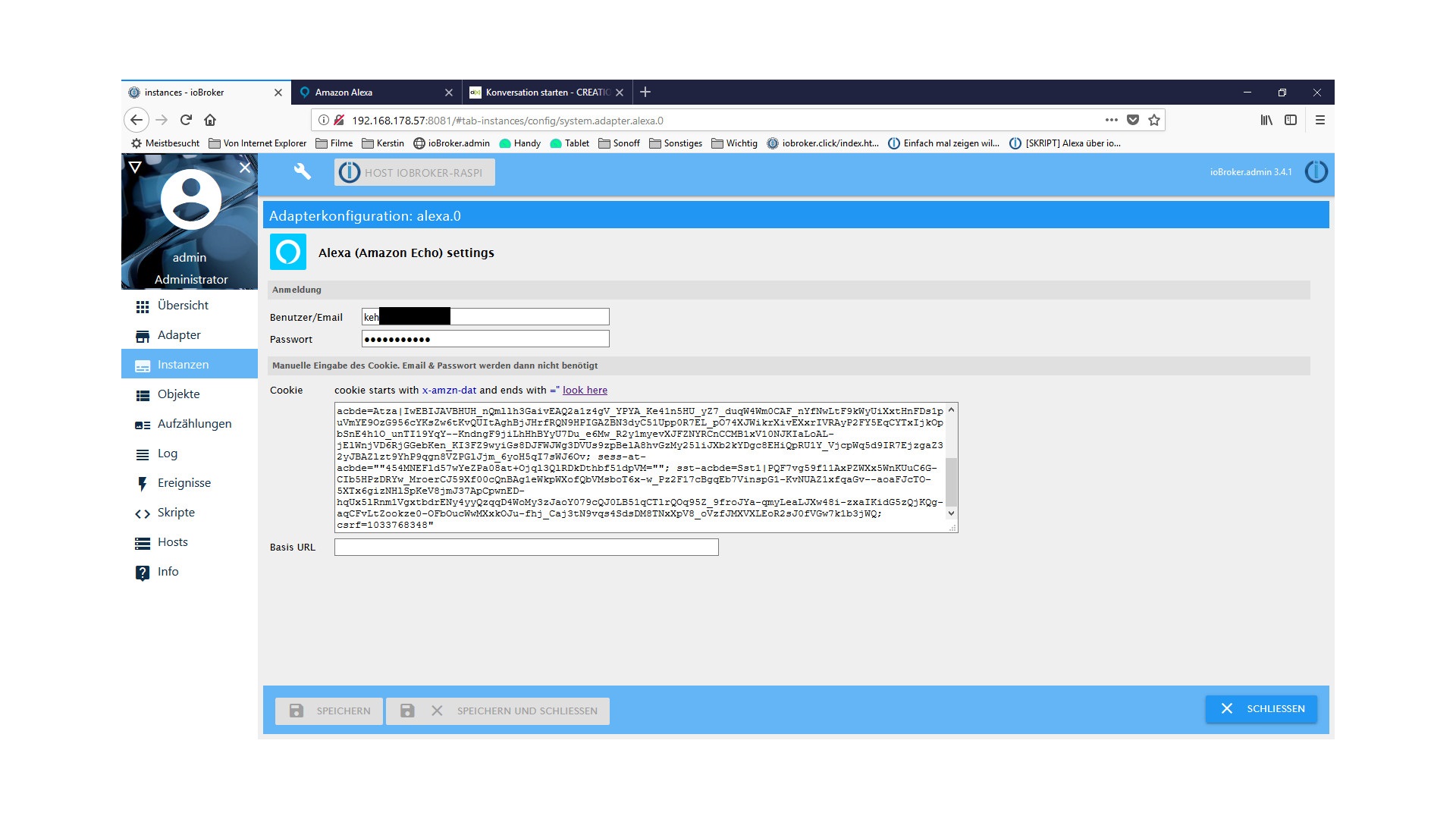
Habe in Instanzen die Email + Passwort eingegeben sowie manuell den Cookie. Siehe Bilder, es werden aber wie gesagt keine Echos angezeigt.
Was habe ich verkehrt gemacht oder muss ich noch irgendwelche Einstellungen machen??
Hoffe auf baldige Antwort.
-
Hi,
den Effekt hatte ich auch schon, nimm einfach den Cookie mal raus, den brauchst du nicht, wenn du Email und Passwort einträgst.
Dann den Adapter nochmal neu starten und ein paar Minuten warten, bei mir hat er dann so nach und nach alle Echos gefunden.
-
und das bei neustart:
host.ioBroker-RasPi 2018-05-21 18:06:03.912 error instance system.adapter.alexa.0 terminated with code 0 (OK)
host.ioBroker-RasPi 2018-05-21 18:06:03.911 error Caught by controller[0]: at process._tickCallback (internal/process/next_tick.js:180:9)
host.ioBroker-RasPi 2018-05-21 18:06:03.911 error Caught by controller[0]: at _combinedTickCallback (internal/process/next_tick.js:138:11)
host.ioBroker-RasPi 2018-05-21 18:06:03.910 error Caught by controller[0]: at emitErrorNT (internal/streams/destroy.js:64:8)
host.ioBroker-RasPi 2018-05-21 18:06:03.910 error Caught by controller[0]: at TLSSocket.emit (events.js:211:7)
host.ioBroker-RasPi 2018-05-21 18:06:03.909 error Caught by controller[0]: at emitOne (events.js:116:13)
host.ioBroker-RasPi 2018-05-21 18:06:03.909 error Caught by controller[0]: at TLSSocket.socketErrorListener (_http_client.js:387:9)
host.ioBroker-RasPi 2018-05-21 18:06:03.908 error Caught by controller[0]: at ClientRequest.emit (events.js:211:7)
host.ioBroker-RasPi 2018-05-21 18:06:03.908 error Caught by controller[0]: at emitOne (events.js:116:13)
host.ioBroker-RasPi 2018-05-21 18:06:03.907 error Caught by controller[0]: at ClientRequest. <anonymous>(/opt/iobroker/node_modules/alexa-cookie/alexa-cookie.js:54:20)
host.ioBroker-RasPi 2018-05-21 18:06:03.907 error Caught by controller[0]: at /opt/iobroker/node_modules/alexa-cookie/alexa-cookie.js:127:35
host.ioBroker-RasPi 2018-05-21 18:06:03.905 error Caught by controller[0]: TypeError: Cannot read property 'req' of null
alexa.0 2018-05-21 18:06:03.866 error TypeError: Cannot read property 'req' of null at /opt/iobroker/node_modules/alexa-cookie/alexa-cookie.js:127:35 at ClientRequest. <anonymous>(/opt/iobroker/node_modules/alexa-cookie/alexa-cook
alexa.0 2018-05-21 18:06:03.864 error uncaught exception: Cannot read property 'req' of null</anonymous></anonymous>
-
Habe eben ein Backup gemacht und folgendes kam raus 1. Geräte alle sichtbar und dann passierte folgendes:
alexa.0 2018-05-21 18:25:36.151 info Delete channel alexa.0.echo-devices.SMG900F9D873EDF79B95A57_Commands
alexa.0 2018-05-21 18:25:36.150 info Delete channel alexa.0.echo-devices.SMG900F9D873EDF79B95A57_States
alexa.0 2018-05-21 18:25:36.150 info Delete channel alexa.0.echo-devices.971931d63b464947b3825a251e67733f_Commands
alexa.0 2018-05-21 18:25:36.149 info Delete channel alexa.0.echo-devices.971931d63b464947b3825a251e67733f_States
alexa.0 2018-05-21 18:25:36.149 info Delete channel alexa.0.echo-devices.4e7b9e92362e4ba0850066a89a913818_Commands
alexa.0 2018-05-21 18:25:36.148 info Delete channel alexa.0.echo-devices.4e7b9e92362e4ba0850066a89a913818_States
alexa.0 2018-05-21 18:25:36.148 info Delete channel alexa.0.echo-devices.G090LF1175040KJB_Commands
alexa.0 2018-05-21 18:25:36.148 info Delete channel alexa.0.echo-devices.G090LF1175040KJB_Bluetooth_B8:6C:E8:42:FB:A8
alexa.0 2018-05-21 18:25:36.147 info Delete channel alexa.0.echo-devices.G090LF1175040KJB_Bluetooth_78:00:9E:73:63:C3
alexa.0 2018-05-21 18:25:36.147 info Delete channel alexa.0.echo-devices.G090LF1175040KJB_States
alexa.0 2018-05-21 18:25:36.146 info Delete channel alexa.0.echo-devices.G2A0P3077407031K_Commands
alexa.0 2018-05-21 18:25:36.146 info Delete channel alexa.0.echo-devices.G2A0P3077407031K_States
alexa.0 2018-05-21 18:25:36.145 info Delete channel alexa.0.echo-devices.G070L80773871QTN_Commands
alexa.0 2018-05-21 18:25:36.144 info Delete channel alexa.0.echo-devices.G070L80773871QTN_States
alexa.0 2018-05-21 18:25:36.095 info Delete channel alexa.0.echo-devices_SMG900F9D873EDF79B95A57_Commands
alexa.0 2018-05-21 18:25:36.077 info Delete channel alexa.0.echo-devices_SMG900F9D873EDF79B95A57_States
alexa.0 2018-05-21 18:25:36.046 info Delete channel alexa.0.echo-devices_971931d63b464947b3825a251e67733f_Commands
alexa.0 2018-05-21 18:25:36.031 info Delete channel alexa.0.echo-devices_971931d63b464947b3825a251e67733f_States
alexa.0 2018-05-21 18:25:36.015 info Delete channel alexa.0.echo-devices_4e7b9e92362e4ba0850066a89a913818_Commands
alexa.0 2018-05-21 18:25:36.001 info Delete channel alexa.0.echo-devices_4e7b9e92362e4ba0850066a89a913818_States
alexa.0 2018-05-21 18:25:35.984 info Delete channel alexa.0.echo-devices_G090LF1175040KJB_Commands
alexa.0 2018-05-21 18:25:35.964 info Delete channel alexa.0.echo-devices_G090LF1175040KJB_Bluetooth_B8:6C:E8:42:FB:A8
alexa.0 2018-05-21 18:25:35.949 info Delete channel alexa.0.echo-devices_G090LF1175040KJB_Bluetooth_78:00:9E:73:63:C3
alexa.0 2018-05-21 18:25:35.933 info Delete channel alexa.0.echo-devices_G090LF1175040KJB_States
alexa.0 2018-05-21 18:25:35.917 info Delete channel alexa.0.echo-devices_G2A0P3077407031K_Commands
alexa.0 2018-05-21 18:25:35.901 info Delete channel alexa.0.echo-devices_G2A0P3077407031K_States
alexa.0 2018-05-21 18:25:35.884 info Delete channel alexa.0.echo-devices_G070L80773871QTN_Commands
alexa.0 2018-05-21 18:25:35.870 info Delete channel alexa.0.echo-devices_G070L80773871QTN_States
alexa.0 2018-05-21 18:25:34.194 info starting. Version 0.0.36 in /opt/iobroker/node_modules/iobroker.alexa, node: v8.11.1
alexa.0 2018-05-21 18:25:34.039 info States connected to redis: 127.0.0.1:6379
-
Ist bei mir genauso, ich bin auch schon zurück auf Version 0.33 geht auch nicht mehr. Lösche ich bei Version 0.36 das manuell angelegte Cookie raus, kommt auch die Meldung "no csrf found. Check configuration of email/password or cookie" Anmeldedaten sind auch richtig eingetragen. Geräte werden bei mir auch keine angezeigt.
-
@g-pitzer Bestimmt nicht. Der Thread ist 2Jahre alt.

Hey! Du scheinst an dieser Unterhaltung interessiert zu sein, hast aber noch kein Konto.
Hast du es satt, bei jedem Besuch durch die gleichen Beiträge zu scrollen? Wenn du dich für ein Konto anmeldest, kommst du immer genau dorthin zurück, wo du zuvor warst, und kannst dich über neue Antworten benachrichtigen lassen (entweder per E-Mail oder Push-Benachrichtigung). Du kannst auch Lesezeichen speichern und Beiträge positiv bewerten, um anderen Community-Mitgliedern deine Wertschätzung zu zeigen.
Mit deinem Input könnte dieser Beitrag noch besser werden 💗
Registrieren Anmelden478
Online33.0k
Benutzer83.6k
Themen1.3m
Beiträge