




[Vorlage] Spotify Skript
-
Evtl verstehe ich dich falsch?, jedoch verstelle ich mit der Variable den Datenpunkt per script.
Hat nichts mit dem Widget zu tun glaube ich, da meine Variable, wenn ich den Regler schiebe, ja auch verstellt wird.
Ich verstelle mit dem Widget nur meine Variable, die den Wert dann auch korrekt annimmt. Der Rest läuft per script was die Lautstärke angeht
Sobald sich diese ändert, wird je nach aktivem Wiedergabegerät entweder die Lautstärke am Onkyo Receiver verstellt (also nicht der Datenpunkt "volume_percent").
Da der FireTV keine Lautstärke anzeigt in dem Adapter
Ist aber der Echo aktiv und ich den Regler schiebe, verstellt sich wiederum meine Variable, jedoch bleibt beim Echo der Datenpunkt "volume_percent" auf dem gleichen Niveau wie vorher.
Obwohl ich per script den Wert beim Datenpunkt (Playbackinfo.Devide.volume_percent) ändere. Man sieht also kurz das der Datenpunkt den Wert der Variable annimmt, jedoch dann wieder zurück springt auf den vorherigen Wert (bei mir jetzt z.B. Lautstärke 7, die mein Echo hat)
2678_amazon.png
2678_echo.png -
Oh mannnn….................
Der Wald vor lauter Bäume bzw. Volume :-)
Wenn man den Volume beim Player nimmt, dann gehts auch (mit Skript für Onkyo bzw. FireTV und ohne für die Echos und Dots) ;)
Danke für den tollen Adapter!!!
Eine Frage noch:
Ist es möglich das Album Picture der Playlist noch einzufügen?
Momentan wird immer das Album des gerade abgespielten Songs eingeblendet und nicht das der Playlist
-
@mikiline: Du hast recht. Das Playlist Cover fehlt noch. Ich schreibst mir auf die Liste :) `
Am Besten denke ich bei jedem der eingelesenen Playlists die URL zum img einfügen (Dann kann man sich mit einem Widget (inkl Cover) eine Auswahlplaylist erstellen und direkt aktivieren
spotify-premium.0.Playlists
und natürlich dann auch bei aktuellem PlayBack unter spotify-premium.0.PlaybackInfo.Playlist
–->spotify-premium.0.PlaybackInfo.Playlist_image_url
wobei dann die vorhandene image_url evtl umzubenennen wäre in Album_image_url
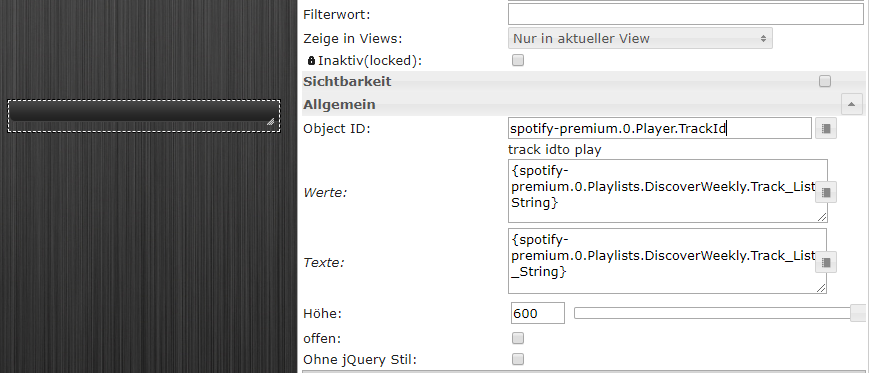
Wo bekomm ich denn die Track ID her um ein Lied auszuwählen? z.B für das jqui Select ValueList (siehe Bild)
Und wenn ich schon dabei bin....
Könntest Du von der gerade abgespielten Playlist die Track_List_String noch zu spotify-premium.0.PlaybackInfo zufügen?
Dann entfällt das skripten und raussuchen der Tracks der Playlist die gerade abgespielt wird und wird automatisch in ein Widget eingefügt (jqui Select ValueList)
2678_bsp.png -
Hallo nochmals,
Hab zwar schon das ein oder andere gefunden, jedoch war mir das zu "unflexibel". Bei den meisten Skripten muss man die Liste selbst pflegen oder Eintragungen vornehmen.
Deshalb hab ich mir mittlerweile ein Skript gebastelt, das die aktuelle Playlist, die gespielt wird in eine Value List einliest, den ich dann im Widget ValueList String anzeigen und auswählen kann.
Die Liste wird bei jedem Wechsel der Playlist automatisch eingelesen!
Kurz und knapp:
-
Erstellung 4 neuer States unter Javascript.0.Spotify
-
der State "javascript.0.Spotify.PlayList.PlayList" wird im Skript nicht direkt verwendet (sollte sein um zu verhindern das nach Track-Auswahl der Player aufhört die Playlist zu spielen (klappt aber momentan nicht)
Bitte schön
! ```
`createState("javascript.0.Spotify.PlayList.TrackList", function () {
});
createState("javascript.0.Spotify.PlayList.TrackTitle", function () {
});
createState("javascript.0.Spotify.PlayList.TrackID", function () {
});
createState("javascript.0.Spotify.PlayList.PlayThis", function () {
});
createState("javascript.0.Spotify.PlayList.PlayList", function () {
});
! on({id: 'spotify-premium.0.PlaybackInfo.Playlist', change: "ne"}, function (obj) {
! var AktuellePlaylist = getState('spotify-premium.0.PlaybackInfo.Playlist').val;
setState("javascript.0.Spotify.PlayList.PlayList"/javascript.0.Spotify.PlayList.TrackID/, AktuellePlaylist);
str_AktuellePlaylist = AktuellePlaylist.replace(/ /g, '');
! str_AktuellePlaylist = 'spotify-premium.0.Playlists.' + str_AktuellePlaylist + '.Track_List'
setState("javascript.0.Spotify.PlayList.TrackList"/javascript.0.Spotify.PlayList.TrackID/, str_AktuellePlaylist);
! var json = JSON.parse(JSON.stringify(getState(str_AktuellePlaylist).val));
! var PlayListid ;
var PlayListTitle ;
! for(var i = 0; i < json.length; i++) {PlayListid += json[i].id + ';'; PlayListTitle += json[i].title + ';';}
PlayListid = PlayListid.slice(9,-1);
PlayListTitle = PlayListTitle.slice(9,-1);! setState("javascript.0.Spotify.PlayList.TrackID"/javascript.0.Spotify.PlayList.TrackID/, PlayListid);
setState("javascript.0.Spotify.PlayList.TrackTitle"/javascript.0.Spotify.PlayList.TrackID/, PlayListTitle);
! });
! on({id: 'javascript.0.Spotify.PlayList.PlayThis', change: "ne"}, function (obj) {
setState("spotify-premium.0.Player.TrackId"/track idto play/, getState("javascript.0.Spotify.PlayList.PlayThis").val);
});! Falls der ein oder andere scripcrack noch einen Fehler findet oder eine Verbesserung des Codes liefern kann, gerne her damit. ! Hier noch mein Widget zur Auswahl der Tracks aus der Liste ! >! ~~[spoiler]~~[code][{"tpl":"tplJquiSelectList","data":{"oid":"javascript.0.Spotify.PlayList.PlayThis","g_fixed":false,"g_visibility":true,"g_css_font_text":true,"g_css_background":false,"g_css_shadow_padding":false,"g_css_border":false,"g_gestures":false,"g_signals":false,"visibility-cond":"==","visibility-val":"","visibility-groups-action":"hide","values":"{javascript.0.Spotify.PlayList.TrackID}","texts":"{javascript.0.Spotify.PlayList.TrackTitle}","height":"120","signals-cond-0":"==","signals-val-0":true,"signals-icon-0":"/vis/signals/lowbattery.png","signals-icon-size-0":0,"signals-blink-0":false,"signals-horz-0":0,"signals-vert-0":0,"signals-hide-edit-0":false,"signals-cond-1":"==","signals-val-1":true,"signals-icon-1":"/vis/signals/lowbattery.png","signals-icon-size-1":0,"signals-blink-1":false,"signals-horz-1":0,"signals-vert-1":0,"signals-hide-edit-1":false,"signals-cond-2":"==","signals-val-2":true,"signals-icon-2":"/vis/signals/lowbattery.png","signals-icon-size-2":0,"signals-blink-2":false,"signals-horz-2":0,"signals-vert-2":0,"signals-hide-edit-2":false,"visibility-oid":"","lc-type":"last-change","lc-is-interval":true,"lc-is-moment":false,"lc-format":"","lc-position-vert":"top","lc-position-horz":"right","lc-offset-vert":0,"lc-offset-horz":0,"lc-font-size":"12px","lc-font-family":"","lc-font-style":"","lc-bkg-color":"","lc-color":"","lc-border-width":"0","lc-border-style":"","lc-border-color":"","lc-border-radius":10,"lc-zindex":0,"no_style":true,"open":false},"style":{"left":"264px","top":"376px","width":"258px","height":"247px"},"widgetSet":"jqui"}][/code]`[/spoiler]
! viel Spass damit
! @twonky
! es wäre wie gest schön, wenn die aktuelle Playlist (Track_List) unter PlaybackInfo zu finden wäre, so erspart man sich das Suchen.
! Es ist mir noch aufgefallen, jetzt wenn ich ein Lied auswähle ändert sich der Wert Device.type von playlist in Track.
! Wähle ich jedoch in der Spotify App einen Track aus der aktuellen Playliste, bleibt "playlist" erhalten.
! Die Wiedergabe stoppt natürlich wenn auf "track" geändert wird, was unschön ist.
! Vielleicht wird das ja dann verhindert, wenn die aktuelle playlist auch unter den PlaybackInfo zu finden ist, dann weiss Spotify das ich "nur" einen anderen Track aus der bereits vorhandenen Playlist auswähle und führt mit dem nächsten Track fort.[/i][/i] -
-
Wenn man den Volume beim Player nimmt, dann gehts auch (mit Skript für Onkyo bzw. FireTV und ohne für die Echos und Dots) ;) `
Zum Thema "spotify-premium.0.Player.Volume" nochmal. Kann man nicht im Adapter das polling und überschreiben des eingegebenen Werts herausnehmen?
Hab immernoch das selbe Problem. Wenn ich über ein Widget oder manuell eine Lautstärke eingebe, wird sie zwar korrekt an das Gerät übergeben und eingestellt. Das Objekt ändert sich dann aber wieder auf "leer"….

LG
-
Bis das Problem behoben ist, kann man sich so aushelfen
ein javascript.0.Spotify.ReglerLautstaerke und ein zugehöriges Blockly das bei Änderung eben den Wert an spotify-premium.0.Player.Volume übergibt.
Dann behalten auch die "Regler" ihren Wert
-
Hi zusammen,
Adapter läuft super bis auf folgende sporadische Log Einträge:
spotify-premium.0 2018-03-17 12:24:26.445 error erron in Requestspotify-premium.0 2018-03-17 10:37:27.637 warn Unexpected api response http 202; continue polling; You will see a 202 response the first time a user connects to the Spotify Connect API or when the device is temporarily unavailable spotify-premium.0 2018-03-17 10:37:22.521 warn Unexpected api response http 202; continue polling; You will see a 202 response the first time a user connects to the Spotify Connect API or when the device is temporarily unavailable spotify-premium.0 2018-03-17 10:37:17.358 warn Unexpected api response http 202; continue polling; You will see a 202 response the first time a user connects to the Spotify Connect API or when the device is temporarily unavailable spotify-premium.0 2018-03-17 10:37:12.205 warn Unexpected api response http 202; continue polling; You will see a 202 response the first time a user connects to the Spotify Connect API or when the device is temporarily unavailable spotify-premium.0 2018-03-17 10:36:46.325 warn Unexpected api response http 202; continue polling; You will see a 202 response the first time a user connects to the Spotify Connect API or when the device is temporarily unavailable spotify-premium.0 2018-03-17 10:36:41.161 warn Unexpected api response http 202; continue polling; You will see a 202 response the first time a user connects to the Spotify Connect API or when the device is temporarily unavailable spotify-premium.0 2018-03-17 10:36:36.019 warn Unexpected api response http 202; continue polling; You will see a 202 response the first time a user connects to the Spotify Connect API or when the device is temporarily unavailable spotify-premium.0 2018-03-17 10:36:30.861 warn Unexpected api response http 202; continue polling; You will see a 202 response the first time a user connects to the Spotify Connect API or when the device is temporarily unavailable spotify-premium.0 2018-03-17 10:36:25.699 warn Unexpected api response http 202; continue polling; You will see a 202 response the first time a user connects to the Spotify Connect API or when the device is temporarily unavailable spotify-premium.0 2018-03-17 10:36:20.483 warn Unexpected api response http 202; continue polling; You will see a 202 response the first time a user connects to the Spotify Connect API or when the device is temporarily unavailable spotify-premium.0 2018-03-17 10:36:15.303 warn Unexpected api response http 202; continue polling; You will see a 202 response the first time a user connects to the Spotify Connect API or when the device is temporarily unavailable spotify-premium.0 2018-03-17 10:36:09.638 warn Unexpected api response http 202; continue polling; You will see a 202 response the first time a user connects to the Spotify Connect API or when the device is temporarily unavailable spotify-premium.0 2018-03-17 10:36:04.428 warn Unexpected api response http 202; continue polling; You will see a 202 response the first time a user connects to the Spotify Connect API or when the device is temporarily unavailable spotify-premium.0 2018-03-17 10:35:59.247 warn Unexpected api response http 202; continue polling; You will see a 202 response the first time a user connects to the Spotify Connect API or when the device is temporarily unavailable spotify-premium.0 2018-03-17 10:35:54.064 warn Unexpected api response http 202; continue polling; You will see a 202 response the first time a user connects to the Spotify Connect API or when the device is temporarily unavailable spotify-premium.0 2018-03-17 10:35:48.825 warn Unexpected api response http 202; continue polling; You will see a 202 response the first time a user connects to the Spotify Connect API or when the device is temporarily unavailable spotify-premium.0 2018-03-17 10:35:43.636 warn Unexpected api response http 202; continue polling; You will see a 202 response the first time a user connects to the Spotify Connect API or when the device is temporarily unavailable spotify-premium.0 2018-03-17 10:35:38.480 warn Unexpected api response http 202; continue polling; You will see a 202 response the first time a user connects to the Spotify Connect API or when the device is temporarily unavailable spotify-premium.0 2018-03-17 10:35:33.308 warn Unexpected api response http 202; continue polling; You will see a 202 response the first time a user connects to the Spotify Connect API or when the device is temporarily unavailable spotify-premium.0 2018-03-17 10:35:28.144 warn Unexpected api response http 202; continue polling; You will see a 202 response the first time a user connects to the Spotify Connect API or when the device is temporarily unavailable spotify-premium.0 2018-03-17 10:35:22.973 warn Unexpected api response http 202; continue polling; You will see a 202 response the first time a user connects to the Spotify Connect API or when the device is temporarily unavailable spotify-premium.0 2018-03-17 10:35:17.767 warn Unexpected api response http 202; continue polling; You will see a 202 response the first time a user connects to the Spotify Connect API or when the device is temporarily unavailable spotify-premium.0 2018-03-17 10:35:12.592 warn Unexpected api response http 202; continue polling; You will see a 202 response the first time a user connects to the Spotify Connect API or when the device is temporarily unavailable spotify-premium.0 2018-03-17 10:35:07.418 warn Unexpected api response http 202; continue polling; You will see a 202 response the first time a user connects to the Spotify Connect API or when the device is temporarily unavailable spotify-premium.0 2018-03-17 10:35:02.269 warn Unexpected api response http 202; continue polling; You will see a 202 response the first time a user connects to the Spotify Connect API or when the device is temporarily unavailable spotify-premium.0 2018-03-17 10:34:57.102 warn Unexpected api response http 202; continue polling; You will see a 202 response the first time a user connects to the Spotify Connect API or when the device is temporarily unavailable spotify-premium.0 2018-03-17 10:34:51.952 warn Unexpected api response http 202; continue polling; You will see a 202 response the first time a user connects to the Spotify Connect API or when the device is temporarily unavailable spotify-premium.0 2018-03-17 10:34:46.815 warn Unexpected api response http 202; continue polling; You will see a 202 response the first time a user connects to the Spotify Connect API or when the device is temporarily unavailable spotify-premium.0 2018-03-17 10:34:41.671 warn Unexpected api response http 202; continue polling; You will see a 202 response the first time a user connects to the Spotify Connect API or when the device is temporarily unavailable spotify-premium.0 2018-03-17 10:34:36.063 warn Unexpected api response http 202; continue polling; You will see a 202 response the first time a user connects to the Spotify Connect API or when the device is temporarily unavailable spotify-premium.0 2018-03-17 10:34:30.908 warn Unexpected api response http 202; continue polling; You will see a 202 response the first time a user connects to the Spotify Connect API or when the device is temporarily unavailable spotify-premium.0 2018-03-17 10:34:25.764 warn Unexpected api response http 202; continue polling; You will see a 202 response the first time a user connects to the Spotify Connect API or when the device is temporarily unavailable spotify-premium.0 2018-03-17 10:34:20.620 warn Unexpected api response http 202; continue polling; You will see a 202 response the first time a user connects to the Spotify Connect API or when the device is temporarily unavailable spotify-premium.0 2018-03-17 10:34:15.471 warn Unexpected api response http 202; continue polling; You will see a 202 response the first time a user connects to the Spotify Connect API or when the device is temporarily unavailable spotify-premium.0 2018-03-17 10:34:10.340 warn Unexpected api response http 202; continue polling; You will see a 202 response the first time a user connects to the Spotify Connect API or when the device is temporarily unavailable spotify-premium.0 2018-03-17 10:34:05.176 warn Unexpected api response http 202; continue polling; You will see a 202 response the first time a user connects to the Spotify Connect API or when the device is temporarily unavailable spotify-premium.0 2018-03-17 10:34:00.031 warn Unexpected api response http 202; continue polling; You will see a 202 response the first time a user connects to the Spotify Connect API or when the device is temporarily unavailable spotify-premium.0 2018-03-17 10:33:54.846 warn Unexpected api response http 202; continue polling; You will see a 202 response the first time a user connects to the Spotify Connect API or when the device is temporarily unavailable spotify-premium.0 2018-03-17 10:33:49.699 warn Unexpected api response http 202; continue polling; You will see a 202 response the first time a user connects to the Spotify Connect API or when the device is temporarily unavailable spotify-premium.0 2018-03-17 10:33:44.550 warn Unexpected api response http 202; continue polling; You will see a 202 response the first time a user connects to the Spotify Connect API or when the device is temporarily unavailable spotify-premium.0 2018-03-17 10:33:39.422 warn Unexpected api response http 202; continue polling; You will see a 202 response the first time a user connects to the Spotify Connect API or when the device is temporarily unavailable spotify-premium.0 2018-03-17 10:33:34.244 warn Unexpected api response http 202; continue polling; You will see a 202 response the first time a user connects to the Spotify Connect API or when the device is temporarily unavailable spotify-premium.0 2018-03-17 10:33:29.082 warn Unexpected api response http 202; continue polling; You will see a 202 response the first time a user connects to the Spotify Connect API or when the device is temporarily unavailable spotify-premium.0 2018-03-17 10:33:23.948 warn Unexpected api response http 202; continue polling; You will see a 202 response the first time a user connects to the Spotify Connect API or when the device is temporarily unavailable spotify-premium.0 2018-03-17 10:33:18.820 warn Unexpected api response http 202; continue polling; You will see a 202 response the first time a user connects to the Spotify Connect API or when the device is temporarily unavailable spotify-premium.0 2018-03-17 10:33:13.659 warn Unexpected api response http 202; continue polling; You will see a 202 response the first time a user connects to the Spotify Connect API or when the device is temporarily unavailable spotify-premium.0 2018-03-17 10:33:03.491 warn Unexpected api response http 202; continue polling; You will see a 202 response the first time a user connects to the Spotify Connect API or when the device is temporarily unavailable spotify-premium.0 2018-03-17 10:32:58.333 warn Unexpected api response http 202; continue polling; You will see a 202 response the first time a user connects to the Spotify Connect API or when the device is temporarily unavailable spotify-premium.0 2018-03-17 10:32:53.190 warn Unexpected api response http 202; continue polling; You will see a 202 response the first time a user connects to the Spotify Connect API or when the device is temporarily unavailable spotify-premium.0 2018-03-17 10:32:48.040 warn Unexpected api response http 202; continue polling; You will see a 202 response the first time a user connects to the Spotify Connect API or when the device is temporarily unavailable spotify-premium.0 2018-03-17 10:32:42.881 warn Unexpected api response http 202; continue polling; You will see a 202 response the first time a user connects to the Spotify Connect API or when the device is temporarily unavailable spotify-premium.0 2018-03-17 10:32:37.726 warn Unexpected api response http 202; continue polling; You will see a 202 response the first time a user connects to the Spotify Connect API or when the device is temporarily unavailableDanke und Grüße ;)
-
Servus Mikiline
kannst du das noch etwas erklären, ich versuche mich gerade an spotify per iobroker, klappt auch bis jetzt. nur mit der Visualisierung ist noch etwas schwer.
dein script mit der Playlist versuche ich gerade zu verwenden, Bitte erkläre doch etwas genauer was du mit " erstelle 4 neue States" meinst und wo und wie,
gruss und Danke
Hallo nochmals,
Hab zwar schon das ein oder andere gefunden, jedoch war mir das zu "unflexibel". Bei den meisten Skripten muss man die Liste selbst pflegen oder Eintragungen vornehmen.
Deshalb hab ich mir mittlerweile ein Skript gebastelt, das die aktuelle Playlist, die gespielt wird in eine Value List einliest, den ich dann im Widget ValueList String anzeigen und auswählen kann.
Die Liste wird bei jedem Wechsel der Playlist automatisch eingelesen!
Kurz und knapp:
-
Erstellung 4 neuer States unter Javascript.0.Spotify
-
der State "javascript.0.Spotify.PlayList.PlayList" wird im Skript nicht direkt verwendet (sollte sein um zu verhindern das nach Track-Auswahl der Player aufhört die Playlist zu spielen (klappt aber momentan nicht)
Bitte schön
! ```
`createState("javascript.0.Spotify.PlayList.TrackList", function () {
});
createState("javascript.0.Spotify.PlayList.TrackTitle", function () {
});
createState("javascript.0.Spotify.PlayList.TrackID", function () {
});
createState("javascript.0.Spotify.PlayList.PlayThis", function () {
});
createState("javascript.0.Spotify.PlayList.PlayList", function () {
});
! on({id: 'spotify-premium.0.PlaybackInfo.Playlist', change: "ne"}, function (obj) {
! var AktuellePlaylist = getState('spotify-premium.0.PlaybackInfo.Playlist').val;
setState("javascript.0.Spotify.PlayList.PlayList"/javascript.0.Spotify.PlayList.TrackID/, AktuellePlaylist);
str_AktuellePlaylist = AktuellePlaylist.replace(/ /g, '');
! str_AktuellePlaylist = 'spotify-premium.0.Playlists.' + str_AktuellePlaylist + '.Track_List'
setState("javascript.0.Spotify.PlayList.TrackList"/javascript.0.Spotify.PlayList.TrackID/, str_AktuellePlaylist);
! var json = JSON.parse(JSON.stringify(getState(str_AktuellePlaylist).val));
! var PlayListid ;
var PlayListTitle ;
! for(var i = 0; i < json.length; i++) {PlayListid += json[i].id + ';'; PlayListTitle += json[i].title + ';';}
PlayListid = PlayListid.slice(9,-1);
PlayListTitle = PlayListTitle.slice(9,-1);! setState("javascript.0.Spotify.PlayList.TrackID"/javascript.0.Spotify.PlayList.TrackID/, PlayListid);
setState("javascript.0.Spotify.PlayList.TrackTitle"/javascript.0.Spotify.PlayList.TrackID/, PlayListTitle);
! });
! on({id: 'javascript.0.Spotify.PlayList.PlayThis', change: "ne"}, function (obj) {
setState("spotify-premium.0.Player.TrackId"/track idto play/, getState("javascript.0.Spotify.PlayList.PlayThis").val);
});! Falls der ein oder andere scripcrack noch einen Fehler findet oder eine Verbesserung des Codes liefern kann, gerne her damit. ! Hier noch mein Widget zur Auswahl der Tracks aus der Liste ! >! ~~[spoiler]~~[code][{"tpl":"tplJquiSelectList","data":{"oid":"javascript.0.Spotify.PlayList.PlayThis","g_fixed":false,"g_visibility":true,"g_css_font_text":true,"g_css_background":false,"g_css_shadow_padding":false,"g_css_border":false,"g_gestures":false,"g_signals":false,"visibility-cond":"==","visibility-val":"","visibility-groups-action":"hide","values":"{javascript.0.Spotify.PlayList.TrackID}","texts":"{javascript.0.Spotify.PlayList.TrackTitle}","height":"120","signals-cond-0":"==","signals-val-0":true,"signals-icon-0":"/vis/signals/lowbattery.png","signals-icon-size-0":0,"signals-blink-0":false,"signals-horz-0":0,"signals-vert-0":0,"signals-hide-edit-0":false,"signals-cond-1":"==","signals-val-1":true,"signals-icon-1":"/vis/signals/lowbattery.png","signals-icon-size-1":0,"signals-blink-1":false,"signals-horz-1":0,"signals-vert-1":0,"signals-hide-edit-1":false,"signals-cond-2":"==","signals-val-2":true,"signals-icon-2":"/vis/signals/lowbattery.png","signals-icon-size-2":0,"signals-blink-2":false,"signals-horz-2":0,"signals-vert-2":0,"signals-hide-edit-2":false,"visibility-oid":"","lc-type":"last-change","lc-is-interval":true,"lc-is-moment":false,"lc-format":"","lc-position-vert":"top","lc-position-horz":"right","lc-offset-vert":0,"lc-offset-horz":0,"lc-font-size":"12px","lc-font-family":"","lc-font-style":"","lc-bkg-color":"","lc-color":"","lc-border-width":"0","lc-border-style":"","lc-border-color":"","lc-border-radius":10,"lc-zindex":0,"no_style":true,"open":false},"style":{"left":"264px","top":"376px","width":"258px","height":"247px"},"widgetSet":"jqui"}][/code][/spoiler] ! viel Spass damit ! @twonky ! es wäre wie gest schön, wenn die aktuelle Playlist (Track_List) unter PlaybackInfo zu finden wäre, so erspart man sich das Suchen. ! Es ist mir noch aufgefallen, jetzt wenn ich ein Lied auswähle ändert sich der Wert Device.type von playlist in Track. ! Wähle ich jedoch in der Spotify App einen Track aus der aktuellen Playliste, bleibt "playlist" erhalten. ! Die Wiedergabe stoppt natürlich wenn auf "track" geändert wird, was unschön ist. ! Vielleicht wird das ja dann verhindert, wenn die aktuelle playlist auch unter den PlaybackInfo zu finden ist, dann weiss Spotify das ich "nur" einen anderen Track aus der bereits vorhandenen Playlist auswähle und führt mit dem nächsten Track fort.[/i][/i] ``` -
-
Wird nämlich jetzt dann nicht schön im Widget angezeit, …..
<link_text text="https://www.forum.iobroker.net/download ... &mode=view">https://www.forum.iobroker.net/download/file.php?id=23240&mode=view</link_text>" />` ~~Hey xmace, der view für Spotify gefällt mir. Könntest Du den mit mir teilen?Gruß
Stefan~~
-
Hi zusammen,
Adapter läuft super bis auf folgende sporadische Log Einträge:
spotify-premium.0 2018-03-17 12:24:26.445 error erron in Requestspotify-premium.0 2018-03-17 10:37:27.637 warn Unexpected api response http 202; continue polling; You will see a 202 response the first time a user connects to the Spotify Connect API or when the device is temporarily unavailable spotify-premium.0 2018-03-17 10:37:22.521 warn Unexpected api response http 202; continue polling; You will see a 202 response the first time a user connects to the Spotify Connect API or when the device is temporarily unavailable spotify-premium.0 2018-03-17 10:37:17.358 warn Unexpected api response http 202; continue polling; You will see a 202 response the first time a user connects to the Spotify Connect API or when the device is temporarily unavailable spotify-premium.0 2018-03-17 10:37:12.205 warn Unexpected api response http 202; continue polling; You will see a 202 response the first time a user connects to the Spotify Connect API or when the device is temporarily unavailable spotify-premium.0 2018-03-17 10:36:46.325 warn Unexpected api response http 202; continue polling; You will see a 202 response the first time a user connects to the Spotify Connect API or when the device is temporarily unavailable spotify-premium.0 2018-03-17 10:36:41.161 warn Unexpected api response http 202; continue polling; You will see a 202 response the first time a user connects to the Spotify Connect API or when the device is temporarily unavailable spotify-premium.0 2018-03-17 10:36:36.019 warn Unexpected api response http 202; continue polling; You will see a 202 response the first time a user connects to the Spotify Connect API or when the device is temporarily unavailable spotify-premium.0 2018-03-17 10:36:30.861 warn Unexpected api response http 202; continue polling; You will see a 202 response the first time a user connects to the Spotify Connect API or when the device is temporarily unavailable spotify-premium.0 2018-03-17 10:36:25.699 warn Unexpected api response http 202; continue polling; You will see a 202 response the first time a user connects to the Spotify Connect API or when the device is temporarily unavailable spotify-premium.0 2018-03-17 10:36:20.483 warn Unexpected api response http 202; continue polling; You will see a 202 response the first time a user connects to the Spotify Connect API or when the device is temporarily unavailable spotify-premium.0 2018-03-17 10:36:15.303 warn Unexpected api response http 202; continue polling; You will see a 202 response the first time a user connects to the Spotify Connect API or when the device is temporarily unavailable spotify-premium.0 2018-03-17 10:36:09.638 warn Unexpected api response http 202; continue polling; You will see a 202 response the first time a user connects to the Spotify Connect API or when the device is temporarily unavailable spotify-premium.0 2018-03-17 10:36:04.428 warn Unexpected api response http 202; continue polling; You will see a 202 response the first time a user connects to the Spotify Connect API or when the device is temporarily unavailable spotify-premium.0 2018-03-17 10:35:59.247 warn Unexpected api response http 202; continue polling; You will see a 202 response the first time a user connects to the Spotify Connect API or when the device is temporarily unavailable spotify-premium.0 2018-03-17 10:35:54.064 warn Unexpected api response http 202; continue polling; You will see a 202 response the first time a user connects to the Spotify Connect API or when the device is temporarily unavailable spotify-premium.0 2018-03-17 10:35:48.825 warn Unexpected api response http 202; continue polling; You will see a 202 response the first time a user connects to the Spotify Connect API or when the device is temporarily unavailable spotify-premium.0 2018-03-17 10:35:43.636 warn Unexpected api response http 202; continue polling; You will see a 202 response the first time a user connects to the Spotify Connect API or when the device is temporarily unavailable spotify-premium.0 2018-03-17 10:35:38.480 warn Unexpected api response http 202; continue polling; You will see a 202 response the first time a user connects to the Spotify Connect API or when the device is temporarily unavailable spotify-premium.0 2018-03-17 10:35:33.308 warn Unexpected api response http 202; continue polling; You will see a 202 response the first time a user connects to the Spotify Connect API or when the device is temporarily unavailable spotify-premium.0 2018-03-17 10:35:28.144 warn Unexpected api response http 202; continue polling; You will see a 202 response the first time a user connects to the Spotify Connect API or when the device is temporarily unavailable spotify-premium.0 2018-03-17 10:35:22.973 warn Unexpected api response http 202; continue polling; You will see a 202 response the first time a user connects to the Spotify Connect API or when the device is temporarily unavailable spotify-premium.0 2018-03-17 10:35:17.767 warn Unexpected api response http 202; continue polling; You will see a 202 response the first time a user connects to the Spotify Connect API or when the device is temporarily unavailable spotify-premium.0 2018-03-17 10:35:12.592 warn Unexpected api response http 202; continue polling; You will see a 202 response the first time a user connects to the Spotify Connect API or when the device is temporarily unavailable spotify-premium.0 2018-03-17 10:35:07.418 warn Unexpected api response http 202; continue polling; You will see a 202 response the first time a user connects to the Spotify Connect API or when the device is temporarily unavailable spotify-premium.0 2018-03-17 10:35:02.269 warn Unexpected api response http 202; continue polling; You will see a 202 response the first time a user connects to the Spotify Connect API or when the device is temporarily unavailable spotify-premium.0 2018-03-17 10:34:57.102 warn Unexpected api response http 202; continue polling; You will see a 202 response the first time a user connects to the Spotify Connect API or when the device is temporarily unavailable spotify-premium.0 2018-03-17 10:34:51.952 warn Unexpected api response http 202; continue polling; You will see a 202 response the first time a user connects to the Spotify Connect API or when the device is temporarily unavailable spotify-premium.0 2018-03-17 10:34:46.815 warn Unexpected api response http 202; continue polling; You will see a 202 response the first time a user connects to the Spotify Connect API or when the device is temporarily unavailable spotify-premium.0 2018-03-17 10:34:41.671 warn Unexpected api response http 202; continue polling; You will see a 202 response the first time a user connects to the Spotify Connect API or when the device is temporarily unavailable spotify-premium.0 2018-03-17 10:34:36.063 warn Unexpected api response http 202; continue polling; You will see a 202 response the first time a user connects to the Spotify Connect API or when the device is temporarily unavailable spotify-premium.0 2018-03-17 10:34:30.908 warn Unexpected api response http 202; continue polling; You will see a 202 response the first time a user connects to the Spotify Connect API or when the device is temporarily unavailable spotify-premium.0 2018-03-17 10:34:25.764 warn Unexpected api response http 202; continue polling; You will see a 202 response the first time a user connects to the Spotify Connect API or when the device is temporarily unavailable spotify-premium.0 2018-03-17 10:34:20.620 warn Unexpected api response http 202; continue polling; You will see a 202 response the first time a user connects to the Spotify Connect API or when the device is temporarily unavailable spotify-premium.0 2018-03-17 10:34:15.471 warn Unexpected api response http 202; continue polling; You will see a 202 response the first time a user connects to the Spotify Connect API or when the device is temporarily unavailable spotify-premium.0 2018-03-17 10:34:10.340 warn Unexpected api response http 202; continue polling; You will see a 202 response the first time a user connects to the Spotify Connect API or when the device is temporarily unavailable spotify-premium.0 2018-03-17 10:34:05.176 warn Unexpected api response http 202; continue polling; You will see a 202 response the first time a user connects to the Spotify Connect API or when the device is temporarily unavailable spotify-premium.0 2018-03-17 10:34:00.031 warn Unexpected api response http 202; continue polling; You will see a 202 response the first time a user connects to the Spotify Connect API or when the device is temporarily unavailable spotify-premium.0 2018-03-17 10:33:54.846 warn Unexpected api response http 202; continue polling; You will see a 202 response the first time a user connects to the Spotify Connect API or when the device is temporarily unavailable spotify-premium.0 2018-03-17 10:33:49.699 warn Unexpected api response http 202; continue polling; You will see a 202 response the first time a user connects to the Spotify Connect API or when the device is temporarily unavailable spotify-premium.0 2018-03-17 10:33:44.550 warn Unexpected api response http 202; continue polling; You will see a 202 response the first time a user connects to the Spotify Connect API or when the device is temporarily unavailable spotify-premium.0 2018-03-17 10:33:39.422 warn Unexpected api response http 202; continue polling; You will see a 202 response the first time a user connects to the Spotify Connect API or when the device is temporarily unavailable spotify-premium.0 2018-03-17 10:33:34.244 warn Unexpected api response http 202; continue polling; You will see a 202 response the first time a user connects to the Spotify Connect API or when the device is temporarily unavailable spotify-premium.0 2018-03-17 10:33:29.082 warn Unexpected api response http 202; continue polling; You will see a 202 response the first time a user connects to the Spotify Connect API or when the device is temporarily unavailable spotify-premium.0 2018-03-17 10:33:23.948 warn Unexpected api response http 202; continue polling; You will see a 202 response the first time a user connects to the Spotify Connect API or when the device is temporarily unavailable spotify-premium.0 2018-03-17 10:33:18.820 warn Unexpected api response http 202; continue polling; You will see a 202 response the first time a user connects to the Spotify Connect API or when the device is temporarily unavailable spotify-premium.0 2018-03-17 10:33:13.659 warn Unexpected api response http 202; continue polling; You will see a 202 response the first time a user connects to the Spotify Connect API or when the device is temporarily unavailable spotify-premium.0 2018-03-17 10:33:03.491 warn Unexpected api response http 202; continue polling; You will see a 202 response the first time a user connects to the Spotify Connect API or when the device is temporarily unavailable spotify-premium.0 2018-03-17 10:32:58.333 warn Unexpected api response http 202; continue polling; You will see a 202 response the first time a user connects to the Spotify Connect API or when the device is temporarily unavailable spotify-premium.0 2018-03-17 10:32:53.190 warn Unexpected api response http 202; continue polling; You will see a 202 response the first time a user connects to the Spotify Connect API or when the device is temporarily unavailable spotify-premium.0 2018-03-17 10:32:48.040 warn Unexpected api response http 202; continue polling; You will see a 202 response the first time a user connects to the Spotify Connect API or when the device is temporarily unavailable spotify-premium.0 2018-03-17 10:32:42.881 warn Unexpected api response http 202; continue polling; You will see a 202 response the first time a user connects to the Spotify Connect API or when the device is temporarily unavailable spotify-premium.0 2018-03-17 10:32:37.726 warn Unexpected api response http 202; continue polling; You will see a 202 response the first time a user connects to the Spotify Connect API or when the device is temporarily unavailableDanke und Grüße ;) `
Gibt es eine Möglichkeit, diese Log Einträge zu deaktivieren?
-
Hallo,
bekomme vom Adapter keine Werte mehr und im Log ist nur
"Unexpected api response http 202; continue polling; You will see a 202 response the first time a user connects to the Spotify Connect API or when the device is temporarily unavailable"
zu sehen. Woran kann das liegen?
-
Moin!
Ich erhalten leider ein "null" als Werte Ausgabe bei der "PlayList" Object Anzeige.
Kannst evtl. sagen, woran es liegt?
Vielen Dank im voraus.
Hallo nochmals,
Hab zwar schon das ein oder andere gefunden, jedoch war mir das zu "unflexibel". Bei den meisten Skripten muss man die Liste selbst pflegen oder Eintragungen vornehmen.
Deshalb hab ich mir mittlerweile ein Skript gebastelt, das die aktuelle Playlist, die gespielt wird in eine Value List einliest, den ich dann im Widget ValueList String anzeigen und auswählen kann.
Die Liste wird bei jedem Wechsel der Playlist automatisch eingelesen!
Kurz und knapp:
-
Erstellung 4 neuer States unter Javascript.0.Spotify
-
der State "javascript.0.Spotify.PlayList.PlayList" wird im Skript nicht direkt verwendet (sollte sein um zu verhindern das nach Track-Auswahl der Player aufhört die Playlist zu spielen (klappt aber momentan nicht)
Bitte schön
! ```
`createState("javascript.0.Spotify.PlayList.TrackList", function () {
});
createState("javascript.0.Spotify.PlayList.TrackTitle", function () {
});
createState("javascript.0.Spotify.PlayList.TrackID", function () {
});
createState("javascript.0.Spotify.PlayList.PlayThis", function () {
});
createState("javascript.0.Spotify.PlayList.PlayList", function () {
});
! on({id: 'spotify-premium.0.PlaybackInfo.Playlist', change: "ne"}, function (obj) {
! var AktuellePlaylist = getState('spotify-premium.0.PlaybackInfo.Playlist').val;
setState("javascript.0.Spotify.PlayList.PlayList"/javascript.0.Spotify.PlayList.TrackID/, AktuellePlaylist);
str_AktuellePlaylist = AktuellePlaylist.replace(/ /g, '');
! str_AktuellePlaylist = 'spotify-premium.0.Playlists.' + str_AktuellePlaylist + '.Track_List'
setState("javascript.0.Spotify.PlayList.TrackList"/javascript.0.Spotify.PlayList.TrackID/, str_AktuellePlaylist);
! var json = JSON.parse(JSON.stringify(getState(str_AktuellePlaylist).val));
! var PlayListid ;
var PlayListTitle ;
! for(var i = 0; i < json.length; i++) {PlayListid += json[i].id + ';'; PlayListTitle += json[i].title + ';';}
PlayListid = PlayListid.slice(9,-1);
PlayListTitle = PlayListTitle.slice(9,-1);! setState("javascript.0.Spotify.PlayList.TrackID"/javascript.0.Spotify.PlayList.TrackID/, PlayListid);
setState("javascript.0.Spotify.PlayList.TrackTitle"/javascript.0.Spotify.PlayList.TrackID/, PlayListTitle);
! });
! on({id: 'javascript.0.Spotify.PlayList.PlayThis', change: "ne"}, function (obj) {
setState("spotify-premium.0.Player.TrackId"/track idto play/, getState("javascript.0.Spotify.PlayList.PlayThis").val);
});! Falls der ein oder andere scripcrack noch einen Fehler findet oder eine Verbesserung des Codes liefern kann, gerne her damit. ! Hier noch mein Widget zur Auswahl der Tracks aus der Liste ! >! ~~[spoiler]~~[code][{"tpl":"tplJquiSelectList","data":{"oid":"javascript.0.Spotify.PlayList.PlayThis","g_fixed":false,"g_visibility":true,"g_css_font_text":true,"g_css_background":false,"g_css_shadow_padding":false,"g_css_border":false,"g_gestures":false,"g_signals":false,"visibility-cond":"==","visibility-val":"","visibility-groups-action":"hide","values":"{javascript.0.Spotify.PlayList.TrackID}","texts":"{javascript.0.Spotify.PlayList.TrackTitle}","height":"120","signals-cond-0":"==","signals-val-0":true,"signals-icon-0":"/vis/signals/lowbattery.png","signals-icon-size-0":0,"signals-blink-0":false,"signals-horz-0":0,"signals-vert-0":0,"signals-hide-edit-0":false,"signals-cond-1":"==","signals-val-1":true,"signals-icon-1":"/vis/signals/lowbattery.png","signals-icon-size-1":0,"signals-blink-1":false,"signals-horz-1":0,"signals-vert-1":0,"signals-hide-edit-1":false,"signals-cond-2":"==","signals-val-2":true,"signals-icon-2":"/vis/signals/lowbattery.png","signals-icon-size-2":0,"signals-blink-2":false,"signals-horz-2":0,"signals-vert-2":0,"signals-hide-edit-2":false,"visibility-oid":"","lc-type":"last-change","lc-is-interval":true,"lc-is-moment":false,"lc-format":"","lc-position-vert":"top","lc-position-horz":"right","lc-offset-vert":0,"lc-offset-horz":0,"lc-font-size":"12px","lc-font-family":"","lc-font-style":"","lc-bkg-color":"","lc-color":"","lc-border-width":"0","lc-border-style":"","lc-border-color":"","lc-border-radius":10,"lc-zindex":0,"no_style":true,"open":false},"style":{"left":"264px","top":"376px","width":"258px","height":"247px"},"widgetSet":"jqui"}][/code][/spoiler] ! viel Spass damit ! @twonky ! es wäre wie gest schön, wenn die aktuelle Playlist (Track_List) unter PlaybackInfo zu finden wäre, so erspart man sich das Suchen. ! Es ist mir noch aufgefallen, jetzt wenn ich ein Lied auswähle ändert sich der Wert Device.type von playlist in Track. ! Wähle ich jedoch in der Spotify App einen Track aus der aktuellen Playliste, bleibt "playlist" erhalten. ! Die Wiedergabe stoppt natürlich wenn auf "track" geändert wird, was unschön ist. ! Vielleicht wird das ja dann verhindert, wenn die aktuelle playlist auch unter den PlaybackInfo zu finden ist, dann weiss Spotify das ich "nur" einen anderen Track aus der bereits vorhandenen Playlist auswähle und führt mit dem nächsten Track fort. [/i][/i] ``` -
-
-
Die Playlist muss Laufen
-
Die Playlist muss im Spotify-Adapter bekannt sein
Ansonsten kann ich Dir ohne Weitere Infos keine Angaben machen. `
Habe ich geprüft. Jetzt zeigt er mehr an, aber nicht die Liste. Folgend mein Script.
! createState("javascript.2.Spotify.PlayList.TrackList", function () {
! });
! createState("javascript.2.Spotify.PlayList.TrackTitle", function () {
! });
! createState("javascript.2.Spotify.PlayList.TrackID", function () {
! });
! createState("javascript.2.Spotify.PlayList.PlayThis", function () {
! });
! createState("javascript.2.Spotify.PlayList.PlayList", function () {
! });
! on({id: 'javascript.2.Spotify.PlaybackInfo.Playlist', change: "ne"}, function (obj) {
! var AktuellePlaylist = getState('javascript.2.Spotify.PlaybackInfo.Playlist').val;
! setState("javascript.2.Spotify.PlayList.PlayList"/javascript.2.Spotify.PlayList.TrackID/, AktuellePlaylist);
! str_AktuellePlaylist = AktuellePlaylist.replace(/ /g, '');
! str_AktuellePlaylist = 'javascript.2.Spotify.Playlists.' + str_AktuellePlaylist + '.Track_List';
! setState("javascript.2.Spotify.PlayList.TrackList"/javascript.2.Spotify.PlayList.TrackID/, str_AktuellePlaylist);
! var json = JSON.parse(JSON.stringify(getState(str_AktuellePlaylist).val));
! var PlayListid ;
! var PlayListTitle ;
! for(var i = 0; i < json.length; i++) {
! PlayListid += json__.id + ';';
! PlayListTitle += json__.title + ';';
! }
! PlayListid = PlayListid.slice(9,-1);
! PlayListTitle = PlayListTitle.slice(9,-1);
! setState("javascript.2.Spotify.PlayList.TrackID"/javascript.2.Spotify.PlayList.TrackID/, PlayListid);
! setState("javascript.2.Spotify.PlayList.TrackTitle"/javascript.2.Spotify.PlayList.TrackID/, PlayListTitle);
! });
! on({id: 'javascript.2.Spotify.PlayList.PlayThis', change: "ne"}, function (obj) {
! setState("javascript.2.Spotify.Player.TrackId"/track idto play/, getState("javascript.2.Spotify.PlayList.PlayThis").val);
! });____ __ __
__ -



Hey! Du scheinst an dieser Unterhaltung interessiert zu sein, hast aber noch kein Konto.
Hast du es satt, bei jedem Besuch durch die gleichen Beiträge zu scrollen? Wenn du dich für ein Konto anmeldest, kommst du immer genau dorthin zurück, wo du zuvor warst, und kannst dich über neue Antworten benachrichtigen lassen (entweder per E-Mail oder Push-Benachrichtigung). Du kannst auch Lesezeichen speichern und Beiträge positiv bewerten, um anderen Community-Mitgliedern deine Wertschätzung zu zeigen.
Mit deinem Input könnte dieser Beitrag noch besser werden 💗
Registrieren AnmeldenSupport us
232
Online33.0k
Benutzer83.6k
Themen1.3m
Beiträge