




Homematic - einzelne States stimmen nicht mit CCU überein


-
@martinschm bitte die Langfassung und bitte keine 4k microfiches
@homoran said in Homematic - einzelne States stimmen nicht mit CCU überein:
bitte keine 4k microfiches
?? microfiches ?
-
@martinschm bitte die Langfassung und bitte keine 4k microfiches
@homoran said in Homematic - einzelne States stimmen nicht mit CCU überein:
Langfassung
```bash Script v.2024-10-19 *** BASE SYSTEM *** Static hostname: smarthome Icon name: computer-vm Chassis: vm Virtualization: kvm Operating System: Ubuntu 22.04.5 LTS Kernel: Linux 5.15.0-127-generic Architecture: x86-64 Hardware Vendor: QEMU Hardware Model: Standard PC _i440FX + PIIX, 1996_ OS is similar to: debian model name : Common KVM processor Docker : false Virtualization : kvm Kernel : x86_64 Userland : 64 bit Systemuptime and Load: 16:47:58 up 3 days, 22:06, 2 users, load average: 0.46, 0.36, 0.37 CPU threads: 8 *** LIFE CYCLE STATUS *** Operating System codenamed 'jammy' is an aging Ubuntu release! Please upgrade to the latest LTS release 'noble' in due time! *** TIME AND TIMEZONES *** Local time: Thu 2025-01-02 16:47:58 CET Universal time: Thu 2025-01-02 15:47:58 UTC RTC time: Thu 2025-01-02 15:47:58 Time zone: Europe/Berlin (CET, +0100) System clock synchronized: yes NTP service: active RTC in local TZ: no *** Users and Groups *** User that called 'iob diag': martin HOME=/home/martin GROUPS=martin adm cdrom sudo dip plugdev lxd iobroker User that is running 'js-controller': iobroker HOME=/home/iobroker GROUPS=iobroker tty dialout audio video redis *** DISPLAY-SERVER SETUP *** Display-Server: false Desktop: Terminal: tty System is booting into 'graphical.target'. Usually a server is running in 'multi-user.target'. Please set BootTarget to 'multi-user.target' or run 'iobroker fix' *** MEMORY *** total used free shared buff/cache available Mem: 4.8G 3.1G 619M 1.0M 1.1G 1.4G Swap: 3.9G 546M 3.4G Total: 8.8G 3.6G 4.0G Active iob-Instances: 43 4817 M total memory 3103 M used memory 2007 M active memory 1811 M inactive memory 619 M free memory 176 M buffer memory 918 M swap cache 3934 M total swap 546 M used swap 3388 M free swap *** top - Table Of Processes *** top - 16:47:59 up 3 days, 22:06, 2 users, load average: 0.58, 0.38, 0.38 Tasks: 172 total, 1 running, 171 sleeping, 0 stopped, 0 zombie %Cpu(s): 6.9 us, 4.2 sy, 0.0 ni, 86.1 id, 0.0 wa, 0.0 hi, 1.4 si, 1.4 st MiB Mem : 4817.4 total, 619.7 free, 3103.3 used, 1094.4 buff/cache MiB Swap: 3935.0 total, 3388.9 free, 546.1 used. 1446.4 avail Mem *** FAILED SERVICES *** UNIT LOAD ACTIVE SUB DESCRIPTION 0 loaded units listed. *** DMESG CRITICAL ERRORS *** No critical errors detected *** FILESYSTEM *** Filesystem Type Size Used Avail Use% Mounted on tmpfs tmpfs 482M 1.2M 481M 1% /run /dev/mapper/ubuntu--vg-ubuntu--lv ext4 20G 18G 1.5G 93% / tmpfs tmpfs 2.4G 0 2.4G 0% /dev/shm tmpfs tmpfs 5.0M 0 5.0M 0% /run/lock /dev/sda2 ext4 974M 242M 665M 27% /boot tmpfs tmpfs 482M 4.0K 482M 1% /run/user/1000 Messages concerning ext4 filesystem in dmesg: [Sun Dec 29 18:41:27 2024] EXT4-fs (dm-0): mounted filesystem with ordered data mode. Opts: (null). Quota mode: none. [Sun Dec 29 18:41:31 2024] EXT4-fs (dm-0): re-mounted. Opts: (null). Quota mode: none. [Sun Dec 29 18:41:35 2024] EXT4-fs (sda2): mounted filesystem with ordered data mode. Opts: (null). Quota mode: none. Show mounted filesystems: TARGET SOURCE FSTYPE OPTIONS / /dev/mapper/ubuntu--vg-ubuntu--lv ext4 rw,relatime |-/snap/core18/2846 /dev/loop1 squashfs ro,nodev,relatime,errors=continue |-/snap/core18/2829 /dev/loop0 squashfs ro,nodev,relatime,errors=continue |-/snap/core20/2379 /dev/loop2 squashfs ro,nodev,relatime,errors=continue |-/snap/core20/2434 /dev/loop3 squashfs ro,nodev,relatime,errors=continue |-/snap/lxd/24061 /dev/loop4 squashfs ro,nodev,relatime,errors=continue |-/snap/lxd/29619 /dev/loop6 squashfs ro,nodev,relatime,errors=continue |-/snap/snapd/21759 /dev/loop5 squashfs ro,nodev,relatime,errors=continue |-/snap/snapd/23258 /dev/loop7 squashfs ro,nodev,relatime,errors=continue `-/boot /dev/sda2 ext4 rw,relatime Files in neuralgic directories: /var: 3.4G /var/ 2.1G /var/log/journal/818509edfb63406a9da2a367f427536a 2.1G /var/log/journal 2.1G /var/log 1.2G /var/lib Archived and active journals take up 2.0G in the file system. /opt/iobroker/backups: 582M /opt/iobroker/backups/ /opt/iobroker/iobroker-data: 2.2G /opt/iobroker/iobroker-data/ 1.1G /opt/iobroker/iobroker-data/files 868M /opt/iobroker/iobroker-data/history 617M /opt/iobroker/iobroker-data/files/javascript.admin 561M /opt/iobroker/iobroker-data/files/javascript.admin/static The five largest files in iobroker-data are: 62M /opt/iobroker/iobroker-data/objects.jsonl 38M /opt/iobroker/iobroker-data/files/iot.admin/static/js/main.d3d286bd.js.map 35M /opt/iobroker/iobroker-data/files/devices.admin/static/js/main.24f2bb56.js.map 26M /opt/iobroker/iobroker-data/files/echarts/static/js/main.41cee985.js.map 26M /opt/iobroker/iobroker-data/files/echarts.admin/chart/static/js/main.41cee985.js.map USB-Devices by-id: USB-Sticks - Avoid direct links to /dev/tty* in your adapter setups, please always prefer the links 'by-id': /dev/serial/by-id/usb-Texas_Instruments_XDS110__03.00.00.13__Embed_with_CMSIS-DAP_L1100FA9-if03 /dev/serial/by-id/usb-Texas_Instruments_XDS110__03.00.00.13__Embed_with_CMSIS-DAP_L1100FA9-if00 HINT: Your zigbee.0 COM-Port is NOT matching 'by-id'. Please check your setting: /dev/ttyACM0 *** NodeJS-Installation *** /usr/bin/nodejs v20.18.1 /usr/bin/node v20.18.1 /usr/bin/npm 10.8.2 /usr/bin/npx 10.8.2 /usr/bin/corepack 0.29.4 nodejs: Installed: 20.18.1-1nodesource1 Candidate: 20.18.1-1nodesource1 Version table: *** 20.18.1-1nodesource1 1001 500 https://deb.nodesource.com/node_20.x nodistro/main amd64 Packages 100 /var/lib/dpkg/status 20.18.0-1nodesource1 1001 500 https://deb.nodesource.com/node_20.x nodistro/main amd64 Packages 20.17.0-1nodesource1 1001 500 https://deb.nodesource.com/node_20.x nodistro/main amd64 Packages 20.16.0-1nodesource1 1001 500 https://deb.nodesource.com/node_20.x nodistro/main amd64 Packages 20.15.1-1nodesource1 1001 500 https://deb.nodesource.com/node_20.x nodistro/main amd64 Packages 20.15.0-1nodesource1 1001 500 https://deb.nodesource.com/node_20.x nodistro/main amd64 Packages 20.14.0-1nodesource1 1001 500 https://deb.nodesource.com/node_20.x nodistro/main amd64 Packages 20.13.1-1nodesource1 1001 500 https://deb.nodesource.com/node_20.x nodistro/main amd64 Packages 20.13.0-1nodesource1 1001 500 https://deb.nodesource.com/node_20.x nodistro/main amd64 Packages 20.12.2-1nodesource1 1001 500 https://deb.nodesource.com/node_20.x nodistro/main amd64 Packages 20.12.1-1nodesource1 1001 500 https://deb.nodesource.com/node_20.x nodistro/main amd64 Packages 20.12.0-1nodesource1 1001 500 https://deb.nodesource.com/node_20.x nodistro/main amd64 Packages 20.11.1-1nodesource1 1001 500 https://deb.nodesource.com/node_20.x nodistro/main amd64 Packages 20.11.0-1nodesource1 1001 500 https://deb.nodesource.com/node_20.x nodistro/main amd64 Packages 20.10.0-1nodesource1 1001 500 https://deb.nodesource.com/node_20.x nodistro/main amd64 Packages 20.9.0-1nodesource1 1001 500 https://deb.nodesource.com/node_20.x nodistro/main amd64 Packages 20.8.1-1nodesource1 1001 500 https://deb.nodesource.com/node_20.x nodistro/main amd64 Packages 20.8.0-1nodesource1 1001 500 https://deb.nodesource.com/node_20.x nodistro/main amd64 Packages 20.7.0-1nodesource1 1001 500 https://deb.nodesource.com/node_20.x nodistro/main amd64 Packages 20.6.1-1nodesource1 1001 500 https://deb.nodesource.com/node_20.x nodistro/main amd64 Packages 20.6.0-1nodesource1 1001 500 https://deb.nodesource.com/node_20.x nodistro/main amd64 Packages 20.5.1-1nodesource1 1001 500 https://deb.nodesource.com/node_20.x nodistro/main amd64 Packages 20.5.0-1nodesource1 1001 500 https://deb.nodesource.com/node_20.x nodistro/main amd64 Packages 20.4.0-1nodesource1 1001 500 https://deb.nodesource.com/node_20.x nodistro/main amd64 Packages 20.3.1-1nodesource1 1001 500 https://deb.nodesource.com/node_20.x nodistro/main amd64 Packages 20.3.0-1nodesource1 1001 500 https://deb.nodesource.com/node_20.x nodistro/main amd64 Packages 20.2.0-1nodesource1 1001 500 https://deb.nodesource.com/node_20.x nodistro/main amd64 Packages 20.1.0-1nodesource1 1001 500 https://deb.nodesource.com/node_20.x nodistro/main amd64 Packages 20.0.0-1nodesource1 1001 500 https://deb.nodesource.com/node_20.x nodistro/main amd64 Packages 12.22.9~dfsg-1ubuntu3.6 500 500 http://de.archive.ubuntu.com/ubuntu jammy-updates/universe amd64 Packages 500 http://de.archive.ubuntu.com/ubuntu jammy-security/universe amd64 Packages 12.22.9~dfsg-1ubuntu3 500 500 http://de.archive.ubuntu.com/ubuntu jammy/universe amd64 Packages Temp directories causing deletion problem: 0 No problems detected Errors in npm tree: 0 No problems detected *** ioBroker-Installation *** ioBroker Status iobroker is running on this host. Objects type: jsonl States type: redis Hosts: smarthome smarthome (version: 7.0.3, hostname: smarthome , alive, uptime: 338773) Core adapters versions js-controller: 7.0.3 admin: 7.1.5 javascript: 8.8.3 nodejs modules from github: 3 +-- iobroker.sma-speedwire@0.9.0 (git+ssh://git@github.com/rg-engineering/ioBroker.sma-speedwire.git#33e9a5196f7c445f4906a61281172ab71dd986bf) +-- iobroker.vesync@0.0.7 (git+ssh://git@github.com/TA2k/ioBroker.vesync.git#b0109fb28c94f7a3664eb0e599fd8359808a7b3e) +-- iobroker.web-speedy@0.2.0 (git+ssh://git@github.com/DrozmotiX/ioBroker.web-speedy.git#79889767b80052eb5093509d55a7751d966e80ed) Adapter State + system.adapter.admin.0 : admin : smarthome - enabled, port: 8081, bind: 0.0.0.0, run as: admin + system.adapter.admin.1 : admin : smarthome - enabled, port: 8090, bind: 0.0.0.0, run as: admin + system.adapter.alarm.0 : alarm : smarthome - enabled system.adapter.alarm.1 : alarm : smarthome - disabled + system.adapter.alexa2.0 : alexa2 : smarthome - enabled system.adapter.alias-manager.0 : alias-manager : smarthome - enabled + system.adapter.backitup.0 : backitup : smarthome - enabled + system.adapter.cloud.0 : cloud : smarthome - enabled system.adapter.daswetter.0 : daswetter : smarthome - enabled + system.adapter.device-reminder.0 : device-reminder : smarthome - enabled system.adapter.devices.0 : devices : smarthome - disabled + system.adapter.discovery.0 : discovery : smarthome - enabled + system.adapter.echarts.0 : echarts : smarthome - enabled system.adapter.feiertage.0 : feiertage : smarthome - enabled system.adapter.flot.0 : flot : smarthome - disabled + system.adapter.frigate.0 : frigate : smarthome - enabled system.adapter.harmony.0 : harmony : smarthome - disabled + system.adapter.heatingcontrol.0 : heatingcontrol : smarthome - enabled + system.adapter.history.0 : history : smarthome - enabled + system.adapter.hm-rega.0 : hm-rega : smarthome - enabled + system.adapter.hm-rpc.0 : hm-rpc : smarthome - enabled, port: 0 + system.adapter.hm-rpc.1 : hm-rpc : smarthome - enabled, port: 0 system.adapter.hm-rpc.2 : hm-rpc : smarthome - disabled, port: 0 + system.adapter.hm-rpc.3 : hm-rpc : smarthome - enabled, port: 0 system.adapter.ical.0 : ical : smarthome - enabled + system.adapter.influxdb.0 : influxdb : smarthome - enabled, port: 8086 + system.adapter.iot.0 : iot : smarthome - enabled + system.adapter.iqontrol.0 : iqontrol : smarthome - enabled + system.adapter.javascript.0 : javascript : smarthome - enabled + system.adapter.mqtt.0 : mqtt : smarthome - enabled, port: 1885, bind: 0.0.0.0 + system.adapter.nuki-extended.0 : nuki-extended : smarthome - enabled + system.adapter.opendtu.0 : opendtu : smarthome - enabled system.adapter.ph803w.0 : ph803w : smarthome - disabled + system.adapter.ping.0 : ping : smarthome - enabled + system.adapter.proxmox.0 : proxmox : smarthome - enabled, port: 8006 system.adapter.scenes.0 : scenes : smarthome - disabled + system.adapter.shelly.0 : shelly : smarthome - enabled, port: 1882, bind: 0.0.0.0 + system.adapter.simple-api.0 : simple-api : smarthome - enabled, port: 8087, bind: 0.0.0.0, run as: admin + system.adapter.sma-speedwire.0 : sma-speedwire : smarthome - enabled, port: 9522 + system.adapter.socketio.0 : socketio : smarthome - enabled, port: 8084, bind: 0.0.0.0, run as: admin + system.adapter.sonoff.0 : sonoff : smarthome - enabled, port: 1883, bind: 0.0.0.0 + system.adapter.sourceanalytix.0 : sourceanalytix : smarthome - enabled + system.adapter.statistics.0 : statistics : smarthome - enabled + system.adapter.telegram.0 : telegram : smarthome - enabled, port: 8443, bind: 0.0.0.0 system.adapter.text2command.0 : text2command : smarthome - disabled + system.adapter.trashschedule.0 : trashschedule : smarthome - enabled + system.adapter.tuya.0 : tuya : smarthome - enabled system.adapter.unifi.0 : unifi : smarthome - disabled + system.adapter.vesync.0 : vesync : smarthome - enabled + system.adapter.viessmann.0 : viessmann : smarthome - enabled, port: 3002 system.adapter.vis.0 : vis : smarthome - disabled + system.adapter.volvo.0 : volvo : smarthome - enabled system.adapter.web-speedy.0 : web-speedy : smarthome - disabled + system.adapter.web.0 : web : smarthome - enabled, port: 8082, bind: 0.0.0.0, run as: admin + system.adapter.wifilight.0 : wifilight : smarthome - enabled + system.adapter.worx.0 : worx : smarthome - enabled system.adapter.yr.0 : yr : smarthome - disabled + system.adapter.zigbee.0 : zigbee : smarthome - enabled, port: /dev/ttyACM0 + instance is alive Enabled adapters with bindings + system.adapter.admin.0 : admin : smarthome - enabled, port: 8081, bind: 0.0.0.0, run as: admin + system.adapter.admin.1 : admin : smarthome - enabled, port: 8090, bind: 0.0.0.0, run as: admin + system.adapter.hm-rpc.0 : hm-rpc : smarthome - enabled, port: 0 + system.adapter.hm-rpc.1 : hm-rpc : smarthome - enabled, port: 0 + system.adapter.hm-rpc.3 : hm-rpc : smarthome - enabled, port: 0 + system.adapter.influxdb.0 : influxdb : smarthome - enabled, port: 8086 + system.adapter.mqtt.0 : mqtt : smarthome - enabled, port: 1885, bind: 0.0.0.0 + system.adapter.proxmox.0 : proxmox : smarthome - enabled, port: 8006 + system.adapter.shelly.0 : shelly : smarthome - enabled, port: 1882, bind: 0.0.0.0 + system.adapter.simple-api.0 : simple-api : smarthome - enabled, port: 8087, bind: 0.0.0.0, run as: admin + system.adapter.sma-speedwire.0 : sma-speedwire : smarthome - enabled, port: 9522 + system.adapter.socketio.0 : socketio : smarthome - enabled, port: 8084, bind: 0.0.0.0, run as: admin + system.adapter.sonoff.0 : sonoff : smarthome - enabled, port: 1883, bind: 0.0.0.0 + system.adapter.telegram.0 : telegram : smarthome - enabled, port: 8443, bind: 0.0.0.0 + system.adapter.viessmann.0 : viessmann : smarthome - enabled, port: 3002 + system.adapter.web.0 : web : smarthome - enabled, port: 8082, bind: 0.0.0.0, run as: admin + system.adapter.zigbee.0 : zigbee : smarthome - enabled, port: /dev/ttyACM0 ioBroker-Repositories ┌─────────┬──────────┬─────────────────────────────────────────────────────────┬──────────────┐ │ (index) │ name │ url │ auto upgrade │ ├─────────┼──────────┼─────────────────────────────────────────────────────────┼──────────────┤ │ 0 │ 'stable' │ 'http://download.iobroker.net/sources-dist.json' │ false │ │ 1 │ 'beta' │ 'http://download.iobroker.net/sources-dist-latest.json' │ false │ └─────────┴──────────┴─────────────────────────────────────────────────────────┴──────────────┘ Active repo(s): stable Upgrade policy: none Installed ioBroker-Instances Used repository: stable Adapter "admin" : 7.1.5 , installed 7.1.5 Adapter "alarm" : 3.6.4 , installed 3.6.4 Adapter "alexa2" : 3.26.5 , installed 3.26.5 Adapter "alias-manager": 2.0.0 , installed 2.0.0 Adapter "backitup" : 3.0.25 , installed 3.0.25 Adapter "cloud" : 5.0.1 , installed 5.0.1 Adapter "daswetter" : 3.2.2 , installed 3.2.2 Adapter "device-reminder": 3.1.2 , installed 3.1.2 Adapter "devices" : 1.1.5 , installed 1.1.5 Adapter "discovery" : 5.0.0 , installed 5.0.0 Adapter "echarts" : 1.9.2 , installed 1.9.2 Adapter "feiertage" : 1.2.0 , installed 1.2.0 Adapter "flot" : 1.12.0 , installed 1.12.0 Adapter "frigate" : 1.3.1 , installed 1.3.1 Adapter "harmony" : 1.5.0 , installed 1.5.0 Adapter "heatingcontrol": 2.12.13 , installed 2.12.13 Adapter "history" : 3.0.1 , installed 3.0.1 Adapter "hm-rega" : 5.1.0 , installed 5.1.0 Adapter "hm-rpc" : 2.0.2 , installed 2.0.2 Adapter "ical" : 1.16.1 , installed 1.16.1 Adapter "influxdb" : 4.0.2 , installed 4.0.2 Adapter "iot" : 3.3.0 , installed 3.3.0 Adapter "iqontrol" : 3.0.0 , installed 3.0.0 Adapter "javascript" : 8.8.3 , installed 8.8.3 Controller "js-controller": 7.0.6 , installed 7.0.3 [Updatable] Adapter "mqtt" : 6.1.2 , installed 6.1.2 Adapter "nuki-extended": 2.7.0 , installed 2.7.0 Adapter "opendtu" : 3.1.0 , installed 3.1.0 Adapter "ph803w" : 1.2.0 , installed 1.2.0 Adapter "ping" : 1.6.2 , installed 1.6.2 Adapter "proxmox" : 2.3.0 , installed 2.3.0 Adapter "scenes" : 3.2.3 , installed 3.2.3 Adapter "shelly" : 8.2.1 , installed 8.2.1 Adapter "simple-api" : 2.8.0 , installed 2.8.0 Adapter "smartmeter" : 3.4.0 , installed 3.4.0 Adapter "socketio" : 6.7.1 , installed 6.7.1 Adapter "sonoff" : 3.1.2 , installed 3.1.2 Adapter "statistics" : 2.4.0 , installed 2.4.0 Adapter "telegram" : 3.9.0 , installed 3.9.0 Adapter "text2command" : 3.0.3 , installed 3.0.3 Adapter "trashschedule": 3.3.0 , installed 3.3.0 Adapter "tuya" : 3.16.0 , installed 3.16.0 Adapter "unifi" : 0.7.0 , installed 0.7.0 Adapter "viessmann" : 1.5.0 , installed 1.5.0 Adapter "vis" : 1.5.6 , installed 1.5.6 Adapter "volvo" : 0.1.2 , installed 0.1.2 Adapter "web" : 6.2.5 , installed 6.2.5 Adapter "wifilight" : 1.2.2 , installed 1.2.2 Adapter "worx" : 3.1.1 , installed 3.1.1 Adapter "ws" : 2.6.2 , installed 2.6.2 Adapter "yr" : 5.3.0 , installed 5.3.0 Adapter "zigbee" : 1.10.13 , installed 1.10.13 Objects and States Please stand by - This may take a while Objects: 19904 States: 22141 *** OS-Repositories and Updates *** Hit:1 http://de.archive.ubuntu.com/ubuntu jammy InRelease Hit:2 http://de.archive.ubuntu.com/ubuntu jammy-updates InRelease Hit:3 https://deb.nodesource.com/node_20.x nodistro InRelease Hit:4 http://de.archive.ubuntu.com/ubuntu jammy-backports InRelease Hit:5 http://de.archive.ubuntu.com/ubuntu jammy-security InRelease Reading package lists... Pending Updates: 2 *** Listening Ports *** Active Internet connections (only servers) Proto Recv-Q Send-Q Local Address Foreign Address State User Inode PID/Program name tcp 0 0 127.0.0.53:53 0.0.0.0:* LISTEN 101 21875 633/systemd-resolve tcp 0 0 192.168.1.198:9292 0.0.0.0:* LISTEN 1001 24900 1204/io.hm-rpc.3 tcp 0 0 0.0.0.0:6379 0.0.0.0:* LISTEN 112 22093 655/redis-server 0. tcp 0 0 0.0.0.0:2010 0.0.0.0:* LISTEN 1001 25700 1048/io.hm-rpc.1 tcp 0 0 0.0.0.0:2001 0.0.0.0:* LISTEN 1001 3007665 189732/io.hm-rpc.0 tcp 0 0 0.0.0.0:1885 0.0.0.0:* LISTEN 1001 21452 1063/io.mqtt.0 tcp 0 0 0.0.0.0:1883 0.0.0.0:* LISTEN 1001 25800 1137/io.sonoff.0 tcp 0 0 0.0.0.0:9001 0.0.0.0:* LISTEN 1001 23331 769/iobroker.js-con tcp 0 0 0.0.0.0:111 0.0.0.0:* LISTEN 0 17274 1/init tcp 0 0 0.0.0.0:22 0.0.0.0:* LISTEN 0 22027 684/sshd: /usr/sbin tcp6 0 0 :::8090 :::* LISTEN 1001 22443 888/io.admin.1 tcp6 0 0 :::8087 :::* LISTEN 1001 24254 1382/io.simple-api. tcp6 0 0 :::8084 :::* LISTEN 1001 27015 1410/io.socketio.0 tcp6 0 0 :::8082 :::* LISTEN 1001 27126 1505/io.web.0 tcp6 0 0 :::8081 :::* LISTEN 1001 23381 881/io.admin.0 tcp6 0 0 :::51989 :::* LISTEN 1001 70718 12052/io.nuki-exten tcp6 0 0 :::1886 :::* LISTEN 1001 32466 1575/io.frigate.0 tcp6 0 0 :::111 :::* LISTEN 0 14680 1/init tcp6 0 0 :::22 :::* LISTEN 0 22032 684/sshd: /usr/sbin udp 0 0 0.0.0.0:5683 0.0.0.0:* 1001 25900 1130/io.shelly.0 udp 0 0 0.0.0.0:6666 0.0.0.0:* 1001 624385 49120/io.tuya.0 udp 0 0 0.0.0.0:6667 0.0.0.0:* 1001 624386 49120/io.tuya.0 udp 0 0 0.0.0.0:56109 0.0.0.0:* 1001 631528 49665/io.sma-speedw udp 0 0 127.0.0.53:53 0.0.0.0:* 101 21874 633/systemd-resolve udp 0 0 192.168.1.198:68 0.0.0.0:* 100 2720036 631/systemd-network udp 0 0 0.0.0.0:111 0.0.0.0:* 0 17275 1/init udp6 0 0 :::111 :::* 0 17276 1/init *** Log File - Last 25 Lines *** 2025-01-02 16:43:00.188 - warn: sma-speedwire.0 (49665) unknown cmd : B47600 cmdLength : 156 pointer : 124 hex : 534d4100000402a000000001003a001060650ed07800c8e80338000180007045cb7d000100000000e8ad0d04fdff07000000840300006776b40400000000bfbebbb8bfeae9f5eafdfbcc00000000 2025-01-02 16:43:00.224 - warn: sma-speedwire.0 (49665) could not translate 9067 2025-01-02 16:43:00.381 - warn: sma-speedwire.0 (49665) could not translate INV_TEMP 2025-01-02 16:44:00.214 - warn: sma-speedwire.0 (49665) unknown cmd : B47600 cmdLength : 156 pointer : 124 hex : 534d4100000402a000000001003a001060650ed07800c8e80338000180007045cb7d000100000000e8ba0d04fdff07000000840300006776b44000000000bfbebbb8bfeae9f5eafdfbcc00000000 2025-01-02 16:44:00.362 - warn: sma-speedwire.0 (49665) could not translate INV_TEMP 2025-01-02 16:45:00.196 - warn: sma-speedwire.0 (49665) unknown cmd : B47600 cmdLength : 156 pointer : 124 hex : 534d4100000402a000000001003a001060650ed07800c8e80338000180007045cb7d000100000000e8c70d04fdff07000000840300006776b47c00000000bfbebbb8bfeae9f5eafdfbcc00000000 2025-01-02 16:45:00.231 - warn: sma-speedwire.0 (49665) could not translate 9067 2025-01-02 16:45:00.389 - warn: sma-speedwire.0 (49665) could not translate INV_TEMP 2025-01-02 16:45:52.041 - info: host.smarthome instance system.adapter.daswetter.0 in version "3.2.2" started with pid 193902 2025-01-02 16:45:55.404 - info: daswetter.0 (193902) starting. Version 3.2.2 in /opt/iobroker/node_modules/iobroker.daswetter, node: v20.18.1, js-controller: 7.0.3 2025-01-02 16:46:00.210 - warn: sma-speedwire.0 (49665) unknown cmd : B47600 cmdLength : 156 pointer : 124 hex : 534d4100000402a000000001003a001060650ed07800c8e80338000180007045cb7d000100000000e8d40d04fdff07000000840300006776b4b800000000bfbebbb8bfeae9f5eafdfbcc00000000 2025-01-02 16:46:00.381 - warn: sma-speedwire.0 (49665) could not translate INV_TEMP 2025-01-02 16:46:05.302 - info: daswetter.0 (193902) Terminated (ADAPTER_REQUESTED_TERMINATION): All data handled, adapter stopped until next scheduled moment 2025-01-02 16:46:05.826 - info: daswetter.0 (193902) cleaned everything up... 2025-01-02 16:46:05.849 - info: host.smarthome instance system.adapter.daswetter.0 having pid 193902 terminated with code 11 (ADAPTER_REQUESTED_TERMINATION) 2025-01-02 16:47:00.195 - warn: sma-speedwire.0 (49665) unknown cmd : B47600 cmdLength : 156 pointer : 124 hex : 534d4100000402a000000001003a001060650ed07800c8e80338000180007045cb7d000100000000e8e10d04fdff07000000840300006776b4f400000000bfbebbb8bfeae9f5eafdfbcc00000000 2025-01-02 16:47:00.224 - warn: sma-speedwire.0 (49665) could not translate 9067 2025-01-02 16:47:00.385 - warn: sma-speedwire.0 (49665) could not translate INV_TEMP 2025-01-02 16:48:00.193 - warn: sma-speedwire.0 (49665) unknown cmd : B57600 cmdLength : 156 pointer : 124 hex : 534d4100000402a000000001003a001060650ed07800c8e80338000180007045cb7d000100000000e8ee0d04fdff07000000840300006776b53000000000bfbebbb8bfeae9f5eafdfbcc00000000 2025-01-02 16:48:00.251 - warn: sma-speedwire.0 (49665) could not translate 9067 2025-01-02 16:48:00.376 - warn: sma-speedwire.0 (49665) could not translate INV_TEMP 2025-01-02 16:48:05.509 - info: web.0 (1505) ==> Connected system.user.admin from ::ffff:192.168.1.32 2025-01-02 16:48:54.945 - info: web.0 (1505) <== Disconnect system.user.admin from ::ffff:192.168.1.32 iqontrol.0 2025-01-02 16:49:00.200 - warn: sma-speedwire.0 (49665) unknown cmd : B57600 cmdLength : 156 pointer : 124 hex : 534d4100000402a000000001003a001060650ed07800c8e80338000180007045cb7d000100000000e8fb0d04fdff07000000840300006776b56c00000000bfbebbb8bfeae9f5eafdfbcc00000000 2025-01-02 16:49:00.232 - warn: sma-speedwire.0 (49665) could not translate 9067 -
@homoran said in Homematic - einzelne States stimmen nicht mit CCU überein:
bitte keine 4k microfiches
?? microfiches ?
@martinschm sagte in Homematic - einzelne States stimmen nicht mit CCU überein:
?? microfiches ?
Deine Multi-Megamini hoch aufgelösten Bildchen im ersten Post. Diese Screenshots wirken wie auf einem Microfilm. Am Mobilgerät quasi nicht lesbar.
-
Hi,
mir ist jetzt bei zwei HM Geräten aufgefallen, das einzelne States nicht "stimmen".Bei einem Rolladenaktor steht Unreach auf true, in der CCU (Raspberrymatic) wird aber nichts der gleichen angezeigt und der Aktor lässt sich auch steuern.

Der zweite Aktor ist ein Heizungsthermostat, das noch immer auf Lowbat steht.

H-REGASS läuft in V5.1.0 und HM RPC in V 2.0.2
RaspberryMatic Firmware Version: 3.79.6.20241122iob diag output
v.2024-10-19 Static hostname: smarthome Icon name: computer-vm Chassis: vm Virtualization: kvm Operating System: Ubuntu 22.04.5 LTS Kernel: Linux 5.15.0-127-generic Architecture: x86-64 Hardware Vendor: QEMU Hardware Model: Standard PC _i440FX + PIIX, 1996_ Installation: kvm Kernel: x86_64 Userland: 64 bit Timezone: Europe/Berlin (CET, +0100) User-ID: 1000 Display-Server: false Boot Target: graphical.target Pending OS-Updates: 2 Pending iob updates: 1 Nodejs-Installation: /usr/bin/nodejs v20.18.1 /usr/bin/node v20.18.1 /usr/bin/npm 10.8.2 /usr/bin/npx 10.8.2 /usr/bin/corepack 0.29.4 Recommended versions are nodejs 20.18.1 and npm 10.8.2 nodeJS installation is correct MEMORY: total used free shared buff/cache available Mem: 4.8G 3.1G 632M 1.0M 1.1G 1.4G Swap: 3.9G 548M 3.4G Total: 8.8G 3.7G 4.0G Active iob-Instances: 43 Upgrade policy: none ioBroker Core: js-controller 7.0.3 admin 7.1.5 ioBroker Status: iobroker is running on this host. Objects type: jsonl States type: redis Status admin and web instance: + system.adapter.admin.0 : admin : smarthome - enabled, port: 8081, bind: 0.0.0.0, run as: admin + system.adapter.admin.1 : admin : smarthome - enabled, port: 8090, bind: 0.0.0.0, run as: admin system.adapter.web-speedy.0 : web-speedy : smarthome - disabled + system.adapter.web.0 : web : smarthome - enabled, port: 8082, bind: 0.0.0.0, run as: admin Objects: 19904 States: 22141 Size of iob-Database: 62M /opt/iobroker/iobroker-data/objects.jsonl 20M /opt/iobroker/iobroker-data/objects.json.migrated 20M /opt/iobroker/iobroker-data/objects.json.bak.migrated 0 /opt/iobroker/iobroker-data/objects.json.broken 2.7M /opt/iobroker/iobroker-data/states.json 232K /opt/iobroker/iobroker-data/states.json.bak Operating System codenamed 'jammy' is an aging Ubuntu release! Please upgrade to the latest LTS release 'noble' in due time!@martinschm sagte in Homematic - einzelne States stimmen nicht mit CCU überein:
HM RPC in V 2.0.2
und davon bitte die Konfigurationen aller 4 Instanzen
Vielleicht auch mal ein Screenshot der Servicemeldungen in der RaspberryMatic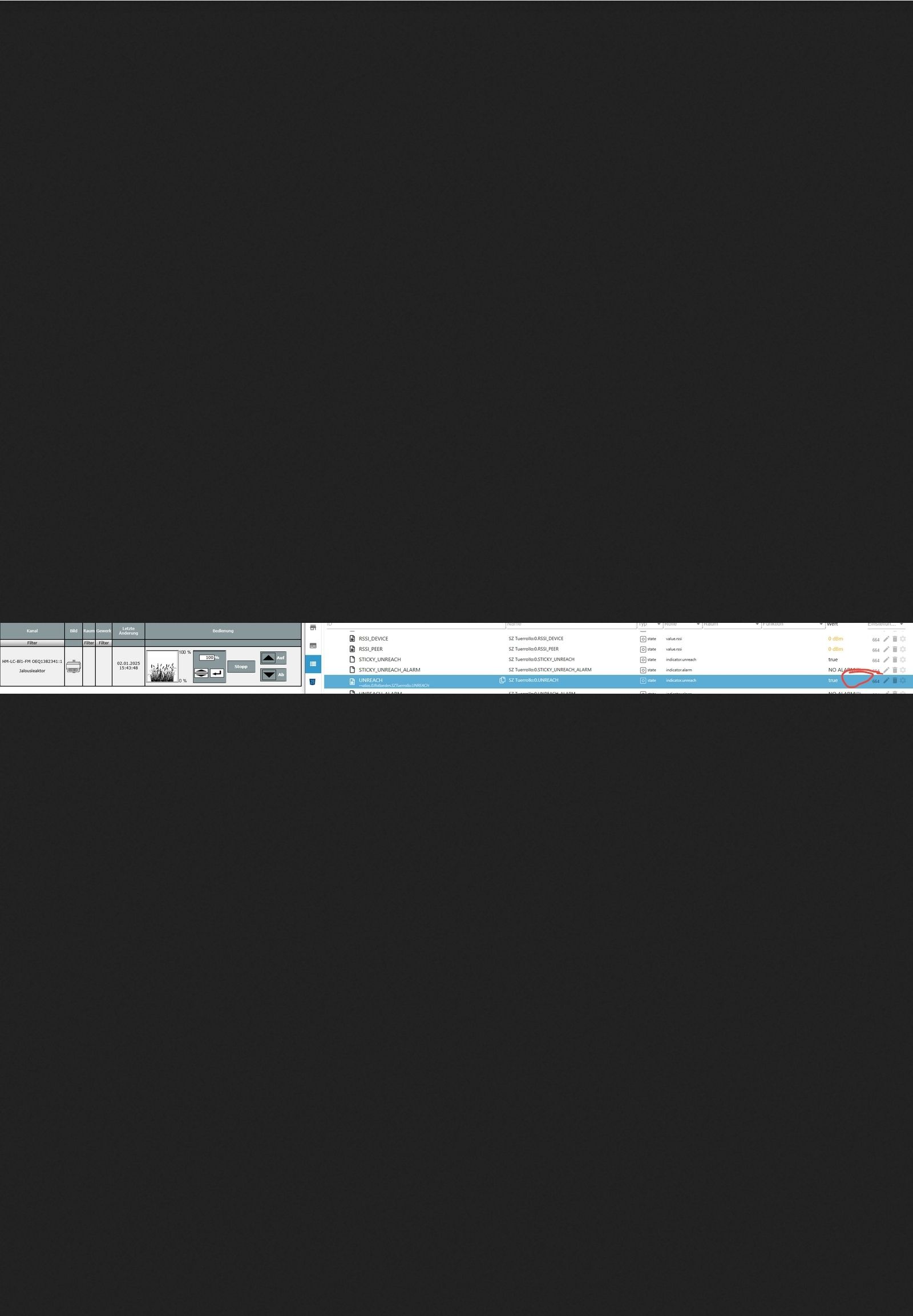
wie sind da die Timestamps? -
@martinschm sagte in Homematic - einzelne States stimmen nicht mit CCU überein:
HM RPC in V 2.0.2
und davon bitte die Konfigurationen aller 4 Instanzen
Vielleicht auch mal ein Screenshot der Servicemeldungen in der RaspberryMatic
wie sind da die Timestamps?@homoran said in Homematic - einzelne States stimmen nicht mit CCU überein:
und davon bitte die Konfigurationen aller 4 Instanzen
HM Rega
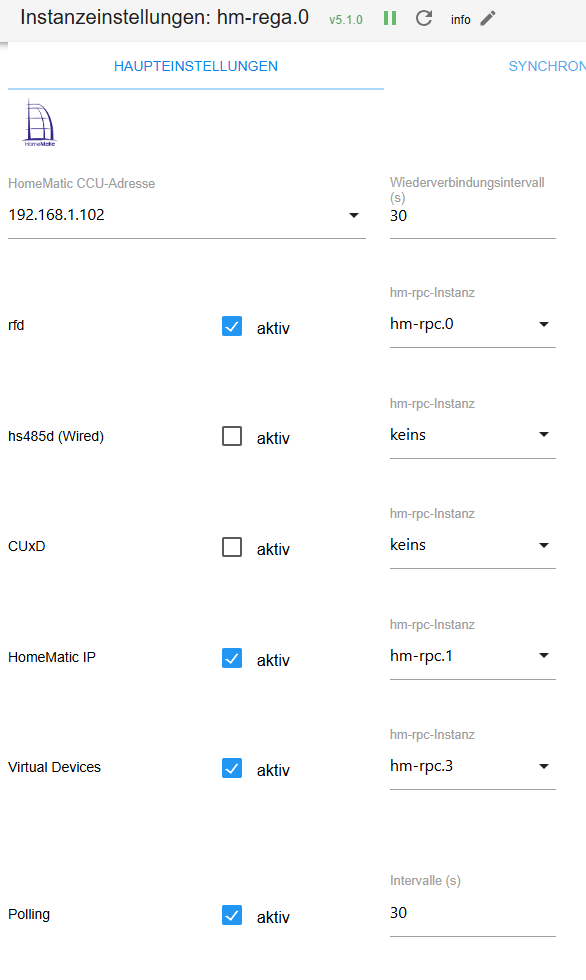
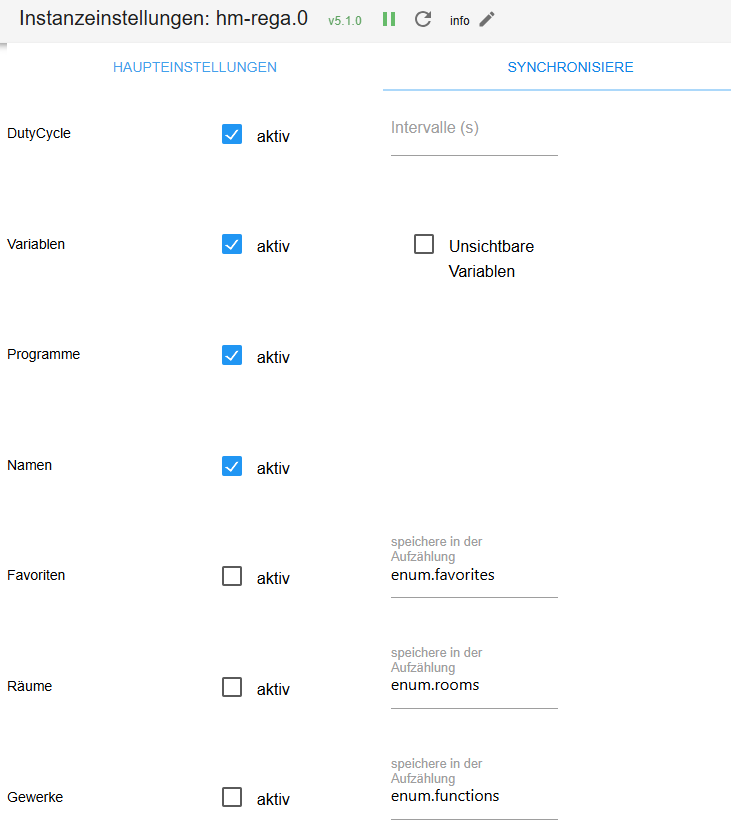
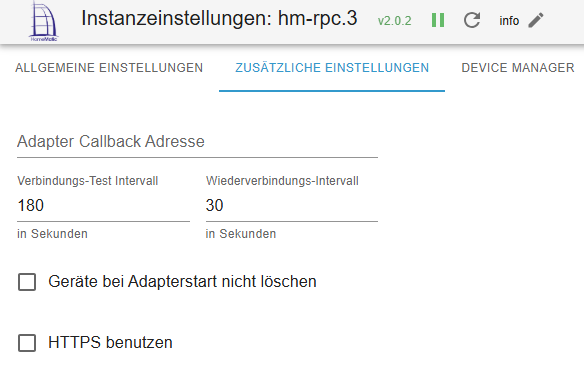
RPC0
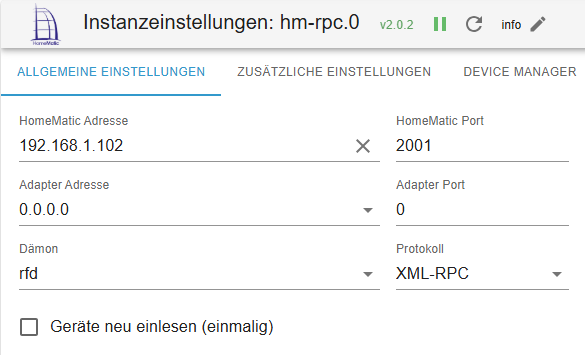
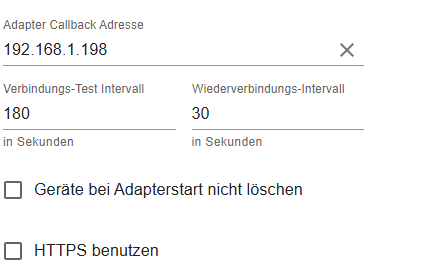
RPC1
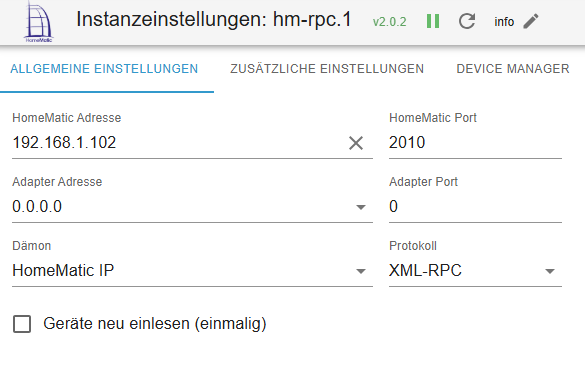
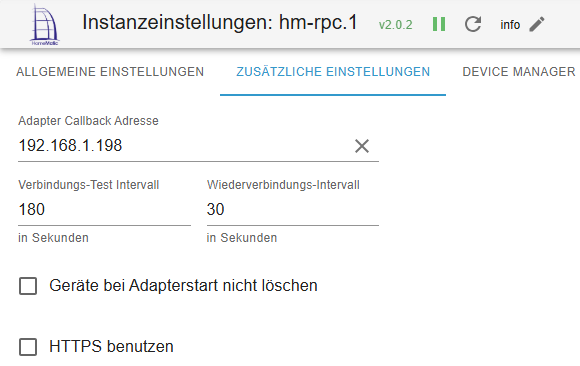
RPC2 - inaktiv
RPC3
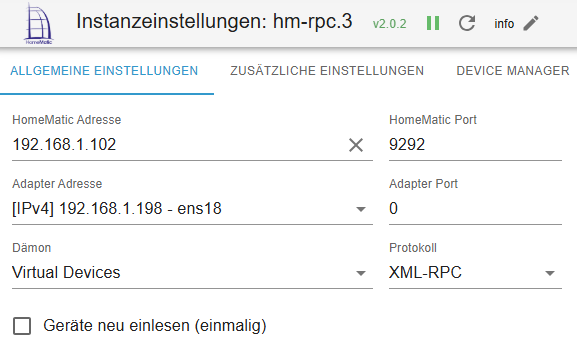
Raspberrymatic Fehlermeldungen
Vielleicht auch mal ein Screenshot der Servicemeldungen in der RaspberryMatic
Da gibt es aktuell keine Servicemeldungen
Timestamps der States
wie sind da die Timestamps?
Unreach bei dem Tür Rollo: 2024-07-07 18:31

LowBat bei der WZ Rechts Heizung: 2024-12-21 18:16

Ich hoffe die Screenshots sind jetzt besser anzuschauen
-
@homoran said in Homematic - einzelne States stimmen nicht mit CCU überein:
und davon bitte die Konfigurationen aller 4 Instanzen
HM Rega
RPC0
RPC1
RPC2 - inaktiv
RPC3
Raspberrymatic Fehlermeldungen
Vielleicht auch mal ein Screenshot der Servicemeldungen in der RaspberryMatic
Da gibt es aktuell keine Servicemeldungen
Timestamps der States
wie sind da die Timestamps?
Unreach bei dem Tür Rollo: 2024-07-07 18:31
LowBat bei der WZ Rechts Heizung: 2024-12-21 18:16
Ich hoffe die Screenshots sind jetzt besser anzuschauen
@martinschm sagte in Homematic - einzelne States stimmen nicht mit CCU überein:
Unreach bei dem Tür Rollo: 2024-07-07 18:31
das ist ja wirklich schon was her.
@martinschm sagte in Homematic - einzelne States stimmen nicht mit CCU überein:
LowBat bei der WZ Rechts Heizung: 2024-12-21 18:16
War möglicherweise ein kurzer Lowbat während des Antriebs.
Warum beide nicht gelöscht werden kann zwei Gründe haben.
- Die Änderung wird von der RM nicht zuverlässig mitgeteilt.
- Wenn diese Info einmal verloren gegangen ist, wird erst beim nächsten Wechsel des Zustands wieder geändert.
- Du hast die Checkbox "Geräte nicht löschen..." nicht aktiv
- kann sein, dass die Meldung dadurch bei einem Neustart verloren gegangen ist oder falsch aktualisiert wurde
Hak die Checkboxen an, ebenfalls die "neu einlesen" und starte die Instanzen neu.
Warum ist in der .3 bei Adapteradresse eine IP eingetragen und keine Callback Adresse?
Bei allen anderen 0.0.0.0 und dafür die Iob Adresse als Callback?.102 ist doch die RM und .198 iob?
- Die Änderung wird von der RM nicht zuverlässig mitgeteilt.
-
@martinschm sagte in Homematic - einzelne States stimmen nicht mit CCU überein:
Unreach bei dem Tür Rollo: 2024-07-07 18:31
das ist ja wirklich schon was her.
@martinschm sagte in Homematic - einzelne States stimmen nicht mit CCU überein:
LowBat bei der WZ Rechts Heizung: 2024-12-21 18:16
War möglicherweise ein kurzer Lowbat während des Antriebs.
Warum beide nicht gelöscht werden kann zwei Gründe haben.
- Die Änderung wird von der RM nicht zuverlässig mitgeteilt.
- Wenn diese Info einmal verloren gegangen ist, wird erst beim nächsten Wechsel des Zustands wieder geändert.
- Du hast die Checkbox "Geräte nicht löschen..." nicht aktiv
- kann sein, dass die Meldung dadurch bei einem Neustart verloren gegangen ist oder falsch aktualisiert wurde
Hak die Checkboxen an, ebenfalls die "neu einlesen" und starte die Instanzen neu.
Warum ist in der .3 bei Adapteradresse eine IP eingetragen und keine Callback Adresse?
Bei allen anderen 0.0.0.0 und dafür die Iob Adresse als Callback?.102 ist doch die RM und .198 iob?
@homoran said in Homematic - einzelne States stimmen nicht mit CCU überein:
Hak die Checkboxen an, ebenfalls die "neu einlesen" und starte die Instanzen neu.
Erledigt, die Werte bleiben aber gleich !!!
.102 ist doch die RM und .198 iob?
Ja korrekt.
Warum ist in der .3 bei Adapteradresse eine IP eingetragen und keine Callback Adresse?
Bei allen anderen 0.0.0.0 und dafür die Iob Adresse als Callback?Kann ich dir nicht mehr sagen, warum ich das mal unterschiedlich eingestellt habe.
Wie sollte es denn idealerweise konfiguriert sein ? - Die Änderung wird von der RM nicht zuverlässig mitgeteilt.
-
@homoran said in Homematic - einzelne States stimmen nicht mit CCU überein:
Hak die Checkboxen an, ebenfalls die "neu einlesen" und starte die Instanzen neu.
Erledigt, die Werte bleiben aber gleich !!!
.102 ist doch die RM und .198 iob?
Ja korrekt.
Warum ist in der .3 bei Adapteradresse eine IP eingetragen und keine Callback Adresse?
Bei allen anderen 0.0.0.0 und dafür die Iob Adresse als Callback?Kann ich dir nicht mehr sagen, warum ich das mal unterschiedlich eingestellt habe.
Wie sollte es denn idealerweise konfiguriert sein ?@martinschm sagte in Homematic - einzelne States stimmen nicht mit CCU überein:
Wie sollte es denn idealerweise konfiguriert sein ?
wenn es kein Docker oder ähnliches ist, braucht es (eigentlich) keine CallbackAdresse
hm-rpc übermittelt die AdapterAdresse an die CCU, damit diese dorthin die abonnierten Änderungen schickt.
mit 0.0.0.0 oder der internen Container Adresse kann die CCU nichts anfangen, daher braucht es dann die Callback Adresse.Da es bei dir aber nur einzelne Geräte betrifft, ist das Verhalten seltsam.
Vielleicht hilft stromlos machen, etwas warten, und Batterien wieder einlegen ja, um eine Änderung und damit erneute Sendung des Wertes anzustoßen
kein Support per PN! - Fragen im Forum stellen - Benutzt das Voting rechts unten im Beitrag wenn er euch geholfen hat.
Das Forum freut sich über eine Spende. Benutzt dazu den Spendenbutton oben rechts. Danke!
der Installationsfixer: curl -fsL https://iobroker.net/fix.sh | bash - -
@martinschm sagte in Homematic - einzelne States stimmen nicht mit CCU überein:
Wie sollte es denn idealerweise konfiguriert sein ?
wenn es kein Docker oder ähnliches ist, braucht es (eigentlich) keine CallbackAdresse
hm-rpc übermittelt die AdapterAdresse an die CCU, damit diese dorthin die abonnierten Änderungen schickt.
mit 0.0.0.0 oder der internen Container Adresse kann die CCU nichts anfangen, daher braucht es dann die Callback Adresse.Da es bei dir aber nur einzelne Geräte betrifft, ist das Verhalten seltsam.
Vielleicht hilft stromlos machen, etwas warten, und Batterien wieder einlegen ja, um eine Änderung und damit erneute Sendung des Wertes anzustoßen
@homoran said in Homematic - einzelne States stimmen nicht mit CCU überein:
@martinschm sagte in Homematic - einzelne States stimmen nicht mit CCU überein:
Wie sollte es denn idealerweise konfiguriert sein ?
wenn es kein Docker oder ähnliches ist, braucht es (eigentlich) keine CallbackAdresse
hm-rpc übermittelt die AdapterAdresse an die CCU, damit diese dorthin die abonnierten Änderungen schickt.
mit 0.0.0.0 oder der internen Container Adresse kann die CCU nichts anfangen, daher braucht es dann die Callback Adresse.Da es bei dir aber nur einzelne Geräte betrifft, ist das Verhalten seltsam.
Vielleicht hilft stromlos machen, etwas warten, und Batterien wieder einlegen ja, um eine Änderung und damit erneute Sendung des Wertes anzustoßen
Läuft ein einer Proxmox Instanz.
Hilft es vielleicht die Geräte doch mal zu löschen und die Liste neu einzulesen ?
-
@homoran said in Homematic - einzelne States stimmen nicht mit CCU überein:
@martinschm sagte in Homematic - einzelne States stimmen nicht mit CCU überein:
Wie sollte es denn idealerweise konfiguriert sein ?
wenn es kein Docker oder ähnliches ist, braucht es (eigentlich) keine CallbackAdresse
hm-rpc übermittelt die AdapterAdresse an die CCU, damit diese dorthin die abonnierten Änderungen schickt.
mit 0.0.0.0 oder der internen Container Adresse kann die CCU nichts anfangen, daher braucht es dann die Callback Adresse.Da es bei dir aber nur einzelne Geräte betrifft, ist das Verhalten seltsam.
Vielleicht hilft stromlos machen, etwas warten, und Batterien wieder einlegen ja, um eine Änderung und damit erneute Sendung des Wertes anzustoßen
Läuft ein einer Proxmox Instanz.
Hilft es vielleicht die Geräte doch mal zu löschen und die Liste neu einzulesen ?
@martinschm sagte in Homematic - einzelne States stimmen nicht mit CCU überein:
Läuft ein einer Proxmox Instanz.
heisst was?
VM oder Container?
-
@martinschm sagte in Homematic - einzelne States stimmen nicht mit CCU überein:
Läuft ein einer Proxmox Instanz.
heisst was?
VM oder Container?
@homoran said in Homematic - einzelne States stimmen nicht mit CCU überein:
@martinschm sagte in Homematic - einzelne States stimmen nicht mit CCU überein:
Läuft ein einer Proxmox Instanz.
heisst was?
VM oder Container?
Als VM.
-
@martinschm sagte in Homematic - einzelne States stimmen nicht mit CCU überein:
Wie sollte es denn idealerweise konfiguriert sein ?
wenn es kein Docker oder ähnliches ist, braucht es (eigentlich) keine CallbackAdresse
hm-rpc übermittelt die AdapterAdresse an die CCU, damit diese dorthin die abonnierten Änderungen schickt.
mit 0.0.0.0 oder der internen Container Adresse kann die CCU nichts anfangen, daher braucht es dann die Callback Adresse.Da es bei dir aber nur einzelne Geräte betrifft, ist das Verhalten seltsam.
Vielleicht hilft stromlos machen, etwas warten, und Batterien wieder einlegen ja, um eine Änderung und damit erneute Sendung des Wertes anzustoßen
@homoran sagte in Homematic - einzelne States stimmen nicht mit CCU überein:
Vielleicht hilft stromlos machen, etwas warten, und Batterien wieder einlegen ja, um eine Änderung und damit erneute Sendung des Wertes anzustoßen
hast du das versucht?
-
@homoran sagte in Homematic - einzelne States stimmen nicht mit CCU überein:
Vielleicht hilft stromlos machen, etwas warten, und Batterien wieder einlegen ja, um eine Änderung und damit erneute Sendung des Wertes anzustoßen
hast du das versucht?
@homoran said in Homematic - einzelne States stimmen nicht mit CCU überein:
@homoran sagte in Homematic - einzelne States stimmen nicht mit CCU überein:
Vielleicht hilft stromlos machen, etwas warten, und Batterien wieder einlegen ja, um eine Änderung und damit erneute Sendung des Wertes anzustoßen
hast du das versucht?
Ja, hat aber nichts gebracht.
Ich habe gerade das Gerät einmal manuell aus dem Objektbaum gelöscht und im Adapter "Geräte einmalig neueinlesen" angeklickt.
Jetzt wurde es korrekt wieder angelegt und die Info stimmt.Hab das dann bei dem Türrollo der angeblich auf Unreach stand wiederholt und beim neu einlesen waren die Werte dann richtig.
Mal schauen wie lange.

Hey! Du scheinst an dieser Unterhaltung interessiert zu sein, hast aber noch kein Konto.
Hast du es satt, bei jedem Besuch durch die gleichen Beiträge zu scrollen? Wenn du dich für ein Konto anmeldest, kommst du immer genau dorthin zurück, wo du zuvor warst, und kannst dich über neue Antworten benachrichtigen lassen (entweder per E-Mail oder Push-Benachrichtigung). Du kannst auch Lesezeichen speichern und Beiträge positiv bewerten, um anderen Community-Mitgliedern deine Wertschätzung zu zeigen.
Mit deinem Input könnte dieser Beitrag noch besser werden 💗
Registrieren AnmeldenSupport us
176
Online33.0k
Benutzer83.6k
Themen1.3m
Beiträge