




[solved] Problem mit jqplot - MeterGauge
-
Seit dem (vorletzten ?) Update des Admin-Adapters sieht das Widget etwas verunglückt aus:
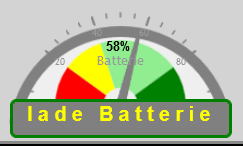
Kann ich das was umstellen oder liegt das Problem außerhalb meiner Reichweite?
Zur Info: aktuell bin ich auf Admin V6.7.2
Gruß Stefan@lueghi sagte in Problem mit jqplot - MeterGauge:
Seit dem (vorletzten ?) Update des Admin-Adapters sieht das Widget etwas verunglückt aus:
der admin hat absolut nichts mit vis zu tun!
selbst die Webserver sind unterschiedlich auf unterschiedlichen Ports. -
@lueghi sagte in Problem mit jqplot - MeterGauge:
Seit dem (vorletzten ?) Update des Admin-Adapters sieht das Widget etwas verunglückt aus:
kann ich mir nicht vorstellen , das es vom Admin kommt und wenn ja hast du es schonmal mit einer alten Versionen versucht !?
oder einen anderen Browser die Vis geöffnet !?
Browser refresh gemacht !?
würde auch mal ein
iobroker upload all
sudo reboot
mal machen
Zeige mal die
Full - Ausgabe von
iob diagdamit man sieht was du so hast !
@glasfaser
Ok, mag sein, dass es nicht am Admin liegt. Ich glaube ich habe zu dem Zeitpunkt auch noch weiteren Adaptern ein Update spendiert. Für mich war aber im 1 .Schritt der Admin im Gedächtnis geblieben .... sorry für die falsche Bewertung.Hier mein iob diag:
Skript v.2023-04-16 *** BASE SYSTEM *** Architecture : x86_64 Docker : false Virtualization : lxc Distributor ID: Ubuntu Description: Ubuntu 20.04.5 LTS Release: 20.04 Codename: focal NAME="Ubuntu" VERSION="20.04.5 LTS (Focal Fossa)" ID=ubuntu ID_LIKE=debian PRETTY_NAME="Ubuntu 20.04.5 LTS" VERSION_ID="20.04" HOME_URL="https://www.ubuntu.com/" SUPPORT_URL="https://help.ubuntu.com/" BUG_REPORT_URL="https://bugs.launchpad.net/ubuntu/" PRIVACY_POLICY_URL="https://www.ubuntu.com/legal/terms-and-policies/privacy-policy" VERSION_CODENAME=focal UBUNTU_CODENAME=focal Systemuptime and Load: 20:49:54 up 12 days, 23:02, 1 user, load average: 2.05, 1.85, 2.02 CPU threads: 1 *** Time and Time Zones *** Local time: Fri 2023-08-11 20:49:55 CEST Universal time: Fri 2023-08-11 18:49:55 UTC RTC time: n/a Time zone: Europe/Berlin (CEST, +0200) System clock synchronized: yes NTP service: inactive RTC in local TZ: no *** User and Groups *** adminuser /home/adminuser adminuser sudo iobroker *** X-Server-Setup *** X-Server: false Desktop: Terminal: tty Boot Target: graphical.target *** MEMORY *** total used free shared buff/cache available Mem: 3.1G 2.2G 763M 0.0K 99M 862M Swap: 0B 0B 0B Total: 3.1G 2.2G 763M 3072 M total memory 2209 M used memory 43 M active memory 2161 M inactive memory 762 M free memory 0 M buffer memory 99 M swap cache 0 M total swap 0 M used swap 0 M free swap *** FILESYSTEM *** Filesystem Type Size Used Avail Use% Mounted on rpool/data/subvol-104-disk-0 zfs 8.0G 5.9G 2.2G 74% / none tmpfs 492K 4.0K 488K 1% /dev tmpfs tmpfs 7.8G 0 7.8G 0% /dev/shm tmpfs tmpfs 1.6G 128K 1.6G 1% /run tmpfs tmpfs 5.0M 0 5.0M 0% /run/lock tmpfs tmpfs 1.6G 0 1.6G 0% /run/user/1000 Messages concerning ext4 filesystem in dmesg: [Sat Jul 29 21:46:10 2023] EXT4-fs (md0): mounted filesystem with ordered data mode. Opts: (null). Quota mode: none. [Sat Jul 29 21:46:10 2023] ext4 filesystem being mounted at /boot supports timestamps until 2038 (0x7fffffff) Show mounted filesystems (real ones only): TARGET SOURCE FSTYPE OPTIONS / rpool/data/subvol-104-disk-0 zfs rw,noatime,xattr,posixacl |-/proc/cpuinfo lxcfs[/proc/cpuinfo] fuse.lxcfs rw,nosuid,nodev,relatime,user_id=0,group_id=0,allow_other |-/proc/diskstats lxcfs[/proc/diskstats] fuse.lxcfs rw,nosuid,nodev,relatime,user_id=0,group_id=0,allow_other |-/proc/loadavg lxcfs[/proc/loadavg] fuse.lxcfs rw,nosuid,nodev,relatime,user_id=0,group_id=0,allow_other |-/proc/meminfo lxcfs[/proc/meminfo] fuse.lxcfs rw,nosuid,nodev,relatime,user_id=0,group_id=0,allow_other |-/proc/slabinfo lxcfs[/proc/slabinfo] fuse.lxcfs rw,nosuid,nodev,relatime,user_id=0,group_id=0,allow_other |-/proc/stat lxcfs[/proc/stat] fuse.lxcfs rw,nosuid,nodev,relatime,user_id=0,group_id=0,allow_other |-/proc/swaps lxcfs[/proc/swaps] fuse.lxcfs rw,nosuid,nodev,relatime,user_id=0,group_id=0,allow_other |-/proc/uptime lxcfs[/proc/uptime] fuse.lxcfs rw,nosuid,nodev,relatime,user_id=0,group_id=0,allow_other `-/sys/devices/system/cpu lxcfs[/sys/devices/system/cpu] fuse.lxcfs rw,nosuid,nodev,relatime,user_id=0,group_id=0,allow_other Files in neuralgic directories: /var: 759M /var/ 333M /var/log/journal/b354c482f7cc342776f020ee5ea440c3 333M /var/log/journal 333M /var/log 300M /var/cache Hint: You are currently not seeing messages from other users and the system. Users in groups 'adm', 'systemd-journal' can see all messages. Pass -q to turn off this notice. Archived and active journals take up 2.4M in the file system. /opt/iobroker/backups: 11M /opt/iobroker/backups/ /opt/iobroker/iobroker-data: 282M /opt/iobroker/iobroker-data/ 187M /opt/iobroker/iobroker-data/files 80M /opt/iobroker/iobroker-data/files/icons-open-icon-library-png 80M /opt/iobroker/iobroker-data/backup-objects 32M /opt/iobroker/iobroker-data/files/icons-open-icon-library-png/apps The five largest files in iobroker-data are: 5.3M /opt/iobroker/iobroker-data/objects.jsonl 3.3M /opt/iobroker/iobroker-data/objects.json.migrated 3.3M /opt/iobroker/iobroker-data/objects.json.bak.migrated 3.3M /opt/iobroker/iobroker-data/files/devices.admin/static/js/main.24f2bb56.js 3.2M /opt/iobroker/iobroker-data/files/web.admin/static/js/main.e564fb87.js *** NodeJS-Installation *** /usr/bin/nodejs v18.16.0 /usr/bin/node v18.16.0 /usr/bin/npm 9.5.1 /usr/bin/npx 9.5.1 nodejs: Installed: 18.16.0-deb-1nodesource1 Candidate: 18.17.0-deb-1nodesource1 Version table: 18.17.0-deb-1nodesource1 500 500 https://deb.nodesource.com/node_18.x focal/main amd64 Packages *** 18.16.0-deb-1nodesource1 100 100 /var/lib/dpkg/status 10.19.0~dfsg-3ubuntu1 500 500 http://archive.ubuntu.com/ubuntu focal/universe amd64 Packages Temp directories causing npm8 problem: 0 No problems detected *** ioBroker-Installation *** ioBroker Status iobroker is running on this host. Objects type: jsonl States type: jsonl MULTIHOSTSERVICE/enabled: false Core adapters versions js-controller: 5.0.11 admin: 6.7.2 javascript: 7.1.4 Adapters from github: 1 Adapter State + system.adapter.admin.0 : admin : iobroker - enabled, port: 8081, bind: 192.168.50.10 (SSL), run as: admin system.adapter.alarm.0 : alarm : iobroker - disabled + system.adapter.backitup.0 : backitup : iobroker - enabled system.adapter.coronavirus-statistics.0 : coronavirus-statistics: iobroker - enabled + system.adapter.countdown.0 : countdown : iobroker - enabled system.adapter.devices.0 : devices : iobroker - disabled system.adapter.discovery.0 : discovery : iobroker - disabled system.adapter.dwd.0 : dwd : iobroker - enabled system.adapter.ebus.0 : ebus : iobroker - disabled + system.adapter.email.0 : email : iobroker - enabled + system.adapter.email.1 : email : iobroker - enabled system.adapter.feiertage.0 : feiertage : iobroker - enabled + system.adapter.fullybrowser.0 : fullybrowser : iobroker - enabled + system.adapter.hm-rega.0 : hm-rega : iobroker - enabled + system.adapter.hm-rpc.0 : hm-rpc : iobroker - enabled, port: 0 + system.adapter.hm-rpc.1 : hm-rpc : iobroker - enabled, port: 12001 + system.adapter.hm-rpc.2 : hm-rpc : iobroker - enabled, port: 0 system.adapter.hp-ilo.0 : hp-ilo : iobroker - disabled system.adapter.ical.0 : ical : iobroker - enabled system.adapter.ical.1 : ical : iobroker - enabled system.adapter.icons-addictive-flavour-png.0: icons-addictive-flavour-png: iobroker - disabled system.adapter.icons-fatcow-hosting.0 : icons-fatcow-hosting : iobroker - disabled system.adapter.icons-mfd-svg.0 : icons-mfd-svg : iobroker - disabled system.adapter.icons-open-icon-library-png.0: icons-open-icon-library-png: iobroker - disabled system.adapter.icons-ultimate-png.0 : icons-ultimate-png : iobroker - disabled + system.adapter.influxdb.0 : influxdb : iobroker - enabled, port: 8086 + system.adapter.info.0 : info : iobroker - enabled + system.adapter.javascript.0 : javascript : iobroker - enabled system.adapter.mpd.0 : mpd : iobroker - disabled, port: 6600 system.adapter.mqtt.0 : mqtt : iobroker - disabled, port: 1883, bind: 0.0.0.0 system.adapter.mytime.0 : mytime : iobroker - disabled + system.adapter.pi-hole.0 : pi-hole : iobroker - enabled + system.adapter.ping.0 : ping : iobroker - enabled + system.adapter.proxmox.0 : proxmox : iobroker - enabled, port: 8006 system.adapter.sayit.0 : sayit : iobroker - disabled, port: 0 + system.adapter.simple-api.0 : simple-api : iobroker - enabled, port: 8087, bind: 0.0.0.0, run as: admin + system.adapter.tankerkoenig.0 : tankerkoenig : iobroker - enabled + system.adapter.tr-064.0 : tr-064 : iobroker - enabled + system.adapter.trashschedule.0 : trashschedule : iobroker - enabled system.adapter.vis-bars.0 : vis-bars : iobroker - disabled system.adapter.vis-canvas-gauges.0 : vis-canvas-gauges : iobroker - disabled system.adapter.vis-colorpicker.0 : vis-colorpicker : iobroker - disabled system.adapter.vis-fancyswitch.0 : vis-fancyswitch : iobroker - disabled system.adapter.vis-history.0 : vis-history : iobroker - disabled system.adapter.vis-hqwidgets.0 : vis-hqwidgets : iobroker - disabled system.adapter.vis-jqui-mfd.0 : vis-jqui-mfd : iobroker - disabled system.adapter.vis-justgage.0 : vis-justgage : iobroker - disabled system.adapter.vis-metro.0 : vis-metro : iobroker - disabled system.adapter.vis-timeandweather.0 : vis-timeandweather : iobroker - disabled system.adapter.vis.0 : vis : iobroker - enabled + system.adapter.web.0 : web : iobroker - enabled, port: 8083, bind: 192.168.50.10, run as: admin + system.adapter.worx.0 : worx : iobroker - enabled + system.adapter.ws.0 : ws : iobroker - enabled, port: 8084, bind: 192.168.50.10, run as: admin system.adapter.yr.0 : yr : iobroker - enabled + instance is alive Enabled adapters with bindings + system.adapter.admin.0 : admin : iobroker - enabled, port: 8081, bind: 192.168.50.10 (SSL), run as: admin + system.adapter.hm-rpc.0 : hm-rpc : iobroker - enabled, port: 0 + system.adapter.hm-rpc.1 : hm-rpc : iobroker - enabled, port: 12001 + system.adapter.hm-rpc.2 : hm-rpc : iobroker - enabled, port: 0 + system.adapter.influxdb.0 : influxdb : iobroker - enabled, port: 8086 + system.adapter.proxmox.0 : proxmox : iobroker - enabled, port: 8006 + system.adapter.simple-api.0 : simple-api : iobroker - enabled, port: 8087, bind: 0.0.0.0, run as: admin + system.adapter.web.0 : web : iobroker - enabled, port: 8083, bind: 192.168.50.10, run as: admin + system.adapter.ws.0 : ws : iobroker - enabled, port: 8084, bind: 192.168.50.10, run as: admin ioBroker-Repositories stable : http://download.iobroker.net/sources-dist.json beta : http://download.iobroker.net/sources-dist-latest.json Active repo(s): beta Installed ioBroker-Instances Used repository: beta Adapter "admin" : 6.7.2 , installed 6.7.2 Adapter "alarm" : 3.3.12 , installed 3.3.12 Adapter "backitup" : 2.6.23 , installed 2.6.23 Adapter "coronavirus-statistics": 0.8.7, installed 0.8.7 Adapter "countdown" : 2.1.0 , installed 2.1.0 Adapter "devices" : 1.1.5 , installed 1.1.5 Adapter "discovery" : 3.2.0 , installed 3.2.0 Adapter "dwd" : 2.8.5 , installed 2.8.5 Adapter "ebus" : 3.2.2 , installed 3.2.2 Adapter "email" : 1.2.0 , installed 1.2.0 Adapter "feiertage" : 1.1.0 , installed 1.1.0 Adapter "fullybrowser" : 2.1.2 , installed 2.1.2 Adapter "hm-rega" : 3.0.47 , installed 3.0.47 Adapter "hm-rpc" : 1.15.19 , installed 1.15.19 Adapter "hp-ilo" : 1.0.6 , installed 1.0.6 Adapter "ical" : 1.13.3 , installed 1.13.3 Adapter "icons-addictive-flavour-png": 0.1.0, installed 0.1.0 Adapter "icons-fatcow-hosting": 0.1.0, installed 0.1.0 Adapter "icons-mfd-svg": 1.1.0 , installed 1.1.0 Adapter "icons-open-icon-library-png": 0.1.2, installed 0.1.3 Adapter "icons-ultimate-png": 1.0.1, installed 1.0.1 Adapter "influxdb" : 3.2.0 , installed 3.2.0 Adapter "info" : 1.9.26 , installed 1.9.26 Adapter "javascript" : 7.1.4 , installed 7.1.4 Controller "js-controller": 5.0.11 , installed 5.0.11 Adapter "mpd" : 1.1.1 , installed 1.1.1 Adapter "mqtt" : 4.1.1 , installed 4.1.1 Adapter "mytime" : 0.7.12 , installed 0.7.12 Adapter "pi-hole" : 1.3.6 , installed 1.3.6 Adapter "ping" : 1.6.2 , installed 1.6.2 Adapter "proxmox" : 1.3.5 , installed 1.3.5 Adapter "sayit" : 3.0.5 , installed 3.0.5 Adapter "simple-api" : 2.7.2 , installed 2.7.2 Adapter "socketio" : 6.5.2 , installed 6.5.2 Adapter "tankerkoenig" : 3.3.7 , installed 3.3.7 Adapter "tr-064" : 4.2.18 , installed 4.2.18 Adapter "trashschedule": 2.2.0 , installed 2.2.0 Adapter "vis" : 1.4.16 , installed 1.4.16 Adapter "vis-bars" : 0.1.4 , installed 0.1.4 Adapter "vis-canvas-gauges": 1.0.1, installed 1.0.1 Adapter "vis-colorpicker": 2.0.3 , installed 2.0.3 Adapter "vis-fancyswitch": 1.1.0 , installed 1.1.0 Adapter "vis-history" : 1.0.0 , installed 1.0.0 Adapter "vis-hqwidgets": 1.4.0 , installed 1.4.0 Adapter "vis-jqui-mfd" : 1.0.12 , installed 1.0.12 Adapter "vis-justgage" : 1.0.2 , installed 1.0.2 Adapter "vis-metro" : 1.2.0 , installed 1.2.0 Adapter "vis-timeandweather": 1.2.2, installed 1.2.2 Adapter "web" : 6.1.0 , installed 6.1.0 Adapter "worx" : 2.3.2 , installed 2.3.2 Adapter "ws" : 2.5.3 , installed 2.5.3 Adapter "yr" : 5.3.0 , installed 5.3.0 Objects and States Please stand by - This may take a while Objects: 11468 States: 11423 *** OS-Repositories and Updates *** W: An error occurred during the signature verification. The repository is not updated and the previous index files will be used. GPG error: https://packages.grafana.com/enterprise/deb stable InRelease: The following signatures couldn't be verified because the public key is not available: NO_PUBKEY 9E439B102CF3C0C6 W: Failed to fetch https://packages.grafana.com/enterprise/deb/dists/stable/InRelease The following signatures couldn't be verified because the public key is not available: NO_PUBKEY 9E439B102CF3C0C6 W: Some index files failed to download. They have been ignored, or old ones used instead. Hit:1 http://archive.ubuntu.com/ubuntu focal InRelease Get:2 https://packages.grafana.com/enterprise/deb stable InRelease [5984 B] Hit:3 http://archive.ubuntu.com/ubuntu focal-updates InRelease Hit:4 https://deb.nodesource.com/node_18.x focal InRelease Hit:5 http://archive.ubuntu.com/ubuntu focal-security InRelease Err:2 https://packages.grafana.com/enterprise/deb stable InRelease The following signatures couldn't be verified because the public key is not available: NO_PUBKEY 9E439B102CF3C0C6 Reading package lists... W: An error occurred during the signature verification. The repository is not updated and the previous index files will be used. GPG error: https://packages.grafana.com/enterprise/deb stable InRelease: The following signatures couldn't be verified because the public key is not available: NO_PUBKEY 9E439B102CF3C0C6 W: Failed to fetch https://packages.grafana.com/enterprise/deb/dists/stable/InRelease The following signatures couldn't be verified because the public key is not available: NO_PUBKEY 9E439B102CF3C0C6 W: Some index files failed to download. They have been ignored, or old ones used instead. Pending Updates: 160 *** Listening Ports *** Active Internet connections (only servers) Proto Recv-Q Send-Q Local Address Foreign Address State User Inode PID/Program name tcp 0 0 192.168.50.10:12001 0.0.0.0:* LISTEN 1001 42915284 707368/io.hm-rpc.1 tcp 0 0 192.168.50.10:2010 0.0.0.0:* LISTEN 1001 42915278 707375/io.hm-rpc.2 tcp 0 0 0.0.0.0:9001 0.0.0.0:* LISTEN 1001 33802153 558666/iobroker.js- tcp 0 0 0.0.0.0:9000 0.0.0.0:* LISTEN 1001 33802165 558666/iobroker.js- tcp 0 0 127.0.0.53:53 0.0.0.0:* LISTEN 106 40644 87/systemd-resolved tcp 0 0 0.0.0.0:22 0.0.0.0:* LISTEN 0 41167 148/sshd: /usr/sbin tcp 0 0 0.0.0.0:111 0.0.0.0:* LISTEN 0 32058 1/init tcp 0 0 127.0.0.1:25 0.0.0.0:* LISTEN 0 41886 277/master tcp 0 0 192.168.50.10:8701 0.0.0.0:* LISTEN 1001 42915276 707362/io.hm-rpc.0 tcp 0 0 192.168.50.10:8084 0.0.0.0:* LISTEN 1001 33809853 559487/io.ws.0 tcp 0 0 192.168.50.10:8081 0.0.0.0:* LISTEN 1001 46869727 771696/io.admin.0 tcp 0 0 192.168.50.10:8083 0.0.0.0:* LISTEN 1001 33809688 559333/io.web.0 tcp6 0 0 :::22 :::* LISTEN 0 41178 148/sshd: /usr/sbin tcp6 0 0 :::111 :::* LISTEN 0 32066 1/init tcp6 0 0 :::8087 :::* LISTEN 1001 33809780 559464/io.simple-ap tcp6 0 0 ::1:25 :::* LISTEN 0 41887 277/master udp 0 0 192.168.50.10:5353 0.0.0.0:* 1001 33804552 558875/io.tr-064.0 udp 0 0 127.0.0.53:53 0.0.0.0:* 106 40643 87/systemd-resolved udp 0 0 0.0.0.0:111 0.0.0.0:* 0 32061 1/init udp6 0 0 :::111 :::* 0 32071 1/init *** Log File - Last 25 Lines *** 2023-08-11 19:30:13.900 - info: host.iobroker instance system.adapter.ical.0 terminated with code 0 (NO_ERROR) 2023-08-11 19:40:00.076 - info: host.iobroker instance system.adapter.dwd.0 started with pid 829943 2023-08-11 19:40:03.000 - info: host.iobroker instance system.adapter.dwd.0 terminated with code 11 (ADAPTER_REQUESTED_TERMINATION) 2023-08-11 19:47:00.101 - info: host.iobroker instance system.adapter.yr.0 started with pid 830243 2023-08-11 19:47:42.339 - info: host.iobroker instance system.adapter.yr.0 terminated with code 11 (ADAPTER_REQUESTED_TERMINATION) 2023-08-11 19:50:00.071 - info: host.iobroker instance system.adapter.dwd.0 started with pid 830391 2023-08-11 19:50:03.124 - info: host.iobroker instance system.adapter.dwd.0 terminated with code 11 (ADAPTER_REQUESTED_TERMINATION) 2023-08-11 20:00:00.158 - info: host.iobroker instance system.adapter.dwd.0 started with pid 830797 2023-08-11 20:00:04.210 - info: host.iobroker instance system.adapter.ical.0 started with pid 830812 2023-08-11 20:00:04.282 - info: host.iobroker instance system.adapter.dwd.0 terminated with code 11 (ADAPTER_REQUESTED_TERMINATION) 2023-08-11 20:00:14.007 - info: host.iobroker instance system.adapter.ical.0 terminated with code 0 (NO_ERROR) 2023-08-11 20:10:00.046 - info: host.iobroker instance system.adapter.dwd.0 started with pid 831235 2023-08-11 20:10:02.388 - info: host.iobroker instance system.adapter.dwd.0 terminated with code 11 (ADAPTER_REQUESTED_TERMINATION) 2023-08-11 20:20:00.080 - info: host.iobroker instance system.adapter.dwd.0 started with pid 831668 2023-08-11 20:20:10.291 - info: host.iobroker instance system.adapter.dwd.0 terminated with code 11 (ADAPTER_REQUESTED_TERMINATION) 2023-08-11 20:30:00.110 - info: host.iobroker instance system.adapter.dwd.0 started with pid 832075 2023-08-11 20:30:03.254 - info: host.iobroker instance system.adapter.dwd.0 terminated with code 11 (ADAPTER_REQUESTED_TERMINATION) 2023-08-11 20:30:04.178 - info: host.iobroker instance system.adapter.ical.0 started with pid 832111 2023-08-11 20:30:15.212 - info: host.iobroker instance system.adapter.ical.0 terminated with code 0 (NO_ERROR) 2023-08-11 20:40:00.107 - info: host.iobroker instance system.adapter.dwd.0 started with pid 832525 2023-08-11 20:40:04.086 - info: host.iobroker instance system.adapter.dwd.0 terminated with code 11 (ADAPTER_REQUESTED_TERMINATION) 2023-08-11 20:47:00.122 - info: host.iobroker instance system.adapter.yr.0 started with pid 832842 2023-08-11 20:47:43.397 - info: host.iobroker instance system.adapter.yr.0 terminated with code 11 (ADAPTER_REQUESTED_TERMINATION) 2023-08-11 20:50:00.082 - info: host.iobroker instance system.adapter.dwd.0 started with pid 833080 2023-08-11 20:50:03.478 - info: host.iobroker instance system.adapter.dwd.0 terminated with code 11 (ADAPTER_REQUESTED_TERMINATION)Hoffe, die Profis unter Euch können da was erkennen. Ich kann es jedenfalls nicht .... :(. Am Problem mit der grafana verification arbeite ich noch.
Habe seit dem Zeitpunkt aber auch noch das zusätzliche Problem, dass Systemvariablen (hautpsächlich booeans) von der CCU (RaspberryMatic) nicht mehr korrekt dargestellt werden. Das habe ich aber bisher als separates Problem gesehen und bin noch auf der Suche nach dem Fehler ...
Gruß StefanGruß Lueghi
(iobroker unter proxmox) -
@glasfaser
Ok, mag sein, dass es nicht am Admin liegt. Ich glaube ich habe zu dem Zeitpunkt auch noch weiteren Adaptern ein Update spendiert. Für mich war aber im 1 .Schritt der Admin im Gedächtnis geblieben .... sorry für die falsche Bewertung.Hier mein iob diag:
Skript v.2023-04-16 *** BASE SYSTEM *** Architecture : x86_64 Docker : false Virtualization : lxc Distributor ID: Ubuntu Description: Ubuntu 20.04.5 LTS Release: 20.04 Codename: focal NAME="Ubuntu" VERSION="20.04.5 LTS (Focal Fossa)" ID=ubuntu ID_LIKE=debian PRETTY_NAME="Ubuntu 20.04.5 LTS" VERSION_ID="20.04" HOME_URL="https://www.ubuntu.com/" SUPPORT_URL="https://help.ubuntu.com/" BUG_REPORT_URL="https://bugs.launchpad.net/ubuntu/" PRIVACY_POLICY_URL="https://www.ubuntu.com/legal/terms-and-policies/privacy-policy" VERSION_CODENAME=focal UBUNTU_CODENAME=focal Systemuptime and Load: 20:49:54 up 12 days, 23:02, 1 user, load average: 2.05, 1.85, 2.02 CPU threads: 1 *** Time and Time Zones *** Local time: Fri 2023-08-11 20:49:55 CEST Universal time: Fri 2023-08-11 18:49:55 UTC RTC time: n/a Time zone: Europe/Berlin (CEST, +0200) System clock synchronized: yes NTP service: inactive RTC in local TZ: no *** User and Groups *** adminuser /home/adminuser adminuser sudo iobroker *** X-Server-Setup *** X-Server: false Desktop: Terminal: tty Boot Target: graphical.target *** MEMORY *** total used free shared buff/cache available Mem: 3.1G 2.2G 763M 0.0K 99M 862M Swap: 0B 0B 0B Total: 3.1G 2.2G 763M 3072 M total memory 2209 M used memory 43 M active memory 2161 M inactive memory 762 M free memory 0 M buffer memory 99 M swap cache 0 M total swap 0 M used swap 0 M free swap *** FILESYSTEM *** Filesystem Type Size Used Avail Use% Mounted on rpool/data/subvol-104-disk-0 zfs 8.0G 5.9G 2.2G 74% / none tmpfs 492K 4.0K 488K 1% /dev tmpfs tmpfs 7.8G 0 7.8G 0% /dev/shm tmpfs tmpfs 1.6G 128K 1.6G 1% /run tmpfs tmpfs 5.0M 0 5.0M 0% /run/lock tmpfs tmpfs 1.6G 0 1.6G 0% /run/user/1000 Messages concerning ext4 filesystem in dmesg: [Sat Jul 29 21:46:10 2023] EXT4-fs (md0): mounted filesystem with ordered data mode. Opts: (null). Quota mode: none. [Sat Jul 29 21:46:10 2023] ext4 filesystem being mounted at /boot supports timestamps until 2038 (0x7fffffff) Show mounted filesystems (real ones only): TARGET SOURCE FSTYPE OPTIONS / rpool/data/subvol-104-disk-0 zfs rw,noatime,xattr,posixacl |-/proc/cpuinfo lxcfs[/proc/cpuinfo] fuse.lxcfs rw,nosuid,nodev,relatime,user_id=0,group_id=0,allow_other |-/proc/diskstats lxcfs[/proc/diskstats] fuse.lxcfs rw,nosuid,nodev,relatime,user_id=0,group_id=0,allow_other |-/proc/loadavg lxcfs[/proc/loadavg] fuse.lxcfs rw,nosuid,nodev,relatime,user_id=0,group_id=0,allow_other |-/proc/meminfo lxcfs[/proc/meminfo] fuse.lxcfs rw,nosuid,nodev,relatime,user_id=0,group_id=0,allow_other |-/proc/slabinfo lxcfs[/proc/slabinfo] fuse.lxcfs rw,nosuid,nodev,relatime,user_id=0,group_id=0,allow_other |-/proc/stat lxcfs[/proc/stat] fuse.lxcfs rw,nosuid,nodev,relatime,user_id=0,group_id=0,allow_other |-/proc/swaps lxcfs[/proc/swaps] fuse.lxcfs rw,nosuid,nodev,relatime,user_id=0,group_id=0,allow_other |-/proc/uptime lxcfs[/proc/uptime] fuse.lxcfs rw,nosuid,nodev,relatime,user_id=0,group_id=0,allow_other `-/sys/devices/system/cpu lxcfs[/sys/devices/system/cpu] fuse.lxcfs rw,nosuid,nodev,relatime,user_id=0,group_id=0,allow_other Files in neuralgic directories: /var: 759M /var/ 333M /var/log/journal/b354c482f7cc342776f020ee5ea440c3 333M /var/log/journal 333M /var/log 300M /var/cache Hint: You are currently not seeing messages from other users and the system. Users in groups 'adm', 'systemd-journal' can see all messages. Pass -q to turn off this notice. Archived and active journals take up 2.4M in the file system. /opt/iobroker/backups: 11M /opt/iobroker/backups/ /opt/iobroker/iobroker-data: 282M /opt/iobroker/iobroker-data/ 187M /opt/iobroker/iobroker-data/files 80M /opt/iobroker/iobroker-data/files/icons-open-icon-library-png 80M /opt/iobroker/iobroker-data/backup-objects 32M /opt/iobroker/iobroker-data/files/icons-open-icon-library-png/apps The five largest files in iobroker-data are: 5.3M /opt/iobroker/iobroker-data/objects.jsonl 3.3M /opt/iobroker/iobroker-data/objects.json.migrated 3.3M /opt/iobroker/iobroker-data/objects.json.bak.migrated 3.3M /opt/iobroker/iobroker-data/files/devices.admin/static/js/main.24f2bb56.js 3.2M /opt/iobroker/iobroker-data/files/web.admin/static/js/main.e564fb87.js *** NodeJS-Installation *** /usr/bin/nodejs v18.16.0 /usr/bin/node v18.16.0 /usr/bin/npm 9.5.1 /usr/bin/npx 9.5.1 nodejs: Installed: 18.16.0-deb-1nodesource1 Candidate: 18.17.0-deb-1nodesource1 Version table: 18.17.0-deb-1nodesource1 500 500 https://deb.nodesource.com/node_18.x focal/main amd64 Packages *** 18.16.0-deb-1nodesource1 100 100 /var/lib/dpkg/status 10.19.0~dfsg-3ubuntu1 500 500 http://archive.ubuntu.com/ubuntu focal/universe amd64 Packages Temp directories causing npm8 problem: 0 No problems detected *** ioBroker-Installation *** ioBroker Status iobroker is running on this host. Objects type: jsonl States type: jsonl MULTIHOSTSERVICE/enabled: false Core adapters versions js-controller: 5.0.11 admin: 6.7.2 javascript: 7.1.4 Adapters from github: 1 Adapter State + system.adapter.admin.0 : admin : iobroker - enabled, port: 8081, bind: 192.168.50.10 (SSL), run as: admin system.adapter.alarm.0 : alarm : iobroker - disabled + system.adapter.backitup.0 : backitup : iobroker - enabled system.adapter.coronavirus-statistics.0 : coronavirus-statistics: iobroker - enabled + system.adapter.countdown.0 : countdown : iobroker - enabled system.adapter.devices.0 : devices : iobroker - disabled system.adapter.discovery.0 : discovery : iobroker - disabled system.adapter.dwd.0 : dwd : iobroker - enabled system.adapter.ebus.0 : ebus : iobroker - disabled + system.adapter.email.0 : email : iobroker - enabled + system.adapter.email.1 : email : iobroker - enabled system.adapter.feiertage.0 : feiertage : iobroker - enabled + system.adapter.fullybrowser.0 : fullybrowser : iobroker - enabled + system.adapter.hm-rega.0 : hm-rega : iobroker - enabled + system.adapter.hm-rpc.0 : hm-rpc : iobroker - enabled, port: 0 + system.adapter.hm-rpc.1 : hm-rpc : iobroker - enabled, port: 12001 + system.adapter.hm-rpc.2 : hm-rpc : iobroker - enabled, port: 0 system.adapter.hp-ilo.0 : hp-ilo : iobroker - disabled system.adapter.ical.0 : ical : iobroker - enabled system.adapter.ical.1 : ical : iobroker - enabled system.adapter.icons-addictive-flavour-png.0: icons-addictive-flavour-png: iobroker - disabled system.adapter.icons-fatcow-hosting.0 : icons-fatcow-hosting : iobroker - disabled system.adapter.icons-mfd-svg.0 : icons-mfd-svg : iobroker - disabled system.adapter.icons-open-icon-library-png.0: icons-open-icon-library-png: iobroker - disabled system.adapter.icons-ultimate-png.0 : icons-ultimate-png : iobroker - disabled + system.adapter.influxdb.0 : influxdb : iobroker - enabled, port: 8086 + system.adapter.info.0 : info : iobroker - enabled + system.adapter.javascript.0 : javascript : iobroker - enabled system.adapter.mpd.0 : mpd : iobroker - disabled, port: 6600 system.adapter.mqtt.0 : mqtt : iobroker - disabled, port: 1883, bind: 0.0.0.0 system.adapter.mytime.0 : mytime : iobroker - disabled + system.adapter.pi-hole.0 : pi-hole : iobroker - enabled + system.adapter.ping.0 : ping : iobroker - enabled + system.adapter.proxmox.0 : proxmox : iobroker - enabled, port: 8006 system.adapter.sayit.0 : sayit : iobroker - disabled, port: 0 + system.adapter.simple-api.0 : simple-api : iobroker - enabled, port: 8087, bind: 0.0.0.0, run as: admin + system.adapter.tankerkoenig.0 : tankerkoenig : iobroker - enabled + system.adapter.tr-064.0 : tr-064 : iobroker - enabled + system.adapter.trashschedule.0 : trashschedule : iobroker - enabled system.adapter.vis-bars.0 : vis-bars : iobroker - disabled system.adapter.vis-canvas-gauges.0 : vis-canvas-gauges : iobroker - disabled system.adapter.vis-colorpicker.0 : vis-colorpicker : iobroker - disabled system.adapter.vis-fancyswitch.0 : vis-fancyswitch : iobroker - disabled system.adapter.vis-history.0 : vis-history : iobroker - disabled system.adapter.vis-hqwidgets.0 : vis-hqwidgets : iobroker - disabled system.adapter.vis-jqui-mfd.0 : vis-jqui-mfd : iobroker - disabled system.adapter.vis-justgage.0 : vis-justgage : iobroker - disabled system.adapter.vis-metro.0 : vis-metro : iobroker - disabled system.adapter.vis-timeandweather.0 : vis-timeandweather : iobroker - disabled system.adapter.vis.0 : vis : iobroker - enabled + system.adapter.web.0 : web : iobroker - enabled, port: 8083, bind: 192.168.50.10, run as: admin + system.adapter.worx.0 : worx : iobroker - enabled + system.adapter.ws.0 : ws : iobroker - enabled, port: 8084, bind: 192.168.50.10, run as: admin system.adapter.yr.0 : yr : iobroker - enabled + instance is alive Enabled adapters with bindings + system.adapter.admin.0 : admin : iobroker - enabled, port: 8081, bind: 192.168.50.10 (SSL), run as: admin + system.adapter.hm-rpc.0 : hm-rpc : iobroker - enabled, port: 0 + system.adapter.hm-rpc.1 : hm-rpc : iobroker - enabled, port: 12001 + system.adapter.hm-rpc.2 : hm-rpc : iobroker - enabled, port: 0 + system.adapter.influxdb.0 : influxdb : iobroker - enabled, port: 8086 + system.adapter.proxmox.0 : proxmox : iobroker - enabled, port: 8006 + system.adapter.simple-api.0 : simple-api : iobroker - enabled, port: 8087, bind: 0.0.0.0, run as: admin + system.adapter.web.0 : web : iobroker - enabled, port: 8083, bind: 192.168.50.10, run as: admin + system.adapter.ws.0 : ws : iobroker - enabled, port: 8084, bind: 192.168.50.10, run as: admin ioBroker-Repositories stable : http://download.iobroker.net/sources-dist.json beta : http://download.iobroker.net/sources-dist-latest.json Active repo(s): beta Installed ioBroker-Instances Used repository: beta Adapter "admin" : 6.7.2 , installed 6.7.2 Adapter "alarm" : 3.3.12 , installed 3.3.12 Adapter "backitup" : 2.6.23 , installed 2.6.23 Adapter "coronavirus-statistics": 0.8.7, installed 0.8.7 Adapter "countdown" : 2.1.0 , installed 2.1.0 Adapter "devices" : 1.1.5 , installed 1.1.5 Adapter "discovery" : 3.2.0 , installed 3.2.0 Adapter "dwd" : 2.8.5 , installed 2.8.5 Adapter "ebus" : 3.2.2 , installed 3.2.2 Adapter "email" : 1.2.0 , installed 1.2.0 Adapter "feiertage" : 1.1.0 , installed 1.1.0 Adapter "fullybrowser" : 2.1.2 , installed 2.1.2 Adapter "hm-rega" : 3.0.47 , installed 3.0.47 Adapter "hm-rpc" : 1.15.19 , installed 1.15.19 Adapter "hp-ilo" : 1.0.6 , installed 1.0.6 Adapter "ical" : 1.13.3 , installed 1.13.3 Adapter "icons-addictive-flavour-png": 0.1.0, installed 0.1.0 Adapter "icons-fatcow-hosting": 0.1.0, installed 0.1.0 Adapter "icons-mfd-svg": 1.1.0 , installed 1.1.0 Adapter "icons-open-icon-library-png": 0.1.2, installed 0.1.3 Adapter "icons-ultimate-png": 1.0.1, installed 1.0.1 Adapter "influxdb" : 3.2.0 , installed 3.2.0 Adapter "info" : 1.9.26 , installed 1.9.26 Adapter "javascript" : 7.1.4 , installed 7.1.4 Controller "js-controller": 5.0.11 , installed 5.0.11 Adapter "mpd" : 1.1.1 , installed 1.1.1 Adapter "mqtt" : 4.1.1 , installed 4.1.1 Adapter "mytime" : 0.7.12 , installed 0.7.12 Adapter "pi-hole" : 1.3.6 , installed 1.3.6 Adapter "ping" : 1.6.2 , installed 1.6.2 Adapter "proxmox" : 1.3.5 , installed 1.3.5 Adapter "sayit" : 3.0.5 , installed 3.0.5 Adapter "simple-api" : 2.7.2 , installed 2.7.2 Adapter "socketio" : 6.5.2 , installed 6.5.2 Adapter "tankerkoenig" : 3.3.7 , installed 3.3.7 Adapter "tr-064" : 4.2.18 , installed 4.2.18 Adapter "trashschedule": 2.2.0 , installed 2.2.0 Adapter "vis" : 1.4.16 , installed 1.4.16 Adapter "vis-bars" : 0.1.4 , installed 0.1.4 Adapter "vis-canvas-gauges": 1.0.1, installed 1.0.1 Adapter "vis-colorpicker": 2.0.3 , installed 2.0.3 Adapter "vis-fancyswitch": 1.1.0 , installed 1.1.0 Adapter "vis-history" : 1.0.0 , installed 1.0.0 Adapter "vis-hqwidgets": 1.4.0 , installed 1.4.0 Adapter "vis-jqui-mfd" : 1.0.12 , installed 1.0.12 Adapter "vis-justgage" : 1.0.2 , installed 1.0.2 Adapter "vis-metro" : 1.2.0 , installed 1.2.0 Adapter "vis-timeandweather": 1.2.2, installed 1.2.2 Adapter "web" : 6.1.0 , installed 6.1.0 Adapter "worx" : 2.3.2 , installed 2.3.2 Adapter "ws" : 2.5.3 , installed 2.5.3 Adapter "yr" : 5.3.0 , installed 5.3.0 Objects and States Please stand by - This may take a while Objects: 11468 States: 11423 *** OS-Repositories and Updates *** W: An error occurred during the signature verification. The repository is not updated and the previous index files will be used. GPG error: https://packages.grafana.com/enterprise/deb stable InRelease: The following signatures couldn't be verified because the public key is not available: NO_PUBKEY 9E439B102CF3C0C6 W: Failed to fetch https://packages.grafana.com/enterprise/deb/dists/stable/InRelease The following signatures couldn't be verified because the public key is not available: NO_PUBKEY 9E439B102CF3C0C6 W: Some index files failed to download. They have been ignored, or old ones used instead. Hit:1 http://archive.ubuntu.com/ubuntu focal InRelease Get:2 https://packages.grafana.com/enterprise/deb stable InRelease [5984 B] Hit:3 http://archive.ubuntu.com/ubuntu focal-updates InRelease Hit:4 https://deb.nodesource.com/node_18.x focal InRelease Hit:5 http://archive.ubuntu.com/ubuntu focal-security InRelease Err:2 https://packages.grafana.com/enterprise/deb stable InRelease The following signatures couldn't be verified because the public key is not available: NO_PUBKEY 9E439B102CF3C0C6 Reading package lists... W: An error occurred during the signature verification. The repository is not updated and the previous index files will be used. GPG error: https://packages.grafana.com/enterprise/deb stable InRelease: The following signatures couldn't be verified because the public key is not available: NO_PUBKEY 9E439B102CF3C0C6 W: Failed to fetch https://packages.grafana.com/enterprise/deb/dists/stable/InRelease The following signatures couldn't be verified because the public key is not available: NO_PUBKEY 9E439B102CF3C0C6 W: Some index files failed to download. They have been ignored, or old ones used instead. Pending Updates: 160 *** Listening Ports *** Active Internet connections (only servers) Proto Recv-Q Send-Q Local Address Foreign Address State User Inode PID/Program name tcp 0 0 192.168.50.10:12001 0.0.0.0:* LISTEN 1001 42915284 707368/io.hm-rpc.1 tcp 0 0 192.168.50.10:2010 0.0.0.0:* LISTEN 1001 42915278 707375/io.hm-rpc.2 tcp 0 0 0.0.0.0:9001 0.0.0.0:* LISTEN 1001 33802153 558666/iobroker.js- tcp 0 0 0.0.0.0:9000 0.0.0.0:* LISTEN 1001 33802165 558666/iobroker.js- tcp 0 0 127.0.0.53:53 0.0.0.0:* LISTEN 106 40644 87/systemd-resolved tcp 0 0 0.0.0.0:22 0.0.0.0:* LISTEN 0 41167 148/sshd: /usr/sbin tcp 0 0 0.0.0.0:111 0.0.0.0:* LISTEN 0 32058 1/init tcp 0 0 127.0.0.1:25 0.0.0.0:* LISTEN 0 41886 277/master tcp 0 0 192.168.50.10:8701 0.0.0.0:* LISTEN 1001 42915276 707362/io.hm-rpc.0 tcp 0 0 192.168.50.10:8084 0.0.0.0:* LISTEN 1001 33809853 559487/io.ws.0 tcp 0 0 192.168.50.10:8081 0.0.0.0:* LISTEN 1001 46869727 771696/io.admin.0 tcp 0 0 192.168.50.10:8083 0.0.0.0:* LISTEN 1001 33809688 559333/io.web.0 tcp6 0 0 :::22 :::* LISTEN 0 41178 148/sshd: /usr/sbin tcp6 0 0 :::111 :::* LISTEN 0 32066 1/init tcp6 0 0 :::8087 :::* LISTEN 1001 33809780 559464/io.simple-ap tcp6 0 0 ::1:25 :::* LISTEN 0 41887 277/master udp 0 0 192.168.50.10:5353 0.0.0.0:* 1001 33804552 558875/io.tr-064.0 udp 0 0 127.0.0.53:53 0.0.0.0:* 106 40643 87/systemd-resolved udp 0 0 0.0.0.0:111 0.0.0.0:* 0 32061 1/init udp6 0 0 :::111 :::* 0 32071 1/init *** Log File - Last 25 Lines *** 2023-08-11 19:30:13.900 - info: host.iobroker instance system.adapter.ical.0 terminated with code 0 (NO_ERROR) 2023-08-11 19:40:00.076 - info: host.iobroker instance system.adapter.dwd.0 started with pid 829943 2023-08-11 19:40:03.000 - info: host.iobroker instance system.adapter.dwd.0 terminated with code 11 (ADAPTER_REQUESTED_TERMINATION) 2023-08-11 19:47:00.101 - info: host.iobroker instance system.adapter.yr.0 started with pid 830243 2023-08-11 19:47:42.339 - info: host.iobroker instance system.adapter.yr.0 terminated with code 11 (ADAPTER_REQUESTED_TERMINATION) 2023-08-11 19:50:00.071 - info: host.iobroker instance system.adapter.dwd.0 started with pid 830391 2023-08-11 19:50:03.124 - info: host.iobroker instance system.adapter.dwd.0 terminated with code 11 (ADAPTER_REQUESTED_TERMINATION) 2023-08-11 20:00:00.158 - info: host.iobroker instance system.adapter.dwd.0 started with pid 830797 2023-08-11 20:00:04.210 - info: host.iobroker instance system.adapter.ical.0 started with pid 830812 2023-08-11 20:00:04.282 - info: host.iobroker instance system.adapter.dwd.0 terminated with code 11 (ADAPTER_REQUESTED_TERMINATION) 2023-08-11 20:00:14.007 - info: host.iobroker instance system.adapter.ical.0 terminated with code 0 (NO_ERROR) 2023-08-11 20:10:00.046 - info: host.iobroker instance system.adapter.dwd.0 started with pid 831235 2023-08-11 20:10:02.388 - info: host.iobroker instance system.adapter.dwd.0 terminated with code 11 (ADAPTER_REQUESTED_TERMINATION) 2023-08-11 20:20:00.080 - info: host.iobroker instance system.adapter.dwd.0 started with pid 831668 2023-08-11 20:20:10.291 - info: host.iobroker instance system.adapter.dwd.0 terminated with code 11 (ADAPTER_REQUESTED_TERMINATION) 2023-08-11 20:30:00.110 - info: host.iobroker instance system.adapter.dwd.0 started with pid 832075 2023-08-11 20:30:03.254 - info: host.iobroker instance system.adapter.dwd.0 terminated with code 11 (ADAPTER_REQUESTED_TERMINATION) 2023-08-11 20:30:04.178 - info: host.iobroker instance system.adapter.ical.0 started with pid 832111 2023-08-11 20:30:15.212 - info: host.iobroker instance system.adapter.ical.0 terminated with code 0 (NO_ERROR) 2023-08-11 20:40:00.107 - info: host.iobroker instance system.adapter.dwd.0 started with pid 832525 2023-08-11 20:40:04.086 - info: host.iobroker instance system.adapter.dwd.0 terminated with code 11 (ADAPTER_REQUESTED_TERMINATION) 2023-08-11 20:47:00.122 - info: host.iobroker instance system.adapter.yr.0 started with pid 832842 2023-08-11 20:47:43.397 - info: host.iobroker instance system.adapter.yr.0 terminated with code 11 (ADAPTER_REQUESTED_TERMINATION) 2023-08-11 20:50:00.082 - info: host.iobroker instance system.adapter.dwd.0 started with pid 833080 2023-08-11 20:50:03.478 - info: host.iobroker instance system.adapter.dwd.0 terminated with code 11 (ADAPTER_REQUESTED_TERMINATION)Hoffe, die Profis unter Euch können da was erkennen. Ich kann es jedenfalls nicht .... :(. Am Problem mit der grafana verification arbeite ich noch.
Habe seit dem Zeitpunkt aber auch noch das zusätzliche Problem, dass Systemvariablen (hautpsächlich booeans) von der CCU (RaspberryMatic) nicht mehr korrekt dargestellt werden. Das habe ich aber bisher als separates Problem gesehen und bin noch auf der Suche nach dem Fehler ...
Gruß Stefan -
@glasfaser sagte in Problem mit jqplot - MeterGauge:
Was ist mit meinen Fragen ...und Befehle von oben
Sorry, hatte ich im (Lösungs-)Eifer übersehen.
Der Tipp mit
iobroker upload all
sudo reboot
war sehr gut. Die Anzeige ist wieder korrekt! Ganz herzlichen Dank 👍.
Vielleicht ist ja jetzt auch das andere Problem weg. Werde es beobachten ....Gruß Lueghi
(iobroker unter proxmox) -
@glasfaser sagte in Problem mit jqplot - MeterGauge:
Was ist mit meinen Fragen ...und Befehle von oben
Sorry, hatte ich im (Lösungs-)Eifer übersehen.
Der Tipp mit
iobroker upload all
sudo reboot
war sehr gut. Die Anzeige ist wieder korrekt! Ganz herzlichen Dank 👍.
Vielleicht ist ja jetzt auch das andere Problem weg. Werde es beobachten .... -
@lueghi sagte in Problem mit jqplot - MeterGauge:
Vielleicht ist ja jetzt auch das andere Problem weg.
Tipp ... als BETA Tester , kann auch mal was nicht rund/-laufen ;)
@glasfaser sagte in [solved] Problem mit jqplot - MeterGauge:
...
Tipp ... als BETA Tester , kann auch mal was nicht rund/-laufen ;)Ja, das ist mir schon klar :🙂. Aber bisher hatte ich damit so gut wie keine Probleme. Außerdem fehlt mir der Überblick welchen Stand die Stable hat. Gibt es da eine Übersicht / Gegenüberstellung? Und man braucht ja auch Beta-Tester, auch wenn ich sicher kein guter bin .....

Gruß Lueghi
(iobroker unter proxmox) -
@glasfaser sagte in [solved] Problem mit jqplot - MeterGauge:
...
Tipp ... als BETA Tester , kann auch mal was nicht rund/-laufen ;)Ja, das ist mir schon klar :🙂. Aber bisher hatte ich damit so gut wie keine Probleme. Außerdem fehlt mir der Überblick welchen Stand die Stable hat. Gibt es da eine Übersicht / Gegenüberstellung? Und man braucht ja auch Beta-Tester, auch wenn ich sicher kein guter bin .....
@lueghi sagte in [solved] Problem mit jqplot - MeterGauge:
Außerdem fehlt mir der Überblick welchen Stand die Stable hat.
Kennst du ... !?
https://download.iobroker.net/list.html -
@lueghi sagte in [solved] Problem mit jqplot - MeterGauge:
Außerdem fehlt mir der Überblick welchen Stand die Stable hat.
Kennst du ... !?
https://download.iobroker.net/list.html@glasfaser
Nein. das kannte ich noch nicht. Herzlichen Dank dafür!
Danach könnte ich wohl ohne größere Einschränkungen auf den Stable-Zweig gehen. Die meisten Adapter sind ja aktuell. Nur der JS-Controller ist "relativ" alt. Bekomme ich da Probleme, wenn ich umstelle?Gruß Lueghi
(iobroker unter proxmox) -
@glasfaser
Nein. das kannte ich noch nicht. Herzlichen Dank dafür!
Danach könnte ich wohl ohne größere Einschränkungen auf den Stable-Zweig gehen. Die meisten Adapter sind ja aktuell. Nur der JS-Controller ist "relativ" alt. Bekomme ich da Probleme, wenn ich umstelle?@lueghi sagte in [solved] Problem mit jqplot - MeterGauge:
Bekomme ich da Probleme, wenn ich umstelle?
Wenn Du wissentlich Betatester spielen willst und Dich auskennst, dann nicht. Wenn Du Dich mit der Materie nicht auskennst und auch nicht aktiv als Tester teilnehmen willst, dann lass das lieber !
Betatester sollten auch tatsächlich Testen und ausschließlich im jeweiligen BetaTesterBeitrag des Adapters die Erfahrungen/Probleme detailliert schildern und ggf. auch auf GIT ein Issue erstellen !.
-
@glasfaser
Nein. das kannte ich noch nicht. Herzlichen Dank dafür!
Danach könnte ich wohl ohne größere Einschränkungen auf den Stable-Zweig gehen. Die meisten Adapter sind ja aktuell. Nur der JS-Controller ist "relativ" alt. Bekomme ich da Probleme, wenn ich umstelle? -
@lueghi
Solange du keine Probleme hast mit dem BETA js-controller: 5.0.11 .. dann lass es so .Ist das dein produktiv System , dann wäre das A und O , Backups immer aktuell zu haben !?
@glasfaser sagte in [solved] Problem mit jqplot - MeterGauge:
@lueghi
...
Ist das dein produktiv System , dann wäre das A und O , Backups immer aktuell zu haben !?Ja und danke für den Hinweis. Backups sind aber da .... :)


Hey! Du scheinst an dieser Unterhaltung interessiert zu sein, hast aber noch kein Konto.
Hast du es satt, bei jedem Besuch durch die gleichen Beiträge zu scrollen? Wenn du dich für ein Konto anmeldest, kommst du immer genau dorthin zurück, wo du zuvor warst, und kannst dich über neue Antworten benachrichtigen lassen (entweder per E-Mail oder Push-Benachrichtigung). Du kannst auch Lesezeichen speichern und Beiträge positiv bewerten, um anderen Community-Mitgliedern deine Wertschätzung zu zeigen.
Mit deinem Input könnte dieser Beitrag noch besser werden 💗
Registrieren AnmeldenSupport us
462
Online33.0k
Benutzer83.3k
Themen1.3m
Beiträge