




Kein Adapter Update, keine Adapter Installation
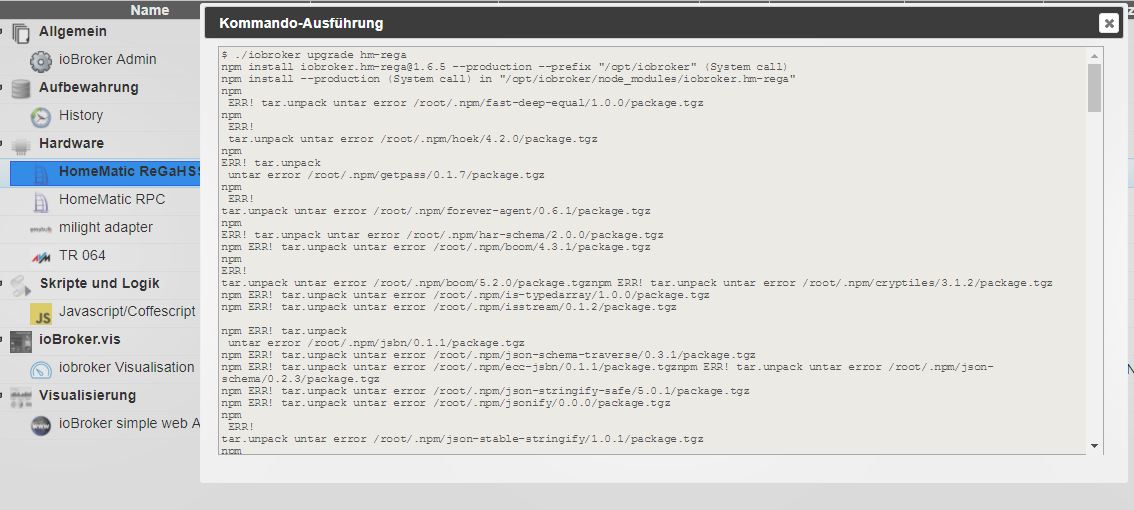
-
Hier der Post:
!
login as: pi pi@192.168.1.161's password: ! The programs included with the Debian GNU/Linux system are free software; the exact distribution terms for each program are described in the individual files in /usr/share/doc/*/copyright. ! Debian GNU/Linux comes with ABSOLUTELY NO WARRANTY, to the extent permitted by applicable law. Last login: Mon Sep 4 11:17:09 2017 pi@raspberrypi:~ $ cd /opt/iobroker pi@raspberrypi:/opt/iobroker $ iobroker stop ! iobroker controller daemon is not running pi@raspberrypi:/opt/iobroker $ pi@raspberrypi:/opt/iobroker $ sudo iobroker stop ! Stopping iobroker controller daemon... iobroker controller daemon stopped. Exit code for "killall.sh": 0 pi@raspberrypi:/opt/iobroker $ pi@raspberrypi:/opt/iobroker $ sudo iobroker update ! update done Adapter "zwave" : 0.4.4 Adapter "yr" : 1.0.5 , installed 1.0.5 Adapter "yamaha" : 0.3.14 , installed 0.3.14 Adapter "yahka" : 0.5.4 Adapter "xs1" : 1.0.2 Adapter "wolf" : 0.9.2 Adapter "wm-bus" : 0.1.12 , installed 0.2.3 [Updateable] Adapter "wifilight" : 0.1.4 Adapter "wetty" : 0.1.1 Adapter "web" : 2.1.3 , installed 2.0.2 [Updateable] Adapter "weatherunderground": 1.0.2 Adapter "vis-weather" : 0.0.6 Adapter "vis-timeandweather": 1.1.7 Adapter "vis-rgraph" : 0.0.2 Adapter "vis-plumb" : 0.1.6 Adapter "vis-players" : 0.1.4 , installed 0.1.4 Adapter "vis-metro" : 1.0.4 Adapter "vis-map" : 0.1.4 Adapter "vis-lcars" : 1.0.3 Adapter "vis-keyboard" : 0.0.2 Adapter "vis-justgage" : 0.7.1 , installed 0.7.1 Adapter "vis-jqui-mfd" : 1.0.5 Adapter "vis-hqwidgets" : 1.0.11 Adapter "vis-history" : 0.2.4 Adapter "vis-google-fonts": 0.1.0 Adapter "vis-fancyswitch": 1.0.0 Adapter "vis-colorpicker": 1.1.1 Adapter "vis-canvas-gauges": 0.1.5 Adapter "vis-bars" : 0.1.2 Adapter "vis" : 0.15.5 , installed 0.10.15 [Updateable] Adapter "vcard" : 0.0.8 Adapter "upnp" : 0.3.5 Adapter "unifi" : 0.3.1 Adapter "tvspielfilm" : 0.2.2 Adapter "tradfri" : 0.2.1 Adapter "tr-064" : 0.3.22 , installed 0.3.18 [Updateable] Adapter "text2command" : 1.1.3 Adapter "terminal" : 0.1.2 Adapter "telegram" : 1.0.6 Adapter "tankerkoenig" : 1.0.0 Adapter "starline" : 0.2.0 Adapter "squeezebox" : 0.2.0 Adapter "sql" : 1.5.6 Adapter "sony-bravia" : 0.1.0 Adapter "sonos" : 1.6.0 Adapter "sonoff" : 0.3.0 Adapter "solarwetter" : 0.1.2 Adapter "socketio" : 1.8.2 Adapter "smartmeter" : 1.0.0 Adapter "simple-api" : 1.6.0 Adapter "scenes" : 0.2.6 Adapter "sayit" : 1.5.1 Adapter "samsung" : 0.2.4 Adapter "s7" : 0.2.5 Adapter "rwe-smarthome" : 0.1.11 Adapter "rpi2" : 0.3.1 Adapter "rickshaw" : 0.4.4 Adapter "rflink" : 1.1.2 Adapter "radar" : 1.1.3 Adapter "pushsafer" : 0.1.7 Adapter "pushover" : 1.0.2 Adapter "pushbullet" : 0.0.11 Adapter "proxy" : 0.1.0 Adapter "ping" : 1.2.0 , installed 1.2.0 Adapter "pimatic" : 0.1.2 Adapter "piface" : 1.0.0 Adapter "phantomjs" : 0.1.2 Adapter "paw" : 0.0.4 Adapter "parser" : 0.2.1 Adapter "panasonic-viera": 0.1.0 Adapter "owntracks" : 0.2.0 Adapter "owfs" : 0.4.0 Adapter "openhab" : 0.1.4 Adapter "onkyo" : 0.2.0 Adapter "nut" : 1.1.1 Adapter "noolite" : 0.0.1 Adapter "node-red" : 1.1.6 , installed 1.2.0 [Updateable] Adapter "netatmo" : 1.1.5 Adapter "mysensors" : 1.0.7 Adapter "mqtt-client" : 0.3.0 Adapter "mqtt" : 1.3.2 Adapter "mpd" : 0.2.4 Adapter "modbus" : 0.5.0 , installed 0.5.2 Adapter "mobile" : 0.4.10 Adapter "milight-smart-light": 0.0.5 Adapter "milight" : 0.3.0 , installed 0.2.2 [Updateable] Adapter "mikrotik" : 0.0.20 Adapter "mihome-vacuum" : 0.5.6 Adapter "mihome-plug" : 0.1.1 Adapter "mihome" : 0.2.2 Adapter "miele" : 0.1.2 Adapter "megaesp" : 0.1.0 Adapter "megadd" : 0.2.0 Adapter "megad" : 1.2.1 Adapter "maxcul" : 0.3.0 Adapter "loxone" : 0.2.1 Adapter "lightify" : 0.2.10 Adapter "lifx" : 0.0.3 Adapter "lgtv" : 1.0.2 Adapter "landroid-s" : 1.0.3 Adapter "landroid" : 1.0.0 Adapter "kodi" : 0.2.3 Adapter "knx" : 0.8.3 Adapter "km200" : 1.01 Adapter "js2fs" : 0.0.12 Controller "js-controller" : 1.2.0 , installed 0.17.2 [Updateable] Adapter "javascript" : 3.4.0 , installed 3.3.4 [Updateable] Adapter "innogy-smarthome": 0.1.17 Adapter "influxdb" : 1.4.4 Adapter "icons-ultimate-png": 0.1.0 Adapter "icons-open-icon-library-png": 0.1.3 Adapter "icons-mfd-svg" : 1.0.2 Adapter "icons-mfd-png" : 1.0.2 Adapter "icons-material-svg": 0.1.0 Adapter "icons-material-png": 0.1.0 Adapter "icons-icons8" : 0.0.1 Adapter "icons-fatcow-hosting": 0.1.0 Adapter "icons-addictive-flavour-png": 0.1.0 Adapter "ical" : 1.3.2 Adapter "hue" : 0.6.0 Adapter "homepilot" : 0.2.6 Adapter "homekit2" : 0.1.6 Adapter "hmm" : 1.0.1 , installed 1.0.1 Adapter "hm-rpc" : 1.4.14 , installed 1.4.2 [Updateable] Adapter "hm-rega" : 1.6.5 , installed 1.4.4 [Updateable] Adapter "history" : 1.6.3 , installed 1.6.2 [Updateable] Adapter "hid" : 0.1.12 Adapter "harmony" : 0.7.0 Adapter "haier" : 0.1.0 Adapter "geofency" : 0.1.6 , installed 0.1.6 Adapter "fronius" : 1.0.2 Adapter "fritzdect" : 0.0.7 Adapter "fritzbox" : 0.2.1 Adapter "foobar2000" : 0.2.0 Adapter "flot" : 1.6.1 Adapter "firetv" : 0.0.27 Adapter "find-my-iphone": 0.2.9 Adapter "fhem" : 0.2.2 Adapter "feiertage" : 0.3.6 Adapter "fakeroku" : 0.2.1 Adapter "epson_stylus_px830": 0.0.2 Adapter "email" : 1.0.2 , installed 1.0.2 Adapter "egigeozone" : 0.1.0 Adapter "dwd" : 2.1.1 , installed 2.1.1 Adapter "discovery" : 0.4.4 Adapter "daswetter" : 0.1.6 Adapter "daikin" : 0.2.3 Adapter "cul" : 0.2.2 Adapter "cloud" : 2.0.4 Adapter "chromecast" : 1.2.3 Adapter "broadlink2" : 1.0.1 Adapter "broadlink" : 0.1.1 Adapter "botvac" : 0.5.0 Adapter "bmw" : 1.2.1 Adapter "benq" : 0.0.6 Adapter "b-control-em" : 0.2.1 Adapter "artnet" : 0.1.6 Adapter "amazon-dash" : 0.2.5 Adapter "admin" : 2.0.4 , installed 1.7.3 [Updateable] pi@raspberrypi:/opt/iobroker $ pi@raspberrypi:/opt/iobroker $ sudo iobroker upgrade self ! npm install iobroker.js-controller@1.2.0 --production --prefix "/opt/iobroker" (System call) npm WARN prefer global npm@2.15.12 should be installed with -g gyp ERR! clean error gyp ERR! stack Error: EACCES: permission denied, unlink 'build/Makefile' gyp ERR! stack at Error (native) gyp ERR! System Linux 4.9.35-v7+ gyp ERR! command "/usr/local/bin/node" "/usr/local/lib/node_modules/npm/node_modules/node-gyp/bin/node-gyp.js" "rebuild" gyp ERR! cwd /opt/iobroker/node_modules/unix-dgram gyp ERR! node -v v6.10.2 gyp ERR! node-gyp -v v3.4.0 gyp ERR! not ok gyp ERR! clean error gyp ERR! stack Error: EACCES: permission denied, unlink 'build/Makefile' gyp ERR! stack at Error (native) gyp ERR! System Linux 4.9.35-v7+ gyp ERR! command "/usr/local/bin/node" "/usr/local/lib/node_modules/npm/node_modules/node-gyp/bin/node-gyp.js" "rebuild" gyp ERR! cwd /opt/iobroker/node_modules/ursa gyp ERR! node -v v6.10.2 gyp ERR! node-gyp -v v3.4.0 gyp ERR! not ok Cannot write file. Not critical: Error: EACCES: permission denied, open '/opt/iobroker/node_modules/iobroker.js-controller/lib/setup/../../../../killall.sh' npm WARN optional SKIPPING OPTIONAL DEPENDENCY: unix-dgram@0.2.3 (node_modules/unix-dgram): npm WARN optional SKIPPING OPTIONAL DEPENDENCY: unix-dgram@0.2.3 install: `node-gyp rebuild` npm WARN optional SKIPPING OPTIONAL DEPENDENCY: Exit status 1 npm WARN optional SKIPPING OPTIONAL DEPENDENCY: ursa@0.9.4 (node_modules/ursa): npm WARN optional SKIPPING OPTIONAL DEPENDENCY: ursa@0.9.4 install: `node-gyp rebuild` npm WARN optional SKIPPING OPTIONAL DEPENDENCY: Exit status 1 Host "raspberrypi" (linux) updated Execute: chmod 777 -R /opt/iobroker Chmod finished. Restart controller Starting node restart.js pi@raspberrypi:/opt/iobroker $ pi@raspberrypi:/opt/iobroker $ ! -
Ich konnte eben den Host auf Version 1.2.0 updaten, allerdings war nach dem reboot der Host wieder auf Version 0.17.2!
-
Kann es sein, dass du zwei ioBroker Installationen in verschiedenen Verzeichnissen hast?
Gruß
Rainer
-
Nicht das ich wüsste.
Wie kann ich das prüfen?
gruß Tobi
-
kurze frage. bei mir gehen viele javascripte nicht bzw dinge die als kommand ausgeführt werden. ich glaube ich habe iobroker als pi und nicht als root installiert. gibt es eine möglichkeit iobroker als root umzuschreiben?? denke daran liegt es aber ich will nicht neu installieren. und wenn ja wie wird man root user ??
frage 2
welcher befehlt updatet denn das gesamte iobroker mit admin mit vis mit adapter ??
-
kurze frage. bei mir gehen viele javascripte nicht bzw dinge die als kommand ausgeführt werden. …...
frage 2
..... `
Bitte keinen laufenden Diskussion mit einem neuen Thema kapern, und das eigene Thema dann auch noch gleichzeitig als neuen Thread eröffnen.Gruß,
Eric
Von unterwegs getippert
-
@Käpten Karacho:Teil 2:
prompt@1.0.0 node_modules/iobroker.js-controller/node_modules/prompt -> node_mod                                                                                        ules/prompt
tar.gz@1.0.5 node_modules/iobroker.js-controller/node_modules/tar.gz -> node_mod                                                                                        ules/tar.gz
npm WARN optional SKIPPING OPTIONAL DEPENDENCY: moment-timezone@0.5.13 (node_mod                                                                                        ules/moment-timezone):
npm WARN optional SKIPPING OPTIONAL DEPENDENCY: invalid literal/length code
npm WARN optional SKIPPING OPTIONAL DEPENDENCY: moment@2.19.0 (node_modules/mome                                                                                        nt):
npm WARN optional SKIPPING OPTIONAL DEPENDENCY: unexpected end of file
npm WARN optional SKIPPING OPTIONAL DEPENDENCY: npm@2.15.12 (node_modules/npm):
npm WARN optional SKIPPING OPTIONAL DEPENDENCY: Failed to parse json
npm WARN optional SKIPPING OPTIONAL DEPENDENCY: Unexpected token '\u001f' at 1:1
npm WARN optional SKIPPING OPTIONAL DEPENDENCY: �
```` `
Wieso schiebst du hier 2MB von logs, wenn nur 20 letze Zeilen relevant sind?
Es sieht so aus, als ob deine SD Karte bald kaputt geht und die Dateien nicht mehr richtig gelesen erden können.
-
Aber welche npm Version hast du? Falls du 5.. Hast `
Hat er nicht.
@Käpten Karacho:npm ERR! node v6.10.2
npm ERR! npm v3.10.10 `
Aber Bluefox hat mit der sterbenden SD Karte wahrscheinlich recht.
Gruß
Rainer


Hey! Du scheinst an dieser Unterhaltung interessiert zu sein, hast aber noch kein Konto.
Hast du es satt, bei jedem Besuch durch die gleichen Beiträge zu scrollen? Wenn du dich für ein Konto anmeldest, kommst du immer genau dorthin zurück, wo du zuvor warst, und kannst dich über neue Antworten benachrichtigen lassen (entweder per E-Mail oder Push-Benachrichtigung). Du kannst auch Lesezeichen speichern und Beiträge positiv bewerten, um anderen Community-Mitgliedern deine Wertschätzung zu zeigen.
Mit deinem Input könnte dieser Beitrag noch besser werden 💗
Registrieren Anmelden360
Online33.0k
Benutzer83.5k
Themen1.3m
Beiträge