



Skip to content
  • Home
  • Recent
  • Tags
  • 0 Unread 0
  • Categories
  • Unreplied
  • Popular
  • GitHub
  • Docu
  • Hilfe
Skins
  • Light
  • Brite
  • Cerulean
  • Cosmo
  • Flatly
  • Journal
  • Litera
  • Lumen
  • Lux
  • Materia
  • Minty
  • Morph
  • Pulse
  • Sandstone
  • Simplex
  • Sketchy
  • Spacelab
  • United
  • Yeti
  • Zephyr
  • Dark
  • Cyborg
  • Darkly
  • Quartz
  • Slate
  • Solar
  • Superhero
  • Vapor

  • Default (No Skin)
  • No Skin
Collapse
ioBroker Logo

Community Forum

donate donate
  1. ioBroker Community Home
  2. Deutsch
  3. Cloud Dienste
  4. Frage zur Bezeichnung der einzelnen Geräte
NEWS

  • Neuer ioBroker-Blog online: Monatsrückblick März/April 2026
    BluefoxB
    Bluefox
    5
    1
    109

  • Verwendung von KI bitte immer deutlich kennzeichnen
    HomoranH
    Homoran
    8
    1
    152

  • Monatsrückblick Januar/Februar 2026 ist online!
    BluefoxB
    Bluefox
    18
    1
    865

Frage zur Bezeichnung der einzelnen Geräte

Scheduled Pinned Locked Moved Cloud Dienste
2 Posts 2 Posters 602 Views
  • Oldest to Newest
  • Newest to Oldest
  • Most Votes
Reply
  • Reply as topic
Log in to reply
This topic has been deleted. Only users with topic management privileges can see it.
  • B Offline
    B Offline
    BennyB2912
    wrote on last edited by
    #1

    Hallo Community,

    ich komme mit der Bezeichnung der einzelnen Geräte in der CCU in Verbindung mit Alexa nicht ganz klar.

    Ich habe meine Rollladen im Büro "Rollladen Büro" genannt und ihm den Raum "Büro" und das Gewerk "Rollladen" zugewiesen.

    Wenn ich jetzt "Rollladen Büro aus" sage, sagt mir Alexa "ich habe Rollladen Büro nicht gefunden".

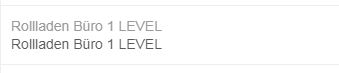
    Im Menue "Smart Home" bei Alexa finde ich den Rollladen wie folgt: siehe angehängte Datei

    Warum steht da jetzt Rollladen Büro 1 LEVEL?

    Wie muss ich ich meine Geräte benennen, damit das auch mit Alexa funktioniert ohne das irgendwelche Anhänge am Namen sind, wie hier in dem Beispiel das "1 LEVEL"?
    2228_rolladen_b_ro_1_level.jpg

    1 Reply Last reply
    0
    • Z Offline
      Z Offline
      zdenko33
      wrote on last edited by
      #2

      In den Einstellungen von Cloud Adapter, gibt es im Reiter Smart Geräte, einen Button (Bleistift) zum editieren, dort kannst du deinen Namen vergeben…

      Danach wieder in Alexa App die Geräte suchen lassen.

      1 Reply Last reply
      0

      Hello! It looks like you're interested in this conversation, but you don't have an account yet.

      Getting fed up of having to scroll through the same posts each visit? When you register for an account, you'll always come back to exactly where you were before, and choose to be notified of new replies (either via email, or push notification). You'll also be able to save bookmarks and upvote posts to show your appreciation to other community members.

      With your input, this post could be even better 💗

      Register Login
      Reply
      • Reply as topic
      Log in to reply
      • Oldest to Newest
      • Newest to Oldest
      • Most Votes


      Support us

      ioBroker
      Community Adapters
      Donate
      FAQ Cloud / IOT
      HowTo: Node.js-Update
      HowTo: Backup/Restore
      Downloads
      BLOG

      503

      Online

      32.8k

      Users

      82.7k

      Topics

      1.3m

      Posts
      Community
      Impressum | Datenschutz-Bestimmungen | Nutzungsbedingungen | Einwilligungseinstellungen
      ioBroker Community 2014-2025
      logo
      • Login

      • Don't have an account? Register

      • Login or register to search.
      • First post
        Last post
      0
      • Home
      • Recent
      • Tags
      • Unread 0
      • Categories
      • Unreplied
      • Popular
      • GitHub
      • Docu
      • Hilfe