




[solved] Broadlink2 adapter does not learn HF (433MHz) dev.
-
Hello.
I have purchased a "BroadLink RM4 pro".
I have integrated this via the Broadlink2 adapter in the ioBroker.
Everything works and I can teach my IR devices and also control them from the ioBroker.But I am not able to control HF, i.e. 433MHz devices.
node: v16.16.0
js-controller: 4.0.23
Broadlink2 adapter: 2.1.5My adapter settings:
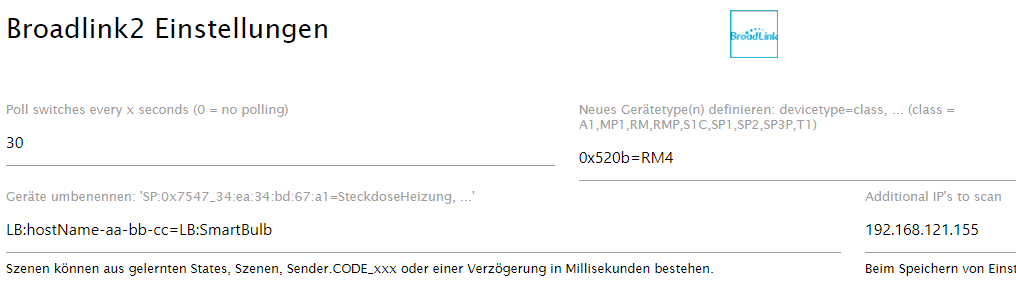
The log shows the start of the adapter and the successful learning of an IR code. If I try to connect a 433MHz device, no message appears in the log (except this: "Please press button on remote in next x seconds!", and the "checkData command 04:RM4, RM:BroadLink-Remote-84-f3-75").:
broadlink2.0
2022-07-10 19:54:57.255	info	Learned new Code RM:BroadLink-Remote-84-f3-75 (hex): 2600b8000001138e16321512161215121412151315321612143315111612153216311612153215111612153215121631161116111612151115331512163116121532153216311631160003a600011447140003a600011547140003a700011447140003a600011546150003a700011447150003a500011547130003a800011447150003a600011645150003a600011646130003a800011545150003a700011645140003a800011347140003a700011547130003a80001164415000d050000000000000000000000000000

broadlink2.0
2022-07-10 19:54:57.201	info	Learning finished and packet received!

broadlink2.0
2022-07-10 19:54:57.200	info	checkData command 04:RM4, RM:BroadLink-Remote-84-f3-75, ec:0b:ae:84:f3:75, 192.168.121.155, 智能遥控, fw=f28c, 2600b8000001138e16321512161215121412151315321612143315111612153216311612153215111612153215121631161116111612151115331512163116121532153216311631160003a600011447140003a600011547140003a700011447140003a600011546150003a700011447150003a500011547130003a800011447150003a600011645150003a600011646130003a800011545150003a700011645140003a800011347140003a700011547130003a80001164415000d050000000000000000000000000000, 202

broadlink2.0
2022-07-10 19:54:56.069	info	Please press button on remote in next 28 seconds!

broadlink2.0
2022-07-10 19:54:56.069	info	checkData command 04:RM4, RM:BroadLink-Remote-84-f3-75, ec:0b:ae:84:f3:75, 192.168.121.155, 智能遥控, fw=f28c, 00000000000000000000, 10

broadlink2.0
2022-07-10 19:54:54.850	info	Please press button on remote in next 29 seconds!

broadlink2.0
2022-07-10 19:54:54.849	info	checkData command 04:RM4, RM:BroadLink-Remote-84-f3-75, ec:0b:ae:84:f3:75, 192.168.121.155, 智能遥控, fw=f28c, 00000000000000000000, 10

broadlink2.0
2022-07-10 19:54:53.675	info	enterLearning command 03:RM4, RM:BroadLink-Remote-84-f3-75, ec:0b:ae:84:f3:75, 192.168.121.155, 智能遥控, fw=f28c

broadlink2.0
2022-07-10 19:54:52.670	info	Start learning with RM:BroadLink-Remote-84-f3-75: Please press button on remote in next 30 seconds!

broadlink2.0
2022-07-10 19:54:30.884	info	Learned new Code RM:BroadLink-Remote-84-f3-75 (hex): 260090000001148f1730171115111612151216111532161116311612161115331631161016311612163116121532170f161215121611151216121532161016311633153216311730160003a400011943170003a400011646160003a400011546170003a300011845160003a400011546170003a400011745170003a400011744170003a400011844160003a50001184316000d05000000000000

broadlink2.0
2022-07-10 19:54:30.783	info	Learning finished and packet received!

broadlink2.0
2022-07-10 19:54:30.781	info	checkData command 04:RM4, RM:BroadLink-Remote-84-f3-75, ec:0b:ae:84:f3:75, 192.168.121.155, 智能遥控, fw=f28c, 260090000001148f1730171115111612151216111532161116311612161115331631161016311612163116121532170f161215121611151216121532161016311633153216311730160003a400011943170003a400011646160003a400011546170003a300011845160003a400011546170003a400011745170003a400011744170003a400011844160003a50001184316000d05000000000000, 154

broadlink2.0
2022-07-10 19:54:29.654	info	Please press button on remote in next 25 seconds!

broadlink2.0
2022-07-10 19:54:29.653	info	checkData command 04:RM4, RM:BroadLink-Remote-84-f3-75, ec:0b:ae:84:f3:75, 192.168.121.155, 智能遥控, fw=f28c, 00000000000000000000, 10

broadlink2.0
2022-07-10 19:54:28.565	info	Please press button on remote in next 26 seconds!

broadlink2.0
2022-07-10 19:54:28.563	info	checkData command 04:RM4, RM:BroadLink-Remote-84-f3-75, ec:0b:ae:84:f3:75, 192.168.121.155, 智能遥控, fw=f28c, 00000000000000000000, 10

broadlink2.0
2022-07-10 19:54:27.522	info	Please press button on remote in next 27 seconds!

broadlink2.0
2022-07-10 19:54:27.519	info	checkData command 04:RM4, RM:BroadLink-Remote-84-f3-75, ec:0b:ae:84:f3:75, 192.168.121.155, 智能遥控, fw=f28c, 00000000000000000000, 10

broadlink2.0
2022-07-10 19:54:26.478	info	Please press button on remote in next 28 seconds!

broadlink2.0
2022-07-10 19:54:26.476	info	checkData command 04:RM4, RM:BroadLink-Remote-84-f3-75, ec:0b:ae:84:f3:75, 192.168.121.155, 智能遥控, fw=f28c, 00000000000000000000, 10

broadlink2.0
2022-07-10 19:54:25.355	info	Please press button on remote in next 29 seconds!

broadlink2.0
2022-07-10 19:54:25.354	info	checkData command 04:RM4, RM:BroadLink-Remote-84-f3-75, ec:0b:ae:84:f3:75, 192.168.121.155, 智能遥控, fw=f28c, 00000000000000000000, 10

broadlink2.0
2022-07-10 19:54:24.235	info	enterLearning command 03:RM4, RM:BroadLink-Remote-84-f3-75, ec:0b:ae:84:f3:75, 192.168.121.155, 智能遥控, fw=f28c

broadlink2.0
2022-07-10 19:54:24.233	info	checkData command 04:RM4, RM:BroadLink-Remote-84-f3-75, ec:0b:ae:84:f3:75, 192.168.121.155, 智能遥控, fw=f28c, 00000000000000000000, 10

broadlink2.0
2022-07-10 19:54:24.125	info	Start learning with RM:BroadLink-Remote-84-f3-75: Please press button on remote in next 30 seconds!

broadlink2.0
2022-07-10 19:53:43.611	info	found macs: ec:0b:ae:84:f3:75

broadlink2.0
2022-07-10 19:53:43.610	info	broadlink2.0 started and found 1 devices named RM:BroadLink-Remote-84-f3-75

broadlink2.0
2022-07-10 19:53:43.609	info	Poll every 30 secods.

broadlink2.0
2022-07-10 19:53:39.227	info	discover [ '192.168.121.155' ] from 0.0.0.0:56742

broadlink2.0
2022-07-10 19:53:39.226	info	interface to be used: { netmaskBits: 24, address: '192.168.121.111/24', addrs: [ 192, 168, 121, 111 ], cidr: '192.168.121.111/24', bcaddr: '192.168.121.255' }:

broadlink2.0
2022-07-10 19:53:34.744	info	Device RM:BroadLink-Remote-84-f3-75 detected: address=192.168.121.155, mac=ec:0b:ae:84:f3:75, typ=RM4, id=0x520b devtype=rm4

broadlink2.0
2022-07-10 19:53:34.008	info	discover [ '192.168.121.255', '255.255.255.255', '224.0.0.251' ] from 0.0.0.0:58726

broadlink2.0
2022-07-10 19:53:34.005	info	interface to be used: { netmaskBits: 24, address: '192.168.121.111/24', addrs: [ 192, 168, 121, 111 ], cidr: '192.168.121.111/24', bcaddr: '192.168.121.255' }:

broadlink2.0
2022-07-10 19:53:33.985	info	Discover Broadlink devices for 10sec on broadlink2.0

broadlink2.0
2022-07-10 19:53:33.982	info	macObjects: []

broadlink2.0
2022-07-10 19:53:33.981	info	interface to be used: { netmaskBits: 24, address: '192.168.121.111/24', addrs: [ 192, 168, 121, 111 ], cidr: '192.168.121.111/24', bcaddr: '192.168.121.255' }:

broadlink2.0
2022-07-10 19:53:33.977	info	broadlink2 has 0 old devices!

broadlink2.0
2022-07-10 19:53:33.975	info	Devices to rename: LB:hostName-aa-bb-cc=LB:SmartBulb

broadlink2.0
2022-07-10 19:53:33.974	info	Devices to add: 0x520b=RM4

broadlink2.0
2022-07-10 19:53:33.972	info	Scanning additional IP's: 192.168.121.155

broadlink2.0
2022-07-10 19:53:33.969	info	broadlink2 initialization started...

broadlink2.0
2022-07-10 19:53:33.843	info	starting. Version 2.1.5 in /opt/iobroker/node_modules/iobroker.broadlink2, node: v16.16.0, js-controller: 4.0.23
Using the BroadLink app, teaching the 433 MHz device had worked without any problems.
Does anyone have any ideas about this?
Greetings
Otto -
Hello.
I have purchased a "BroadLink RM4 pro".
I have integrated this via the Broadlink2 adapter in the ioBroker.
Everything works and I can teach my IR devices and also control them from the ioBroker.But I am not able to control HF, i.e. 433MHz devices.
node: v16.16.0
js-controller: 4.0.23
Broadlink2 adapter: 2.1.5My adapter settings:
The log shows the start of the adapter and the successful learning of an IR code. If I try to connect a 433MHz device, no message appears in the log (except this: "Please press button on remote in next x seconds!", and the "checkData command 04:RM4, RM:BroadLink-Remote-84-f3-75").:
broadlink2.0
2022-07-10 19:54:57.255	info	Learned new Code RM:BroadLink-Remote-84-f3-75 (hex): 2600b8000001138e16321512161215121412151315321612143315111612153216311612153215111612153215121631161116111612151115331512163116121532153216311631160003a600011447140003a600011547140003a700011447140003a600011546150003a700011447150003a500011547130003a800011447150003a600011645150003a600011646130003a800011545150003a700011645140003a800011347140003a700011547130003a80001164415000d050000000000000000000000000000

broadlink2.0
2022-07-10 19:54:57.201	info	Learning finished and packet received!

broadlink2.0
2022-07-10 19:54:57.200	info	checkData command 04:RM4, RM:BroadLink-Remote-84-f3-75, ec:0b:ae:84:f3:75, 192.168.121.155, 智能遥控, fw=f28c, 2600b8000001138e16321512161215121412151315321612143315111612153216311612153215111612153215121631161116111612151115331512163116121532153216311631160003a600011447140003a600011547140003a700011447140003a600011546150003a700011447150003a500011547130003a800011447150003a600011645150003a600011646130003a800011545150003a700011645140003a800011347140003a700011547130003a80001164415000d050000000000000000000000000000, 202

broadlink2.0
2022-07-10 19:54:56.069	info	Please press button on remote in next 28 seconds!

broadlink2.0
2022-07-10 19:54:56.069	info	checkData command 04:RM4, RM:BroadLink-Remote-84-f3-75, ec:0b:ae:84:f3:75, 192.168.121.155, 智能遥控, fw=f28c, 00000000000000000000, 10

broadlink2.0
2022-07-10 19:54:54.850	info	Please press button on remote in next 29 seconds!

broadlink2.0
2022-07-10 19:54:54.849	info	checkData command 04:RM4, RM:BroadLink-Remote-84-f3-75, ec:0b:ae:84:f3:75, 192.168.121.155, 智能遥控, fw=f28c, 00000000000000000000, 10

broadlink2.0
2022-07-10 19:54:53.675	info	enterLearning command 03:RM4, RM:BroadLink-Remote-84-f3-75, ec:0b:ae:84:f3:75, 192.168.121.155, 智能遥控, fw=f28c

broadlink2.0
2022-07-10 19:54:52.670	info	Start learning with RM:BroadLink-Remote-84-f3-75: Please press button on remote in next 30 seconds!

broadlink2.0
2022-07-10 19:54:30.884	info	Learned new Code RM:BroadLink-Remote-84-f3-75 (hex): 260090000001148f1730171115111612151216111532161116311612161115331631161016311612163116121532170f161215121611151216121532161016311633153216311730160003a400011943170003a400011646160003a400011546170003a300011845160003a400011546170003a400011745170003a400011744170003a400011844160003a50001184316000d05000000000000

broadlink2.0
2022-07-10 19:54:30.783	info	Learning finished and packet received!

broadlink2.0
2022-07-10 19:54:30.781	info	checkData command 04:RM4, RM:BroadLink-Remote-84-f3-75, ec:0b:ae:84:f3:75, 192.168.121.155, 智能遥控, fw=f28c, 260090000001148f1730171115111612151216111532161116311612161115331631161016311612163116121532170f161215121611151216121532161016311633153216311730160003a400011943170003a400011646160003a400011546170003a300011845160003a400011546170003a400011745170003a400011744170003a400011844160003a50001184316000d05000000000000, 154

broadlink2.0
2022-07-10 19:54:29.654	info	Please press button on remote in next 25 seconds!

broadlink2.0
2022-07-10 19:54:29.653	info	checkData command 04:RM4, RM:BroadLink-Remote-84-f3-75, ec:0b:ae:84:f3:75, 192.168.121.155, 智能遥控, fw=f28c, 00000000000000000000, 10

broadlink2.0
2022-07-10 19:54:28.565	info	Please press button on remote in next 26 seconds!

broadlink2.0
2022-07-10 19:54:28.563	info	checkData command 04:RM4, RM:BroadLink-Remote-84-f3-75, ec:0b:ae:84:f3:75, 192.168.121.155, 智能遥控, fw=f28c, 00000000000000000000, 10

broadlink2.0
2022-07-10 19:54:27.522	info	Please press button on remote in next 27 seconds!

broadlink2.0
2022-07-10 19:54:27.519	info	checkData command 04:RM4, RM:BroadLink-Remote-84-f3-75, ec:0b:ae:84:f3:75, 192.168.121.155, 智能遥控, fw=f28c, 00000000000000000000, 10

broadlink2.0
2022-07-10 19:54:26.478	info	Please press button on remote in next 28 seconds!

broadlink2.0
2022-07-10 19:54:26.476	info	checkData command 04:RM4, RM:BroadLink-Remote-84-f3-75, ec:0b:ae:84:f3:75, 192.168.121.155, 智能遥控, fw=f28c, 00000000000000000000, 10

broadlink2.0
2022-07-10 19:54:25.355	info	Please press button on remote in next 29 seconds!

broadlink2.0
2022-07-10 19:54:25.354	info	checkData command 04:RM4, RM:BroadLink-Remote-84-f3-75, ec:0b:ae:84:f3:75, 192.168.121.155, 智能遥控, fw=f28c, 00000000000000000000, 10

broadlink2.0
2022-07-10 19:54:24.235	info	enterLearning command 03:RM4, RM:BroadLink-Remote-84-f3-75, ec:0b:ae:84:f3:75, 192.168.121.155, 智能遥控, fw=f28c

broadlink2.0
2022-07-10 19:54:24.233	info	checkData command 04:RM4, RM:BroadLink-Remote-84-f3-75, ec:0b:ae:84:f3:75, 192.168.121.155, 智能遥控, fw=f28c, 00000000000000000000, 10

broadlink2.0
2022-07-10 19:54:24.125	info	Start learning with RM:BroadLink-Remote-84-f3-75: Please press button on remote in next 30 seconds!

broadlink2.0
2022-07-10 19:53:43.611	info	found macs: ec:0b:ae:84:f3:75

broadlink2.0
2022-07-10 19:53:43.610	info	broadlink2.0 started and found 1 devices named RM:BroadLink-Remote-84-f3-75

broadlink2.0
2022-07-10 19:53:43.609	info	Poll every 30 secods.

broadlink2.0
2022-07-10 19:53:39.227	info	discover [ '192.168.121.155' ] from 0.0.0.0:56742

broadlink2.0
2022-07-10 19:53:39.226	info	interface to be used: { netmaskBits: 24, address: '192.168.121.111/24', addrs: [ 192, 168, 121, 111 ], cidr: '192.168.121.111/24', bcaddr: '192.168.121.255' }:

broadlink2.0
2022-07-10 19:53:34.744	info	Device RM:BroadLink-Remote-84-f3-75 detected: address=192.168.121.155, mac=ec:0b:ae:84:f3:75, typ=RM4, id=0x520b devtype=rm4

broadlink2.0
2022-07-10 19:53:34.008	info	discover [ '192.168.121.255', '255.255.255.255', '224.0.0.251' ] from 0.0.0.0:58726

broadlink2.0
2022-07-10 19:53:34.005	info	interface to be used: { netmaskBits: 24, address: '192.168.121.111/24', addrs: [ 192, 168, 121, 111 ], cidr: '192.168.121.111/24', bcaddr: '192.168.121.255' }:

broadlink2.0
2022-07-10 19:53:33.985	info	Discover Broadlink devices for 10sec on broadlink2.0

broadlink2.0
2022-07-10 19:53:33.982	info	macObjects: []

broadlink2.0
2022-07-10 19:53:33.981	info	interface to be used: { netmaskBits: 24, address: '192.168.121.111/24', addrs: [ 192, 168, 121, 111 ], cidr: '192.168.121.111/24', bcaddr: '192.168.121.255' }:

broadlink2.0
2022-07-10 19:53:33.977	info	broadlink2 has 0 old devices!

broadlink2.0
2022-07-10 19:53:33.975	info	Devices to rename: LB:hostName-aa-bb-cc=LB:SmartBulb

broadlink2.0
2022-07-10 19:53:33.974	info	Devices to add: 0x520b=RM4

broadlink2.0
2022-07-10 19:53:33.972	info	Scanning additional IP's: 192.168.121.155

broadlink2.0
2022-07-10 19:53:33.969	info	broadlink2 initialization started...

broadlink2.0
2022-07-10 19:53:33.843	info	starting. Version 2.1.5 in /opt/iobroker/node_modules/iobroker.broadlink2, node: v16.16.0, js-controller: 4.0.23
Using the BroadLink app, teaching the 433 MHz device had worked without any problems.
Does anyone have any ideas about this?
Greetings
Otto@smartotto warum Doppelpost?
-
Hello.
I have purchased a "BroadLink RM4 pro".
I have integrated this via the Broadlink2 adapter in the ioBroker.
Everything works and I can teach my IR devices and also control them from the ioBroker.But I am not able to control HF, i.e. 433MHz devices.
node: v16.16.0
js-controller: 4.0.23
Broadlink2 adapter: 2.1.5My adapter settings:
The log shows the start of the adapter and the successful learning of an IR code. If I try to connect a 433MHz device, no message appears in the log (except this: "Please press button on remote in next x seconds!", and the "checkData command 04:RM4, RM:BroadLink-Remote-84-f3-75").:
broadlink2.0
2022-07-10 19:54:57.255	info	Learned new Code RM:BroadLink-Remote-84-f3-75 (hex): 2600b8000001138e16321512161215121412151315321612143315111612153216311612153215111612153215121631161116111612151115331512163116121532153216311631160003a600011447140003a600011547140003a700011447140003a600011546150003a700011447150003a500011547130003a800011447150003a600011645150003a600011646130003a800011545150003a700011645140003a800011347140003a700011547130003a80001164415000d050000000000000000000000000000

broadlink2.0
2022-07-10 19:54:57.201	info	Learning finished and packet received!

broadlink2.0
2022-07-10 19:54:57.200	info	checkData command 04:RM4, RM:BroadLink-Remote-84-f3-75, ec:0b:ae:84:f3:75, 192.168.121.155, 智能遥控, fw=f28c, 2600b8000001138e16321512161215121412151315321612143315111612153216311612153215111612153215121631161116111612151115331512163116121532153216311631160003a600011447140003a600011547140003a700011447140003a600011546150003a700011447150003a500011547130003a800011447150003a600011645150003a600011646130003a800011545150003a700011645140003a800011347140003a700011547130003a80001164415000d050000000000000000000000000000, 202

broadlink2.0
2022-07-10 19:54:56.069	info	Please press button on remote in next 28 seconds!

broadlink2.0
2022-07-10 19:54:56.069	info	checkData command 04:RM4, RM:BroadLink-Remote-84-f3-75, ec:0b:ae:84:f3:75, 192.168.121.155, 智能遥控, fw=f28c, 00000000000000000000, 10

broadlink2.0
2022-07-10 19:54:54.850	info	Please press button on remote in next 29 seconds!

broadlink2.0
2022-07-10 19:54:54.849	info	checkData command 04:RM4, RM:BroadLink-Remote-84-f3-75, ec:0b:ae:84:f3:75, 192.168.121.155, 智能遥控, fw=f28c, 00000000000000000000, 10

broadlink2.0
2022-07-10 19:54:53.675	info	enterLearning command 03:RM4, RM:BroadLink-Remote-84-f3-75, ec:0b:ae:84:f3:75, 192.168.121.155, 智能遥控, fw=f28c

broadlink2.0
2022-07-10 19:54:52.670	info	Start learning with RM:BroadLink-Remote-84-f3-75: Please press button on remote in next 30 seconds!

broadlink2.0
2022-07-10 19:54:30.884	info	Learned new Code RM:BroadLink-Remote-84-f3-75 (hex): 260090000001148f1730171115111612151216111532161116311612161115331631161016311612163116121532170f161215121611151216121532161016311633153216311730160003a400011943170003a400011646160003a400011546170003a300011845160003a400011546170003a400011745170003a400011744170003a400011844160003a50001184316000d05000000000000

broadlink2.0
2022-07-10 19:54:30.783	info	Learning finished and packet received!

broadlink2.0
2022-07-10 19:54:30.781	info	checkData command 04:RM4, RM:BroadLink-Remote-84-f3-75, ec:0b:ae:84:f3:75, 192.168.121.155, 智能遥控, fw=f28c, 260090000001148f1730171115111612151216111532161116311612161115331631161016311612163116121532170f161215121611151216121532161016311633153216311730160003a400011943170003a400011646160003a400011546170003a300011845160003a400011546170003a400011745170003a400011744170003a400011844160003a50001184316000d05000000000000, 154

broadlink2.0
2022-07-10 19:54:29.654	info	Please press button on remote in next 25 seconds!

broadlink2.0
2022-07-10 19:54:29.653	info	checkData command 04:RM4, RM:BroadLink-Remote-84-f3-75, ec:0b:ae:84:f3:75, 192.168.121.155, 智能遥控, fw=f28c, 00000000000000000000, 10

broadlink2.0
2022-07-10 19:54:28.565	info	Please press button on remote in next 26 seconds!

broadlink2.0
2022-07-10 19:54:28.563	info	checkData command 04:RM4, RM:BroadLink-Remote-84-f3-75, ec:0b:ae:84:f3:75, 192.168.121.155, 智能遥控, fw=f28c, 00000000000000000000, 10

broadlink2.0
2022-07-10 19:54:27.522	info	Please press button on remote in next 27 seconds!

broadlink2.0
2022-07-10 19:54:27.519	info	checkData command 04:RM4, RM:BroadLink-Remote-84-f3-75, ec:0b:ae:84:f3:75, 192.168.121.155, 智能遥控, fw=f28c, 00000000000000000000, 10

broadlink2.0
2022-07-10 19:54:26.478	info	Please press button on remote in next 28 seconds!

broadlink2.0
2022-07-10 19:54:26.476	info	checkData command 04:RM4, RM:BroadLink-Remote-84-f3-75, ec:0b:ae:84:f3:75, 192.168.121.155, 智能遥控, fw=f28c, 00000000000000000000, 10

broadlink2.0
2022-07-10 19:54:25.355	info	Please press button on remote in next 29 seconds!

broadlink2.0
2022-07-10 19:54:25.354	info	checkData command 04:RM4, RM:BroadLink-Remote-84-f3-75, ec:0b:ae:84:f3:75, 192.168.121.155, 智能遥控, fw=f28c, 00000000000000000000, 10

broadlink2.0
2022-07-10 19:54:24.235	info	enterLearning command 03:RM4, RM:BroadLink-Remote-84-f3-75, ec:0b:ae:84:f3:75, 192.168.121.155, 智能遥控, fw=f28c

broadlink2.0
2022-07-10 19:54:24.233	info	checkData command 04:RM4, RM:BroadLink-Remote-84-f3-75, ec:0b:ae:84:f3:75, 192.168.121.155, 智能遥控, fw=f28c, 00000000000000000000, 10

broadlink2.0
2022-07-10 19:54:24.125	info	Start learning with RM:BroadLink-Remote-84-f3-75: Please press button on remote in next 30 seconds!

broadlink2.0
2022-07-10 19:53:43.611	info	found macs: ec:0b:ae:84:f3:75

broadlink2.0
2022-07-10 19:53:43.610	info	broadlink2.0 started and found 1 devices named RM:BroadLink-Remote-84-f3-75

broadlink2.0
2022-07-10 19:53:43.609	info	Poll every 30 secods.

broadlink2.0
2022-07-10 19:53:39.227	info	discover [ '192.168.121.155' ] from 0.0.0.0:56742

broadlink2.0
2022-07-10 19:53:39.226	info	interface to be used: { netmaskBits: 24, address: '192.168.121.111/24', addrs: [ 192, 168, 121, 111 ], cidr: '192.168.121.111/24', bcaddr: '192.168.121.255' }:

broadlink2.0
2022-07-10 19:53:34.744	info	Device RM:BroadLink-Remote-84-f3-75 detected: address=192.168.121.155, mac=ec:0b:ae:84:f3:75, typ=RM4, id=0x520b devtype=rm4

broadlink2.0
2022-07-10 19:53:34.008	info	discover [ '192.168.121.255', '255.255.255.255', '224.0.0.251' ] from 0.0.0.0:58726

broadlink2.0
2022-07-10 19:53:34.005	info	interface to be used: { netmaskBits: 24, address: '192.168.121.111/24', addrs: [ 192, 168, 121, 111 ], cidr: '192.168.121.111/24', bcaddr: '192.168.121.255' }:

broadlink2.0
2022-07-10 19:53:33.985	info	Discover Broadlink devices for 10sec on broadlink2.0

broadlink2.0
2022-07-10 19:53:33.982	info	macObjects: []

broadlink2.0
2022-07-10 19:53:33.981	info	interface to be used: { netmaskBits: 24, address: '192.168.121.111/24', addrs: [ 192, 168, 121, 111 ], cidr: '192.168.121.111/24', bcaddr: '192.168.121.255' }:

broadlink2.0
2022-07-10 19:53:33.977	info	broadlink2 has 0 old devices!

broadlink2.0
2022-07-10 19:53:33.975	info	Devices to rename: LB:hostName-aa-bb-cc=LB:SmartBulb

broadlink2.0
2022-07-10 19:53:33.974	info	Devices to add: 0x520b=RM4

broadlink2.0
2022-07-10 19:53:33.972	info	Scanning additional IP's: 192.168.121.155

broadlink2.0
2022-07-10 19:53:33.969	info	broadlink2 initialization started...

broadlink2.0
2022-07-10 19:53:33.843	info	starting. Version 2.1.5 in /opt/iobroker/node_modules/iobroker.broadlink2, node: v16.16.0, js-controller: 4.0.23
Using the BroadLink app, teaching the 433 MHz device had worked without any problems.
Does anyone have any ideas about this?
Greetings
OttoProblem was solved by proper configuration.
After I used as devices definition RM4P also the object _LearnRF appeared and I can teach the HF (433MHz) devices.
It takes several attempts but at some point the adapter recognizes the button.
Hey! Du scheinst an dieser Unterhaltung interessiert zu sein, hast aber noch kein Konto.
Hast du es satt, bei jedem Besuch durch die gleichen Beiträge zu scrollen? Wenn du dich für ein Konto anmeldest, kommst du immer genau dorthin zurück, wo du zuvor warst, und kannst dich über neue Antworten benachrichtigen lassen (entweder per E-Mail oder Push-Benachrichtigung). Du kannst auch Lesezeichen speichern und Beiträge positiv bewerten, um anderen Community-Mitgliedern deine Wertschätzung zu zeigen.
Mit deinem Input könnte dieser Beitrag noch besser werden 💗
Registrieren AnmeldenSupport us
441
Online33.0k
Benutzer83.6k
Themen1.3m
Beiträge