




JSON - Reading a datapoint with a . in the name? - Solved
-
Hi, I am having trouble reading a data point from a JSON message in blockly. The script works, however there is 1 datapoint with a . in it. Is there a trick to get it done? I tried various solutions I found online, however to no avail. See the JSON message below.
{"Time":"2021-03-28T11:31:08","BMP180":{"Temperature":11.4,"Pressure":1022.7},"SHT3X-0x45":{"Temperature":11.2,"Humidity":45.3,"DewPoint":-0.3},"SDS0X1":{"PM2.5":3.6,"PM10":7.0},"PressureUnit":"hPa","TempUnit":"C"}
-
Hi, I am having trouble reading a data point from a JSON message in blockly. The script works, however there is 1 datapoint with a . in it. Is there a trick to get it done? I tried various solutions I found online, however to no avail. See the JSON message below.
{"Time":"2021-03-28T11:31:08","BMP180":{"Temperature":11.4,"Pressure":1022.7},"SHT3X-0x45":{"Temperature":11.2,"Humidity":45.3,"DewPoint":-0.3},"SDS0X1":{"PM2.5":3.6,"PM10":7.0},"PressureUnit":"hPa","TempUnit":"C"}
-
This is my code, however the PM2.5 still does not work in this script. I used the code in blockly and that works fine! Now I can see the differences, but I still would like to understand why the script does not work?
Probably obvious to experienced Java programmers, however not for a newbie like me. Any help appreciated!
var AQ; on({id: "mqtt.0.tele.tasmota_sensors_7E466A.SENSOR", change: "any"}, async function (obj) { var value = obj.state.val; var oldValue = obj.oldState.val; AQ = (function () { try {return JSON.parse(getState("mqtt.0.tele.tasmota_sensors_7E466A.SENSOR").val);} catch(e) {return {};}})(); console.log('PM10 & PM2.5'); console.log(parseFloat(getAttr(AQ, 'SDS0X1.PM10'))); console.log(parseFloat(getAttr(AQ, 'SDS0X1['PM2.5']'))); if (parseFloat(getAttr(AQ, 'SDS0X1.PM10')) != 0) { setState("javascript.0.Air-quality.10um", parseFloat(getAttr(AQ, 'SDS0X1.PM10')), true); } if (parseFloat(getAttr (AQ, 'SDS0X1['PM2.5']') != 0) { setState("javascript.0.Air-quality.2_5um", parseFloat(getAttr(AQ, 'SDS0X1['PM2.5']')), true); } }); -
This is my code, however the PM2.5 still does not work in this script. I used the code in blockly and that works fine! Now I can see the differences, but I still would like to understand why the script does not work?
Probably obvious to experienced Java programmers, however not for a newbie like me. Any help appreciated!
var AQ; on({id: "mqtt.0.tele.tasmota_sensors_7E466A.SENSOR", change: "any"}, async function (obj) { var value = obj.state.val; var oldValue = obj.oldState.val; AQ = (function () { try {return JSON.parse(getState("mqtt.0.tele.tasmota_sensors_7E466A.SENSOR").val);} catch(e) {return {};}})(); console.log('PM10 & PM2.5'); console.log(parseFloat(getAttr(AQ, 'SDS0X1.PM10'))); console.log(parseFloat(getAttr(AQ, 'SDS0X1['PM2.5']'))); if (parseFloat(getAttr(AQ, 'SDS0X1.PM10')) != 0) { setState("javascript.0.Air-quality.10um", parseFloat(getAttr(AQ, 'SDS0X1.PM10')), true); } if (parseFloat(getAttr (AQ, 'SDS0X1['PM2.5']') != 0) { setState("javascript.0.Air-quality.2_5um", parseFloat(getAttr(AQ, 'SDS0X1['PM2.5']')), true); } });@erwinberlin sagte): 'SDS0X1['PM2.5']'
Try this:
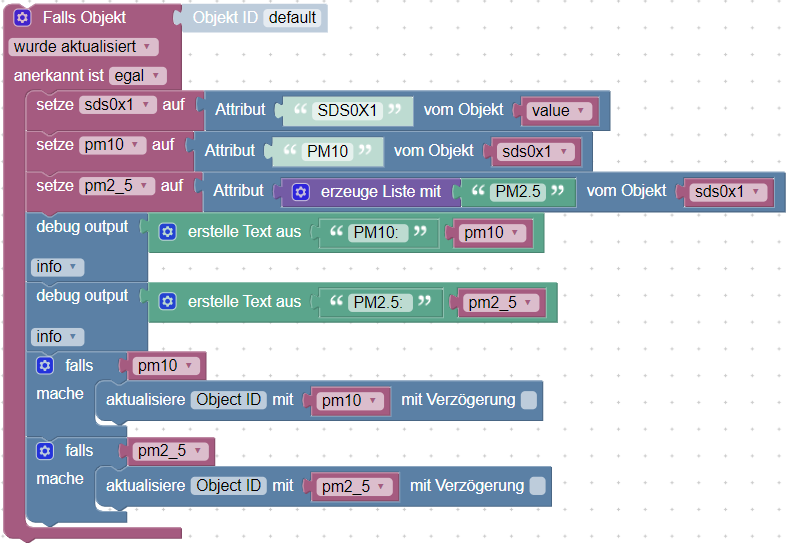
PM10 and PM2.5 values are numbers.
let x = getAttr(json, 'SDS0X1['PM2.5']'); // designed for Blockly
// is not
let x = JSON.parse(json).SDS0X1['PM2.5']; // Javascript
because the 2. parameter of getAttr() must be a string or an array with one string element.
P.S. Spricht ErwinBerlin kein deutsch?
-
This is my code, however the PM2.5 still does not work in this script. I used the code in blockly and that works fine! Now I can see the differences, but I still would like to understand why the script does not work?
Probably obvious to experienced Java programmers, however not for a newbie like me. Any help appreciated!
var AQ; on({id: "mqtt.0.tele.tasmota_sensors_7E466A.SENSOR", change: "any"}, async function (obj) { var value = obj.state.val; var oldValue = obj.oldState.val; AQ = (function () { try {return JSON.parse(getState("mqtt.0.tele.tasmota_sensors_7E466A.SENSOR").val);} catch(e) {return {};}})(); console.log('PM10 & PM2.5'); console.log(parseFloat(getAttr(AQ, 'SDS0X1.PM10'))); console.log(parseFloat(getAttr(AQ, 'SDS0X1['PM2.5']'))); if (parseFloat(getAttr(AQ, 'SDS0X1.PM10')) != 0) { setState("javascript.0.Air-quality.10um", parseFloat(getAttr(AQ, 'SDS0X1.PM10')), true); } if (parseFloat(getAttr (AQ, 'SDS0X1['PM2.5']') != 0) { setState("javascript.0.Air-quality.2_5um", parseFloat(getAttr(AQ, 'SDS0X1['PM2.5']')), true); } });@erwinberlin
Javascript-Version:on('mqtt.0.tele.tasmota_sensors_7E466A.SENSOR', function (dp) { let sensor = JSON.parse(dp.state.val); let pm10 = sensor.SDS0X1.PM10; let pm2_5 = sensor.SDS0X1['PM2.5']; log('PM10: ' + pm10); log('PM2.5: ' + pm2_5); if (pm10) setState("javascript.0.Air-quality.10um", pm10, true); if (pm2_5) setState("javascript.0.Air-quality.2_5um", pm2_5, true); }); -
@erwinberlin
Javascript-Version:on('mqtt.0.tele.tasmota_sensors_7E466A.SENSOR', function (dp) { let sensor = JSON.parse(dp.state.val); let pm10 = sensor.SDS0X1.PM10; let pm2_5 = sensor.SDS0X1['PM2.5']; log('PM10: ' + pm10); log('PM2.5: ' + pm2_5); if (pm10) setState("javascript.0.Air-quality.10um", pm10, true); if (pm2_5) setState("javascript.0.Air-quality.2_5um", pm2_5, true); });@paul53 Super, vielen Dank! Das hat mich sehr geholfen.
Übrigens spreche ich Deutsch, aber schreiben ist jedoch etwas ganz anderes...


Hello! It looks like you're interested in this conversation, but you don't have an account yet.
Getting fed up of having to scroll through the same posts each visit? When you register for an account, you'll always come back to exactly where you were before, and choose to be notified of new replies (either via email, or push notification). You'll also be able to save bookmarks and upvote posts to show your appreciation to other community members.
With your input, this post could be even better 💗
Register LoginSupport us
400
Online33.0k
Users83.6k
Topics1.3m
Posts