




Selection widget for navigation SOLVED!
-
-
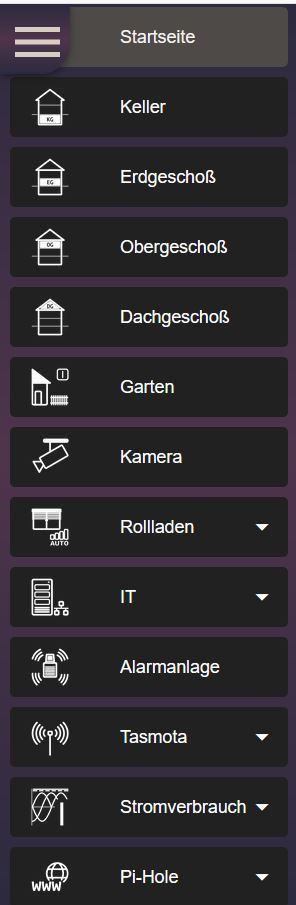
@Glasfaser I swear to God I was looking at this widget when received your response. I will try it and see how convenient this widget for finger operation from touch screen.
-
@ap2017 sagte in Selection widget for navigation:
for finger operation from touch screen.
it works ... is also on my Trekstor Primebook Touch.
-
@Glasfaser What do I use as Object ID for this widget? Some string data-point with project/view data? Thanks.
@ap2017 sagte in Selection widget for navigation:
Some string
number
Look this :
under Top App Bar with Navigation Drawer
https://github.com/Scrounger/ioBroker.vis-materialdesign#top-app-bar-with-navigation-drawer
-
@ap2017 sagte in Selection widget for navigation:
Some string
number
Look this :
under Top App Bar with Navigation Drawer
https://github.com/Scrounger/ioBroker.vis-materialdesign#top-app-bar-with-navigation-drawer
-
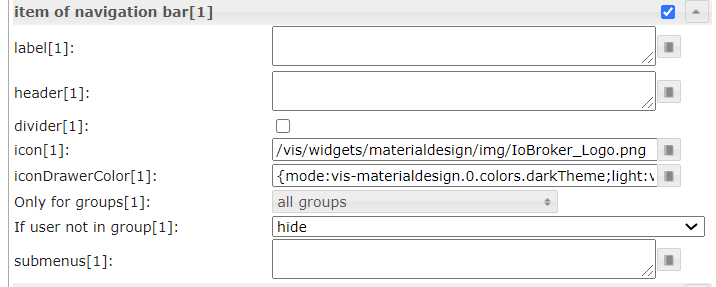
@Glasfaser Thanks, but how to associate number with the view? I guess I need to use Item of navigation bar, see screen shot. I tried to enter view name into header field, but it does not take it
-
@ap2017 sagte in Selection widget for navigation:
view name
The view name in label
... with me " Startseite "
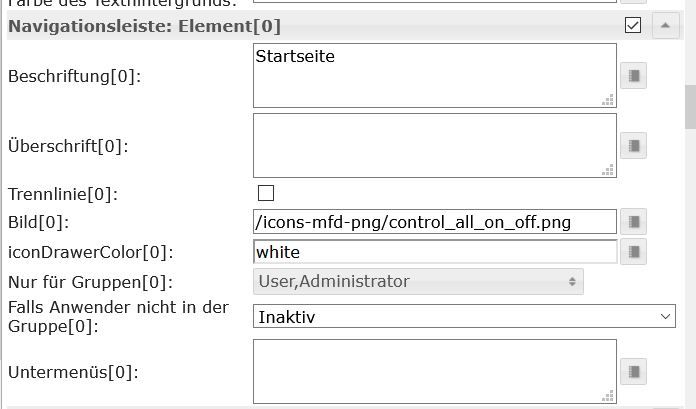
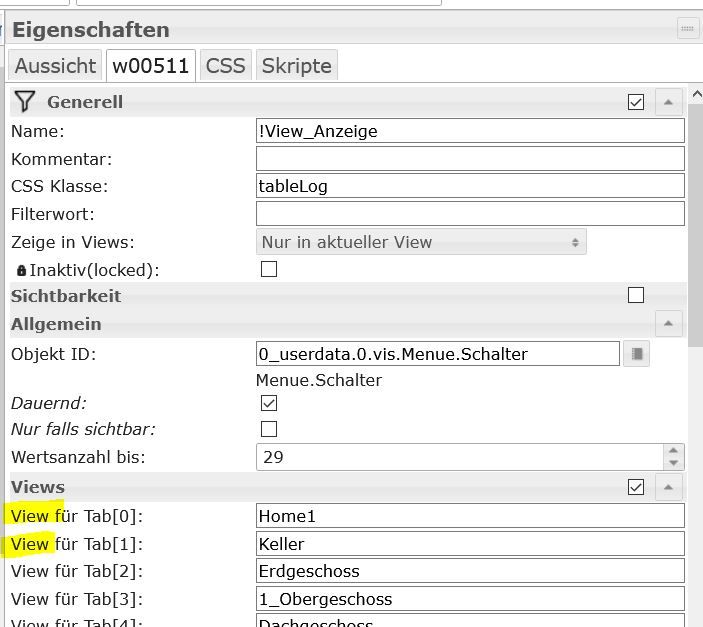
The View in Widget view in widget 8
....with me View name is "Home1" ( 0 )
@Glasfaser Got it, thanks, it works! I guess for dummy like myself the user guide description material is not sufficient.

Hey! Du scheinst an dieser Unterhaltung interessiert zu sein, hast aber noch kein Konto.
Hast du es satt, bei jedem Besuch durch die gleichen Beiträge zu scrollen? Wenn du dich für ein Konto anmeldest, kommst du immer genau dorthin zurück, wo du zuvor warst, und kannst dich über neue Antworten benachrichtigen lassen (entweder per E-Mail oder Push-Benachrichtigung). Du kannst auch Lesezeichen speichern und Beiträge positiv bewerten, um anderen Community-Mitgliedern deine Wertschätzung zu zeigen.
Mit deinem Input könnte dieser Beitrag noch besser werden 💗
Registrieren AnmeldenSupport us
188
Online33.0k
Benutzer83.6k
Themen1.3m
Beiträge