




Ständig Lade"balken" bzw kreis, Admin kaum nutzbar
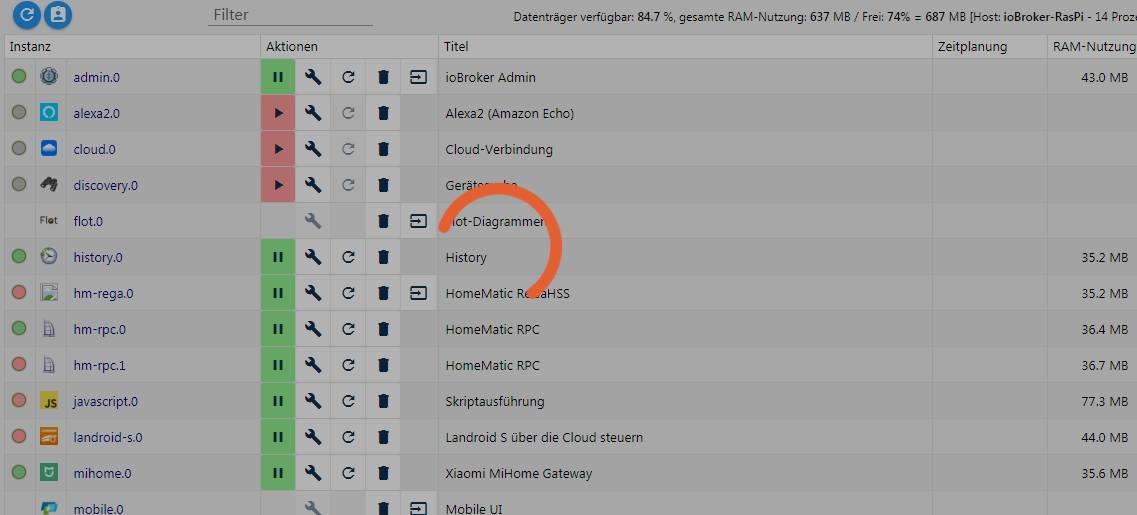
-
Hmm. Die ist keine 2 Monate alt. Das wäre ärgerlich.
-
Es kann auch sein, dass du genau bei einem Schreibvorgang den Computer ausgeschaltet oder resetet hast. Dann kann so etwas auch passieren.
-
Hui, mit der js-Controller Version 1.5.0 unterwegs… 8-)
Wenn Du als User root unterwegs bist, kannst Du die folgenden Befehle ohne "sudo" ausführen.
cd /opt/iobroker
sudo iobroker stop
sudo npm install http-signature --force --no-save --production
sudo iobroker start
Was steht jetzt im Log? `
Aus der Admin Log Anzeige rauskopiert
! landroid-s.0 2018-07-26 08:51:21.082 warn product_id: 37 Plese make an issue on git with this product id
! landroid-s.0 2018-07-26 08:51:21.081 info undefined
! landroid-s.0 2018-07-26 08:51:21.081 info mower 0 selected
! landroid-s.0 2018-07-26 08:51:20.099 info Logged in as martin@m-schmidt.de API Token Set to : sdfsdfsdfmI
! landroid-s.0 2018-07-26 08:51:19.670 info starting. Version 2.2.2 in /opt/iobroker/node_modules/iobroker.landroid-s, node: v8.11.1
! landroid-s.0 2018-07-26 08:51:19.417 info States connected to redis: 127.0.0.1:6379
! host.ioBroker-RasPi 2018-07-26 08:51:18.100 info instance system.adapter.landroid-s.0 started with pid 4860
! text2command.0 2018-07-26 08:51:15.362 info starting. Version 1.2.2 in /opt/iobroker/node_modules/iobroker.text2command, node: v8.11.1
! text2command.0 2018-07-26 08:51:15.201 info States connected to redis: 127.0.0.1:6379
! host.ioBroker-RasPi 2018-07-26 08:51:14.126 info instance system.adapter.text2command.0 started with pid 4850
! telegram.0 2018-07-26 08:51:13.491 info getMe: {"id":539908xxx,"is_bot":true,"first_name":"abc","username":"abcbot"}
! telegram.0 2018-07-26 08:51:13.075 info starting. Version 1.2.4 in /opt/iobroker/node_modules/iobroker.telegram, node: v8.11.1
! telegram.0 2018-07-26 08:51:12.863 info States connected to redis: 127.0.0.1:6379
! host.ioBroker-RasPi 2018-07-26 08:51:10.104 info instance system.adapter.telegram.0 started with pid 4840
! hm-rpc.1 2018-07-26 08:51:07.577 info Connected
! hm-rpc.1 2018-07-26 08:51:07.504 info xmlrpc client is trying to connect to 192.1.2.3:2010 with ["http://192.1.2.4:2010","hm-rpc.1"]
! hm-rpc.1 2018-07-26 08:51:07.504 info xmlrpc server is trying to listen on 192.1.2.4:2010
! hm-rpc.1 2018-07-26 08:51:07.350 info starting. Version 1.6.1 in /opt/iobroker/node_modules/iobroker.hm-rpc, node: v8.11.1
! hm-rpc.1 2018-07-26 08:51:07.188 info States connected to redis: 127.0.0.1:6379
! host.ioBroker-RasPi 2018-07-26 08:51:06.106 info instance system.adapter.hm-rpc.1 started with pid 4830
! mihome.0 2018-07-26 08:51:03.265 info starting. Version 1.0.6 in /opt/iobroker/node_modules/iobroker.mihome, node: v8.11.1
! mihome.0 2018-07-26 08:51:03.101 info States connected to redis: 127.0.0.1:6379
! javascript.0 2018-07-26 08:51:02.095 info script.js.telegram.tastatur: registered 0 subscriptions and 0 schedules
! host.ioBroker-RasPi 2018-07-26 08:51:02.097 info instance system.adapter.mihome.0 started with pid 4820
! javascript.0 2018-07-26 08:51:02.070 info Start javascript script.js.telegram.tastatur
! javascript.0 2018-07-26 08:51:01.995 info received all objects
! javascript.0 2018-07-26 08:51:01.589 info received all states
! javascript.0 2018-07-26 08:51:01.185 info requesting all objects
! javascript.0 2018-07-26 08:51:01.182 info requesting all states
! javascript.0 2018-07-26 08:51:01.168 info starting. Version 3.6.4 in /opt/iobroker/node_modules/iobroker.javascript, node: v8.11.1
! javascript.0 2018-07-26 08:51:01.123 info States connected to redis: 127.0.0.1:6379
! host.ioBroker-RasPi 2018-07-26 08:50:58.108 info instance system.adapter.javascript.0 started with pid 4809
! history.0 2018-07-26 08:50:55.311 info starting. Version 1.8.5 in /opt/iobroker/node_modules/iobroker.history, node: v8.11.1
! history.0 2018-07-26 08:50:55.155 info States connected to redis: 127.0.0.1:6379
! host.ioBroker-RasPi 2018-07-26 08:50:54.110 info instance system.adapter.history.0 started with pid 4799
! host.ioBroker-RasPi 2018-07-26 08:50:52.410 info instance system.adapter.vis.0 terminated while should be started once
! vis.0 2018-07-26 08:50:51.555 info vis license is OK.
! vis.0 2018-07-26 08:50:51.400 info starting. Version 1.1.4 in /opt/iobroker/node_modules/iobroker.vis, node: v8.11.1
! vis.0 2018-07-26 08:50:51.231 info States connected to redis: 127.0.0.1:6379
! socketio.0 2018-07-26 08:50:47.668 info socket.io server listening on port 8084
! socketio.0 2018-07-26 08:50:47.623 info starting. Version 2.1.1 in /opt/iobroker/node_modules/iobroker.socketio, node: v8.11.1
! socketio.0 2018-07-26 08:50:47.471 info States connected to redis: 127.0.0.1:6379
! host.ioBroker-RasPi 2018-07-26 08:50:46.110 info instance system.adapter.socketio.0 started with pid 4779
! rpi2.0 2018-07-26 08:50:43.299 info starting. Version 0.3.2 in /opt/iobroker/node_modules/iobroker.rpi2, node: v8.11.1
! rpi2.0 2018-07-26 08:50:43.146 info States connected to redis: 127.0.0.1:6379
! host.ioBroker-RasPi 2018-07-26 08:50:42.108 info instance system.adapter.rpi2.0 started with pid 4724
! hm-rega.0 2018-07-26 08:50:40.889 info got state values
! hm-rega.0 2018-07-26 08:50:40.679 info request state values
! hm-rega.0 2018-07-26 08:50:40.678 info deleted 0 variables
! hm-rega.0 2018-07-26 08:50:40.678 info added/updated 5 variables
! hm-rega.0 2018-07-26 08:50:40.628 info got 5 variables
! hm-rega.0 2018-07-26 08:50:40.591 info deleted 0 programs
! hm-rega.0 2018-07-26 08:50:40.591 info added/updated 3 programs
! hm-rega.0 2018-07-26 08:50:40.555 info got 0 programs
! hm-rega.0 2018-07-26 08:50:40.293 info added/updated rooms to enum.rooms
! hm-rega.0 2018-07-26 08:50:40.245 info added/updated functions to enum.functions
! hm-rega.0 2018-07-26 08:50:40.168 info added/updated 1 favorites to enum.favorites
! hm-rega.0 2018-07-26 08:50:40.098 info time difference local-ccu 0s
! hm-rega.0 2018-07-26 08:50:40.042 info ReGaHSS 192.1.2.3 up
! hm-rega.0 2018-07-26 08:50:39.289 info subscribe hm-rpc.0.BidCoS-RF.50.PRESS_SHORT
! hm-rega.0 2018-07-26 08:50:39.282 info starting. Version 1.7.0 in /opt/iobroker/node_modules/iobroker.hm-rega, node: v8.11.1
! hm-rega.0 2018-07-26 08:50:39.120 info States connected to redis: 127.0.0.1:6379
! host.ioBroker-RasPi 2018-07-26 08:50:38.111 info instance system.adapter.hm-rega.0 started with pid 4714
! hm-rpc.0 2018-07-26 08:50:35.932 info Connected
! hm-rpc.0 2018-07-26 08:50:35.804 info binrpc -> 91 devices
! hm-rpc.0 2018-07-26 08:50:35.789 info binrpc <- listDevices ["hm-rpc.0"]
! hm-rpc.0 2018-07-26 08:50:35.772 info binrpc <- system.listMethods ["hm-rpc.0"]
! hm-rpc.0 2018-07-26 08:50:35.736 info binrpc client is trying to connect to 192.1.2.3:2001 with ["xmlrpc_bin://192.1.2.4:2001","hm-rpc.0"]
! hm-rpc.0 2018-07-26 08:50:35.735 info binrpc server is trying to listen on 192.1.2.4:2001
! hm-rpc.0 2018-07-26 08:50:35.548 info starting. Version 1.6.1 in /opt/iobroker/node_modules/iobroker.hm-rpc, node: v8.11.1
! hm-rpc.0 2018-07-26 08:50:35.367 info States connected to redis: 127.0.0.1:6379
! admin.0 2018-07-26 08:50:34.562 info Repository received successfully.
! host.ioBroker-RasPi 2018-07-26 08:50:34.097 info instance system.adapter.hm-rpc.0 started with pid 4703
! admin.0 2018-07-26 08:50:33.405 info Use link "http://localhost:8081" to configure.
! admin.0 2018-07-26 08:50:33.405 info http server listening on port 8081
! admin.0 2018-07-26 08:50:33.373 warn No repository source configured
! host.ioBroker-RasPi 2018-07-26 08:50:33.478 info Update repository "default" under "http://download.iobroker.net/sources-dist.json"
! admin.0 2018-07-26 08:50:33.363 info received all objects
! admin.0 2018-07-26 08:50:32.970 info received all states
! admin.0 2018-07-26 08:50:32.417 info Request actual repository…
! admin.0 2018-07-26 08:50:32.416 info requesting all objects
! admin.0 2018-07-26 08:50:32.413 info requesting all states
! admin.0 2018-07-26 08:50:32.389 info starting. Version 3.4.7 in /opt/iobroker/node_modules/iobroker.admin, node: v8.11.1
! admin.0 2018-07-26 08:50:32.202 info States connected to redis: 127.0.0.1:6379
! host.ioBroker-RasPi 2018-07-26 08:50:30.162 info States connected to redis: 127.0.0.1:6379
! host.ioBroker-RasPi 2018-07-26 08:50:30.145 info instance system.adapter.admin.0 started with pid 4691
! host.ioBroker-RasPi 2018-07-26 08:50:30.080 info starting 13 instances
! host.ioBroker-RasPi 2018-07-26 08:50:30.046 info 19 instances found
! host.ioBroker-RasPi 2018-07-26 08:50:30.022 info InMemoryDB connected
! host.ioBroker-RasPi 2018-07-26 08:50:30.003 info inMem-objects listening on port 9001
! host.ioBroker-RasPi 2018-07-26 08:50:29.608 info ip addresses: 192.1.2.4 fe80::4723:5b0e:e7bf:d7ff
! host.ioBroker-RasPi 2018-07-26 08:50:29.604 info hostname: ioBroker-RasPi, node: v8.11.1
! host.ioBroker-RasPi 2018-07-26 08:50:29.604 info Copyright (c) 2014-2018 bluefox, 2014 hobbyquakerAuf der Kommandozeile steht überall immer noch ein ^[[32minfo^[[39m: vor jeder Meldung. Das sieht dann so aus
2018-07-26 08:50:32.970 - ^[[32minfo^[[39m: admin.0 received all states
-
Sieht doch schon ganz gut aus. Wie geht es dem Admin?
-
Mit Kommandozeile meinst du die Logdatei aus dem log-Ordner, oder? Z.B. ^[[32m dürfte, so behaupte ich einfach, für Farbcodierungen im Terminal (in dem Fall grün) zuständig sein. Nichts Schlimmes also.
-
Sieht doch schon ganz gut aus. Wie geht es dem Admin? `
Hi,
Ja wollte ich grade nachtragen. Admin sieht gut aus, schien auf den ersten Blick auch zu funktionieren.
Muss jetzt leider zur Arbeit. Werde heute Abend mal schauen.
-
Du solltest Deine SD-Karte übrigens mal global auf Fehler im Dateisystem prüfen.
-
Hi,
Hab wenig Ahnung von Linux.
Nutze ich badblocks -n -v ?
Ciao
Martin
-
Öhm, das würde ich dringend bleiben lassen. Damit wird über einen Schreibzugriff geprüft, ob der Datenträger defekte Blöcke hat. Deine Daten verlierst Du dabei.
-
fsck bei jedem Boot auszuführen ist eine Option
Standardmäßig prüft fsck das Datgeisystem jeder einzelnen Partition bei jedem 30. Bootvorgang. MIt dem folgenden Komando wird die Überprüfung bei jedem Bootvorgang ausgeführt. Damit bemerkst Du Fehler früher.
sudo tune2fs -c 1 /dev/sda1/dev/sda1 bezeichnet dabei die Partiton.

Hey! Du scheinst an dieser Unterhaltung interessiert zu sein, hast aber noch kein Konto.
Hast du es satt, bei jedem Besuch durch die gleichen Beiträge zu scrollen? Wenn du dich für ein Konto anmeldest, kommst du immer genau dorthin zurück, wo du zuvor warst, und kannst dich über neue Antworten benachrichtigen lassen (entweder per E-Mail oder Push-Benachrichtigung). Du kannst auch Lesezeichen speichern und Beiträge positiv bewerten, um anderen Community-Mitgliedern deine Wertschätzung zu zeigen.
Mit deinem Input könnte dieser Beitrag noch besser werden 💗
Registrieren Anmelden346
Online33.0k
Benutzer83.6k
Themen1.3m
Beiträge