




Alexa2 anmelde Probleme
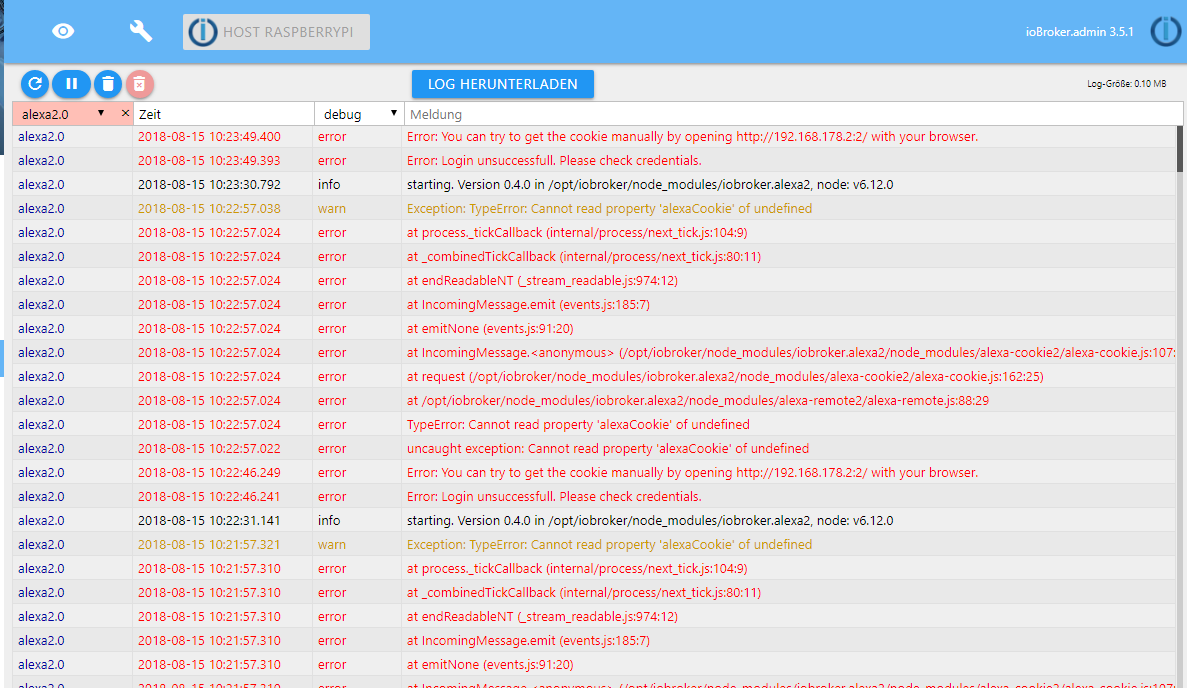
-
Thanks for your answer, this is my log:
alexa2.0 2018-09-03 10:15:25.461 error Error: You can try to get the cookie manually by opening http://192.168.43.69:52770/ with your browser.
alexa2.0 2018-09-03 10:15:25.460 error Error: Amazon-Login-Error: Wichtige Mitteilung!: Zum besseren Schutz Ihres Kontos geben Sie bitte nochmals Ihr Passwort ein, und geben Sie dann die Zeichen ein, die in der Abbildung unten gezeigt wer
alexa2.0 2018-09-03 10:15:11.391 info starting. Version 0.5.2 in C:/ioBroker/node_modules/iobroker.alexa2, node: v6.0.0
host.Florea-ZX 2018-09-03 10:15:10.807 info instance system.adapter.alexa2.0 started with pid 6812
host.Florea-ZX 2018-09-03 10:15:08.302 info instance system.adapter.alexa2.0 terminated with code null ()
host.Florea-ZX 2018-09-03 10:15:08.302 warn instance system.adapter.alexa2.0 terminated due to SIGTERM
host.Florea-ZX 2018-09-03 10:15:08.278 info stopInstance system.adapter.alexa2.0 killing pid 4336
host.Florea-ZX 2018-09-03 10:15:08.278 info stopInstance system.adapter.alexa2.0
host.Florea-ZX 2018-09-03 10:15:08.278 info object change system.adapter.alexa2.0
alexa2.0 2018-09-03 10:10:13.392 error Error: You can try to get the cookie manually by opening http://192.168.43.69:52257/ with your browser.
alexa2.0 2018-09-03 10:10:13.391 error Error: Amazon-Login-Error: Wichtige Mitteilung!: Zum besseren Schutz Ihres Kontos geben Sie bitte nochmals Ihr Passwort ein, und geben Sie dann die Zeichen ein, die in der Abbildung unten gezeigt wer
alexa2.0 2018-09-03 10:10:05.316 info starting. Version 0.5.2 in C:/ioBroker/node_modules/iobroker.alexa2, node: v6.0.0
host.Florea-ZX 2018-09-03 10:10:04.738 info instance system.adapter.alexa2.0 started with pid 4336
host.Florea-ZX 2018-09-03 10:10:02.238 info instance system.adapter.alexa2.0 terminated with code null ()
host.Florea-ZX 2018-09-03 10:10:02.238 warn instance system.adapter.alexa2.0 terminated due to SIGTERM
host.Florea-ZX 2018-09-03 10:10:02.220 info stopInstance system.adapter.alexa2.0 killing pid 2280
host.Florea-ZX 2018-09-03 10:10:02.220 info stopInstance system.adapter.alexa2.0
host.Florea-ZX 2018-09-03 10:10:02.219 info object change system.adapter.alexa2.0
alexa2.0 2018-09-03 10:09:21.958 error Error: You can try to get the cookie manually by opening http://192.168.43.69:52172/ with your browser.
alexa2.0 2018-09-03 10:09:21.957 error Error: Amazon-Login-Error: Wichtige Mitteilung!: Zum besseren Schutz Ihres Kontos geben Sie bitte nochmals Ihr Passwort ein, und geben Sie dann die Zeichen ein, die in der Abbildung unten gezeigt wer
So if i manualy access http://192.168.43.69:52770/ , login page open and i can login without problems . Thanks in advance!
-
And do the adapter works after you logged in using this url? What is the final page after login saying?
What amazon country you use? I dir Germany or an other country if amazon?
For Germany he should work, other countries you need to set some specific things in config.
If not please set adapter to debug loglevel and start and login again. I then need the full log of this from disc (/opt/ioBroker/log) as PN …
Gesendet vom Handy ...
-
Hallo erstmal.
Auch ich versuche seit einiger Zeit die Anmelde-Probleme in den USA zu überwinden.
Nach einigen Hin und Her erreiche ich nun die USA Login Webseite und nach erfolgreichem Login, mittels proxy, erhalte ich im Browser die Meldung : Amazon Alexa Cookie successfully retrieved. You can close the browser.
Der Adapter startet neu und haengt wieder fest beim cookie.
Vielleicht übersehe ich ja irgendwas.
Alexa base url : https://alexa.amazon.com
Custom User-Agent: Mozilla/5.0 (Windows NT 6.1; WOW64) AppleWebKit/537.36 (KHTML, like Gecko) Chrome/67.0.3396.87 Safari/537.36
Custom Accept-Language Header: en-US
Custom Cookie-Amazon-URL: amazon.com
node.js v6.14.4
NPM: 3.10.10
alexa2.0 v1.0.0
logs:
2018-09-09 15:00:04.538 - debug: alexa2.0 Alexa-Cookie: Step 4: get CSRF
2018-09-09 15:00:04.538 - debug: alexa2.0 Alexa-Cookie: Sending Request with
2018-09-09 15:00:04.599 - error: alexa2.0 uncaught exception: Cannot read property 'headers' of null
2018-09-09 15:00:04.600 - error: alexa2.0 TypeError: Cannot read property 'headers' of null
at request (/opt/iobroker/node_modules/alexa-cookie2/alexa-cookie.js:158:50)
at ClientRequest. (/opt/iobroker/node_modules/alexa-cookie2/alexa-cookie.js:114:24)
at emitOne (events.js:96:13)
at ClientRequest.emit (events.js:188:7)
at TLSSocket.socketErrorListener (_http_client.js:314:9)
at emitOne (events.js:96:13)
at TLSSocket.emit (events.js:188:7)
at connectErrorNT (net.js:1034:8)
at _combinedTickCallback (internal/process/next_tick.js:80:11)
at process._tickCallback (internal/process/next_tick.js:104:9)
2018-09-09 15:00:04.601 - warn: alexa2.0 Exception: TypeError: Cannot read property 'headers' of null
2018-09-09 15:00:04.610 - error: Caught by controller[0]: TypeError: Cannot read property 'headers' of null
2018-09-09 15:00:04.610 - error: Caught by controller[0]: at request (/opt/iobroker/node_modules/alexa-cookie2/alexa-cookie.js:158:50)
2018-09-09 15:00:04.610 - error: Caught by controller[0]: at ClientRequest. (/opt/iobroker/node_modules/alexa-cookie2/alexa-cookie.js:114:24)
2018-09-09 15:00:04.610 - error: Caught by controller[0]: at emitOne (events.js:96:13)
2018-09-09 15:00:04.610 - error: Caught by controller[0]: at ClientRequest.emit (events.js:188:7)
2018-09-09 15:00:04.610 - error: Caught by controller[0]: at TLSSocket.socketErrorListener (_http_client.js:314:9)
2018-09-09 15:00:04.610 - error: Caught by controller[0]: at emitOne (events.js:96:13)
2018-09-09 15:00:04.610 - error: Caught by controller[0]: at TLSSocket.emit (events.js:188:7)
2018-09-09 15:00:04.610 - error: Caught by controller[0]: at connectErrorNT (net.js:1034:8)
2018-09-09 15:00:04.611 - error: Caught by controller[0]: at _combinedTickCallback (internal/process/next_tick.js:80:11)
2018-09-09 15:00:04.611 - error: Caught by controller[0]: at process._tickCallback (internal/process/next_tick.js:104:9)
2018-09-09 15:00:04.611 - error: host.debianiobroker instance system.adapter.alexa2.0 terminated with code 0 (OK)
2018-09-09 15:00:04.611 - info: host.debianiobroker Restart adapter system.adapter.alexa2.0 because enabled
2018-09-09 15:00:34.618 - info: host.debianiobroker instance system.adapter.alexa2.0 started with pid 23389
2018-09-09 15:00:34.957 - debug: alexa2.0 objectDB connected
2018-09-09 15:00:34.980 - debug: alexa2.0 statesDB connected
2018-09-09 15:00:35.098 - info: alexa2.0 starting. Version 1.0.0 in /opt/iobroker/node_modules/iobroker.alexa2, node: v6.14.4
2018-09-09 15:00:35.116 - debug: alexa2.0 Alexa-Remote: Use as User-Agent: Mozilla/5.0 (Windows NT 6.1; WOW64) AppleWebKit/537.36 (KHTML, like Gecko) Chrome/67.0.3396.87 Safari/537.36
2018-09-09 15:00:35.116 - debug: alexa2.0 Alexa-Remote: Use as Login-Amazon-URL: amazon.com
2018-09-09 15:00:35.117 - debug: alexa2.0 Alexa-Remote: Use as Base-URL: https://alexa.amazon.com
2018-09-09 15:00:35.117 - debug: alexa2.0 Alexa-Remote: No cookie given, generate one
2018-09-09 15:00:35.404 - debug: alexa2.0 Alexa-Cookie: Use as Login-Amazon-URL: amazon.com
2018-09-09 15:00:35.404 - debug: alexa2.0 Alexa-Cookie: Use as Alexa-Service-Host: https://alexa.amazon.com
2018-09-09 15:00:35.404 - debug: alexa2.0 Alexa-Cookie: Use as User-Agent: Mozilla/5.0 (Windows NT 6.1; WOW64) AppleWebKit/537.36 (KHTML, like Gecko) Chrome/67.0.3396.87 Safari/537.36
2018-09-09 15:00:35.404 - debug: alexa2.0 Alexa-Cookie: Use as Accept-Language: en-US
2018-09-09 15:00:35.404 - debug: alexa2.0 Alexa-Cookie: Proxy-Mode enabled if needed: 192.168.1.7:0 to listen on 0.0.0.0
2018-09-09 15:00:35.404 - debug: alexa2.0 Alexa-Cookie: Step 1: get first cookie and authentication redirect
2018-09-09 15:00:35.404 - debug: alexa2.0 Alexa-Cookie: Sending Request with
2018-09-09 15:00:35.577 - debug: alexa2.0 Alexa-Cookie: Sending Request with
2018-09-09 15:00:39.598 - debug: alexa2.0 Alexa-Cookie: Response (200)
2018-09-09 15:00:39.906 - debug: alexa2.0 Alexa-Cookie: Step 2: login empty to generate session
2018-09-09 15:00:39.907 - debug: alexa2.0 Alexa-Cookie: Sending Request with
2018-09-09 15:00:40.054 - debug: alexa2.0 Alexa-Cookie: Response (200)
2018-09-09 15:00:40.330 - debug: alexa2.0 Alexa-Cookie: Step 3: login with filled form, referer contains session id
2018-09-09 15:00:40.331 - debug: alexa2.0 Alexa-Cookie: Sending Request with
2018-09-09 15:00:40.634 - debug: alexa2.0 Alexa-Cookie: Response (200)
2018-09-09 15:00:40.663 - debug: alexa2.0 Alexa-Cookie: Proxy-Server listening on port 41701
2018-09-09 15:00:40.663 - debug: alexa2.0 Alexa-Remote: Error from retrieving cookies
2018-09-09 15:00:40.664 - error: alexa2.0 Error: Amazon-Login-Error: Important Message!: To better protect your account, please re-enter your password and then enter the characters as they are shown in the image below.
2018-09-09 15:00:40.664 - error: alexa2.0 Error: You can try to get the cookie manually by opening http://192.168.1.7:41701/ with your browser.
-
JUHUUUUUUUUUUUUUUUU !!!!!!!!
Jetzt funktioniert :-) es nachdem ich
Alexa base url : pitangui.amazon.com
eingetragen habe.
-
please try the following settings for the cookie in the adapter. It finally worked for me.
Alexa base url : pitangui.amazon.com
Custom User-Agent: Mozilla/5.0 (Windows NT 6.1; WOW64) AppleWebKit/537.36 (KHTML, like Gecko) Chrome/67.0.3396.87 Safari/537.36
Custom Accept-Language Header: en-US
Custom Cookie-Amazon-URL: amazon.com
i also updated to alexa2.0 v 1.0.0 over github
hope it works for you too.
-
please try the following settings for the cookie in the adapter. It finally worked for me.
Alexa base url : pitangui.amazon.com
Custom User-Agent: Mozilla/5.0 (Windows NT 6.1; WOW64) AppleWebKit/537.36 (KHTML, like Gecko) Chrome/67.0.3396.87 Safari/537.36
Custom Accept-Language Header: en-US
Custom Cookie-Amazon-URL: amazon.com
i also updated to alexa2.0 v 1.0.0 over github
hope it works for you too. `
works perfect , tanks !!!
-
Ich klinke mich hier mal ein.
Ich habe am Wochenende mal ein bisschen Ordnung zwischen allen meinen Alexen und den diversen unterschiedlichen Accounts geschaffen. Soll heißen, ich habe jetzt alle auf ein speziell dafür registriertes Konto zusammen geführt.
Nun muss ich natürlich auch im Alexa 2.0 Adapter diese neuen Anmeldedaten eintragen. Mit meiner alten Amazon Konfiguration hat alles einwandfrei mit dem Adapter funktioniert - das nur mal am Rande.
Jetzt mit dem neuen Account habe ich das Problem, das scheinbar mein Login nicht angenommen wird. Auch das manuell erstellte Cookie bringt keine Änderung. Der Adapter bleibt gelb.
Hier die Debug Meldungen bei Verwendung des manuellen Cookie:
! alexa2.0 2018-12-03 12:42:03.469 debug system.adapter.admin.0: logging true
! alexa2.0 2018-12-03 12:41:57.813 error Error: You can try to get the cookie manually by opening http://10.122.60.47:55583/ with your browser.
! alexa2.0 2018-12-03 12:41:57.813 error Error: Login unsuccessfull. Please check credentials.
! alexa2.0 2018-12-03 12:41:57.813 debug Alexa-Remote: Error from retrieving cookies
! alexa2.0 2018-12-03 12:41:57.813 debug Alexa-Cookie: Proxy-Server listening on port 55583
! alexa2.0 2018-12-03 12:41:57.782 debug Alexa-Cookie: Response (404)
! alexa2.0 2018-12-03 12:41:57.657 debug Alexa-Cookie: Sending Request with {"host":"www.amazon.de","path":"/ap/signin","method":"POST","headers":{"DNT":"1","Upgrade-Insecure-Requests":"1","User-Agent":"Mozilla/5.0 (Windows NT 10.0; Win64;
! alexa2.0 2018-12-03 12:41:57.657 debug Alexa-Cookie: Step 3: login with filled form, referer contains session id
! alexa2.0 2018-12-03 12:41:57.625 debug Alexa-Cookie: Response (404)
! alexa2.0 2018-12-03 12:41:57.516 debug Alexa-Cookie: Sending Request with {"host":"www.amazon.de","path":"/ap/signin","method":"POST","headers":{"DNT":"1","Upgrade-Insecure-Requests":"1","User-Agent":"Mozilla/5.0 (Windows NT 10.0; Win64;
! alexa2.0 2018-12-03 12:41:57.516 debug Alexa-Cookie: Step 2: login empty to generate session
! alexa2.0 2018-12-03 12:41:57.485 debug Alexa-Cookie: Response (200)
! alexa2.0 2018-12-03 12:41:57.344 debug Alexa-Cookie: Sending Request with {"host":"www.amazon.de","path":"/ap/signin?showRmrMe=1&openid.return_to=https%3A%2F%2Falexa.amazon.de%2F&openid.identity=http%3A%2F%2Fspecs.openid.net%2Fauth%2F2.0%
! alexa2.0 2018-12-03 12:41:57.344 debug Alexa-Cookie: Response (302) - Redirect to https://www.amazon.de/ap/signin?showRmr … %2F2.0%2Fi
! alexa2.0 2018-12-03 12:41:57.204 debug Alexa-Cookie: Sending Request with {"host":"alexa.amazon.de","path":"","method":"GET","headers":{"DNT":"1","Upgrade-Insecure-Requests":"1","User-Agent":"Mozilla/5.0 (Windows NT 10.0; Win64; x64; rv:9
! alexa2.0 2018-12-03 12:41:57.204 debug Alexa-Cookie: Step 1: get first cookie and authentication redirect
! alexa2.0 2018-12-03 12:41:57.204 debug Alexa-Cookie: Proxy-Mode enabled if needed: 10.122.60.47:0 to listen on 0.0.0.0
! alexa2.0 2018-12-03 12:41:57.204 debug Alexa-Cookie: Use as Accept-Language: de-DE
! alexa2.0 2018-12-03 12:41:57.204 debug Alexa-Cookie: Use as User-Agent: Mozilla/5.0 (Windows NT 10.0; Win64; x64; rv:99.0) Gecko/20100101 Firefox/99.0
! alexa2.0 2018-12-03 12:41:57.204 debug Alexa-Cookie: Use as Alexa-Service-Host: alexa.amazon.de
! alexa2.0 2018-12-03 12:41:57.204 debug Alexa-Cookie: Use as Login-Amazon-URL: amazon.de
! alexa2.0 2018-12-03 12:41:56.766 debug Alexa-Remote: No cookie given, generate one
! alexa2.0 2018-12-03 12:41:56.766 debug Alexa-Remote: Use as Base-URL: alexa.amazon.de
! alexa2.0 2018-12-03 12:41:56.766 debug Alexa-Remote: Use as Login-Amazon-URL: amazon.de
! alexa2.0 2018-12-03 12:41:56.766 debug Alexa-Remote: Use as User-Agent: Mozilla/5.0 (Windows NT 10.0; Win64; x64; rv:99.0) Gecko/20100101 Firefox/99.0
! alexa2.0 2018-12-03 12:41:56.766 debug Alexa-Remote: Cookie was set, but authentication invalid, retry with email/password ...
! alexa2.0 2018-12-03 12:41:56.766 debug Alexa-Remote: Authentication checked: false
! alexa2.0 2018-12-03 12:41:56.766 debug Alexa-Remote: Response: No body
! alexa2.0 2018-12-03 12:41:56.563 debug Alexa-Remote: Sending Request with {"host":"alexa.amazon.de","path":"/api/bootstrap?version=0","method":"GET","timeout":10000,"headers":{}}
! alexa2.0 2018-12-03 12:41:56.563 debug Alexa-Remote: cookie was provided
! alexa2.0 2018-12-03 12:41:56.563 debug Alexa-Remote: Use as Base-URL: alexa.amazon.de
! alexa2.0 2018-12-03 12:41:56.563 debug Alexa-Remote: Use as Login-Amazon-URL: amazon.de
! alexa2.0 2018-12-03 12:41:56.563 debug Alexa-Remote: Use as User-Agent: Mozilla/5.0 (Windows NT 10.0; Win64; x64; rv:99.0) Gecko/20100101 Firefox/99.0
! alexa2.0 2018-12-03 12:41:56.532 info starting. Version 1.1.3 in C:/ioBroker/node_modules/iobroker.alexa2, node: v8.13.0
! alexa2.0 2018-12-03 12:41:56.375 debug statesDB connected
! alexa2.0 2018-12-03 12:41:56.360 debug objectDB connected…. und hier nochmal das ganze bei Verwendung des Benutzernamen und des Passwort:
! alexa2.0 2018-12-03 12:48:35.266 error Error: You can try to get the cookie manually by opening http://10.122.60.47:55745/ with your browser.
! alexa2.0 2018-12-03 12:48:35.266 error Error: Login unsuccessfull. Please check credentials.
! alexa2.0 2018-12-03 12:48:35.266 debug Alexa-Remote: Error from retrieving cookies
! alexa2.0 2018-12-03 12:48:35.266 debug Alexa-Cookie: Proxy-Server listening on port 55745
! alexa2.0 2018-12-03 12:48:35.235 debug Alexa-Cookie: Response (404)
! alexa2.0 2018-12-03 12:48:35.094 debug Alexa-Cookie: Sending Request with {"host":"www.amazon.de","path":"/ap/signin","method":"POST","headers":{"DNT":"1","Upgrade-Insecure-Requests":"1","User-Agent":"Mozilla/5.0 (Windows NT 10.0; Win64;
! alexa2.0 2018-12-03 12:48:35.094 debug Alexa-Cookie: Step 3: login with filled form, referer contains session id
! alexa2.0 2018-12-03 12:48:35.079 debug Alexa-Cookie: Response (404)
! alexa2.0 2018-12-03 12:48:34.954 debug Alexa-Cookie: Sending Request with {"host":"www.amazon.de","path":"/ap/signin","method":"POST","headers":{"DNT":"1","Upgrade-Insecure-Requests":"1","User-Agent":"Mozilla/5.0 (Windows NT 10.0; Win64;
! alexa2.0 2018-12-03 12:48:34.954 debug Alexa-Cookie: Step 2: login empty to generate session
! alexa2.0 2018-12-03 12:48:34.922 debug Alexa-Cookie: Response (200)
! alexa2.0 2018-12-03 12:48:34.782 debug Alexa-Cookie: Sending Request with {"host":"www.amazon.de","path":"/ap/signin?showRmrMe=1&openid.return_to=https%3A%2F%2Falexa.amazon.de%2F&openid.identity=http%3A%2F%2Fspecs.openid.net%2Fauth%2F2.0%
! alexa2.0 2018-12-03 12:48:34.782 debug Alexa-Cookie: Response (302) - Redirect to https://www.amazon.de/ap/signin?showRmr … %2F2.0%2Fi
! alexa2.0 2018-12-03 12:48:34.423 debug Alexa-Cookie: Sending Request with {"host":"alexa.amazon.de","path":"","method":"GET","headers":{"DNT":"1","Upgrade-Insecure-Requests":"1","User-Agent":"Mozilla/5.0 (Windows NT 10.0; Win64; x64; rv:9
! alexa2.0 2018-12-03 12:48:34.423 debug Alexa-Cookie: Step 1: get first cookie and authentication redirect
! alexa2.0 2018-12-03 12:48:34.423 debug Alexa-Cookie: Proxy-Mode enabled if needed: 10.122.60.47:0 to listen on 0.0.0.0
! alexa2.0 2018-12-03 12:48:34.423 debug Alexa-Cookie: Use as Accept-Language: de-DE
! alexa2.0 2018-12-03 12:48:34.423 debug Alexa-Cookie: Use as User-Agent: Mozilla/5.0 (Windows NT 10.0; Win64; x64; rv:99.0) Gecko/20100101 Firefox/99.0
! alexa2.0 2018-12-03 12:48:34.423 debug Alexa-Cookie: Use as Alexa-Service-Host: alexa.amazon.de
! alexa2.0 2018-12-03 12:48:34.423 debug Alexa-Cookie: Use as Login-Amazon-URL: amazon.de
! alexa2.0 2018-12-03 12:48:33.985 debug Alexa-Remote: No cookie given, generate one
! alexa2.0 2018-12-03 12:48:33.985 debug Alexa-Remote: Use as Base-URL: alexa.amazon.de
! alexa2.0 2018-12-03 12:48:33.985 debug Alexa-Remote: Use as Login-Amazon-URL: amazon.de
! alexa2.0 2018-12-03 12:48:33.985 debug Alexa-Remote: Use as User-Agent: Mozilla/5.0 (Windows NT 10.0; Win64; x64; rv:99.0) Gecko/20100101 Firefox/99.0
! alexa2.0 2018-12-03 12:48:33.954 info starting. Version 1.1.3 in C:/ioBroker/node_modules/iobroker.alexa2, node: v8.13.0
! alexa2.0 2018-12-03 12:48:33.813 debug statesDB connected
! alexa2.0 2018-12-03 12:48:33.798 debug objectDB connected -
Habe ich versucht - aber ich bekomme ein "Webseite ist nicht erreichbar" zurück. Ich habe schon Firewall und alles mögliche abgeschaltet für den Fall das es daran gelegen haben sollte. Hatte aber auch keinen Erfolg.
Der 404er Response weist doch auch auf eine fehlende Webseite hin - oder?
…... wobei ich auch gar nicht weiß was man sich von dieser IP Adresse erhofft. In meinem gesamten Netzwerk gibt es kein Gerät was unter der IP Adresse aufgelistet wäre. Weder der Broker noch eine der Alexen haben diese IP
-
Aahhhhhh … na dann geh mal in die Alex2 Instanz-Einstellungen, Tab "Proxy" glaube ich und wähle mal die korrekte IP aus (ggf musst du bei port mal was reinschreiben und wieder auf 0 setzen oder so das der "Speichern"-Button aktiviert wird,
Dann hat es irgendwie dort ne falsche IP mal reingehauen
-
OK - habe den Fehler gefunden !!! Es liegt nicht am Adapter !!!
Das Problem ist Google seine Autovervollständigung. Auf der ersten Seite habe ich meine neue Mail Adresse eingegeben. Nach wenigen Buchstaben hat mir Google die vollständige Mail Adresse per Autovervollständig vorgeschlagen, was ich auch dankbar angenommen habe.
Was ich aber nicht sehen konnte war, das Google im Rahmen dieser Autovervollständigung auch das Feld "Eigener User Agent" bei den Cookies und bei den Proxy Einstellungen die IP Adresse "Autovervollständigt" hatte. Da stand natürlich nicht das drin was der Adapter gerne gehabt hätte, wodurch die oben beschriebenen Fehler zustande kamen
Da ich mir aber sicher war nur Name und Passwort eingegeben zu haben, bin ich gar nicht auf die Idee gekommen das dass was da drin stand nicht richtig sein könnte.
ERGO - FINGER WEG VON GOOGLE SEINER AUTOVERVOLLSTÄNDIGUNG BEI FORMULAR FELDERN
Vielen Dank an apollon77 für den "Schubs" in der richtigen Richtung zu suchen.


Hey! Du scheinst an dieser Unterhaltung interessiert zu sein, hast aber noch kein Konto.
Hast du es satt, bei jedem Besuch durch die gleichen Beiträge zu scrollen? Wenn du dich für ein Konto anmeldest, kommst du immer genau dorthin zurück, wo du zuvor warst, und kannst dich über neue Antworten benachrichtigen lassen (entweder per E-Mail oder Push-Benachrichtigung). Du kannst auch Lesezeichen speichern und Beiträge positiv bewerten, um anderen Community-Mitgliedern deine Wertschätzung zu zeigen.
Mit deinem Input könnte dieser Beitrag noch besser werden 💗
Registrieren Anmelden323
Online33.0k
Benutzer83.7k
Themen1.3m
Beiträge