



Skip to content
  • Home
  • Aktuell
  • Tags
  • 0 Ungelesen 0
  • Kategorien
  • Unreplied
  • Beliebt
  • GitHub
  • Docu
  • Hilfe
Skins
  • Light
  • Brite
  • Cerulean
  • Cosmo
  • Flatly
  • Journal
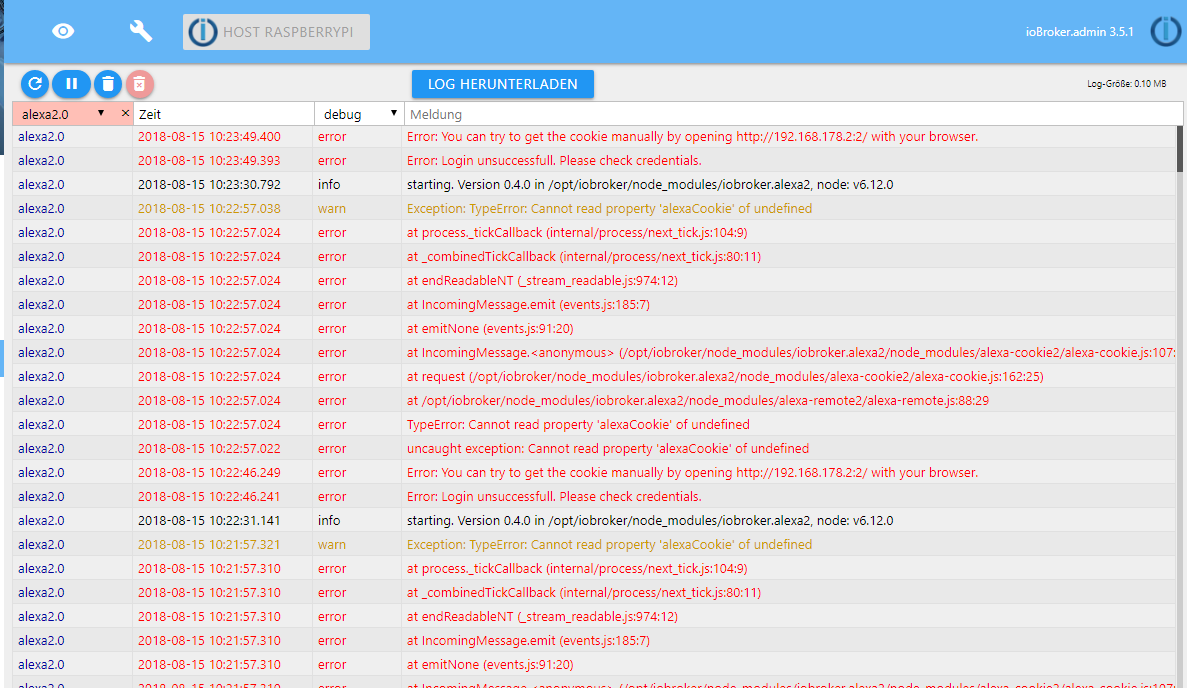
  • Litera
  • Lumen
  • Lux
  • Materia
  • Minty
  • Morph
  • Pulse
  • Sandstone
  • Simplex
  • Sketchy
  • Spacelab
  • United
  • Yeti
  • Zephyr
  • Dark
  • Cyborg
  • Darkly
  • Quartz
  • Slate
  • Solar
  • Superhero
  • Vapor

  • Standard: (Kein Skin)
  • Kein Skin
Einklappen
ioBroker Logo

Community Forum

donate donate
  1. ioBroker Community Home
  2. Deutsch
  3. Cloud Dienste
  4. Alexa2 anmelde Probleme
NEWS

  • UPDATE 31.10.: Amazon Alexa - ioBroker Skill läuft aus ?
    apollon77A
    apollon77
    48
    3
    8.8k

  • Monatsrückblick – September 2025
    BluefoxB
    Bluefox
    13
    1
    2.2k

  • Neues Video "KI im Smart Home" - ioBroker plus n8n
    BluefoxB
    Bluefox
    16
    1
    3.2k

Alexa2 anmelde Probleme

Geplant Angeheftet Gesperrt Verschoben Cloud Dienste
41 Beiträge 8 Kommentatoren 10.5k Aufrufe
  • Älteste zuerst
  • Neuste zuerst
  • Meiste Stimmen
Antworten
  • In einem neuen Thema antworten
Anmelden zum Antworten
Dieses Thema wurde gelöscht. Nur Nutzer mit entsprechenden Rechten können es sehen.
  • M Offline
    M Offline
    Major Joomla
    schrieb am zuletzt editiert von
    #15

    das war ja das problem adapter2 ;)

    @jan1 Ergänzung sollte besser erklärt werden. nicht jeder kann so gut english.(google hat merkwürdige übersetztung ;))

    MFG Major Joomla

    PS. Vielleicht kann ja einer mal nee Deutsche Anleitung schreiben ;)

    Live: MSI NUC (N3150/8GB)debian 9 ioBroker, Entwicklung: RPI 3 mit IoBroker, FHEM über RPI3

    Geräte: DS 3615xs, DS 216+, Sonoff div. Basic, 4CH,Touch, Homematic…

    1 Antwort Letzte Antwort
    0
    • apollon77A Offline
      apollon77A Offline
      apollon77
      schrieb am zuletzt editiert von
      #16

      Du hast aber schon mitbekommen das seit 16.8. die 0.5 draussen ist die das problem vom ersten Post löst?!

      Beitrag hat geholfen? Votet rechts unten im Beitrag :-) https://paypal.me/Apollon77 / https://github.com/sponsors/Apollon77

      • Debug-Log für Instanz einschalten? Admin -> Instanzen -> Expertenmodus -> Instanz aufklappen - Loglevel ändern
      • Logfiles auf Platte /opt/iobroker/log/… nutzen, Admin schneidet Zeilen ab
      1 Antwort Letzte Antwort
      0
      • M Offline
        M Offline
        Major Joomla
        schrieb am zuletzt editiert von
        #17

        hab 0.5.2 drauf und die Probleme

        Live: MSI NUC (N3150/8GB)debian 9 ioBroker, Entwicklung: RPI 3 mit IoBroker, FHEM über RPI3

        Geräte: DS 3615xs, DS 216+, Sonoff div. Basic, 4CH,Touch, Homematic…

        1 Antwort Letzte Antwort
        0
        • apollon77A Offline
          apollon77A Offline
          apollon77
          schrieb am zuletzt editiert von
          #18

          Ok, er Fehler oben im ersten Post kann nur in 0.4 sein.

          Also was genau sind "die Probleme"?

          Was sagt das Log?

          Beitrag hat geholfen? Votet rechts unten im Beitrag :-) https://paypal.me/Apollon77 / https://github.com/sponsors/Apollon77

          • Debug-Log für Instanz einschalten? Admin -> Instanzen -> Expertenmodus -> Instanz aufklappen - Loglevel ändern
          • Logfiles auf Platte /opt/iobroker/log/… nutzen, Admin schneidet Zeilen ab
          1 Antwort Letzte Antwort
          0
          • M Offline
            M Offline
            Major Joomla
            schrieb am zuletzt editiert von
            #19

            im log steht nichts.

            Benutzername und PW ging gar nicht bzw passierte nichts.

            cookies hatte ich wohl die falsche Übersetzung via google wusste hat nicht was ich kopieren sollte.

            MFG Major Joomla

            Live: MSI NUC (N3150/8GB)debian 9 ioBroker, Entwicklung: RPI 3 mit IoBroker, FHEM über RPI3

            Geräte: DS 3615xs, DS 216+, Sonoff div. Basic, 4CH,Touch, Homematic…

            1 Antwort Letzte Antwort
            0
            • apollon77A Offline
              apollon77A Offline
              apollon77
              schrieb am zuletzt editiert von
              #20

              Stelle loglevel der Instanz auf debug, dann kommt einiges im log. Das bitte Posten.

              Gesendet vom Handy …

              Beitrag hat geholfen? Votet rechts unten im Beitrag :-) https://paypal.me/Apollon77 / https://github.com/sponsors/Apollon77

              • Debug-Log für Instanz einschalten? Admin -> Instanzen -> Expertenmodus -> Instanz aufklappen - Loglevel ändern
              • Logfiles auf Platte /opt/iobroker/log/… nutzen, Admin schneidet Zeilen ab
              1 Antwort Letzte Antwort
              0
              • J Offline
                J Offline
                Jan1
                schrieb am zuletzt editiert von
                #21

                Ok, die Anleitung ist auch nicht direkt für den Adapter gemacht, sondern allgemein wie man an den Cookie von Amazon ran kommt. Wobei hier auch ein wenig die Logik weiter hilft. Man möchte den Cookie im Adapter eintragen und was der Cookie ist, wird ja erklärt. Also geht man mal davon aus, dass das was nach "Cookie:" der eigentliche Cookie ist und da das im Text mit nem Apostroph vor Cookie anfängt und das schon nicht Bestandteil des Cookie ist, lässt man das letzte eben auch weg und schon hat man was man will.

                Selbst wenn man da nicht gleich drauf kommt, mit 3 Versuchen sollte die Hürde auch genommen sein. Da fand ich es schon etwas spannender, dass man im Log schauen muss, wie es weiter geht :D

                Englisch muss man dazu auch nicht sehr gut können, da die Bilder schon die halbe Miete sind.

                1 Antwort Letzte Antwort
                0
                • M Offline
                  M Offline
                  Major Joomla
                  schrieb am zuletzt editiert von
                  #22

                  log umgestellt, aber log erst ab jetzt wo umgestellt da lief der adapter ja schon

                  Live: MSI NUC (N3150/8GB)debian 9 ioBroker, Entwicklung: RPI 3 mit IoBroker, FHEM über RPI3

                  Geräte: DS 3615xs, DS 216+, Sonoff div. Basic, 4CH,Touch, Homematic…

                  1 Antwort Letzte Antwort
                  0
                  • apollon77A Offline
                    apollon77A Offline
                    apollon77
                    schrieb am zuletzt editiert von
                    #23

                    Die Magie ist eigentlich das der Adapter das Cookie ermittelt und man es nicht manuell einträgt. Aber wenn es erstmal tut … bestens.

                    Merk dir wie es ging musst Du in ca 2 Woche n wieder tun ;-)

                    Gesendet vom Handy ...

                    Beitrag hat geholfen? Votet rechts unten im Beitrag :-) https://paypal.me/Apollon77 / https://github.com/sponsors/Apollon77

                    • Debug-Log für Instanz einschalten? Admin -> Instanzen -> Expertenmodus -> Instanz aufklappen - Loglevel ändern
                    • Logfiles auf Platte /opt/iobroker/log/… nutzen, Admin schneidet Zeilen ab
                    1 Antwort Letzte Antwort
                    0
                    • J Offline
                      J Offline
                      Jan1
                      schrieb am zuletzt editiert von
                      #24

                      Im Log steht dass man die eine bestimmte Amazon Seite aufrufen muss und erst wenn man das gemacht hat, läuft der Adapter mit dem Cookie. Kein Plan was Du mit Log umgestellt meinst.

                      1 Antwort Letzte Antwort
                      0
                      • J Offline
                        J Offline
                        Jan1
                        schrieb am zuletzt editiert von
                        #25

                        @apollon77:

                        Die Magie ist eigentlich das der Adapter das Cookie ermittelt und man es nicht manuell einträgt. Aber wenn es erstmal tut … bestens.

                        Merk dir wie es ging musst Du in ca 2 Woche n wieder tun ;-)

                        Gesendet vom Handy ... `

                        Eben ist bei mir der Groschen gefallen :lol:

                        1 Antwort Letzte Antwort
                        0
                        • T Offline
                          T Offline
                          tyson0941
                          schrieb am zuletzt editiert von
                          #26

                          First hi to all ,

                          Can some one please explain to me how can i login alexa2 in iobroker using cookie, because i have the following error:

                          Amazon-Login-Error: Wichtige Mitteilung!: Zum besseren Schutz Ihres Kontos geben Sie bitte nochmals Ihr Passwort ein, und geben Sie dann die Zeichen ein, die in der Abbildung unten gezeigt wer

                          I apreciate if some one show an example .

                          Thanks !!

                          1 Antwort Letzte Antwort
                          0
                          • apollon77A Offline
                            apollon77A Offline
                            apollon77
                            schrieb am zuletzt editiert von
                            #27

                            Amazon wants you to solve a captcha. The line after this message should show a link. Use that one to login and the adapter will catch what he need automatically.

                            Gesendet vom Handy …

                            Beitrag hat geholfen? Votet rechts unten im Beitrag :-) https://paypal.me/Apollon77 / https://github.com/sponsors/Apollon77

                            • Debug-Log für Instanz einschalten? Admin -> Instanzen -> Expertenmodus -> Instanz aufklappen - Loglevel ändern
                            • Logfiles auf Platte /opt/iobroker/log/… nutzen, Admin schneidet Zeilen ab
                            1 Antwort Letzte Antwort
                            0
                            • T Offline
                              T Offline
                              tyson0941
                              schrieb am zuletzt editiert von
                              #28

                              Hi to all,

                              I am running iobroker under win 7 64bits and i have problems with alexa2.0 adapter, i cant login it show always yellow light .

                              can someone help me with this issue please?

                              1 Antwort Letzte Antwort
                              0
                              • apollon77A Offline
                                apollon77A Offline
                                apollon77
                                schrieb am zuletzt editiert von
                                #29

                                Please read exactly the last post before yours. Answer is the same. And if you want more support please post log.

                                Gesendet vom Handy …

                                Beitrag hat geholfen? Votet rechts unten im Beitrag :-) https://paypal.me/Apollon77 / https://github.com/sponsors/Apollon77

                                • Debug-Log für Instanz einschalten? Admin -> Instanzen -> Expertenmodus -> Instanz aufklappen - Loglevel ändern
                                • Logfiles auf Platte /opt/iobroker/log/… nutzen, Admin schneidet Zeilen ab
                                1 Antwort Letzte Antwort
                                0
                                • T Offline
                                  T Offline
                                  tyson0941
                                  schrieb am zuletzt editiert von
                                  #30

                                  Thanks for your answer, this is my log:

                                  alexa2.0 2018-09-03 10:15:25.461 error Error: You can try to get the cookie manually by opening http://192.168.43.69:52770/ with your browser.

                                  alexa2.0 2018-09-03 10:15:25.460 error Error: Amazon-Login-Error: Wichtige Mitteilung!: Zum besseren Schutz Ihres Kontos geben Sie bitte nochmals Ihr Passwort ein, und geben Sie dann die Zeichen ein, die in der Abbildung unten gezeigt wer

                                  alexa2.0 2018-09-03 10:15:11.391 info starting. Version 0.5.2 in C:/ioBroker/node_modules/iobroker.alexa2, node: v6.0.0

                                  host.Florea-ZX 2018-09-03 10:15:10.807 info instance system.adapter.alexa2.0 started with pid 6812

                                  host.Florea-ZX 2018-09-03 10:15:08.302 info instance system.adapter.alexa2.0 terminated with code null ()

                                  host.Florea-ZX 2018-09-03 10:15:08.302 warn instance system.adapter.alexa2.0 terminated due to SIGTERM

                                  host.Florea-ZX 2018-09-03 10:15:08.278 info stopInstance system.adapter.alexa2.0 killing pid 4336

                                  host.Florea-ZX 2018-09-03 10:15:08.278 info stopInstance system.adapter.alexa2.0

                                  host.Florea-ZX 2018-09-03 10:15:08.278 info object change system.adapter.alexa2.0

                                  alexa2.0 2018-09-03 10:10:13.392 error Error: You can try to get the cookie manually by opening http://192.168.43.69:52257/ with your browser.

                                  alexa2.0 2018-09-03 10:10:13.391 error Error: Amazon-Login-Error: Wichtige Mitteilung!: Zum besseren Schutz Ihres Kontos geben Sie bitte nochmals Ihr Passwort ein, und geben Sie dann die Zeichen ein, die in der Abbildung unten gezeigt wer

                                  alexa2.0 2018-09-03 10:10:05.316 info starting. Version 0.5.2 in C:/ioBroker/node_modules/iobroker.alexa2, node: v6.0.0

                                  host.Florea-ZX 2018-09-03 10:10:04.738 info instance system.adapter.alexa2.0 started with pid 4336

                                  host.Florea-ZX 2018-09-03 10:10:02.238 info instance system.adapter.alexa2.0 terminated with code null ()

                                  host.Florea-ZX 2018-09-03 10:10:02.238 warn instance system.adapter.alexa2.0 terminated due to SIGTERM

                                  host.Florea-ZX 2018-09-03 10:10:02.220 info stopInstance system.adapter.alexa2.0 killing pid 2280

                                  host.Florea-ZX 2018-09-03 10:10:02.220 info stopInstance system.adapter.alexa2.0

                                  host.Florea-ZX 2018-09-03 10:10:02.219 info object change system.adapter.alexa2.0

                                  alexa2.0 2018-09-03 10:09:21.958 error Error: You can try to get the cookie manually by opening http://192.168.43.69:52172/ with your browser.

                                  alexa2.0 2018-09-03 10:09:21.957 error Error: Amazon-Login-Error: Wichtige Mitteilung!: Zum besseren Schutz Ihres Kontos geben Sie bitte nochmals Ihr Passwort ein, und geben Sie dann die Zeichen ein, die in der Abbildung unten gezeigt wer

                                  So if i manualy access http://192.168.43.69:52770/ , login page open and i can login without problems . Thanks in advance!

                                  1 Antwort Letzte Antwort
                                  0
                                  • apollon77A Offline
                                    apollon77A Offline
                                    apollon77
                                    schrieb am zuletzt editiert von
                                    #31

                                    And do the adapter works after you logged in using this url? What is the final page after login saying?

                                    What amazon country you use? I dir Germany or an other country if amazon?

                                    For Germany he should work, other countries you need to set some specific things in config.

                                    If not please set adapter to debug loglevel and start and login again. I then need the full log of this from disc (/opt/ioBroker/log) as PN …

                                    Gesendet vom Handy ...

                                    Beitrag hat geholfen? Votet rechts unten im Beitrag :-) https://paypal.me/Apollon77 / https://github.com/sponsors/Apollon77

                                    • Debug-Log für Instanz einschalten? Admin -> Instanzen -> Expertenmodus -> Instanz aufklappen - Loglevel ändern
                                    • Logfiles auf Platte /opt/iobroker/log/… nutzen, Admin schneidet Zeilen ab
                                    1 Antwort Letzte Antwort
                                    0
                                    • R Offline
                                      R Offline
                                      RaymundM
                                      schrieb am zuletzt editiert von
                                      #32

                                      Hallo erstmal.

                                      Auch ich versuche seit einiger Zeit die Anmelde-Probleme in den USA zu überwinden.

                                      Nach einigen Hin und Her erreiche ich nun die USA Login Webseite und nach erfolgreichem Login, mittels proxy, erhalte ich im Browser die Meldung : Amazon Alexa Cookie successfully retrieved. You can close the browser.

                                      Der Adapter startet neu und haengt wieder fest beim cookie.

                                      Vielleicht übersehe ich ja irgendwas.

                                      Alexa base url : https://alexa.amazon.com

                                      Custom User-Agent: Mozilla/5.0 (Windows NT 6.1; WOW64) AppleWebKit/537.36 (KHTML, like Gecko) Chrome/67.0.3396.87 Safari/537.36

                                      Custom Accept-Language Header: en-US

                                      Custom Cookie-Amazon-URL: amazon.com

                                      node.js v6.14.4

                                      NPM: 3.10.10

                                      alexa2.0 v1.0.0

                                      logs:

                                      2018-09-09 15:00:04.538 - debug: alexa2.0 Alexa-Cookie: Step 4: get CSRF

                                      2018-09-09 15:00:04.538 - debug: alexa2.0 Alexa-Cookie: Sending Request with

                                      2018-09-09 15:00:04.599 - error: alexa2.0 uncaught exception: Cannot read property 'headers' of null

                                      2018-09-09 15:00:04.600 - error: alexa2.0 TypeError: Cannot read property 'headers' of null

                                      at request (/opt/iobroker/node_modules/alexa-cookie2/alexa-cookie.js:158:50)

                                      at ClientRequest. (/opt/iobroker/node_modules/alexa-cookie2/alexa-cookie.js:114:24)

                                      at emitOne (events.js:96:13)

                                      at ClientRequest.emit (events.js:188:7)

                                      at TLSSocket.socketErrorListener (_http_client.js:314:9)

                                      at emitOne (events.js:96:13)

                                      at TLSSocket.emit (events.js:188:7)

                                      at connectErrorNT (net.js:1034:8)

                                      at _combinedTickCallback (internal/process/next_tick.js:80:11)

                                      at process._tickCallback (internal/process/next_tick.js:104:9)

                                      2018-09-09 15:00:04.601 - warn: alexa2.0 Exception: TypeError: Cannot read property 'headers' of null

                                      2018-09-09 15:00:04.610 - error: Caught by controller[0]: TypeError: Cannot read property 'headers' of null

                                      2018-09-09 15:00:04.610 - error: Caught by controller[0]: at request (/opt/iobroker/node_modules/alexa-cookie2/alexa-cookie.js:158:50)

                                      2018-09-09 15:00:04.610 - error: Caught by controller[0]: at ClientRequest. (/opt/iobroker/node_modules/alexa-cookie2/alexa-cookie.js:114:24)

                                      2018-09-09 15:00:04.610 - error: Caught by controller[0]: at emitOne (events.js:96:13)

                                      2018-09-09 15:00:04.610 - error: Caught by controller[0]: at ClientRequest.emit (events.js:188:7)

                                      2018-09-09 15:00:04.610 - error: Caught by controller[0]: at TLSSocket.socketErrorListener (_http_client.js:314:9)

                                      2018-09-09 15:00:04.610 - error: Caught by controller[0]: at emitOne (events.js:96:13)

                                      2018-09-09 15:00:04.610 - error: Caught by controller[0]: at TLSSocket.emit (events.js:188:7)

                                      2018-09-09 15:00:04.610 - error: Caught by controller[0]: at connectErrorNT (net.js:1034:8)

                                      2018-09-09 15:00:04.611 - error: Caught by controller[0]: at _combinedTickCallback (internal/process/next_tick.js:80:11)

                                      2018-09-09 15:00:04.611 - error: Caught by controller[0]: at process._tickCallback (internal/process/next_tick.js:104:9)

                                      2018-09-09 15:00:04.611 - error: host.debianiobroker instance system.adapter.alexa2.0 terminated with code 0 (OK)

                                      2018-09-09 15:00:04.611 - info: host.debianiobroker Restart adapter system.adapter.alexa2.0 because enabled

                                      2018-09-09 15:00:34.618 - info: host.debianiobroker instance system.adapter.alexa2.0 started with pid 23389

                                      2018-09-09 15:00:34.957 - debug: alexa2.0 objectDB connected

                                      2018-09-09 15:00:34.980 - debug: alexa2.0 statesDB connected

                                      2018-09-09 15:00:35.098 - info: alexa2.0 starting. Version 1.0.0 in /opt/iobroker/node_modules/iobroker.alexa2, node: v6.14.4

                                      2018-09-09 15:00:35.116 - debug: alexa2.0 Alexa-Remote: Use as User-Agent: Mozilla/5.0 (Windows NT 6.1; WOW64) AppleWebKit/537.36 (KHTML, like Gecko) Chrome/67.0.3396.87 Safari/537.36

                                      2018-09-09 15:00:35.116 - debug: alexa2.0 Alexa-Remote: Use as Login-Amazon-URL: amazon.com

                                      2018-09-09 15:00:35.117 - debug: alexa2.0 Alexa-Remote: Use as Base-URL: https://alexa.amazon.com

                                      2018-09-09 15:00:35.117 - debug: alexa2.0 Alexa-Remote: No cookie given, generate one

                                      2018-09-09 15:00:35.404 - debug: alexa2.0 Alexa-Cookie: Use as Login-Amazon-URL: amazon.com

                                      2018-09-09 15:00:35.404 - debug: alexa2.0 Alexa-Cookie: Use as Alexa-Service-Host: https://alexa.amazon.com

                                      2018-09-09 15:00:35.404 - debug: alexa2.0 Alexa-Cookie: Use as User-Agent: Mozilla/5.0 (Windows NT 6.1; WOW64) AppleWebKit/537.36 (KHTML, like Gecko) Chrome/67.0.3396.87 Safari/537.36

                                      2018-09-09 15:00:35.404 - debug: alexa2.0 Alexa-Cookie: Use as Accept-Language: en-US

                                      2018-09-09 15:00:35.404 - debug: alexa2.0 Alexa-Cookie: Proxy-Mode enabled if needed: 192.168.1.7:0 to listen on 0.0.0.0

                                      2018-09-09 15:00:35.404 - debug: alexa2.0 Alexa-Cookie: Step 1: get first cookie and authentication redirect

                                      2018-09-09 15:00:35.404 - debug: alexa2.0 Alexa-Cookie: Sending Request with

                                      2018-09-09 15:00:35.577 - debug: alexa2.0 Alexa-Cookie: Sending Request with

                                      2018-09-09 15:00:39.598 - debug: alexa2.0 Alexa-Cookie: Response (200)

                                      2018-09-09 15:00:39.906 - debug: alexa2.0 Alexa-Cookie: Step 2: login empty to generate session

                                      2018-09-09 15:00:39.907 - debug: alexa2.0 Alexa-Cookie: Sending Request with

                                      2018-09-09 15:00:40.054 - debug: alexa2.0 Alexa-Cookie: Response (200)

                                      2018-09-09 15:00:40.330 - debug: alexa2.0 Alexa-Cookie: Step 3: login with filled form, referer contains session id

                                      2018-09-09 15:00:40.331 - debug: alexa2.0 Alexa-Cookie: Sending Request with

                                      2018-09-09 15:00:40.634 - debug: alexa2.0 Alexa-Cookie: Response (200)

                                      2018-09-09 15:00:40.663 - debug: alexa2.0 Alexa-Cookie: Proxy-Server listening on port 41701

                                      2018-09-09 15:00:40.663 - debug: alexa2.0 Alexa-Remote: Error from retrieving cookies

                                      2018-09-09 15:00:40.664 - error: alexa2.0 Error: Amazon-Login-Error: Important Message!: To better protect your account, please re-enter your password and then enter the characters as they are shown in the image below.

                                      2018-09-09 15:00:40.664 - error: alexa2.0 Error: You can try to get the cookie manually by opening http://192.168.1.7:41701/ with your browser.

                                      1 Antwort Letzte Antwort
                                      0
                                      • R Offline
                                        R Offline
                                        RaymundM
                                        schrieb am zuletzt editiert von
                                        #33

                                        JUHUUUUUUUUUUUUUUUU !!!!!!!!

                                        Jetzt funktioniert :-) es nachdem ich

                                        Alexa base url : pitangui.amazon.com

                                        eingetragen habe.

                                        1 Antwort Letzte Antwort
                                        0
                                        • R Offline
                                          R Offline
                                          RaymundM
                                          schrieb am zuletzt editiert von
                                          #34

                                          @tyson0941

                                          please try the following settings for the cookie in the adapter. It finally worked for me.

                                          Alexa base url : pitangui.amazon.com

                                          Custom User-Agent: Mozilla/5.0 (Windows NT 6.1; WOW64) AppleWebKit/537.36 (KHTML, like Gecko) Chrome/67.0.3396.87 Safari/537.36

                                          Custom Accept-Language Header: en-US

                                          Custom Cookie-Amazon-URL: amazon.com

                                          i also updated to alexa2.0 v 1.0.0 over github

                                          hope it works for you too.

                                          1 Antwort Letzte Antwort
                                          0
                                          Antworten
                                          • In einem neuen Thema antworten
                                          Anmelden zum Antworten
                                          • Älteste zuerst
                                          • Neuste zuerst
                                          • Meiste Stimmen


                                          Support us

                                          ioBroker
                                          Community Adapters
                                          Donate
                                          FAQ Cloud / IOT
                                          HowTo: Node.js-Update
                                          HowTo: Backup/Restore
                                          Downloads
                                          BLOG

                                          708

                                          Online

                                          32.4k

                                          Benutzer

                                          81.5k

                                          Themen

                                          1.3m

                                          Beiträge
                                          Community
                                          Impressum | Datenschutz-Bestimmungen | Nutzungsbedingungen | Einwilligungseinstellungen
                                          ioBroker Community 2014-2025
                                          logo
                                          • Anmelden

                                          • Du hast noch kein Konto? Registrieren

                                          • Anmelden oder registrieren, um zu suchen
                                          • Erster Beitrag
                                            Letzter Beitrag
                                          0
                                          • Home
                                          • Aktuell
                                          • Tags
                                          • Ungelesen 0
                                          • Kategorien
                                          • Unreplied
                                          • Beliebt
                                          • GitHub
                                          • Docu
                                          • Hilfe