




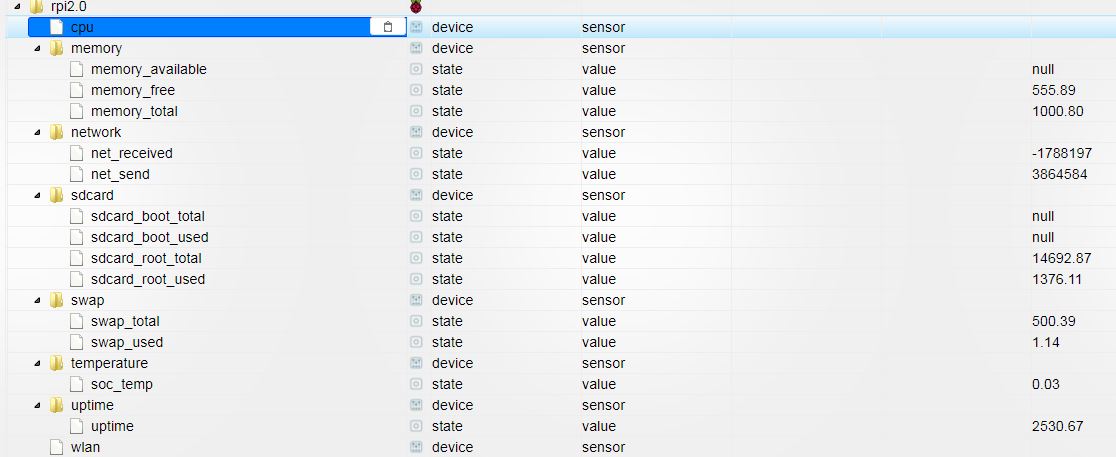
Драйвер rpi2.0 работает, но забивает лог ошибками. Orange Pi PC

-
Добрый день.
Поставил ioBroker на Armbian (Orange Pi PC), через````
armbianmonitor -rВ ioBroker установил драйвер rpi2.0\. В объектах почти все данные появились  , но логи забиты ошибками  . Как поправить? -
Пробовал https://github.com/PrinzEisenherz1/iobroker.opi ?
RPI2 должен работать только с raspberry
-
Его же через npm надо ставить?
Что-то не получается:
root@opi:~# npm install iobroker.opi npm ERR! Linux 3.4.113-sun8i npm ERR! argv "/usr/bin/node" "/usr/bin/npm" "install" "iobroker.opi" npm ERR! node v4.8.7 npm ERR! npm v2.15.11 npm ERR! code E404 npm ERR! 404 Registry returned 404 for GET on https://registry.npmjs.org/iobroker.opi npm ERR! 404 npm ERR! 404 'iobroker.opi' is not in the npm registry. npm ERR! 404 You should bug the author to publish it (or use the name yourself!) npm ERR! 404 npm ERR! 404 Note that you can also install from a npm ERR! 404 tarball, folder, http url, or git url. npm ERR! Please include the following file with any support request: npm ERR! /root/npm-debug.log -
Его же через npm надо ставить?
Что-то не получается:
root@opi:~# npm install iobroker.opi
npm ERR! Linux 3.4.113-sun8i
npm ERR! argv "/usr/bin/node" "/usr/bin/npm" "install" "iobroker.opi"
npm ERR! node v4.8.7
npm ERR! npm  v2.15.11
npm ERR! code E404

npm ERR! 404 Registry returned 404 for GET on https://registry.npmjs.org/iobroker.opi
npm ERR! 404
npm ERR! 404 'iobroker.opi' is not in the npm registry.
npm ERR! 404 You should bug the author to publish it (or use the name yourself!)
npm ERR! 404
npm ERR! 404 Note that you can also install from a
npm ERR! 404 tarball, folder, http url, or git url.

npm ERR! Please include the following file with any support request:
npm ERR!     /root/npm-debug.log

```` `
npm i https://github.com/PrinzEisenherz1/iobroker.opi/tarball/master --production iobroker add opi -
У меня на апельсинке без всяких драйверов:
createState('Server.MEMORY_used',''); createState('Server.CORE_temp',''); createState('Server.CPU_freq',''); createState('Server.CPU_loadAVG',''); createState('Server.UPTIME',''); createState('Server.EMMC_used',''); //Будет исполняться каждую минуту: //on("system.host.orangepiplus2e.freemem", function (obj) { // setState ('Server.MEMORY_used', (100-(getState('system.host.orangepiplus2e.mem').val) + '%')); //}); schedule("* * * * *", function () { //log("Будет исполняться каждую минуту!"); setState ('Server.MEMORY_used', (100-(getState('system.host.orangepiplus2e.mem').val) + '%')); exec('cat /sys/class/thermal/thermal_zone0/temp', function (error, stdout, stderr) { setState ('Server.CORE_temp', stdout ); }); exec('cat /sys/devices/system/cpu/cpu0/cpufreq/cpuinfo_cur_freq', function (error, stdout, stderr) { setState ('Server.CPU_freq', (stdout/1000) ); }); exec('cat /proc/loadavg', function (error, stdout, stderr) { setState ('Server.CPU_loadAVG', stdout ); }); exec('uptime -p', function (error, stdout, stderr) { setState ('Server.UPTIME', stdout ); }); exec("df | grep /dev/mmcblk0p1 | awk '{print $5}'", function (error, stdout, stderr) { setState ('Server.EMMC_used', stdout ); }); }); -
В итоге проблема нашлась. У меня стоит armbian и в нём вывод некоторых команд (например free или meminfo) отличается от обычных ubuntu/debian.
Hey! Du scheinst an dieser Unterhaltung interessiert zu sein, hast aber noch kein Konto.
Hast du es satt, bei jedem Besuch durch die gleichen Beiträge zu scrollen? Wenn du dich für ein Konto anmeldest, kommst du immer genau dorthin zurück, wo du zuvor warst, und kannst dich über neue Antworten benachrichtigen lassen (entweder per E-Mail oder Push-Benachrichtigung). Du kannst auch Lesezeichen speichern und Beiträge positiv bewerten, um anderen Community-Mitgliedern deine Wertschätzung zu zeigen.
Mit deinem Input könnte dieser Beitrag noch besser werden 💗
Registrieren AnmeldenSupport us
202
Online33.0k
Benutzer83.6k
Themen1.3m
Beiträge